RP 6402 DAB+ - Radio GRUNDIG - Free user manual and instructions
Find the device manual for free RP 6402 DAB+ GRUNDIG in PDF.


| Product Type | DAB+/FM Radio |
| Brand | Grundig |
| Model | RP 6402 DAB+ |
| Dimensions (W x H x D) | 235 mm x 134 mm x 61 mm |
| Weight | Approx. 850 g |
| Power Supply (Battery) | 4 x 1.5 V, LR20/AM1/D-Size |
| Power Supply (Mains) | 6 V DC, 1000 mA adapter (supplied) |
| Battery Life | Approx. 30 hours (normal volume) |
| Frequency Bands | DAB Band III (174.928–239.200 MHz), FM (87.5–108 MHz) |
| Audio Output | 700 mW at 10% THD |
| Antenna | Telescopic antenna for DAB and FM |
| Speaker | Built-in, automatically switches off when headphones are connected |
| Headphone Jack | 3.5 mm stereo, impedance 2 x 32 Ω |
| Display | LC display |
| Controls | ON/OFF, DAB/FM, MENU/INFO, SELECT/SCAN, TUNING ▲/▼, PRESET 1–5, Volume dial |
| DAB Features | Full and local auto tune, manual tune, station list sorting (alphanumeric, favorites, active, prune), DRC, preset storage (5), signal strength check, station information display |
| FM Features | Auto search, manual tuning (50 kHz steps), RDS display, stereo/mono auto switching |
| Preset Stations | 5 station presets (independent for DAB and FM) |
| Dynamic Range Control (DRC) | Off, DRC 1/2, DRC 1 (to improve quiet sound audibility in noisy environments) |
| RDS Support | Yes, displays station name, program type, time, frequency, traffic program, and artist/track |
| Signal Strength | Displayed as error level (0 = optimum) in DAB and FM modes |
| Maintenance | Clean with a clean, damp leather cloth; do not use cleaning agents |
| Safety | Protect from moisture, do not place naked flames on device, do not open casing, hearing protection with earphones |
| Environment | Do not dispose with household waste; recycle at designated collection points |
| User-Replaceable Parts | Batteries (4 x LR20/AM1/D) |
Frequently Asked Questions - RP 6402 DAB+ GRUNDIG
User questions about RP 6402 DAB+ GRUNDIG
0 question about this device. Answer the ones you know or ask your own.
Ask a new question about this device
Download the instructions for your Radio in PDF format for free! Find your manual RP 6402 DAB+ - GRUNDIG and take your electronic device back in hand. On this page are published all the documents necessary for the use of your device. RP 6402 DAB+ by GRUNDIG.
USER MANUAL RP 6402 DAB+ GRUNDIG
To ensure that this device provides you with long-term satisfaction and enjoyment, please observe the following instructions.
This device is designed for the playback of audio signals.
Any other use is expressly prohibited.
Protect the device from moisture (water drops or splashes). Do not place any vessels such as vases on the device. These may be knocked over and spill fluid on the electrical components, thus presenting a safety risk. Do not place any naked flames such as candles on the device.
When deciding where to place the device, please note that furniture surfaces are covered by various types of varnish and plastic, most of which contain chemical additives. These additives can corrode the device supports, leaving residues on the furniture surfaces which can be difficult or impossible to remove.
Do not use any cleaning agent, as this may damage the casing. Clean the device with a clean, damp leather cloth.
Never open the device casing. No warranty claims are accepted for damage caused by incorrect handling.
The type plate is located on the bottom of the device.
Note
Prolonged use of earphones can damage your hearing.
Environmental note
This product has been made from high-quality parts and materials which can be re-used and recycled.
Therefore, do not throw the product away with normal household waste at the end of its life. Take it to a collection point for recycling electrical and electronic devices. This is indicated by this symbol on the product, in the operating manual and on the packaging.
Please find out about collection points operated by your local authority.
Help protect the environment by recycling used products.
Controls
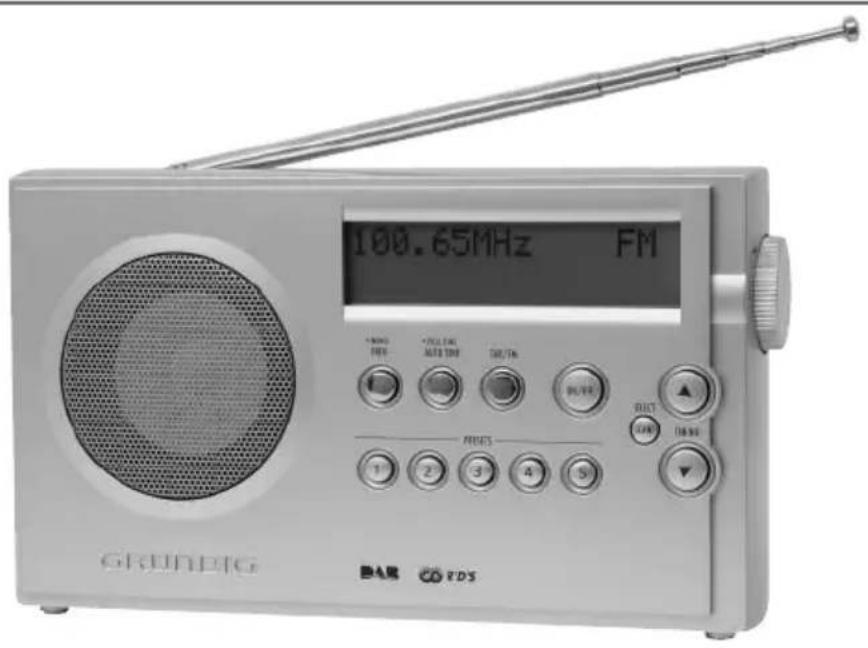
Front
ON/OFF Switches the device on and off.
DAB/FM Switches between the DAB and FM (VHF) input sources.
- FULL TUNE In DAB mode: press briefly to activate the "local" AUTO TUNE station search (Band III, 11B - 12D), hold down to activate the full station search (Band III, 5A - 13F).
- MENU In DAB mode: press briefly to select various DAB INFO station information; hold down longer to open the DAB menu. In FM mode: calls up RDS information.
SELECT In DAB mode: choose settings and look for SCAN secondary service components.
TUNING
In FM mode: starts the automatic station search; for tuning DAB and FM stations manually.
PRESETS Preset buttons for storing DAB stations.
1 ... 5
Display LC display.
natural_image
Pure mechanical part diagram showing a circular hole and rotational arrow, without any text or symbols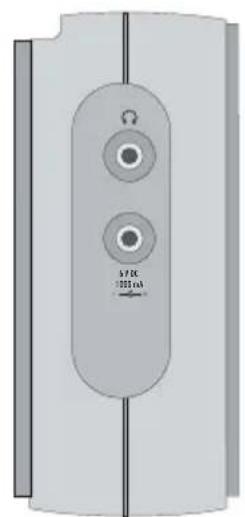
natural_image
Pure electrical circuit lines without any symbolsTop:
Antenna Telescopic antenna for DAB and FM reception.
Right side of device
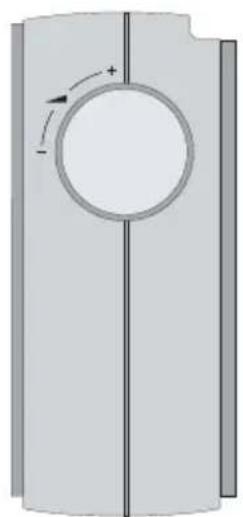
Volume control dial.
Left side of device

Earphone socket (3.5 mm stereo socket); automatically switches off the loudspeaker.
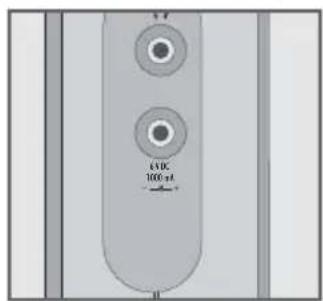
DC 6V 1000 mA Connection socket for mains adapter supplied, input voltage 6V (1000 mA).
Back of device
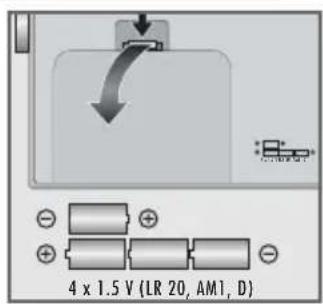
Batteries Compartment for batteries (4 x 1.5 V, LR20/AM1/D-Size)
Power supply
Battery operation
1 Open the battery compartment on the back of the device by pressing the marking and opening the lid.
2 Insert the batteries (4 x 1.5 V, LR20/AM1/D-Size).
Notes:
The lifetime of the batteries with every day usage (at normal volume) is approximately 30 hours. Therefore use a mains supply whenever possible and only use the batteries when you have to.
Take out the batteries when you know that the device will not be used for a long period of time. The manufacturer accepts no liability for damage resulting from leaking batteries.
Environmental note:
Batteries, including those which contain no heavy metal, should not be disposed of with household waste. Please dispose of used batteries in an environmentally responsible manner. Find out about the legal regulations which apply in your area.
Mains operation (with 6 V/1000 mA adapter)
Check if the mains voltage on the mains adapter type plate corresponds to your local mains supply. The only way to disconnect the device from the mains supply is to unplug the adapter.
1 Plug the adapter cable into the »DC 6 V 1000 mA -©+« socket on the left of the device.
2 Plug the adapter into the mains socket.
- The batteries in the compartment are switched off.
SETTINGS
Searching for and saving DAB stations
Your device has a DAB (Digital Audio Broadcasting) input source which enables crystal-clear radio reception in CD quality, i.e. without hissing or crackling.
DAB stations are combined into ensembles (multiplexes) at regional and national levels. An ensemble contains several stations broadcast on the same frequency. One individual station can combine other secondary service components such as live broadcasts or foreign language news.
DAB stations are broadcast on Band III (174.928-239.200 MHz, 5A - 13F).
When the device is used in DAB mode for the first time it performs an automatic station search ("local function") (display: briefly »DAB Digital Radio«, then »Scanning...«). During the search, the first line shows the number of stations found, and the second shows the search scale. At the end of the search, you will hear the first station in alphanumerical order (A to Z, 0 to 9). If no stations are found, »Station not available« appears in the display. The display then changes to a manual station search.
Automatic station search
The device has two automatic station search modes.
1 Press »•FULL TUNE AUTO TUNE« briefly.
- Display: »Scanning...«.
- The device searches for new stations on the bands reserved for local stations (11B - 12D). New stations are added to the station list.
2 Hold down »•FULL TUNE AUTO TUNE« until »Scanning...« appears in the display.
- The device searches the entire DAB band for new stations. New stations are added to the station list.
Manually searching for stations
If the automatic station search is not successful, you can search for DAB stations manually.
←Station order →
←50 174.92MHz →
[ ] TB 190.64MHz
1 Press »•MENU INFO« until »←Station order →« appears on the display.
- New stations are added to the list and can be selected with »▲ TUNING ▼«.
Sorting stations
After the station search, the station list can be arranged in four different ways.
flowchart
graph TD
    A["←Station order"] --> B["Alphanumeric"]
    B --> C["←Fav station"]
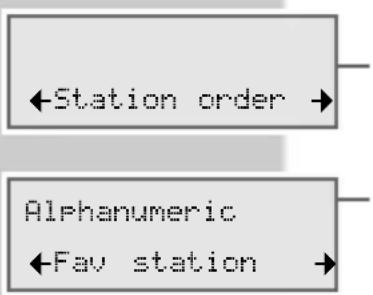
1 Press »•MENU INFO« until »←Station order →« appears in the display.
2 Press » ←Station order→« to confirm the option.
- Display: »Alphanumeric«, above a list of options:
- »◀Fav station →«: The device automatically sorts 10 favourite stations (display »♥«) at the beginning of the station list, depending on the time they are listed to.
- »←Alphanumeric →«: All stations are sorted alphanumerically (default setting).
- »←Active station →«: Active stations are listed first, stations that are not active are shown with a question mark after being selected.
- »←Prune stations →«: Stations that are not active are removed from the station list.
3 Make the setting with »▲ TUNING ▼« and press »SELECT SCAN« to confirm.
Storing DAB stations on the preset buttons
1 Search for the DAB station as described.
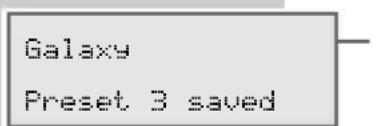
2 To save stations, press the preset button »1 ... 5« until »Preset 3 saved« for example appears in the display.
3 To store more stations, repeat steps 1 and 2 as many times as necessary.
Note:
If you save more than 5 stations, the stations saved previously are overwritten.
Setting Dynamic Range Control (DRC)
When you activate Dynamic Range Control (DRC), you can hear quiet sounds better in a loud environment.
1 Press »•MENU INFO« until »←Station order →« appears in the display.
- Display: e.g. »DRC 0« (Dynamic Range Control off).
3 To select the value (»DRC 1/2« or »DRC 1«), press »▲ TUNING ▼ « and then »SELECT SCAN« to confirm.
Note:
The station must support DRC.
SETTINGS
Searching for and saving FM stations
Automatic station search
- Display: The automatic search stops at the next station up or down (depending on whether you first press » ▲ « or » ▼ «) with a strong signal.
- If RDS information is transmitted by the broadcaster, then the device saves the station name. If programme or title information is sent, this appears after a short while as ticker text.
100.60MHz ST FM
VILRADIO ST RDS
Tuning stations manually
1 To move the frequency up in steps, briefly press »▲ TUNING ▼« several times.
- The frequency goes up or down in 50 kHz steps.
or
- The frequency changes up or down in the rapid run-through.
Storing FM stations on the preset buttons
1 Search for the FM station as described.
2 To save stations, keep pressing the preset button »1 ... 5« until »Preset 2 saved« appears in the display.
3 To store more stations, repeat steps 1 and 2 as many times as necessary.
Note:
If you save more than 5 stations, the stations saved previously are overwritten.
Restoring the default settings (Reset) (only in DAB mode)
This function enables you to reset all the custom settings back to the default settings (DAB and FM stations are deleted).
1 Press »•MENU INFO« until »←Station order →« appears in the display.
2 Press » ▲ TUNING ▼ « to select »←Factory reset →« and press »SELECT SCAN« to confirm.
- Display: »Press SELECT to confirm reset...«.
3 Press »SELECT SCAN« to reset the device.
100.60MHz ST FM Preset 2 saved
←Factory reset →
OPERATION
General information
Switching on and off
1 Press »ON/OFF« to switch the device on and off.
– The device switches on with the DAB or FM station last selected.
Selecting the input source
1 Select the input source (DAB or FM) with »DAB/FM«.
- Display: »Now tuning...« (DAB) or »FM«.
Adjusting the volume
1 Use the dial »- ▲ +« on the right of the device to adjust the volume.
Listening with headphones or earphones
1 Insert the headphone or earphone plug (3.5 mm, stereo) into the » 🔒« jack on the left of the device.
- The loudspeaker of the device is automatically switched off.
DAB operation
Selecting the DAB input source
1 Press »DAB/FM« to select DAB as the input source.
- Display: briefly »Now tuning...«, then the most recently selected DAB station.
Selecting stations
At the end of the search, the DAB stations are arranged a list in alpha-numerical order (listed A to Z, 0 to 9).
Now tuning...
Rock Antenne
←Galaxy
Station
not available
1 Scroll through the station list by repeatedly pressing » ▲ TUNING ▼ «.
2 Press »SELECT SCAN« when you find the station you want.
- Display: briefly, »Now tuning...«.
– The radio station is then played.
Note:
If »Station not available« appears in the display after you select the station, move the device to a better position for reception; alternatively, this station is no longer available due to a change of location.
Selecting stored stations
1 Select the preset number by pressing the station buttons »1 ... 5«. – The station is played.
Checking the signal strength (only in DAB mode)
You can check the signal strength of the station being listened to.
1 Press »SELECT SCAN« briefly.
- The signal level.
2 Press »SELECT SCAN« to return to the station display.
Displaying DAB station information
1 To select station information, press »•MENU INFO« repeatedly.
– The following information appears successively in the display:
- Date and time. »
Displaying the software version
1 Press »•MENU INFO« until »←Station order →« appears on the display.
Selecting the FM input source
1 Press »DAB/FM« to select FM as the input source.
- Display: »FM« and the frequency, soon followed by the station name of RDS stations.
Selecting stored stations
1 Select the preset number by pressing the station buttons »1 ... 5«.
- The station is played.
Stereo and mono reception
The device has an auto mode, which switches automatically between stereo and mono depending on the reception signal.
Displaying RDS station information
If the DVD receiver receives an RDS station, the station name appears in the display. Then station and track information appear as ticker text. Various RDS information can then be displayed, if available.
1 To select station information, press »•MENU INFO« repeatedly.
– The following information appears successively in the display:
- Programme types such as »Pop Music« or »Classical Music«. »
- Date and time. »(Time/Date)« appears if no information is available.
- Frequency, e.g. » 100.60MHz« and audio format (stereo or mono). »TP« also appears if the station offers traffic announcements.
- Reference to signal interference, e.g. »Signal error 2« (at optimum signal »Signal error 0«).
100.60MHz ST FM
ANTENNE ST RDS EW RADICALS - YO
ANTENNE RDS Pop Music
ANTENNE ST RDS 13:02 10-10-2005
ANTENNE ST RDS 100.60MHz TP
CE
INFORMATION
This device is noise-suppressed according to the applicable EU directives.
This product fulfils the European directives 89/336/EEC, 73/23/EEC and 93/68/EEC.
This device conforms to the safety regulation DIN EN 60065 (VDE 0860) and therefore the international safety regulation IEC 60065.
Technical data
Power supply
Battery operation 4 x 1.5 V, LR20/AM1/D-Size
Mains operation 6 V (1000 mA) mains adapter, DC
Output 700 mW 10% THD
Antennas
Telescopic antenna DAB and FM (VHF)
Frequency bands
DAB Band III 174.928 ... 239.200 MHz
(5A - 13F)
FM (VHF) 87.5 ... 108 MHz
Sockets
DC socket ∅ 5.5 mm, 6 V (1000 mA)
Head/earphone jack ∅ 3.5 mm stereo, 2 x 32 Ω impedance
Dimensions and weight
W x H x D 235 mm x 134 mm x 61 mm
Weight approx. 850 g
Technical and design modifications reserved
- Note
- Environmental note
- Controls
- Front
- TUNING
- Top:
- Right side of device
- Left side of device
- Back of device
- Power supply
- Battery operation
- Notes:
- Environmental note:
- Mains operation (with 6 V/1000 mA adapter)
- SETTINGS
- Searching for and saving DAB stations
- Automatic station search
- Manually searching for stations
- Sorting stations
- Storing DAB stations on the preset buttons
- Note:
- Setting Dynamic Range Control (DRC)
- Searching for and saving FM stations
- Tuning stations manually
- Storing FM stations on the preset buttons
- Restoring the default settings (Reset) (only in DAB mode)
- OPERATION
- General information
- Switching on and off
- Selecting the input source
- Adjusting the volume
- Listening with headphones or earphones
- DAB operation
- Selecting the DAB input source
- Selecting stations
- Selecting stored stations
- Checking the signal strength (only in DAB mode)
- Displaying DAB station information
- Displaying the software version
- Selecting the FM input source
- Stereo and mono reception
- Displaying RDS station information
- CE
- INFORMATION
- Technical data
- Antennas
- Frequency bands
- Sockets
- Dimensions and weight
Brand : GRUNDIG
Model : RP 6402 DAB+
Category : Radio