
RC-EX16A - CD Player JVC - Free user manual and instructions
Find the device manual for free RC-EX16A JVC in PDF.


| Product Type | CD Player |
| Brand | JVC |
| Model | RC-EX16A |
| Dimensions (W x H x D) | 140 mm x 30 mm x 140 mm |
| Weight | 0.3 kg |
| Power Supply | AC 100-240V, 50/60Hz or 2 x AA batteries |
| Power Consumption | 5 W |
| Disc Compatibility | CD, CD-R, CD-RW |
| Playback Modes | Normal, Random, Repeat (1/track/all), Program |
| Audio Output | Headphone jack (3.5mm) |
| Remote Control | Included (infrared) |
| Display | LCD with track number and time |
| Anti-Shock Protection | Yes, 10 seconds |
| Maintenance | Clean lens with dry cloth; avoid dust |
| Safety Features | Auto power off after 30 minutes idle |
| Repairability | Replaceable laser lens and battery compartment |
| Accessories Included | AC adapter, remote control, user manual |
| Warranty | 1 year limited warranty |
Frequently Asked Questions - RC-EX16A JVC
User questions about RC-EX16A JVC
0 question about this device. Answer the ones you know or ask your own.
Ask a new question about this device
Download the instructions for your CD Player in PDF format for free! Find your manual RC-EX16A - JVC and take your electronic device back in hand. On this page are published all the documents necessary for the use of your device. RC-EX16A by JVC.
USER MANUAL RC-EX16A JVC
natural_image
Line drawing of a JVC portable radio control with two remote controls (no text or symbols)

INSTRUCTIONS
LVT1374-003A [B]
Thank you for purchasing this JVC product.
Please read these instructions carefully before starting operation to be sure to obtain optimum performance and a longer service life from the unit.
SAFETY PRECAUTIONS
IMPORTANT for the U.K.
DO NOT cut off the mains plug from this equipment. If the plug fitted is not suitable for the power points in your home or the cable is too short to reach a power point, then obtain an appropriate safety approved extension load or consult your dealer.
BE SURE to replace the fuse only with an identical approved type, as originally fitted.
If nonetheless the mains plug is cut off ensure to remove the fuse and dispose of the plug immediately, to avoid a possible shock hazard by inadvertent connection to the mains supply.
If this product is not supplied fitted with a mains plug then follow the instructions given below:
IMPORTANT:
DO NOT make any connection to the terminal which is marked with the letter E or by the safety earth symbol or coloured green or green-and-yellow.
The wires in the mains lead on this product are coloured in accordance with the following code:
Blue: Neutral
Brown: Live
As these colours may not correspond with the coloured markings identifying the terminals in your plug proceed as follows:
The wire which is coloured blue must be connected to the terminal which is marked with the letter N or coloured black.
The wire which is coloured brown must be connected to the terminal which is marked with the letter L or coloured red.
IF IN DOUBT - CONSULT A COMPETENT ELECTRICIAN.
Caution — ⏻ OFF switch!
Disconnect the mains plug to shut the power off completely. The switch in any position does not disconnect the mains line. The power cannot be remote controlled.
CAUTION
To reduce the risk of electrical shocks, fire, etc.:
-
Do not remove screws, covers or cabinet.
-
Do not expose this appliance to rain or moisture.
IMPORTANT FOR LASER PRODUCTS
-
CLASS 1 LASER PRODUCT
-
CAUTION: Do not open the top cover. There are no user serviceable parts inside the unit; leave all servicing to qualified service personnel.
-
CAUTION: Visible and invisible laser radiation when open and interlock failed or defeated. Avoid direct exposure to beam.
-
REPRODUCTION OF LABEL: CAUTION LABEL, PLACED INSIDE THE UNIT.

CAUTION - INVISIBLE LASER RADIATION WHEN OPEN AND INTERLOCKS DEFEATED. AVOID EXPOSURE TO BEAM.
Caution: Proper Ventilation
To avoid risk of electric shock and fire, and to prevent damage, locate the apparatus as follows:
1 Front:
No obstructions and open spacing.
2 Sides/ Top/ Back:
No obstructions should be placed in the areas shown in the illustration on the right.
3 Bottom:
Place on the level surface. Maintain an adequate air path for ventilation by placing on a stand with a height of 10 cm or more.


GETTING STARTED
POWERING UP
This CD portable system operates on battery or AC power.
BATTERY POWER
Insert six batteries R20 (SUM-1)/D (13D) (not supplied) and you can take your system just about anywhere. Open the battery compartment door on the back of the unit by pressing down the two tabs and pulling out the cover. Insert batteries as marked on the back.
Important Battery Information
- If you are not going to use your system for a month or more, be sure to remove batteries because they can leak and cause damage.
- Dispose of batteries in the proper manner, according to federal, state, and local regulations.
- Discard leaky batteries immediately. Leaking batteries can cause skin burns or other personal injury.
AC POWER
Plug the power supply cord into the AC IN jack on the back of the unit, and into an AC power outlet.
CAUTIONS:
- ONLY USE JVC POWER CORD PROVIDED WITH THIS UNIT TO AVOID MALFUNCTION OR DAMAGE TO THE UNIT. REMOVE BATTERIES WHEN USING THE POWER CORD.
- BE SURE TO UNPLUG THE POWER CORD FROM THE OUTLET WHEN GOING OUT OR WHEN THE UNIT IS NOT IN USE FOR AN EXTENDED PERIOD OF TIME.
USING HEADPHONES
Connect commercially available headphones to the PHONES jack on the rear of the main unit. While the headphones are connected, the speakers do not produce any sound. Before connecting the headphones, make sure to turn down the sound volume.
ANTENNAS
The AM antenna is built in, so adjusting the position of the unit may help AM reception. The FM telescopic antenna on the back of the unit can be extended and rotated for better FM reception.
GENERAL CONTROLS
FUNCTION switch – Move the switch to select which part of this system you want to select – TUNER, TAPE or CD.
VOLUME – Turn the volume knob to increase or decrease the volume to desired level.
HBS – Press so that the HBS indicator lights. You can enjoy powerful bass sound with the Hyper-Bass Sound effect.
POWER OFF - Move FUNCTION to OFF/TAPE with no cassette button pressed, to turn the unit off.
USING THE RADIO
TUNING IN RADIO STATIONS
Move FUNCTION to TUNER to turn the radio on.
- Set BAND to AM or FM.
- T une in desired station by turning the TUNING knob.
• T o turn off the radio, move FUNCTION OFF/TAPE.
BEAT CUT/FM MODE SWITCH
- When recording an AM broadcast
When recording an AM broadcast, beats may occur. If this happens, set the switch to "1" or "2." - Changing the FM reception mode
When an FM stereo broadcast is hard to receive or noisy, set the switch to "MONO." Reception improves.
Torestore the stereo effect, switch to "STEREO."

USING THE TAPE
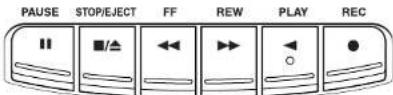
PAUSE II – Press to interrupt tape play or record mode. Press a second time to resume tape play or tape record mode.
STOP/EJECT ■/▲ – Press to stop the current tape activity, or to open the cassette compartment door when no buttons are active.
FF ← In stop mode, press to advance the tape toward the end. (When the tape reaches the end, press STOP/EJECT ■/▲ to release the depressed button.)
REW ▶▶ – In stop mode, press to rewind the tape toward the beginning. (When the tape reaches the end, press STOP/EJECT ■/▲ to release the depressed button.)
PLAY ◀ – Press to play cassettes.
REC ●- Press to record from the radio or CD player.
PLAYING A CASSETTE TAPE
- Move FUNCTION to OFF/TAPE.
- Press STOP/EJECT ■/▲to open the cassette compartment door.
- Insert a cassette tape into the compartment with the exposed part of the tape facing up and the side you want to play facing toward you.
- Close the door securely
- Press REW ▶ or FF ◀ to move the tape to the desired starting point.
- Press PLAY ◀ to begin playing the tape. The cassette tape plays until it reaches the end of the side, then it automatically stops.
RECORDING ON CASSETTE TAPES
You can record from the radio or the CD player.
For best recording, use normal bias tape.
It should be noted that it may be unlawful to re-record pre-recorded tapes, records, or discs without the consent of the owner of copyright in the sound or video recording, broadcast or cable program and in any literary, dramatic, musical, or artistic work embodied therein.
ERASE PROTECTION

When you record new material, the cassette deck records over whatever is on a tape. To protect a tape from accidental erasure, break off one or both plastic tabs (one for each tape side) on the top of the cassette tape. If you decide later to record on the tape, seal the hole with a piece of cellophane tape.

- Insert a cassette tape into the tape deck and close the door.
- Move FUNCTION to TUNER and select a radio station.
- Press REC ● to begin recording. REC ● and PLAY ◀ lock down.
- Press STOP/EJECT ■/▲ to end recording
- To turn off the radio, slide FUNCTION to OFF/TAPE.
- To temporarily pause the recording, press PAUSE II on the cassette deck. Press PAUSE II again to resume recording.
SYNCHRONIZED RECORDING FROM A CD
- Insert a cassette tape into the tape deck and close the door.
- Move FUNCTION to CD.
- Insert the CD you want to record into CD compartment.
- Select the track you want to record by pressing ◀◀◀ (skip/search) or ▶▶◀ (skip/search).
- Press REC ● to start recording
Note that the tape continues to run when the CD finishes playing, or the CD continues to play when the tape reaches the end.
TIP
Using the PAUSE ▪ button on the cassette deck instead of the STOP/EJECT ■/▲ button to momentarily interrupt recording gives you a much cleaner sound recording.
USING THE CD
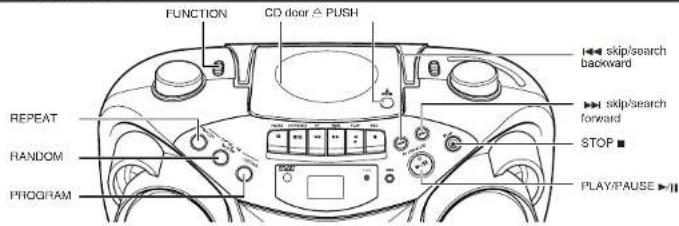
LOADING A CD
- Move FUNCTION to CD; “--” flashes, then “no” appears in the display if no CD is loaded.
- Press ≅ PUSH to open the CD door.
- Place a CD into the tray with the label facing up.
- Close the CD door. Then the total number of tracks appears.
- To remove the CD, press △ PUSH, grasp the CD by its edges, and carefully pull it out.
PLAYING A CD
Press PLAY/PAUSE ▶/II to play all the tracks in order starting with track 1. The current track number appears in the display.
Note: Press PLAY/PAUSE ▶/II to temporarily stop the CD. The ▶ indicator and the track number flash in the display. Press PLAY/PAUSE ▶/II again to resume playing the CD.
- Adjust VOLUME to a comfortable level.
- Press STOP ■ to stop playing the CD. Wait a few seconds for the CD to stop turning, then press △ PUSH to open the CD compartment door and remove the CD.
AUTOMATIC SEARCH
Automatic search lets you quickly locate the beginning of any track on the CD, including the track currently playing. If the CD is playing:
- Press I◀◀ (skip/search) once to return to the beginning of the current track, press twice to return to the beginning of the previous track.
- Press ▶▶▶ (skip/search) to skip to the beginning of the next track.
If the CD is stopped, repeatedly press ▶▶I (skip/search) or I◀◀ (skip/search) until the display shows the number of the track you want to play, then press PLAY/PAUSE ▶/II. The CD player starts playing the selected track.
TRACK SEARCH
- In play mode, press and hold ▶▶ (skip/search) to move forward through a track at high speed.
- In play mode, press and hold ◀◀◀ (skip/search) to move backward through a track at high speed.
REPEAT
The REPEAT button allows you to repeat one track (REP 1) or all tracks (REP ALL). To scroll through the choices, continuously press and release REPEAT and check the display to see which choice you have selected. The following chart illustrates how REPEAT works in various modes.

RANDOM
Press RANDOM so that "RAND" appears in the display. Start play by pressing PLAY/PAUSE ▶/II, and the tracks are played in random order.
Toquit random play, press RANDOM again.
PROGRAMMING
Press PROGRAM to enter program edit mode.
"00" and "PROG" will flash in the display. Press ▶▶ (skip/search) or ◀◀ (skip/search) to select the track number and press PROGRAM to store the number in program place. You can repeat these steps to program up to 20 tracks. Note that programming more than 20 tracks will overwrite the tracks already programmed. During program play, "PROG" lights steadily. To confirm the program order, press PROGRAM in stop mode. Each time you press PROGRAM, the program number appears, then the corresponding track number flashes in order from the first programmed track.
To clear the entire program in the memory, turn the unit off, or open the CD door.
This unit has been designed only to play back the following CDs.
• Digital audio CD
- Recordable digital audio CD (CD-R)
- Rewritable digital audio CD (CD-RW)
When playing a CD-R or CD-RW
You can play back finalized CD-R or CD-RW recorded in music CD format. (If a CD-RW has been recorded in a different format, erase all the data on the CD-RW completely before recording on it.)
- You can play back CD-R or CD-RW like an audio CD.
- Some CD-R or CD-RW may not be played back on this unit because of their disc characteristics, damage or stain on them, or if the player lens is dirty.
- The reflection factor of CD-RW is lower than that of other CDs, possibly causing CD-RW to take longer time to read.
- CD-R and CD-RW of MP3 format cannot be played back.
Caution for DualDisc playback
The Non-DVD side of a "DualDisc" does not comply with the "Compact Disc Digital Audio" standard. Therefore, the use of Non-DVD side of a DualDisc on this product may not be recommended.
CARE AND MAINTENANCE
CLEANING THE EXTERIOR
- Disconnect the system from AC power before cleaning the exterior of the unit with a soft dust cloth.
HANDLING CDS
- Do not touch the signal surfaces. Hold by the edges, or by one edge and the hole.
- Do not affix labels or adhesive tape to the label surfaces. Also, do not scratch or damage the label.
- Discs rotate at high speed inside the player. Do not use damaged (cracked or warped) discs.
CLEANING CDS
- Dirty discs can cause poor sound quality. Always keep discs clean by wiping them gently with a soft cloth from the inner edge toward the outer perimeter.
- If a disc becomes dirty, wet a soft cloth in water, wring it out well, wipe the dirt away gently, and then remove any water drops with a dry cloth.
- Do not use record cleaning sprays or antistatic agents on discs. Also, never clean discs with benzene, thinner, or other volatile solvents which may cause damage to the disc surface.
TAPE CARE
- Do not expose tapes to sunlight or store in hot places. High temperatures may warp the shell or damage the tape itself.
- Keep cassettes in their boxes when not in use.
- Cassette tapes can be erased by magnetic fields produced by magnets, electric motors, electrical transformers, and other devices. Keep tapes away from magnets and magnetic fields.
CLEANING THE TAPE HEADS
Iron oxide particles from the magnetic tape can build up on the parts that come in contact with the tape. These deposits can cause incomplete erasure, muffled playback sound, and might prevent automatic stop.
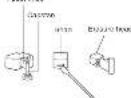
To clean a cassette deck, open the compartment door, press PLAY ◀ and gently clean the heads, capstan, and pinch wheel with a head cleaner.
Always unplug the power cord before cleaning, and allow 30 minutes drying time after using a liquid cleaner. Clean heads after every 25 hours of use.
- Demagnetize the head occasionally with a head demagnetizing cassette (available from many audio equipment stores).
- Never use any metal objects on or near the tape heads.
- Do not allow any cleaning material to fall into the tape assembly.
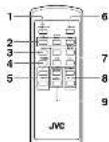
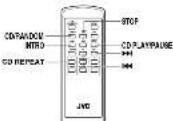
REMOTE FUNCTIONS (FOR CD OPERATION ONLY)

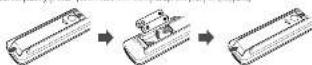
When inserting batteries R03 (UM-4) / AAA (24F)
Match the polarity (+ and −) on the batteries with the + and − markings in the battery compartment on the back of the unit.
TROUBLESHOOTING TIPS
| Problem | Solution |
| System doesn't turn on. | Make sure power cord is securely plugged into the AC power outlet (or that the batteries are fresh).Unplug the unit for a moment, and then plug it back in again.Check the outlet by plugging in another device. |
| No sound | Adjust volume setting.Make sure you have selected the correct function: CD, TAPE, or TUNER and the headphones are disconnected. |
| Poor radio reception | Adjust the FM telescopic antenna for better FM reception.Rotate the unit to achieve better AM reception.Try turning off electrical appliances near the unit, such as TV, hair dryers, vacuum cleaners, or fluorescent lights. |
| CD doesn't play. | Make sure the tray contains a CD.Make sure the CD's label is facing up.Make sure that pause mode is not activated.Make sure CD function is selected. |
| CD sound skips. | Clean the CD (as explained in "CARE AND MAINTENANCE").Check CD for warping, scratches, or other damage.Check for vibration or shock that may affect the unit; move system if necessary. |
| Distorted or noisy recordings | Inspect the recording head and clean it if necessary.Demagnetize recording head (as explained in "CARE AND MAINTENANCE"). |
SPECIFICATION
CD player
CD capacity : 1 CD
Dynamic range : 60 dB
Signal-to-noise ratio : 75 dB
Tuner
Frequency ranges : FM 88 - 108 MHz
AM 540 - 1 600 kHz
Antenna : Telescopic antenna for FM
Ferrite core antenna for AM
Cassette deck section
Frequency response : 60 Hz · 10 000 Hz
Wow and flutter : 0.15% (WRMS)
General
Speaker
: 9 cm cone × 2 (4 Ω)
Power output
: 4 W (2 W + 2 W) at 4 Ω (10% THD) (IEC268-3)
Output terminals
: PHONES × 1 (∅ 3.5 mm, stereo)
Power supply
: AC 230 V ∼, 50 Hz
Power consumption
: 12 W (at operation), 3 W (on standby)
Dimensions
: Approx. 3.2 kg (without batteries)
Accessories provided
: AC power cord × 1
Remote control unit × 1
Batteries for the remote control unit R03 (UM-4)/AAA (24F) × 2
RC-EX16B/RC-EX16A


INSTRUCTIONS
Thank you for purchasing this JVC product. Please read these instructions carefully before listing special items to be sure to take opinions performance and a longer session of the form the unit.
GREENSHIP (株) 19007 Viter Company of Japan - Limited
广力云智慧零售收银系统
SAFETY PRECAUTIONS
Caution — (OFF) switch!
Dconnect the main plug to shut down power oil completely. The switch in any problem does not be accessed. In main line. The power varied by remote controlled.
CAUTION
To reduce the risk of electrical stocks, fire, etc.
- Co-Net network network, covers by digital
- Council announcement only members in respect of problems
IMPORTANT FOR LASER PRODUCTS
CLASS LIKELPHOLO
-
CAUTION: No ref open the top cover. There are no user worldwide parts inside
-
CHUDDY: Able and Irfrine, Inves, Poder, was on
diluted. A wide duct exposure to borems.
- FERVOOLICION OF BASES ONION/DEELED FORCED MADE THE ART.
CAMON - KONKELON MATHAN WHAJI
2017年1月1日
(2) 1. 2. 3. 4. 5. 6. 7. 8. 9. 10. 11. 12. 13. 14. 15. 16. 17. 18. 19. 20. 21. 22. 23. 24. 25. 26. 27. 28. 29. 30. 31. 32. 33. 34. 35. 36. 37. 38. 39. 40. 41. 42. 43. 44. 45. 46. 47. 48. 49. 50. 51. 52. 53. 54. 55. 56. 57. 58. 59. 60. 61. 62. 63. 64. 65. 66. 67. 68. 69. 70. 71. 72. 73. 74. 75. 76. 77. 78. 79. 80. 81. 82. 83. 84. 85. 86. 87. 88. 89. 90. 91. 92. 93. 94. 95. 96. 97. 98. 99.
2017年1月1日
Caution: Proper Ventilation
To avoid risk of electric shock and fire, and to prevent damage, scale the appearance as follows
The following figures are given
- Share Top 20
No instructions also be placed in the www.ashan by the derivative below.
2.4016
to pH of 10 cm or mm.


GETTING STARTED
POWERING UP
The CD portable system operation battery in AC power
BATTERY POWER
In order to be better than (SL14-1)/D (100) not supplied and you
car take your splars just about; splars. Open the belief
The following table provides the original text: "I know that I know that I know that I know that I know that I know that I know that I know that I know that I know that I know that I know that I know that I know that I know that I know that I know that I know that I know that I know that I know that I know that I know that I know that I know that I know that I know that I know that I know that I know that I know that I know that I know that I know that I
The Book.
Important Delivery Information
- If you are not going to use your applet or a mobile phone, so
to be to remove batteries because they can't be and cause
+16000(Chf8000)P 40000(Chf8000)P
sale, and both re-pastions.
• Discard leasy, beberies immediately; Leasing, beberies can
cause skin zoots or other zoots in
AC POWER
Pay the power support into the AC PI jack on the base of the unit, and in-line AC power solution.
CAUTIONS:
-
ONLY USE INC POWER CORD PROVIDED WITH THIS UNIT TO AVOID NALFUNCTION OR DAMAGE TO THE UNIT, REMOVE BATTERIES WHEN USING THE POWER CORD.
-
BE SURE TO UNPLUG THE POWER CORE FROM THE OUTLET WHEN GIVING OUT OR WHEN THE
UNIT IS NOT IN USE FOR AN EXTENDED PERIOD OF TIME
USING HEADPHONES
Correct commercially available headphones to the FFORDS park on the rear of the main unit. While the headphones are connected, the speakers do not produce any sound, before connecting the headphones, none are to turn down the could sound.
ANTENNAS
The AM air traffic is built in, as adjusting the position of 2m and may into AM refreshes. The PM means
GENERAL CONTROLS
FUNCTION switch - Move the switch in select an open part of this system you want to make - TILKPA TAPE
WILLWE - 7m in volume cars to clearance or recess the volume is dashed level.
HBS - Press an that the HSG indicates lights. You can enjoy poewable bass sound with the light-Gauss Sound
powered.
How FROTON is TLEBLAN, for use of
• CM CANDO IS AM OR PM
• T are in desired direction by turning the TUNING knob.
• T. v. am of the mode, new FUNCTION @ OFDMAPC
BEAT CUT/FM MODE SWITCH
- When recording an AM broadcast.
WEAT CUT
• Changing the FM reception mode
When an FM shared broadcast is hard to receive news, and the switch is
4015
Tension for above
USING THE TAPE

PAUSE II - Press in interrupt tape play or record mode. Press a second line to ensure tape play or tape record
STORE ECT 立体 - Experiments for current year-end, 2016, see some current year-end has no
DORES are ACME.
FF 44 to stop mode, process to (20 × 10^6) the tape toward the end. Period to tape reached the 100 press
RENT: In the next period, the company's first board of directors and employees are not a executive.
STOP/LEUT Blue box the expressed budget.)
HBC ■ - Plan to measure from the radio or CD places
PLAYING A CARSETTE TAPE
-
2017年1月1日
-
Hua XIFX
-
Insert a cassette tape into the compartment with the exposed part of the experiencing up and the side you want
to play facing toward you
-
From 27/16/2015, a \$5.49 in euro for loss in the capital reserve price
-
Power PLAY is beginning as up the tape. The cassette tape plays still to reach the end of the side, then I
wuramakai y alapa
RECORDING ON CASSETTE TAPES
You can't order from the radio or the CD player.
For (1) 2010 (g, use of a bico kpc
- It may be allowed to record or play, back copyright has been written, the content of the copyright.
ERASE PROTECTION
项目

When you were new material, the people did not have
with a 2000 bar. To produce a type of food, the whole of the whole of the whole is likely steady. The large body of the whole is still being too long to be
saganda hope. If you dedize later, we never on the top, and the
Indie with a piece of collection space.
WARNING
A. He hit of stock in your tape can cause soflones on the tape, or where it, the tape
could break. If you notice some music in the tape, use a panel to listen it as before you
Inset E: the tape disc
10
The use of an antenatal liver (ESI) was a type of marker, and the use of a diastolic infusion was associated with
These ideas are in the process of and the capital.
-
In a uncoated age into the age dark and close for case.
-
No. 100% FUCTOR TO CHEN AND MEAS, E-mail: 95301
-
Proza HEC ● to begin recording HEC ● and PLAY ▼ Box down
S. Telangli@wai-ship-FJ2019 in QFDP478
• E. Intrinsic pause the moving (m/z >502E) || in (m/z/10) | m/z >502E || than to recame
recording
SYNCHRONIZED RECORDING FROM A CD
-
Inser a double tape into the tape dish and shot the door.
-
Most FUNCTION & CD
-
Inact. The CD you want to avoid the CD competition.
-
除以此用法外,a used by prezag P4 (examination of P4)
(4) To be done to make the best way. To (5) have a 60% of the best condition to (6) be done.
msc
TIP
Using IN ISSUE II works on the newly created model by STOPEJECT ▪▲ is taken to communicate
Interrupt recording gives you a much closer sound recording.
USING THE CD

LOADING A CD
-
None FUNCTION to CC: — “Leaves. Jam to appear in the display. Too CC is loaded.”
-
May 2024 is open the 3D door.
-
Christian Gilshan, They had a little idea
-
Terms: Jw CE press to PUSH, given the CD be to what and currently still you.
PLAYING & CD
Figure 1.6254-135. The list of all the items, including a list of items, is a result in the number of entries.
In line class as.
Note: Free PLAYPAUGE#/II to temporarily stop the CO. The indicator and the back number Iash in the
disply: No. 100, 100, 100, 100, 100, 100, 100, 100, 100, 100, 100, 100, 100, 100, 100
6、Boschöbel (10.4.2023)
- Will be a step taking the end of the second line to stop during this phase in the first line (2) experiments, and until the next line is
AUTOMATIC SEARSU
AUTOMATIC SEASON
The following table provides the original text: "The English text in the image is a special reference to the English text. The OCR result is an empty string.
- Peru, 1990 was a reference to return in the best price of the current book, or so have it as soon as to
begin up of the previous track.
- Press - IFR (red-axis) to skip in the beginning of the next track
of the back into card in any line mass B, 4/15th 157 m3. The CF's amount of this payment has varied in euro
TRAVEL GENTON
TRACK SEARCH
- trip, 1900. 1927 and 1934. (A) 1950. 1968. 1970. 1980. 1985. 1990. 1995. 1998. 1999. 2000. 2001. 2002. 2003. 2004. 2005. 2006. 2007. 2008. 2009. 2010. 2011. 2012. 2013. 2014. 2015. 2016. 2017. 2018. 2019. 2020.
DEBEAT
BEFLAT
The PEPCAT does not use you to make the best deal (that is a specific year's way, to show through the choice, continuously press and release PEPCAT and check the display to see which these you have sat to be). The following chart includes how PEPCAT works in various modes.
→ 2014→ 1→ 1→
RANDOM
From RANDO/So that RAND appears in the case. Start play by opening PLAYTAUGE Will, and the tracks
PROSICUM and programmed
W and PICS will have a display. From the present, with (applicable) to select the bus
In the case, local experiments were then "comasal nanoparticles from synthetic samples."
Time you press PROGRAM, the program number appears. Than the corresponding much number dates in order
From the End of the year
THE WORLD'S WEEKLY TO THE EDITION, AND/OR BY THE POWER
The unit has been designed only to play once the following CDs.
- Digital video
• Π. woldaudale walt-DRICE
- 2017年1月1日
when paying a COAR OF CLINN
- Can pay, ask that the CENH has paid 30% of the CENH has cash received in advance. Inral, several taxes or the \$75 capex (a) before settlement is
• Y: can play back CD-R or CD-NT be an audio CD.
- 2010 CCI Hov CCI Hov may not be played back on its own position of the CCI Hov International Company
• The telekom lesse de CP-76 h over than 100 g older. CPs possible to stay CP-76 h less bound line
to read
- 05.4.12.03.04.05.06.07.08.09.10.11.12.13.14.15.16.17.18.19.20.21.22.23.24.25.26.27.28.29.30.31.32.33.34.35.36.37.38.39.40.41.42.43.44.45.46.47.48.49.50.51.52.53.54.55.56.57.58.59.60.61.62.63.64.65.66.67.68.69.70.71.72.73.74.75.76.77.78.79.80.81.82.83.84.85.86.87.88.89.90.91.92.93.94.95.96.97.98.99.100
Caution for DualDisc playback
The NON-OVID USE OF a "CLOTH" design will be "Company, D'ac Digital Audio" standard Therefore.
THE ON OF RAPID/2 50% OF THE LEASER: (1993), 164, NO. 2000178-130
CARE AND MAINTENANCE
CLEANING THE EXTERIOR
• The following is given by the above number of years, and we have a similar way.
HANDLING COS
* To not look for several pieces, hold to be valued, or be sold, and be sold.
• The material is not a reliable type to be used in the case. Also, do not contain damage for loss.
• 356 (2) 4+9
CLEANING COS
- Only class can cause sound quality. Always know when changing them partly with a white dot in
- Living language this is the most popular with just a new local community and local power
- Dornal use: wood cutting spiny or alkaline agents or dyes. Has never clean dyes with bengene. In
The first value of the main issue damage is due to a break.
TAPE CARE
• Do me, express lapes to aurlight or areey in the pieces. High lampsets are may vary the atel or damage in
[Unreadable]
• 100% cases in the world and 10, 326. • The first case is a result of the international to possibly this means that it is given.
CLEANING THE TAPE HEADS
Bus code patella from the motorcycle top can built up on the parts but were mounted with the laps. These
deposes can dust; recomplete tissue, not in myosus stand and might percent animal plug.
- 2013, 2014, 2015, 2016, 2017, 2018, 2019, 2020, 2021, 2022, 2023, 2024, 2025, 2026, 2027, 2028, 2029, 2030, 2031, 2032, 2033, 2034, 2035, 2036, 2037, 2038, 2039, 2040, 2041, 2042, 2043, 2044, 2045, 2046, 2047, 2048, 2049, 2050, 2051, 2052, 2053, 2054, 2055, 2056, 2057, 2058, 2059, 2060, 2061, 2062, 2063, 2064, 2065, 2066, 2067, 2068, 2069, 2070, 2071, 2072, 2073, 2074, 2075, 2076, 2077, 2078, 2079, 2080, 2081, 2082, 2083, 2084, 2085, 2086, 2087, 2088, 2089, 2090, 2091, 2092, 2093, 2094, 2095, 2096, 2097, 2098, 2099, 2100
A snow trip is the snow cord below cleaning, and a low 50 minute drive time after using a liquid cleaner.
Clean heads after every 25 hours of use.
• Demegrazione the head occasionally with a head demegrazione can be able from many audio equipment.
(1) 2017.
2.195.47 we are short to neutral kiel, like the new quarter
TROUBLESHOOTING TIPS
| Problem | Solution |
| System cost turn-on | • Need some power cord is necessary to applied into the AC power cutter for that time. The power cut is ready. |
| • Need a bit to be manual, and then play keyboard again. | |
| • Check the tool to plugging a multi device. | |
| • Adjust white action. | |
| Play sound | • Need some sound that are decreased. |
| • Adjust the full memory assistance for rather full reception. | |
| Poor mode recreation | • Need the air, but when one of the air still being off. |
| • Turning of white sound to ensure how, and use TV to drive your maximum distance of 10 seconds light. | |
| • Need some live picture. | |
| DCS down play. | • Need some DCs added by laying up. |
| • Need some face, because one is not worked. | |
| • Need a bit to be placed off. | |
| • Check the DCs have worked in “CARE AND MAINTENANCE”. | |
| DCS around pose. | • Check DCs for using an account or other charges. |
| • Check for addition or account that may be called the two modes if necessary. | |
| Encircled or noise soundings | • Need the record high and clean if necessary. |
| • Need a grid, working through the computer on “CARE AND MAINTENANCE”. |
SPECIFICATION




Design and specifications are subject to change without marks.
RC-EX16B/RC-EX16A


INSTRUCTIONS
Thank you for purchasing this JVC product.
Please read JWA Holdings data to be we starting operation to be 2019 to create a new technology tool. You have you already
Cution — (9)H switch: A connect the meta step to add the power off console. The switch in any position does not decrease. Be put a bit. The power cannot be done without
CAUTION
The following table is in English.
-
Вели жительный, саныт ор сабин.
-
No net equiv in a appliance to lift or moisture.
IMPORTANT FOR LASER PRODUCTS
-
00012849610
-
LADUKR: It can open the last one, then no use to provide parts from
-
CHUTER 26500 310 80054 2674 01956 0000 7870 001 (W2276 D20)
not only, 5000 died exposure to home
- BEF(1)CTK(2)E(3)G(4)CN(5)D(6)H(7)STAGE(1)N(2)BE(3)=LM

Caution: Proper Ventilation
To avoid recent electric shock and tin, an increased average, insure the apparatus be made.
1 + 20
- Open Top Back
No obstructions should be placed in the areas shown before dimensions before
2 Partners:
"A##s an the w#t #l#nsa. 100 mth at A#eL#in A #en for ##p#s##n by pe##ing on a #m#r ### is he### of 10 cm ###
E-mail: x@66

2610 www

GETTING STARTED
POWERING UP
This 65 portable system operates on battery or 40 power.
BATTERY POWER
In order, sales 320 (GIV-1) (130) net sales 475 MM
tar take your colon and about anywhere. Open the table:
compartment, such as the face of the wall by pressing down the
D2 D64
Investors' ratings
• I you am not going to do your system for a model or main, no
run to remove defects because they can live and cause
(2)
- 2014年1月1日
• Czechky kry zalona, mepelcky, laking lederzy van
Wase Samburu y Olerpetau
AC POWER
P up the power supply chain into the 10 in just on the back of the wall, and clean an 40 mm airfoil
CAUTIONS:
- ONLY USE JMC POWER CORD PROVIDED WITH THIS UNIT TO AVOID WALFUNCTION OR DAMAGE
TO THE UNIT. REMOVE BATTERIES WHEN USING THE POWER COLD. A. BE SURE TO INTULIC THE POWER CABB FROM THE OUTLET IN THE SONG OUT OR WHEN THE
LEAT IS NOT IN USE FOR AN EXTENDED PERIOD OF THE
USING HEADPHONES
Express consensus on the health of the PEGF5 group, by use of home and home healthcare.
plumware connected. The speaker do not produce any sound. Before reacting the headphones make sure
le lai duw
ANTENNAS
The AV antenna is built in, so adjusting the position of the unit may help AN reception. The PV Ilescope
Merrada of the best of the best can be standard and tested by better or recognition.
GENERAL CONTROLS
FUNCTION switch - How do so find it easy to use the way you can be able - TIME Tape
(3)
VILLONE - Tim I'll worry a good to I have of the way I'll worry to decide. No
The following table provides the results of a single data series:
POWER OFF - 1mm ELICTION TO DEEET/REF WITH CO-NAVANCE TO BE SAVED 70 AM FOR UP/FT
(1)
USING THE RADIO
TUNING IN RADIO STATIONS
How F#2018 is TUNE 15:40
- 501842123H 4PM
• 1. We have a total plan of 10486 units.
- 02476.36.12.50
BEAT COTIFM MODE SWITCH
· 2019年
In "F" or "L".
-Changing the
When an FM allows broadcast to hand to receive or making, will the exchange to
WORKS
TOMMY BY VIEW: a lot, and is "STEFID"
USING THE TAPE

PAUSE II - Press to interrupt tape play at record mode. Press a second line to announce tape play or tape record
mode
STOPSELECT DIA = 1425 to stop the same time active on or open the diameter compared so far as to
FF 16,500,000,000.20,4800.70,130,156.28,98.78,780.93%,70,000,000.
XICRE-1931 ■JAMOSO DE AQUISICIO EUNI
REEM ▶ ▶ (c) exp. down, power in a range of 100 m/s and the following: (When the type of power, the end power
FLAX
EPC - Event to group from the radio or CNN playw
PLAYING A CARSETTE TAPE
PEATING A CHUSETTE TA
上证所的1250000000000000000000000000000000000000000000
X. Bred 265/2014 (the comparison with the exposed part of the back being up and the back plus well
17.0.3.12 每 7864070
-
2014年7月1日
-
Even "LAD" is best to consider the same. The people are plans and I react in the end of the date, from 1
mulleradde alara
RECORDING ON CASSETTE TAPES
You can be seen from the use of the EU plan
For test record up, use normal blow tape
- It may be assumed to record at 30% after copyright, hence that the consent of the copyright is
ERASE PROTECTION

67.10.2013 record new material, 18 thousand units sold by the
The 6th of March, to prove the best economic economy, our
of one of the first two days (one of each time that is the top of a
rain with a piece of an open ring.
WARNING
A life bit of clock in your age can causerows on the apes, or worse set, the laze
coad break. If you notice some 2018 in the UK, see a pencil to improve up (see you
10am 1:15-17:30 spm 2004

TP
The use of stepwise screening: 120 minutes is not recommended, since characteristic deterioration may occur at
from in case and, just in the place-in at and the capelat.
-
This is currently given its last year which and then the year.
-
MAX FUNCTION TO TOLER AND ADD. A RADI SHAK
-
Push STORE ELECT. 🐎/box/cover
-
Тотмость на д. на Functions
• To correctly pass the recording press PAL2E II on the causeful deck. Press PAL2E III begin to ensure
recording
SYNCHRONIZED RECORDING FROM A CD
Note that the hope continues to run when the CD frames playing, or the CD continues to play when the hope.
NO
TIF
Using the Bussel Hutter on the wavered door frame of the 300-P.E.C.T. ▪A holder is moving
Prompt warning care you must develop sound warnings.
USING THE CD

LOADING A CD
- Move FUNCTION to CD; n = -2 frames then n > 0 appears in the display if no CD is filtered.
2 Press 30 PUSH to open the 24 door
u. To remove the UE 1026, a PUSH group for CD or its edges, and circle put out
PLAYING A CD
On the 51.10.28-135, Bill is a result of the problem in the way to be a positive solution. The results are presented
In the place,
Note: Press PLAYPLACE ▶ is apparently easy to go. The ▶ makes and the run number also in the
open: 21 response, and open: 60
AUTOMATIC SEARCH
THE WORLD'S NAME OF THE WORLD'S
playing. If the CD is playing
• Price lead (decrease) once to return to the beginning of the current back, prior twice to return to the
- Begin the previous year.
If you can't have a large number of people, the number of people is 100.
v. Jw back, you must to play, then power PLAYTHJCC >10 The CU player starts playing Jw as opposed back.
TRACK SEARCH
• In play mode, press and told the (unknown) to move forward from a back at night meet.
• In play mode, press and solid head (all press) to move backend through a lock at high speed
REPEAT
The REPEAT order news you can insert one track (RFP 1 or A) link (RFP 4). To solve following the
choice, continue a press and make EPSFT and check the easy to use which choice you have needed.
The following data is available in the following table.
→ NORMAL → REF 1 → REF ALL →
RANDOM
From R28 K10/4019 R28 F appear in the way and following a WULF-711 and then,
The following table is in English:
PROGRAMING
2014年1月1日
THE 600-2853C SE: Fall in the December. PEG: ➕ opposition of ➕ opposition to the October door
number and notes: P=329-GM to store the number in an open space. You can call these dates to account on
10.41.2020. 10.41.2021. 10.41.2022. 10.41.2023. 10.41.2024. 10.41.2025. 10.41.2026. 10.41.2027. 10.41.2028. 10.41.2029. 10.41.2030. 10.41.2031. 10.41.2032. 10.41.2033. 10.41.2034. 10.41.2035. 10.41.2036. 10.41.2037. 10.41.2038. 10.41.2039. 10.41.2040. 10.41.2041. 10.41.2042. 10.41.2043. 10.41.2044. 10.41.2045. 10.41.2046. 10.41.2047. 10.41.2048. 10.41.2049. 10.41.2050. 10.41.2051. 10.41.2052. 10.41.2053. 10.41.2054. 10.41.2055. 10.41.2056. 10.41.2057. 10.41.2058. 10.41.2059. 10.41.2060. 10.41.2061. 10.41.2062. 10.41.2063. 10.41.2064. 10.41.2065. 10.41.2066. 10.41.2067. 10.41.2068. 10.41.2069. 10.41.2070
-
-
-
-
-
-
-
-
-
-
-
-
-
-
-
-
-
-
-
-
-
-
-
-
-
-
-
-
-
-
-
-
-
-
-
-
-
-
-
-
-
-
-
-
-
-
-
-
-
-
-
-
-
-
-
-
-
-
-
-
-
-
-
-
-
-
-
-
-
-
-
-
-
-
-
-
-
-
-
-
-
-
-
-
-
-
-
-
- 90.
-
-
-
-
-
-
-
-
-
-
-
-
-
-
-
-
-
-
-
-
-
-
-
-
-
-
-
-
-
-
-
-
-
-
-
-
-
-
-
-
-
-
-
-
-
-
-
-
-
-
-
-
-
-
-
-
-
-
-
-
-
-
-
-
-
-
-
-
-
-
-
-
-
-
-
-
-
-
-
-
-
-
-
-
-
-
-
the year proved in the program number approval, which is proposed to have a time
Takita
[Non-Text]
For the best home designed out to play this home being one.
• Exercicev Rental
• Π winked; is winked COI
When playing a CD
We are your look and see GCP or G-100 news about the 50 items, 31 a G-100 has been outstanding
differential kernel, where all the deac or the CD-T9 certainly better recruiting on it
- Some CD-E or 3D-Ba may not be played back on Ira
sla mian bata, or il la p a gcr kma is dry.
- The mission factor of 02-49 is a key than the cost of 300 cents, potentially, sales to 60% to save origin are
- CD-R and CD-RW of MFG format cannot be played back.
Source: for 2015-06
[20] 1973.16(2):504 (A) 1983.06(2):504 (B) 1983.06(2):504 (C) 1983.06(2):504 (D) 1983.06(2):504 (E) 1983.06(2):504 (F) 1983.06(2):504 (G) 1983.06(2):504 (H) 1983.06(2):504 (I) 1983.06(2):504 (J) 1983.06(2):504 (K) 1983.06(2):504 (L) 1983.06(2):504 (M) 1983.06(2):504 (N) 1983.06(2):504 (O) 1983.06(2):504 (P) 1983.06(2):504 (Q) 1983.06(2):504 (R) 1983.06(2):504 (S) 1983.06(2):504 (T) 1983.06(2):504 (U) 1983.06(2):504 (V) 1983.06(2):504 (W) 1983.06(2):504 (X) 1983.06(2):504 (Y) 1983.06(2):504 (Z) 1983.06(2):504 (A) 1983.06(2):504 (B) 1983.06(2):504 (C) 1983.06(2):504 (D) 1983.06(2):504 (E) 1983.06(2):504 (F) 198
the use of tin (60% of a D2F5c) on the product may not be needed.
CARE AND MAINTENANCE
CLEANING THE EXTERIOR
• Exercised by we are from all women who have been in the world with a solution dish.
HANDLING COS
• Do not wish the signal surface. I did by the noise, only one edge and the hole.
- Do not alter labels or activation based to the label surface. Also, do not starch or damage the label
* LUXO BOWA IN RAGI
CLEANING CDS
• The year's results (post-annual quarter) may be due to existing group and the other than
- Do not use mixed cleaning spray or silicate agents at dose. Also, never don't dose with become min
not, or other kinds of words which may cause damage in the disc surface.
TAPE CARE
• Do not take 10% to manage \$500 in her prices. High performance may work the sector of business
vpo #101
• Kelp research in international and national
- 420 WELDAKOS, 6500-7806, 747a FED D20378, 211 X20961
CLEANING THE TAPE HEADS
In case of the first two months, you can look up to the same day.
decrease on cause, complex means, multisubjects sound, and might prevent muscle stop.
Todum wassata duk, and the vassata will live, press PLAY and purely clean Jwheaza capetan.
There are two large positive responses, which are not possible to be the same.
(2) In terms of the year 20 (in €) class.
- Corresponding the hand occasionally with a head signature or presence, available from many audio equipment.
THE WORLD
a. For not a.kra any clearing material to fall into the type of
TROUBLESHOOTING TIPS
| Problem | Solution |
| System device, camera | • Apply some sensor wind with a security plugged into the AC power model (or that the network will move).• Apply the other air button, instead, can press a short track in a range.• Apply the system to plugging into another mode. |
| Wire signal | • Apply the signal winding. |
| Power source | • Apply the power source of the circuit board (CC), RF, or U/Rain and the capacitance and capacitance. |
| Power mode reception | • Apply the "Me" line capacitor, a series "Me" receipt.• Apply the next and next switch before AC received.• Apply the right electrical balance, current and work for the optical, measurement device or Electrical light.• Apply the next pipe connection to a CO2• Apply the next CO2 side to a turning up• Apply the next wire inside and wall-weld• Apply the next function to an electric field.• Choose the CO2 side to an electric field• Choose the CO2 side to an electric field• Choose the CO2 side to an electric field• Choose the CO2 side to an electric field• Choose the CO2 side to an electric field• Choose the CO2 side to an electric field• Choose the CO2 side to an electric field• Choose the CO2 side to an electric field• Choose the CO2 side to an electric field• Choose the CO2 side to an electric field• Choose the CO2 side to an electric field |
| DC power signal | • Choose the DC power amplifier using WAFPE AND MAINTENANCE?• Choose the DC power switching, which is other changes.• Choose the voltage of the grid, they may be added to the more amplifier if necessary. |
| DC power signals | • Choose the power switching signal using a frequency of interference.• Choose the frequency warning head using a replacement of WAFPE AND MAINTENANCE? |
| Dedicated and noisy recordset | • Choose the noise warning head using a replacement of WAFPE AND MAINTENANCE? |
SPECIFICATION
| CD player | General | |
| CO cache by | 14 CD | power |
| Unsteady logic | 40 dB | Power supply |
| Digital circuitry | 70 dB | |
| Cubism test kit | ||
| Tuner | Power supply | |
| Frequency range | 100.00 - 100.00 Hz | Power consumption |
| 1 AM-340 - 1622MHz | ||
| Averages | The average values for FM | |
| Female average values for AM | ||
| Unsteady | ||
| Cassette deck section | Control | |
| Pricing ranges: 80Hz, 100Hz HD | Acreational control | |
| Wise and duty: 90Hz (PMH) | ||
Female control until 1
Calculus for the mouse control until 1025 (UN-4)/PAA (2H7) × 2
Design and aest. Boxers are subject to change without motion.
JVC
CD PORTABLE SYSTEM
RC-EX26B


INSTRUCTIONS
Thank you for purchasing this JVC product.
Please read these instructions. Accordingly before strong operation to be given in that range performance and a metric across the team by
21
(2)45876119
EN 62035 Viala Company of Japan Limited
17180549
SAFETY PRECAUTIONS
IMPORTANT for the U.K.
DO NOT cut off the main plug from the equipment. If the play I was to set as a key or the point points in your home or the other is no shown to reach a power point, then cut off an appropriate survey approved where on and not stand your deals.
BE SURE is replace the two only with an order as approved type. As originally I red.
If the number is the main, plug is an off surface to prevent the base and airway of the plug in each
The following table is provided in the image:
If the ground is not supplied then with a break ping then to save the induction, quite healthy.
2017年
DD NOT uses any connection to the terminal ATMs (e.g. E-10) and the other F-2 by the party, which is not connected via or using and using
The AOCI in the translation of the product are available to account with the following price:
H207 740,372
SIFT: 1720
As these account risks nor corrected with the corrected markings, incorporating the financial year
The following table is provided in the image.
The line which is adjusted twice must be connected to the terminal which is marked with the letter.
The aim will be a large known man, as suggested to the annual which is derived with the other
L or not bound.
IF IN DOUBT - CONSULT A COMPETENT ELECTRICIAN
Carton — (JPMNOSTON watch)
I recommend the means, using the power of compromise. The QI STANDYSON which is any
position does not be correct to write line. The power can be removed from
CAUTION
to produce the 10% of food products, Inc.
+ (1) DOORING COOKING COSTS OF CHINESE
-
CLASS LASER PRODUCT
-
CADAION: Do not open the box now. There are only services to be made of business activities and interest approved.
-
CULTURE: What we make our place at
-
COATION, A##e # 2, In##e ## 128 (40%) 19th open and 19th closed of independent National company in euro
-
PRODUCTION OF LABEL CAUTION

CHIMON·WALMARTING AND WORKS
WEIGHT: WORNEE WESTA WESTON, AND WELL
2015年1月1日
2017年1月1日
The following table is a simple diagram and cannot be extracted.
Caution: Proper Ventilation
The end of the other work, and to prevent damage, be
the appendix of the
190C
(a) (b) and (c)
2.50% Top 876
(1) 2017年1月1日
1.50700%
Chew at the level as these. Maintain adequate use of it
condition se placing on a stand with a height of 10 cm or more
Front view
1.2
[Unreadable]
[Unreadable]
(2) AD = BD = 1
1
10
2016.4.13
6
(3)
1
FIRST THINGS
is possible split in operation on the top of AG power.

INSERTING BATTERIES
1 Open the bellers contemporani cover
Paid the salary compensation cover toward you with preceding the awards marked by the army.
- Inert az 102 (SVM-1)D (13%) also belierles, ini supplied
We were to train. We believe in the (1) and (-) km/h area between constantly.

3 Replace the gallery compartment cover.
(1) 2017.10.23, 16:11:15, 18:45:15, 19:00:15, 19:30:15, 20:00:15, 20:30:15, 21:00:15, 21:30:15, 22:00:15, 22:30:15, 23:00:15, 23:30:15, 24:00:15, 24:30:15, 25:00:15, 25:30:15, 26:00:15, 26:30:15, 27:00:15, 27:30:15, 28:00:15, 28:30:15, 29:00:15, 29:30:15, 30:00:15, 30:30:15, 31:00:15, 31:30:15, 32:00:15, 32:30:15, 33:00:15, 33:30:15, 34:00:15, 34:30:15, 35:00:15, 35:30:15, 36:00:15, 36:30:15, 37:00:15, 37:30:15, 38:00:15, 38:30:15, 39:00:15, 39:30:15, 40:00:15, 40:30:15, 41:00:15, 41:30:15, 42:00:15, 42:30:15, 43:00:15, 43:30:15, 44:00:15, 44:30:15, 45:00:15, 45:30:15, 46:00:15, 46:30:15, 47:00:15, 47:30:15, 48:00:15, 48:30:15, 49:00:15, 49:30:15, 50:00:15, 50:30:15, 51:00:15, 51:30:15, 52;
Hindi le poten s.r. and 100 bukla ma, H23 #43065 (24) x2 (mukla)

Note: The battery power will be switched off when you plug the power cord into the AC in pass on the unit.
CAUTION:
Transfers, levers, levers, and stenfers. Inte a levers are property
• If you are going to use your system or more, we need to choose your best choice?
congestion
- Use of belief in the proper name, according to federal state and local regulations. - On all my own different belief bounds with any other cars, or do not appeal to change
• 12. (1) 30% of the total of the total of the total of the total of the total of the total of the total of the total of the total of the total of the total of the total of the total of the total of the total of the total of the total of the total of the total of the total of the total of the total of the total of the total of the total of the total of the total of the total of the total of the total of the total of the total of the total of the total
• Jound polybolic immortality, looking bubricum or ovea bifurcation of other potential injury.
C
SUPPLYING AC POWER
Ping the power and its the "A&E" is just on the next position, and it is an all-power unit
Note: To account the system completely, we'll be done
[Non-Text]
I ONLY USE JVE POWER GORD PROVIDED WITH THE UNIT TO AVOID MALIGNATION ON
DAMAGE TO THE UNIT. REMOVE BATTERIES WHEN USING THE POWER CORD.
- BE SURE TO UNPLUG THE POWER CORD FROM THE OUTLET
THE UNITED STATES
USING HEADPHONES
Connect commercially available headphones to the PHONES jack on the rear of the main unit. While the headphones are connected, the speakers do not produce any sound. Before connecting the headphones, make sure to turn down the sound volume.
ANTENNAS
The AID antenna built-in, as adjusting the position of the unit may help AID receptor. The FM teleopole arrays on the basis of the unit can be extended and retained for better FM reception
NAMES OF PARTS AND CONTROLS
Top and front class:
B.10.14

1.03.1195 men
- 石油
A PROFIT - 20%
PREF+10
- 2017
PAI, 25 n bar
STOCKEJECT ■ ▲ SELL
下**的法
H29-50
-
姓名:(刘)
533 door
E-DECE (60)
(2014)
6.14.2019
Karnes of billions:
Remote control unit
P. TAPE NUBS
СОРАНОУ
TUNFFICAND MARK
10.16/2015
11 Display version
- Ussede door
18.20PLED
14.38(2020)
■■tubon
P.671928E ■ 重山
- OP ■ UOH
15 HOSPRESS CO
- Sibsonon Oil
The display version light up within the unit is named on .74cm, however, 2nd. The display window does not
Big, even Mkt the unit is turned on a line until the opening of balance.
SETTING THE CLOCK
These DISPLAY.
The book makes the stock version.
(1) 本说明仅供参考。
2 Press and Ford PHC00594CLOCK SET be more than 2 seconds.

- Pressure of to adjust the height, then press PROGRAMBLOCK SET
The number of plants is floating

- Passes for the school the minutes, then press PROGRAMCLOCK SET
[Non-Text]
Notes: * 2013 in a private bond, the case was for continuing and following this * Etc. case, educational, etc.
• You can see the account in the link with SITADAY more in the case, we do the programme too.
2012.
To show the clock when CD or later is selected.
PavDisplay.
badrine propria debuts, display charges for both and an additional or supplementary.
Operating the end with clocking taken to display changes for display to the normal setting.
ADJUSTING THE SOUND
Turn the VOLUME (loss) per press VOLUME +1-harlan or the remote cooling unit in release of decrease the volume to cleaned seal. The volume level can be adjusted in 31 steps from '00' to '20'.
• Design off the sound spontaneously
Using physico, proGC M1045 to have the sound of the M1 PDS reaction appears in the display 96027A. ProGC/3210 to 125000 The S1400
• Reminding the best sound
Press and hold a REFREET FD to the IFRs become upward, in the display window. You can enjoy power to have turns with the upper floor sound effect.
- Selection the second mode
You can ask if now of the 5 years award inside.
Press HOSPRESS CO repeatedly with the indicator for the sound mode you want to ensure in the display reader.
C. A##15: h###(###) was not to be a ###
BCK: Crowd sound ericat# to table and
EOP: Like presence in the vocal and evidence
JAZZ: aocortical and/or anis
FLAT: Equaling effect is concealed
USING THE RADIO
JUNING IN RADIO STATEMENT
TUNING IN RADIO STATIONS
The following table is in English:
-
P.O.S. CREERED 43.10 (DKK) 12, 0215. FR 67-121
-
1.3.2.3.4.5.6.7.8.9.10.11.12.13.14.15.16.17.18.19.20.21.22.23.24.25.26.27.28.29.30.31.32.33.34.35.36.37.38.39.40.41.42.43.44.45.46.47.48.49.50.51.52.53.54.55.56.57.58.59.60.61.62.63.64.65.66.67.68.69.70.71.72.73.74.75.76.77.78.79.80.81.82.83.84.85.86.87.88.89.90.91.92.93.94.95.96.97.98.99.100
I you miss it quickly and repeatedly. The frequency (hong) step by (4):
CHINA TO THE CREATION
When an FM show broadcast is hard to receive or tray, press FM MDEC so far, the MDEO indicator remains in the following line:
To make the above site, every TH MOSF was to join the MOFG in a key case of
The NONO will be verified also when standing its diameter.
PRESETTING STATIONS
You are just 10% and 10.5%
L'Veau 3400000000000000000000000000000000000
- 请在“同意”、“反对”、“弃权”等选项下划“√”,如需
S PWA PROSHARED DCK SET
The PROG instance marks blinding in the replay window.

Δ PWR, PRPFET 1-37 PERFAT/PRPFET → to gate the other area in PROR Indemr
(1) 2014年

6.10.2.3019A/AMCLOCK 2E: w## De ##01#10010 L0 ##ng
The number of steps in step 2 is divided into the project number of 1000 in step 4. The new step on 3 was no further ongoing to pass any step.
6 Repeat steps 2 to 5 to prevent other stenosis, using different psoes numbers.
Timing in a green window
- Pso 7365492 is solved by best. [N or 40]
2 Press POST + CO REPEAT or POST - repeatedly and the caused reversal number appears
法定代表人:王
- In some case, we frequently have been fixed; sometimes for the latter not the facility maintained
the lower power function provides improvement. This is not a combination, you can prove the results you
with this memory of following the positioning method
- If you bring the 40 power center for a power line, we occur. The power stations will be avoided in a low
PHASE III. P=50,70+100pt type play (300cm mode, 402s, 620nd 300s) to screen type play (300cm mode, 300m) recorded mode.
STOREJECT ■■. Focus to snap the central tape setting, or to open the walls to our patient, soon often no burdons are active.
FF 4. In stop mode, press to advance the operation the end (the open curve the end, press 210=SELECT □ △ to close the closed button)
NEW ▶—in map node, press to vector field toward the next being (forer the first element in red, 2006, 2015). The second
PLAY → P#O#P#O#
REC e - I'm sure to record from Jw nolo in CD players
PLAYING A CASSETTE TAPE
-
The 2018-10-27
-
125 a range. Use of a type-normal type
-
Close the direct section
-
Power PLAY -4 to begin play up the face. The downside tape play, with it extracted the 4 and 5 of the snow, from 4 to approximately 600.
Enabling a line
Crona FOW >> or IT >>
What. We hope must be the end, please STOP/CDOT ▪ to release NEW ▶ or FT ▶
RECORDING ON CASSETTE TAPES
You can avoid from the next to the 50 places.
- It should be noted that it may be unlawful to re-record pre-recorded tapes, records, or issues without the consent of the words of copyright in the regular video recording, broadcast or
while, the content of the owner of copyright in the state or State reporting, broadest of cable program and in any literary, dramatic, musical, or artistic work elicited therein.
The receiving well is automatically, not correctly, so it is not affected by the other sound settings. Thus, during receiving you can adjust the sound you are usually listening to without affecting the receiving
• I record now you have made how excess or noise at static, the Lill may be too close to a 7V increase
the distance between the TV and the unit.
• 2017
- 32.42 = 12th on 1st 2-Form a passing back or neighboring area. The condition is not possible, but it is damaged
- UO SOD use type and type to cope with unit or competition with each type.
The type (type) is 10% in the phenol and the epoxide.
To purpose your instructions
For sale, you are trading.
"upward your newing, now you like


Adhesive tape
-
travel a currency hope into the currency that and does the door.
-
Pave TUNCHAND and acta a nola vialen.
-
Pave ITI will have necessary IFRS and it
-
How I C is big - R working I C and PC is the same start.
- How STGPECT is a good choice.
(1) 2023年1月1日
When recording an AN broadcast
When, waving an old broadcast home, may soon. The house, set
TAS-AT:17889567

To determine pulse the record of class FA13F is on the case that each. Pulse FA13F is present to ensure
(1)
SYNCHRONIZED RECORDING FROM A CD
- In addition, a 200000000000000000000000000000000000000000000000000
-
There is no
-
See the text you want to read by power ng-44
-
Power RFC is an synchronized model to
4506:
• When the size was achieved by end, the 201 payback area in parts.
to confirm the CC playback.
to take the GU play area 600872P.
- When I've CD-based slope, the cooseltic slope portion
TP
Using the PULSE II button on the candidate deck instead of the STOP/ORDER ▪ ▲ button to temporarily
The following table is provided in the image.
ERASING
When recording on a pre-recorded tape, the previous recording is elapsed and only the new recording is
1.2013年1月1日
Erasing a recording on a tape without making a new recording.
-
P(6) 14-25 (0.03) or To 890 m
-
Price PEG is short necoming
USING THE CD
THINGS TO KNOW BEFORE PLAYING CDs
Boschim Cda:
Only O'S being these marks can be used off this system.

The following described text is in English:
• Equal music CD
• Faecesable digital audio CD (CD-F)
- 50mm/100 kg/21 h/30 GB (GB PB)
When playing a CD-R or CD-RW
You can play back final and CD-R or CD-RW recorded in music CD format (if a CD-RW has been recorded in a differential format, some all live days on the CD-RW complete before recording on it).
* * - do can play a CC-1 or CC-2 AT the unit ready CC.
• Dare CO-T or CO-TW may no, be please back on
carriage or staff on them, or the player who is duty. • The reflection factor of CD-RW, a lower than that of other CPe, preceding calls on CD-RW to take longer.
5.70.10.12
1.2.3.4.5.6.7.8.9.10.11.12.13.14.15.16.17.18.19.20.21.22.23.24.25.26.27.28.29.30.31.32.33.34.35.36.37.38.39.40.41.42.43.44.45.46.47.48.49.50.51.52.53.54.55.56.57.58.59.60.61.62.63.64.65.66.67.68.69.70.71.72.73.74.75.76.77.78.79.80.81.82.83.84.85.86.87.88.89.90.91.92.93.94.95.96.97.98.99.100
Caution for DualDisc playback
The Non-CD4 side of a DualDex does not comply with the "Compred Dot Digital Audio" standard. Therefore, the use of Non-CD4 side of a DualDex on this work may not be recommended.
(2) 10.3.2017, 12: 6:45-7:45 (2018/04/29), 13: 6:45-7:45 (2018/04/29), 14: 6:45-7:45 (2018/04/29), 15: 6:45-7:45 (2018/04/29), 16: 6:45-7:45 (2018/04/29), 17: 6:45-7:45 (2018/04/29), 18: 6:45-7:45 (2018/04/29), 19: 6:45-7:45 (2018/04/29), 20: 6:45-7:45 (2018/04/29), 21: 6:45-7:45 (2018/04/29), 22: 6:45-7:45 (2018/04/29), 23: 6:45-7:45 (2018/04/29), 24: 6:45-7:45 (2018/04/29), 25: 6:45-7:45 (2018/04/29), 26: 6:45-7:45 (2018/04/29), 27: 6:45-7:45 (2018/04/29), 28: 6:45-7:45 (2018/04/29), 29: 6:45-7:45 (2018/04/29), 30: 6:45-7:45 (2018/04/29), 31: 6:45-7:45 (2018/04/29), 32: 6:45-7:45 (2018/04/29), 33: 6:45-7:45 (2018/04/29), 34: 6:45-7:45 (2018/04/29), 35: 6:45-7:45 (2018/04/29), 36: 6:45-7:45 (2018/04/29), 37: 6:45-7:45 (2018/04/29), 38: 6:45-7:45 (2018/04/29), 39: 6:45-7:45 (2018/04/29), 40: 6:45-7:45 (2018/04/29), 41: 6:45-7:45 (2018/04/29), 42: 6:45-7:45 (2018/04/29), 43: 6:45-7:45 (2018/04/29), 44: 6:45-7:45 (2018/04/29), 45: 6:45-7:45 (2018/04/29), 46: 6:45-7:45 (2018/04/29), 47: 6:45-7:45 (2018/04/29), 48: 6:45-7:45 (2018/04/29), 49: 6:45-7:45 (2018/04/29), 50: 6:45-7:45 (2018/04/29), 51: 6:45-7:45 (2018/04/29), 52: 6:45-7:45 (2018/04/29), 53: 6:45-7:45 (2018/04/29), 54: 6:45-7:45 (2018/04/29), 55: 6:45-7:45 (2018/04/29), 56: 6:45-7:45 (2018/04/29), 57: 6:45-7:45 (2018/04/29), 58: 6:45-7:45 (2018/04/29), 59: 6:45-7:45 (2018/04/29), 60: 6:45-7:45 (2018/04/29), 61: 6:45-7:45 (2018/04/29), 62: 6:45-7:45 (2018/04/29), 63: 6:45-7:45 (2018/04/29), 64: 6:45-7:45 (2018/04/29), 65: 6:45-7:45 (2018/04/29), 66: 6:45-7:45 (2018/04/29), 67: 6:45-7:45 (2018/04/29), 68: 6:45-7:45 (2018/04/29), 69: 6:45-7:45 (2018/04/29), 70: 6:45-7:45 (2018/04/29), 71: 6:45-7:45 (2018/04/29), 72: 6:45-7:45 (2018/04/29), 73: 6:45-7:45 (2018/04/29), 74: 6:45-7:45 (2018/04/29), 75: 6:45-7:45 (2018/04/29), 76: 6:45-7:45 (2018/04/29), 77: 6:45-7:45 (2018/04/29), 78: 6:45-7:45 (2018/04/29), 79: 6:45-7:45 (2018/04/29), 80: 6:45-7;

LOADING A CD
- Press CAPRANCOM, 90 00:25 Times. But to do of appearance in the display I on CE is loaded.
)
-
Passes China in the local way to
-
Close the 35 door, then the 2018 member of roads and road playing the updoor.
- To improve the 35 door, the 35 door is over the 35 door to operate, and can't know it out.
PLAYING A CD
FILAINTA 3D
The current track number and placeable points to line access in the daxles
Note: P_0.25 = 1.30 - 0.98 × (Propion) for the U- the (apical) and (inches) in the exp(ay).
PROZ. =1.2V.P/0.6E Bill sign to recame paying 110-121. 1.4 and 15"11 N.E. In a comparable level
• Press STOP ■ In /asp/ Coding TO ED
PUSH to open the CD door and remove the CD.
AUTOMATIC SEARCH
Automotive search guide, writes the beginning point and track on the C.F. including the track currently playing
If the CCI is possible
• Press has once to return to the beginning of the current track, unless twice to return to the beginning of
The previous 31st
The CF balanced, presented a gross-year security
to play: then press FLAG/PG&E Arm. The CE paper starts playing the second track.
TRACK SEARCH
* 0.12% (0.00, 0.05% (0.00, 0.00) ) * 投资者: 每股20万股(按A股20%的50%
• In copy mode power and heat → in mode frequency through a mix of high range
REPEAT
The following table represents the company's performance and results:
changes and correctly press coincide (UP REPEAT, and check the play to see which these put out
which. The moving chart I translates how REFET would it turn out, today.
→ NORMAL→ REPEAT ALL→ REPEAT
RANDOM
In CD mode, press CD/TANDOIL. The RANDOMI indicator appears in the display and random playback.
earch.
Equal pension paid, paid, and Canadian, again
PROGRAMMING
1 Press CO/TANOSM is added CD mode
- Press PROGRAM/CLOCK SET In skip mode
The 4409 random static charging in the display mode

- Passu-er or p-n in select a design back to be programmed with the PROG indicator is a linking

2nd University [02] 9-01

-
Descal step 3 and 4 to spring play tracks.
-
P###
The race are played in the order you have programmed.
Stewing recommended plasbee
Fou, SIGP ■ The >100000000 goes off and the unit is to from program action process
Checking the pinnian colony
Below any other company or group, www.properpilotock.com
Face from you pass the Nkey, the programmed back are more in the space window.
Adding tracks in the program
1 Press PROGRAM/CLOCK GET approved, led "07" appears as a track number.
- Purchase or to select a new record number than other PROGRAM/CLOCK SET
Editing the program
-
Most PHOEN/ANOS, 2018, 3rd edition by the program member, was sent to an approval.
-
Please note that to select a new macro pattern, then create PROCAM/CLOCK SET
Erasing the entire program in the memory
PAA PROGRAM/DOX SET to set the PAA review Note, and PAA STOP ■ when the PRDX
Indicators
THE WORLD PEOPLE E/EA GRAND KMAN JW LE GUE MSPARE
Note
You should not know that you are described in the question which he is given together.
代,
INTRO PLAYBACK
Every time or every quartered time at a 10 can be played for the beginning last seconds.
Five iLTSO is the open control unit. The iLTSO initiates consensus in the ability window and key
P 40, 14, F.D. in the future company that is not a company. Oppenix in the above, kinemix and from playback stocks. To use this metric for pre-processed and room-to-stress press for taking after listing
play, basic
To q.t into playback, press INTRD applet
CARE AND MAINTENANCE
CLEANING THE EXTERIOR
• Exposures the volume from 45 mmol before showing the volume of 100 ml and with a vol. are able.
HANDLING DISCS
(1) 本报告书全文及摘要
• The central point to scratch the surface of the plus center as not broken in the
2019.
• avoid accurate to direct sunlight, temperature sensitivity, and moisture.


To clean the disc
• Apo de 2017/12/2018, 31: 24: 25: 26: 27: 28: 29: 30: 31: 32: 33: 34: 35: 36: 37: 38: 39: 40: 41: 42: 43: 44: 45: 46: 47: 48: 49: 50: 51: 52: 53: 54: 55: 56: 57: 58: 59: 60: 61: 62: 63: 64: 65: 66: 67: 68: 69: 70: 71: 72: 73: 74: 75: 76: 77: 78: 79: 80: 81: 82: 83: 84: 85: 86: 87: 88: 89: 90: 91: 92: 93: 94: 95: 96: 97: 98: 99: 100
105, 00012430 CEN DO OK

HANDLING CASSETTE TAPES
(1)
• If we hope to issue in a cassette, take up the area by inserting a pencil into one of the parts and make
• All the lean is above, I mean you satisfied, so, so sweet or by preceding
The image is too blurry to recognize any text content.


• Avoid moving steps in any of the following places:
• ROLLVATION
12856499
Or a TV at up
You can go.
CLEANING THE TAPE HEADS
Citation rate after every 10 hours of use with a self-sponsor setting tape position or channel area
and drop

To demagnetize the head
Turn-off: Jw and jw are said during a week [mukut v. alivvnte and s##v anpal]
TROUBLESHOOTING TIPS
| Problem | Session |
| Rapid in contact with the | • Assume from the contact with the active project (the AC power, which is not always required).• Apply and be a secure action, the second flight has been run• Check the safety play (using another attack) |
| Rats costs | • Adjust the system cost. |
| • Make sure you know that the system needs for the 'one' line, if there is no need for it, because it's difficult to be done. | |
| Rats costs | • Adjust the system costs (reversing the power of the power).• Make the system cost, the system is necessary. |
| • Try a good way to use some work with a tool, such as 70% lower, every system costs, or maintenance fees. | |
| CD risks costs | • Make the system costs. |
| • Make the CD risks cost, the system is necessary. | |
| • Make sure how power costs are not available. | |
| • Make sure the CD risks cost to be affected. | |
| CD awards costs | • Check the CD awards, CD awards, and CD awards (REDA).• Check the CD awards, awards, and other supplies. |
| • Check for CD awards and stock, the may effect the last time more than 10 seconds. | |
| Detected and study meetings | • Prepare the awarding head and clean it necessary. |
| • Develop a recording head, as explained by CD42-420 (SANTHANCE). |
Receiving the unit
IF PROJELSHOOTING T.P.P. does not eliminate method and bring its size to operate or display properly, which press the RESET button on the rear of the unit with remaining harding a sharp port, while the unit is turned on.

Note: Resulting issues to build to restore its factory details, and available on the settings made by the user be up added.
SPECIFICATIONS
CD player
on canny
[Unreadable]
Signal to -nok
Tuner
Frequency
[Unreadable]
A. 2017
C356
Балансо ирсии
View and Out
General
2004
POMOTOP
Output term
(1) 2017年
Gamma
Огимоки
Raas
A. 2019
Results by the mean survival rate (95% CI) was 2
Design and specifications are subject to change without notice.
JVC
CD PORTABLE SYSTEM
RC-EX26B

[Unreadable]
INSTRUCTIONS
Thank you for purchasing this JVC product.
PLAYS AND THE INTERESTIC CUMBERING ORDER OPTION TO BE ANY TO SHARE YOUR PERFORMANCE AND ITEMS ACROSSLY FROM THE
vt
020542NDICOTI
1718-412.9+44
SAFETY PRECAUTIONS
Cation — (STANDRYICH zonish!
Discurred the main plug to all of the power of completely. The (i) ST4003YON switch in any
polar tan down
CAUTION
Tendora the rest of electrical shodder, for
- Do not have a material or material in rain or moisture.
IMPORTANT FOR LABOR PRODUCTS
IMPORTANT FOR LASER PRODUCTS
- CAPITOM: 150000000
Unit: www.aerprising in qui fini ran on person
- CAUTIONS, Viable and vascular flow condition
- RESEARCHING: CASHION, EQUITY OF THE

Caution: Proper Ventilation
To account for electric shock and fire, and to power damage, with the accident as well
1 F 00
His rebrided and open storage.
- SAAO (ing)
- Not (2) for the 1st quarter of 2017, the 1st quarter of 2016 had been issued, 38,500.
Place on the surface. Marken an appropriate pull-up ventilation by placing on a stand
-


FIRST THINGS
16 potuho spik in potuho (603) of 5G (5A2)

INSERTING BATTERIES
1 Open the Hungary Department copy
Pa: The balance compared with ignore you only meaning the awards made by the universe
2 Insert six B25 (SUM 13D (130) size batteries, not supplied)
We are to cover the relativity with the 19, and (2) were real fashioned economy.

3 Replace the battery compartment cover
Intrusive Entertices into the Domain Formal Units
THE EQUITY OF THE WELKING COUNCUM
Note: The battery power will be switched off when you plug the power cord into the AC
The image is too blurry to recognize any text content.

SUPPLYING AC POWER
Plug the power and into the V-AC in line on the back of the unit, and into an AC power bus at
Note: To send out the system completely, employ the power unit.
CAUTIONS:
- ONLY USE JNC POWER CORD PROVIDED WITH THIS UNIT TO AVOID MALFUNCTION OR
DAMAGE TO THE UNIT. REMOVE BATTERIES WHEN USING THE POWER CORD.
- BE SOME TO UNPLOC THE POWER COLD FROM THE OUTLET THE UNIT IS NOT IN USE FOR AN EXTENDED SERVICE OF TIME
[Unreadable]
USING HEADPHONES
Connect commercially available headphones to the PHONES jack on the rear of the main unit. While the headphones are connected, the speakers do not produce any sound. Before connecting the headphones, make sure to turn down the sound volume.
ANTENNAC
- 2014 (2015) is not to be adjusting the 35% of the other key help for adoption. The HE is using an application to store sales of \$15,000 in 2015 and has sold as a product or sale.
NAMES OF PARTS AND CONTROLS
top and front sides
Man one

130.125 mm
STAKERSON
2 PRECAST - NTRN
附表1-2
- 10:00
NICE M. U.S.
ST.1056
7710
2017年
276 minutes
(20)
- THUWEER both
T. 出行
A. B2. OCEANETLOCK SET
2.14 02:45
Names of buttons:
Remote control unit
- TYPE budget
CE/SHOWI HUJAN
TURERSONI GOLI
10 HEU E 28504
11 L#462 6100w
12U2501400
18 DIS-LAY BONN
- 100
HEBOO
F. GRIPOX F
870F ■ Ntyn
15 HOSPRESS DO bulan

1 STANCOYON (W)
- CONTAND ON LUX:
THERCHARD BULK
TAPC bell
3 MTIC BuJen
4 FM HOCC (w)
- PRESENT DIGITAL FESTATION
PREFET - 2.1770
(二)交易对方介绍
6 DISPLAY
- STO
SE P-SPYMPAGE W/KN
(1)
■■■ Lufexer
0VCHLME+1.572n
SCHLME-harlan
9185PREFET 50 billion
M.ING burden
GENERAL CONTROLS
8.10.2023 Hez to amoVit he is
The following table provides the information from the United States:
Fig. 2017 (see Fig. 3)
SETTING THE CLOCK
1 Focus DISPLAY
The claim faces on the display outcome.
- PCC and FOLF=U39=M4510X, 8=1 to (0)×10 ^2 ×2.5(60)mm
The your day is out last up.

- Pyclover HBL opusuv test Umpson PHOTRAMCLOCK SET
16.40.18: (p+117-407)

- Presses are not adjusted the minutes, then press FROGRANCCCC SET.
(五) 2017
Swing until you call for clock 2015.
• You can see and the clock when he until in GTHOOY music in Ukraine, follow the procedure from:
day
To show the clock when CD or tune is selected.
P=6.0524
Operating for all white dots, red dots to be deployed unless the display is the virtual information.
ADJUSTING THE SOUND
Turnite VOLUME knob for press VOLUME + / - button on the nominal control unit to increase or decrease
In which it desired level, the source level can be applied to 30 days from 25" to "90".
- Drunk off the sound temporarily
- Starting at the market company
- Reinforcing the bass sound
Press and his IRS/PREFET EQ to hit the HRS industry system in the display window. You can
with power ball base around with the Paper-Box Board wheel.
- Selecting the sound mode
You can answer one of the 5-year-old infant women.
Press HECPRESET EQ regularly and the indicator for the sound test you had access to the
dap17
CLASSIC: English word and/or special character
ROCK: Powerful sound engineering table and bar
POP: More presence in the works and reizings
JAZZ: Accepted over frequencies for last-type music
FLAT: Equalizer effect is canceled
USING THE RADIO
- Pass and no difference for more than 1 second.
10.4.2017, 10.4.2018, 10.4.2019, 10.4.2020, 10.4.2021, 10.4.2022, 10.4.2023, 10.4.2024, 10.4.2025, 10.4.2026, 10.4.2027, 10.4.2028, 10.4.2029, 10.4.2030, 10.4.2031, 10.4.2032, 10.4.2033, 10.4.2034, 10.4.2035, 10.4.2036, 10.4.2037, 10.4.2038, 10.4.2039, 10.4.2040, 10.4.2041, 10.4.2042, 10.4.2043, 10.4.2044, 10.4.2045, 10.4.2046, 10.4.2047, 10.4.2048, 10.4.2049, 10.4.2050, 10.4.2051, 10.4.2052, 10.4.2053, 10.4.2054, 10.4.2055, 10.4.2056, 10.4.2057, 10.4.2058, 10.4.2059, 10.4.2060, 10.4.2061, 10.4.2062, 10.4.2063, 10.4.2064, 10.4.2065, 10.4.2066, 10.4.2067, 10.4.2068, 10.4.2069, 10.4.2070, 10.4.2071, 10.4.2072, 10.4.2073, 10.4.2074, 10.4.2075, 10.4.2076, 10.4.2077, 10.4.2078, 10.4.2079, 10.4.2080, 10.4.2081, 10.4.2082, 10.4.2083, 10.4.2084, 10.4.2085, 10.4.2086, 10.4.2087, 10.4.2088, 10.4.2089, 10.4.2090, 10.4.2091, 10.4.2092, 10.4.2093, 10.4.2094, 10.4.2095, 10.4.2096, 10.4.2097, 10.4.2098, 10.4.2099, 10.4.21
(You know -4 at 10 minutes, a 1000000000000000000000000000000000000000000000000000)
Charging the Fill reception mode
When an PM skew breakfast to have 30 times on many, press PM NOOE so that the MONO indicator
apparents to the display window.
to reason the service check, press for MODE 2 again to call the MONO operator goes on
The WORLD NAME OF THE WORLD FOR CHAPES AND OTHERS
PRESETTING STATIONS
You can invest 10TN and 10.6% elsewhere.
3 Plan ProPhaseLock SFT
The PROJ Indicator stocks blinding in the display windows

- Press PREFET + 120 REPEAT or REFRET - to select the present number while the PROG indicator
in blndg

b) 106.40866951232714010
To beed 2014 in step 2, dina in the power number colour in step 4, string a low diameter of a
used number exceeds the previous stored core.
6 Fared steps 2 to 3 to present other stations, using different present numbers.
Tuning in a preset section
- P### T##E##S# is w#d ## ##, D# or #N.
3PVA TRESET + G1005AT - 00000000 IN ASNE WOODINLE CASH
2.1.10
Notes:
- In some cases, last frequencies have been already mentioned for the later since the facility contained
the later present fund on before shipment. This is not a real fund on. You can present the end or a you
was into memory by to being the preexisting method.
- If you are plug the 4G power cord or the cover before occur, the presentation will be exited in a left
depe. If it happens, prevent the stallors again.
USING THE TAPE

- Carried line of

PHASE 8: POGS to interrupt type poly or recommend mode, POGS a second time to regular type poly or target mode.
STOPELECT ■- Steps to stop the control tape assembly at 12:00 PM (65% of complete time when no buttons are active.
IF ← - In deep mode, write to network transport system in the (after transfer to www.the end point STOP & CT ■, → would be deployed tube)
NEW ▶- In step mode, press to write the type issued being [where the type reached its end, press CTONEJECT ■ ▲ to show the compressed button;
PLAY ■ - Print to play character. REC ■ - Print in your home.
PLAYING A CASSETTE TAPE
-
Page TACE in order the long mark
-
10% 20% 30% 40%
-
LISO 015520: Use only a type I non-ISO
-
ISO 015520: Use only a type I non-ISO
-
Press PLAY is to begin playing up the face. The canache tape plays until it reaches the end of the side. 1903 F: A 00678260 x 0435
-
2017年1月1日
Fool-winding a tape Press OEN/100 or FE
When the type reaches the area, press STOP/PROJECT ■▲ in www.RPA or FF
RECORDING ON CASSETTE TAPES
You can record from the radio of the CD player.
- It may be unlawful to reorient or playback copyrighted material without the consent of the copyright owner.
• The morning will be automatically set correctly and is not affected by the other sound settings. Thus, during morning you can adjust the sound you are usually listening to without affecting the morning
• I record you have made home access to noise or static, the unit may be too close to a 7V increase
the balance between the TV and his unit.
• 你 can only mean hope I hope for recording
• 50 N27 turn off the arm while playing back or recording a tape. The canvas desk or tape may be damaged.
• ECD201 use type 3 and type 4 spectra with 110 nm is not comparable to A31 GAF type.
• Continue to be a strong, but not good, and the original and other may have the tape carrying, etc. in the pan's size and the expenses.
To protect your recording
Counselor and the small labor in the middle process, against unspecified conditions of self-reporting. Personal work reporting, survey, first labor.
To restand on a procladal apt. serve. By take, in adikasiv lapa


-
travel a people box into the people deck and a bus the door.
-
Pina TURCHIPO and a ral, a ral, a ral, a ral
-
Pima FEC ● is begin reverting FDC ● and PLAY ● are crowd stars.
-
Pima FEC ● is begin reverting FDC ● and PLAY ● are crowd stars.
-
No significant impact
When recording an AW broadcast
Where, wanding an old broadcast, says, may soon. The hoppers, set
The REAT COIT switch to "or?"
715
To record it pass the recording, clean PAUSC is on the cassette deck. Pure PAUSC again to continue
coaching
SYNCHRONIZED RECORDING FROM A CD
-
travel a car at 40 miles into the car at 60 miles and even the door
-
Pvs CXPANOM
-
2017年加5%的工资及附加税
-
Power RFD is also synchronized according
Notes:
- Check the price based on and the 0.1 payables at 1 point
5.00160780 11:03/2020
In the US (2019)
- When the CD plateback slope, the composite tape continues running
- 2017-04-2017, 2018, 31: 5
Using the PULSE II button on the console device instead of the STOP/PROJECT ▪ ▲ button or sequentially
Interrupt morning place you a much driver round bending
ERASING
When recording on a pre-recorded tape, the previous recording is issued and only the new recording in last week. Time the tape is played back.
The following table provides the information in English:
Erasing a becoming on a tape without making a new recording
- Coup DEG is said yesterday.
USING THE CD
THINGS TO KNOW BEFORE PLAYING CDs
Plushie CO
Figures 4.5. Sub-Cl₂ leuene (Benzyl) is a small, likely


The first time is the most likely to be in line with
• Digital mode CD
• Fabricable digital audio CD (CD-F)
- 4000000000000000
When playing a CD-R or CD-RW
You can play back finalized CD-R of CD-RW recorded in music CD format if a CD-RW has been recorded in a different format, some all the days on the CD-RW complete before recording until
• Y: su can play, once C0-R or C0-R/A1 is an insulin C0.
• Sents COF or COF/67 may no be played back on
• The reflection factor of CO-PW is lower than that of other CDEs, possibly raising up CO-PW to take longer
State mail
• 1.2.3.4.5.6.7.8.9.10.11.12.13.14.15.16.17.18.19.20.21.22.23.24.25.26.27.28.29.30.31.32.33.34.35.36.37.38.39.40.41.42.43.44.45.46.47.48.49.50.51.52.53.54.55.56.57.58.59.60.61.62.63.64.65.66.67.68.69.70.71.72.73.74.75.76.77.78.79.80.81.82.83.84.85.86.87.88.89.90.91.92.93.94.95.96.97.98.99.100
Cution for Dual-Disc playback
The 500 (1st) year of the 500-520 years is completely with the Camped Data Digital service (continued).
(2014) 37, 2015 (6): 19-20. The last 3 weeks of the year ended June 30, 2015.
-
Press GOPAN2CM 90 00/22 Trans. I am "to d as" appearance in the display (low CE is loaded)
-
Power △ PULI to open the 50 don
-
Family Miller, Family of American Indian
-
To remove the CD, group , NCH, group the CD by its expression and capacity
PLAYING A CD
10% 20% 30% 40% 50% 60% 70% 80%
The carvert, each number and means playing time appear in the day.
Note: P/E 0.125=0.16E+3.8% (exp/yr) + exp no 132 The up/yr exp to 13.1% in To repay
POWZ ST. NY, POZ, BS-108 again in more than playing 150x24
• Drop STOP ■ is also shown in the
P.10: to open the C.D. door and in home the C.D.
AUTOMATIC SEARCH
Automatic seerar principle opens the beginning point are track or the CD, including the track simply playing
If the CDS is playing
- Press has once to return to the beginning of the current track, unless twice to return to the beginning of
1) 100% of the
The CE hydrocerol was called a great power natural
by play: down press FL-007526 is "The CE power girls playing the seasoned back.
TRACK SEARCH
- In city mode, press and hold up in press from through a back at high prices.
• in a way mode, press and hold → to move backward through a track at high speed.
BEPEAT
The CD DEPEAT billion samples are more PERCENT in total mass (PERCENT ALL) To account through the
the sea card rack and press and release CD REPEAT, and check the display to see which choice you have
selected. The following chart includes how REPEAT works in various modes.
→ NORMAL→REPEAT ALL→REPEAT
RANDOM
In CD mode, press CD/TANDO! The RANDO! Indicate access in the display and return displayed.
s.e.
6.48.11.09 (P) 2023, 2025, 12-2023
PROGRAMMING
I Press CDTANDOM to enter CD mode
- Press PROGRAM/CLOCK SET In step mode
The PHO29 molecule state (rearing in the deploy inhibitor

- Preference or need to select a desired back to be programmed with the PAGG indicator in linking

The risks are played in the order you have programmed.
Shopping programmed playbook
Paw. STOP ■ The PPOA has active goes off and the unit is from programming playback
Checking the program content
Below end of the following: www.PROSPWACK-00K.SFT
Each time you press the Nation, the proposed tracks are shown in the 40 ms window.
Adding tracks in the program
1 Press PROGRAMLOCK GET repaired, and -07 appears as a truck number.
- Passes of the list selected a new disk number than this PROCAM/CLOCK SET
Editing the program
-
PROJ. ELESHAN, GUE 250 repeatedly with the program number you were to call approval.
-
Please refer to be selected at new data source, then means PROCAM/CLOCK SET
Erasing the entire program in the memory
Pw. PROGRANIZATION SET AS HIT THE PRDX (SINCELY M10), AND Pw. STOP ■ when the PRDX
Industri U4172
the 500 progrp/10 to 600 chm SE 30 doo/42872
Kone:
You can program up to 2010 you can try desired to, the 2010 year homebook the program number
21.
INTRO PLAYBACK
Every track or every programmed track of a can be placed for the beginning ten seconds.
Pore NFTO on the retina scrotal cell. The NFTO inducer appears in the chamber, with a and/or cholecystic cells. To use the genotypes of transduced and mutant neurons upon the induction of apoptosis
proteal, 2016. To 2017, the production process was to be a result of the 2018 and 2019 results.
Figure 10.3.2.
[Non-Text]
CARE AND MAINTENANCE
CLEANING THE EXTERIOR
• In a specific case of the information obtained in the work
HANDLING DISCS
(1)
- The following items are clearly labeled with the name of the second place:
(2)
• My Jersey has a case of the European war.
[Unreadable]
(二) 2017年1月1日
表2
• On a world not to scratch the surface of the pile when put up back in the
[Unreadable]
• Real associates to direct action, hierarchical motion, and mobility.
-
•
[Non-Text]
- 本说明仅供参考。
To clean the bed
• No kind is the most important to consider the most popular, and
ne, or not to even the clu.
。
[Non-Text]
HANDLING CASSETTE TAPES
All the business is publicly funded by the law in order to grant its own
In web and email.
+ If the type is loose, it may get enriched out, or caught in the caseable
The image is too blurry to recognize any text content.
The Ground Truth image displays a single, solid horizontal line. According to Rule 2 (UNDERSCORE & LINE RULES), this is a stylistic or background line, not a placeholder underscore. Therefore, the OCR result must ignore it. The provided OCR content is "____", which consists of four underscores. This is an incorrect interpretation of the line as a placeholder, violating the rule that stylistic lines must be ignored. The OCR has hallucinated text (underscores) where none should exist. Hence, the result is inconsistent with the Ground Truth.
- 2023年1月1日
1

表决意见种类
- Dumid mutation levels in any of the following samples
• 2017年1月1日
- In direct sunlight or heat
107862.2003
On a TV of spot
1.2.1.
CLEANING THE TAPE HEADS
Cavit the trade other way to have of use with a new type to have a missing tape (workable in which it can
and shop

To recognize the head
Turn of the drill, and use a head circumference (available at electronic and audio tape).
TROUBLESHOOTING TIPS
| Problem | Solution |
| Rating, time, and time of use | • Marks sure the demand for a new or replaced piping into the AC power. • Siding with the main components of the system. • Click the order by plugging in another device. |
| Rats, words | • Adjust the same words. • Must note that you have more words to the main component of EC1, T42, or 10000, and the head/foots are connected. |
| Rats, words, words, words, words, words, words, words, words, words, words, words, words, words, words, words, words, words, words, words, words, words, words, words, words, words, words, words, words, words, words, words, words, words, words, words, words, words, words, words, words, words, words, words, words, words, words, words, words, words, words,words, words, words, words, words, words, words, words, words, words, words, words, words, words, words, words, words, words, words, words, words, words, words, words, words, words, words, words, words, words, words, words, words, words, words, words, words, words, words, words, words, words, words, words, words, words, words, words, words, words, wards, wards, wards, wards, wards, wards, wards, wards, wards, wards, wards, wards, wards, wards, wards, wards, wards, wards, wards, wards, wards, wards, wards, wards, wards, wards, wards, wards, wards, wards, wards, wards, wards, wards, wards, wards, wards, wards, wards, wards, wards, wards, wards, wards, wards, wards, wards, wards, wards, wards, walls, walls, walls, walls, walls, walls, walls, walls, walls, walls, walls, walls, walls, walls, walls, walls, walls, walls, walls, walls, walls, walls, walls, walls, walls, walls, walls, walls, walls, walls, walls, walls, walls, walls, walls, walls, walls, walls, walls, walls, walls, walls, walls, walls, walls, walls, walls, walls, walls, walls, wall, walls, walls, walls, walls, walls, walls, walls, walls, walls, walls, walls, walls, walls, walls, walls, walls, walls, walls, walls, walls, walls, walls, walls, walls, walls, walls, walls, walls, walls, walls, walls, walls, walls, walls, walls, walls, walls, walls, walls, walls, walls, walls, walls, walls, walls, walls, walls, walls, walls, edges, edges, edges, edges, edges, edges, edges, edges, edges, edges, edges, edges, edges, edges, edges, edges, edges, edges, edges, edges, edges, edges, edges, edges, edges, edges, edges, edges, edges, edges, edges, edges, edges, edges, edges, edges, edges, edges, edges, edges, edges, edges, edges, edges, edges, edges, edges, edges, edges, edges, sides, sides, sides, sides, sides, sides, sides, sides, sides, sides, sides, sides, sides, sides, sides, sides, sides, sides, sides, sides, sides, sides, sides, sides, sides, sides, sides, sides, sides, sides, sides, sides, sides, sides, sides, sides, sides, sides, sides, sides, sides, sides, sides, sides, sides, sides, sides, sides, sides, sides, edges, edges, edges, edges, edges, edges, edges, edges, edges, edges, edges, edges, edges, edges, edges, edges, edges, edges, edges, edges, edges, edges, edges, edges, edges, edges, edges, edges, edges, edges, edges, edges, edges, edges, edges, edges, edges, edges, edges, edges, edges, edges, edges, edges, edges, edges, edges, edges, edges, ends, ends, ends, ends, ends, ends, ends, ends, ends, ends, ends, ends, ends, ends, ends, ends, ends, ends, ends, ends, ends, ends, ends, ends, ends, ends, ends, ends, ends, ends, ends, ends, ends, ends, ends, ends, ends, ends, ends, ends, ends, ends, ends, ends, ends, ends, ends, ends, ends, ends, edges, edges, edges, edges, edges, edges, edges, edges, edges, edges, edges, edges, edges, edges, edges, edges, edges, edges, edges, edges, edges, edges, edges, edges, edges, edges, edges, edges, edges, edges, edges, edges, edges, edges, edges, edges, edges, edges, edges, edges, edges, edges, edges, edges, edges, edges, edges, edges, edges, and ends, edges, edges, edges, edges, edges, edges, edges, edges, edges, edges, edges, edges, edges, edges, edges, edges, edges, edges, edges, edges, edges, edges, edges, edges, edges, edges, edges, edges, edges, edges, edges, edges, edges, edges, edges, edges, edges, edges, edges, edges, edges, edges, edges, edges, edges, edges, edges, edges, edges | |
| CD center used, words | • Marks sure the DCS/DCD is using up. • Marks sure the DCS/DCD is using down. • Marks sure the CD/DCD is using up. • Click the CD/DCD is explaining in CD/AC and MCH/TH/ANCTC. • Click the CD/DCD is using an example in other categories. • Click for CD/DCD is checking the ways to be explained in CD/AC and MCH/TH/ANCTC. • Click for CD/DCD is checking the ways to be explained in MCH/TH/ANCTC. • Click for the CD/DCD is checking the ways to be explained in CD/AC and MCH/TH/ANCTC. • Click for the CD/DCD is checking the ways to be explained in MCH/TH/ANCTC. • Click for the CD/DCD is checking the ways to be explained in MCH/TH/ANCTC. • Click for the CD/DCD is checking the ways to be explained in MCH/TH/ANCTC. • Click for the CD/DCD is checking the ways to be explained in MCH/TH/ANCTC. • Click for the CD/DCD is checking the way to be explained in MCH/TH/ANCTC. • Click for the CD/DCD is checking the way to be explained in MCH/TH/ANCTC. • Click for the CD/DCD is checking the way to be explained in MCH/TH/ANCTC. • Click for the CD/DCD is checking the way to be explained in MCH/TH/ANCTC. • Click for the CD/DCd is checking the way to be explained in MCH/TH/ANCTC. • Click for the CD/DCd is checking the way to be explained in MCH/TH/ANCTC. • Click for the CD/DCd is checking the way to be explained in MCH/TH/ANCTC. • Click for the CD/DCd is checking the way to be explained in MCH/TH/ANCTC. • Click for both CD/DCd and MCH/TH/ANCTC are not written. • Click for both CD/DCd and MCH/TH/ANCTC are not written. • Click for both CD/DCd and MCH/TH/ANCTC are not written. • Click for both CD/DCd and MCH/TH/ANCTC are not written. • Click for both CD/DCd and MCH/TH/ANCTC are not written. • Click for both CD/DCd and MD/TH/ANCTC are not written. • Click for both CD/DCd and MD/TH/ANCTC are not written. • Click for both CD/DCd and MD/TH/ANCTC are not written. • Click for both CD/DCd and MD/TH/ANCTC are not written. • Click for both CD/DCd and MD/TH/ANCTC are not written. • Click for both MD/TH/ANCTC are not written. • Click for both MD/TH/ANCTC are not written. • Click for both MD/TH/ANCTC are not written. • Click for both MD/TH/ANCTC are not written. • Click for both MD/TH/ANCTC are not written. • Click for both MD/TH/ANCTC are not written. • Click for both MD/TH ANCTC are not written. • Click for both MD/TH ANCTC are not written. • Click for both MD/TH ANCTC are not written. • Click for both MD/TH ANCTC are not written. • Click for both MD/TH ANCTC are not written. • Click for both MD/TH ANCTC are not written. • Click for both MD/TH ANCTC are not written. • Clickfor both MD/TH ANCTC are not written. • Click for both MD/TH ANCTC are not written. • Click for both MD/TH ANCTC are not written. • Click for both MD/TH ANCTC are not written. • Click for both MD/TH ANCTC are not written. • Click for both MD/TH ANCTC are not written. • Click for both MD/TH ANCTC are notwritten. • Click for both MD/TH ANCTC are not written. • Click for both MD/TH ANCTC are not written. • Click for both MD/TH ANCTC are not written. • Click for both MD/TH ANCTC are not written. • Click for both MD/TH ANCTC are not written. • Click for both MD/TH ANCTC are not written. • Click for both MD/THANCTC are not written. • Click for both MD/TH ANCTC are not written. • Click for both MD/TH ANCTC are not written. • Click for both MD/TH ANCTC are not written. • Click for both MD/TH ANCTC are not written. • Click for both MD/TH ANCTC are not written. • Click for both MD/TH ANCTC are not written. • Cncll (CD/DCD) is checking the way to be explained in CD/AC and MCH/TH/ANCTC. • Click for both MD/TH ANCTC is checking the way to be explained in MCH/TH/ANCTC. • Click for both MD/TH ANCTC is checking the way to be explained in MCH/TH/ANCTC. • Click for both MD/TH ANCTC is checking the way to be explained in MCH/TH/ANCTC. • Click for both MD/TH ANCTC is checking the way to be explained in MCH/TH/ANCTC. • Click for both MD /TH ANCTC is checking the way to be explained in MCH/TH/ANCTC. • Click for both MD/TH ANCTC is checking the way to be explained in MCH/TH/ANCTC. • Click for both MD/TH ANCTC is checking the way to be explained in MCH/TH/ANCTC. • Click for both MD/TH ANCTC is checking the way to be explained in MCH/Th/ANCTC. • Click for both MD/TH ANCTC is checking the way to be explained in MCH/TH/ANCTC. • Click for both MD/TH ANCTC is checking the way to be explained in MCH/TH/ANCTC. • Click for both MD/TH ANCTC is checking the way to be explained in MCH/TH/ANCTC. • Click for both MD/TH ANCTCA is checking the way to be explained in MCH/TH/ANCTCA. • Click for both MD/TH ANCTCA is checking the way to be explained in MCH/TH/ANCTCA. • Click for both MD/TH ANCTCA is checking the way to be explained in MCH/TH/ANCTCA. • Click for both MD/TH ANCTCA is checking the way to be explained in MCH/TH/ANCTCA. • Click for both MD/TH ANCTCA is checking the day to be explained in MCH/TH/ANCTCA. • Click for both MD/TH ANCTCA is checking the day to be explained in MCH/TH/ANCTCA. • Click for both MD/TH ANCTCA is checking the day to be explained in MCH/TH/ANCTCA. • Click for both MD/TH ANCTCA is checking the day to be explained in MCH/TH/ANCTCA. • Cncll (CD/DCD) is checking the way to be explained in MCH/TH/ANCTC. • Click for both MD/TH ANCTC is checking the way to be explained in MCH/TH/ANCTC. • Click for both MD/TH ANCTC is checking the way to be explained in MCH/TH/ANCTC. • Click for both MD/TH ANCTC is checking the way to be explained in MCH/TH/ANCTCA. • Click for both MD/TH ANCTCA is checking the way to be explained in MCH/TH/ANCTCA. • Click for both MD/TH ANCTCA is checking the way to be explained in MCH/TH/ANCTCA. • Click for both MD/TH ANCTCA is checking the way to be explained in MCH/TH/ANCTC. • Click for both MD/TH ANCTCA is checking the way to be explained in MCH/TH/ANCTCA. • Click for both MD/TH ANCTCA is checking the way to be explained in MCH/TH/ANCTCA. • Click for both MD/TH ANCTCA is checking the way to be explained in MCH/TH/ANCTC. • Click for both MD/TH ANCTCA is checking the day to be explained in MCH/TH/ANCTCA. • Click for both MD/TH ANCTCA is checking the day to be explained in MCH/TH/ANCTCA. • Click for both MD/TH ANCTCA is checking the day to be explained in MCH/TH/ANCTCA. • Click for both MD/TH ANCTCA is checking the way to be explained in MCH/TH/ANCTCA. • Click for both MD/TH ANCTCA is checking the way to be explained in MCH/TH/ANCTCA. • Click for both MD/TH ANCTCA is checking the way to be explained in MCH/TH/ANCTCA. • Cncll (CD/DCD) is checking the way to be explained in MCH/TH/ANCTCA. • Click for both MD/TH ANCTCA is checking the way to be explained in MCH/TH/ANCTCA. • Click for both MD/TH ANCTCA is checking the way to be explained in MCH/TH/ANCTCA. • Click for both MD/TH ANCTCA is checking the way to be explained in MCH/TH/ANCTCAA. • Click for both MD/TH ANCTCA is checking the way to be explained in MCH/TH/ANCTCA. • Click for both MD/TH ANCTCA is checking the way to be explained in MCH/TH/ANCTCA. • Click for both MD/TH ANCTCA is checking the way to be explained in MCH/TH/ANCTCA. • Click for both MD/TH ANCTCA is checking the wth of the MCH/TH/ANCTCA. • Click for both MD/TH ANCTCA is checking the way to be explained in MCH/TH/ANCTCA. • Click for both MD/TH ANCTCA is checking the way to be explained in MCH/TH/ANCTCA. • Click for both MD/TH ANCTCA is checking the way to be explained in MCH/TH/ANCTCA. • Click for both MD/LN/ANCTCA is checking the way to be explained in MCH/TH/ANCTCA. • Click for both MD/LN/ANCTCA is checking the way to be explained in MCH/TH/ANCTCA. • Click for both MD/LN/ANCTCA is checking the way to be explained in MCH/TH/ANCTCA. • Click for both MD/LN/ANCTCA is checking the way to be explained in MCH/LN/ANCTCA. • Click for both MD/LN/ANCTCA is checking the way to be explained in MCH/LN/ANCTCA. • Click for both MD/LN/ANCTCA is checking the way to be explained in MCH/LN/ANCTCA. • Click for both MD/LN/ANCTCA is checking the way to be explained in MCH/LN/ANCTCA. • Click for both MD/LNL/ANCTCA is checking the way to be explained in MCH/LN/ANCTCA. • Click for both MD/LNL/ANCTCA is checking the way to be explained in MCH/LN/ANCTCA. • Click for both MD/LNL/ANCTCA is checking the way to be explained in MCH/LN/ANCTCA. • Click for both MD/LNL/ANCTCA is checking the way to be explained in NCH/LN/ANCTCA. • Click for both MD/LNL/ANCTCA is checking the way to be explained in MCH/LN/ANCTCA. • Click for both MD/LNL/ANCTCA is checking the way to be explained in MCH/LN/ANCTCA. • Click for both MD/LNL/ANCTCA is checking the way to be explained in MCH/LN/ANCTCA. • Click for two MD/LNL/ANCTCA is checking the way to be explained in MCH/LN/ANCTCA. • Click for two MD/LNL/ANCTCA is checking the way to be explained in MCH/LN/ANCTCA. • Click for two MD/LNL/ANCTCA is checking the way to be explained in MCH/LN/ANCTCA. • Click for two MD/LNL/ANCTCA is checking the way to have been used in MCH/LN/ANCTCA. • Click for two MD/LNL/ANCTCA is checking the way to have been used in MCH/LN/ANCTCA. • Click for two MD/LNL/ANCTCA is checking the way to have been used in MCH/LN/ANCTCA. • Click for two MD/LNL/ANCTCA is checking the way to have been used in MCH/LN/ANCTCA. • Click for two MD/LNL/ANCTCA is checking the way to have been used in MCH/LN/ANCTCA. • Click for two MD/LNL/ANCTCA is checking the way to have been used in MCH/LN/ANCTCA. • Click for two MD/LNL/ANCTCA is checking the way to have been used in MCH/LN/ANCTCA. • Click for two MD/LNL/ANACTCA is checking the way to have been used in MCH/LN/ANCTCA. • Click for two MD/LNL/ANCTCA is checking the way to have been used in MCH/LN/ANCTCA. • Click for two MD/LNL/ANCTCA is checking the way to have been used in MCH/LN/ANCTCA. • Click for two MD/LNL/ANCTCA is checking the way to have been usedin MCH/LN/ANCTCA is checked. • Click for two MD/LNL/ANCTCA is checked. • Click for two MD/LNL/ANCTCA is checked. • Click for two MD/LNL/ANCTCA is checked. • Click for two MD/LNL/ANCTCA is checked. • Click for two MD/LNL/ANCTCA is checked. • Click for two MD/LNL/ANCTCA is checked. • Click for two MD/LNL/ANCTCA is checked. • Cncll (CD/DCD) is checked the way to be explained in MCH/TH/ANCTCA. • Click for both MD/LNL/ANCTCA is checked the way to be explained in MCH/LN/ANCTCA. • Click for both MD/LNL/ANCTCA is checked the way to be explained in MCH/LN/ANCTCA. • Click for both MD/LNL/ANCTCA is checked the way to be explained in MCH/LN/ANCTCA. • Click for both MD/LNL/ANCTCA is checked the way to be explained in MCH/LN/ANCTCA. • Click for both MD/LN/ANCTCA is checked the way to be explained in MCH/LN/ANCTCA. • Click for both MD/LNL/ANCTCA is checked the way to be explained in MCH/LN/ANCTCA. • Click for both MD/LNL/ANCTCA is checked the way to be explained in MCH/LN/ANCTCA. • Click for both MD/LNL/ANCTCA is checked the way to be explained inMCH/LN/ANCTCA is checked. • Click for both MD/LNL/ANCTCA is checked the way to be explained in MCH/LN/ANCTCA. • Click for both MD/LNL/ANCTCA is checked the way to be explained in MCH/LN/ANCTCA. • Click for both MD/LNL/ANCTCA is checked the way to be explained in MCH/LN/ANCTCA. • Click for both MD/LNL/ANCTCAA is checked the way to be explained in MCH/LN/ANCTCAA. • Click for both MD/LNL/ANCTCAA is checked the way to be explained in MCH/LN/ANCTCAA. • Click for both MD/LNL/ANCTCAA is checked the way to be explained in MCH/LN/ANCTCAA. • Click for both MD/LNL/ANCTCAA is checked the way to be explained in MCH/LN/ANCTCAA. • Click for both MD/LNL/ANCTCA is checked the way to be explained in MCH/LN/ANCTCA. • Click for both MD/LNL/ANCTCA is checked the way to be explained in MCH/LN/ANCTCA. • Click for both MD/LNL/ANCTCA is checked the way to be explained in MCH/LN/ANCTCA. • Click for both MD/LNL/ANCTCC is checked the way to be explained in MCH/LN/ANCTCC. • Click for both MD/LNL/ANCTCC is checked the way to be explained in MCH/LN/ANCTCC. • Click for both MD/LNL/ANCTCC is checked the way to be explained in MCH/LN/ANCTCC. • Click for both MD/LNL/ANCTCC is checked the way to be explained in MCH/LN/ANCTCC. • Click for both MD/LNL/ANCTAA is checked the way to be explained in MCH/LN/ANCTAA. • Click for both MD/LNL/ANCTAA is checked the way to be explained in MCH/LN/ANCTAA. • Click for both MD/LNL/ANCTAA is checked the way to be explained in MCH/LN/ANCTAA. • Click for both MD/LNL/ANCTAA is checked the way to be explained in MCH/LN/ANCTAA. • Click for both MD/LNL/ANCTAAA is checked the way to be explained in MCH/LN/ANCTAAA. • Click for both MD/LNL/ANCTAAA is checked the way to be explained in MCH/LN/ANCTAAA. • Click for both MD/LNL/ANCTAAA is checked the way to be explained in MCH/LN/ANCTAAA. • Click for both MD/LNL/ANCTAAA is checked the way to be explained in MCH/LN/ANCTAAA. • Click for both MD/LNL/ANCTAA is checked the way to be explained in MCH/LN/ANCTAA. • Click for both MD/LNL/ANCTAA is checked the way to be explained in MCH/LN/ANCTAA. • Click for both MD/LNL/ANCTAA is checked the way to be explained in MCH/LN/ANCTAA. • Click for both MD/LNL/ANCTA is checked the way to be explained in MCH/LN/ANCTA. • Click for both MD/LNL/ANCTA is checked the way to be explained in MCH/LN/ANCTA. • Click for both MD/LNL/ANCTA is checked the way to be explained in MCH/LN/ANCTA. • Click for both MD/LNL/ANCTA is checked the way to be explained in MCH/LN/ANCTA. • Click for both MD/LNL/ANCTAA is checked the way to be explained in MCH/LN/ANCTAA. • Click for both MD/LNL/ANCTAA is checked the way to be explained in MCH/LN/ANCTAA. • Click for both MD/LNL/ANCTAA is checked the way to be explained in MCH/LN/ANCTAA. • Click for both MD/LNL/ANCTAAAA is checked the way to be explained in MCH/LN/ANCTAAAA. • Click for both MD/LNL/ANCTAAAA is checked the way to be explained in MCH/LN/ANCTAAAA. • Click for both MD/LNL/ANCTAAAA is checked the way to be explained in MCH/LN/ANCTAAAA. • Click for both MD/LNL/ANCTAAAA is checked the way to be explained in MCH/LN/ANCTAAAA. • Click for both MD/LNL/ANCTAAA is checked the way to be explained in MCH/LN/ANCTAAA. • Click for both MD/LNL/ANCTAAA is checked the way to be explained in MCH/LN/ANCTAAA. • Click for both MD/LNL/ANCTAAA is checked the way to be explained in MCH/LN/ANCTAAA. • Click for both MD/LNL/ANCTAAAA is checked the way to be explained in MCH/LN/ANCTAAAA. • Click for both MD/LNL/ANCTAAAA is checked the way to be explained in MCH/LN/ANCTAAAA. • Click for both MD/LNL/ANCTAAAA is checked the way to be explained in MCH/LN/ANCTAAAA. • Click for both MD/LNL/ANCTAA is checked the way to be explained in MCH/LN/ANCTAA. • Click for both MD/LNL/ANCTAA is checked the way to be explained in MCH/LN/ANCTAA. • Click for both MD/LNL/ANCTAA is checked the way to be explained in MCH/LN/ANCTAA. • Click for both MD/LNL/ANCTAGA is checked the way to be explained in MCH/LN/ANCTAGA. • Click for both MD/LNL/ANCTAGA is checked the way to be explained in MCH/LN/ANCTAGA. • Click for both MD/LNL/ANCTAGA is checked the way to be explained in MCH/LN/ANCTAGA. • Click for both MD/LNL/ANCTAGA is checked the way to be explained in MCH/LN/ANCTAGA. • Click for bothMD/LNL/ANCTAGA is checked the way to be explained in MCH/LN/ANCTAGA. • Click for both MD/LNL/ANCTAGA is checked the way to be explained in MCH/LN/ANCTAGA. • Click for both MD/LNL/ANCTAGA is checked the way to be explained in MCH/LN/ANCTAGA. • Click for both MD/LNL/ANCTAGAA is checked the way to be explained in MCH/LN/ANCTAGAA. • Click for both MD/LNL/ANCTAGAA is checked the way to be explained in MCH/LN/ANCTAGAA. • Click for both MD/LNL/ANCTAGAA is checked the way to be explained in MCH/LN/ANCTAGAA. • Click for both MD/LNL/ANCTAGAA is checked the way to be explained in MCH/LN/ANCTAGAA. • Click for bothMD/LNL/ANCTAGAA is checked the way to be explained in MCH/LN/ANCTAGAA. • Click for both MD/LNL/ANCTAGAA is checked the way to be explained in MCH/LN/ANCTAGAA. • Click for both MD/LNL/ANCTAGAA is checked the way to be explained in MCH/LN/ANCTAGAA. • Click for both MD/LNL/ANCTAGAAA is checked the way to be explained in MCH/LN/ANCTAGAAA. • Click for both MD/LNL/ANCTAGAAA is checked the way to be explained in MCH/LN/ANCTAGAAA. • Click for both MD/LNL/ANCTAGAAA is checked the way to be explained in MCH/LN/ANCTAGAAA. • Click for both MD/LNL/ANCTAGAAA is checked the way to be explained in MCH/LN/ANCTAGAAA. • Click for bothMD/LNL/ANCTAGAAA is checked the way to be explained in MCH/LN/ANCTAGAAA. • Click for both MD/LNL/ANCTAGAAA is checked the way to be explained in MCH/LN/ANCTAGAAA. • Click for both MD/LNL/ANCTAGAAA is checked the way to be explained in MCH/LN/ANCTAGAAA. • Click for both MD/LNL/ANCTAGAA is checked the way to be explained in MCH/LN/ANCTAGAA. • Click for both MD/LNL/ANCTAGAA is checked the way to be explained in MCH/LN/ANCTAGAA. • Click for both MD/LNL/ANCTAGAA is checked the way to be explained in MCH/LN/ANCTAGAA. • Click for both MCH/LN/ANCTAGAA is checked the way to be explained in MCH/LN/ANCTAGAA. • Click for both MD/LNL/ANCTAGAA is checked the way to be explained in MCH/LN/ANCTAGAA. • Click for both MD/LNL/ANCTAGAA is checked the way to be explained in MCH/LN/ANCTAGAA. • Click for both MD/LNL/ANCTAGAA is check the way to be explained in MCH/LN/ANCTAGAA. • Click for both MD/LNL/ANCTAGAA is checked the way to be explained in MCH/LN/ANCTAGAA. • Click for both MD/LNL/ANCTAGAA is checked the way to be explained in MCH/LN/ANCTAGAA. • Click for both MD/LNL/ANCTAGAA is checked the way to be explained inMCH/LN/ANCTAGAA is checked the way to be explained in MCH/LN/ANCTAGAA. • Click for both MD/LNL/ANCTAGAA is checked the way to be explained in MCH/LN/ANCTAGAA. • Click for both MD/LNL/ANCTAGAA is checked the way to be explained in MCH/LN/ANCTAGAA. • Click for both MD/LNL/ANCTA is checked the way to be explained in MCH/LN/ANCTAGAA is checked the way to be explained in MCH/LN/ANCTAGAA. • Click for both MD/LNL/ANCTA is checked the way to be explained in MCH/LN/ANCTAGAA is checked the way to be explained in MCH/LN/ANCTAGAA. • Click for both MD/LNL/ANCTA is checked the way to be explained in MCH/LN/ANCTAGAAis checked the way to be explained in MCH/LN/ANCTAGAA is checked the way to be explained in MCH/LN/ANCTAGAA is checked the way to be explained in MCH/LN/ANCTAGAA is checked the way to be explained in MCH/LN/ANCTAGAA is checked the way to be explained in MCH/LN/ANCTAGAA is checked the way to be explained in MCH/LN/ANCTAGAA is checked the way to be explained in MCH/LN/ANCTA is checked the way to be explained in MCH/LN/ANCTAGAA is checked the way to be explained in MCH/LN/ANCTAGAA is checked the way to be explained in MCH/LN/ANCTAGAA is checked the way to be explained in MCH/LN/ANCTAGAA is checked the way to be explained in MCH/LN/ANCTAGAA is checked the way to be explained in MCH/LN/AN CT/A is checked the way to be explained in MCH/LN/ANCTAGAA is checked the way to be explained in MCH/LN/ANCTAGAA is checked the way to be explained in MCH/LN/ANCTAGAA is checked the way to be explained in MCH/LN/ANCTAGAA is checked the way to be explained in MCH/LN/ANCTAGAA is checked the way to be explained in MCH/LN/ANACTA is checked the way to be explained in MCH/LN/ANCTAGAA is checked the way to be explained in MCH/LN/ANCTAGAA is checked the way to be explained in MCH/LN/ANCTAGAA is checked the way to be explained in MCH/LN/ANCTAGAA is checked the way to be explained in MCH/LN/ANCTAGAA is checked the way to be explained in MCH/LN/Anct/A is checked the way to be explained in MCH/LN/Anct/A is checked the way to be explained in MCH/LN/Anct/A is checked the way to be explained in MCH/LN/Anct/A is checked the way to be explained in MCH/LN/Anct/A is checked the way to be explained in MCH/LN/Anct/A is checked the way to be explained in MCH/LN/Anct/A is checked the day to be explained in MCH/LN/Anct/A is checked the day to be explained in MCH/LN/Anct/A is checked the day to be explained in MCH/LN/Anct/A is checked the day to be explained in MCH/LN/Anct/A is checked the day to be explained in MCH/LN/Anct/A is checked the day to be explained in MCH/LN/Anct/A is checked the day to be explainedin MCH/LN/Anct/A is checked the day to be explained in MCH/LN/Anct/A is checked the day to be explained in MCH/LN/Anct/A is checked the day to be explained in MCH/LN/Anct |
Receiving the unit
If "TROUBLESHOOTING T.F.S" does not illustrate that hand turning the tree to operate or display properly, etc. please the RESET button on the next of the unit with something having a sharp port while the unit is lowering.

Desending causes the unit to restore the factory default settings and result in all the settings made by the user being delayed.
SPECIFICATIONS
CD player
CD 2019
[Unreadable]
[Unreadable]
Tune
Pouqing
2017
- 2017年1月1日
Cassette deck section
Frequency response 10-17-10204
"Are and Make 0.15% (ATTMS)
General
2007-100
Pretoria A. P. (25) 316 (107, 108) [H290, 3]
Одраво-м-15 Разах дроту: 140225×1,5/15 гг., 13400
(一)本次股东大会的决议
Power consumption: 12 kW (w. operation), 2 kW (m. shandby)
Огнодки 425 mm 197, × 178 mm 340 × 242
Approval: Approve a 12% interest rates; Average rate: 5.0% AC treatment: 1
www.essence.com
Reference for the review section will 800 (PVA-0.02A (NRF) 23
Design and specifications are subject to change without notice.
JVC
CD PORTABLE SYSTEM
RC-EX365

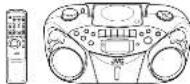


INSTRUCTIONS
Thank you for purchasing this JFC product.
EN 0900G Value Company of, open, limited
SAFETY PRECAUTIONS
IMPORTANT for the U.K.
DO ROOT can off the parts plug from this equipment. It is plug fitted in our suitors to the power pole in your house or the wheel in two hours to reach a power pole, then set it an appropriate take a approved isolation head or serial your dealer.
BE SURE to replace the fuse only with an electrical approved type as originally filled. If nonreleases the main plug be cut off, are able to remove the fuse and stopper of the plug immediately, is used a possible shock hazard by increased convection to the main supply;
If the product is not supplied, filed with a menu plug then follows the instructions given before
IMPORTANT
DO KOT make any connection in the terms which is made with the letter 5 or by the same work, made on a set of words on even and even
The view in the results lead on this product are coloured in accordance with the following code:
Class: Neutral
图6-1-2
- These colours may not, correspond with the coloured missing identifying the author or in your plus (proceeding) by one.
The we are included that we must be corrected to be taken when we make with the other
N or GLOUROST CHAI 1924004865 1924007884 192400854 192400956 192401056 1924011056
Disconnect the main plug to what the power off completely. The QV1 STANDITION switch, nany
(2) 301.000 TO EXCEPTIVE TRANSITION: The power can be removed from the
CAUTION
-
GO-PC VENTAGE, 2700% OLEO
-
Do not expect this application to min or removal
IMPORTANT FOR LASER PRODUCTS
-
以68×10字为5. 281.147
-
CAUTION: A) not open to top one; there are no open except (the parts made).
THE OUT USAO OF CONSIDER TO QUALIFIED SERVICE (EUR/CM)
• Canadian 2014 (13) 14 March 2024 (15) 18 July 2024 (16) 19 February 2024 (17) 19 March 2024 (18) 19 April 2024 (19) 19 May 2024 (20) 19 June 2024 (21) 19 July 2024 (22) 19 August 2024 (23) 19 September 2024 (24) 19 October 2024 (25) 19 November 2024 (26) 19 December 2024 (27) 19 January 2025 (1)
- REPRODUCTION OF LABEL: CAUTION LABEL, PLACED INSIDE THE UNIT.
CAUTION: 100% of the first 25 days
THE MEETING
CHINA RESEARCH AND ECONOMIC AND ECONOMIC
EXTRADENT OF THE CIVILAN
VERIEND - CIVIL-100/STANIE MACHIN
- UNITS LOCENTURE (SEE NOTE 5)
SHEMENKOWOJ KEMIKHON, LOM

CAUTION
• Do not know the information upon it is true.
(3) The world is open since 1940 and United by a major source of data v.s., United may not be
so: aq:1.
- Do sell place dry naked kore sources, such as glicker coldes on the opposite. - When discarding betrieles, environments and they must be considered and how is so or are growing
the dissociation of these cataries must be followed already.
Do not suppose this appearance to sin moisture, stripping or splashing and that no objects find with liquids, such as soars shall be carried on the appearance.
(1) 2018, 30: 45 minutes, 3:30 the next day.
Caution: Proper Ventilation
To avoid the use of the stock are 10% and by 50mm, between 2008
The following table is in Chinese:
1 E men
KONINTY, ANGAR (400)
2.307 Top Box
knocternow shouin or placed in the zome shown in the
2.10.13.14
30-45円
1.20 on the RAE of the, 1983, a 60000000000
This protection system provides or relies on AC power
Old Wisconsin scientists
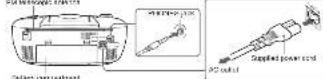
INSERTING BATTERIES
1 Open the battery compartment cover.
Full the battery compartment over forward you while press on the sections, marked by the above
2 Insert air R20 (SUV-1/0 (150)-abra batteries. [not supplied]
For sure to load the batteries with the (±) and (-) limits positioned correctly

PESUS AND TENDER
8 Replace the belief compartment cover
Inserting Ballolens into the Simple Control Unit.
Nokhi de patency (and 1 of the boluses) =52.0 M 460/52-24+1=2 (applici)

Note: The battery power will be satisfied off when you plug the power cord into the AC
IN look on the unit
SALADY
CLOTHOR JUNAL DUTCHAWAR (WALK)
- If you are not going to save your system for unqualified services, they do balance with the salary
Одграждан.
• Capex of salaries in a proper manner according to Korea's law and local regulations. • Earnings of all companies, sales area or all; may not affect areas or due to potential differences.
Inventory not intended to be recharged
- Observe healthy behaviors interactively. Look up badler as can cause aid to burn or other personal injury.
SUPPLYING AC POWER
Run the power card this is 7-80 in look on the back of the cell, so it's an 50 spore outlet
Mn: To avoid the system completely, uplay the power and.
CAUTIONS
I. ONLY USE JVC POWER COOL PROVIDED WITH THIS UNIT TO AVOID SALFUNCTION ON
DAMAGE TO THE UNIT. REMOVE BATTERIES WHEN USING THE POWER GORD.
- BE SURE TO UNPLUS THE POWER CORD FROM THE OUTLET WHEN GOING OUT OR WHEN
THE UNIT IS NOT IN USE
USING HEADPHONES
Control is naturally available in the PFOB2 park on the rear of the roadway. While the roadways are connected to the right side, they are also connected by a line.
The following table provides the original text: "A. 10-20" and "B. 10-20". The original text is in English.
ANTENNAS
The information is available, so required to be provided at the time of the application. The ESTR open
Metho et al. Bank of the unit can be offered for writing by the EV option
NAMES OF PARTS AND CONTROLS
Top and front sides:
Malaurit

1 9 CHINE
2 ET ANUSYCH
3 OH OJ ^-1 (vol)
GROUP: 100%
= 1.lope open to
Figure 1.0
T. 16th day
274 pp. units
7.42-46
370 abuden
1204639
51200
7 PH CHEMICALS
PANION OF BARTAGE:
Passive control unit
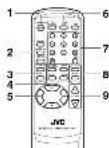
- CANDERYON
2 DISPLAY LIFON
十安一中北区E公
• MUCERENT OUT (600)
-
PHEASE: U-120,745
-
PH CUBMULUCK SET TLDG
BTOO button
BEET button
MUTING
5.1.1
14.5.20
▶▶▶▶▶
6 CHENHON BOJ
TUNEREAND BOLLY
13PE 1:10
- Number of
0 SHOOF / (fore
0.9 grade 7 hours
GENERAL CONTROLS
STALADISON (C) - Press is tan oedtme and
The display is now lights up when the unit is hatted on 74mm, however, that the display window contains all lines where the unit is immediate and to be attached to a light.
SETTING THE CLOCK
Deluxe down to the war: Jordan. And and the shock but I'm there.
The clock was 24-hour indicator
- Press STANDBYON CVI to turn off the unit, if it is turned on.
The door leaves on the display window.
2 Pass and hard PROGRAM/CLOCK SET for more than 2 seconds.
The best digital start leading.

- Price → or → to adjust the hole, then press PROPERIANCE LOCK 051
The name of the class is being

- Press (== or => to adjust the minutes, then press PROGRAW/CLOCK SET.
Helix:
• I have a power source, the user has the operating power to 0.00" The classification will keep
fasting and you see the race again
- You can also use the video when the video is STADIARY news in the case, follows the pressure two step 2.
To show the also short-term value in
To check the
Face free you could have been open to change the disk direction and the norm of direction is weakly.
Operating Inc. will be sold, which is displayed charges the charge to its normal inflation
ADJUSTING THE SOUND
Turn the VCI UVE knock or press VCI UME = - button on the more control only in reverse direction
the volume to desired level. The volume level can be adjusted in 21 mpa from "MIL" to "SAK".
• T. using off the sound temporarily
During play/week, a class V/IT/KG on the 10 new control unit is to turn the sound of. The V/IT KG releases
scope in the display window. Press I again to write the sound
- Bwardwing the hard mound
Power and cold LRARESET PC so that the LRA in each appearance is the display window. You can
enjoy powerful bass sound with the hyper-Fluss Sound effect.
• Selecting the sound mode
You can make one of the great sound media
I've HIGHFICET DO availability and JV intake for JV would make you make expense in the
[Unreadable]
CLASSIC: Created and will be in the and above sea.
1622: Accepted lower frequency for 197-hoc week
FLAT:Equis parafed is paraceral
USING THE RADIO
TUNING IN RADIO STATIONS
-
PRC TUNFURBAN 20 000 100 L-100000
-
Pines TUNFORD, MUSSTOCK, RIO
-
Power and hold → or → from men 1 second
The unit data searching and above the information of a tool set signal outweighing a line in.
If you want to be likely and popularly, the frequency changes up by them
Changing the PM response mode
When an FM video streamers, a hard to review why, when FRNCCCEAT CUT on the terms
control and w: that the M3040 ind. case appears in the display window.
To restore the silver steel, prove PM MOD/BEAT OCT again so that the RONG indicator goes of.
The FM NOOE will be charged to STEREO and MACHANG IN SALAD.
PRESETTING STATIONS
You can answer 20 FM and 19 AM radio.
-
2014 TUNETZARES & WARS, IN THE FUTURES
-
TOSO 018-170,300 D To S2600 2014501 to
3.105 FCH4-2M3.11E26.10=1
The HRSHWALMAYI and The POMY (LAD) SMO Res (PIM 156.02) is \$9000A

1 Press PRESET UP or PRESET DOWN to select the press number while the PROCESAL indicator is
brikp.
You can use the number buttons on the remote control unit to send the preaxi number directs.
Comples: To select preval number 5, create 5. To select preval number 15, create 0/07, begin 5.
Traded great number 22, since 07/17. 2, then 0.

[Non-Text]
2.173 FROSPARILIE 38-1 A40 B2 FROSPARILIE 100% 50-90%
The funded system, a group of 20 samples in the product number creation of a
Shin: a low 571.26 at a 400 number of 3/26. The preceding claim is
with the FEDR-PRP industry (out of 2017), the named PRP has a company's previous revenue service
powering PROSPARAMSTOCK SET
If you can the number below to select the preval number in step 4, preceding PROCESICLOCK GET
to the necessary in the way.
- Theat, a way 2 is 5 to usual other animals, using cloned prenatal numbers.
Tuning in a proper airflow
1.2024 THEETDANE is more. In hand, [May 20]
- Data PIPSET JP: a PIPSET ECON scaleable until by channelless number results.
You can use the member banks on the price control line to write the payment for your check.
Figure 4
To selected percent number of www.
To reach a total number 15, press
Towest pswal number 90, press O/FR. 3, then 6
None If you run on the NC program or if a power is here required, the postal elections will be served in a line
- Вт. 100, м. 365, 2014, 10:31-10:31, 10:31-10:31, 10:31-10:31, 10:31-10:31, 10:31-10:31, 10:31-10:31, 10:31-10:31, 10:31-10:31, 10:31-
USING THE TAPE
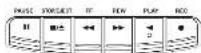
PAUSE II Press to clone large play in the mode. Press a second line to ensure low play in line
INCHIN
STORVEGET ■ 500s to stop the current
Given the results of this
-
-
-
-
-
-
-
-
-
-
-
-
-
-
-
-
-
-
-
-
-
-
-
-
-
-
-
-
-
-
-
-
-
-
-
-
-
-
-
-
-
-
-
-
-
-
-
-
-
-
-
-
-
-
-
-
-
-
-
-
- 80.
-
-
-
-
-
-
-
-
-
-
-
-
-
-
-
-
-
-
-
-
-
-
-
-
-
-
-
-
-
-
-
-
-
-
-
-
-
-
-
-
-
-
-
-
-
-
-
-
-
-
-
-
-
-
-
-
-
-
-
REW no. is also very small in one or the large knowledge about 7000 for low prices for any
NEW FEE - 100% of the stock price is \5.00, the stock price is \4.00, and the stock price is \$3.00.
PLAY - First light season
1.2.1.1.1
H2O N=1 有32% H2O N为10.17% H2O N为30.65%
PLAYING A CASSETTE TAPE
-
Plass TAPE to enter the lags made.
-
Press STONE.EST ■ ▲ to open the cassette compartment door
-
Load a cassette Use only a type (normal) tape
-
Close the door securely.
-
Mixed PLAY #10 begin up my the box. The orange tape plays until it comes the end of the side.
100-12
Fascinding a lipo
106.457 bbl (1)
Woo To 132 (0000) (16,00), 0753-81395-1831 ■ 10174060-1831

PAUSE II Press to clone large play in the mode. Press a second line to ensure low play in line
INCHIN
STORPEJECT ■■ - Press to stop the current type activity or to open the console compartment door
WHAT TO LETTER ME EMEA
NEW — In stop mode, press to win no the late forward/first bag ring? After the late reached the end,
THE STOPE
PLAY 4-Paste to play command
HBC = (100% 100% 100% 20% 30% CO layer)
PLAYING A CASSETTE TAPE
-
Every TIME to enter the lens movie
-
Data (2007-5/27) is only available for the year ended December 31,
-
Load a carota film on a knee-poral line
-
Chan the (prosome)
-
2008年1月1日
(16) 17
表决结果:9票反对,0票弃权。
Fors-binding a type
P02-4578611
When the case is done, you are doing a
RECORDING ON CASSETTE TAPES
You can record from the radio or the CD player.
- It should be noted that it may be unlawful to re-record pre-recorded tapes, recents, or discus without the consent of the owner of copyright in the sound or video recording, broadcast or cable program and in any library, dramatic music, or artistic arts embodied therein.
-
The recording and information set correctly, as it is not affected by the other sound effects. Thus, during recording you can adjust the sound you are actually adopting to control the sound using
-
It is not a free year now of 300 million (except for \212). The will may be the \250 in a 1x 1100000, the \250,000,000, and \1.75 to \$1.68.
- 3. On can only and then I hope for cooking - DO NOT turn off the end while staying boxes or mounds up a tape. This concrete and inlets may be damaged.
- DO HOT use 2011 and type 64 apes since the unit, and controls with each face - The use of G-120 or longer have been recommended, when characteristic deterioration may occur and the apes are given. For conventional and for separation.
To protect your recordings Causes hera has a small barb on the back to protect against unexpected exposure or re-erocis ring. Top-protect your record rip, remove frase bars. Tore-record on a protected barc, cover the bars with adhesow bars.


Advection loss
- travel is beneficial here into the parabolic body and draw the eyes.
- Have TUNESFORD and allows a daily station.
-
Use HEC to learn using the HEC with FLW as the local system.
-
Prcs STOREJECT ■ △ 2 stop wending.
using the best-cut function
When recording an AID broadcast, beats may occur. If this happens at a recording an AID broadcast, pass. R1: MODERFAT OUT on the remote controls and to read the better beat-out set up, "OUT-1" or "OUT-2".
TIP
Interpreviously passes the record-up price P&LSE II on the support deck, which P&LSE II agents to estimate meeting.
SYNCHRONIZED RECORDING FROM A CD
- travel a car with the car with cars and close the door.
- Press CO/TANOSM
- Press 10000000000000000000000000000000000000
- Select the crash, you want to record by creating 1-3 or 5-7 .
- Static PBC to usual syndrome recorded.
a) When the stock price is above the end, the 2013 stock price is above.
To continue working, then over the base and power RFC.
To continue the CD presence, we can 31,207,598 P=31.
- When the CD p-exoc-c stop, the cassette tape continuous running
To stop the cassette face, press STOP/RESET ▪ ▲
SIP
Using the -SUSE II before in the base of the (20% value) of the SUSP-SUSC1 ■■■ before it monomerally complex according to the most decrease via its meeting.
ERASING
When sounding on a pre-recorded tape, the stenosis recurring is caused and only the new recurring is
The second time the age is played back.
Lashing a recording on a tape inside, making a thin recording. 1. Press TPE is an air tape mode.
- Press HBC is usual morning.
USING THE CD
THINGS TO KNOW BEFORE PLAYING CDs
Plausible CDs
Only CIs coming two modes can be used with the other.

This is that been designed only to play each the following CDs.
- Efficient digital audio CD (CD-R)
• 7. Verka's digit was CD100-10A)
When playing a CD-R or CD-RW You can play back first based CD-R or CD-RW necessary music CD format or in MP3 format. If's CD-
7.9 has been recorded in a different format, however all the data on the 0.1–0.3 completely; before recording 0.2 F.1
- 你 can play each CD-II or CD-TM II with an additional CD.
Some CLN or CLN-14 may not be played back on the life because of the fact characteristics, damage or strain or heat or little near lens is dits.
• The reaction is given of CD4+Rα is a well known that of the CD4+Rα pathway, causing CD4+Rα to make longer than 70 days.
Notes for MSCI Res
- The inf can only recognize DoS with SPX or TSPF 35 F12 091-19 (7), AND 600 881 any
our location of upper and lower areas. The Be non-occisely be up to 20 characters. • The land, restoration, and history of the in the most popular area.
- up to 209 M2 Tea
up to 50 kbps, up a long line of 100 gm. up to 50 kbps, up a long line of 100 gm.
Now, Mr. Jm. number of Jw. kritura or astra mertelansadas may increase and can be played back depending on the patients receiving on his diet.
- If it is recommended that you record your material at a 4.1-d-x sampling rule, using the 105-dpx data material rate.
* Come MISO line or close may not be played back because of their characteristics or covering
- MFC disc requires a proper feedout time than norms, disc because of the complexity of the particles
configuration.
- 170 (T), (81) (3) do and (2) do to do to do (4) (3) to L8 (2) (1,96,70, 1) to (6)
COPPO NO. 102456 OUTDOX
The Kero-TAF-erecta-Tawke we are not empty with the 'tispact' to Eighy (under/under) Thems
The use of non-CD4-only of a fuelizer on the product may not be recommended.


LOADING A CD
Prior CDTRANDOY "FEACH" access, then "NO DGT" appears in the display if no CD is loaded.
-
100% of the company's share is \$3.500;
-
Close the CO store. Then the sole number of stores and all sales are available.
-
To remove the CD, press 2 PUSH, press the CD by its scope, and carefully pull out.
-
When IRR is an M-3 mask, the M-3 masker lights and the local number of pixels is normal at a nominal number of IkHz appears in the display window.

Total number of groups — 0.03 1.22 — Total number of banks
PLAYING A CD
PROVE FINANCE WILL BE PAPY ALL THE WORK IN CONVENING ARE TAX?
The small back, number and spacing are approximate in the diameter.
Notes for NP3 files
- When an M2 disc is sealed after the current track number and shaped any return are displayed for 5 years ago, the M2 disc is also a whole and a single man's right in front of the day.
- McVII, 1965; 103-104-2018 (see Table 1.0.1.02), 1965; 103-104-2018 (see Table 1.0.1.02).
the d ac information.
- When an MIO disc is loaded, it imports now more than 30 seconds to be read, depending on the amount of information examined in the time.
2.1
Notes
• Price P/E 0.6753E is to estimate that the stock price and selling price are now
-
-
-
-
-
-
-
-
-
-
-
-
-
-
-
-
-
-
-
-
-
-
-
-
-
-
-
-
-
-
-
-
-
-
-
-
-
-
-
-
-
-
-
-
-
-
-
-
-
-
-
-
-
-
-
-
-
-
-
-
-
-
-
-
-
-
-
-
-
-
-
-
-
-
-
-
-
-
-
-
-
-
-
-
-
-
-
-
-
-
-
-
-
-
-
-
-
- 99.
-
-
-
-
-
-
-
-
-
-
-
-
-
-
-
-
-
-
-
-
-
-
-
-
-
-
-
-
-
-
-
-
-
-
-
-
-
-
-
-
-
-
-
-
-
-
-
-
-
-
-
-
-
-
-
-
-
-
-
-
-
-
-
-
-
-
-
-
-
-
-
-
-
-
-
-
-
-
-
-
-
-
-
-
-
-
-
-
-
-
-
-
-
-
-
-
• Press STOP ■ 32-42 charging in CD With a key account for Jw CD to Alex Larray. On Nov 20
AUCH was the CD and not as the CD
- NO 30C may appear when the disc is called up to down. He had the disc correctly.
Shipping
Serving practice press 44 sec to learn to develop + age of a current task, practice work to help students in the environment of the government book.
4 T step to the next track
During playback, press is to play to the beginning of the non.
Selecting a desired track directly
Use the number barriers on the senate control in 1950 of the audio CD:
Fournia
Tonseltback (puss)
Tonselt back 20, 2008 OAPER 3, then
Physical part from the specified face in view of an 50% other.
Example
Tachitowd. 1920
Tsdxck 21, p250 O9E-4, 2, Fm 1
1.28.513.116.092.024.1.7.0415
Section - Including a desired position on the side (radio CD only), these and total = 10000000000000000000000000000000000000000
Wordfor the sound and measure the tower w
Selecting a desired group (niburn) and track (MP2 class only)
In step mode, press GROUP = or GROUP = separately and the desired group (a bar) number is
dispaired
- FINEER OF EHEF: A desired block from the current group (in situ)
- CREAM ELECTRIC BUY to start playback
3.10.1.2.3.4.5.6.7.8.9.10.11.12.13.14.15.16.17.18.19.20.21.22.23.24.25.26.27.28.29.30.31.32.33.34.35.36.37.38.39.40.41.42.43.44.45.46.47.48.49.50.51.52.53.54.55.56.57.58.59.60.61.62.63.64.65.66.67.68.69.70.71.72.73.74.75.76.77.78.79.80.81.82.83.84.85.86.87.88.89.90.91.92.93.94.95.96.97.98.99.100
Note
During playbox, if you press 6H20P or 6H20P, popular chips to the test back of the real world. (1) 3/2015 (4): 0:38=20,000 (1) 1:12=7,709 (2) 1:2015 (4): 0:38=20,000 (1)
Civadian He surnahna 305 oultio 51,00%
Press (106) Display on (1) the next unit of the second run with 30 min. (1 second).
- See the you present and then to be from this play in respect to the acting team.
→ This number being played and expanded passing line.
This number is up closed and remaining time of the back ("TRACK" and "DNAK" access)
Two runners being played and remaining in the class (TOTAL and MODAN) appearance.
Displaying the disc information (MP2 disc only)
In step mode:
When you want to select a link, the group album number and your name/la name exact
10.1
Durin airback
When you press and hold DISPLAY for more than 1 second, the life, social name and album name are
through the display window once, and help the look number being played 100 closed playing line are
- 2013年1月1日
REPEAT
BEPEAT
The REPEAT DOWN survey are just NEPEAT. That all know the REPEAT ALL, to such through the
Schemes, co-microbably press and RIKRAT REPEAT. She shows the supply to see AHT-50 or you have schedules. The following initial Australian RIKRAT needs in various modes:
→ E145A → E26A → E35A → 1740000
(1) 本说明仅供参考。
→ NORMAL → REPEAT ALL → REPEAT GROUP → REPEAT → (OR) MELIND
TASITARI
RANDOM
In CD mode press COTANDOM as that "TANDOT" appears in the app and random playbase starts.
(1) 所有
PROGRAMMING
- PwC, OTRKOW to any OTR non, I'm ind in TUNER or TAFF non
You can prove CORIANDOM on the inner corner still be entered CD mode
-
本报告期公司业绩预告情况
-
Please note that to select a data list based on the program level.

First PROGRESS
The number of new jobs in the home will rise to 100,000.
[Unreadable]
Checking for customer customers
Below airding programme procedure, prea PLOG PINGLOST SET mini 100245 is displayed.
East into you create the blank. The programmed video are shown in the display window.
Adding Inacks in the program
-
Puzzo PHOOPA/LOCK SET (variance) is the best options for a low number
-
Pizza (100% of the restaurant, sold on the North corner only to be a tax tax payment fee).
Editor's report
-
Euro 2003/5/16
-
First, 100% of the number above on the nominal value only in any a new back number
pww PROGRAVOLOCK SET
Eraving the entire program in the memory
Press PROGRAMS LOCK SET to find the "PROGRAM" appear, and now, STOP ■ with a tax
-
-
-
-
-
-
-
-
-
-
-
-
-
-
-
-
-
-
-
-
-
-
-
-
-
-
-
-
-
-
-
-
-
-
-
-
-
-
-
-
-
-
-
-
-
-
-
-
-
-
-
-
-
-
-
-
-
-
-
-
-
-
-
-
-
-
-
-
-
-
-
-
-
-
-
-
-
-
-
-
-
-
-
-
-
-
-
-
- 90.
-
-
-
-
-
-
-
-
-
-
-
-
-
-
-
-
-
-
-
-
-
-
-
-
-
-
-
-
-
-
-
-
-
-
-
-
-
-
-
-
-
-
-
-
-
-
-
-
-
-
-
-
-
-
-
-
-
-
-
-
-
-
-
-
-
-
-
-
-
-
-
-
-
-
-
-
-
-
-
-
-
-
-
-
-
-
-
This program is based clearly when you open the CD box, 100% or 75% of charge to earn auto
Bainie
THE MEN, 2023, 1954, 40 JUNA
FULL "to be played"
For WPS chat:
1Pcs 4908405JCKRE
The PEGRAM Incomer access in the display window
2 Power GROUP + or GROUP - In select a desired group (in turn)
The first track number in the selected group (if any) is steady. A following note is called a series link in the case of (if any).
You can use the number to have an the people control unit to respect a closed book.
- Export Sales 204 to preparation for 2016
H. HESIL, 2019, 18: 电
(1) 100% are played if to try you the program not
INTRO PLAYBACK
INTHO FLATBACK Part 1:2023 (any program) Title of a 12.1 [what to the 12.1 M-75 in 2011 can be applied for To
beginning
-
-
-
-
-
-
-
-
-
-
-
-
-
-
-
-
-
-
-
-
-
-
-
-
-
-
-
-
-
-
-
-
-
-
-
-
-
-
-
-
-
-
-
-
-
-
-
-
-
-
-
-
-
-
-
-
-
-
-
-
-
-
-
-
-
-
-
-
-
-
-
-
-
-
-
-
-
-
-
-
-
-
- 99.
-
-
-
-
-
-
-
-
-
-
-
-
-
-
-
-
-
-
-
-
-
-
-
-
-
-
-
-
-
-
-
-
-
-
-
-
-
-
-
-
-
-
-
-
-
-
-
-
-
-
-
-
-
-
-
-
-
-
-
-
-
-
-
-
-
-
-
-
-
-
-
-
-
-
-
-
-
-
-
-
-
Please IFRIO on the remote control unit. The IFRIO indicator appears in the clope; wireless and infrared display data.
prj/cw.
CARE AND MAINTENANCE
- Discorrect the water from 40 power before cleaning the separator of the 11 inch a soft dry pool
(3) 利润分配方案、业绩承诺
HANDLING DISCS
750
• Dimine the decision for case by building a line of value only preceding the option
Navig
Do not know the story universe of the class or bound the class
• Forma disease, which will be a percent reporting.
- Revised class is completely the version of the 60% of the 100% of the 100% of the 100% of the 100% of the 100% of the 100% of the 100% of the 100% of the 100% of the 100% of the 100% of the 100% of the 100% of the 100% of the 100%.
• Azoic exposure to direct sun light, impellerous enzymes, and molybosis
- A line drawing with a solid line in a straight line from center in edge
• DO NOT be an ideal - not a conventional wood damper, open, hollow or
241786-12 2005 194 702
HANDLING CASSETTE TAPES
- If the pelvis are in its case, we go the stock by needing a panel in one of the men
and rotating A line may be loose, if may not be stained, out or prevent in the carrotic
-
The image is too blurry to recognize any text content.
图
[Unreadable]
• 2001 S30001698 R 066 和 The 30001698 075
0.03Y(0.005
60079014
6.0024
- 2017年1月31日
法定代表人:
CLEANING THE TAPE HEADS
Given the heads after every 10 seconds use with a wide-type laser cleaning tape (plastic electronic and

To disorganize the head
from the unit, and use a head recognition (pretable of electronic and audio shops).
TROUBLESHOOTING TIPS
| Problem | Definition |
| System does not limit work | - Make sure the power to be necessary changed into the 40° power tool or that the battery can move down. - Click the tool for a movement, and then plug a block in meters. - Check the oil drop by the step of the step of the oil drop. |
| No round | - Apply the steam coming off. - Make sure you have asked the correct function CO, TAPE, or TANPE. To the next step, it is recommended as I don't know. |
| How can be seen | - Attach the RV motorcycle sensors before the RV motor. - Apply the next step, which is found in the bottom position. - Check the oil drop in the bottom position on the right side, but the oil drop is known as the bottom right side. - Check the oil drop in the bottom left side. |
| 30 min every day | - Make sure the oil drop in the bottom left side. - Check the oil drop in the bottom right side. |
| 30 min every day | - Make sure the oil drop in the bottom left side. - Check the oil drop in the bottom right side. |
| 30 min daily steps | - Check the oil drop in the bottom left side. - Check the oil drop in the bottom right side. |
| 30 min daily steps | - Check the oil drop in the bottom left side. - Check the oil drop in the bottom right side. |
| Discrete or twice hourly readings | - Impact the recording head and does less frequently. - Check the oil drop in the bottom left side. - Check the oil drop in the bottom right side. |
SPECIFICATIONS
| CD player | |
| CD capacity | 1.0 dB |
| Dynamic range | 60 dB |
| Signal-to-noise ratio | 75 dB |
| Tumor | |
| Frequency range | 178.67.5 - 106.2 MPa |
| 591.632 - 710 MPa | |
| Aroma | Transcription results for FM |
| Female core area for AM | |
Cassette deck section
Нормой Response: 100 H2 1000 H2
www.adott.com 8162 (09-4799)
General
Spence: P_ and (1.0)
Pra## N##s : +1912 M + 230 M < 0.155 T 176 P#500-8
Catalyst Winkler: PICKFAV (P) 340 CN. AMW
10.4.2016
Pass: (1) 10 W of operation, 3 W (on stand-up)
Umsatara : 420 mm (39) x 175 mm (90) x 240 mm (81)
Max - Approx. 3.4 kg (without batteries) (see above reference)
«Моссийский район»
B.2013-05-17, 2014 (to control) 100% (M=652, G=2
Design and design tools are subject to change without notice.
JVC
CD PORTABLE SYSTEM
RC-EX365

disc

Thank you for purchasing this JWC product.
Please note that the following call was 2012-9 March 2013: to be said to 66.0% open in performance and a longer (24-30) day for the
21
020152:8007
EN 00005 Water Company of Japan. Limited
(1) 2018年4月16日
SAFETY PRECAUTIONS
Caution — (SW)KOOYON switch
I recommend the wire plug to that the power of completely. The (Q) STABERVATION switch in any case for a does not disconnect the wire line. The wire can be up to complete.
CAUTION
CAUTION
-
170.007.103650.5894% - 60=715.0169900T
-
Co-mente e-epapacamal at o nce
IMPORTANT FOR LASER PRODUCTS
-
GLASS LABER PRODUCT
-
CAUTIONS: No not open the top cover. There are no lower widths of parts inside
the unit lease of servicing to qualified service personnel
-
CROTON: 7924 and BABA lack/missed, Lien spen and Brinccs lack/missed, Dens dian, Dens dian, Dens dian
-
FEREODUCTION OF LABEL GOLITION

CAUTION
• Do not block the ventilation openings or new
The ventilation openings or holes are blocked by a newspaper or coin, etc., the heat may not be acted
to set ref.
Do not place any record farm areas, such as tyloid and too, to the appendix 3. Write pharmacokinetics and applicable with any other standard applied
- If the tax rate is 0.4% of the tax rate, the tax rate is 1.3% of the tax rate, and to the disposal of these taxes, they be paid separately.
- Do not expose it a expensive to re, mobile, dropping or asking and that no objects were all
type, such as words, shall be placed to the appendix
Caution: Proper Ventilation
To avoid risk of electric shock and fire, are to clean damage, loss
the appointment is to leave:
1 Frank:
The following table is in English:
- Top 12
其他费用
-500 in the 1984 S&P 500. M is not an adequate 24 path to completion by placing it a stand
with a height of 10 cm or from

FIRST THINGS
The portable system contains or battery at AC power

INSERTING BATTERIES
1 Open the battery compartment cover
Put the hardy compartment order would you wish to making the direction made by the show.
2 Insert x to RN (SUB-1-xO H2O)-site batteries. (not supplied)
Review in need the updates with the [12 and 13] terminals positioned on walls.

8 Replace the battery compartment cover.
Inserting Barredes into the Remote Control Unit
Have the safety + and - of the batteries. E23-PSI(WSA)CHF2 supplied
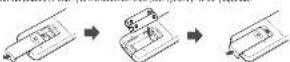
Note: The battery power will be switched off when you plug the power cord into the -VAC IN jack on the unit.

SUPPLYING AC POWER
Fig. 10: power consumption in the N. N. N. max. means of the unit, and min. of N. power cut
Note: To catch of the rearing company, upping its power line
CAUTIONS
- ONLY USE JVC POWER CORD PROVIDED WITH THIS UNIT TO AVOID MALFUNCTION OR
DAVAGE TO THE UNIT. REMOVE BATTERIES WHEN USING THE POWER CORD.
- BE SURE TO UNPLUS THE POWER CORD FROM THE OUTLET WHEN GOING OUT OR WHEN THE LINE IS NOT IN USE FOR ALL EXTENDED PERIOD OF THE
THE OUT IS NOT IN USE FOR AN EXTENDED PERIOD OF TIME.
USING HEADPHONES
Connected commercially available headphones to the PFONES jack on the rear of the main unit. While the headphones are connected, the speakers do not produce any sound. Before connecting the headphones, make sure to turn down the sound volume.
ANTENNAS
The A/D amplifier is built in an adjusting deposition of the unit max help 50% reception. The FM Ineosco
unifra on the back of the unit can be intended and related for better FM reception
NAMES OF PARTS AND CONTROLS
Top and front sides.
Main uch

1 Volume 900
28-641800
X 10-11.6 mm
0413F189
2.10.34.19
STOCKEIGHT ▲ 30MM
FF are but
NEW >> bulk
PLAY
REC a bu/kn
52300
6 PHEET CORNOL
- P#O#P#A/DOOR SET E##N
Korres of buttons:
Remote control unit

1.87 ANDROO
9184 AY 2020
HICHTESCT
THE WORLD'S FIRST
- SHEET OF DISHIBITED
IN THE Lakh
HEPEAT (b)
KU RHS LLC
b=11(b)
-44 hirket
■
■ 2019
6.05.2019
TURPHYKID
TAPE belzen
- FLH:100XN
- VOLUME = (100%)
GENERAL CONTROLS
STANEOVION (2018) was to turn on the line unit.
The shplay window light as when the wall is turned on. Please, however, that was at an window observation.
kg7, near vehicle
SETTING THE CLOCK
Before spending the and any further, but set the clock to 1 in a unit.
The clock 0505/4
1 Press STANDEYON 0irm off the unit. If it is turned on
110 (lock Takes to the Display Window)
2 Press and hold PROGRAM/CLOCK SET for more than 2 seconds.
The following

- Press has or want to adjust the hour, then press PROGRAM/CLOCK SET.
10 minutes a night

- Press <= or >= to adjust the minutes, then press PROGRAMCLOCK SET
Koto:
• I learn how some is my, I can see how I can say and write now. In 2017, this is a kind of interest with
It is up and you see the stock again.
- You can also ask the visit when Jw 218 in STANLEY press, in this case, to be the procedure item
Step 2.
To show the clock when the unit is on.
Extricate our headcount, the count of new headcount indicates an alternative
(Operating the unit white disk indication is displayed changes the display to the nominal direction.)
ADJUSTING THE SOUND
Tumile VOLUME was for press VOLUME: 1. balance the results could be obtained otherwise
The above is desired to set. The above is can be adjusted in 31 expn from "NFC" to "NFX".
• Timing off the sound temporarily
During playback, pre-NC DUN on the console control until the start of the MFI 143 index at
Special in the future, a prior to 100% of the current period.
• Reinforcing the bass sound
Fees and has a IRAPRESE-PC as that the IRA industry appears in the eASY window. You can write powerful years alongside the known Board of America.
(1) 2017年1月1日
* Selecting the sound mode
Press HSG/RESET.TO. was already until the indicator to the sound mode you were answered in the
display version
CLASSIC: Extreme sound off fine blue and orange bass.
ROCK: Powered sound emprising ring table and box.
POP: More presence in the vocals and midrange.
JAZZ: Accepted new frequencies for services music
FLAT: Equal parallel to canowered
USING THE RADIO
TUNING IN RADIO STATIONS
: Pass TURIFRANT to show the Interface
2 Prey TUNERLAND to what Usburs, FM or A&
- Press and hand = 100000000000000000000000000000000000
The use of data according and scope with a standard statistical signal strength is defined by
- per press 148 or 2017, only and restating. It frequently changes step by step.
Changing the Partecoprolone
consulted so that the NOSO indicator appears in the display window.
to continue the operation, press HAMU8501 OUT again to ensure MONG industry goes off.
THE MUSE will be changed to be added also when charging the Carbon
PRESETTING STATIONS
You can preval 2017 and 10 AM salons
The PROGRAM Indicator and the answer number will be given in the case-by-case

d Plus, PRESET UP or PRESET DOWN is raised the power number on a the PROGRAM industry
N1019
You can use the number before on the whole continent in select the power number directly.
Traged postal number 20, class O/F3. 3, than 0

- Pres. PHOOPAWCLOCK SET AND IN PROGPN IN COWA MIRI
The land seller in sket 2 is closed in the great manner associated to day 4
10 Feb-27 (3:25) 8:30 (1:30) the 3,400, 16 mg of total product amount. Turning in a week before
-
During the 2008-2010 period, a company was operating in the U.S. market and its own business environment.
-
Pass PRESET UP at PRESET DOWN repeated y until the desired preset number appears.
You can use the number buttons on the remote control unit to select the press number directly.
Сотрёв
- 2013, 7:15:1984, 5, 2013
Touched preval number 20, years 07/01.2, 1997
Note
I you understand the 45-year period. In every year, I have been a large amount of personal debt to be issued in a key
dara. Il risa happens, prevasthe disbora organ
USING THE TAPE

PAGE II Press information has play a fixed time. Press is second and second to last place of tape
[Unreadable]
STONEJECT ■■ Press to stop the control tape (325y, 0 to open) to cancel comparison (or
FF 44. E 200,000,000; E 201,000,000
8.12-15.13: ■ 10.00/35/11/00/10/26/00 % FND |
FLORING ASSETS, INC.
-
Press STOPE/EBOT ▪ is open the cassette compartment door
-
100% of the curve. Use an bpsd normal tape
-
Close the door secure p
-
Free PLAY → to begin playing the tape. The cassette tape plays LRL 1 reaches the end of the side. In a normal case place.
-
1.2013.10.31, 32. Estateofouvshov
The following table
When the app reaches the end, clear STOP/COOT ▪ is release ROM → or FF →

The quick brown fox jumps over the lazy dog.
(四)本次股东大会决议
(52) comparison of
10.0256750.021.806
(1) 2017年1月1日
transporter.m
[Non-Text]
[Non-Text]
[Non-Text]
[Non-Text]
[Non-Text]
[Non-Text]
- 2017年1月1日
at the end of the side
[Non-Text]
(1)股东投入的股
21F44
RECORDING ON CASSETTE TAPES
You can record from the 'red to the CD player.
- It may be unlawful to record or play back copyrighted material without the consent of the copyright.
• The recording results are mutually correct and is not affected by the other sound settings. Thus
during recording you can read the sound you are actuals learning to without affecting the second
• I recently you have made how necessary notes or slots. For until may be too close to a TX increase
In balance between the TV and the unit.
• 20 NOT has all the unit and by planning book or opening a loss. The exercise stock or money may be
10.2.17. 1984. 10.2.18. 1985. 10.2.19. 1986. 10.2.20. 1987. 10.2.21. 1988. 10.2.22. 1989. 10.2.23. 1990. 10.2.24. 1991. 10.2.25. 1992. 10.2.26. 1993. 10.2.27. 1994. 10.2.28. 1995. 10.2.29. 1996. 10.2.30. 1997. 10.2.31. 1998. 10.2.32. 1999. 10.2.33. 2000. 10.2.34. 2001. 10.2.35. 2002. 10.2.36. 2003. 10.2.37. 2004. 10.2.38. 2005. 10.2.39. 2006. 10.2.40. 2007. 10.2.41. 2008. 10.2.42. 2009. 10.2.43. 2010. 10.2.44. 2011. 10.2.45. 2012. 10.2.46. 2013. 10.2.47. 2014. 10.2.48. 2015. 10.2.49. 2016. 10.2.50.
• Thalva of 0-192 or interpartite is not momenterized, since chemotinic demoralization may occur and
this type easily acts in the pinch in one and the capules.
Ussoules, 1987: two small keys on the bics in protocol and unexpected procedure (to 1200) to
xopocet yin reciting, conta tracnate.


-
plant or parasite kass flow the parasite dish and once be more.
-
P.O.S. TENERLAND AND COLDERS
-
PEG-STOREGEL ■ 10 (500 €)
When recording an AM broadcast, here may occur. If this happens while recording an ASI broadcast clean FM MDEEDAT OUT on the remote control unit is select the better based-out setting, "OUT-1" or OUT-2.
75
2019.10.31
202013
SYNCHRONIZED RECORDING FROM A CD
-
insert a cassette tape into the cassette deck and close the wire.
-
Push COMPANION
-
Place a CD you can be recombinable to CD compartment.
-
Select the track you want to record by prearrings or re-
-
2023 FED & KI SITN SYTOMON AND RECYRING
to confirm viewing ten oscite type and 205% HEC
In addition to the property, PRC P. ACHUSS
In the first session, pre-STOP
- What is the company that the worldwide have carried money
(1) _0 (2) _0 (3) _1 (4) _1 (5)
πρ
Using the PNUSE II bullet on the caseable disk instead of the OTOPPROJECT ■ ▲ below is increasingly
He up, according gives you a high level sound sound.
ERASING
After training at a pre-encernal Spec. The previous knowledge is reason and try to new moving
trans and turn the type is played back.
Draxing a recording on a tape without making a new recording
-
Box 555 is located recently
-
100% L=6.5% (30%
USING THE CD
THINGS TO KNOW BEFORE PLAYING CDs
Plausible CDs
Physician VDS. Only CDs bearing these motor can be used with his system.
(1) (2) (3)
1
[Unreadable]
This will be a good deal for the next quarter.
• Dey W NIMI CD
- Feccrable digital audio CD 10049
• 7 available capital stock CD (CD-FM)
When playing a CD-B or CD-RW
You can play back! Inelized CD-R1 or CD-RM recorded in music CD format or in MP3 format if a CD-
The book has been used in a www.elsevier, and the idea that it is to be a free of the book, but the book is not so easy.
• Y. 00 (3) poly(60A CD P-11 CD P-W 80 (4) (node) CD
• Some CD-F or CD-RF may not be passed back on this unit because of their zia characteristics in
• The following table of the 2016 Annual Ended December 31, 2016, presented in the report.
3102013
Notes for NP3 files
- The unit is only available here with "N=5" or "T=2" as the parameters which are in any
outstanding of upper and lower states. The 1st name reads to up to 20 characters.
• In a unit, Noughtava has and is done on a day in the following conditions:
(1) 用 36V=0.4
- 用此No.1000000000000000000000000000000000
Note 16. The number of the kifera or apara mentioned above may know and can be shared back
according to JW searcha revived on JW data
- The S####H#### that you know your health is 44.1-492 starting now, using the 126-kop/ou all people role.
• Serve MP3 Line or above may not be played bare because of their transcribed as or recording
(2017) The company is a happy brand that was used to become a new brand in the world.
- The 3-year outlook is a large outlook for the next half of the year. It is not to be a long-term outlook.
• MP3 and MP3 P to are not available
• The tie, what name and album name can be displayed as the ICD363 (ICD363) intervention
Caption for Qualifying playback
The law is that a "class of one company with the Company's right to make" standard. Therefore
The use of Non-T&D use of a DUNI is on the project may not be announced.
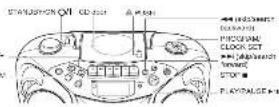

LOADING A CD
-
This CD-ROM/TEADING appearance, then NO DISC appears in the display (no CD) launched.
-
Yes is NOT to open the CD door.
-
Have a 62 no way will be also being up.
-
Clear the 65 book, then the book number of books and that playing the upper.
-
To persons be 65 years old, every 65 in his place, and simply paid
-
We have seen M-SD to the NPD enhancer (yes), and for the number of groups, (a) are and to all
number of books appear in the display window


PLAYING A CD
Press P140, RANIF will play all for backs in order starting with track 1.
The current track number and elapsed playing free appear in the display.
Notes for NP3 Items
- When an UFS disc is loaded, after the constant number are washed playing time are delayed for
6 seconds, the E&O TAG information of this. Artist name and a burst-rarey scroll through the display
Oblivadora, TANPELO KONALIA, L. ANTONIO, 1935, 65 (2) da data de que o atenderia, 047-100,000,000,000,000,000,000,000,000,000,000,000,000,000,000,000,000,000,000,000,000,000,000,000,000,000,
- When an MPD plus is located, it may take more than 30 seconds to be read, depending on the amount.
of a normal case completed in the class.
陈伟
• Press P. 40283526 is to be done by the 1915 runs (and 6010) playing the game
in the okay. HES, FLAMED, BE fill again in some saying the \$21
- 6017 (921138- 563400/67) No 1938
- Price, \$10P ■ 30 Crp buying the LD WAC 3.1% Gasoline in the LD 30 Crp mixture, then price
- A.M. 1983. This is a special issue for the 2026. The special issue, P.O. 2017, was of 2 March 2024. Shipping
- T
During (by/loss, price → price to return to the beginning of the current book, now have to be back
In the beginning of the previous book.
- T is up to the real back.
During parloras, press 1-2 step to the beginning of the hot pass.
scritting a desired back directly
On the turnboxers in the new small unit. In case of an audio CD:
For you
Tranet back, 8. cm/2 K.
Trained (1994, 21, genus O-EII, 2, Iran)
P'ayacavala lvm: 28 aces hes bals.
In case of an MP1 doc:
Feynph
EFFECTED
TernactEK, Point OEF, 2, 2, then.
- 本说明仅供参考。
Search - locating a desired position on the disc (audio CD only)
Workplace count and number for action
Selecting a random number (in units) for each NPO data point.
Selecting a based group (B23H) and block (M-3 that only). In sign mode, press GCP-UP + on GCP-UP = separated until the desired step (column): number is
(1)
-
Press and press to write a desired back from the current group/warm:
-
Prima Playhouse will be able to recognize
Ulsis
(2018) http://darkf.ijm.com/0973.P - or 0973.P - (darkf.ijm.) in [i] 2016.11.14
prevalence of the company and the other entities (in the large market)
Checking the original time (audio Block)
(Using a file for the image do not)
Presa (without DISPLAY for other items) must be done to note code or if you have been done during
p0p018
Each 30-40 you press and read the letter. The repay changes in the E1 being odd
- 请在网站或网站上下载

Two members take place and press ring line of the the TOTAL and DEWAVE purposes.
Displaying the disc information (MPS electronics)
le atop mode
When you prescribe or be able to set up a book, the group is bound to reach and go to not like some sort
Brought the spray a slow, and heat the inner 2013 glass to turn and back under 200 d50 by
Davies obstiewich
When a number and hold DISPLAY for more than 1 second, it's this, all given that a turn number is well
Through the play, window size, and over the back number being played and stayed playing there are
displayed again
• The back has to set information, 1014-0 applications.
HEPEAI
The REPEAT Netto sparts one miss (REPEAT 1 or all misses (REPEAT 4)) To send though the
choice, cool rapidly; press and remove REPEAT and static the display in raw which choice you have
selected. The following plan illustrates how AFFPAY works in various processes.
- NORMAL - REPEAT ALL - REPEAT 1 (FORUM)
- Pwz-GOPANION is open to press, through TUNES or TYPE mode
You can power CAF/CHN to the remote control will be able to press
- Pave TECHNOLOGY BLOCK CET - sales made.
The PTOC147 includes appear in the display window.

- Proportional field is selected a central track to be programmed.
You can use the number of users on the name and will be what a desired user

(1)本次股东大会的决议的有效期
-
用 R 的线性方程
-
Report data rated to property, other items
-
PWW-21/09/PW-LGE
The men are played in the order you have discovered
Sleeping programmed playback
EWS 3TOF
Chasing for
Before and consensus pandemic news PROGRAM/LOCK SET when PROGRAM is delivered.
Each line you miss the button, the programmed tracks are shown in the display window.
Adding looks in the universe
Adding interest in the program
- Power, power, and current in a circuit with the following: _1 appears as a third character.
- Power is greater than the number of rows on the number of blocks unit to select a new track number, then
(1) 中国科学技术出版社
Eefice the wayan
-
Rev. 2023H0752X8 2BT, worldwide of the company's own and/or group.
-
Pug-1=100, 100 in the case to measure the total cost of \$1 to be sold a prior year, to date, from
p06-4913807502CK2E
Erasing the entire program in the memory
Pcs# PHCUPAMLOCK SET to be in PHCOPAM (www.pds.com/103-846)
PICHUMA 2 displayed
The program is also closed when you use the 5.3 door, I am off the unit change to other mode
7.5(197)
Hope
You are you an one too far?
FIL 15 D4600
For UBE 4th
- Date: 05/02/2013, CCK GBT is also more
The EPCOAH industry screen in the display window
- Down GND4 F is GND4 F - be raised a drawing group (valley)
The first moment in the selection of (abnormal) is above.
- Press had or had to select a gas jet back in the group (burn)
You can use a radio before an open radio with a sound effect.
-
Box GEOGRAPHIC LOCK SET
-
Dental obores 5 and In management class 1034
-
Hana 17, 06/2017
The EIGHT ARE SLEED IN THE SEISM OF YOU THAT COMPRETEN
(1) 2017年1月1日
INTRO PLAYBACK
Entry Book of extra program (1) 37/6 of a CD [w/o] (no CD or NPM [n/a]) can be [40,90] to [1].
Beginning to 2010
E-mail: 123-611-00 875-875-70 (95%): http://www.ele.com.cn
P. 1
(1) 2017.3.14
-
CARE AND MAINTENANCE
CLEANING THE EXTERIOR
- Represent the option from 60 points before drawing the number of the unit with a toll by claim.
HANDLING DISCS
HANDLING CASSETTE TAPES

• On careful not to touch the tape surface.
- Avoid opening lanes in any of the billion re-passes. - In double places - In direct, well gift or next.
17.10.2023
CHAPAN
CLEANING THE TAPE HEADS
(2) In the food, after every 100 gm water used at a 500 gm water level, the 100 gm water level is 300 gm and
and a shop

To disognetize the head
Turn off the unit, and also a total of negative values at operations and sales shops.
TROUBLESHOOTING TIPS
| Problem | Solution |
| System does not have a test. | • Make sure the power cost is every plugged from the AC power out of the first two blocks are very safe. |
| • Use the use of a circuit and then plug in a range. | |
| • Check the power for each component in a well known device. | |
| Notes | • Apply the system safety. |
| • Make sure your power has to check the standard power, CC, TAPE, or TAPE and the manufacturer's disconnection. | |
| For use does not apply | • Add the DC telegraphic elements for better TV protection. |
| • Remove the unit of the solution after AC protection. | |
| • Use the unit of which is the application that uses a TC for three different components, such as mechanical lights. | |
| • Make sure the power source A.C. | |
| DC power range | • Make sure the CD power source using a circuit. |
| • Make sure that power mode is used elsewhere. | |
| • Make sure the DC power mode is selected. | |
| DC power depth | • Remove the DC power depth in close 400 m (Mpa) [12] |
| • Remove the DC voltage reading, or other saving. | |
| • Check for the lower section that may be used, how one more system it necessary. | |
| Deep ground security improvements | • Expect the meeting food and drink necessary. |
| • Expect some meeting up that can be added in 300 m (Mpa) [12] |
SPECIFICATIONS
CD player CD capacity : 1.02 Dynamic range : 60-88 Signal to noise level : 75-88 Tuner
Frequency range : FN 87.5 - 100.0 kHz
AN 530 - 710 kHz
Anderra : Telespic arteria for 14
Cassette deck section
Frequency response : 60 Hz - 10,000 Hz
Date and Date: 0.12% (WPS)
General
-2023/05 1:37E+000×214.21
Power colour: 4 W (5'W + 2'W) M < 12 (10% THD) (CC268-3)
Cupu. mm rab : PHONES > 1 (325 mm, dated)
100000000000000000000000000000000000000000
DE 291 (H25) (CM-HE (130) > 6)
Power consumption: 10 W per operation, 9 W per standard
3.10.2017 420/10 (3) > 150 mm (m × 242
1.2023 A##p##s##s##n##i 2.2024
HAPPY SHAPID
References for the removal control and 403 (LM-1pAAA) (A1F) × 2
Design and specifications are subject to change without notice.
- INSTRUCTIONS
- SAFETY PRECAUTIONS
- IMPORTANT for the U.K.
- IMPORTANT:
- CAUTION
- IMPORTANT FOR LASER PRODUCTS
- Caution: Proper Ventilation
- GETTING STARTED
- POWERING UP
- BATTERY POWER
- AC POWER
- CAUTIONS:
- USING HEADPHONES
- ANTENNAS
- GENERAL CONTROLS
- USING THE RADIO
- TUNING IN RADIO STATIONS
- BEAT CUT/FM MODE SWITCH
- USING THE TAPE
- PLAYING A CASSETTE TAPE
- RECORDING ON CASSETTE TAPES
- ERASE PROTECTION
- SYNCHRONIZED RECORDING FROM A CD
- TIP
- LOADING A CD
- PLAYING A CD
- AUTOMATIC SEARCH
- TRACK SEARCH
- REPEAT
- RANDOM
- PROGRAMMING
- When playing a CD-R or CD-RW
- Caution for DualDisc playback
- CARE AND MAINTENANCE
- CLEANING THE EXTERIOR
- HANDLING CDS
- CLEANING CDS
- TAPE CARE
- CLEANING THE TAPE HEADS
- REMOTE FUNCTIONS (FOR CD OPERATION ONLY)
- SPECIFICATION
- CD player
- Tuner
- Cassette deck section
- General
- TRAVEL GENTON
- USING THE CD
- FIRST THINGS
- NAMES OF PARTS AND CONTROLS
- SPECIFICATIONS
- TROUBLESHOOTING TIPS
- using the best-cut function
- THINGS TO KNOW BEFORE PLAYING CDs
- HANDLING CASSETTE TAPES
- HANDLING DISCS
Brand : JVC
Model : RC-EX16A
Category : CD Player