California - VCR SEG - Free user manual and instructions
Find the device manual for free California SEG in PDF.


Pick your language and provide your email: we'll send you a specifically translated version.
| Product Type | VHS Cassette Videorecorder |
| Brand | SEG |
| Model | California |
| Video Format | VHS HQ (High Quality) |
| Audio Format | Hi-Fi Stereo |
| Timer Recording | Yes, with VPS/PDC support |
| On-Screen Display (OSD) | Yes, selectable On/Off |
| Tape Speed | SP (Standard Play), LP (Long Play) |
| Remote Control | Infrared remote included |
| Power Supply | 220-240V AC, 50Hz |
| Power Consumption | Approx. 20W |
| Dimensions (W x D x H) | Approx. 435 x 280 x 95 mm |
| Weight | Approx. 3.5 kg |
| Inputs | RF antenna in, AV1 (SCART), AV2 (front) |
| Outputs | RF out, AV out (SCART), Audio out (RCA) |
| Channel Tuning | Automatic preset system |
| Index Search | Yes, with index mark function |
| Slow Motion & Still | Yes |
| Programming Capacity | Up to 8 events (one-time or weekly) |
Frequently Asked Questions - California SEG
How do I set up timer recording on my SEG California VCR?
Press the PROG button on the remote. Use PR+/- to select the program number. Set the start time, end time, date, and tape speed using the number keys and arrow keys. Confirm with OK. Make sure a blank tape is inserted and the VCR is in standby.
Why is the VCR not powering on?
Check that the power cord is firmly plugged into the wall outlet. Ensure the outlet is working. If the VCR is in standby mode, press the STANDBY/ON button on the remote or front panel. Try a different power outlet.
How do I clean the video heads?
Use a VHS head cleaning cassette (dry type recommended). Insert the cleaning cassette and play for 10-15 seconds. Do not use abrasive materials or liquid cleaners directly on the heads. Repeat if playback quality does not improve.
The remote control is not working. What should I do?
First, replace the batteries. Ensure there are no obstructions between the remote and the VCR. Point the remote directly at the VCR's sensor. If still not working, try resetting the VCR by unplugging it for 30 seconds. Check if the remote works with another device (if compatible).
Can I connect the VCR to a modern TV?
Yes, use the SCART output to a SCART input on the TV, or use an adapter (SCART to HDMI) if your TV lacks SCART. Alternatively, connect via RF coaxial cable to the antenna input and tune the TV to the correct channel.
How do I play a tape?
Insert the tape with the label facing you and the window facing up. The VCR will automatically load it. Press PLAY (▶). Use STOP (■) to stop. To eject, press EJECT (▲).
What does 'OSD AAN/UIT' mean?
It means On-Screen Display On/Off. In the menu, you can set it to AAN (On) to show display information on screen, or UIT (Off) to hide it.
How do I record from an external source like a camcorder?
Connect the camcorder to the front AV input (usually yellow video, white/red audio). Select AV2 as the input by pressing the AV button on the remote. Insert a blank tape and press REC (●) while the source is playing.
The tape is stuck inside the VCR. What can I do?
Unplug the VCR for 30 seconds and then plug it back in. Try pressing EJECT. If the tape does not come out, gently pull it while pressing eject. Do not force it. If still stuck, the mechanism may be jammed and require professional service.
How do I set the clock?
Press the MENU button and navigate to the clock setting option. Use PR+/- or number keys to set the date and time. Confirm with OK. The VCR may also set the clock automatically via a TV signal if available.
User questions about California SEG
0 question about this device. Answer the ones you know or ask your own.
Ask a new question about this device
No questions yet. Be the first to ask one.
Download the instructions for your VCR in PDF format for free! Find your manual California - SEG and take your electronic device back in hand. On this page are published all the documents necessary for the use of your device. California by SEG.
USER MANUAL California SEG
natural_image
Pure technical line drawing of a mechanical component without any text, numbers, or symbolsOHIO : VHS HQ Videorecorder

CALIFORNIA : VHS HQ HiFi Videorecorder
Selecteer OSD AAN/UIT.
3

natural_image
Top-down view of a remote control with circular buttons and a central button (no text or symbols)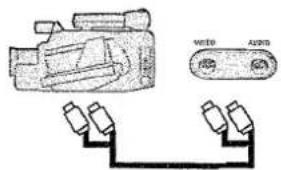
natural_image
Top-down view of a remote control with circular buttons and a central button (no text or symbols)natural_image
Front view of a remote control with circular buttons and a central button (no text or symbols visible)○ STANDBY/ON Aan/Uit-knop (Uit = Stand-by)
natural_image
Illustration of a remote control with circular buttons and a central button (no text or symbols)natural_image
Top-down view of a remote control with circular buttons and a central abstract symbol (no text or labels)
natural_image
Top-down view of a remote control with circular buttons and a central button (no text or symbols visible)2