
RJ45COUPLER - Cables and Computer Accessories StarTech.com - Free user manual and instructions
Find the device manual for free RJ45COUPLER StarTech.com in PDF.


| Product Type | RJ45 Coupler |
| Model | RJ45COUPLER |
| Brand | StarTech.com |
| Connector Type | 2 x RJ45 Female |
| Compatibility | Cat5e, Cat6, Cat6a cables |
| Data Rate | Up to 10 Gbps (Cat6a) |
| Shielding | Unshielded (UTP) |
| Dimensions (L x W x H) | Approx. 2.5 x 1.5 x 1.5 cm |
| Weight | Approx. 10 g |
| Material | ABS plastic, gold-plated contacts |
| Power Supply | None (passive device) |
| Operating Temperature | -10°C to 60°C |
| Storage Temperature | -20°C to 70°C |
| Humidity | 10% to 90% non-condensing |
| Color | Beige or Black (depending on variant) |
| Certifications | RoHS, REACH |
| Warranty | Lifetime warranty |
| Package Contents | 1 x RJ45 Coupler |
| Installation | Plug-and-play, no tools required |
| Maintenance | Keep dry and clean; wipe with a soft cloth if needed |
| Safety | Not applicable (no electrical hazard) |
| Spare Parts / Repairability | Not repairable; replace if defective |
Frequently Asked Questions - RJ45COUPLER StarTech.com
User questions about RJ45COUPLER StarTech.com
0 question about this device. Answer the ones you know or ask your own.
Ask a new question about this device
Download the instructions for your Cables and Computer Accessories in PDF format for free! Find your manual RJ45COUPLER - StarTech.com and take your electronic device back in hand. On this page are published all the documents necessary for the use of your device. RJ45COUPLER by StarTech.com.
USER MANUAL RJ45COUPLER StarTech.com
StarTech ID: RJ45COUPLER
natural_image
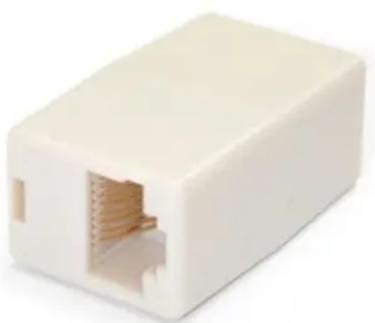
White rectangular electronic device with a central port and two side slots (no text or symbols visible)Brand : StarTech.com
Model : RJ45COUPLER
Category : Cables and Computer Accessories