
SRC 180 GN - Radio SENCOR - Free user manual and instructions
Find the device manual for free SRC 180 GN SENCOR in PDF.


| Product Type | Portable Radio |
| Brand | Sencor |
| Model | SRC 180 GN |
| Color | Green |
| Power Supply | AC 230V ~ 50Hz or DC 3V (2 x AA batteries) |
| Dimensions (W x H x D) | Approx. 12 x 7 x 3 cm |
| Weight | Approx. 200 g |
| Radio Bands | AM / FM |
| Tuning Type | Analog rotary dial |
| Speaker | Built-in, 3 W |
| Headphone Jack | 3.5 mm stereo |
| Antenna | Telescopic for FM, built-in ferrite for AM |
| Display | None (analog tuning scale) |
| Handle | Built-in carry handle |
| Controls | Power/Volume knob, tuning knob, band selector |
| Cleaning | Wipe with a dry, soft cloth |
| Safety | Keep away from water and heat sources |
| Spare Parts Availability | Contact Sencor service center |
| Repairability | Professional repair recommended |
Frequently Asked Questions - SRC 180 GN SENCOR
User questions about SRC 180 GN SENCOR
0 question about this device. Answer the ones you know or ask your own.
Ask a new question about this device
Download the instructions for your Radio in PDF format for free! Find your manual SRC 180 GN - SENCOR and take your electronic device back in hand. On this page are published all the documents necessary for the use of your device. SRC 180 GN by SENCOR.
USER MANUAL SRC 180 GN SENCOR
natural_image
Blank white image with no visible content, text, or symbolsThank you for buying Brandname's product. Read this manual carefully to get the best performance form this unit.
IMPORTANT
- Read these instructions.
- Heed all warnings.
- Follow all instructions.
- Do not block any ventilation openings, Install in accordance with the manufacturer's instructions.
- Do not install near any heat sources such as radiators, heat registers, stoves, or other apparatus (including amplifiers) that produce heat.
- Protect the power cord from being walked on or pinched, particularly at plugs, convenience receptacles, and the point where they exit from the clock radio.
- Only use attachments/accessories specified by the manufacturer.
● Unplug this clock radio during lightning storms or when unused for long periods of time. - Refer all servicing to qualified service personnel. Servicing is required when the clock radio has been damaged in any way, such as power supply cord or plug is damaged, liquid has been spilled or objects have fallen into the clock radio, the clock radio has been expose to rain or moisture, does not operate normally, or has been dropped.
- This clock radio shall not be exposed to dripping or splashing.
- Do not place any sources of danger on the clock radio (e.g. liquid filled objects, lighted candles).
- Where the plug of the Direct-Plug-in Adaptor is used as the disconnect device, the disconnect device shall remain readily operable.
- Attention should be drawn to the environmental aspects of battery disposal. Don't throw used batteries in dustbin. Please contact your retailer in order to protect the environment.
Attention should be drawn to the environmental aspects of battery disposal.
Electrical products should not be disposal of with household waste. Please recycle where facilities exist. Check with your Local Authority of retailer for recycling device.
(Batteries pack or batteries installed) shall not be exposed to excessive heat such as sunshine, fire or the like.
LOCATION OF CONTROL
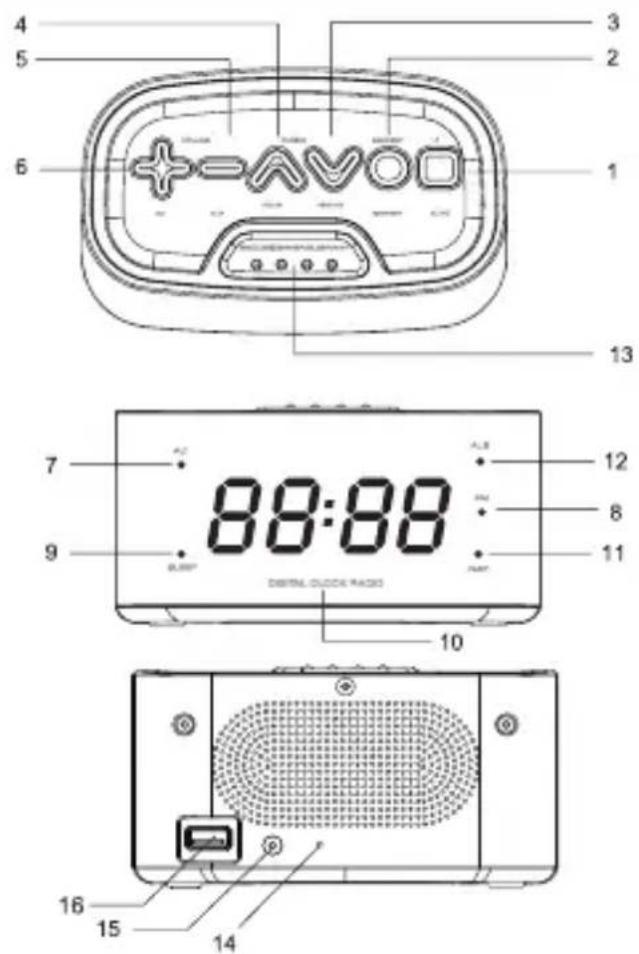
- STANDBY ⏻ / AUTO
- MEMORY / TIME SET
- TUNING DOWN / MINUTE
- TUNING UP / HOUR
- VOLUME - / AL2
- VOLUME + / AL1
- AL1 INDICATOR
- FM INDICATOR
-
SLEEP INDICATOR
-
DIGIT DISPLAY
- NAP INDICATOR
- AL2 INDICATOR
- SNOOZE / DIMMER / SLEEP/ NAP
- FM ANTENNA WIRE
- DC INPUT
- USB CONNECTOR FOR CHARGING
CONNECT POWER
CAUTION
- Risk of product damage! Ensure that the power voltage corresponds to the voltage printed on the back or underside of the clock radio.
- Risk of electric shock! When you unplug the AC adaptor, always pull the plug from the socket. Never pull the cord.
UNDERSIDE OF THE DEVICE: Compartment for two
1.5 V (LR6, UM-3, AA) batteries (not included), which serves to temporarily store the clock settings during a power outage on the 230 V AC grid.
REAR SIDE OF THE DEVICE: USB connector 5 V / max 1 A, which is used for charging mobile phones.
Be careful with electronic devices, such as tablets, that have a higher charging current. This could damage the device.
SET TIME
- Press and hold TIME SET for two seconds.
[0:00] is blink
-
Press HOUR and MINUTE to set hour and minute respectively
-
Press TIME SET to confirm
LISTEN TO FM RADIO
For better reception, fully extend and adjust the position of the FM antenna wire.
- Press ⏻ / AUTO to turn on FM radio.
➢ [FM frequency] is displayed and FM indicator is light up.
- Press TUNING ∨ for two seconds.
The FM Tuner tunes to a station with strong reception automatically.
To search for a radio station manually :
Press TUNING ∧ ∨ repeatedly to tune to a radio station
STORE FM RADIO STATIONS
You can store up to 20 FM radio stations in preset channel automatically or manually.
STORE FM RADIO STATIONS AUTOMATICALLY (AUTO SCAN)
- Press ⏻ / AUTO to turn on FM radio.
- Press ⏻ / AUTO and hold for 2 seconds.
The received stations are automatically stored to preset numbers.
STORE FM RADIO STATIONS MANUALLY.
- Tune to an FM radio station.
- Press MEMORY to activate the storing mode.
- Press TUNING ∨ to select the preset number.
[P 01 \~ P 20] is preset station numbers.
If this position is occupied, the previous stored frequency will be displayed;
To remove a pre-stored FM radio station, store another station in its place.
LISTEN TO A PRESET FM RADIO STATION
In FM mode, press MEMORY to select a preset number.
Note: The digit display return to clock display if no buttons is pressed for 10 seconds
SET ALARM TIMER
Make sure that you have set the clock correctly.
You can set two separate alarm timers. For the alarm sound, you can select the FM radio or the buzzer.
- Press ⏻ / AUTO to Clock mode.
- Press and hold AL1/AL2 for two seconds.
[0:00] is blink.
- Press HOUR / MINUTE to set alarm time.
- Press AL1/AL2 to confirm.
- Press AL1 / AL2 again to select a sound source: FM or Buzzer.
The current FM radio frequency is blink if FM radio source is selected and AL1 / AL2 indicator is light up.
➢ [bb] is blink if the buzzer sound is selected and AL1 / AL2 indicator is light up.
➢ [OFF] is blink if select to turn on the alarm timer.
SNOOZE ALARM
When alarm sounds, press SNOOZE to activate the snooze time 8 minutes.
The AL1 / AL2 indicator keeps blinking.
SET SLEEP TIMER
This clock radio can switch to standby mode automatically after a preset period.
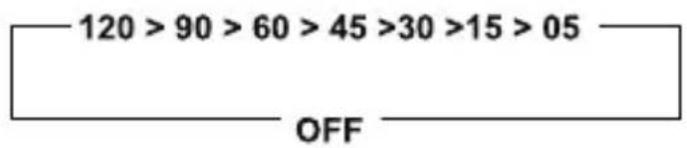
Press [SLEEP] repeatedly to select the sleep timer period (in minutes).
When the sleep timer is activated, Sleep indicator is light on.
To deactivate the sleep timer, press SLEEP repeatedly until Sleep indicator off.
SET NAP TIMER
- Press ⏻ / AUTO to clock mode.
- Press NAP repeatedly to select the nap timer period (in minutes).
When the nap timer is activated, NAP indicator is light up.
To deactivate the nap timer, press NAP repeatedly until NAP indicator off.
Sleep / Nap Timer period circle as follow:
ADJUST VOLUME
While listening, press + VOLUME – to adjust volume.
Press and hold DIMMER for 2 seconds repeatedly to select high or low brightness levels.
BATTERY BACK-UP
(For Temporary Time Storage Only)
Install 2 x LR06, AA or EU-3 battery (not included) according to polarity shown inside the battery compartment. In the event of a power interruption, your set will not work normally from the mains supply but there is now the advantage that your clock will continue to work. The clock display will not light up, as the clock time will be held in the memory. This also enables you to move the set from place to place without re-setting the clock every time. The battery back-up system is only meant to be used from short temporary power interruption. For longer durations, the battery may become exhausted or there may be some deviation in accuracy. When the battery is exhausted, it should be removed from the set to prevent leakage. If you do not wish to take advantage of the battery back-up system, your set will work normally without a battery. However, if disconnected from the mains, the clock figures will flash when the mains are
INSTRUCTIONS AND INFORMATION REGARDING THE DISPOSAL OF USED PACKAGING MATERIALS
Dispose of packaging material at a public waste disposal site.
DISPOSAL OF USED ELECTRICAL AND ELECTRONIC APPLIANCES
The meaning of the symbol on the product, its accessory or packaging indicates that this product shall not be treated as household waste. Please, dispose of this product at your applicable collection point for the recycling of electrical & electronic equipment waste. Alternatively in some states of the European Union or other European states you may return your products to your local retailer when buying an equivalent new product. The correct disposal of this product will help save valuable natural resources and help in preventing the potential negative impact on the environment and human health, which could be caused as a result of improper liquidation of waste. Please ask your local authorities or the nearest waste collection centre for further details. The improper disposal of this type of waste may fall subject to national regulations for fines.
For business entities in the European Union
If you wish to dispose of an electrical or electronic device, request the necessary information from your seller or supplier.
Disposal in other countries outside the European Union If you wish to dispose of this product, request the necessary information about the correct disposal method from local government departments or from your seller.

This product meets all the basic EU regulation requirements that relate to it.
Changes to the text, design and technical specifications may occur without prior notice and we reserve the right to make these changes.
re-connected and you must re-set the clock as described in the Electronic Clock Operation paragraph.
Attention should be drawn to the environmental aspects of battery disposal. Don't throw used batteries in dustbin.
Please contact your retailer in order to protect the environment.
Attention should be drawn to the environmental aspects of battery disposal.
Electrical products should not be disposal of with household waste. Please recycle where facilities exist. Check with your Local Authority of retailer for recycling device.
(Batteries pack or batteries installed) shall not be exposed to excessive heat such as sunshine, fire or the like.
SPECIFICATION
Power Source: power adapter 5 V DC / 1 A (included)
- backup batteries 2 x 1.5 V type AA
(not included)
Tuner Range: FM 87.5-108.0MHz
Power Consumption: 5W
Dimensions: 73 x 140 x 89 mm
Weight: 230 g
Product information is subject to change without prior notice.
- IMPORTANT
- CONNECT POWER
- CAUTION
- SET TIME
- LISTEN TO FM RADIO
- STORE FM RADIO STATIONS
- LISTEN TO A PRESET FM RADIO STATION
- SET ALARM TIMER
- SNOOZE ALARM
- SET SLEEP TIMER
- SET NAP TIMER
- ADJUST VOLUME
- BATTERY BACK-UP
- INSTRUCTIONS AND INFORMATION REGARDING THE DISPOSAL OF USED PACKAGING MATERIALS
- DISPOSAL OF USED ELECTRICAL AND ELECTRONIC APPLIANCES
- For business entities in the European Union
- SPECIFICATION
Brand : SENCOR
Model : SRC 180 GN
Category : Radio