
WOMBAT - Loudspeaker EASYTOUCH - Free user manual and instructions
Find the device manual for free WOMBAT EASYTOUCH in PDF.


| Product Type | 5.1 Channel Home Theater Speaker System |
| Model | ET-5015 WOMBAT |
| Brand | EasyTouch |
| Speaker Configuration | Central, Front Left/Right, Rear Left/Right, Subwoofer |
| Power Supply | AC 220V / 50Hz |
| Audio Inputs | 2.1 Audio Input, USB, SD/MMC Card |
| Audio Modes | 2.1 / 5.1 / VSS / FM Radio |
| Control Features | Mute, Volume, Bass, Central, Input Selection, Remote Control |
| Playback Sources | USB, SD Card, FM Radio |
| Front Panel Indicators | Display window, Bass light, Front light, Central light, Mode indicators |
| Setup | Place speakers as per diagram; connect cables before powering on |
| Cleaning | Unplug from power and computer; clean with dry cloth only |
| Safety Precautions | Avoid water, heat sources; protect power cord; unplug during storms |
| Servicing | Refer all servicing to qualified personnel |
| WEEE Compliance | Dispose according to local regulations for electronic waste |
Frequently Asked Questions - WOMBAT EASYTOUCH
User questions about WOMBAT EASYTOUCH
0 question about this device. Answer the ones you know or ask your own.
Ask a new question about this device
Download the instructions for your Loudspeaker in PDF format for free! Find your manual WOMBAT - EASYTOUCH and take your electronic device back in hand. On this page are published all the documents necessary for the use of your device. WOMBAT by EASYTOUCH.
USER MANUAL WOMBAT EASYTOUCH
IMPORTANT SAFETY INFORMATION


CAUTION ELECTRIC SHOCK HAZARD
- Read these instructions
- Keep these instruction
- Heed all warnings
- Unplug the speakers from the computer and from the electrical outlet before cleaning them with a dry cloth
• Install in accordance with the manufacture's instruction - Place the speakers in a stable location so they will not fall causing damage to the speakers or bodily harm
- Do not use the speakers near water, and do not immerse them in any liquid or pour any liquid on them
- Do not block the openings in the speakers cabinets, never push objects into speakers vents or slots because of fire or electric shock hazards, and provide sufficient space around the speakers for proper ventilation
- Do not install near any heat sources as radiators, stoves or other apparatus (including amplifiers) that produce heat
- Protect the power cord from being walked on or pinched particularly at plugs, convenience receptacles and the point where they exit from the apparatus
• Use only accessories specified by the manufacturer - For added protection during lighting storms, unplug the speakers from the electrical outlet and turn off the computer
- Unplug this apparatus when unused for a long period of time
- Servicing is required when the apparatus has been damaged in any way such as when the power-supply cord or plug has been damaged, liquid has been spilled or objects have fallen into the apparatus, the apparatus has been exposed to rain or moisture, does not operate normally or has been dropped
• Refer all servicing to qualified service personnel
- The speakers should be disconnected from the mains by placing the power/standby switch in the standby position and unplugging the power cord of the speakers from the AC mains receptacle
- Do not place any form of open flame sources such as lighted candles on the apparatus
• The socket-outlet shall be installed near the equipment and shall be readily accessible
WARNING:
TO REDUCE THE RISK OF ELECTRIC SHOCK DO NOT EXPOSE THIS APPARATUS TO RAIN OR MOISTURE
Setting up your ET-5015 WOMBAT speakers
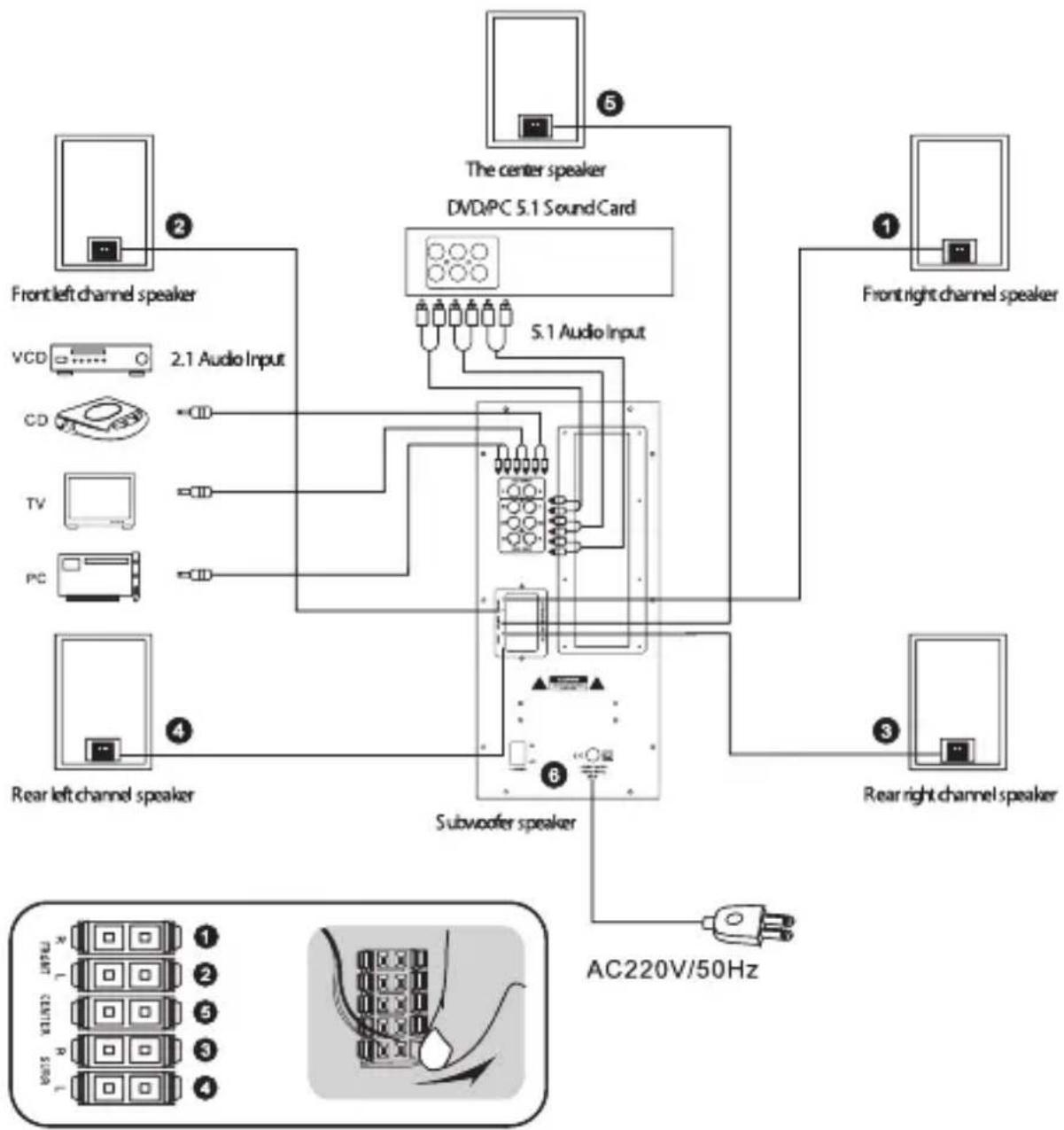
flowchart
graph TD
    A["Front left channel speaker"] -->|2| B["2.1 Audio Input"]
    C["Front right channel speaker"] -->|1| D["Front right channel speaker"]
    B --> E["CD"]
    B --> F["TV"]
    B --> G["PC"]
    E --> H["Subwoofer speaker"]
    F --> H
    G --> H
    H --> I["AC220V/50Hz"]
    style A fill:#f9f,stroke:#333
    style C fill:#f9f,stroke:#333
    style B fill:#ccf,stroke:#333
    style E fill:#cff,stroke:#333
    style F fill:#cff,stroke:#333
    style G fill:#cff,stroke:#333
    style H fill:#ffc,stroke:#333
    style I fill:#ffc,stroke:#333
Multimedia Speakers 5.1 ET-5015 WOMBAT
- Right front speaker connecting cable
- Left front speaker connecting cable
- Right rear speaker connecting cable
- Left rear speaker connecting cable
- Central speaker connecting cable
- Subwoofer speaker
Important:
For your safety, set up the system before plugging it into a power source
The 5.1 channel home-theater speaker system is composed with one central speaker, 2 front speakers (left and right), 2 rear speakers (left and right) and one subwoofer. The central speaker is placed on the top of the TV set or in the shelf straightly under the TV set; front speakers are placed at the both sides of the TV set; rear speakers are placed at the both back side of the listening spot; and the subwoofer is placed aside the front speaker or some other suitable places according to the sound field effect. You are suggested to adjust the space and angle of each speaker according to the audio room or the living room to get the best theatre effect.

flowchart
graph TD
    A["①"] --> B["②"]
    A --> C["③"]
    B --> D["④"]
    C --> D
    D --> E["⑤"]
    E --> F["⑥"]
- Subwoofer(Main Cabinet)
- Left front speaker
- Right front speaker
- Central speaker
- Left rear speaker
- Right rear speaker
Subwoofer Speaker Panel Description

- IR Remote display head
- Display window
- Bass light
- Front light
- 2.1 Mode Indicator
- 5.1 Mode Indicator
- Central light
- Input Mode Switch
- 2.1/5.1 Output Switch
10.Mute Key - Central
12.Front
13.Bass - Volume Control knob
15.USB Jack
16.SD/MMC Card slot

- Mute Key
- Input Mode Switch
3 - 11, 13. Number keys - Next track key
- Previous track key
15.FM Auto search Channels
16.2.1/5.1 Output switch
17.FM Radio Key
18.Previous FM Channel - Next FM Channel
20.Bass Volume Decreasing
21.Play / Pause key - All Volume Decreasing
- All Volume Increasing
- Bass Volume Increasing
- Central Volume Decreasing
-
Central Volume Increasing
-
Connect up related signal cable to the subwoofer first, then press the "INPUT" key to swift to the corresponding signal input state (the display will show 5.1/AU/Ud/FN corresponding status);
- Press 2.1/VSS^* key to switch to 2.1/5.1 output mode;
- Press _ button, speaker mute function can be controlled;
- Press _SUB +" key to increase the bass volume;
- Press „SUB -” key to decrease the bass volume;
- Press "CEN +" key to increases the central volume;
- Press „CEN -” key to reduce the central volume;
- When the USB/SD playback mode, press the „▶” key, control play / pause function;
- When the USB/SD playback mode, press „,” key, play the previous track on a USB/SD control;
- When the USB/SD playback mode, press the „▶”, key, control USB/ SD Play to the next track;
- When the USB/SD playback mode, press the number keys were „1,2,3,4,5,6,7,8,9,0“ may custom select the USB / SD Play Tracks;
-
Press „FM“ key to enter FM radio mode, press „CH-“ key to control FM radio on a channel, press the „CH+“ key control FM radio for the next channel, press „AUTO“ key control automatically search for FM frequency channels;
-
Press „VOL + „key to increase the total sound volume;
- Press" VOL-"key to decrease the total sound volume;
- Getting the sound field effect to your need based on personal preferences to adjust the size of each part of the volume.
Thank you for purchasing the speaker system from Easy Touch. Your speaker produce great sound and are easy to use. To discover more Easy Touch products, or if you have questions about your speaker, visit us on the web at www.easy-touch.com

This mark provides information that the product is compliant with WEEE Directive on ways of disposal of old household electrical and electronic equipment. The product bearing this mark must not be treated as standard unsorted municipal waste and it should be utilized accordingly. Contact the seller, a representative of your local authorities or any provider of utilization services in order to dispose of the old electric and electronic equipment. The proper waste utilization helps preserve our environment.
LET OP! BEDREIGING VAN VERLAMMING
Brand : EASYTOUCH
Model : WOMBAT
Category : Loudspeaker