
SM-351WCR - Cooker Spring USA - Free user manual and instructions
Find the device manual for free SM-351WCR Spring USA in PDF.


| Product Type | Single Burner Electric Cooker |
| Brand | Spring USA |
| Model | SM-351WCR |
| Dimensions (W x D x H) | 12.5 x 10.5 x 3.5 inches |
| Weight | 4.2 lbs |
| Power Source | 120V, 60Hz, 1500W |
| Cooking Surface | Cast-iron hot plate, 6.5-inch diameter |
| Temperature Control | Adjustable thermostat with 5 heat settings |
| Indicator Light | Power-on indicator |
| Main Functions | Boiling, simmering, frying, and warming |
| Compatible Cookware | Flat-bottom pots and pans up to 8 inches |
| Cleaning | Wipe with damp cloth; do not immerse in water |
| Safety Features | Overheat protection, auto shut-off |
| Spare Parts Available | Replacement power cord and hot plate |
| Repairability | Modular design; user-replaceable components |
| Certifications | ETL listed |
| Warranty | 1-year limited |
| Country of Origin | China |
Frequently Asked Questions - SM-351WCR Spring USA
User questions about SM-351WCR Spring USA
0 question about this device. Answer the ones you know or ask your own.
Ask a new question about this device
Download the instructions for your Cooker in PDF format for free! Find your manual SM-351WCR - Spring USA and take your electronic device back in hand. On this page are published all the documents necessary for the use of your device. SM-351WCR by Spring USA.
USER MANUAL SM-351WCR Spring USA
The Evolution of Intelligent Design®
Spring USA®
127 Ambassador Drive
Suite 147
Naperville, IL 60540-4079
Phone: (1) 630-527-8600
Fax: 630-527-8677
Email: springusa@springusa.com
Web: www.springusa.com
Operation Manual
MAX INDUCTION®
By Spring USA®
Models: SM-351WCR
&
SM-353WCR & SM-353WCRU
(International)
Before You Begin:
2
Read the following instructions in their entirety.
Use proper cookware. See specifications, below.
Check your ventilation. Your MAX Induction® Wok Range must have the proper ventilation in order to operate correctly. There must be at least 4" of space available around your induction range.
Ensure that you have dedicated power to the installed location. Verify the electrical requirements for your specific model induction range, as shown on Page 4.
Suitable Cookware:
Your MAX Induction® Wok Range requires the use of induction-ready Wok Pans.
For optimal heating and performance the induction woks shown below should be used. The hemispherical shape of these Wok Pans are specifically matched to the radius of the range glass and induction coil inside the induction range.
Alternative wok pans may heat on the range, but optimal performance will be achieved by using the pans designed specifically for this system.
The following Spring USA components are recommended for use with the MAX Induction® Wok Range.
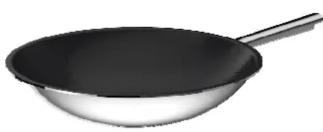
natural_image
Illustration of a stainless steel wok with a black handle (no text or symbols)Vulcano 32 cm Non-Stick Wok Pan
4 Qt (130 oz)
Item # 8217-60/32
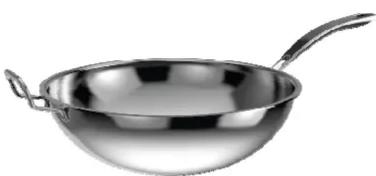
natural_image
Metallic bowl with handle and handles, no text or symbols visiblePrimo! 34 cm Wok Pan 7.3 Qt (232 oz)
Item # 8217-60/34
Mounting of the Control Panel:
7
![CONTROL BOX DETAIL 6 1/4" [159mm] 1 1/4" [32mm] 3 7/16" [87mm] 5.315" [135mm] MOUNTING BRACKET CAN ACCOMODATE PANEL THICKNESS 1/2"-3/4" (13mm - 19mm)](/content/2026/05/842450/images/bfcd2a403f3e96c9606b7cc861d717f1e15faa7e6ed43cf8ce8171efdd49d289.jpg)
To install the control panel, use the template provided. Please the template on a plane or panel, perpendicular to the Wok Range, centering it to the range whenever possible. Once you have cut the opening, insert the control panel. Using the bracket provided, secure the control panel into place. Connect the control box cable to the induction range.
Maintaining Your MAX Induction® Range:
Never touch the glass plate immediately after cooking. The surface of the cooktop may remain hot due to the heat transferred from the cookware.
Do not damage the glass surface of the induction range. If the glass plate is broken, turn the unit off and unplug it immediately. Call Spring USA at (1) 630-527-8600 for service or warranty. Be sure to have your Model # and Serial Number available when you contact our office or when completing the service form on the website.
To clean your MAX Induction® Range, unplug the unit from its power source. Wipe the unit down with a sponge or cloth with a mild dishwashing liquid. Dry with a clean, soft cloth. Do not immerse the induction range directly in water for cleaning – this will damage the unit.
Remember to clean the vent located on the underside and at the back of the unit. Inspect the mesh air filter on the underside of the induction range, each day. If it is soiled, remove the filter and wash it with dish washing detergent. Dry and replace before operating the induction range.
Keep your induction range away from other ovens or stoves. If the surrounding temperature is hot, your induction range may stop heating.
Safety Precautions:
Plug the power cord into a dedicated circuit. Note: Nothing else should be plugged into this circuit. Each MAX Induction® Range must have its own, sufficient power supply as outlined below. Once you have plugged the unit in, it will beep, and an 'EO' code will appear in the display window.
To Begin:
Turn the unit on. An ‘EO’ code will appear next in the digital window, indicating the induction range is searching for cookware.
Turn the knob clockwise to turn the unit on. Your MAX Induction® range will always start out in the “Cook” mode. “Cook” is the default mode.
Place suitable cookware within the circle on top of the MAX Induction® Range.
Select either the "Cook" Mode or the "Temp" Mode.
In “Cook” mode, turn the dial clockwise. The LED will display cook power levels of 1 thru 20.
In “Temp” mode, turn the dial clockwise. The LED will display temperature levels from 110^ to 400^ fahrenheit ( 43^ to 204^ celsius).
Turn the knob clockwise to set the power level or temperature.
To shut the induction range off, turn the knob counter clockwise until you hear the unit ‘click’ and turn off.
Specifications:
| Plug TypePeak E | |||
| SM-351WCR | Amps | 3500 Watts ~ 60 Hz20 | 8 NEMMoths20P56' Cord |
| SM-353WCR | Amps | 3500 Watts ~ 50 Hz22 | 0 CHF ∇6/16/151.8 m Cord |
| SM-353WCRU | Amps | 3000 Watts ~ 50 Hz22 | 0 CHF ∇6/16/151.8 m Cord |
All International Ranges ship with a CEE 7/7 16A plug. International plugs must be changed to match the national standard, based on country requirement.
Induction Range Error Codes:
| SolutionCauseError | ||
| E0 | Induction range does not sense induction-ready cookware has been placed on the glass surface | Place an induction ready pan on the range. |
| E1 | Range has overheated due to blocked ventilation and has shut down the range. | Clear vents, let range cool down, then restart. If error message continues, your range needs to be serviced. |
| E2 | The range has overheated. | Remove the cookware from the range and let the range cool. Make sure the vents are clear. Verify you are using induction-ready cookware. Once the range has cooled, restart. |
| E3 | Range will not turn on. Range is experiencing temporary voltage overload or is not on its own, dedicated circuit. | Review your dedicated power requirements. Each range must operate with the power required on Page 4. |
Actual range temperatures may vary due to a number of variables, such as ambient temperature in the immediate surrounding area, content and volume of food being heated or cooked, and whether or not you are using a cover on the cookware.
Never attempt to service any part of your MAX Induction® Range on your own. Contact our Service Department by calling (1) 630-527-8600. Attempting to service your Induction Range on your own, or through an unauthorized repair facility automatically voids your warranty. For service forms, visit the Spring USA website. tag / AmpsModel #
For Limited Warranty Information, visit www.springusa.com
Note:
This equipment uses, generates and can radiate radio frequency energy. If not installed correctly and used in accordance with the instructions, may cause harmful interference to radio communications. Users or guests with Pacemakers should contact their health care professional prior to using this product.
Spring USA®
(1) 630-527-8600
www.springusa.com
Mounting Your Induction Range:
6
Your MAX Induction ^® Wok Range has a detachable control plate, so the unit can be used in a built-in application. For built-in applications, your counter or table thickness must not exceed 2". Your MAX Induction ^® Wok Range must have proper ventilation in order to operate correctly. There must be at least 10" of space available under a mounted induction range. Cabinets housing the induction range should have both vents & circulation fans installed. The inside temperature of the cabinet must not exceed 90°F/32°C.
To mount your range, you must first remove the control panel. Place the template of the induction range on the surface you are preparing for the install. Center the template, allowing a minimum of 4" of countertop space on each side of the induction range.
Once you insert the induction range into the cut out, the edge of the range will sit 0.5" (12.75mm) above the surface of the countertop. Apply a thin bead of 100% rubber silicone sealant around the surface perimeter of the mounted induction range.

(1) 630-527-8600
www.springusa.com
Spring USA®
How To Operate:
3
Your MAX Induction® Range is designed to operate in two modes: “Cook” or “Temp”.
“Cook” Mode offers you high-speed heating, used for sautéing, omelet stations, pasta bars or demonstration cooking.
“Temp” Mode offers you thermostatically controlled holding temperatures for use with soups, sauces, buffets or pastry work. The LED display allows for more accurate temperature selection.
In "Cook" Mode:
An ‘E0’ code will flash until suitable cookware is placed on the glass surface of the range.
The LED panel will display a two-digit number indicating the power level. Power levels run from 1 thru 20.
As a safety precaution, if no cookware is placed on the induction range plate after 2-1/2 minutes, the unit will shut off.
Once suitable cookware has been placed on the glass induction plate, the unit will continue to cook until the range is manually shut down, or the mode is changed over to “Temp” mode.
Note: As a safety precaution, make sure you have at least 4" of space at the back of the Induction range. Induction ranges need ventilation to operate efficiently.
In "Temp" Mode:
An ‘E0’ code will flash until suitable cookware is placed on the glass surface of the range.
The LED panel will display a three-digit number indicating the temperature setting. To increase the temperature setting, turn the dial clockwise. To decrease the setting, turn the dial to the counter-clockwise.
The induction range will continue to warm the food until the set temperature has been reached. Once the temperature has been reached, the range will maintain that pre-selected temperature setting.
➢ Temperature settings in “Temp” mode, in Fahrenheit are:
110°, 120°, 130°, 140°, 150°, 160°, 170°, 180°, 190°, 200°, 220°, 240°,
260°, 280°, 300°, 320°, 340°, 380° & 400°.
Celsius: 43^ , 49^ , 54^ , 60^ , 66^ , 71^ , 77^ , 82^ , 88^ , 93^ , 104^ , 116^ , 127^ , 138^ , 149^ , 160^ , 171^ , 182^ , 193^ & 204^ .
- Operation Manual
- MAX INDUCTION®
- By Spring USA®
- Before You Begin:
- Suitable Cookware:
- Mounting of the Control Panel:
- Maintaining Your MAX Induction® Range:
- Safety Precautions:
- To Begin:
- Select either the "Cook" Mode or the "Temp" Mode.
- Note:
- Mounting Your Induction Range:
- How To Operate:
- In "Cook" Mode:
- In "Temp" Mode:
Brand : Spring USA
Model : SM-351WCR
Category : Cooker