
InMotion E1000 - Elliptical bike Stamina - Free user manual and instructions
Find the device manual for free InMotion E1000 Stamina in PDF.


| Product Type | Elliptical Bike |
| Brand | Stamina |
| Model | InMotion E1000 |
| Resistance System | Magnetic with manual tension control |
| Display | Basic LCD (Time, Distance, Calories, Scan) |
| Stride Length | 12 inches |
| Maximum User Weight | 250 lbs (113 kg) |
| Product Dimensions | 30 x 20 x 60 inches (76 x 51 x 152 cm) |
| Product Weight | 55 lbs (25 kg) |
| Power Source | 2 AA batteries (not included) |
| Pedal Type | Oversized with adjustable straps |
| Handlebar Design | Fixed with foam grips |
| Transport Wheels | Yes |
| Leveling Feet | Yes |
| Assembly Required | Yes (tools included) |
| Warranty | 1 year frame, 90 days parts |
| Maintenance | Keep bolts tight, wipe down after use, store indoors |
| Safety Features | Non-slip pedals, stable base, user manual with warnings |
| Spare Parts Availability | Contact Stamina customer service or authorized dealers |
| Repairability | Basic user maintenance; professional repair for complex issues |
Frequently Asked Questions - InMotion E1000 Stamina
User questions about InMotion E1000 Stamina
0 question about this device. Answer the ones you know or ask your own.
Ask a new question about this device
Download the instructions for your Elliptical bike in PDF format for free! Find your manual InMotion E1000 - Stamina and take your electronic device back in hand. On this page are published all the documents necessary for the use of your device. InMotion E1000 by Stamina.
USER MANUAL InMotion E1000 Stamina
natural_image
Technical line drawing of a stationary exercise machine with adjustable arms and control buttons (no text or symbols)Product May Vary Slightly From Pictured.
CAUTION:
Weight on this product should not exceed 250 lbs.
This Product is Distributed Exclusively by

2040 N. Alliance, Springfield, MO 65803
Customer Service
1 (800) 375-7520
www.staminaproducts.com
WARNING
Exercise can present a health risk. Consult a physician before beginning any exercise program with this equipment. If you feel faint or dizzy, immediately discontinu e use of th is equipment. Serious bodily injury can o cc u r if th is equipment is not assembled and used correctly. Serious bodily injury can also occur if all instructions are not followed. Keep others and pets away from equipment when in use. Always make sure all bolts and nuts are securely tightened prior to each use. Follow all safety instructions in this manual.
When calling for parts or service, please specify the following number:
Model#:
55-1610C /55-1610CR
STAMINA PRODUCTS
MADE IN CHINA
© 2011 Stamina Products, Inc. 2011, 11
TABLE OF CONTENTS
Safety Instructions 2
Before You Begin 4
Equipment Warning, Caution & Notice Labels... 5
Hardware Identification Chart 6
Assembly Instructions 7
Set Up Instructions 8
Operational Instructions 9
Storage 11
Maintenance 11
Conditioning Guidelines 12
Warm-Up and Cool-Down 13
Product Parts Drawing 14
Parts List 15
Warranty 17
Notes 18
Fax/Mail Ordering Form 19
SAFETY INSTRUCTIONS
WARNING
WARNING
This product contains a chemical known to the State of California to cause cancer and birth defects or other reproductive harm.
Consult your physician before starting this or any exercise program. This is especially important if you are over the age of 35, have never exercised before, are pregnant, or suffer from any health problem. This product is for home use only. Do not use in institutional or commercial applications. Failure to follow all warnings and instructions could result in serious injury or death.
WARNING
To reduce the risk of serious injury, read the following Safety Instructions before using the InMotion® E1000.
- Read all warnings and cautions posted on the InMotion® E1000.
- The InMotion® E1000 should only be used after a thorough review of the Owner's Manual.
- We recommend that two people be available for assembly of this product.
- Keep children away from the InMotion® E1000. Do not allow children to use or play on the InMotion® E1000. Keep children and pets away from the InMotion® E1000 when it is in use.
- It is recommended that you place this exercise equipment on an equipment mat.
- Set up and operate the InMotion® E1000 on a solid level surface. Do not position the InMotion® E1000 on loose rugs or uneven surfaces.
- Make sure that adequate space is available for access to and around the InMotion® E1000.
- Before using, inspect the InMotion® E1000 for worn or loose components, and securely tighten or replace any worn or loose components prior to use.
- Consult a physician prior to commencing an exercise program. If, at any time during exercise, you feel faint, dizzy, or experience pain, stop and consult your physician.
- Follow your physician's recommendations in developing your own personal fitness program.
- Always choose the workout which best fits your physical strength and flexibility level. Know your limits and train within them. Always use common sense when exercising.
- Do not wear loose or dangling clothing while using the InMotion® E1000.
- Never exercise in bare feet or socks; always wear correct footwear, such as running, walking, or crosstraining shoes. Be sure that they fit well, provide foot support and feature non-skid rubber soles.
- Be careful to maintain your balance while using, mounting, dismounting, or assembling the InMotion® E1000, loss of balance may result in a fall and serious bodily injury.
- To maintain your balance, always mount or dismount the InMotion® E1000 from the lowest foot pedal. Refer to the detail instructions on page 9.
- Keep both feet firmly and securely on the pedal caps while exercising.
- This unit is not equipped with a free-wheel. Pedal speed should be reduced in a controlled manner.
- The InMotion® E1000 should not be used by persons weighing over 250 pounds.
- The InMotion® E1000 should be used by only one person at a time.
- The InMotion® E1000 is for consumer use only. It is not for use in public or semipublic facilities.
Call Us First

Customer Service
1 (800) 375-7520
www.staminaproducts.com
THANK YOU FOR PURCHASING THE
InMotion® E1000
To enact your warranty, please register your product by going to register.staminaproducts.com
To help you get started, we have pre-assembled most of your InMotion® E1000 at the factory with the exception
of those few parts left unassembled for shipping purposes.
Simply follow the few assembly instructions set forth in this manual.
With regular workouts, you will be getting your body into shape and be on your way to achieving a happier and healthier lifestyle.
Should you have any questions,
please call our Customer Service Department toll-free number, 1 (800) 375-7520
Monday - Thursday, 7:30 A.M. - 5:00 P.M., Central Time.
Friday, 8:00 A.M. - 3:00 P.M., Central Time.

ONLINE
CUSTOMER SERVICE
customerservice@staminaproducts.com
www.staminaproducts.com

TELEPHONE
CUSTOMER SERVICE
Tel: 1 (800) 375-7520

FAX
CUSTOMER SERVICE
Fax: (417) 889-8064

MAIL
STAMINA PRODUCTS, INC. ATTN: Customer Service
P.O. Box 1071
Springfield, MO. 65801-1071
BECOME A FAN!

BECOME A FAN!

BEFORE YOU BEGIN
Thank you for choosing the InMotion® E1000. We take great pride in producing this quality product and hope it will provide many hours of quality exercise to make you feel better, look better, and enjoy life to its fullest.
It's a proven fact that a regular exercise program can improve your physical and mental health. Too often, our busy lifestyles limit our time and opportunity to exercise. The InMotion® E1000 provides a convenient and simple method to begin your assault on getting your body in shape and achieving a happier and healthier lifestyle.
Before reading further, please review the drawing below and familiarize yourself with the parts that are labeled.
Read this manual carefully before using the InMotion® E1000.
Although Stamina constructs its products with the finest materials and uses the highest standards of manufacturing and quality control, there can sometimes be missing parts or incorrectly sized parts. If you have any questions or problems with the parts included with your InMotion® E1000, please do not return the product. Contact us FIRST!
If a part is missing or defective, please go to staminaproducts.com to the Services section and order the part needed, or call us toll free at 1-800-375-7520 (in the U.S.). Our Customer Service Staff is available to assist you from 7:30 A.M. to 5:00 P.M. (Central Time) Monday through Thursday and 8:00 A.M. to 3:00 P.M. (Central Time) on Friday.
Be sure to have the name and model number of the product available when you contact us.

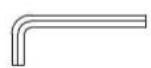
THE FOLLOWING TOOLS ARE INCLUDED FOR ASSEMBLY : Ⓞ Wrench
Allen Wrench (6mm)
EQUIPMENT WARNING, CAUTION & NOTICE LABELS
This chart is provided to help identify the warning, caution, and notice labels on the InMotion® E1000. Please take a moment to familiarize yourself with all of the warning, caution, and notice labels.
Label is larger than actual size

WARNING LABEL(55)
WARNING
Failure to follow all warnings and instructions could result in serious injury or death. Before assembling or using this product, read and follow the Owner's Manual and all other warnings and instructions that accompany this product. Replace this warning label if damaged, illegible, or removed.
Keep others including children & pets away from equipment when in use.
Consult your physician before starting this or any exercise program. This is especially important if you are over the age of 35 or have any pre-existing health condition. Always make sure all nuts and bolts are securely tightened before using this product. This product should not be used by persons weighing more than 250 lbs. unless otherwise stated in your Owner's Manual.
HARDWARE IDENTIFICATION CHART
This chart is provided to help identify the hardware used in the assembly process. Place the washers or the ends of the bolts or screws on the circles to check for the correct diameter. Use the small scale to check the length of the bolts and screws.

bubble
| Metric | Value | | -------------- | ----- | | 3/16" | 3/16" | | 1/4" | 1/4" | | 5/16" | 5/16" | | 3/8" | 3/8" | | 1/2" | 1/2" | | MILLIMETERS | 6 | | MILLIMETERS | 8 | | MILLIMETERS | 10 | | MILLIMETERS | 12 |NOTICE: The length of all bolts and screws, except those with flat heads, is measured from below the head to the end of the bolt or screw. Flat head bolts and screws are measured from the top of the head to the end of the bolt or screw.


After unpacking the unit, open the hardware bag and make sure that you have all the following items. Some hardware may be already attached to the part.
Part Number and Description Qty

42 Carriage Bolt (M10 x 1.5 x 43mm) 2
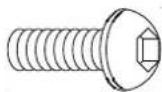
45 Bolt, Button Head (M8 x 1.25 x 20mm) 4
59 Bolt, Button Head (M8 x 1.25 x 16mm) 2

51 Nylock Nut (M10 x 1.5) 2

40 Stand 2
ASSEMBLY INSTRUCTIONS
Place all parts from the box in a cleared area and position them on the floor in front of you. Remove all packing materials from your area and place them back into the box. Do not dispose of the packing materials until assembly is completed. Read each step carefully before beginning. If you are missing a part, please go to staminaproducts.com under the Service section and order the part needed, e-mail us at customerservice@staminaproducts.com, or call us toll free at 1-800-375-7520 U.S.). Our Customer Service Staff is available to assist you from 7:30 A.M. to 5:00 P. Time) Monday through Thursday and 8:00 A.M. to 3:00 P.M. (Central Time) on Friday.
(in th
STEP 1
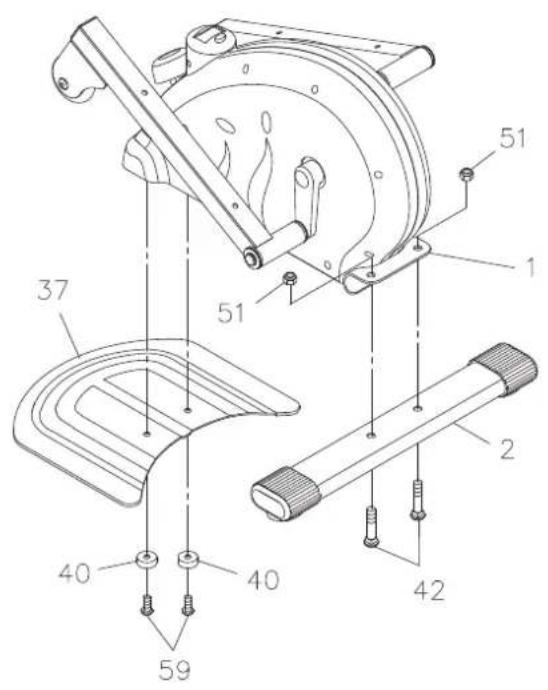
Attach the REAR STABILIZER(2) to the MAIN FRAME(1) with CARRIAGE BOLTS(M10x1.5x43mm)(42) and NYLOCK NUTS(M10x1.5)(51).
STEP 2
Attach the BASE BOARD(37) to the MAIN FRAME(1) with the STANDS(40) and BUTTON HEAD BOLTS (M8x1.25x16mm)(59).
STEP 3
Attach the LEFT PEDAL CAP(33) to the LEFT PEDAL ARM(3) with BUTTON HEAD BOLTS (M8x1.25x20mm)(45). Repeat on the other side.
NOTE: The LEFT and RIGHT PEDAL CAPS(33, 34) have a raised lip on three sides. Attach the LEFT and RIGHT PEDAL CAPS(33, 34) to the LEFT and RIGHT PEDAL ARMS(3, 4) so that the side without the raised lip is on the outside.

SET UP INSTRUCTIONS
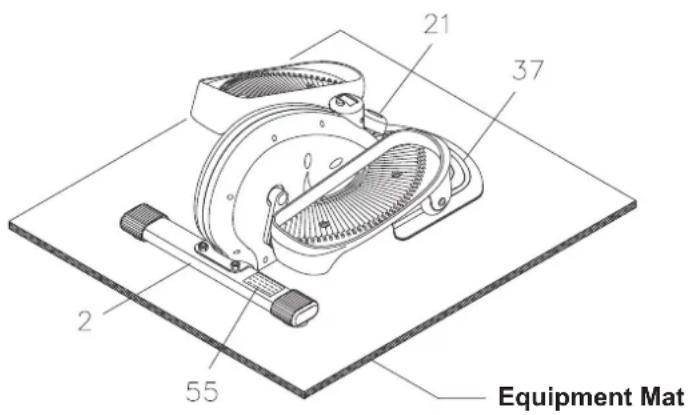
Place the InMotion® E1000 in the area where it will be used. It is recommended that the InMotion® E1000 be placed on an equipment mat. The InMotion® E1000 is approximately 24.3 inches long x 17 inches wide x 11.4 inches tall. (These dimensions may vary up to one inch.) Make sure that adequate space is available for access to, passage around and emergency dismount from the InMotion® E1000. A minimum of 20 inches on at least one side and 20 inches either behind or in front of the InMotion® E1000 is required for safe operation.
LEVELING: Adjust the location of InMotion® E1000 to ensure InMotion® E1000 sits on the floor without rocking.
MOVING: Grasp the REAR STABILIZER(2) to move the InMotion® E1000. Do not use the PEDAL ARMS(3,4) to move the InMotion® E1000. The PEDAL ARMS(3,4) will move and may pinch your hand or fingers.
FUNCTION INSPECTION:
Visually inspect the InMotion® E1000 to verify that assembly is as shown in the above illustration. Check the function of the InMotion® E1000. Stand on the foot pedals. Slowly move your highest foot forward and follow the natural path of the machine. Turn the crank slowly through one complete revolution to verify that the drive train functions properly. Adjust the TENSION KNOB(21) and verify that it functions properly.
CAUTION: Locate and read the WARNING LABEL(55) on the InMotion® E1000. Make sure that all users read the WARNING LABEL(55).
OPERATIONAL INSTRUCTIONS
USING THE FITNESS METER
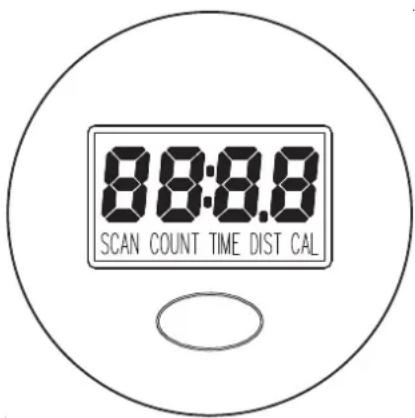
POWER ON: Pedal movement or press the button.
POWER OFF: Automatic shut off after four minutes of inactivity.
FUNCTION BUTTON:
Press and release to select functions.
Press and hold for four seconds to reset all functions to zero.
FUNCTIONS:
SCAN: Automatically scans TIME, DISTANCE, COUNT, and CALORIES in sequence with a change every six seconds. Press and release the button until “SCAN” appears on the display.
TIME: Displays the time from one second up to 99:59 minutes.
DISTANCE: Displays the distance from zero to 999.9 miles.
COUNT : Displays the total number of strides you have taken from zero to 9999 strides.
CALORIES: Displays the calorie consumption from zero to 999.9 Kcal.
The calorie readout is an estimate for an average user. It should be used only as a comparison between workouts on this unit.
NOTE: The meter will shut off automatically after four minutes of inactivity. All function values will be kept. Push the button and hold it down for four seconds to reset all functions to zero.
BATTERY
The meter operates with a 1.5v LR44 button cell battery. Replace the battery when you see inconsistencies in the display.
PRECAUTIONS FOR USING
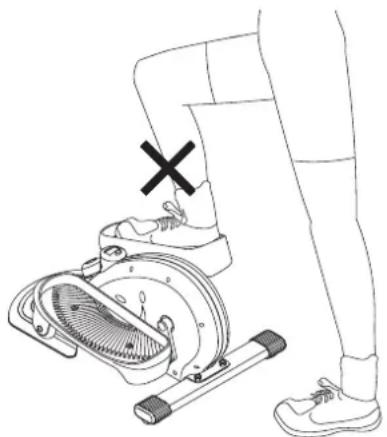
- To maintain your balance, always mount or dismount the InMotion® E1000 from the lowest foot pedal, refer to the following illustrations. Loss of balance may result in a fall and serious bodily injury.
- Use a wall or a table to help to maintain your balance while using the InMotion® E1000 until you are familiar with the InMotion® E1000.

natural_image
Line drawing of a person performing a leg exercise using a stationary exercise machine (no text or symbols)CORRECT INCORRECT
natural_image
Line drawing of a person using a stationary exercise machine with a cross mark indicating the knee (no text or symbols present)OPERATIONAL INSTRUCTIONS
EXERCISE WORKOUT
To start using the InMotion® E1000 simply stand on the foot pedals with the front of your shoes close to the front edge of the pedal cap. Move your highest foot forward and follow the natural path of the machine. For more stability, place a chair next to the InMotion® E1000 and place your hand on the chair back while stepping onto the pedals. Start on a load level that is comfortable until you are familiar with the machine. Once you are familiar with the elliptical and comfortable with the resistance, adjust the load level as described below to achieve the workout desired.
FORWARD AND REVERSE
The InMotion® E1000 can be used in forward and reverse directions to vary the muscles that you work. This will help you to stay motivated and achieve the best results. To change directions, simply slow the pedals down until they stop, then pedal in the opposite direction.
SITTING WORKOUT
Refer to the illustration. Seated workouts are effective for toning legs and hips, and for improving circulation and mobility. When sitting, your feet will face the opposite direction on the pedals than when standing. This will put your feet, ankles, and hips at the proper workout angles. To adjust the METER(22) to face you, find the two cavities on either side of the meter case, grasp the top of the meter and pull the top of the METER(22) from the casing being careful not to disconnect or damage the SENSOR WIRE(23). Turn the meter 180 degrees, and push it back into position.
Place the InMotion® E1000 on the floor in front of a chair as shown in the illustration below. Sit in the chair and pedal the InMotion® E1000 with your feet.
CAUTION: Do not stand up on the InMotion® E1000 in this workout position.

LOAD LEVEL ADJUSTMENT
The load level of InMotion® E1000 can be changed at any time during your workout. Adjusting your load level will allow you to increase or decrease your intensity level.
To increase the load, turn the TENSION KNOB(21) clockwise. To decrease the load, turn the TENSION KNOB(21) counterclockwise.

STORAGE
- To store the InMotion® E1000 simply keep it in a clean dry place.
- The InMotion® E1000 is approximately 24.3 inches long x 17 inches wide x 11.4 inches tall. These dimensions will vary. Please measure your InMotion® E1000 if exact dimensions are needed.
- Grasp the REAR STABILIZER(2) to move the InMotion® E1000. Do not use the Pedal Arms to move the InMotion® E1000.
MAINTENANCE
The safety and integrity designed into the InMotion® E1000 can only be maintained when the InMotion® E1000 is regularly examined for damage and wear. Special attention should be given to the following:
- Adjust the TENSION KNOB(21) and verify that the Flywheel System provides tension. The Flywheel System should provide many years of use.
- Verify that the WARNING LABEL(55) is in place and easy to read. Call Stamina Products immediately at 1-800-375-7520 for a replacement WARNING LABEL(55) if it is missing or damaged.
- It is the sole responsibility of the user/owner to ensure that regular maintenance is performed.
- Worn or damaged components shall be replaced immediately or the InMotion® E1000 removed from service until repair is made.
- Only Stamina Products supplied components shall be used to maintain/repair the InMotion® E1000.
- Keep your InMotion® E1000 clean by wiping it off with an absorbent cloth after use.
NOTE: A standard crank extractor tool is required to remove the CRANKS(68) from the AXLE(69).
CONDITIONING GUIDELINES
How you begin your exercise program depends on your physical condition. If you have been inactive for several years or are severely overweight, start slowly and increase your workout time gradually. Increase your workout intensity gradually by monitoring your heart rate while you exercise.
Remember to follow these essentials:
- Have your doctor review your training and diet programs.
- Begin your training program slowly with realistic goals that have been set by you and your physician.
- Warm up before you exercise and cool down after you work out.
- Take your pulse periodically during your workout and strive to stay within a range of 60% intensity) to 90% (higher intensity) of your maximum heart rate zone. Start at the lower intensity, and build up to higher intensity as you become more aerobically fit.
- If you feel dizzy or lightheaded you should slow down or stop exercising.
Initially you may only be able to exercise within your target zone for a few minutes; however, your aerobic capacity will improve over the next six to eight weeks. It is important to pace yourself while you exercise so you don't tire too quickly.
To determine if you are working out at the correct intensity, use a heart rate monitor or use the table below. For effective aerobic exercise, your heart rate should be maintained at a level between 60% and 90% of your maximum heart rate. If just starting an exercise program, work out at the low end of your target heart rate zone. As your aerobic capacity improves, gradually increase the intensity of your workout by increasing your heart rate.
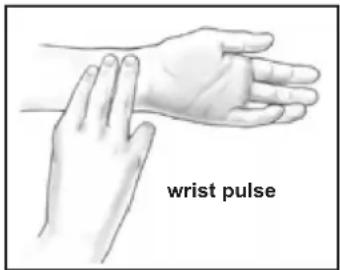
Measure your heart rate periodically during your workout by stopping the exercise but continuing to move your legs or walk around. Place two or three fingers on your wrist and take a six second heartbeat count. Multiply the results by ten to find your heart rate. For example, if your six second heartbeat count is 14, your heart rate is 140 beats per minute. A six second count is used because your heart rate will drop rapidly when you stop exercising. Adjust the intensity of your exercise until your heart rate is at the proper level.
Target Heart Rate Zone Estimated by Age*
| Age | Target Heart Rate Zone(55%-90% of Maximum Heart Rate) | Average MaximumHeart Rate 100% |
| 20 years | 110-180 beats per minute | 200 beats per minute |
| 25 years | 107-175 beats per minute | 195 beats per minute |
| 30 years | 105-171 beats per minute | 190 beats per minute |
| 35 years | 102-166 beats per minute | 185 beats per minute |
| 40 years | 99-162 beats per minute | 180 beats per minute |
| 45 years | 97-157 beats per minute | 175 beats per minute |
| 50 years | 94-153 beats per minute | 170 beats per minute |
| 55 years | 91-148 beats per minute | 165 beats per minute |
| 60 years | 88-144 beats per minute | 160 beats per minute |
| 65 years | 85-139 beats per minute | 155 beats per minute |
| 70 years | 83-135 beats per minute | 150 beats per minute |
* For cardiorespiratory training benefits, the American College of Sports Medicine recommends working out within a heart rate range of 55% to 90% of maximum heart rate. To predict the maximum heart rate, the following formula was used: 220 - Age = predicted maximum heart rate
WARM-UP and COOL-DOWN
Warm-Up The purpose of warming up is to prepare your body for exercise and to minimize injuries.
Warm up for two to five minutes before strength training or aerobic exercising. Perform activities raise your heart rate and warm the working muscles. Activities may include brisk walking, jogging, jumping jacks, jump rope, and running in place
Stretching
Stretching Stretching while your muscles are warm after a proper warm-up and again after strength or aerobic training session is very important. Muscles stretch more easily at these times because of their elevated temperature, which greatly reduces the risk of injury. Stretches should be held for 15 to 30 seconds. Do not bounce.
Suggested Stretching Exercises

natural_image
Simple line drawing of a person in a wide stance (no text or symbols)Lower Body Stretch
Place feet shoulder-width apart and lean forward. Keep this position for 30 seconds using the body as a natural weight to stretch the backs of the legs. DO NOT BOUNCE! When the pull on the back of the legs lessens, gradually try a lower position.

natural_image
Line drawing of a person performing a forward bend yoga pose (no text or symbols)Floor Stretch
While sitting on the floor, open the legs as wide as possible. Stretch the upper body toward the knee on the right leg by using your arms to pull your chest to your thighs. Hold this stretch 10 to 30 seconds. DO NOT BOUNCE! Do this stretch 10 times. Repeat the stretch with the left leg.

natural_image
Line drawing of a seated human figure in motion (no text or symbols)Bent Torso Pulls
While sitting on the floor, have legs apart, one leg straight and one knee bent. Pull the chest down to touch the thigh on the leg that is bent, and twist at the waist. Hold this position at least 10 seconds. Repeat 10 times on each side.
natural_image
Line drawing of a person in a forward bend yoga pose (no text or symbols)Bent Over Leg Stretch
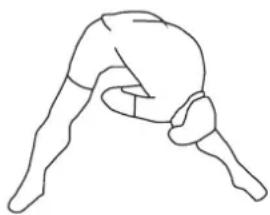
Stand with feet shoulder-width apart and lean forward as illustrated. Using the arms, gently pull the upper body towards the right leg. Let the head hang down. DO NOT BOUNCE! Hold the position a minimum of 10 seconds. Repeat pulling the upper body to the left leg. Do this stretch several times slowly.
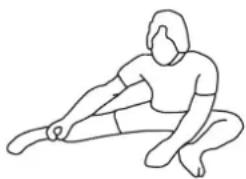
natural_image
Line drawing of a person in a seated posture (no text or symbols)Remember to always check with your physician before starting any exercise program.
Cool-Down The purpose of cooling down is to return the body to its normal, or near normal, resting state at the end of each exercise session. A proper cool-down slowly lowers your heart rate and allows blood to return to the heart. Your cool-down should include the stretches listed above and show completed after each strength training session.
FRONT

PART# PART NAME QTY
1 Main Frame 1
2 Rear Stabilizer 1
3 Left Pedal Arm 1
4 Right Pedal Arm 1
5 Pulley 1
6 Bearing (6003) 2
7 Pulley Spacer 1
8 C Ring (16mm) 4
10 V-Ribbed Belt 1
11 Flywheel 1
12 Bearing (6000) 2
13 Bearing Spacer 1
14 Flywheel Spacer 1
15 Spacer Cap 2
16 Flywheel Shaft Bolt (M10 x 1.5 x 82mm) 1
17 Eyebolt 1
18 Tension Bracket 1
19 Brake Brace 1
20 Spring 1
21 Tension Knob 1
22 Meter 1
23 Sensor Wire 1
24 Magnet 1
25 Square Plug (25mm x 25mm) 1
26 Left Cover 1
27 Right Cover 1
29 Flange Bolt (M8 x 1.25 x 15mm) 2
30 Crank Spacer 2
31 Large Washer (16.3 x 24mm) 4
32 Pedal Arm Bushing 4
33 Left Pedal Cap 1
34 Right Pedal Cap 1
35 Square Plug (30mm x 30mm) 2
36 Roller 2
37 Base Board 1
38 Left Foam Pad 1
39 Right Foam Pad 1
40 Stand 2
41 Oval Endcap (30mm x 60mm) 2
42 Carriage Bolt (M10 x 1.5 x 43mm) 2
43 Bolt, Button Head (M6 x 1 x 13mm) 3
44 Bolt, Button Head (M6 x 1 x 17mm) 2
45 Bolt, Button Head (M8 x 1.25 x 20mm) 4
46 Bolt, Button Head (M8 x 1.25 x 42mm) 2
47 Screw, Round Head (M3.4 x 8mm) 2
48 Screw, Round Head (M4 x 25mm) 10
49 Nylock Nut (M6 x 1) 9
PARTS LIST
PART#
50 Nylock Nut (M8 x 1.25) 2
51 Nylock Nut (M10 x 1.5) 3
52 Nut (M10 x 1.5) 1
53 Washer (M10) 1
54 Wavy Washer (M16) 2
55 Warning Label 1
56 Wrench 1
57 Allen Wrench (6mm) 1
58 Manual 1
59 Bolt, Button Head (M8 x 1.25 x 16mm) 2
60 Wavy Washer (M17) 1
61 C Ring (17mm) 1
62 Pu Bushing 1
63 Square Plug (38mm x 38mm) 1
64 Crank Cap 2
65 Large Tension Bracket 1
66 Double Eyebolt 1
68 Crank 2
69 Axle 1
QTY
WARRANTY
Stamina Products, Inc. warrants that this product will be free from defects in materials and workmanship under normal use, service and proper operation for a period of 90 days on the parts and one year on the frame from the date of the original purchase from an authorized retailer. THIS WARRANTY SHALL NOT APPLY TO ANY PRODUCT WHICH HAS BEEN SUBJECT TO COMMERCIAL USE, ABUSE, MISUSE, ALTERATION OF ANY TYPE OR CAUSE OR TO ANY DEFECT OR DAMAGE CAUSED BY REPAIR, REPLACEMENT, SUBSTITUTION OR USE WITH PARTS OTHER THAN PARTS PROVIDED BY STAMINA PRODUCTS, INC. Commercial use includes use of the product in athletic clubs, health clubs, spas, gymnasiums, exercise facilities, and other public or semipublic facilities whether or not the product's use is in furtherance of a profit making enterprise, and all other use which is not for personal, family, or household purposes.
To implement this limited warranty, send a written notice stating your name, date, and place of purchase and a brief description of the defect along with your receipt to Stamina Products, Inc. P.O. Box 1071, Springfield Missouri, USA, 65801-1071, or email us at customerservice@staminaproducts.com, or call us at 1-800-375-7520. If the defect is covered under this limited warranty, you will be requested to return the product or part to us for free repair or replacement at our option. NO ACTION FOR BREACH OF THIS LIMITED WARRANTY MAY BE COMMENCED MORE THAN ONE (1) YEAR AFTER THE DATE THE ALLEGED BREACH WAS OR SHOULD HAVE BEEN DISCOVERED. NO ACTION FOR BREACH OF ANY IMPLIED WARRANTY MAY BE COMMENCED MORE THAN ONE (1) YEAR AFTER DELIVERY OF THE PRODUCT TO THE PURCHASER. This limited warranty is not transferable. IF ANY PART OF THE PRODUCT IS NOT IN COMPLIANCE WITH THIS LIMITED WARRANTY OR ANY IMPLIED WARRANTY, THE REMEDY OF REPAIR OR REPLACEMENT IS THE EXCLUSIVE REMEDY AVAILABLE TO YOU. In the event that the purchaser makes any claim under this limited warranty or any implied warranty, the Warrantor reserves the right to require the product to be returned for inspection, at the purchaser's expense, to the Warrantor's premises in Springfield, Missouri. Return of the enclosed warranty registration card is not required for warranty coverage, but is merely a way of establishing the date and place of purchase.
Stamina Products, Inc. SHALL NOT BE LIABLE FOR THE LOSS OF USE OF ANY PRODUCT, LOSS OF TIME, INCONVENIENCE, COMMERCIAL LOSS OR ANY OTHER INDIRECT, CONSEQUENTIAL, SPECIAL OR INCIDENTAL DAMAGES DUE TO BREACH OF THE ABOVE WARRANTY OR ANY IMPLIED WARRANTY.
This limited warranty is the only written or express warranty given by Stamina Products, Inc. This warranty gives you specific legal rights, and you may also have other legal rights which vary from state to state. ANY OTHER RIGHT WHICH YOU MAY HAVE, INCLUDING ANY IMPLIED WARRANTY OR MERCHANTABILITY OR FITNESS FOR A PARTICULAR PURPOSE, IS LIMITED IN DURATION TO THE DURATION OF THIS WARRANTY.
The laws in some jurisdictions restrict the rights of manufacturers and distributors of consumer goods to disclaim or limit implied warranties and consequential and incidental damages with respect thereto. If any such law is found to be applicable, the foregoing disclaimers and limitations of and on implied warranties and consequential and incidental damages with respect thereto shall be disregarded and shall be deemed not to have been made to the extent necessary to comply with such legal restriction.
NOTES
TO CONTACT CUSTOMER SERVICE
For your convenience, Stamina's customer service representatives can be reached by email at customerservice@staminaproducts.com or by phone at 1-800-375-7520 (in the U.S.). Our customer service representatives are available Monday through Thursday from 7:30 a.m. until 5:00 p.m., and Friday 8:00 a.m. until 3 p.m. Central Time.

ONLINE
CUSTOMER SERVICE
customerservice@staminaproducts.com www.staminaproducts.com

TELEPHONE
CUSTOMER SERVICE
Tel: 1 (800) 375-7520

FAX
CUSTOMER SERVICE
Fax: (417) 889-8064

MAIL
STAMINA PRODUCTS, INC.
ATTN: Customer Service
P.O. Box 1071 Springfield, MO. 65801-1071
Would you like to recieve email information or special offers from Stamina Products? Register at contact.staminaproducts.com
TO REGISTER YOUR PRODUCT
To enact your warranty, please register your product by going to register.staminaproducts.com. Please have your product model number (printed on the cover of this owner's manual) and the serial number (printed on the black and white sticker on your product) ready.
If you don't have internet access, you can call customer service at 1-800-375-7520, or fill out and mail the product registration form below to Stamina Products, Inc.; P.O. Box 1071; Springfield, MO 65801-1071.
PRODUCT REGISTRATION FORM
Stamina Products, Inc.
P.O. Box 1071
Springfield, MO 65801-1071
Model Number:
Serial Number:
Product Name:
Place Purchased:
Date of Purchase:
First Name:
City:
Email Address:
Would you like to receive email information or special offers from Stamina Products?* ____ Yes ____ No *If yes, be sure your email address is included above.

Detach and Mail or Fax the Form Above

TO ORDER PARTS
If there are missing or damaged parts, you can go to parts.staminaproducts.com and order those parts. If you have questions, please contact customer service. Do not return the product. To order parts by mail, fill out the sheet below and fax it to 417-889-8064. The part will be mailed to your address.

Detach and Mail or Fax the Form Below

PARTS ORDER FORM
Stamina Products, Inc.
P.O. Box 1071
Springfield, MO 65801-1071
Mr./Ms:
Address:
City:
IMPORTANT: We must have your phone number to process the order!
Phone #: (
Date of Purchase:
Model #:
Purchased From:
IMPORTANT: Before filling out the form below make sure you have the correct information. Refer to the parts list to make sure you're ordering the right parts!
| PART # | DESCRIPTION | QUANTITY | |
| EXAMPLE: | Rear Unit Assembly | 1 | |

- WARNING
- TABLE OF CONTENTS
- SAFETY INSTRUCTIONS
- Call Us First
- Customer Service
- (800) 375-7520
- www.staminaproducts.com
- THANK YOU FOR PURCHASING THE
- InMotion® E1000
- BEFORE YOU BEGIN
- EQUIPMENT WARNING, CAUTION & NOTICE LABELS
- HARDWARE IDENTIFICATION CHART
- Part Number and Description Qty
- ASSEMBLY INSTRUCTIONS
- STEP 1
- STEP 2
- STEP 3
- SET UP INSTRUCTIONS
- FUNCTION INSPECTION:
- OPERATIONAL INSTRUCTIONS
- USING THE FITNESS METER
- FUNCTION BUTTON:
- FUNCTIONS:
- BATTERY
- PRECAUTIONS FOR USING
- EXERCISE WORKOUT
- FORWARD AND REVERSE
- SITTING WORKOUT
- LOAD LEVEL ADJUSTMENT
- STORAGE
- MAINTENANCE
- CONDITIONING GUIDELINES
- WARM-UP and COOL-DOWN
- Stretching
- Suggested Stretching Exercises
- Lower Body Stretch
- Floor Stretch
- Bent Torso Pulls
- Bent Over Leg Stretch
- Remember to always check with your physician before starting any exercise program.
- PART# PART NAME QTY
- PARTS LIST
- PART#
- QTY
- WARRANTY
- NOTES
- TO CONTACT CUSTOMER SERVICE
- TO REGISTER YOUR PRODUCT
- PRODUCT REGISTRATION FORM
- TO ORDER PARTS
- PARTS ORDER FORM
Brand : Stamina
Model : InMotion E1000
Category : Elliptical bike