SF-607H - Air conditioner SPT - Free user manual and instructions
Find the device manual for free SF-607H SPT in PDF.


| Type | Evaporative Air Cooler with Humidifier |
| Model | SF-607H |
| Rated Voltage | 120V AC |
| Rated Frequency | 60 Hz |
| Rated Power | 65 W |
| Water Consumption | 0.6-0.7 L/h |
| Water Tank Capacity | 10 L |
| Air Velocity | 8 m/s |
| Dimensions (W x D x H) | 15.4 x 11.8 x 25.2 in (39.1 x 30.0 x 64.0 cm) |
| Net Weight | 16.5 lbs (7.5 kg) |
| Functions | Fan, Evaporative Cooling, Ultrasonic Humidifier |
| Fan Speeds | High, Medium, Low, Natural, Sleep |
| Timer Range | 0.5 to 7.5 hours |
| Swing Operation | 60° horizontal oscillation |
| Cooling Pad Type | 3D honeycomb |
| Water Tank Material | Antibacterial plastic |
| Portability | Casters included |
| Remote Control | Included |
| Recommended Cleaning Interval | Every 2 weeks |
| Operational Temperature Range | 32°F to 104°F (0°C to 40°C) |
| Warranty | 1 year limited |
Frequently Asked Questions - SF-607H SPT
User questions about SF-607H SPT
0 question about this device. Answer the ones you know or ask your own.
Ask a new question about this device
Download the instructions for your Air conditioner in PDF format for free! Find your manual SF-607H - SPT and take your electronic device back in hand. On this page are published all the documents necessary for the use of your device. SF-607H by SPT.
USER MANUAL SF-607H SPT
Evaporative Air Cooler with Humidifier
Model SF-607H
natural_image
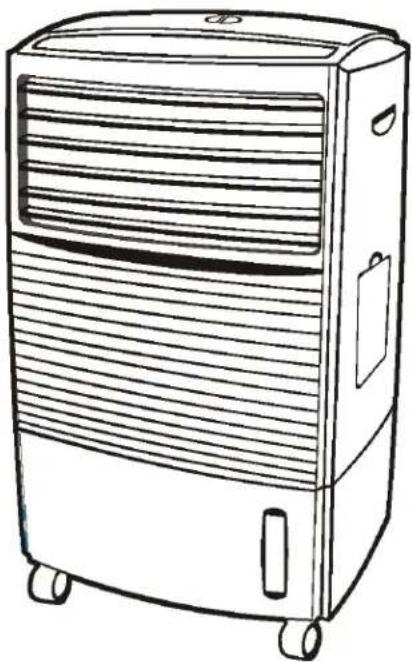
Line drawing of a portable air conditioner unit with wheels and ventilation slots (no text or symbols)READ AND SAVE THIS INSTRUCTION MANUAL
Functions
- Functions: Fan / Fan + Evaporative Cooling / Fan + Evaporative Cooling + Ultrasonic Humidifier
- Anti-bacterial water tank
- 3D honeycomb cooling pad for enhanced cooling performance
- Water-out indicator
- Three fan speeds with Sleep and Natural modes
- Automatic louver swing
- Off-Timer: 0.5 to 7.5 hours
- Casters for portability
- Remote control
Contents
- Important Safety Notes
- Specifications
- Parts Name
● Product Appearance - Control Panel
- Operation
- Maintenance
- Trouble Shooting
- Your Guarantee
Please read the instruction carefully prior to use.
Important Safety Notes
- Make sure the correct power (120V/60 Hz) is supplied.
- To avoid electrical shock or personal injury, do not operate this appliance with a damaged cord or plug or after the appliance malfunctions or has been damaged in any manner. Return the unit to Sunpentown (see warranty) for examination, repair or adjustment.
- Unplug the appliance when not in use and before maintenance or servicing.
- The operational temperature range to run this unit is between 32^ F- 104^ F. Do not operate when the temperature is above or below this range. Do not let unit sit under direct sunlight.
- When the tank is full, move unit from the side slowly to prevent water from spilling.
- Do not place heavy objects on the machine.
- Close supervision is necessary when this appliance is used by or near children.
- When unplugging, pull from the plug and not on the cord.
- Turn off the unit when adding water.
- Turn off and unplug unit before cleaning.
- To avoid excessive dampness, do not use the Evaporative Cooling/Humidifying function for extended period of time, especially in areas with poor air circulation.
- When you have not used or plan on not using the unit for a long period of time, please unplug the power cord, drain water, clean unit and store in a cool, dry place.
- Please change water often to keep the water tank clean. It is recommended to change the water once every 1 \~ 2 days.
This appliance is not intended for use by person (including children) without operation knowledge or control ability, unless they have been given supervision. The person who operates this appliance is responsible for its safety and usage.
Specifications
| Model Rated Voltage | Rated Frequency | Rated Power | Water Consumption | Water Tank Capacity | Speed | Dimensions N.W. | |
| SF-607H ~120V | 60Hz | 65W | 0.6-0.7L/h | 10L | 8m/s | 15.4"x11.8"x25.2" | 16.51bs |
Parts' Name
- Product Appearance
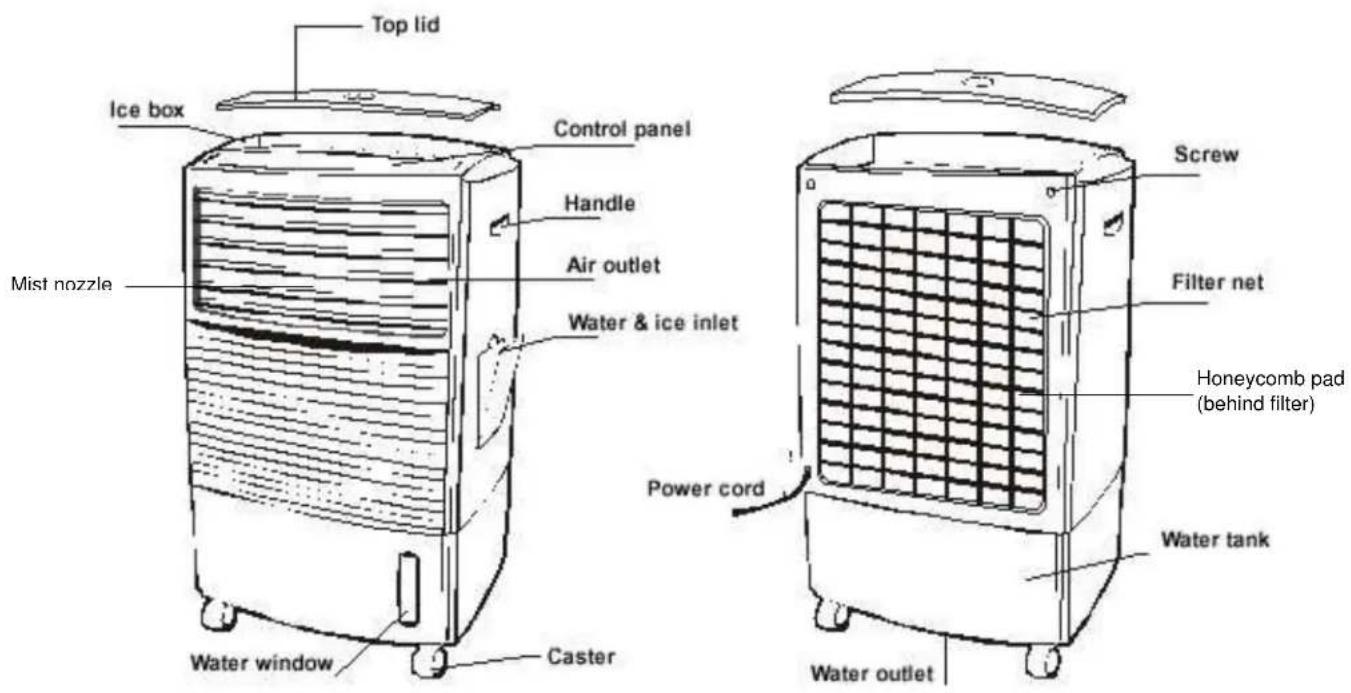
Front view Rear view
- Control Panel

Operation
Please fill the water tank as instructed below before turning on the unit.
Operating instructions:
1. ON/OFF button
Press once to turn ON unit, the power indicator will be on. Press again to turn OFF unit.
2. COOL AIR (HUMIDIFY) button
o Press once to turn on the Evaporative Cooling function, the Cool indicator light is on.
- Press again to turn on Evaporative Cooling + Humidifying functions, the Cool and Humidify indicator lights are on.
o Press again to turn off cooling functions and unit runs in normal fan mode.
- When water level falls below “Empty”, Cool/Humidify function will automatically shut off and the Cool/Humidify indicator will flash. Please turn off this function or add water. Once water is added, indicator will stop flashing and cooling function will automatically resume.
3. SPEED button (total of 5 settings to choose from)
When turned ON, the unit starts on High (the H indicator light is on), to adjust:
o Press once for Medium speed (the M indicator light is on)
o Press again for Low speed (the L indicator light is on)
o Press again for Natural mode (the Natural indicator light is on)
Natural mode operates on preset computer program, alternating between different speeds to imitate natural wind.
o Press again for Sleep mode (the Sleep indicator light is on)
Sleep mode automatically decreases the fan speed.
4. SWING button
Press the swing button to select the swinging function:
o Press once to turn on the swinging function (indicator is on), which can cover 60° horizontally
o Press again for fixed direction (indicator is off)
5. TIMER button
o Sets timer-off in increment of 0.5 hours. Timer can be set between 0.5 to 7.5 hours.
○ Adding the numbers indicated equals the total time for the timer. For example: when the 0.5 and 1 indicators are illuminated, the timer has been set for 1.5 hours; when the 0.5, 1, 2 and 4 indicators are illuminated, the timer has been set for 7.5 hours.
○ If none of the timer indicators are on, the unit will run continuously.
6. WATER FILLING INSTRUCTIONS
- Please be sure the power is OFF before adding water.
o Fill the water tank by pouring water and adding ice into the Ice & Water Inlet.
o The water level can be seen from the water indicator located at the lower right front panel.
o Make sure water is filled above the EMPTY mark on the water indicator.
o Pour in 2/3 of water (6 Liters) and 1/3 of ice (3 Liters) for best cooling effect.
o You can also put ice in the "Ice Box" located on the top of the unit for extra cooling (optional). - DO NOT add more than 10 Liters of water into the water tank. The water indicator should never rise above “Maximum” or the water tank will overflow.
NOTE: When operating the unit for the first time, please add water to the Maximum level.
Maintenance
Cleaning the filter net and water tank
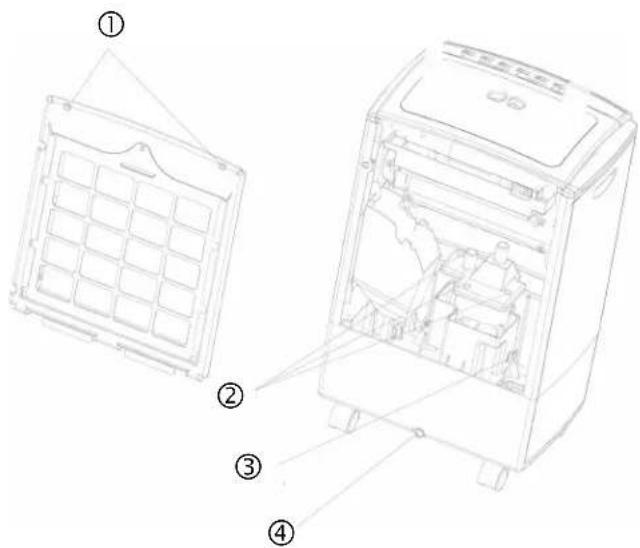
With use, the filter and honeycomb pad will become clogged with dust, which will greatly affect the unit's performance. Sometimes mold and mildew may also occur, due to lack of water changes. To ensure best humidifying and purifying effect, please clean the filtration system and tanks once every two weeks.
Always turn unit off and disconnect power before any maintenance.
- Remove the two screws for filter, pull out the filter and rinse with clean water and mild detergent. Wash the honeycomb pad with clean water only. A soft brush may be used for cleaning.
- This is the water tank for the humidifier. Remove the three screws to access the inside of tank. Clean the water tank with brush or cloth.
- Unplug the rubber stopper to release the dirty water from humidifier tank.
- Clean the main water tank with brush or cloth. Dirty water in the tank can be released through the water outlet.
- Replace parts in reverse order.
Note: During cleaning, do not tilt the unit, place on its side or up-side-down, water may get into the electrical components and cause malfunction.
Troubleshooting
| Problem Reasons Solution | ||
| Not blowing air | Power is not turned onTimer fulfilledUnit is broken/defective | Turn on power, check power connectionSwitch off Timer modeContact Sunpentown |
| Unit will not turn off | "On/Off" button not pressedUnit is broken/defective | Press the “On/Off” buttonContact Sunpentown |
| Unit makes noise | There are objects in itNo water in water tankFaulty motorAir wheel/fan is loose | Take off rear panel and filter net, remove foreign object(s)Add waterContact SunpentownContact Sunpentown |
| Not humidifying | Water level low/emptyFaulty water pump | Add water to Maximum levelContact Sunpentown |
| No swing | “Swing” button not pressedFaulty leaf motor | Press the “Swing” buttonContact Sunpentown |
SPT®
Your Guarantee
If this product is found to be faulty as a result of faulty materials or workmanship within one year from date of purchase, it will be repaired free of charge.
This guarantee is subject to the following terms:
- Sunpentown must be notified of the fault.
- Proof of purchase must be presented to Sunpentown's nominated representative.
• The warranty will be void if the product if modified, misused or repaired by an unauthorized person. - The warranty after repair will not be extended beyond the original one-year period.
- All replacement parts will be new or reconditioned.
- Parts, which are replaced, become the property of Sunpentown.
- The warranty applies for the use of the product in the USA only.
What is NOT COVERED:
- Warranty does not include freight charges.
- Damage due to installation error, product abuse and/or misuse.
- Incidental or consequential damage caused by possible defects with this product.
- Labor cost incurred for the installation and/or removal of a possible defective unit.
• Damage to product caused by improper power supply voltage, accident, fire, floods or acts of nature. - Failure of product resulting from unauthorized modifications to the product.
- Improper installation or failure to perform the necessary maintenance.
- Normal wear and tear on parts or replacement of parts designed to be replaced.
- Damage to personal property from use of product.
• Replacement or repair of household fuses, circuit breakers, wiring or plumbing.
This GUARANTEE is in addition to your Statutory Rights
SUNPENTOWN INTERNATIONAL INC.
14625 Clark Ave. City of Industry, CA 91745
Tel: 800-330-0388
service@sunpentown.com
www.sunpentown.com
- Evaporative Air Cooler with Humidifier
- Functions
- Contents
- Important Safety Notes
- Parts' Name
- Operation
- Operating instructions:
- ON/OFF button
- COOL AIR (HUMIDIFY) button
- SPEED button (total of 5 settings to choose from)
- SWING button
- TIMER button
- WATER FILLING INSTRUCTIONS
- Maintenance
- Always turn unit off and disconnect power before any maintenance.
- SPT®
- Your Guarantee
Brand : SPT
Model : SF-607H
Category : Air conditioner