
KDock-4 - Computer Accessories Kramer - Free user manual and instructions
Find the device manual for free KDock-4 Kramer in PDF.


| Product Type | USB-C Hub Multiport Adapter |
| Brand | Kramer |
| Model | KDock-4 |
| Connectivity | USB-C Male to host |
| Video Outputs | 1x VGA (1920x1080@60Hz max), 1x HDMI (3840x2160@30Hz max), 1x DP (3840x2160@30Hz max) |
| Audio Output | 3.5mm mini jack (stereo, 48K/44.1KHz) |
| USB Ports | 2x USB-A 3.0 (5Gbps, BC1.2 charging 5V/1.5A), 1x USB-A 2.0 (480Mbps), 1x USB-C (power pass-through 100W) |
| Card Reader | SD and microSD (up to 832Mbps, version 3.0/2.0) |
| Ethernet | RJ-45 Gigabit (10/100/1000M), Wake-on-LAN, PXE boot |
| Power Delivery | Up to 100W (5V/1A to 20V/5A) via USB-C |
| Maximum Resolution | 3840x2160@30Hz (single display) |
| Dimensions (HxWxD) | 26.0 x 9.0 x 2.5 cm (10.2 x 3.5 x 1.0 in) |
| Weight | 361 g (0.8 lbs) |
| Material | Aluminum enclosure with 20cm/7.87" flexible USB-C cable |
| Operating Temperature | 0° to +40°C (32° to 104°F) |
| Storage Temperature | -10° to +55°C (14° to 131°F) |
| Safety Compliance | CE, RoHS, FCC |
| Warranty | Not specified (contact Kramer) |
| Device Holder | Flip-up holder for small host devices (phones, tablets) |
| Compatibility | MacBook, laptops with USB-C, mobile phones, tablets |
Frequently Asked Questions - KDock-4 Kramer
User questions about KDock-4 Kramer
0 question about this device. Answer the ones you know or ask your own.
Ask a new question about this device
Download the instructions for your Computer Accessories in PDF format for free! Find your manual KDock-4 - Kramer and take your electronic device back in hand. On this page are published all the documents necessary for the use of your device. KDock-4 by Kramer.
USER MANUAL KDock-4 Kramer
Installation Instructions
MODEL:
KDock-4
USB-C Hub Multiport Adapter







P/N:

2900-301521QS
Rev:

4

SAFETY WARNING
Disconnect the unit from the power supply before opening and servicing
For the latest information on our products and a list of Kramer distributors, visit our Web site where updates to these installation instructions may be found. We welcome your questions, comments, and feedback.
KDock-4 USB-C Hub Multiport Adapter
Introduction
Congratulations on purchasing your Kramer KDock-4 USB-C Hub Multiport Adapter.
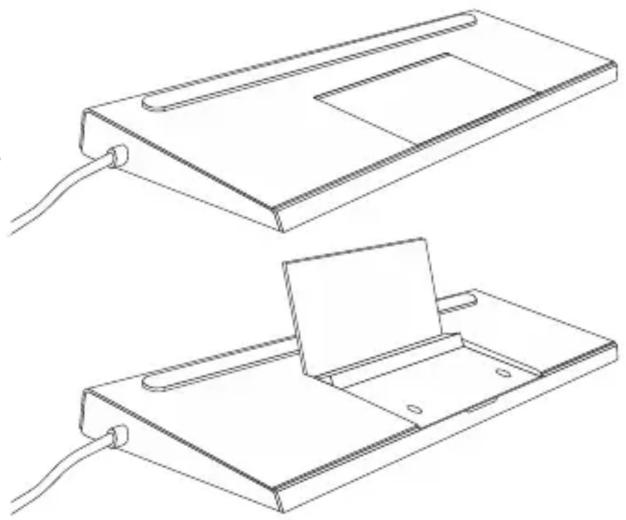
KDock-4 USB-C Hub Multiport Adapter supports HDMI™, DP and VGA video outputs for up to three displays, 3 USB ports, 1 USB-C port, and SD & Micro SD card readers. It is specially designed to support a mobile device on top. it is an ideal accessory for MacBook, laptops equipped with USB Type-C, mobile phones, and tablets.
For small host devices (e.g., phones and tablets), open the flip-up device holder.
natural_image
Technical line drawings of two electronic devices with connectors and a central panel (no text or symbols)Get to Know Your KDock-4

| # | Feature | Function |
| 1 | 3.5mm Mini Jack | Connect to headphones.48K/44.1KHz audio stereo sampling rate. |
| 2 | VGA Connector | Connect to a VGA acceptor. |
| 3 | SD | SD support read/write transmission speed up to 832Mbps (104MB/s). Version: 3.0/2.0. |
| 4 | microSD | microSD support read/write transmission speed up to Speed: 832Mbps (104MB/s). Version: 3.0/2.0. |
| 5 | Ethernet RJ-45 Connector | Ethernet RJ-45 Connector - To directly connect your mobile device or laptop to the Ethernet with an RJ-45 1000M (Gigabit)/100M/10M cable. |
| 6 | 2 USB-A 3.0 Connector | Charging: BC1.2 (5V 1.5A) .Speed: 5.0Gbps (640MB/s). |
| 7 | USB-A 2.0 Connector | Speed: 480Mbps (60MB/s). |
| 8 | 4K DP Connector | Connect to a DP acceptor. |
| 9 | 4K HDMI Connector | Connect to an HDMI acceptor. |
| 10 | USB-C Female | Power pass through 100W (5V/1A-20V/5A) fast charge.Insert a device with a type C (male) plug into the type C port (to recharge it). |
| 11 | USB-C Male | Connect to host (PC, phone, or tablet). |
Technical Specifications
| Inputs | 1 USB | On a male USB-C connector. |
| Outputs | 1 VGA | On a female 15-pin HD Connector.1920x1080P@60Hz when a single display is attached to the device.1920x1080P@60Hz when two displays are attached to the device.1280x720P@60Hz when three displays are attached to the device.Backwards compatible with lower resolutions. |
| 1 HDMI | On a female HDMI connector.3840x2160P@30Hz when a single display is attached to the device.1920x1080P@60Hz when two displays are attached to the device.1280x720P@60Hz when three displays are attached to the device.Backwards compatible with lower resolutions. | |
| 1 DP | On a female DisplayPort connector.3840x2160P@30Hz when a single display is attached to the device.1920x1080P@60Hz when two displays are attached to the device.1280x720P@60Hz when three displays are attached to the device.Backwards compatible with lower resolutions. | |
| Ports | 4 USB | 2 female USB-A 3.0 connectors for USB link extension. |
| 1 female USB-A 2.0 connector for USB link extension. | ||
| 1 female USB-C connector for charging. | ||
| 1 Ethernet | On an RJ-45 connector. | |
| 1 SD | On an SD card port. | |
| 1 microSD | On a microSD card port. | |
| 1 Unbalanced Stereo | On a 3.5mm mini jack | |
| Video | Max Bandwidth | 10.2Gbps (3.4Gbps per graphic channel). |
| Max Resolution | 3840x2160P@30Hz resolution. | |
| Compliance | HDMI and HDCP 1.4. | |
| Extended Ethernet | Max Transmission Bandwidth | 1000M (Gigabit)/100M/10M.Includes Wake-on-LAN (WoL).Single Mac address.PXE boot. |
| Power | Consumption | 100W. |
| Environmental Conditions | Operating Temperature | 0° to +40°C (32° to 104°F). |
| Storage Temperature | -10° to +55°C (14° to 131°F). | |
| Humidity | 5% to 90%, RHL non-condensing. | |
| Regulatory Compliance | Safety | CE. |
| Environmental | RoHs, FCC. | |
| Enclosure | Type | Aluminum with built-in 20cm/7.87" flexible USB-C cable. |
| General | Net Dimensions | 26.0cm x 9.0cm x 2.5cm (10.2" x 3.5" x 1.0"). |
| Net Weight | 361g (0.8lbs) approx. |
Specifications are subject to change without notice at www.kramerav.com
The terms HDMI, HDMI High-Definition Multimedia Interface, and the HDMI Logo are trademarks or registered trademarks of HDMI Licensing Administrator, Inc.
Brand : Kramer
Model : KDock-4
Category : Computer Accessories