
L00670 - Meat Grinder Globe - Free user manual and instructions
Find the device manual for free L00670 Globe in PDF.


| Product Type | Power Drive Unit for Meat Grinder |
| Brand | Globe |
| Model Compatibility | GPD-L, GPD-H (compatible with L00670 meat grinder) |
| Material | Stainless Steel Housing |
| Safety Features | Safety key, ON-OFF switch, reset button, grounded plug |
| Power Cord | 3-prong grounded plug |
| Electrical Requirements | 120V AC, 60Hz (typical) |
| Cleaning Method | Wipe with mild detergent; do not immerse or use abrasive materials |
| Sanitizing | Use quaternary ammonium or other approved sanitizers per local codes |
| Warranty | 1 year parts and labor |
| Accessories (sold separately) | Meat Chopper Attachment (XMCA-SS), Adjustable Slicer Plate (XASP), Plate Holder (XPH), etc. |
| Installation Requirements | Level, non-skid surface; proper grounding |
| Usage | Commercial food preparation |
| Care Frequency | Clean and sanitize every 4 hours of use |
| Compliance | Intertek (ETL) listed |
| Manufacturer Contact | 1-866-260-0522, www.globefoodequip.com |
| Warranty Registration | Online at www.globefoodequip.com/support/warranty-registration-form |
Frequently Asked Questions - L00670 Globe
User questions about L00670 Globe
0 question about this device. Answer the ones you know or ask your own.
Ask a new question about this device
Download the instructions for your Meat Grinder in PDF format for free! Find your manual L00670 - Globe and take your electronic device back in hand. On this page are published all the documents necessary for the use of your device. L00670 by Globe.
USER MANUAL L00670 Globe
natural_image
Exterior view of a modern stainless steel coffee maker with visible branding (Globe logo)Model GPD-L

Model #: ____
Serial #: ____
Date of
Purchase:

Intertek

Intertek
Instruction Manual for Power Drive Unit Models GPD-L and GPD-H
For all after sales support, visit www.globefoodequip.com
- Complete the Warranty Registration
• Find an Authorized Servicer
• View Parts Catalogs
For additional Technical Support call Globe at 1-866-260-0522.
- IMPORTANT SAFETY NOTICE -
This manual contains important safety instructions which must be strictly followed when using this equipment.
Maintain this manual for reference.
INDEX
ATTENTION OWNERS AND OPERATORS....4
KEY COMPONENTS OF THE POWER DRIVE UNIT....5
GLOBE SAFETY TIPS 6
INSTALLATION AND PROPER GROUNDING ....7
OPERATING INSTRUCTIONS....8
CLEANING & SANITIZING....9-10
TROUBLESHOOTING 11
POWER DRIVE UNIT ACCESSORIES....11
LIMITED POWER DRIVE UNIT WARRANTY....12
2153 DRYDEN RD
DAYTON, OH 45439
PHONE: 937-299-5493
TOLL FREE: 800-347-5423
FAX: 937-299-8623
E-MAIL: info@globefoodequip.com
WEBSITE: www.globefoodequip.com
GLOBE FOOI
ATTENTION OWNERS AND OPERATORS
This equipment is designed to provide safe and productive processing of food products as long as the equipment is used in accordance with the instructions in this manual and is properly maintained. Importantly, unless the operator is adequately trained and supervised there is a possibility of serious injury. Owners of this equipment bear the responsibility to make certain that this equipment is used properly and safely to strictly follow all the instructions contained in this manual and the requirements of local, state or federal law.
Owners should not permit anyone to touch this equipment unless they are over 18 years old, are adequately trained and supervised, and have read and understand this manual. Owners should also ensure that no customers, children, visitors or other unauthorized personnel come in contact with this equipment. Please remember that we cannot anticipate every circumstance or environment in which our equipment will be operated. It is the responsibility of the owner and the operator to remain alert to any hazards posed by the function of this equipment and all moving parts. If you are ever uncertain about a particular task or the proper method of operating this equipment, ask your supervisor.
To prevent illness caused by the spread of food-borne pathogens, it is important to properly clean and sanitize the entire power drive unit as any surface of the power drive unit can become contaminated. It is the responsibility of the power drive unit owner/operator to follow all guidelines, instructions and laws as established by your local and state health departments and the manufacturers of chemical sanitizers.
When cleaning your power drive unit, pay particular attention to cracks, broken seams and any area that may collect food debris. If your power drive unit or any of its parts, is damaged or broken, it may become more difficult to properly clean and sanitize the unit. If your power drive unit is damaged or needs repair, contact an experienced service individual immediately to ensure the power drive unit can be properly sanitized. If you have any questions, please contact Globe at 937-299-5493.
Throughout the manual you will see warnings to help alert you to potential hazards and to help promote safe use of this equipment.
Warnings affecting your personal safety are indicated by:

or

Warnings related to possible damage to the equipment are indicated by:

Make certain that the instruction manual is available for easy reference by any operator. An English language warning label has been placed on the power drive unit. French warning labels are available upon request. If the warning label or this manual are misplaced, damaged, or illegible, or if you require additional copies, please contact your nearest representative or the factory directly for these items at no charge.
Please remember that neither this manual nor the warning labels replace the need to be alert, to properly train and supervise operators, and to use common sense when using this equipment.
KEY COMPONENTS OF THE POWER DRIVE UNIT
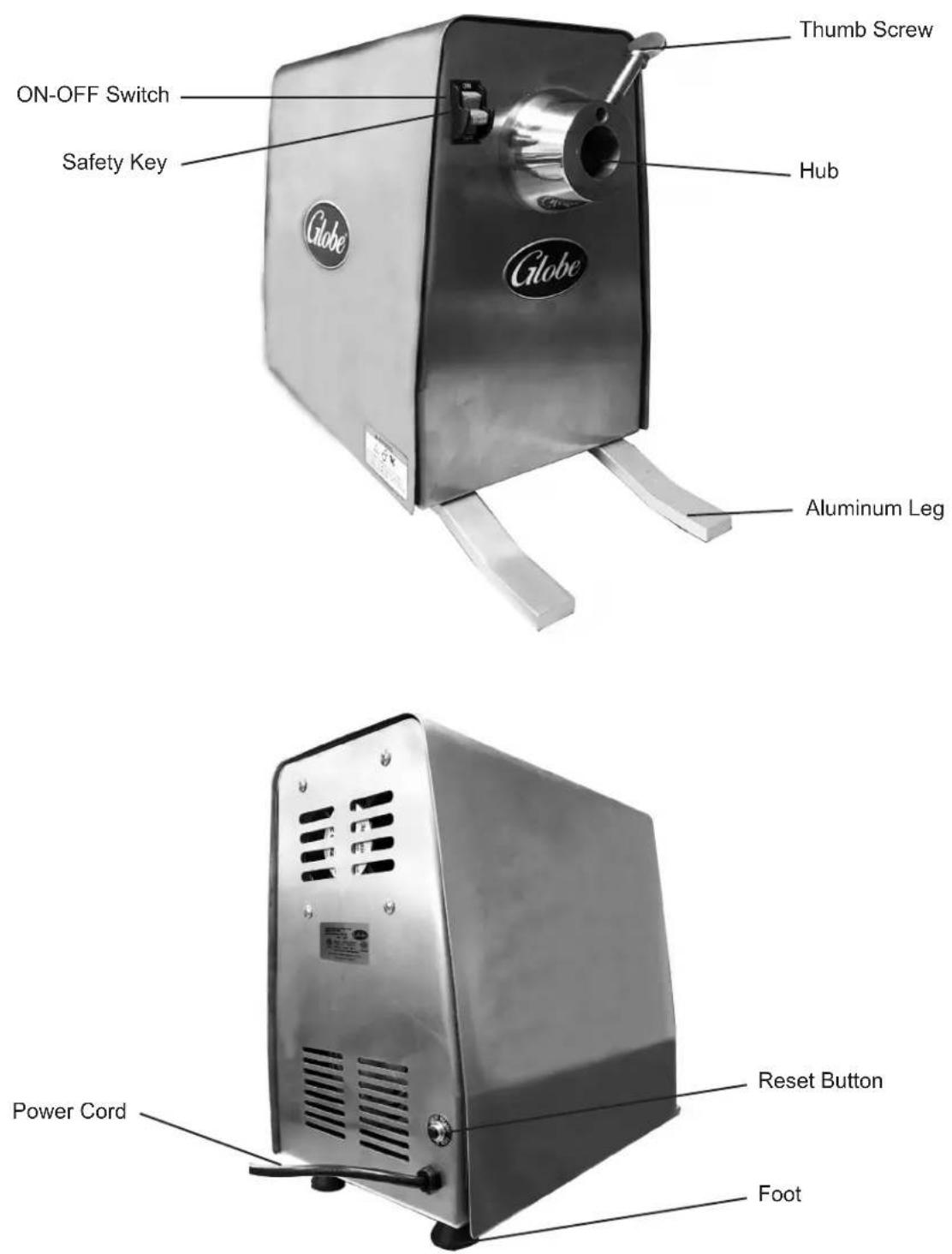
Globe Safety Tips
WARNING

Sharp
Knife
Blade

Mechanical Moving Parts

Risk of Electrical Shock
TO AVOID SERIOUS PERSONAL INJURY:
- NEVER touch power drive unit before reading and completely understanding everything in this instruction manual. You must be at least 18 years old and have had proper training and authorization from your supervisor.
- NEVER bypass, alter or modify this equipment in any way from its original condition. Doing so can create hazards and will void the warranty.
• ALWAYS ground power drive unit utilizing proper power source. - KEEP unit UNPLUGGED when not in use to prevent accidental start up.
- ONLY operate power drive unit on a solid, level, nonskid surface, in a well-lit work area away from children and visitors.
- BEFORE CLEANING, SERVICING, OR REMOVING ANY PARTS always turn power drive unit OFF and unplug power cord.
- ALWAYS properly clean and sanitize your power drive unit to prevent illness or death caused by the spread of food-borne pathogens.
- USE ONLY PROPERLY INSTALLED GLOBE ACCESSORIES.
INSTALLATION AND PROPER GROUNDING
UNPACKING:
- Inspect the package carefully before unpacking. Note any damage on the delivery paperwork and take pictures.
- Unpack the power drive unit immediately after receipt. If the machine is found to be damaged, save the packaging material and take pictures of damage. Contact the carrier within fifteen (15) days of delivery. Immediately contact your source of the equipment. You have no recourse for damage after fifteen (15) days.
- You should receive the power drive unit and an instruction manual. Contact the factory or your local supplier if you did not receive all of these materials.

TO AVOID SERIOUS PERSONAL INJURY PROPERLY INSTALL POWER DRIVE UNIT IN A SUFFICIENT WORK AREA
- ALWAYS install equipment in a work area with sufficient light and space.
- ONLY operate on a solid, level, nonskid surface.
- NEVER bypass, alter or modify this equipment in any way from its original condition. Doing so can create hazards and will void the warranty.
- NEVER operate power drive unit without all warnings attached.
INSTALLATION:
- Read this manual thoroughly before installation and operation. DO NOT continue with installation and operation if you have any questions or do not understand everything in the manual. Contact your local representative or the factory first.
- Remove power drive unit from the corrugated box.

THIS MACHINE IS PROVIDED WITH A THREE-PRONG GROUNDING PLUG. THE OUTLET TO WHICH THIS PLUG IS CONNECTED MUST BE PROPERLY GROUNDED. IF THE RECEPTACLE IS NOT THE PROPER GROUNDING TYPE, CONTACT AN ELECTRICIAN. DO NOT UNDER ANY CIRCUMSTANCES CUT OR REMOVE THE THIRD GROUND PRONG FROM THE POWER CORD OR USE ANY ADAPTER PLUG (Figure 7-1 and Figure 7-2).
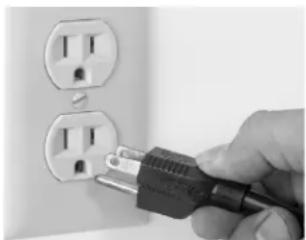
natural_image
Hand inserting a plug into two outlets (no text or symbols visible)Figure 7-1 Correct
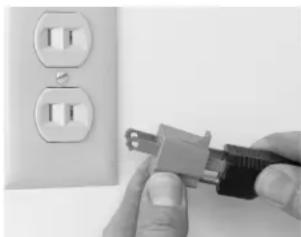
natural_image
Close-up of hands installing a plug into an electrical outlet (no text or symbols visible)Figure 7-2 Incorrect
- Examine power drive unit to make sure all parts have been provided.
- Make sure warning label is correctly positioned, legible, and instruction manual is available near power drive unit.
- Complete the online warranty/registration at: www.globefoodequip.com/support/warranty-registration-form.
- Before use, clean and sanitize power drive unit. Refer to Cleaning and Sanitizing.
- Contact your local representative or the factory directly if you have any questions or problems with the installation or operation of the power drive unit.
OPERATING INSTRUCTIONS
WARNING
TO AVOID SERIOUS PERSONAL INJURY:
- NEVER touch power drive unit without training and authorization from your supervisor or if you are under 18 years old. Read the instruction manual first.
- ONLY use the power drive unit on a level, nonskid surface in a clean, well-lighted work area away from children and visitors.
- ALWAYS ground power drive unit utilizing the proper power source.
- BEFORE CLEANING, SERVICING, OR REMOVING ANY PARTS, always turn power drive unit OFF and unplug unit.
- KEEP unit UNPLUGGED when not in use to prevent accidental start up.
- Make sure that the power drive unit ON-OFF switch is in the OFF position and unit is unplugged (Figure 8-1).
-
Install the attachment on the hub.
-
Insert thumb screw. Tighten thumb screw clockwise until it is secure. Do not use a tool or over tighten (Figure 8-2).
-
Place a container under the power drive unit attachment to catch the food product.
-
Plug in power cord.
Note: The ON-OFF switch includes a safety key. The power drive unit will not turn on without safety key installed in the ON-OFF switch. If safety key is removed during operation, power drive unit will stop. Move ON-OFF switch to OFF before re-installing safety key.
- Turn ON power drive unit (Figure 8-3).
Note: It is important to clean the attachment housing frequently when using the adjustable knife and plates. Build-up of product can occur around the attachment housing, adjustable knife and plates which can cause the reset button to pop out.
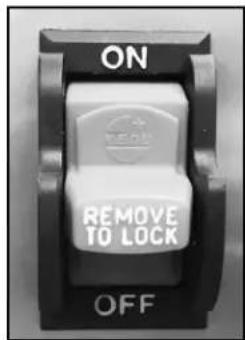
Figure 8-1
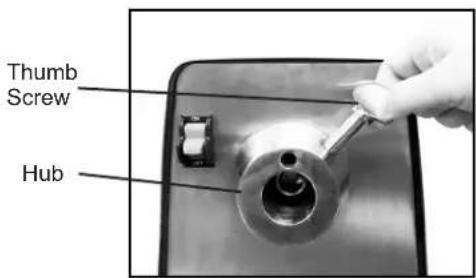
Figure 8-2
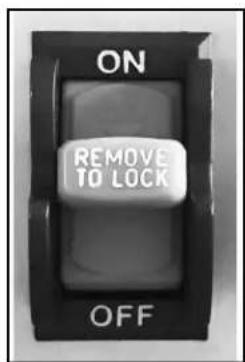
Figure 8-3
CLEANING & SANITIZING
WARNING
TO AVOID SERIOUS PERSONAL INJURY:
- BEFORE CLEANING, SERVICING, OR REMOVING ANY PARTS, always turn power drive unit OFF and unplug unit.
- NEVER attempt to clean power drive unit while power drive unit is in operation.
CAUTION
- DO NOT put power drive unit housing in the dishwasher or immerse in water.
- Dilute detergent per supplier's instruction. Products containing sodium hypochlorite should not be used on power drive unit.
- DO NOT hose down, pressure wash, or pour water on power drive unit.
- NEVER use a scrubber pad, steel wool, or abrasive material to clean power drive unit.
WARNING
To prevent illness or death caused by the spread of food-borne pathogens, it is important to properly clean and sanitize the entire power drive unit as any surface of the power drive unit can become contaminated. It is the responsibility of the power drive unit owner/operator to follow all guidelines, instructions and laws as established by your local and state health departments and the manufacturers of chemical sanitizers.

Once your power drive unit makes contact with food product, the entire power drive unit, including removable parts, must be thoroughly cleaned and sanitized. This process is to be repeated at least every 4 hours. Use these procedures and information; and must comply with additional laws from your state and local health departments.

As with all food contact surfaces, it is extremely important to properly sanitize the entire power drive unit and to closely follow the instructions on your quaternary sanitizer container to make sure proper sanitation is achieved to kill potentially harmful bacteria.
IMPORTANT: If a chemical sanitizer other than chlorine, iodine or quaternary ammonium is used, it must be applied in accordance with the EPA-registered label use instructions. Excessive amounts of sanitizer and use of products not formulated for stainless steel or aluminum can VOID your warranty.
Sanitizer concentration must comply with section 4-501.114, Manual and Mechanical Warewashing Equipment, Chemical Sanitization - Temperature, pH, Concentration, and Hardness of the FDA Food Code.
For more information on proper kitchen and equipment sanitation, visit www.servsafe.com provided by the National Restaurant Association (NRA).
CAUTION
- ALWAYS turn power drive unit OFF, remove safety key from ON-OFF switch and unplug the power cord BEFORE cleaning.
- It is extremely important to follow the instructions on the sanitizer container to make sure proper sanitation is achieved. Allow the parts to air dry before placing them back on power drive unit!
CLEANING & SANITIZING
POWER DRIVE UNIT DISASSEMBLY, CLEANING & SANITIZING
Note: The ON-OFF switch includes a safety key. The power drive unit will not turn on without safety key installed in the ON-OFF switch. If safety key is removed during operation, power drive unit will stop. Move ON-OFF switch to OFF before re-installing safety key.
- Turn OFF and unplug the power drive unit (Figure 10-1).
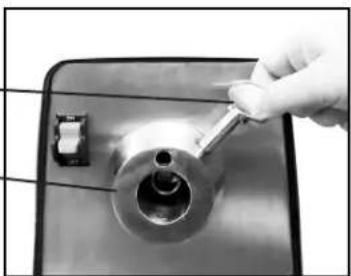
- Loosen thumb screw by rotating it counterclockwise 2 to 3 times. Do not remove thumb screw (Figure 10-2).
- Remove the attachment from the hub.
- Disassemble, clean, dry and sanitize the attachment and make sure all surfaces are dry before reassembling. Thumb Screw

Do not place power drive unit in sink or dishwasher. Damage to power drive unit housing can occur.
- With a clean cloth soaked in mild detergent, wipe down the power drive unit housing to remove any food, debris and grease/oil. Use a mild, non-bleach, non-chlorine sanitizer. Dilute sanitizer per supplier's instructions.
- Make sure all surfaces are dry.
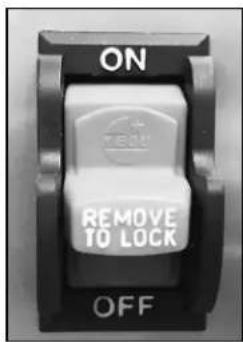
Figure 10-1
natural_image
Close-up of a hand using a tool to adjust a metallic mechanical component (no visible text or symbols)Figure 10-2
TROUBLESHOOTING
| ISSUE CAUSE SOLUTION | —— | |
| Power drive unit does not turn on. | Power drive unit is unplugged. Plug in power drive unit. | Power drive unit. |
| Safety key removed. Install safety key in ON-OFF switch. | ON-OFF switch. | |
| Breaker is not reset. Press reset button. | ||
| Power drive unit quits running. | Power drive unit has overheated. Turn switch to OFF. Let the power drive unit cool for several minutes before starting up again. Press reset button. | Turn switch to OFF. Let the power drive unit cool for several minutes before starting up again. Press reset button. |
| Reset Button has popped out. | Product has built up around the adjustable knife or plate. | Product has built up around the adjustable knife or plate. |
POWER DRIVE UNIT ACCESSORIES
GPD-L & GPD-H ACCESSORIES
Part No. Description
XVSGH 9" Attachment Housing
XASP Adjustable Slicer Plate
XPH 9" Plate Holder - *Only one required
XMCA-SS Meat Chopper Attachment
LIMITED POWER DRIVE UNIT WARRANTY
Globe Food Equipment Company ("GFE") warrants to the original purchaser of new equipment that said equipment, when installed in accordance with our instructions within North America and subjected to normal use, is free from defects in material or workmanship for a period of 1 year on parts (excludes wear/expendable parts). The labor warranty is one year from original installation or 18 months from actual shipment date, whichever date occurs first.
THIS WARRANTY IS IN LIEU OF ALL OTHER WARRANTIES, WHETHER EXPRESSED OR IMPLIED. GFE EXPRESSLY DISCLAIMS ANY IMPLIED WARRANTY OF MERCHANTABILITY OR EXPRESSED OR IMPLIED WARRANTY OF FITNESS FOR A PARTICULAR PURPOSE.
GFE'S OBLIGATION AND LIABILITY UNDER THIS WARRANTY IS EXPRESSLY LIMITED TO REPAIRING AND REPLACING EQUIPMENT WHICH PROVES TO BE DEFECTIVE IN MATERIAL OR WORKMANSHIP WITHIN THE APPLICABLE WARRANTY PERIOD. All repairs pursuant to this Warranty will be performed by an Authorized Designated GFE Servicer or at Service Location during normal working hours. IN NO EVENT SHALL GFE BE LIABLE FOR INCIDENTAL OR CONSEQUENTIAL DAMAGES TO BUYER OR ANY THIRD PARTY, INCLUDING, WITHOUT LIMITATION, LOSS OF PROPERTY, PERSONAL INJURY, LOSS OF BUSINESS OR PROFITS OR OTHER ECONOMIC LOSSES OR STATUTORY OR EXEMPLARY DAMAGES, WHETHER IN NEGLIGENCE, WARRANTY, STRICT LIABILITY OR OTHERWISE.
This warranty is given only to the first purchaser from a retail dealer. No warranty is given to subsequent transferees.
This warranty does not cover product failures caused by: failure to maintain, neglect, abuse, damage due to excess water, fire, normal wear, improper set up and use. Periodic maintenance is not covered.
Example of items not covered under warranty, but not limited to just these items:
- Acts of God, fire, water damage, burglary, accident, theft.
- Freight damage.
- Improper installation or alteration of equipment.
- Use of generic or after market parts.
- Repairs made by anyone other than a GFE designated servicer, or not pre-authorized by GFE.
- Lubrication.
- Expendable wear parts, knife, rubber boots, blown fuses, lamps.
- Cleaning of equipment.
- Misuse or abuse.
Service under this warranty is not in force until such time as a properly completed, digitally signed, Installation/Warranty Registration has been received by GFE within 30 days from the date of installation. Complete warranty registration at: www.globefoodequip.com/support/warranty-registration-form.
THE FOREGOING WARRANTY PROVISIONS ARE A COMPLETE AND EXCLUSIVE STATEMENT BETWEEN THE BUYER AND SELLER. GFE NEITHER ASSUMES NOR AUTHORIZES ANY PERSONS TO ASSUME FOR IT ANY OTHER OBLIGATION OR LIABILITY IN CONNECTION WITH SAID EQUIPMENT.
WARRANTY REGISTRATION
GO TO WWW.GLOBEFOODEQUIP.COM
TO FILL OUT AND SUBMIT YOUR WARRANTY REGISTRATION.
WWW.GLOBEFOODEQUIP.COM/SUPPORT/WARRANTY-REGISTRATION-FORM
- Instruction Manual for Power Drive Unit Models GPD-L and GPD-H
- For all after sales support, visit www.globefoodequip.com
- - IMPORTANT SAFETY NOTICE -
- INDEX
- ATTENTION OWNERS AND OPERATORS
- KEY COMPONENTS OF THE POWER DRIVE UNIT
- Globe Safety Tips
- WARNING
- TO AVOID SERIOUS PERSONAL INJURY:
- INSTALLATION AND PROPER GROUNDING
- UNPACKING:
- TO AVOID SERIOUS PERSONAL INJURY PROPERLY INSTALL POWER DRIVE UNIT IN A SUFFICIENT WORK AREA
- INSTALLATION:
- OPERATING INSTRUCTIONS
- CLEANING & SANITIZING
- CAUTION
- POWER DRIVE UNIT DISASSEMBLY, CLEANING & SANITIZING
- TROUBLESHOOTING
- POWER DRIVE UNIT ACCESSORIES
- GPD-L & GPD-H ACCESSORIES
- LIMITED POWER DRIVE UNIT WARRANTY
Brand : Globe
Model : L00670
Category : Meat Grinder