
650 - Fan Meaco - Free user manual and instructions
Find the device manual for free 650 Meaco in PDF.


| Product Type | Air Circulator / Fan |
| Brand | Meaco |
| Model | 650 |
| Dimensions (HWD) | 350 x 255 x 235 mm |
| Net Weight | 1.6 kg |
| Gross Weight | 3.0 kg |
| Power Supply | 220-240 V ~ 50 Hz |
| Power Consumption | 3.5 to 12 W |
| Standby Power Consumption | 0.3 W |
| Motor Type | DC |
| Maximum Air Flow | 650 m³/h |
| Maximum Air Velocity | 5 m/s |
| Fan Speeds | 12 speeds |
| Oscillation (Left/Right) | Automatic, 37° left / 33° right |
| Oscillation (Up/Down) | Manual, 40° up / 5° down |
| Timer | 1 to 6 hours in 30-minute increments |
| Remote Control | Yes, with mute, light, ECO, speed buttons |
| ECO Mode | Automatic speed based on room temperature |
| Sound Power Level | 20 to 60 dB(A) |
| Display | Room temperature, speed, timer, ECO indicator |
| Cleaning | Use soft dry cloth; blades removable via front guard |
| Remote Battery | CR2025 (3V) |
| Safety Features | Grounding plug, magnets warning, child safety |
| Accessories | Remote control, mains adapter, cable |
Frequently Asked Questions - 650 Meaco
User questions about 650 Meaco
0 question about this device. Answer the ones you know or ask your own.
Ask a new question about this device
Download the instructions for your Fan in PDF format for free! Find your manual 650 - Meaco and take your electronic device back in hand. On this page are published all the documents necessary for the use of your device. 650 by Meaco.
USER MANUAL 650 Meaco
natural_image
White circular fan with spiral blades and a control panel, mounted on a base (no visible text or symbols)MeacoFan 650 Air Circulator
Please read this instruction manual before using the air circulator and keep safe for future reference.
Thank you for choosing Meaco, we really appreciate it.
SAFETY INFORMATION
This air circulator must not be used in rooms under the following conditions:
- Potentially explosive atmosphere
- Aggressive atmospheres
- Featuring a high concentration of solvents
- An extremely high ratio of dust
- Commercial environments

natural_image
Three simple line drawings: an open book with a wrench, an open book with a wrench, and an open book with an information icon (no text or symbols)Magnets: The air circulator and the remote control both contain magnets. Please note the following: Pacemakers and defibrillators may be affected by magnets. If this affects you then please do not put the remote control in a pocket and warn anyone who is likely to use the air circulator or the remote that it has a magnet. Credit cards and data cards can also be affected by magnets and should not be placed near to the air circulator or the fan.
Keep Children Away: Do not allow children to play with or around this unit, which could result in injury. Be sure the unit is inaccessible to children when not attended. This appliance is not intended for use by person (including children) with reduced physical, sensory or mental capabilities, or lack of experience and knowledge, unless they have been given supervision or instruction concerning use of the appliance by a person responsible for their safety.
Keep Unit Grounded: Always operate the unit with a grounding plug and a grounded electrical outlet. A grounding plug is an essential safety feature that helps reduce the risk of shock or fire.
Protect Power Cord from Damage: Never operate a unit with a damaged power cord, as this may lead to electrical or fire hazards. If the power supply cord is damaged, it must be replaced by a cord of the same type and amperage rating.
Extension Cords: Extension cords must be grounded and able to deliver the appropriate voltages to the unit.
Handle with Care: Do not drop, throw or crash the air circulator. Rough treatment can damage the components or wiring and create a hazardous condition.
Run on Stable Surface: Always operate the unit on a stable, level surface, for example the floor or a strong counter, so that the air circulator cannot fall and cause injury.
Keep Out of Water: Never operate the unit in pooled or standing water, as this may create a risk of injury from electrical shock. Do not store or operate outdoors. If electrical wiring or components become wet, thoroughly dry them before using the unit. If in doubt do not use the air circulator and consult a qualified electrician or a Meaco approved engineer.
Keep Air Intakes Clear: Do not clog or block the air intakes by placing the air circulator too close to curtains, walls or anything that will restrict the air inlet. This may cause the unit to overheat and result in a fire or electrical hazard.
Keep Electrical Components Dry: Never allow water inside the air circulator's electrical components. If these areas become wet for any reason, thoroughly dry them before using the air circulator. If in doubt, do not use the air circulator and consult a qualified electrician or a Meaco approved engineer.
The operator must make the operating instruction available for the user and make sure that the user does understand the manual.
POWER SUPPLY
This power supply changes mains alternating current to touch safe low voltage (DC). The power supply is only designed for indoor use and should not come into contact with water or dust. To prevent overheating the power supply should not be covered when it is in use.
The mains socket should be easily accessible. In the event of operational error, the plug should be immediately removed from the socket. In the event that the mains cable becomes damaged, then the power supply should not be used.
The power supply contains potentially dangerous voltages internally and the cover should not be removed. All service or maintenance work should be carried out by qualified personnel.
If you require assistance, please contact Meaco.
GENERAL ADVICE
- Before putting your air circulator into operation for the first time, the instruction manual should be studied carefully.
- After receiving the air circulator, you should check the unit for any transport damage. In case of damage, you should inform the sender immediately.
- Keep the packaging for the air circulator in a safe place in order to be able to despatch the unit safely if it requires a service. In order to save space, you can simply cut through the adhesive tape using a knife and fold the cardboard box.
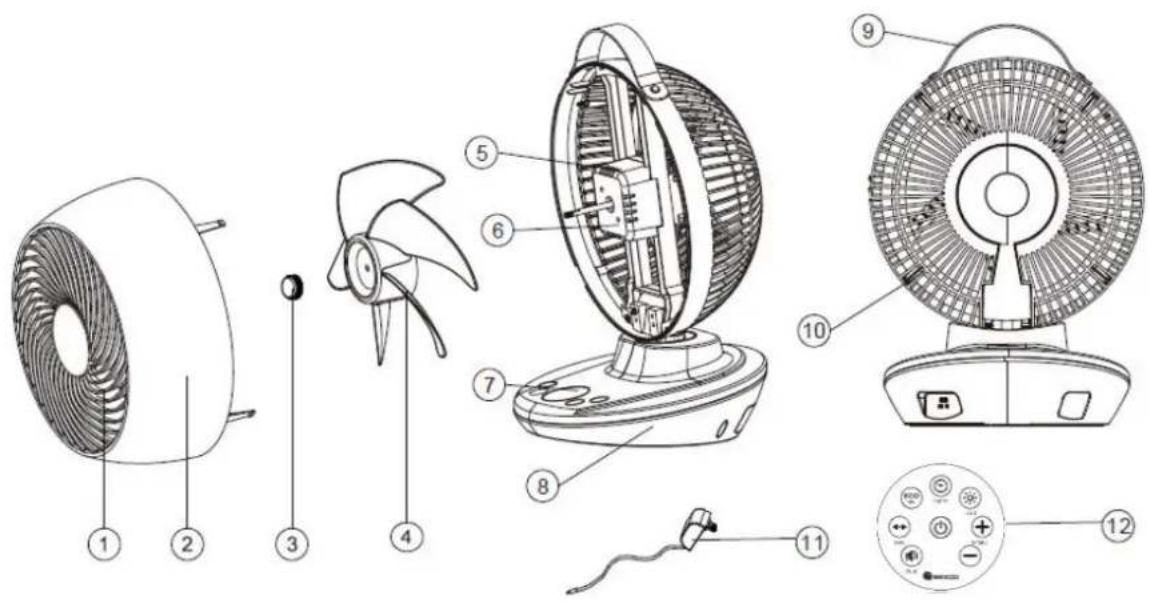
-
Front guard
-
Front shell
-
Blade nut
-
Fan blades
-
Motor holder
-
Fan motor
-
Control panel
-
Base
-
Handle
-
Back guard
-
Cable and mains adapter
-
Remote control
*The handle is made from artificial materials and does not contain any animal products. **The remote is supplied with a CR2025 DC3V battery. Please remove the tab from the battery before use.
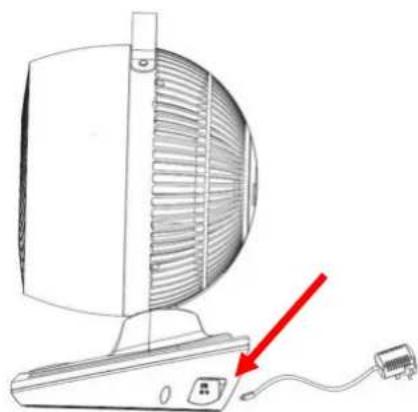
When you first receive the fan, the fan cable and mains adapter must be connected to the base of the fan. In order to do this, see the diagram below. The cable can be inserted into the fan either way up. Do not try and force the connection.
natural_image
Illustration of a desktop computer with ventilation grille and power cord, showing a red arrow pointing to a cable (no text or symbols)CONTROL PANEL
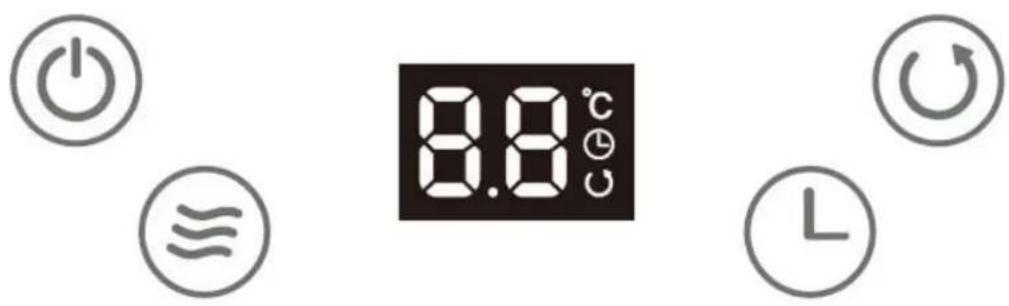
Please note all the buttons are touch sensitive and bleep when pressed. If you do not want the buttons to bleep when pressed, use the Mute Button on the remote control (see page 6).

POWER BUTTON
When plugged in the fan will bleep once and display the room temperature on the display, this is standby mode. To turn the fan on press the ON/OFF button. The fan will bleep and start to operate. To turn the fan off press the ON/OFF button again, you will hear a longer bleep and the fan will slow down and stop.

SPEED BUTTON
Press the speed button to adjust the air flow fan speed. There are 12 fan spee available. As long as the fan remains plugged in the fan will remember the last fan speed used. The speed can be adjusted on the control panel or via the remote control.

OSCILLATION BUTTON (OSC)
Press the oscillation button to start and stop the sideways oscillation left and right. Press the button once to turn the oscillation on and press the button again to stop the motion, in doing so you can fix the direction of the fan.
The up and down angle can be fixed manually by hand, place one hand on the base and one hand on the top of the fan, gently move the head up or down as required.

TIMER BUTTON
When the fan is in standby mode use the timer button to set an interval, in 30-minute segments, between 1 and 6 hours after which the fan will turn ON. Once you have reached the desired number of hours on the display the number will flash four times and then set.
When the fan is turned on and running, use the timer button to set an interval, in 30-minute segments, between 1 and 6 hours after which the fan will turn OFF. Once you have reached the desired number of hours on the display the number will flash four times and then set.
REMOTE CONTROL
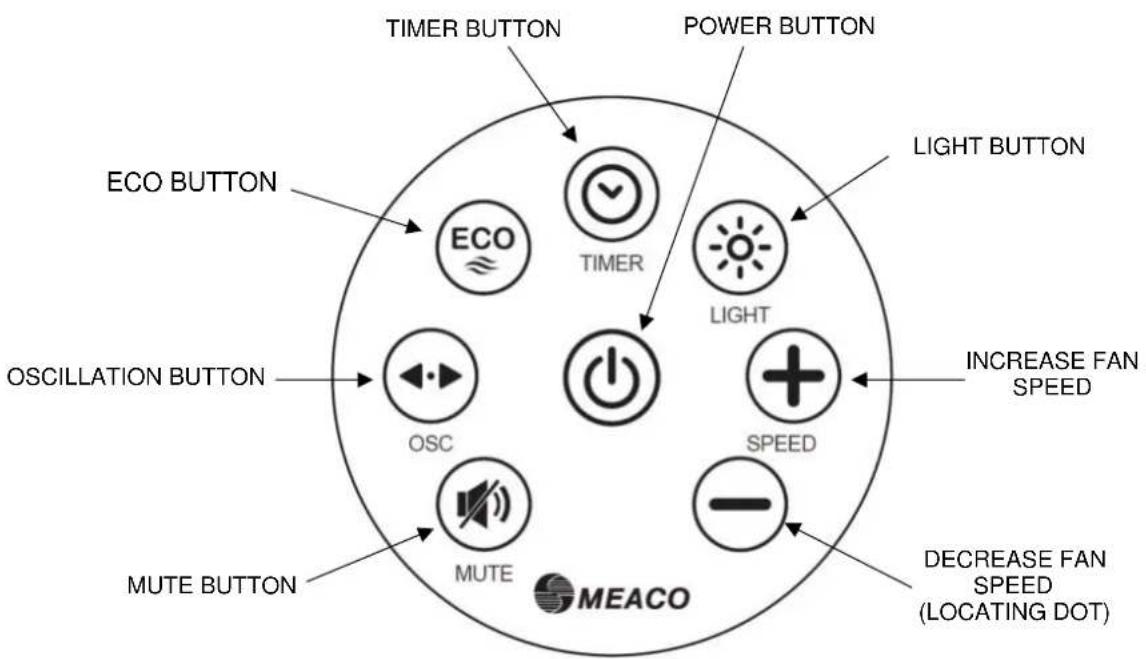
The following functions are only available via the remote-control. All other buttons on the remote-control work in the same way as the control panel (see page 5). The remote control has a range of approximately three metres. Before using the remote control, please remove the plastic tab.
MUTE BUTTON
Press the mute button to stop the fan from bleeping when a button is pressed. To turn the bleeps back on, press the mute button again.
LIGHT BUTTON
Press the light button to turn the lights on the display ON/OFF.
ECO BUTTON
Press the ECO button to turn ECO mode ON/OFF. In ECO mode the fan speed will automatically change as per the table on the following page. AI (Artificial Intelligence) will appear on the display.
INCREASE FAN SPEED
Press the increase fan speed button to increase the air flow fan speed between 1 and 12.
DECREASE FAN SPEED
Press the decrease fan speed button to decrease the air flow fan speed between 1 and 12.
ECO Mode
| Room temperature | Fan speed |
| <23°C | 2 |
| 23 to 25°C | 4 |
| 25 to 27°C | 6 |
| 27 to 29°C | 8 |
| 29 to 31°C | 9 |
| 31 to 33°C | 10 |
| >33°C | 12 |
ELECTRICAL CONNECTIONS AND OPERATING CONDITIONS
This air circulator was designed to operate in a 220V-240V/50Hz electrical installation. Make sure that the electric sockets are connected to earth and that all safety precautions are taken.
This air circulator can be operated within an ambient temperature range from +5°C to +40°C and with a non-condensing relative humidity.
SPECIFICATIONS
| Operating conditions | +5°C / +40°C |
| Humidity operating range | Non-condensing |
| Fan motor type | DC |
| Maximum air flow | 650 cubic metres per hour |
| *Maximum air velocity (c) | 5m/sec |
| *Rated voltage and frequency | 220-240V / 50Hz |
| Power consumption | 3.5 to 12 watts |
| *Standby power consumption (PSB) | 0.3 watts |
| Oscillation swing angles | 40° up and 5° down manually37° left and 33° right automatically |
| *Fan sound power level (LWA) | 20 to 60dB(A) |
| *Service value (SV) | 0.78 (m3/min)/W |
| *Fan power input (P) | 12 watts |
| *Maximum fan flow rate (F) | 9.42m3/min |
| Dimensions (HWD) | 350 x 255 x 235mm |
| Nett / Gross weight | 1.6 / 3.0 Kgs |
*Measurement Standard for Service Value (all items*): EN 55014:2017
CLEANING AND MAINTENANCE
Always turn the fan off and unplug it from the socket before cleaning.
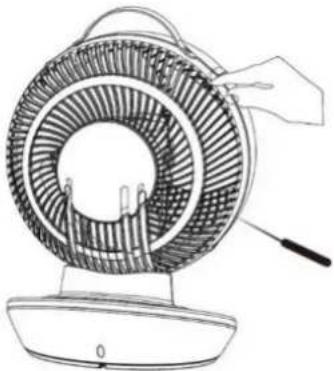
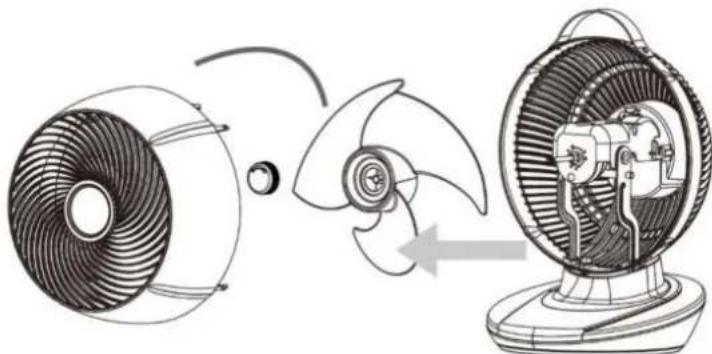
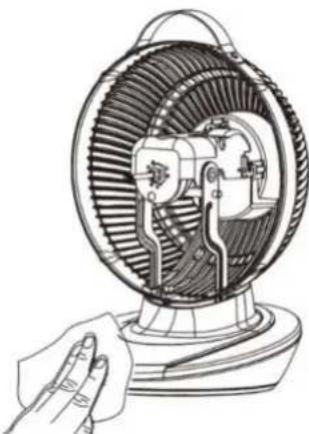
Use a soft dry cloth to clean the external and internal parts of the fan. Do not allow the fan to get wet. In order to access the fan blades, follow the steps below:
- Using a screwdriver, unscrew the small screw at the top back of the fan. It is located directly below the right end of the handle.
natural_image
Line drawing of a portable fan with a handle and base, no text or symbols present- Squeeze four locks to pull away the front guard. At the front of the fan blades there is a locking cap – unscrew the cap in a clockwise motion to remove the fan blades.
natural_image
Diagram of a fan blade and fan assembly process showing internal components and motion (no text or labels)- Clean the fan blades and the internal part of the fan using a soft dry cloth. Reverse the procedure to put the fan back together. Make sure the locking cap is tightened securely.
natural_image
Line drawing of a hand holding a fan or vent, showing internal blades and housing structure (no text or symbols)REPLACING THE BATTERY
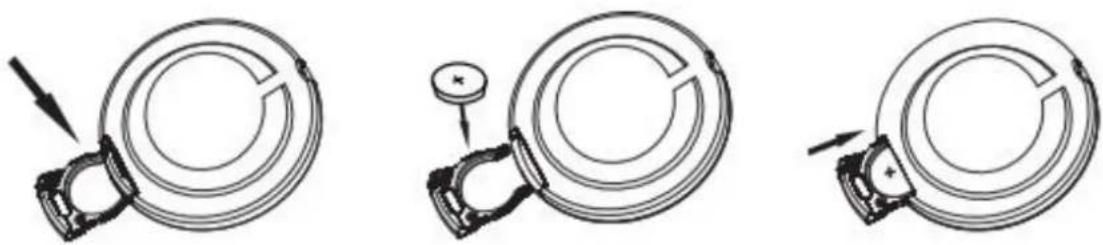
If the remote control fails to work whilst close to the fan, please replace the battery. The battery is a CR2025 and can be replaced following the steps in the diagram below.
natural_image
Three technical line drawings of a mechanical component with arrows indicating motion, no text or symbols present.STORAGE
When storing the fan use the cable compartment at the back of the fan to store the mains cable. The cable compartment cover may be stiff to remove at first – use the small lever at the top to pull it away from the fan.
We recommend storing the fan its plastic bag or original box to protect the fan from dust. Alternatively, a customised bag can be purchased from www.meaco.com.
Remember the fan can also be used in winter to help distribute warm air more effectively within a room.
TROUBLE SHOOTING
| TROUBLE | CAUSE | SOLUTION |
| The display shows ‘00’ or ‘99’ | There is a problem with the circuit | Please contact Meaco |
| The fan does not oscillate | The MPCB needs resetting | Unplug the fan from the mains for 40 minutes |
| Increased noise level | The fan blades are dirty | Clean the fan blades (see page 9) |
| The fan blades or fan motor is loose | Tighten the locking cap (see page 9) | |
| There is a fault with the fan motor | Please contact Meaco | |
| The motor can be heard on the lower fan speeds | As the fan is so quiet it is expected to hear the motor on the lower fan speeds. As the fan speed increases, the noise of the motor will reduce | This is not a fault and is normal |
| The fan does not start up | The fan is in standby mode | Press the power button again |
| The fan is making a clicking noise | The fan needs lubricating | Run the fan on the highest fan speed for 4 hours |
| The remote does not work | The battery needs replacing | Replace the battery (see page 10) |
| The remote is being used more than 3m away from the fan | Use the remote closer to the fan and make sure it is pointing directly at the fan base | |
| AI appears on the display | This is a not a fault, the fan is in ECO mode | Press the ECO button to turn ECO mode off |
- MeacoFan 650 Air Circulator
- SAFETY INFORMATION
- POWER SUPPLY
- GENERAL ADVICE
- CONTROL PANEL
- POWER BUTTON
- SPEED BUTTON
- OSCILLATION BUTTON (OSC)
- TIMER BUTTON
- REMOTE CONTROL
- MUTE BUTTON
- LIGHT BUTTON
- ECO BUTTON
- INCREASE FAN SPEED
- DECREASE FAN SPEED
- ELECTRICAL CONNECTIONS AND OPERATING CONDITIONS
- CLEANING AND MAINTENANCE
- REPLACING THE BATTERY
- STORAGE
Brand : Meaco
Model : 650
Category : Fan