
AT-One - Hi-Fi Audio-Technica - Free user manual and instructions
Find the device manual for free AT-One Audio-Technica in PDF.


| Product Type | UHF Wireless Microphone System |
| Brand | Audio-Technica |
| Model | AT-One |
| Frequency Range | 824 - 831 MHz, 863 - 865 MHz |
| Modulation Mode | FM |
| Number of Frequencies | 2 groups × 4 frequencies |
| Operating Range | 60 m (typical) |
| Frequency Response | 60 Hz – 16 kHz |
| Frequency Stability | ±0.005% (PLL) |
| Receiver System | Antenna switching diversity |
| Image Rejection | 55 dB (minimum) |
| Dynamic Range | Handheld: 108 dB, Bodypack: 103 dB |
| Sensitivity | 10 dBμV (S/N 60 dB @ 20 kHz deviation) |
| Total Harmonic Distortion | <1% @ 20 kHz deviation @ 1 kHz |
| Audio Output Level Control | Mic/Line (0 dB / -20 dB) |
| Antenna Input | BNC, 50 ohms, bias 12V DC 100 mA each |
| Audio Output | Unbalanced -2 dBV, Balanced +4 dBV |
| Output Connectors | Unbalanced 6.3 mm mono jack, Balanced XLRM-type |
| Receiver Dimensions (W×H×D) | 200 mm × 42 mm × 122 mm |
| Receiver Weight (without accessories) | 418 g |
| Bodypack Transmitter Dimensions (W×H×D) | 66 mm × 98 mm × 22 mm |
| Bodypack Transmitter Weight (without batteries) | 71 g |
| Handheld Transmitter Dimensions | 268 mm length × 52 mm diameter |
| Handheld Transmitter Weight (without batteries) | 277 g |
| Microphone Element (Handheld) | Cardioid Condenser |
| RF Output Power | 10 mW |
| Battery Type (per transmitter) | Two 1.5 V AA alkaline |
| Battery Life | Up to 10 hours (depending on battery type and use) |
| Power Supply (Receiver) | DC 12V 800 mA (included AC adapter) |
| Accessories Included | AC adapter, antennas, rack mount adapter, stand clamp (handheld) |
| Optional Accessory | AT8677 Dual rack mount kit |
| Safety | Do not expose to rain/moisture; do not remove covers; use only specified batteries |
| Cleaning | Use a dry cloth; do not use solvents |
| Repair | Refer servicing to qualified personnel; do not open |
| Compliance | Directive 1999/5/EC; compliant in EU countries listed |
Frequently Asked Questions - AT-One Audio-Technica
User questions about AT-One Audio-Technica
0 question about this device. Answer the ones you know or ask your own.
Ask a new question about this device
Download the instructions for your Hi-Fi in PDF format for free! Find your manual AT-One - Audio-Technica and take your electronic device back in hand. On this page are published all the documents necessary for the use of your device. AT-One by Audio-Technica.
USER MANUAL AT-One Audio-Technica
UHF Wireless Microphone System Installation and Operation
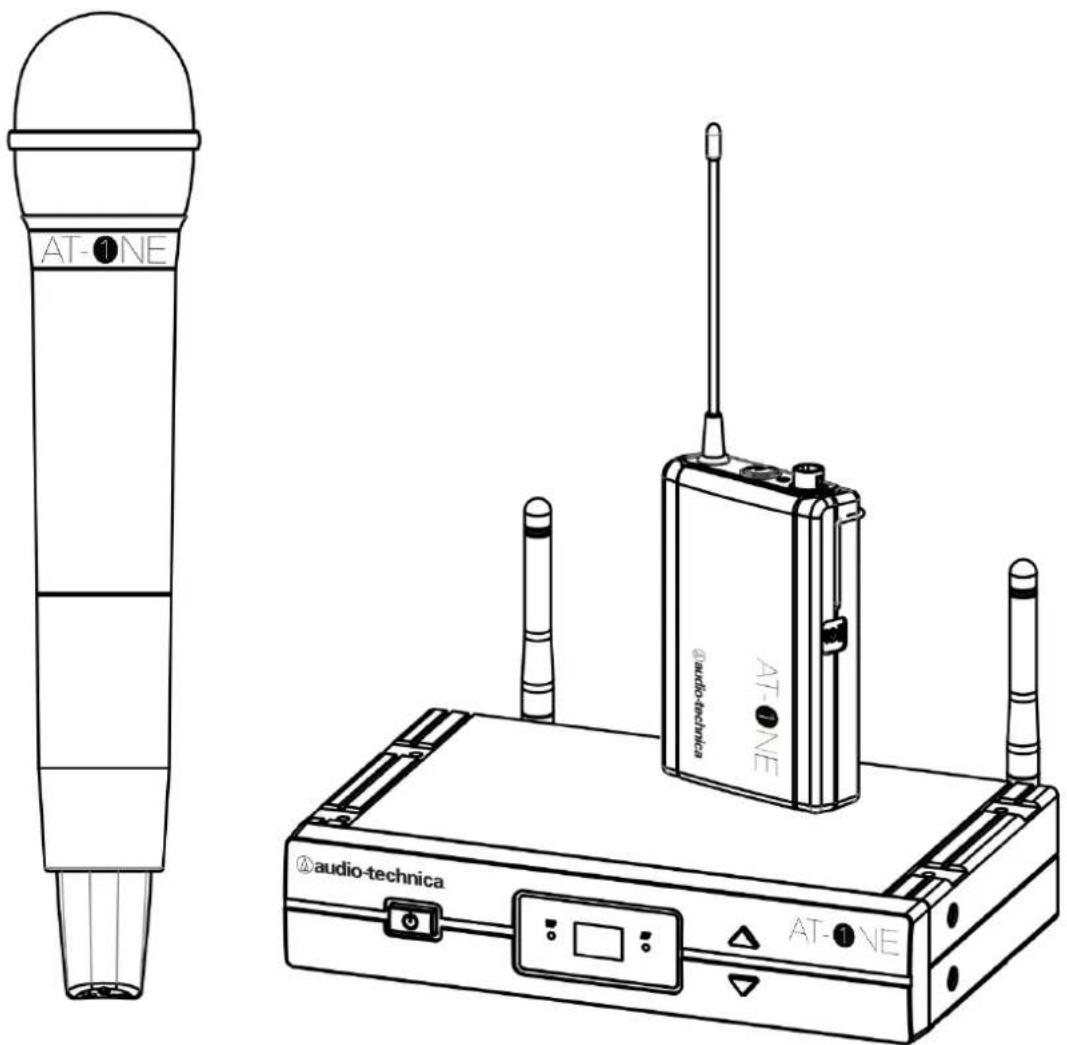
Contents
Introduction
- Introduction
- Safety
System Functions
- Receiver Functions
- Handheld Transmitter Functions
- Bodypack Transmitter Functions
- Battery Status
System Operation
- System Setup
- Receiver Operation
- Transmitter Operation
- Squelch
- Frequencies
- Troubleshooting
- Rack Mount Setup 11
Specifications
- Overall Specification 12
- Receiver Specification 12
- Bodypack Transmitter Specification 13
- Handheld Transmitter Specification 13
Compliance
- WEEE Regulations
- Declaration of Compliance 15
Introduction
Introduction
Thank you for purchasing this Audio-Technica product. This PLL synthesized wireless microphone system operates in the UHF band frequency, with two groups of four frequencies. Please read this manual carefully before operating the AT-One system. This manual covers the function and operation of the wireless microphone system.
Safety
- To prevent fire or shock hazard, do not expose this appliance to rain or moisture
- To prevent fire, do not cover the ventilation of the apparatus with newspaper, tablecloths, etc.
- Do not expose this apparatus to drips or splashes
- Do not place any objects filled with liquids, such as vases, on the apparatus
- Do not install this apparatus in a confined space such as a bookcase or similar unit
- The apparatus should be located close enough to the AC outlet so that you can easily grasp the AC adapter at any time. In case of emergency, disconnect the AC adapter quickly.
- Danger of explosion if battery is incorrectly replaced. Replace only with the same or equivalent type.
- If the transmitter is not in use for an extended period, remove the batteries to avoid damage
- Do not dispose of used batteries with domestic rubbish. Be sure to dispose of batteries in accordance with your local waste disposal rules.
- When disposing of the equipment, remove the batteries, separate the case, circuit boards and cables, and dispose of all components in accordance with local waste disposal rules.
The circuits inside the receiver and transmitter have been precisely adjusted for optimum performance and compliance with government regulations. Do not attempt to open the receiver or transmitter. To do so will void the warranty, and may cause improper operation.
Receiver Functions
Receiver Front:
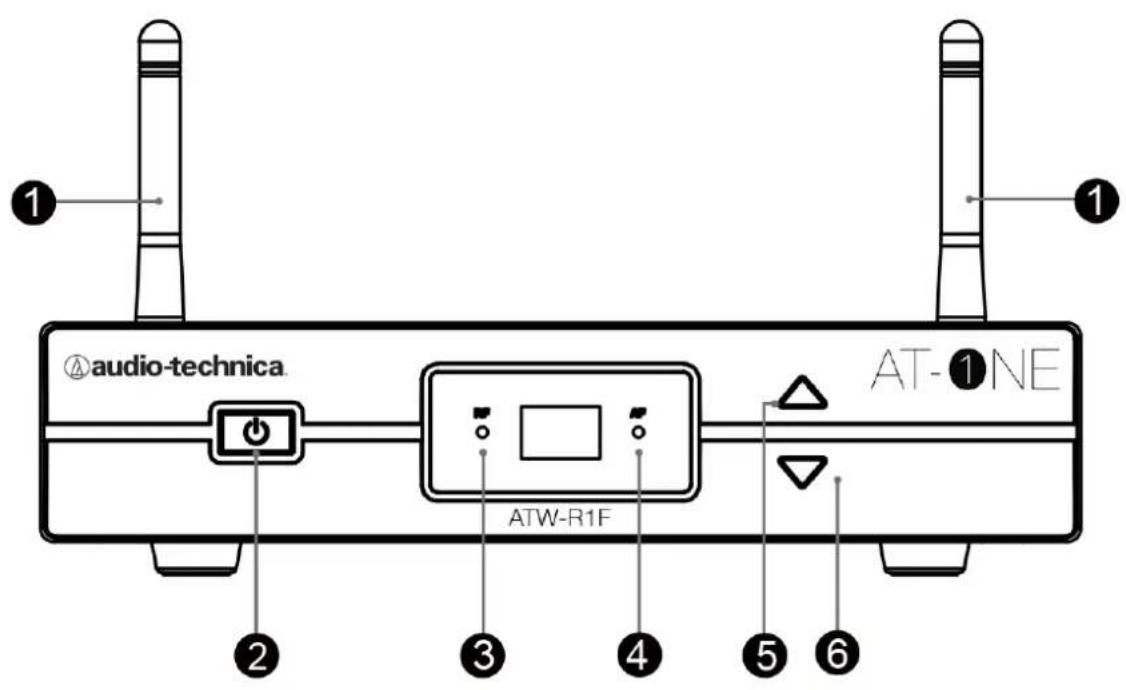
- Antenna: Detachable UHF antenna with BNC connector
- Power Button
- RF Red LED: Displays the reception status of the RF signal
- AF Green LED: Displays the reception status of the AF signal
- UP Channel Button: Tap forward to select an interference free channel
- DOWN Channel Button: Tap backward to select an interference free channel
Receiver Functions
Receiver Rear:
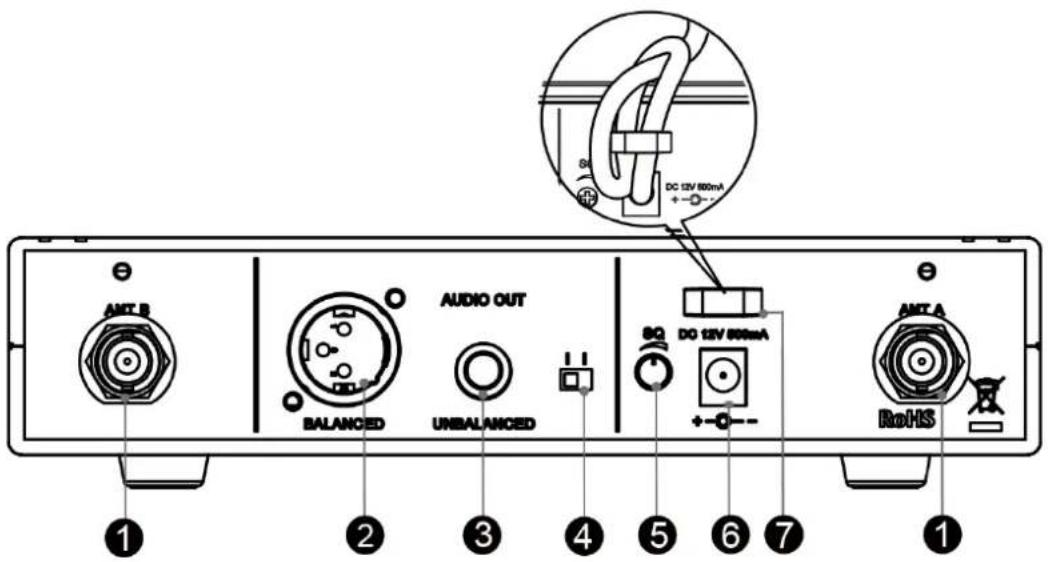
-
Antenna BNC Receptacle: This provides a connection to the supplied antennas or to coaxial cable used with an antenna divider, antenna booster or remote antennas
-
Balanced XLR Audio Output
-
Unbalanced 1/4" Jack Output
-
Mic/Line Switch: Use this to adjust the audio output of the wireless microphone system for mic level (-20dB) or line-level (0dB)
-
SQ (Squelch): Turn the squelch to the lowest possible setting (counter clockwise) to eliminate any interfering signals. In RF crowded environments (other wireless microphones, LTE, etc.) it can be required to increase the squelch level (clock wise) to block out unwanted noise. Please note that this will reduce the operating distance of the system, so always seek the lowest possible setting.
-
DC IN: DC input connector for the supplied AC adapter
-
Cable Strain
Transmitter Functions
Handheld Transmitter:
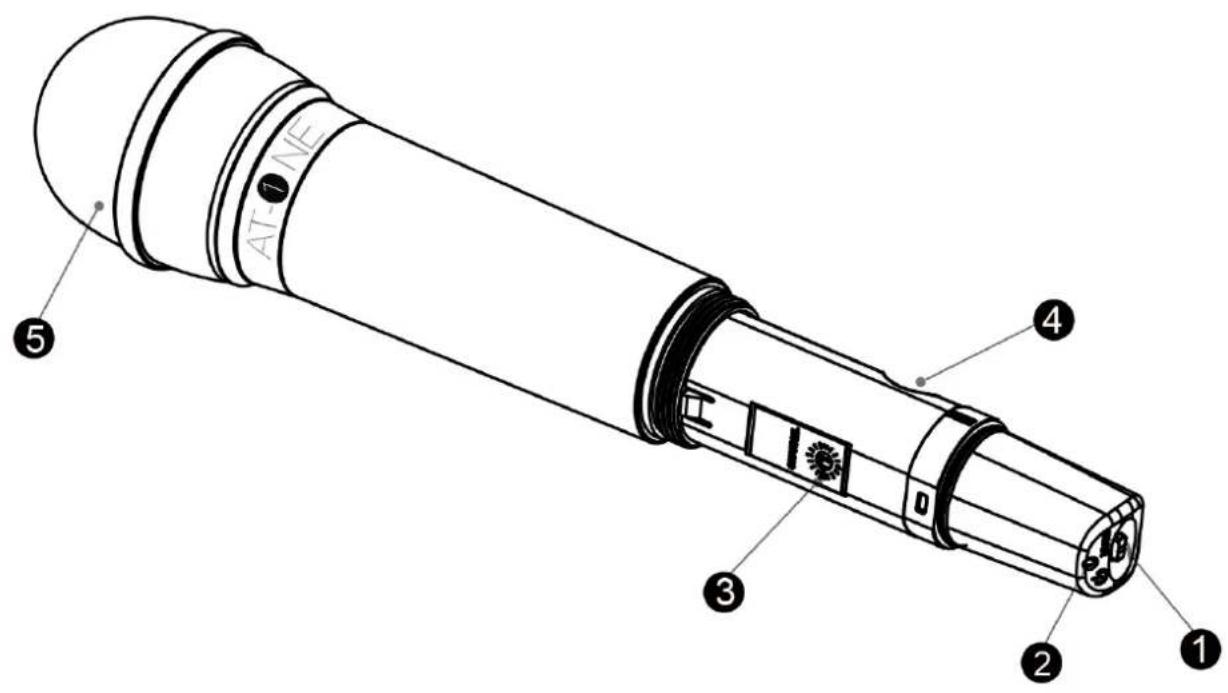
- Power/Mute Button
- Power/Mute/Battery Status LED Indicates the power/mute/battery level status
- Channel Selector: Change the channel setting from 11-14 or 21-24
- Battery Compartment: Insert two AA batteries making sure the polarity is correct
- Grille: Protects the microphone capsule and protects against wind
and breath sound
Transmitter Functions
Bodypack Transmitter:
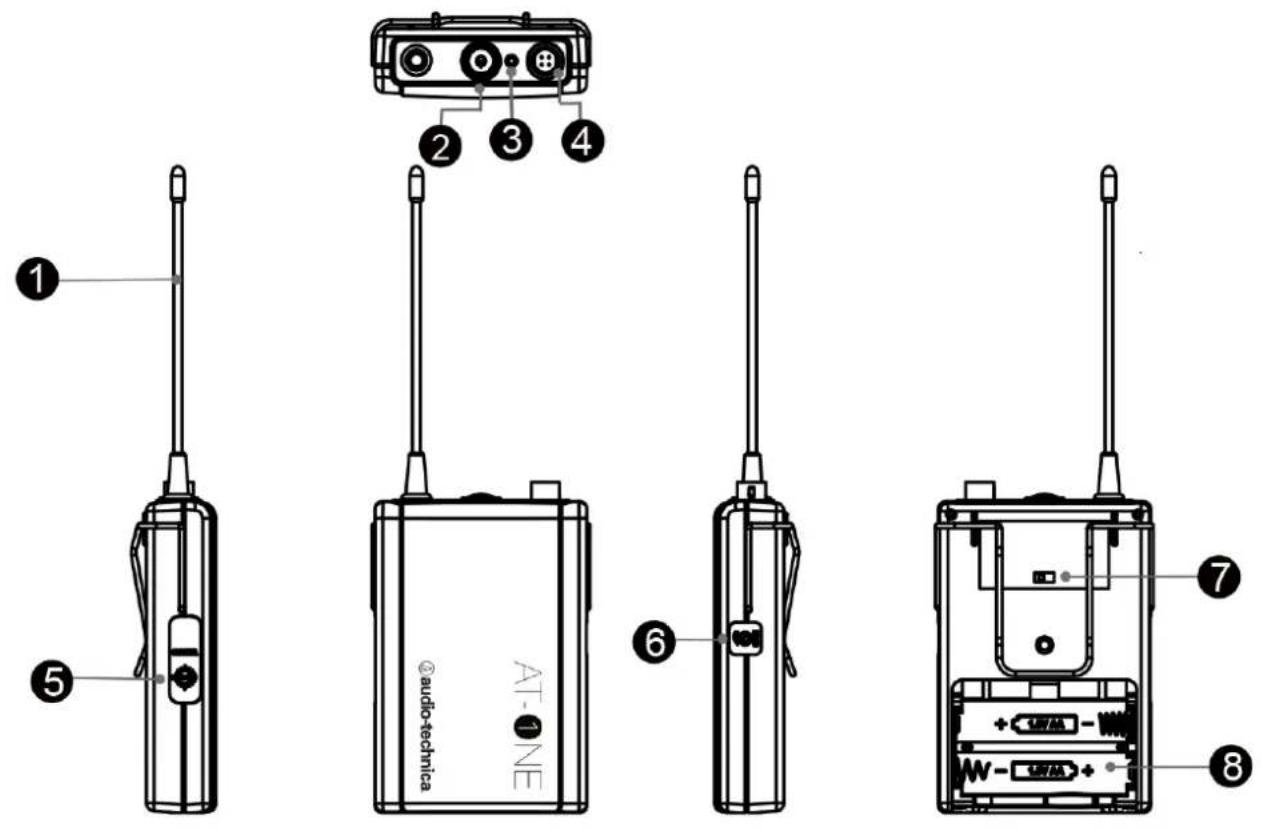
- Antenna
- Power/Mute Button
- Power/Mute/Battery Status LED: Indicates the power/mute/battery level status
- Input Connector: 4-pin locking connector (HRS)
- Channel Selector: Change the channel setting from 11-14 or 21-24
- Gain: Rotary control adjusts the sensitivity of the
transmitter's audio to the level of the connected
mic or instrument
- 10dB Switch: Activate this switch to attenuate the signal by
an additional 10dB.
- Battery Compartment: Insert two AA batteries making sure the polarity is
correct
Transmitter Functions
Power/Battery Status LED:
| LED | Status |
| Green | Ready |
| Red | Muted |
| Green Flashing On, low battery | |
| Red Flashing Muted, low battery | |
| No Light No power | |
System Operation
System Setup:
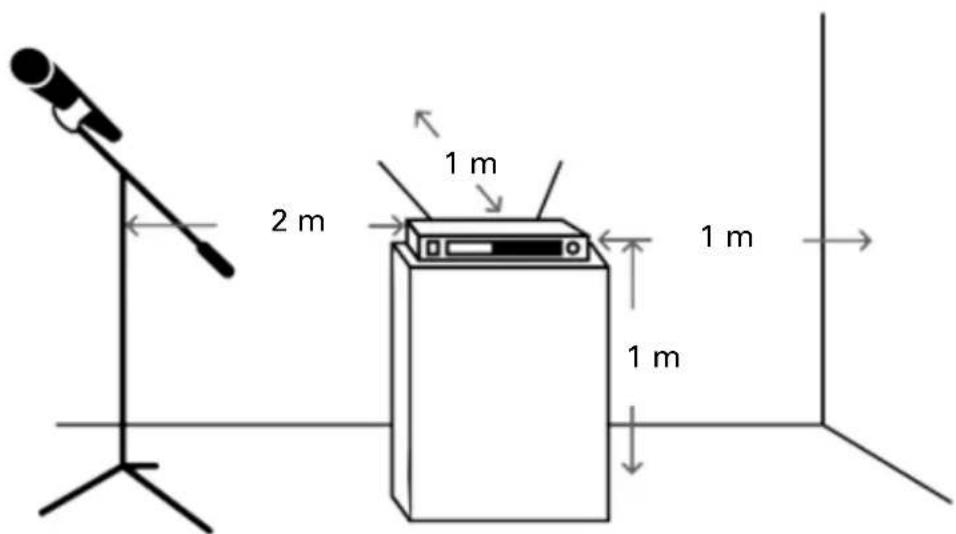
For best operation the receiver should be at least 1 m above the ground and at least 1 m away from a wall or metal surface to minimize reflections. The transmitter should be at least 2 m from the receiver, as shown in in the diagram below. Keep antennas away from noise sources such as digital equipment, motors, automobiles and neon lights, as well as away from large metal objects.
System Operation
Connecting the receiver:
| Plug the DC 12V 500mA power supply into the power connector on the back of the receiver. The power connector is supplied with interchangable UK and EU adaptors. | |
| Connect the receiver output to an audio mixer or amplifier input, using a standard audio cable with 3-pin XLR or 6.35mm Jack connectors. Never use balanced and unbalanced audio outputs at the same time, this may cause signal loss or increased noise. | |
| Set the attenuation for mic or line input. Two-position switch adjusts the audio output attenuation to 0 dB or -20 dB. The factory setting is 0 dB. |
System Operation
Handheld Microphone/Bodypack Transmitter set up:
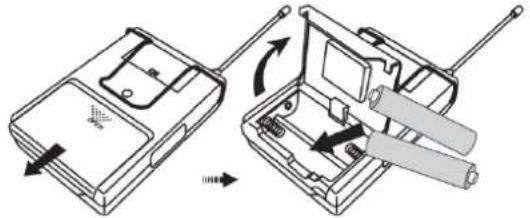 | Open the battery cover and insert AA batteries into the battery compartment making sure the polarity is correct. |
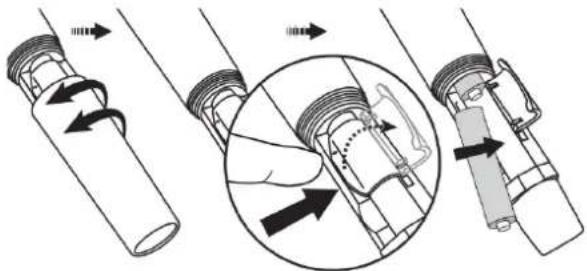 | Unscrew the bottom of the handheld mic and open the battery cover to insert AA batteries into the battery compartment, making sure the polarity is correct. |
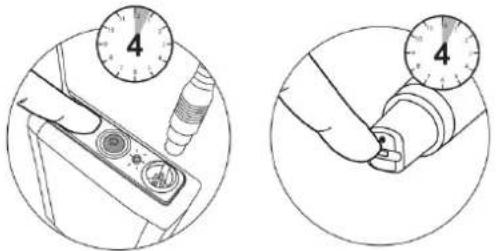 | Press and hold the power button on the micro-phone/bodypack transmitter for 4 seconds to turn on. If the LED remains flashing after 4 seconds it is indicating that the battery is low on power. |
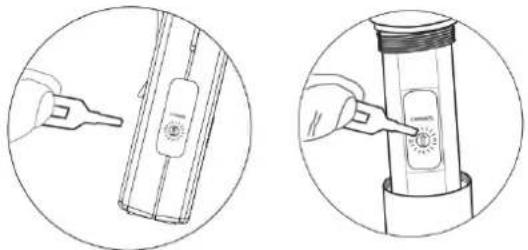 | Use the included key to adjust the frequency of the transmitter to be the same as the receiver. |
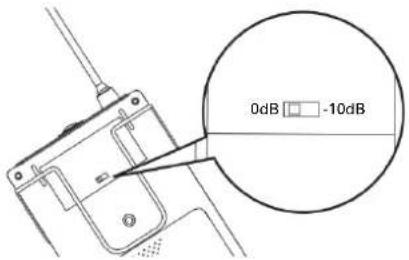 | Use the 0dB/-10dB switch to adjust the audio input level. |
System Operation
Squelch
The squelch function is used to adjust the audio output level to suppress the noise levels. If you experience interference in RF spoiled areas (e.g. areas with a lot of mobile phones) or cross talk between transmitters, increase the squelch level until the interference is gone.
Please note that increasing the squelch level will decrease the operating range of the system. If the squelch level is high, you may need to move the transmitter closer to the receiver. To experience the maximum operating range, make sure the squelch is turned to the lowest position.
Frequencies
| Group 1 | Group 2 | |||
| Channel | Frequency [MHz] | Channel | Frequency [MHz] | |
| 11 | 863.300 21 | 863.700 | ||
| 12 | 864.300 | 22 | 864.700 | |
| 13 | 824.875 | 23 | 824.400 | |
| 14 | 830.850 | 24 | 828.650 | |
Each AT-One system comes with Group 1 and Group 2 frequencies available as shown in the table above. The system has been designed in these groups to allow you to use up to four channels in one group together, interference free (subject to national licensing and regulations).
In an environment with two separated event areas (two separate conference rooms e.g.) it is possible to use Group 1 in the first location and Group 2 in the second location.
All frequency usage is subject to National regulations, please check with your local Government authority for usage restrictions.
System Operation
Troubleshooting
| Problem | Solution |
| No Sound - Check the power supply of the transmitter and receiver- Check that the transmitter and receiver are tuned to the same frequency- Check that the receiver is correctly connected to the mixer or amplifier- Check whether the transmitter is too far from the receiver or the Squelch control is set too high- Check for obstructions between the transmitter and receiver | |
| Sound Interference - Check the location of the aerial for obstacles- When using two or more sets simultaneously, make sure the chosen frequencies do not interfere with each other- Check whether the interference is coming from other wireless microphones, TV, radio etc. being used in the area- When using two or more sets keep the minimum distance between the receiver and the transmitter greater than 2m and the distance between the two transmitters greater than 1m to avoid cross talk interference | |
| Distortion - Check whether the receiver volume level is set too high or too low- Check whether the distortion is coming from other wireless microphones, TV, radio etc. being used in the area | |
System Operation
Rackmount Setup:
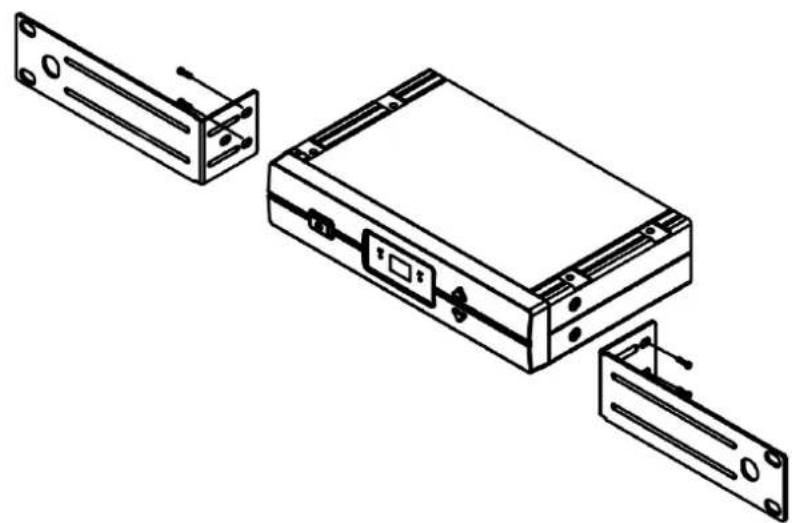
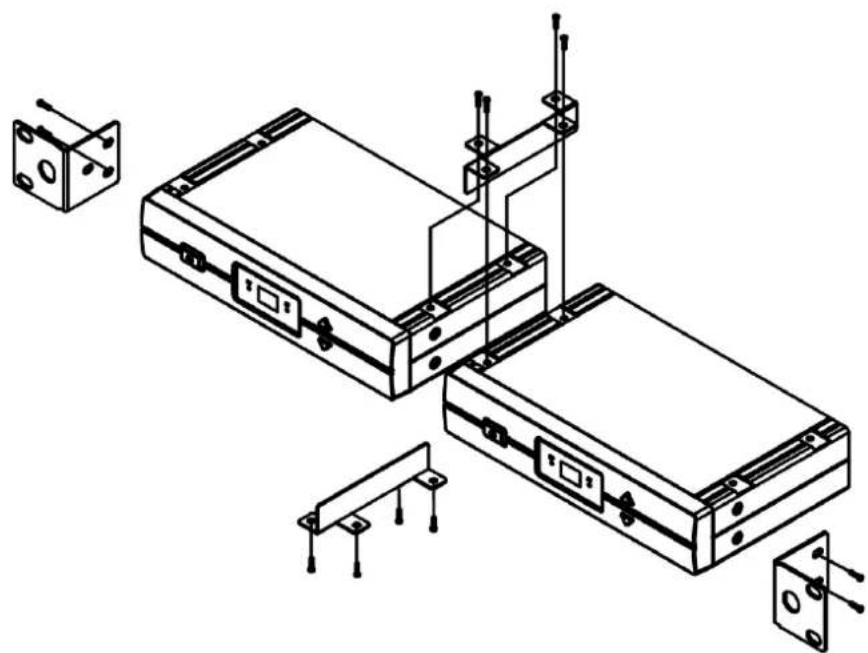
To mount the receiver in a 19" standard rack using the included rack kit, attach the L shaped brackets to the opposite end of the unit and mount in the rack unit.
natural_image
Technical line drawing of an electronic device with three open compartments and a central control panel (no text or symbols)To connect two receivers in a 19" standard rack using the optional AT8677 rack kit, attach the short L shaped brackets to the opposite end of each unit, and connect the units together using two metal connecting plates.
natural_image
Technical line drawing of a mechanical or electronic device assembly with mounting brackets and connectors (no text or symbols)Specifications
Overall System
Frequency range: 824 - 831 MHz, 863 - 865 MHz
Modulation mode: FM
Number of frequencies: 2 x 4 frequencies
Operating range: 60m, typical
Frequency response: 60 HZ - 16 kHz
Frequency stability: +/- 0.005%, phase lock loop frequency control
Receiver Specifications
Receiver system: Antenna switching diversity
Image rejection: 55 dB minimum
Dynamic range: HH: 108 dB BP: 103 dB (@ max deviation)
Sensitivity: 10 dBμV (S/N 60 dB @ 20 kHz deviation)
Total Harmonic Distortion: <1% - 20 kHz deviation @ 1 kHz
Level control: Mic / Line (0/-20dB)
Antenna Input: BNC type, 50 ohms - BIAS voltage 12 V DC 100mA each
Audio Output: Unbalanced -2dBV, Balanced +4dBV
Output connectors: Unbalanced: 6.3 mm mono jack, Balanced: XLRM-type
Dimensions: 200 mm x 42 mm x 122 mm (W x H x D)
Weight: 418 g without accessories
Accessories included: AC Adapter, Antennas, Rack mount adapter
Optional System Accessory: AT8677 Dual rack mount kit
Specifications
Body-Pack Transmitter
RF Output power: 10 mW
Spurious Emissions: Follows national regulations
Input connections: Pin 1: GND
Pin 2: INST
Pin 3: Mic
Pin 4: DC Bias + 10 V
Batteries (not included): Two 1.5 V AA alkaline
Battery Life: 10 hours - depending on battery type and use pattern
Dimensions: 66 mm x 98 mm x 22 mm (W x H x D)
Weight: 71 g without batteries
Handheld Transmitter
RF Output power: 10 mW
Spurious Emissions: Follows national regulations
Microphone Element: Cardioid Condenser
Batteries (not included): Two 1.5 V AA alkaline
Battery Life: 10 hours - depending on battery type and use pattern
Dimensions: 268 mm long - 52 mm (diameter)
Weight: 277 g without batteries
Accessories included: Stand clamp
Product compliant in:
AUT, BEL, BGR, HRV, CYP, CZE, DNK, EST, FIN, FRA, DEU, GRC, HUN, IRL, ITA, LVA, LTU, LUX, MLT, NLD, POL, PRT, ROU, SVK, ESP, SWE, GBR
WEEE Regulations
Disposal of Old Electrical & Electronic Equipment (Applicable in European countries with separate collection systems) This symbol on the product or on its packaging indicates that this product shall not be treated as household waste. Instead it shall be handed over to the applicable collection point for the recycling of electrical and electronic equipment. By ensuring this product is disposed of correctly, you will help prevent potential negative consequences for the environment and human health, which could otherwise be caused by inappropriate waste handling of this product. The recycling of materials will help to conserve natural resources. For more detailed information about recycling of this product, please contact your local city office, your household waste disposal service or the shop where you purchased the product.
Audio-Technica Limited
Technica House, Unit 5, Millennium Way, Leeds LS11 5AL, United Kingdom
Manufactured by / fabriqué par / hergestellt durch / Prodotto da / fabricado por / fabricado por / vervaardigd door / Произведено от / Proizvođač / Výrobce / produceret af / valmistatud / Valmistaja / Kotašovkoučetai anó / Gyártó / mhonaraigh / ražojis / Gamintojas / manifatturat minn / wyprodukowane przez / Produs de / Výrobca / Proizvajalec / tillverkad av
Audio-Technica Corp.
2-46-1 Nishi-naruse, Machida, Tokyo 194-8666, Japan
Made In Taiwan
Declaration of Compliance
GB Hereby, Audio-Technica Corp. declares that ATW-T1F, ATW-T3F and ATW-R1F are in compliance with Directive 1999/5/EC. The full text of the EU declaration of conformity is available at the following internet address: eu.audio-technica.com/doc
A full copy of the statement of conformity may be obtained from: eu.audio-technica.com/doc
CAUTION! Electrical shock can result from removal of the receiver cover. Refer servicing to qualified service personnel.
- To prevent fire or shock hazard, do not expose this appliance to rain or moisture.
- To prevent fire, do not place any naked flame sources (such as lighted candles) on the apparatus.
- To prevent fire do not cover the ventilation of the apparatus with newspaper, tableclothes, curtains etc.
- Do not expose this apparatus to drips or splashes.
- Do not place any objects filled with liquids, such as vases, on the apparatus.
- Do not install this apparatus in a confined space such as a bookcase or similar unit.
- The apparatus should be placed close enough to the AC outlet so that you can easily grasp the AC adaptor at any time.
• In case of emergency disconnect the AC adaptor quickly.
- Danger of explosion if battery incorrectly replaced. Replace only with the same or equivalent type.
• Always consider environmental issues and follow your local regulations when disposing of batteries. Do not expose batteries to excessive heat.
The circuits inside the receiver and transmitter have been precisely adjusted for optimum performance and compliance with federal regulations. Do not attempt to open the receiver or transmitter. To do so will void the warranty, and may cause improper operation.
Notice to individuals with implanted cardiac pacemakers or AICD devices:
Any source of RF (Radio Frequency) energy may interfere with normal operation of the implanted device. All microphones have low-power transmitters (less than 0.05 watts output) which are unlikely to cause difficulty, especially if they are at least a few inches away.
However, since a body-pack transmitter typically is placed against the body, we suggest attaching it to a belt rather than a shirt pocket where it may be immediately adjacent to the medical device.
Note also that any medical device disruption will cease when the RF transmitting source is turned off. Please contact your physician or medical device provider if you have any questions, or experience any problems with the use of this or any other RF equipment.
Please note that wireless frequencies are shared with other radio services.
If you need assistance with operation or frequency selection please contact your dealer or Audio-Technica. Extensive wireless information is also available at www.audio-technica.com
Audio-Technica Ltd
Technica House
Unit 5 Millenium Way
Leeds
LS11 5AL
UNITED KINGDOM
Tel: +44(0) 113 2771441
Fax: +44(0) 113 2704836
Audio-Technica SAS
Audio-Technica Central Europe Ltd
Fogado u 3
H-1107 Budapest
HUNGARY
Tel: +36(0) 433 34 08
Fax: +36(0) 431 90 06
- UHF Wireless Microphone System Installation and Operation
- Contents
- Introduction
- System Functions
- System Operation
- Specifications
- Compliance
- Safety
- Receiver Functions
- Transmitter Functions
- System Setup:
- Handheld Microphone/Bodypack Transmitter set up:
- Squelch
- Rackmount Setup:
- Overall System
- Receiver Specifications
- Body-Pack Transmitter
- Handheld Transmitter
- Product compliant in:
- WEEE Regulations
- Made In Taiwan
- Declaration of Compliance
- A full copy of the statement of conformity may be obtained from: eu.audio-technica.com/doc
- Audio-Technica Ltd
- Audio-Technica SAS
- Audio-Technica Central Europe Ltd
Brand : Audio-Technica
Model : AT-One
Category : Hi-Fi