
EXT-DP - Uncategorized Gefen - Free user manual and instructions
Find the device manual for free EXT-DP Gefen in PDF.


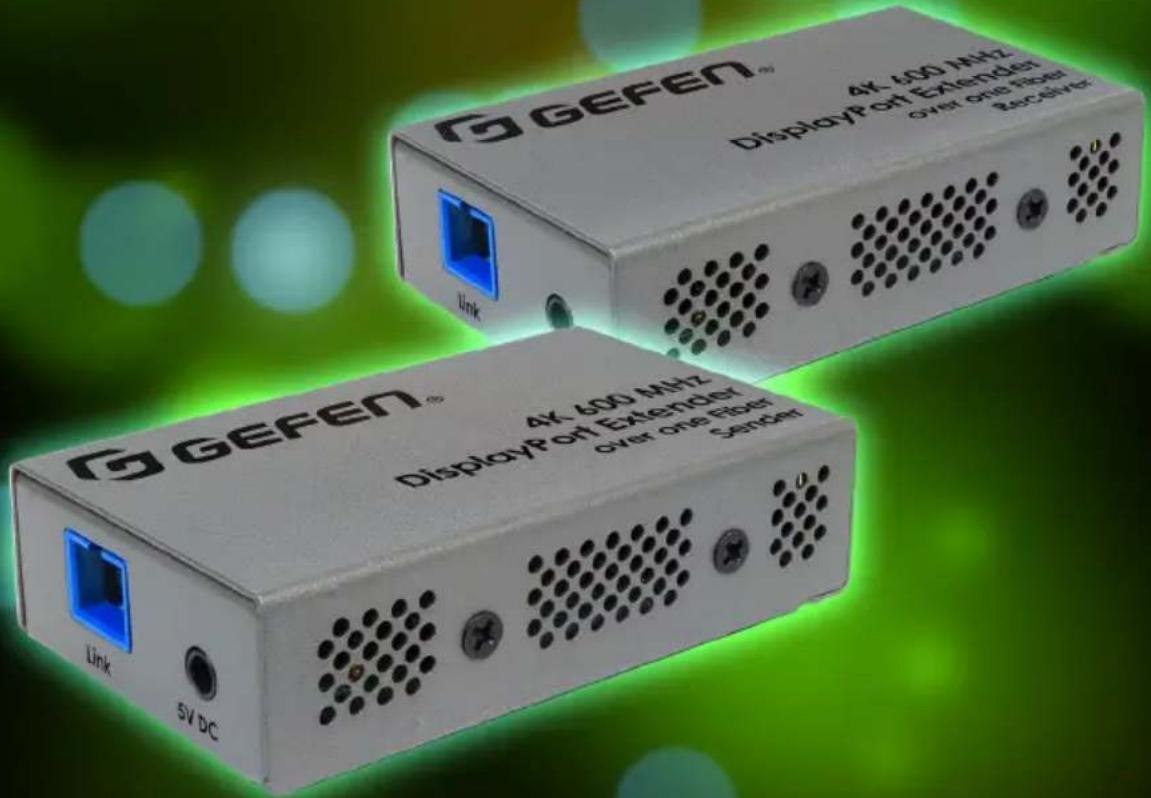
| Product Type | 4K 600 MHz DisplayPort 1.2 Extender over one SC-Terminated Fiber-Optic Cable |
| Brand | Gefen (Core Brands, LLC) |
| Model | EXT-DP-4K600-1SC |
| Dimensions (each unit) | 1-3/4" x 7/8" x 3-1/8" (45 mm x 22 mm x 79 mm) |
| Weight (each unit) | 4.8 oz (0.135 kg) |
| Shipping Weight | 2.5 lbs (1.2 kg) |
| Power Input | 5V DC via included power supplies (EXT-PS52AIP-1.3-6-AL) or USB-to-DC cable |
| Power Consumption (Sender) | 1.75 W |
| Power Consumption (Receiver) | 2.0 W |
| Video Bandwidth | 21.6 Gbps (5.4 Gbps per lane, 4 lanes) |
| Supported Resolutions | 4K Ultra HD (3840x2160) @60Hz 4:4:4, WQUXGA (3840x2400), DCI 4K (4096x2160) @60Hz |
| Maximum Extension Distance | 200 m (660 ft) over one SC-terminated OM3/OM4 multimode fiber optic cable |
| Connectors (Sender Input / Receiver Output) | 1 x DisplayPort (20-pin, female) |
| Fiber Connector | 1 x SC-type female (both units) |
| LED Indicators | Link LED (green) on both units: glows bright green under normal operation |
| Compliance | DisplayPort 1.2, HDCP 2.2/1.4, DPCP; UL/CE listed power supplies |
| EQ Switches | Sender: Off / DE (de-emphasis); Receiver: Off / PE (pre-emphasis) |
| Operating Temperature | +32 to +122 °F (0 to +50 °C) |
| Storage Temperature | -4 to +158 °F (-20 to +70 °C) |
| Humidity (Operating/Storage) | 10% to 85% RH, non-condensing |
| Warranty | 2 years from date of shipment against defects in material and workmanship |
| Included Accessories | Sender unit, Receiver unit, 2x DisplayPort Male-to-Male cables (6 ft), 2x USB-to-DC cables (2.3 ft), 2x power supplies with regional plugs, Quick Start Guide |
| Optional Accessories | EXT-PS52AU-M-1.3-6-AL power supplies for medical safety compliance (EN 60601-1) |
| Cleaning Instructions | Clean only with a dry cloth; do not use liquids or sprays |
Frequently Asked Questions - EXT-DP Gefen
User questions about EXT-DP Gefen
0 question about this device. Answer the ones you know or ask your own.
Ask a new question about this device
Download the instructions for your Uncategorized in PDF format for free! Find your manual EXT-DP - Gefen and take your electronic device back in hand. On this page are published all the documents necessary for the use of your device. EXT-DP by Gefen.
USER MANUAL EXT-DP Gefen
over one SC-Terminated Fiber-Optic Cable
EXT-DP-4K600-1SC
User Manual
Release A1
- Read these instructions.
- Keep these instructions.
- Heed all warnings.
- Follow all instructions.
- Do not use this product near water.
- Clean only with a dry cloth.
- Do not block any ventilation openings. Install in accordance with the manufacturer's instructions.
- Do not install or place this product near any heat sources such as radiators, heat registers, stoves, or other apparatus (including amplifiers) that produce heat.
- Do not defeat the safety purpose of the polarized or grounding-type plug. A polarized plug has two blades with one wider than the other. A grounding type plug has two blades and a third grounding prong. The wide blade or the third prong are provided for your safety. If the provided plug does not fit into your outlet, consult an electrician for replacement of the obsolete outlet.
- Protect the power cord from being walked on or pinched particularly at plugs, convenience receptacles, and the point where they exit from the apparatus.
- Only use attachments/accessories specified by the manufacturer.
- To reduce the risk of electric shock and/or damage to this product, never handle or touch this unit or power cord if your hands are wet or damp. Do not expose this product to rain or moisture.
- Unplug this apparatus during lightning storms or when unused for long periods of time.
- Refer all servicing to qualified service personnel. Servicing is required when the apparatus has been damaged in any way, such as power-supply cord or plug is damaged, liquid has been spilled or objects have fallen into the apparatus, the apparatus has been exposed to rain or moisture, does not operate normally, or has been dropped.
- Batteries that may be included with this product and/or accessories should never be exposed to open flame or excessive heat. Always dispose of used batteries according to the instructions.
Gefen warrants the equipment it manufactures to be free from defects in material and workmanship.
If equipment fails because of such defects and Gefen is notified within two (2) years from the date of shipment, Gefen will, at its option, repair or replace the equipment, provided that the equipment has not been subjected to mechanical, electrical, or other abuse or modifications. Equipment that fails under conditions other than those covered will be repaired at the current price of parts and labor in effect at the time of repair. Such repairs are warranted for ninety (90) days from the day of reshipment to the Buyer.
This warranty is in lieu of all other warranties expressed or implied, including without limitation, any implied warranty or merchantability or fitness for any particular purpose, all of which are expressly disclaimed.
- Proof of sale may be required in order to claim warranty.
- Customers outside the US are responsible for shipping charges to and from Gefen.
- Copper cables are limited to a 30 day warranty and cables must be in their original condition.
The information in this manual has been carefully checked and is believed to be accurate. However, Gefen assumes no responsibility for any inaccuracies that may be contained in this manual. In no event will Gefen be liable for direct, indirect, special, incidental, or consequential damages resulting from any defect or omission in this manual, even if advised of the possibility of such damages. The technical information contained herein regarding the features and specifications is subject to change without notice.
For the latest warranty coverage information, refer to the Warranty and Return Policy under the Support section of the Gefen Web site at www.gefen.com.
Technical Support
(707) 283-5900 (800) 472-5555
8:00 AM to 5:00 PM Monday - Friday, Pacific Time
support@gefen.com
Web
http://www.gefen.com
Mailing Address
Gefen
Core Brands, LLC
c/o Customer Service
1800 S McDowell Blvd
Petaluma, CA 94954 USA
Product Registration
Register your product here: http://www.gefen.com/kvm/Registry/Registration.jsp
- This product operates with SC-terminated single strand OM3 or OM4 (50/125 µm) multimode fiber optic cable. Single mode fiber is not supported.
4K 600 MHz DisplayPort 1.2 Extender over one SC-Terminated Fiber Optic Cable is a trademark of Core Brands, LLC.
© 2017 Core Brands, LLC. All Rights Reserved. All trademarks are the property of their respective owners.
Core Brands, LLC reserves the right to make changes in the hardware, packaging, and any accompanying documentation without prior written notice.



This product uses UL or CE listed power supplies.
Features\*
• Supports Full-Bandwidth 4K 60 Hz 4:4:4 (600 MHz)
- Fully compliant with DisplayPort 1.2 standard
• Supports WQUXGA (4K; 3840x2400), 4K Ultra HD (3840 x 2160), and
• 4K Cinema - DCI (4096 x 2160) at 60Hz, 4:4:4
- Extension up to 200m (660 feet) over one (1) SC-terminated multi-mode
- OM3 or better (50/125um) fiber-optic cable
• HDCP 2.2, HDCP 1.4, and DPCP compliant
• Supports DisplayPort Auxiliary/I²C channel
• Supports DisplayPort Multi-stream technology
- Compact enclosures are easy to install and can be hidden away.
- Sturdy metal construction of the enclosures help provide further immunity against
• Electro-Magnetic Interference (EMI) and radiated noise (RFI).
- Plug & Play – no configuration or set-up required for most applications
• EQ switches on Sender & Receiver ensure compatibility with most sources & displays
• Medical Safety (EN 60601-1) & EMC Compliant (EN 60601-1-2) when used with two EXT-PS52AU-M-1.3-6-AL power supplies (available separately)
*Features and specifications are subject to change without notice. All trademarks and registered trademarks are properties of their respective owners. Copyright© 2017 Core Brands, LLC
Packing List
The following items are shipped with the 4K 600 MHz DisplayPort 1.2 Extender over one SC-Terminated Fiber Optic Cable. If any of these items are not present in the box when you first open it, immediately contact your dealer or Gefen.
• 1 x EXT-DP-4K600-1SC-TX - Sender unit
• 1 x EXT-DP-4K600-1SC-RX - Receiver unit
• 2 x DisplayPort Male-to-Male cables, 6 feet
• 2 x USB-to-DC cables, 2.3 feet
- 2 x EXT-PS52AIP-1.3-6-AL power supplies and 2 sets of regional AC plugs (US, UK, EU, and AU)
• 1 x Quick Start Guide
This page left intentionally blank.
1 Getting Started
Introduction....2
Sender Unit 2
Receiver Unit....4
Installation....6
Connection Instructions....6
EQ Switch Configuration....6
Sample Wiring Diagram 7
2 Appendix
Specifications 10
Index....11
This page left intentionally blank.
This page left intentionally blank.
4K 600 MHz DisplayPort 1.2 Extender
over one SC-Terminated Fiber-Optic Cable
1 Getting Started
Sender Unit
G GEFEN®
The purpose of this section is to review some basic facts about the properties of the -algebras. The reader should be familiar with the definitions of the algebraic structure and the fact that the algebraic structure of a -algebra is not necessarily closed under the usual operations.
4K 600 MHz DisplayPort Extender
over one Fiber
Sender
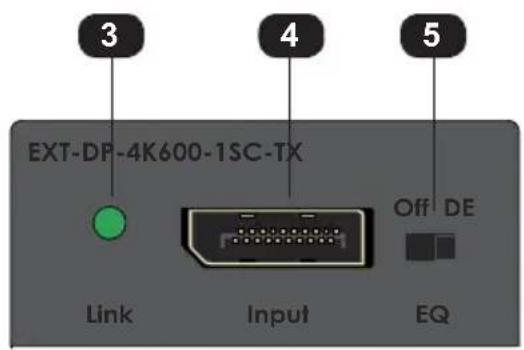
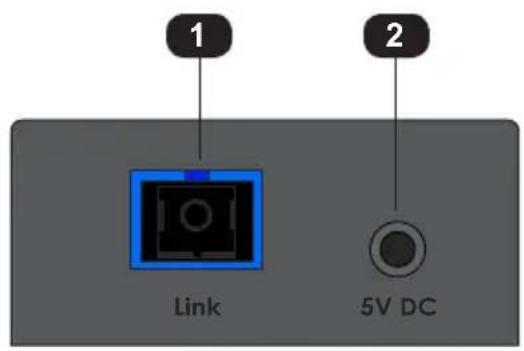
| ID Name Description | ||
| 1 Link Connect an SC-terminated multimode fiber | ||
| optic cable from this connector to the Fiber connector on the Receiver unit. | ||
| 2 5V DC Connect the included 5V DC power supply or USB to DC cable to this power receptacle. | ||
| 3 Link Under normal operating conditions, this | ||
| LED indicator will glow bright green. | ||
| 4 Input Use the included DisplayPort cable to | connect to a DisplayPort 1.2 source. | |
| 5 Off / DE De-emphasis switch. By default this is | ||
| set to the “Off” position. See EQ Switch Configuration (page 6) for more information. | ||
Receiver Unit
GGEFEN®
The purpose of this section is to review some basic facts about the properties of the -algebras. The reader should be familiar with the definitions of the algebraic structure and the fact that the algebraic structure of a -algebra is not necessarily closed under the usual operations.
4K 600 MHz DisplayPort Extender
over one Fiber
Receiver
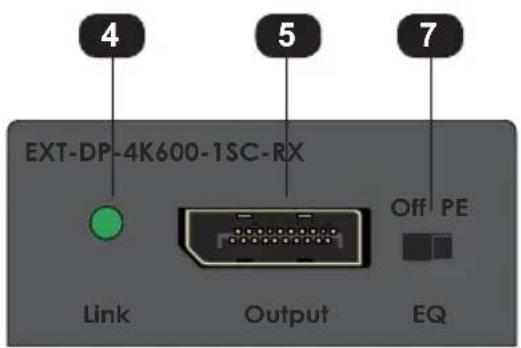
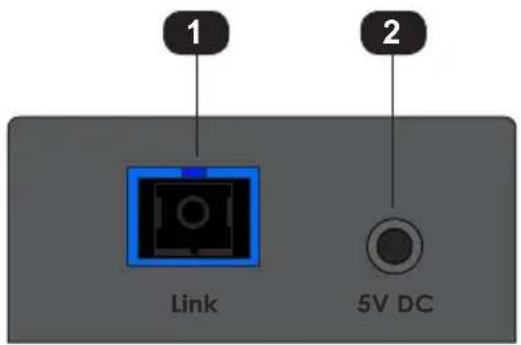
| ID Name Description | ||
| 1 Link Connect an SC-terminated multimode fiber | ||
| optic cable from this connector to the Fiber connector on the Receiver unit. | ||
| 2 5V DC Connect the included 5V DC power supply or USB to DC cable to this power receptacle. | ||
| 3 Link Under normal operating conditions, this | ||
| LED indicator will glow bright green. | ||
| 4 Input Use the included DisplayPort cable to | connect to a DisplayPort 1.2 display. | |
| 5 Off / PE Pre-emphasis switch. By default this is | ||
| set to the “Off” position. See EQ Switch Configuration (page 6) for more information. | ||
Connection Instructions
▶ Video
-
Connect the included DisplayPort cable between the DisplayPort 1.2 source and the Input port on the Sender unit.
-
Connect a DisplayPort 1.2 display to the Output port on the Receiver unit, using the included DisplayPort cable.
▶ Fiber
- Connect a single SC-terminated OM3 or OM4 (50/125 m) multimode fiber optic cable, up to 660 feet (200 meters), between the Link port on the Sender unit and the Link port on the Receiver unit.
▶ Power
-
Connect the included 5V DC power supplies to the 5V DC port on both the Sender and Receiver unit.
-
Connect the opposite end of the power supplies to available electrical outlets.
-
The Link indicators on both units will light once all connections are complete and the units, the source, and the display are powered up.
EQ Switch Configuration
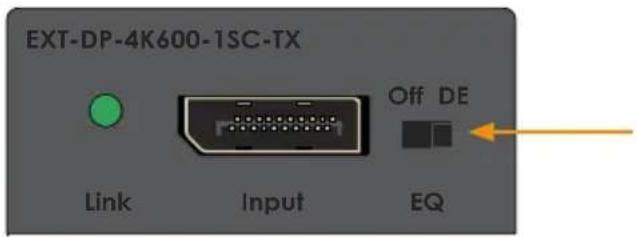
Sender unit - By default, this switch is in the "Off" position. Set the switch to the "DE" (signal de-emphasis) setting, if the source output is very high.
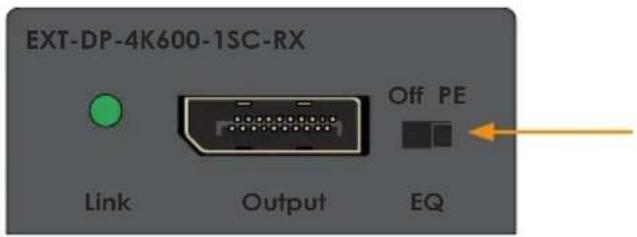
Receiver unit - By default, this switch is set to the "Off" position. Set to the "PE" (signal pre-emphasis) position if the sink device requires a higher than normal input level.
Sample Wiring Diagram

GEFEN
DISPLAYPORT CABLE
FIBER OPTIC (SC-SC) CABLE


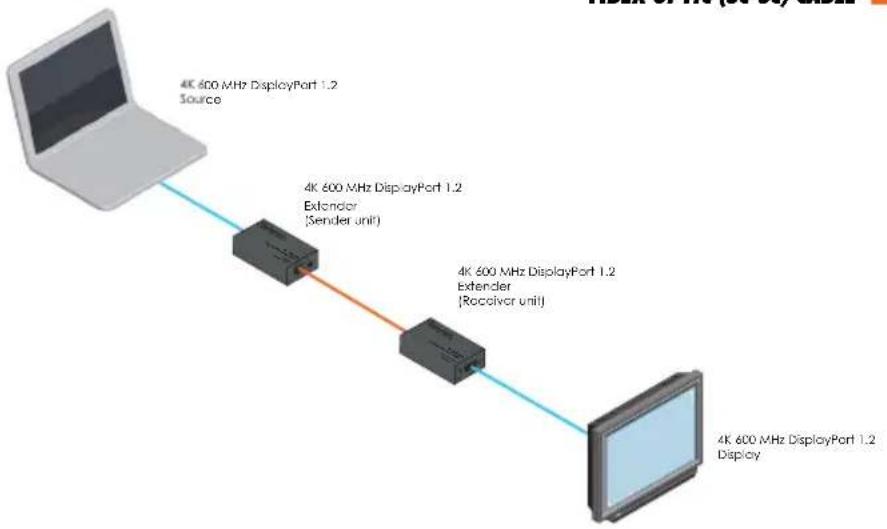
flowchart
graph LR
    A["4K 600 MHz DisplayPort 1.2 Source"] --> B["4K 600 MHz DisplayPort 1.2 Extender (Sender unit)"]
    B --> C["4K 600 MHz DisplayPort 1.2 Extender (Receiver unit)"]
    C --> D["4K 600 MHz DisplayPort 1.2 Display"]
EXT-DP-4K600-1SC
4K 600 MHz DisplayPort 1.2 Extender
over one SC-Terminated Fiber-Optic Cable
2 Appendix
Supported Formats
Video • 3840 x 2160 @ 60 Hz
• WQUXGA (4K; 3840x2400 @ 60Hz)
• 4K Ultra HD (3840 x 2160 @ 60Hz)
• 4K Cinema - DCI (4096 x 2160 60Hz)
Connectors & Indicators
Input (Sender) • 1 x DisplayPort, 20-pin, female
Output (Receiver) • 1 x DisplayPort, 20-pin, female
Link (Sender / Receiver) • 1 x SC-type, female
Link (Sender / Receiver) • 1 x LED, green
Power • 1 x 1.3 mm barrel jack
Operational
Video Bandwidth • 21.6 Gbps (5.4 Gbps per lane, 4 lanes)
Optical Wavelength • 850 nm
Power Input • 5V DC
Power Consumption (Sender) • 1.75 W
Power Consumption (Receiver) • 2.0 W
Optical Power Budget • 6.5 dB
Operating Temperature • +32 to +122 °F (0 to +50 °C)
Operating Humidity • 10% to 85% RH, non-condensing
Storage Temperature
- -4 to +158 °F (-20 to +70 °C)
Storage Humidity (RH)
• 10% to 85% RH, non-condensing
Physical
Dimensions (W x H x D)
(Sender / Receiver), not including connectors
- 1-3/4" x 7/8" x 3-1/8" (45 mm x 22 mm x 79 mm)
Unit Weight (each)
• 4.8 oz. (0.135 kg)
Shipping Weight
• 2.5 lbs (1.2 kg)
NOTE: Features and specifications are subject to change without notice. All trademarks and registered trademarks are properties of their respective owners. Copyright© 2017 Core Brands, LLC
C
Configuration EQ switch 6 Connection Instructions 6
T
Table of Contents viii Technical Support iv
D
De-emphasis EQ switch 3 DisplayPort port 3, 5
W
Warranty Information iii Wiring Diagram 7
E
EQ Off / DE 3 Off / PE 5
F
Features vi
|
Installation 6
L
Link LED 3, 5 port 3, 5
0
Off / DE switch 3 Operating Notes v
P
Packing List vi Power port 3, 5 Pre-emphasis EQ switch 5
S
Safety Instructions ii Sender Unit 2 Specifications 10

GEFEN
1800 S McDowell Blvd. Petaluma CA 94954, USA
(707) 283-5900 (800) 472-5555
- over one SC-Terminated Fiber-Optic Cable
- Technical Support
- Web
- Mailing Address
- Product Registration
- Features\*
- Packing List
- Getting Started
- Appendix
- 4K 600 MHz DisplayPort 1.2 Extender
- 4K 600 MHz DisplayPort Extender
- Connection Instructions
- ▶ Video
- ▶ Fiber
- ▶ Power
- EQ Switch Configuration
- Sample Wiring Diagram
- GEFEN
- C
- T
- D
- W
- E
- F
- |
- L
- 0
- P
- S
Brand : Gefen
Model : EXT-DP
Category : Uncategorized