
Crazy Cart DLX - Electric vehicle for kids RAZOR - Free user manual and instructions
Find the device manual for free Crazy Cart DLX RAZOR in PDF.


| Product Type | Electric Drift Kart |
| Brand | Razor |
| Model | Crazy Cart DLX |
| Recommended Age | 6 years and up |
| Maximum Rider Weight | 140 lbs (63.5 kg) |
| Speed | Up to 12 mph (19 km/h) |
| Battery | 24V (two 12V sealed lead-acid) |
| Run Time | Up to 40 minutes of continuous use |
| Charge Time | Approximately 12 hours for initial charge; 8-10 hours thereafter |
| Motor | High-torque chain-driven motor |
| Frame | Steel frame with a racing-style seat |
| Wheels | Front: 8" pneumatic caster wheels; Rear: 10" pneumatic wheels |
| Drift Mode | Drift bar and caster wheels enable controlled drifting |
| Ground Clearance | Approximately 2.5 inches |
| Dimensions (L x W x H) | Approximately 42" x 27" x 23" (106.7 x 68.6 x 58.4 cm) |
| Weight | Approximately 62 lbs (28.1 kg) |
| Assembly Required | Yes (minor assembly, tools included) |
| Safety Gear | Helmet and protective gear recommended |
| Maintenance | Regularly check tire pressure, battery connections, and chain tension |
| Charger | Includes 24V charger with safety features |
| Color Options | Red/Black (standard) |
Frequently Asked Questions - Crazy Cart DLX RAZOR
User questions about Crazy Cart DLX RAZOR
0 question about this device. Answer the ones you know or ask your own.
Ask a new question about this device
Download the instructions for your Electric vehicle for kids in PDF format for free! Find your manual Crazy Cart DLX - RAZOR and take your electronic device back in hand. On this page are published all the documents necessary for the use of your device. Crazy Cart DLX by RAZOR.
USER MANUAL Crazy Cart DLX RAZOR
natural_image
Two black children's ice skating recreational carts with 'CRAZY CART' branding, shown from different angles (no text or symbols on the carts themselves)OWNER'S MANUAL
Read and understand this entire manual before allowing child to use this product! For assistance contact Razor. DO NOT RETURN TO STORE.
NOTE: Manual illustrations are for demonstration purposes only. Illustrations may not reflect exact appearance of actual product. Specifications subject to change without notice.
Please have your unit and 19 character product I.D. with you before contacting Razor for warranty assistance and/or replacement parts. Product I.D. Code: ____ - ____ - ____
CONTENTS
Safety Warnings 1-2
Before You Begin....3
Assembly and Set-Up 4-5
Charging the Battery 6
Pre-Ride Checklist....7
How to Operate the Crazy Cart....8-9
Repair and Maintenance....10-11
Troubleshooting Guide 12
Crazy Cart Parts....13
Warranty 15
SAFETY WARNINGS
WARNING: The Crazy Cart is not the same as an "ordinary" go-kart and therefore may require greater skill to ride than an ordinary go-kart. The Crazy Cart is designed to allow movement forward, backward, laterally, in drifting arcs and even to pivot around in circles-- and instead of a "conventional" brake, it uses these new features to also allow very quick stopping and braking. It is extremely important to start out slowly, and take the time to get familiar and comfortable with the Crazy Cart's unique directional control and braking abilities (described on pages 8 and 9), before attempting quick turns or other fast moving actions, or otherwise trying to make full use of the Crazy Cart's capabilities. Using this product requires flat open space, free of traffic or other obstacles.
WARNING: Riding any electric product can be a hazardous activity. Certain conditions may cause the equipment to fail without fault of the manufacturer. Like other electric ride-on products, the Crazy Cart can and is intended to move, and it is therefore possible to lose control, fall off and/or get into dangerous situations that no amount of care, instruction or expertise can eliminate. If such things occur you can be seriously injured or die, even when using safety equipment and other precautions. RIDE AT YOUR OWN RISK AND USE COMMON SENSE.
WARNING: PARENTAL AND ADULT RESPONSIBILITY AND SUPERVISION NECESSARY: This manual contains important safety information. It is your responsibility to review this information and make sure that all riders understand all warnings, cautions, instructions and safety topics, and assure that young riders are able to safely and responsibly use this product. Razor recommends that you periodically review and reinforce the information in this manual with younger riders, and that you inspect and maintain your children's product to insure their safety.
WARNING: NOT FOR CHILDREN UNDER AGE 9 OR HEAVIER THAN 140 LB (63 KG). Because products, like the Crazy Cart, can and do present potential hazards plainly associated with their use, it is well recognized THE NEED FOR EXERCISE OF PARENTAL RESPONSIBILITY IN SELECTING RIDING PRODUCTS APPROPRIATE TO THE AGE OF A CHILD, OR PARENTAL SUPERVISION IN SITUATIONS IN WHICH CHILDREN OF VARIOUS AGES MAY HAVE ACCESS TO THE SAME RIDING PRODUCTS, IS IMPORTANT. Not every product is appropriate for every age or size of child, and different age recommendations are found within this category of product which are intended to reflect the nature of the hazards and the expected mental or physical ability, or both, of a rider to cope with the hazards.
Razor recommends that children under the age of 9 not be permitted to use this product. This recommendation is based not just on age or weight or height – it reflects consideration of expected maturity and skills as well as physical size. The recommended rider age of 9 years or older is only an estimate and can be affected by the rider's size, weight or skills – not every child 9 years old will be suited to the product. Certainly, any rider unable to fit comfortably on the Crazy Cart should not attempt to ride it, but a parent's decision to allow his or her child to ride this product should be based on the child's maturity, skill, and ability to follow rules. Razor emphasizes that adults are strongly advised not to disregard Razor's recommendations or permit younger children to ride the Crazy Cart.
DO NOT EXCEED THE WEIGHT LIMIT OF 140 lb (63 kg). Rider weight alone also does not necessarily mean a person's size is appropriate to fit or maintain control of the Crazy Cart. Keep this product away from small children and remember that this product is intended for use only by persons who are, at a minimum, completely comfortable and competent while operating the product.
Persons with any mental or physical conditions that may make them susceptible to injury, impair their physical dexterity or mental capabilities to recognize, understand, and follow safety instructions, and to be able to understand the hazards inherent in a product's use, should not use or be permitted to use products inappropriate for their abilities. Persons with heart conditions, head, back or neck ailments (or prior surgeries to these areas of the body), or pregnant women, should be cautioned not to operate this product.
NOTICE: This manual contains many warnings and cautions concerning the consequences of failing to maintain, inspect or properly use your electric ride-on product. Because any incident can result in serious injury or even death, we do not repeat the warning of possible serious injury or death each time such a possibility is mentioned.
CHECK AND MAINTAIN CRAZY CART
Before use, check to confirm that any and all chain guards or other covers and guards are in place and in serviceable condition. Check that the parts are functioning properly, that the main driving tire is inflated properly and has sufficient tread remaining. The Crazy Cart should be maintained and repaired in accordance with the manufacturer's specifications, using only the manufacturer's authorized replacement parts, and should not be modified from the manufacturer's original design and configuration. Replace worn or broken parts immediately.
WARNING: SAFE OPERATION REQUIRES CAREFUL ATTENTION. This product does not have a traditional brake – stopping is done using the accelerator pedal and steering. Read "How to Operate" section on pages 8 and 9 of this manual and practice to develop skills in using the Crazy Cart.
Always check and obey any local laws or regulations which may affect the locations where the Crazy Cart may be used. The Crazy Cart is meant to be used on private property and on closed courses, and not on public streets or sidewalks. Do not ride your electric product in any areas where pedestrian or vehicle traffic is present.
Do not turn the power switch in the Crazy Cart to ON or depress/activate the accelerator pedal unless you are seated and in a safe, outdoor environment suitable for riding. Always turn the power switch to OFF before exiting the Crazy Cart.
Keep your fingers and other body parts away from the drive chain, steering system, wheels and all other moving components.
Maintain a hold on the steering wheel at all times.
Ride defensively. Watch out for potential obstacles that could catch your wheel(s) or force you to swerve suddenly or lose control. Be careful to avoid pedestrians, skaters, skateboards, scooters, bikes, children or animals who may enter your path, and respect the rights and property of others.
SAFETY WARNINGS
This product was manufactured for performance and durability, but is not impervious to damage. Bumping into obstacles or other aggressive riding can overstress and damage any product, including the Crazy Cart, and the rider assumes all risks associated with high-stress activity. This product is not a "bumper car."
Never carry passengers or allow more than one person at a time to ride the electric product.
Never use headphones or a cell phone when riding. Never hitch a ride with another product.
Do not ride the Crazy Cart in wet or icy weather and never immerse this electric product in water, as the electrical and drive components could get damaged by water or possibly create other unsafe conditions.
Wet, slick, bumpy, uneven or rough surfaces may increase risks. Do not ride this electric product in mud, ice, puddles or water. Avoid excessive speeds that can be associated with downhill rides. Never risk damaging surfaces, such as carpet or flooring, by using an electric product indoors.
Never use near steps or swimming pools.
Do not ride at night or when visibility is limited.
Do not touch the electric motor on your product when in use (or after using) as it can become very hot.
You may see people on TV or videos performing stunts and trick maneuvers on the Crazy Cart. These are people who have been practicing a long time and who accept the risks of trick riding. Do not assume that you can attempt to do the same tricks without great risk.
Be careful and know your limitations. Risk of injury increases as the degree of riding difficulty increases. The rider assumes all risk associated with aggressive riding activities.
PROPER RIDING ATTIRE
Always wear proper protective equipment, such as an approved safety helmet (with chin strap securely buckled). A helmet may be legally required by local law or regulation in your area. Elbow pads and kneepads, a long-sleeved shirt, long pants and gloves are recommended. Always wear athletic shoes (lace-up shoes with rubber soles), never ride barefooted or in sandals, and keep shoelaces tied and out of the way of the wheels, motor, and drive system.
USING THE CHARGER
The charger supplied with the Crazy Cart should be regularly examined for damage to the cord, plug, enclosure and other parts. In the event of such damage, the Crazy Cart must not be charged until the charger has been repaired or replaced.
Use only with the recommended charger.
Use caution when charging.
The charger is not a toy. Charger should be operated by an adult.
Do not operate charger near flammable materials.
Unplug charger and disconnect from Crazy Cart when not in use.
Always disconnect from the charger prior to wiping down and cleaning your Crazy Cart with damp cloth.
FAILURE TO USE COMMON SENSE AND HEED THE WARNINGS INCREASES RISK OF SERIOUS INJURY. USE WITH APPROPRIATE CAUTION AND SERIOUS ATTENTION TO SAFE OPERATION.
BEFORE YOU BEGIN
TURN POWER SWITCH OFF BEFORE CONDUCTING ANY ASSEMBLY OR MAINTENANCE PROCEDURES.
Remove contents from box. Remove the separators that protect the components from damage during shipping. Inspect the contents of the box for scratches in the paint, dents or kinked cables that may have occurred during shipping. Because the Crazy Cart was 99 percent assembled and packed at the factory, there should not be any problems, even if the box has a few scars or dents.
□ Estimated Assembly and Set-Up Time
Razor recommends assembly by an adult.
Allow up to 5 minutes for assembly, not including initial charge time. Allow up to 12 hours for initial charge.
Charger
(Note: Charger design may vary from one shown)

□ Tools Required

6 mm Allen Wrench
(Included - DLX Model Only)

Brodie Knob Installation Tool (Included - DLX Model Only)
WARNING:
DO NOT USE NON-RAZOR PARTS WITH YOUR CRAZY CART.
The Crazy Cart has been built to certain Razor design specifications. The original equipment supplied at the time of sale was selected on the basis of its compatibility with the frame and all other parts. Certain aftermarket components may not be compatible. Use of non-Razor parts will void the warranty.
Product ID Locations:
- Front of Frame
- Battery Cover
- Charger
- Box (Not Shown)
WARNING:
Turn power switch off before conducting any assembly or maintenance procedures.
Plastic Bag Contents:
- Charger
- Tools (DLX Model Only)
- Owner's Manual
ASSEMBLY AND SET-UP
Turn power switch off before conducting any maintenance procedures.
□ Attaching the Steering Wheel (DLX model only)
Tool Required: 6 mm Allen Wrench

1 Remove the cardboard protector from the steering fork. Insert the steering wheel into the steering fork making sure to align the groove on the steering wheel (A) with the groove on the steering fork (B). Push all the way down.

natural_image
Technical line drawing of a mechanical assembly with no visible text or symbols2 Using a 6 mm Allen wrench, tighten the steering bolt to secure the steering wheel in place.
WARNING:
Failure to properly tighten the steering bolt may allow the steering wheel to dislodge while riding and may cause you to lose control.
ASSEMBLY AND SET-UP
□ Adjusting the Seat
Tool Required: 5 mm Allen Wrench
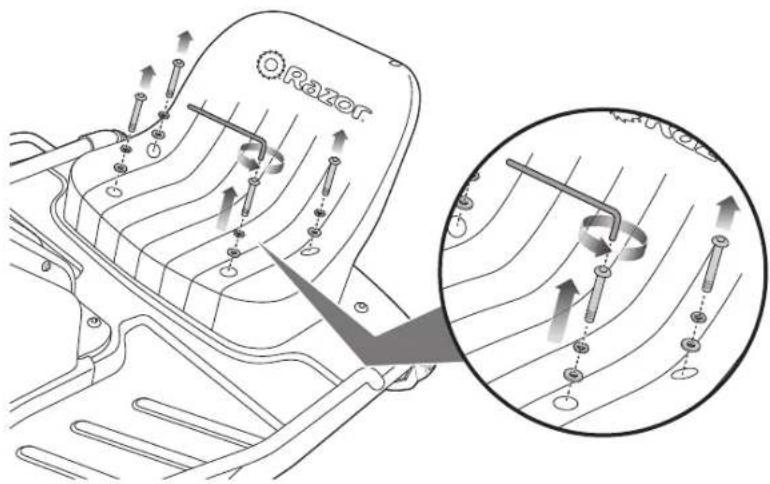
1 Using a 5 mm Allen wrench, remove the four (4) bolts attaching the seat.

2 Move the seat to the desired position and securely tighten the four (4) bolts to the frame.
□ Inflating the Tire
Tire is inflated when shipped, but it will invariably lose some pressure between the point of manufacturing and your purchase. Before initial use: Using a bicycle style tire pump equipped for a Schrader-type valve, inflate the front tire to the correct PSI indicated on the sidewall of the tire.

natural_image
Technical line drawing of a mechanical device with wheels and a handle (no text or symbols)
WARNING:
Do not over inflate, as this could damage tire or wheel.
Note: The pressurized air supplies found at gasoline stations are designed to inflate high-volume automobile tires. If you decide to use such an air supply to inflate your Crazy Cart tire, first make sure the pressure gauge is working, then use very short bursts to inflate to the correct PSI. If you inadvertently over-inflate the tire, release the excess pressure immediately.
CHARGING THE BATTERY
Your Crazy Cart may not have a fully charged battery; therefore you must charge the battery prior to use.
- Initial charge time: 12 hours.
- Recharge time: up to 12 hours, even if the light turns green. Recommended maximum charging time is 24 hours.
• Always charge the battery immediately after riding. - Fully charge battery before storing for extended periods of time.
- Unplug charger from the wall outlet when not in use.
-
Failure to recharge battery periodically may result in a battery that will not accept a charge.
-
Make sure the power switch is turned OFF when unit is not in use. If the power switch is left on for an extended period of time, the battery may reach a stage at which it will no longer hold a charge.
- To ensure long battery life, never store the product in freezing or below freezing temperatures! Freezing will permanently damage the battery.
- Run time: Up to 40 minutes of continuous ride time. Run time may vary depending on riding conditions, rider weight, climate, and/or proper maintenance.
- Battery life can vary depending on proper maintenance and usage of the unit.
Charger
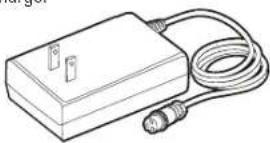
Note: Make sure power is turned OFF when unit is not in use. If the power switch is left on for an extended period of time, the battery may reach a stage at which it will no longer hold a charge.

1 Plug the charger plug into wall outlet. The light on the charger should be green.
Note: If green light (LED) does not turn on, try a different outlet.

natural_image
Technical line drawing of a mechanical assembly with no visible text or symbols2 Plug the charger into the charger port on the Crazy Cart. Make sure the power switch is in the OFF position. The light on the charger should turn red during charging. The light will turn green again when charging is complete.

WARNING: Use ONLY
with the recommended charger. Batteries are only to be charged under adult supervision. The charger is not a toy. Always disconnect the charger before wiping down and/or cleaning the Crazy Cart with a damp cloth.
The charger supplied with the Crazy Cart should be regularly examined for damage to the cord, plug, enclosure and other parts. In the event of such damage, the Crazy Cart must not be charged until it has been repaired or replaced.
Chargers have built-in over-charge protection to prevent battery from being over-charged.
Note: If the charger gets warm during regular use, this is a normal response and is no cause for concern. If your charger does not get warm during use, it does not mean that it is not working properly.
Wall outlet - Green (stand by) Wall outlet and unit - Red (charging) Wall outlet and unit - Green (charged)
Note: Continue charging unit even if light turns green prior to 12 hours.

WARNING: Failure to
recharge the battery at least once a month may result in a battery that will no longer accept a charge.
PRE-RIDE CHECKLIST

Wheels/Tires
Practice drift riding only in wide open areas clear from curbs, parking blocks and other obstacles. Impacting the wheels against any hard surface can damage the wheels. Wheels are not covered under your limited warranty.

Frame, Fork and Steering Wheel
Check for cracks or broken connections. Although broken frames are rare, it is possible for an aggressive rider to run into a curb or object and wreck and bend or break a frame. Get in the habit of inspecting your Crazy Cart on a regular basis.

Hardware/Loose Parts
Before every ride, check all parts, such as nuts, bolts, cables, fasteners, etc., to ensure they are secure and assembled correctly. There should not be any unusual rattles or sounds from loose parts or broken components. If the unit is damaged, do not ride. Reference "Safety Warnings" on pages 1 and 2 of this manual.

Safety Gear
Always wear proper protective gear, such as an approved safety helmet. Elbow pads and kneepads are recommended. Always wear athletic shoes (lace-up shoes with rubber soles) and keep shoelaces tied and out of the way of the wheels, motor and drive system. NEVER RIDE BAREFOOTED OR IN SANDALS.

Laws and Regulations
Always check and obey any local laws or regulations.

Insurance
Do not assume that your existing insurance policies necessarily provide coverage for electric product use. Check with your insurance company for information regarding insurance.
Before you ride this exciting new product, take the time to learn about how it moves the way it moves. Start out slowly. With practice and care, you must familiarize yourself with these riding hints and tips so that your experiences with the Crazy Cart will allow you to maximize fun while keeping in control.
Never turn the Power Switch to ON before sitting down in the driver's seat of the Crazy Cart. By getting yourself situated before turning the power ON, you won't risk losing your balance by pushing the accelerator pedal while standing as you get into (or out of) the Crazy Cart. Always turn the Power Switch to OFF before exiting the Crazy Cart.

Important Control Features:
Accelerator Pedal, Steering Wheel and Drift Bar
The Crazy Cart allows really creative drifting, spinning and turning that no ordinary go-kart can do. If you have ridden a Razor RipStik® or a Razor RipRider® 360, think about those caster wheels and how they allow rapid changes of direction; or how a Razor Ground Force® Drifter™ go-kart allows full speed rear-end drifting. The Crazy Cart builds on these motions and adds even tighter turning possibilities through the fully rotational center motor and an adjustable angling ability for the rear caster wheels. Practice with these Crazy Cart characteristics can lead to amazing fun, and the importance of exercising caution and common sense when riding is – as with all moving products – important for every rider.
Accelerator Pedal
The Crazy Cart has a foot pedal accelerator that controls the cart's speed. This variable speed accelerator allows you to drive the cart at a range of speeds from 0-12 MPH (0-19 KMH), depending on how much it is depressed. This ability to dynamically speed up and slow down is a key to controlled drifting. All stopping should be preceded by releasing any pressure on the accelerator pedal.
Steering Wheel
The Crazy Cart's steering wheel is different from a normal car or cart in a number of ways. The most important thing to remember about the Crazy Cart's steering wheel is that the arrow on it points in the direction where the cart is going to travel, regardless of how the rest of the cart is oriented. Simply point the arrow where you want the cart to go (using the Drift Bar can change how the back of the Crazy Cart follows, as described below).
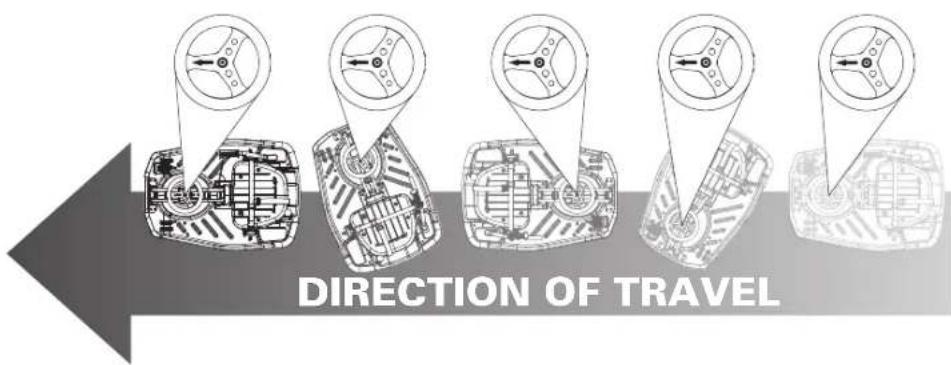
The Crazy Cart's steering wheel is able to rotate more than 180° in each direction. The steering wheel has a "hard stop" when it has reached the limit of its turning – it won't keep going around all the way, but by turning fully one direction or fully the other direction, you can ride the Crazy Cart backwards - and by turning at or near 90° the Crazy Cart can go in a very, very tight circle (be careful to avoid losing control by turning so much as to risk becoming dizzy).
The steering configuration of the Crazy Cart's integrated drive and steering mechanism is similar to what some might call "shopping cart" design. It has no self-correcting camber or castering features (meaning the steering tube goes straight up and down so the wheel doesn't "align" itself on its own). Such steering might, in certain circumstances, shimmy or vibrate a little -- this is normal. Usually it is the result of an uncoordinated or adverse control condition. If you feel a shimmy in the steering, a change of direction ("counter-steering") and/or speed change helps re-establish smooth control.
IMPORTANT: Always select a riding area that is level, smooth, dry, and completely free of traffic or obstacles. DO NOT RIDE AROUND CARS!
Riding Tip: Learning when to push and when to let off of the accelerator pedal will improve your ability to do spins, drifts, and tricks smoothly. The best way to learn the Crazy Cart's abilities is to try things at low speed.

WARNING: Excessive
duration or speed in spins can lead to loss of balance, loss of control and tipping. Keeping one's limbs and head tucked in tight to the center of the Crazy Cart can reduce risks of tipping over because ergonomic forces can increase risk of tipping if the body is leaning outwards and/or the spinning speed accelerates too greatly. Take your foot off the accelerator pedal if spinning becomes too fast to control, do not try to accelerate out of a spin. The Crazy Cart may accelerate faster when lighter riders are on it, which is one reason the minimum recommended age is 9. Be safety conscious!
Drift Bar for Adjustable Rear Casters
The rear wheels on the Crazy Cart are mounted on casters, like RipStik wheels. By altering the angle of the support for these wheels, the Crazy Cart can either "track" in the same direction as the drive wheel is going or allow the rear end to "drift" in response to turning or acceleration forces. The Drift Bar allows control between the two driving modes: normal mode for straight tracking (down or default) and Crazy Cart mode for drifting (when the Drift Bar is pulled up). When the Drift Bar is in the down position, the Crazy Cart will track in-line with the front wheel like a traditional vehicle. As the Drift Bar is raised, it changes the angle of the rear casters and allows the rear of the cart to drift. The more the Drift Bar is raised, the easier the cart drifts. When the Drift Bar is all the way up, the casters are in "Crazy Cart mode." The Crazy Cart can thus actually turn itself around in circles, and the size of the circle the cart will spin in depends on how much, if any, the Drift Bar is pulled up. The higher the Drift Bar is, the tighter the circle the cart will spin in.
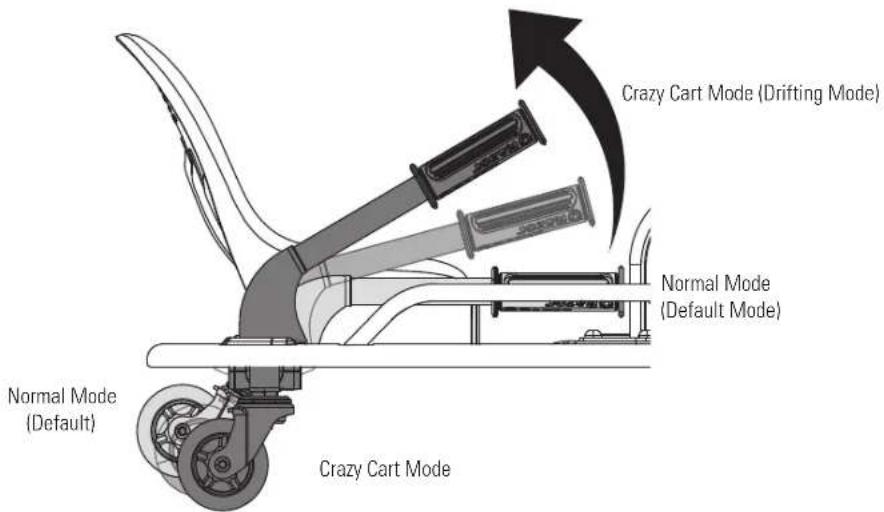
In Crazy Cart mode, the frame is able to rotate any direction, regardless of the direction of travel. In the Crazy Cart mode it is possible to drive in a straight line with the frame oriented any direction, including backwards and sideways. The Drift Bar must be raised all the way up to travel backward in the Crazy Cart.
Spinning, Drifting and Stopping the Crazy Cart
The best use of the Crazy Cart involves careful coordination of the steering, the Drift Bar, and the accelerator. The majority of spins and drifts that can be done in the Crazy Cart are accomplished by careful accelerator control. Learning when to add or reduce power is the key to smoothly connecting tricks. Smooth riding also increases the run time between charges. When first getting oriented with the Crazy Cart, it is highly recommended that riders carefully apply the accelerator and take time to get familiar with the variable effects of the Drift Bar and steering at low speeds.
There is no separate brake on the Crazy Cart, but with practice it is easy to stop. Of course, removing your foot from the accelerator will slow the cart down as a result of friction in the drive train. To stop the Crazy Cart's forward motion immediately, take your foot off of the accelerator and turn the steering wheel 90 degrees to either side. Removing your foot from the accelerator and turning the steering wheel will result in the Crazy Cart spinning or drifting in a circle and slowing to a stop. By turning the steering wheel 90° and taking your foot off the pedal, the rider can immediately arrest forward motion and instead turn away. In this way, the Crazy Cart can avoid collisions and evade things otherwise in its path.
For your safety, take the time to get familiar and comfortable with various combinations of accelerator, steering, and Drift Bar applications to learn how to slow down and how using the Drift Bar affects stopping at slow speeds. Practice these skills for maximum rider safety.
These basic steering exercises may help to familiarize riders with their Crazy Cart's capabilities:
- First steer in a circle with the Drift Bar down.
- Do the same circles, but raise the Drift Bar to different heights, and note how the chassis reacts to drift differently based on lifts and steering.
- Practice bringing the Crazy Cart to a stop by turning 90° to the left or right-- note how much more tightly the Crazy Cart turns with the Drift Bar raised.
- Practice staying "tucked in" in tight turns or spins.

WARNING: Recognize that these specialized riding features affect how the Crazy Cart functions and require extra caution and attention to safe riding conditions and practices. Read and review the Safety Warnings on pages 1 and 2, and be extra careful with the Crazy Cart to avoid traffic, obstacles and downhill environments. This is not a "bumper car" and is not designed to engage in collisions, jumping activities or for use on surfaces other than hardened, smooth, flat and dry areas.
Riding Tip: With the steering wheel at 90°, the Crazy Cart will move in a circle using the rear inside caster as the "pivot point" if the Drift Bar is down -- but will rotate around its center if the Drift Bar is fully raised.
Riding Tip: The front stabilizer posts help to keep your Crazy Cart from tipping when you are first stepping into the cart and when you turn too hard.
REPAIR AND MAINTENANCE
Turn power switch "OFF" before beginning repair or maintenance:
- Read the instructions
- Remove charger plug
-
Turn the power switch off
-
Secure the unit under repair
• Exercise caution around exposed parts
- Contact Razor customer service if unsure about any repair or maintenance
Front Wheel/Chain Replacement
Tools Required: Phillips Screwdriver, two (2) 16 mm Wrenches

natural_image
Mechanical assembly diagram showing a linkage mechanism with pulleys and a wheel (no text or labels)1 Using a Phillips screwdriver, remove the seven (7) screws on the right side of the motor cover (side of the foot pedal throttle) and remove cover.
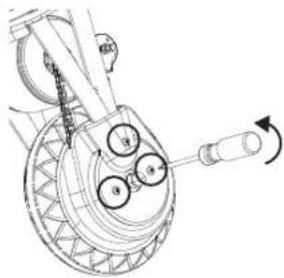
natural_image
Technical line drawing of a mechanical component with no visible text or symbols2 Using a Phillips screwdriver, remove the three (3) screws on the chain guard and remove the chain guard.

natural_image
Mechanical diagram of a wheel and gear assembly with rotating shaft (no text or symbols)3 Using two (2) 16 mm wrenches, remove the locknuts on the front axle bolt and slide axle bolt out from the front wheel. Carefully remove the chain from around the wheel sprocket and remove wheel from the front fork. If replacing the chain, also remove the chain from around the motor shaft. Install replacement wheel/chain.
☐ Rear Wheels/Rear Casters Replacement
Tool Required: 5 mm Allen Wrench, 24 mm Wrench

natural_image
Mechanical assembly diagram showing a gear and lever mechanism (no text or labels)1 Carefully turn unit over. Using a 5 mm Allen wrench, loosen coupling bolt and remove wheel.
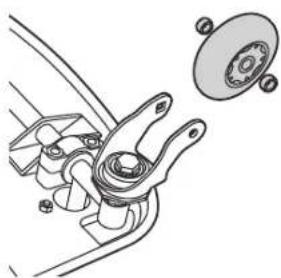
natural_image
Technical line drawing of a mechanical assembly with no visible text or symbols2 Install the wheel into the caster.

natural_image
Mechanical linkage diagram showing a rotating arm mechanism (no text or symbols)3 To remove the caster, use a 24 mm wrench to loosen nut on the caster and remove.
WARNING: Failure to properly install and tighten the screws, nuts and bolts that affix the steering wheel and seat can cause you to lose control and crash.
Note: Front wheel hardware sequence
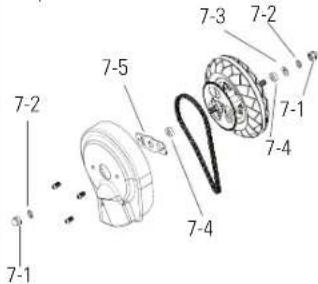
Right Side (Throttle)
7-1 Locknut
7-2 Split Washer
Fork
7-5 Chain Guard Bracket
7-4 Spacer
Left Side
7-1 Locknut
7-2 Split Washer
7-3 Flat Washer
Fork
7-4 Spacer
WARNING: Failure to properly adjust and tighten the screws, nuts and bolts that affix the wheels can cause you to lose control and crash.
Note: Practice riding only in wide open areas clear from curbs, parking blocks and other obstacles. Impacting the wheels against any hard surface can damage the wheels. Wheels are not covered under your limited warranty.
REPAIR AND MAINTENANCE
□ Removing the Brodie Knob
Tool Required: Brodie Knob Installation Tool, 5 mm Allen Wrench

natural_image
Line drawing of a mechanical assembly with a wheel, lever, and handle (no text or symbols)1 Insert the Brodie knob installation tool into the hole in the cap on top of the Brodie knob and remove the cap.

natural_image
Technical line drawing of a mechanical assembly with no visible text or symbols2 Using a 5 mm Allen wrench,

natural_image
Technical line drawing of a mechanical assembly with a central component and a separate cylindrical part (no text or symbols)3 Remove the Brodie knob.
□ Battery Care and Disposal
Do not store in freezing or below freezing temperatures! To properly maintain your battery and ensure maximum battery life, carefully read the "Charging the Battery" section on page 5 of this owner's manual.


CONTAINS SEALED LEAD ACID BATTERIES. BATTERIES MUST BE RECYCLED.
Disposal: Your Razor product uses sealed lead-acid batteries which must be recycled or disposed of in an environmentally safe manner. Do not dispose of a lead-acid battery in a fire. The battery may explode or leak. Do not dispose of a lead-acid battery in your regular household trash. The incineration, land filling or mixing of sealed lead-acid batteries with household trash is prohibited by law in most areas. Return exhausted batteries to a federal or state approved lead-acid battery recycler or a local seller of automotive batteries. If you live in Florida or Minnesota, it is prohibited by law to throw away lead-acid batteries in the municipal waste stream.
□ Charger
The charger supplied with the electric product should be regularly examined for damage to the cord, plug, enclosure and other parts and in the event of such damage, the product must not be charged until it has been repaired or replaced.
Use ONLY with the recommended charger.
Wheels
Wheels and drive system are subject to normal wear and tear. It is the responsibility of the user to periodically inspect wheels for excess wear, and adjust and replace drive train components as required.
□ Replacement Parts
The most frequently requested replacement parts are available for purchase at some Razor retail partners. For the complete selection of replacement parts visit shop.razor.com.
□ Repair Centers
For a list of authorized Razor repair centers:
- Check online at www.razor.com.
• Additional Customer Service contact information is listed on the back of this manual.

WARNING: If a battery
leak develops, avoid contact with the leaking acid and place the damaged battery in a plastic bag. Refer to the disposal instructions at left. If acid comes into contact with skin or eyes, flush with cool water for at least 15 minutes and contact a physician.

WARNING: Battery
posts, terminals and related accessories contain lead and lead compounds. Wash your hands after handling.
TROUBLESHOOTING
*Unit(s) should be turned off and fully charged prior to doing any Troubleshooting
NOTE: All troubleshooting steps should be performed by an adult only
Problem Possible Cause Solution
| Product does not run. Undercharged battery. | Charge the battery. A new battery should have been charged for at least 12 hours before using the product for the first time and up to 12 hours after each subsequent use.Check all connectors. Make sure the charger connector is tightly plugged into the charging port and that the charger is plugged into a functioning wall outlet. | |
| Product was running but suddenly stopped. | Loose wires or connectors. Check all wires and connectors to make sure they are tight. | |
| Short run time. Undercharged battery. | Charge the battery. A new battery should have been charged for at least 12 hours before using the product for the first time and up to 12 hours after each subsequent use. | |
| Product runs sluggishly. Riding conditions are too stressful. | Use only on solid, flat, clean and dry surfaces such as pavement or level ground. | |
| Product is overloaded. | Make sure you do not overload the product by allowing more than one rider at one time, exceeding the maximum weight limit, going up too steep a hill or towing objects behind the product. | |
| Sometimes the product doesn't run, but other times it does. | Loose wires or connectors. | Check all wires connectors to make sure they are tight. |
| Motor or electrical switch damage. | Contact your local Razor authorized service center for diagnosis and repair. Contact Razor customer service or visit www.razor.com. | |
| Charger gets warm during use. | Normal response to charger use. | No action required. This is normal for some chargers and is no cause for concern. If your charger does not get warm during use, it does not mean that it is not working properly. |
Product makes loud noises or grinding sounds.
Chain is too dry. Apply a lubricant such as 3 in 1
^TM or Tri-Flow ^TM to the chain.
For more troubleshooting tips, a list of available replacement parts or to locate an authorized Service Center in your area, visit our website at www.razor.com or call toll free +1 866 467 2967 to speak to a live Customer Service Representative
Need Help? Visit our web site for replacement parts, product support, a list of authorized service centers in the US and customer service contact information at www.razor.com. Please have the product I.D. code (located on the white label of your product) available for better assistance. Additional Customer Service contact information is listed at the back of this manual.
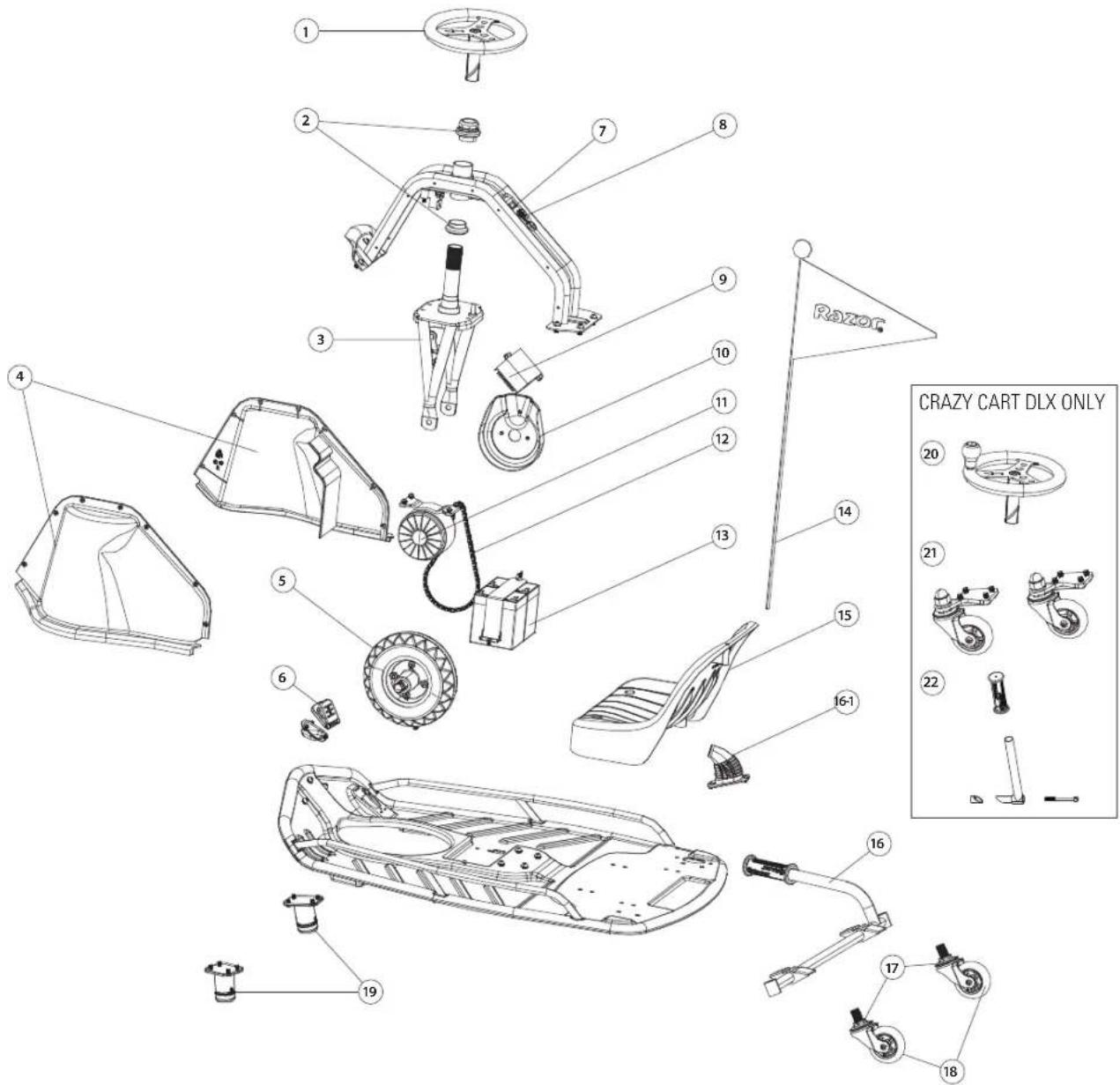
CRAZY CART PARTS
Keep your product running for years with genuine Razor parts. Visit our web site for more information on spare part availability. (Specifications subject to change without notice.)
-
Steering Wheel
-
Chain Guard
-
Rear Caster
-
Headset (Upper/Lower)
-
Motor
-
Rear Wheels
-
Front Fork
-
Chain
-
Stabilizing Posts
-
Motor Cover (Right/Left)
-
Battery
CRAZY CART DLX ONLY
-
Front Wheel
-
Flag
-
Steering Wheel with Brodie Knob
-
Accelerator Pedal
-
Seat
-
Front Caster Wheels
-
On/Off Switch
-
Drift Bar
-
Vertical Drift Bar Extension
-
Charger Port
16.1 Drift Bar Cover
- Control Module
Need Help? Visit our web site for replacement parts, product support, a list of authorized service centers in the US and customer service contact information at www.razor.com. Please have the product I.D. code (located on the white label of your product) available for better assistance. Additional Customer Service contact information is listed at the back of this manual.
NOTICE: INSURANCE
YOUR INSURANCE POLICIES MAY NOT PROVIDE COVERAGE FOR ACCIDENTS INVOLVING THE USE OF THIS SCOOTER/ELECTRIC RIDE-ON PRODUCT. TO DETERMINE IF COVERAGE IS PROVIDED, YOU SHOULD CONTACT YOUR INSURANCE COMPANY OR AGENT.
FCC COMPLIANCE
This device complies with Part 15 of the FCC Rules. Operation is subject to the following two conditions: (1) This device may not cause harmful interference, and (2) this device must accept any interference received, including interference that may cause undesired operation.
Note: This equipment has been tested and found to comply with the limits for a Class B digital device, pursuant to part 15 of the FCC Rules. These limits are designed to provide reasonable protection against harmful interference in a residential installation. This equipment generates, uses and can radiate radio frequency energy and, if not installed and used in accordance with the instructions, may cause harmful interference to radio communications. However, there is no guarantee that interference will not occur in a particular installation. If this equipment does cause harmful interference to radio or television reception, which can be determined by turning the equipment off and on, the user is encouraged to try to correct the interference by one or more of the following measures:
- Reorient or relocate the receiving antenna.
- Increase the separation between the equipment and receiver.
- Connect the equipment into an outlet on a circuit different from that to which the receiver is connected.
- Consult the dealer or an experienced radio/TV technician for help.
WARNING: Changes or modifications to this unit not expressly approved by the party responsible for compliance, could void the user's authority to operate the equipment.
WARRANTY
Razor Limited Warranty
The manufacturer warranties this product to be free of manufacturing defects for a period of 90 days from date of purchase. This Limited Warranty does not cover normal wear and tear, tire, tube or cables, or any damage, failure or loss caused by improper assembly, maintenance, storage or use of the Razor Crazy Cart.
This Limited Warranty will be void if the product is ever:
• used in a manner other than for recreation or transportation;
- modified in any way;
- rented.
The manufacturer is not liable for incidental or consequential loss or damage due directly or indirectly to the use of this product.
Razor does not offer an extended warranty. If you have purchased an extended warranty, it must be honored by the store at which it was purchased.
For your records, save your original sales receipt with this manual and write the serial number below.
CUSTOMER SERVICE CONTACT INFORMATION
Need Help? Visit our web site for replacement parts, product support, a list of authorized service centers in the US and customer service contact information at www.razor.com. Please have the product I.D. code (located on the white label of your product) available for better assistance. Additional Customer Service contact information is listed below:
AMERICAS
Razor USA LLC
P.O. Box 3610
Cerritos, CA 90703
USA
+1 866 467 2967
Monday - Friday
8:00 AM - 5:00 PM Pacific Time
customersupport@razorusa.com
EUROPE
Razor USA LLC (Europe)
Handelsweg 2
2742 RD Waddinxveen
Netherlands
+44 (0) 120 267 2702
ASIA
Razor USA LLC (Asia)
P.O. Box 3610
Cerritos, CA 90703
USA
+81 50 7579 6622
info@razor-asia.com
DISTRIBUTED IN THE UK BY:
Re:creation Limited
2 Meadows Business Park
Station Approach, Blackwater
Camberley, Surrey GU17 9AB
United Kingdom
+44 (0) 118 973 6222 Tel
+44 (0) 118 973 6220 Fax
sales@recreationltd.co.uk
DISTRIBUTED IN AUSTRALIA BY:
Funtastic Limited
Level 2, Tower 2, Chadstone Place
1341 Dandenong Road
Chadstone VIC 3148
Australia
+1 800 244 543
info@funtastic.com.au
Printed in China for Razor USA LLC.
Copyright © 2003-2016 Razor USA, LLC. All rights reserved. Razor® and the Razor logo design are among the registered trademarks of Razor USA LLC in the United States and/or select foreign countries. Crazy Cart® is a trademark of Razor USA LLC.

- OWNER'S MANUAL
- CONTENTS
- SAFETY WARNINGS
- CHECK AND MAINTAIN CRAZY CART
- PROPER RIDING ATTIRE
- USING THE CHARGER
- BEFORE YOU BEGIN
- TURN POWER SWITCH OFF BEFORE CONDUCTING ANY ASSEMBLY OR MAINTENANCE PROCEDURES.
- □ Estimated Assembly and Set-Up Time
- □ Tools Required
- WARNING:
- Product ID Locations:
- Plastic Bag Contents:
- ASSEMBLY AND SET-UP
- □ Attaching the Steering Wheel (DLX model only)
- □ Adjusting the Seat
- □ Inflating the Tire
- CHARGING THE BATTERY
- WARNING: Use ONLY
- WARNING: Failure to
- PRE-RIDE CHECKLIST
- Wheels/Tires
- Frame, Fork and Steering Wheel
- Hardware/Loose Parts
- Safety Gear
- Laws and Regulations
- Insurance
- Important Control Features:
- Accelerator Pedal, Steering Wheel and Drift Bar
- Accelerator Pedal
- Steering Wheel
- WARNING: Excessive
- Drift Bar for Adjustable Rear Casters
- Spinning, Drifting and Stopping the Crazy Cart
- REPAIR AND MAINTENANCE
- Turn power switch "OFF" before beginning repair or maintenance:
- Front Wheel/Chain Replacement
- ☐ Rear Wheels/Rear Casters Replacement
- Right Side (Throttle)
- Fork
- Left Side
- □ Removing the Brodie Knob
- □ Battery Care and Disposal
- □ Charger
- Wheels
- □ Replacement Parts
- □ Repair Centers
- TROUBLESHOOTING
- CRAZY CART PARTS
- CRAZY CART DLX ONLY
- FCC COMPLIANCE
- WARRANTY
- Razor Limited Warranty
- CUSTOMER SERVICE CONTACT INFORMATION
- AMERICAS
- EUROPE
- ASIA
- DISTRIBUTED IN THE UK BY:
- DISTRIBUTED IN AUSTRALIA BY:
Brand : RAZOR
Model : Crazy Cart DLX
Category : Electric vehicle for kids