
AVC042GL - Webcam TARGUS - Free user manual and instructions
Find the device manual for free AVC042GL TARGUS in PDF.


| Product Type | Webcam |
| Brand | Targus |
| Model | AVC042GL |
| Resolution | 1920 x 1080 (Full HD) |
| Frame Rate | 50/60 Hz |
| Focus | Auto-focus |
| Lens | Auto-focus module, f2.5, 67° viewing angle |
| Sensor | 1/3-inch 2MP CMOS |
| Microphone | Built-in sound-absorbing and noise-reducing microphone |
| Interface | USB 2.0 |
| Cable Length | 150 cm (59 in) |
| Photo Format | BMP, JPG |
| Video Compression | MJPEG, H.264, H.265 |
| Operating System | Windows 11/10/8/7/XP, macOS 10.6+ |
| Software Compatibility | QQ, WeChat, DingTalk, Skype, Facebook, Zoom, YouTube, FaceTime, Teams, etc. |
| Privacy Cover | SpyGuard™ privacy cover included |
| Mounting | Clip-on bracket for monitor or laptop |
| Warranty (EMEA) | 2 years limited warranty |
| Warranty (Other Regions) | 1 year limited warranty |
Frequently Asked Questions - AVC042GL TARGUS
User questions about AVC042GL TARGUS
0 question about this device. Answer the ones you know or ask your own.
Ask a new question about this device
Download the instructions for your Webcam in PDF format for free! Find your manual AVC042GL - TARGUS and take your electronic device back in hand. On this page are published all the documents necessary for the use of your device. AVC042GL by TARGUS.
USER MANUAL AVC042GL TARGUS
(UG) AVC042GL-50_410-4230-001B
EMEA CUSTOMERS: 2 YEARS LIMITED WARRANTY OTHER REGIONS: 1 YEAR LIMITED WARRANTY
We conclude ourselves on the quality of our products. For complete warranty details and a list of our Worldwide offices, please visit www.targus.com. Targus product warranty does not cover any device or product that is not manufactured by Targus (including, but not limited to, laptops, smartphones, devices, or any other product that may be used in connection with the Targus product). Targus and DefenseGuard are trademarks or registered trademarks of Targus International LLC in the U.S. and in certain other countries. All logos and registered trademarks are the property of their respective owners. © 2021 Targus International LLC, 1211 North Miller St., Analem, CA 92806. All rights reserved.
CLIENTS EMEA : GARANTIE LIMITÉE DE 2 ANS AUTRES RÉGIONS : GARANTIE LIMITÉE DE 1 AN
1080P HD Camera with Auto-Focus
Model: AVC042 SKU: AVC042GL
(UG) AVC042GL-50_410-4230-001B
taking fusfelding tree
Targus 1080P HD Camera with Auto-Focus Targus 1080P HD Camera with Auto-Focus
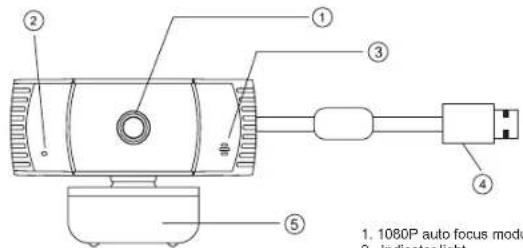
Functional Introduction
-
1080P auto focus module lens
-
Indicator light
-
Mic Interface
-
USB Port
-
Supporting bracket
Product accessories:


Webcam * 1 SpyGuard™ privacy cover * 1 User guide * 1
Installation steps

1. Unfold the supporting bracket of the webcam, and put the webcam at the top of the computer or monitor.

3. Apply the SpyGuard privacy cover (if desired) over the camera lens as shown.

2. Press the supporting bracket against the reverse of the screen

4. Connect the USB cable to the computer.
Detail Specification
| Webcam Specification | |||
| Driver type driver-tree (plug and play) USB cable length 150cm | |||
| Refresh Rate 50Hz, 60Hz Resolution 1920*1060 | |||
| Photo format Bmp, Jorg Interface type USB2.0 | |||
| Senser type 1/3* 2MP sensor Built-In | Sound-absorbing and noise-reducing microphone | ||
| Contrast optimization engine | Contrast balance | Lens | Auto focus module lens, f2.5, Viewing angle 67° |
| Applicable | Support various chat tools and video conferencing software. Such as: QQ / WeChat / Dingding / Skype / Facebook / Zoom / YouTube / Face Time / TEAMs, etc. | ||
| Processor | 2MP image processing chip, supporting various ISP processing algorithms. And support MJPEG / H.264 / H.265 compression | ||
| Supporting Devices | Supports Win 11 / Win 10 / Win8 / Win7 / WinXP 2 / MAC OS 10.6 | ||
(UG) AVC042GL-50_410-4230-001B
faking fusfelding tree
Targus 1080P HD Camera with Auto-Focus Targus 1080P HD Camera with Auto-Focus
taking fusfelding tree
Targus 1080P HD Camera with Auto-Focus Targus 1080P HD Camera with Auto-Focus
faking unfecking tree
Targus 1080P HD Camera with Auto-Focus Targus 1080P HD Camera with Auto-Focus
Targus
Supplier's Declaration of Conformity
Per FCC Part 2 Section 2.1077(a)

Manufacturer/
Responsible Party
Address
Targus International LLC
(五) 本次股东大会的决议
1211 North Miller Street,
Anaheim, CA 92806 USA
Tel:
(五) 本次股东大会的召集和召开程序
Fax 1-714-785-5599
Internet: www.targus.com
Hereby declares that the Produc
Trade name: Targus
Price traded: Pargos
Product name: 1080P HD CAMERA WITH AUTO-FOCUS
Model number: AVC042
Conforms to the following specifications
FCC CFR Title 47 Part 15 Subpart B and ANSI C63.4-2014 standard limits
The test data & results are referred to the test report Number (EA21080497F00401)
Supplementary information:
This device complies with part 15 of the FCC Rules. Operation is subject to the following two conditions: (1) This device may not cause harmful interference, and (2) this device must accept any interference received, including interference that may cause undesired operation.
Director: Targus International LLC Function Title
CF Ngon Name
10/26/2021
Date
αφθ
Signed for and on behalf of Targus
8
Targus
Targus International LLC
1765.24.10 2019.12.31
1211 North Miller Street
Tel.: 1-714-765-5555
Téléc: 1-714-765-5599
Internet: www.bargus.com
Targus International LLC
taking unfeeling tree
Targus 1080P HD Camera with Auto-Focus Targus 1080P HD Camera with Auto-Focus
Targus
Declaration of Conformity
Manufacturer: Targus International LLC
Address: 1211 North Miller Street
Amheim, CA 92806 USA
Importer: Targus Europe Ltd
Address: Fourth Floor One London Road
Shions, TW18-4EX, UK

Tel: 1-714-765-5555
Fax: 1-714-765-5599
internet: www.targms.com
Tel: +44 (0)20 8831 2000
We herewith confirm the following designated product JOSE HD CAMERA WITH AUTO-FOCUS
Model No. AVC042, Brand name "TARGUS", complex with below UK legislation and relevant
standards.
For the evaluation regarding the below legislation, the following standards were applied:
Electromagnetic Compatibility Regulations 2016
BS EN 55032: 2015/A31/2020
BS EN 55015: 2017/A11:2020
The Restriction of the Use of Corten Horizontal Substances in Electrical and Electronic Equipment
Regulatima 2012
EN IEC 63009:2018
This declaration of conformity is issued under the sole responsibility of the manufacturer.
Director, Targun · Global Sourcing Group
Function Title
CFNgob
Narue
10/26/2023 / Hong Kong
Date / Place of Items

Signed for and on behalf of Turgm
Targus
Declaration of Conformity

Manufacturer:
Targus International LLC
Address
1211 North Miller Street,
[Non-Text]
Anheim, CA 92806 USA
Importer:
Targus Europe Ltd
Address:
Termus EMEA Account Management
[Non-Text]
Van Hilststrat 19. 5145 RK Wazlwoik
Netherlands
Tel
1-714-765-5555
Fax
1-714-765-5599
Inter
www.fargus.com
Tel:
+44 (0)20 8831 2000
We hereby confirm the following designated product 1080P HD CAMERA WITH AUTO-FOCUS.
Model No. AVC042, Bond name "TARGUS", complies with EMC directive 2014/30/EU, EU ROHS
Directive 2011/05/EU and its amendment Directive (EU) 2015/063.
For the evaluation regarding the above Directives, the following standards were applied.
EMC directive 2014/30/EU
EN 55032 2015/11:2020
EN 55005:2017/A11:2020
RoHS Directive: 2011/65/EU and its amendment Directive (EU) 2015/981
EN IEC 63000 2018
Year to begin CE marking: 2021
Director, Targos - Global Sourcing Group
Function Title
CF Njolti
Name
10/26/2023
Hong Kong
Date
Place of issue

Signed for and on behalf of Targon
(UG) AVC042GL-50_410-4230-001B
faking fusfelding tree
Targus 1080P HD Camera with Auto-Focus Targus 1080P HD Camera with Auto-Focus
Technical Support
For technical questions, please visit:
US Internet: http://targus.com/us/support
Canada Internet: http://www.targus.com/ca/support
Australia Internet: http://www.targus.com/au/support
Email:
infoaust@targus.com
Telephone:
1800-641-645
New Zealand Telephone: 0800-633-222
Latin America Email: latam.soporte@targus.com
Product Registration
Targus recommends that you register your Targus accessory shortly after purchasing it. Go to:
http://targus.com/us/product_registration
You will need to provide your full name, email address, country of residence and product information.
EMEA CUSTOMERS: 2 YEARS LIMITED WARRANTY
OTHER REGIONS: 1 YEAR LIMITED WARRANTY
We pride ourselves on the quality of our products. For complete warranty details and a list of our Worldwide offices, please visit www.Targus.Com. Targus product warranty does not cover any device or product that is not manufactured by Targus (including, but not limited to, laptops, smartphones, devices, or any other product that may be used in connection with the Targus product).
Targus and DefenseGuard are trademarks or registered trademarks of Targus International LLC in the U.S. and in certain other countries. All logos and registered trademarks are the property of their respective owners. © 2021 Targus International LLC, 1211 North Miller St., Anaheim, CA 92806. All rights reserved.
Australian And New Zealand Consumers Only
Thank you for your purchase. Targus warrants to the original purchaser that its products are free from defects in materials and workmanship and, during the specified warranty period, and lasts as long as the original purchaser owns the product. The warranty period is stated on the packaging or in the documentation provided with this Targus product. Targus' Limited Product Warranty excludes damage caused by accident, neglect, abuse, misuse, improper care, normal wear and tear, ownership transfer, or alteration. The limited warranty also excludes any product that is not manufactured by Targus (including, without limitation, laptops, smartphones, devices, tablets, or any other non-Targus item) that is used in connection with the Targus product.
In the event that the Targus product has a defect in materials or workmanship Targus will, after receiving a warranty claim and inspecting the product, at its discretion, do one of the following: repair, replace, or refund with the same or a similar product (or part) of no lesser quality and ship it to the original purchaser at Targus' expense. As part of this inspection, proof of purchase will be required. There is no charge for inspection. To make a warranty claim, please contact Targus Australia or New Zealand (see details below), or return the product to the place of purchase. The original purchaser must bear the cost of the delivery to Targus.
Under Australian and/or New Zealand Consumer Laws, in addition to any warranty Targus gives, our products come with guarantees that cannot be excluded. You are entitled to a replacement or refund for a major failure and compensation for any other reasonably foreseeable loss or damage. You are entitled to have the products repaired or replaced if they fail to be of acceptable quality and the failure does not amount to a major failure.
For any warranty question, contact Targus Australia Pty. Ltd. (I) by mail at Suite 2, Level 8, 5 Rider Boulevard, Rhodes NSW 2138, by phone AUS 1800 641 645 or NZ 0800 633 222 or by Email: infoaust@targus.com. For additional information, check out our website at targus.com/au/warranty.
Regulatory Compliance
This device complies with Part 15 of the FCC Rules. Operation is subject to the following two conditions: (1) This device may not cause harmful interference, and (2) This device must accept any interference received, including interference that may cause undesired operation.
(UG) AVC042GL-50_410-4230-001B
faking unfecking tree
Targus 1080P HD Camera with Auto-Focus Targus 1080P HD Camera with Auto-Focus
Technical Support
For technical questions, please visit:
Internet
English https://uk.targus.com/pages/support
French https://ir.targus.com/pages/support
German https://de.targus.com/pages/support
Phone (language answered in):
Austria: 01795 676 42 (German)
Belgium: 02-717-2451(French)
Denmark: +45 35 25 87 51(English)
Finland. +358 922948016 [English]
France 01-6453-9151 (French)
Germany: 0211-6579-1151 (German)
Netherlands: 02 0504 0671 (English)
Norway: 14722577729 (English)
Portugal: +351 21415 4123 (English)
South Africa. -27 211 003 270 (English) - Calls answered 10am-6pm South African time
Spain: 917456221 (Spanish)
Sweden: 08-751-4058 (English)
Switzerland: 141 (0) 44 212 0007 (French or German)
UK: 020-7744-0330 (English)
Eastern Europe and others not listed above:
+44 (0) 207 744 0330 (English)
Regulatory Compliance
This device complies with Part 15 of the FCC Rules. Operation is subject to the following two conditions: (1) This device may not cause harmful interference, and (2) this device must accept any interference received, including interference that may cause undesired operation.
Declaration of Conformity
Targus hereby declares that this device is in compliance with the essential requirements and other relevant provisions of Directive 2014/30/EU.
Federal Communication Commission
Interference Statement
This equipment has been tested and found to comply with the limits for a Class B digital device, pursuant to Part 15 of the FCC Rules. These limits are designed to provide reasonable protection against harmful interference in a residential installation. This equipment generates, uses and can radiate radio frequency energy and, if not installed and used in accordance with the instructions, may cause harmful interference to radio communications. However, there is no guarantee that interference will not occur in a particular installation. If this equipment does cause harmful interference to radio or television reception, which can be determined by turning the equipment off and on, the user is encouraged to try to correct the interference by one of the following measures:
- Reorient or relocate the receiving antenna.
- Increase the separation between the equipment and receiver.
- Connect the equipment into an outlet on a circuit different from that to which the receiver is connected.
- Consult the dealer or an experienced radio/TV technician for help.
FCC Caution: Any changes or modifications not expressly approved by the party responsible for compliance could void the user's authority to operate this equipment.
This device complies with Part 15 of the FCC Rules. Operation is subject to the following two conditions: (1) This device may not cause harmful interference, and (2) this device must accept any interference received, including interference that may cause undesired operation.
Industry Canada statement
This device contains licence-exempt transmitter(s)/receiver(s) that comply with Innovation, Science and Economic Development Canada's licence-exempt RSS(s). Operation is subject to the following two conditions: 1. This device may not cause interference.
- This device must accept any interference, including interference that may cause undesired operation of the device.

- Targus
- Declaration of Conformity
- Technical Support
- Product Registration
- EMEA CUSTOMERS: 2 YEARS LIMITED WARRANTY
- Australian And New Zealand Consumers Only
- Regulatory Compliance
- Targus 1080P HD Camera with Auto-Focus Targus 1080P HD Camera with Auto-Focus
- Internet
- Phone (language answered in):
- Federal Communication Commission
- Interference Statement
- Industry Canada statement
Brand : TARGUS
Model : AVC042GL
Category : Webcam