
ASR1100A-D - Secure Access Control System Dahua Technology - Free user manual and instructions
Find the device manual for free ASR1100A-D Dahua Technology in PDF.


| Product Type | Secure Access Control System |
| Model | ASR1100A-D |
| Brand | Dahua Technology |
| Dimensions (H x W x D) | 125 mm x 80 mm x 25 mm |
| Weight | 0.3 kg |
| Power Supply | 12V DC, 1A |
| Power Consumption | ≤ 5W |
| Authentication Methods | Card (RFID), PIN, Fingerprint |
| User Capacity | Up to 10,000 users |
| Card Types Supported | Mifare, EM, HID Prox |
| Communication Interface | RS-485, Wiegand, TCP/IP |
| Relay Output | 1 x Lock relay, 1 x Alarm relay |
| Operating Temperature | -20°C to +60°C |
| Operating Humidity | 10% to 90% (non-condensing) |
| Protection Rating | IP54 (indoor/outdoor) |
| Security Features | Tamper alarm, Anti-passback, Lockout on intrusion |
| Maintenance | Periodic cleaning with soft dry cloth; firmware updates via network |
| Spare Parts | Mounting bracket, screws, card reader module (optional) |
| Repairability | Modular design; user-replaceable reader and PCB |
| Compliance | CE, FCC, RoHS |
Frequently Asked Questions - ASR1100A-D Dahua Technology
User questions about ASR1100A-D Dahua Technology
0 question about this device. Answer the ones you know or ask your own.
Ask a new question about this device
Download the instructions for your Secure Access Control System in PDF format for free! Find your manual ASR1100A-D - Dahua Technology and take your electronic device back in hand. On this page are published all the documents necessary for the use of your device. ASR1100A-D by Dahua Technology.
USER MANUAL ASR1100A-D Dahua Technology
Access Control Card Reader User's Manual
V1.2.0
Table of Contents
1 Overview....1
2 Device Structure 2
2.1 Appearance.... 2
2.2 Dimension....3
3 Device Installation 6
4 System Framework 8
Important Safeguards and Warnings
Please read the following safeguards and warnings carefully before using the product in order to avoid damages and losses.
Note:
- Do not expose the device to lampblack, steam or dust. Otherwise it may cause fire or electric shock.
- Do not install the device at position exposed to sunlight or in high temperature. Temperature rise in device may cause fire.
- Do not expose the device to humid environment. Otherwise it may cause fire.
- The device must be installed on solid and flat surface in order to guarantee safety under load and earthquake. Otherwise, it may cause device to fall off or turnover.
- Do not place the device on carpet or quilt.
- Do not block air vent of the device or ventilation around the device. Otherwise, temperature in device will rise and may cause fire.
- Do not place any object on the device.
- Do not disassemble the device without professional instruction.
Warning:
- Please use battery properly to avoid fire, explosion and other dangers.
- Please replace used battery with battery of the same type.
- Do not use power line other than the one specified. Please use it properly. Otherwise, it may cause fire or electric shock.
Special Announcement
• This manual is for reference only.
- All the designs and software here are subject to change without prior written notice.
- All trademarks and registered trademarks are the properties of their respective owners.
- If there is any uncertainty or controversy, please refer to the final explanation of us.
- Please visit our website for more information.
1 Overview
The Access Control Card Reader is a card reader and also a complement to video monitoring and visual talk. Its appearance is neat and fashionable, and its function is enhanced. It is designed for commercial building, corporation property and intelligent community.
It has:
- 13.56 MHz non-touch card reader (read-only) adopts card, card+password methods with keyboard. Each time user press key, there will be beep.
- Standard Wiegand output or RS485 output.
- Card reading distance 5cm\~8cm, corresponding card swiping time <0.1s.
- Watch dog.
● Lighting-proof, static-free and short circuit-proof. - Beeper and indicator.
2 Device Structure
2.1 Appearance
Card reader includes number and non-number key and device appearance is shown in Figure 2-1 With number key, Figure 2-2 Without number key, and Figure 2-3 Device appearance.
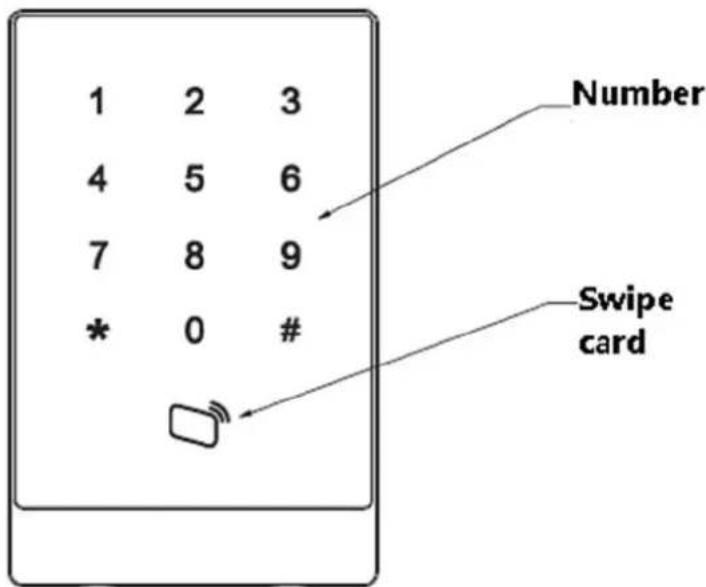
Figure 2-1 With number key
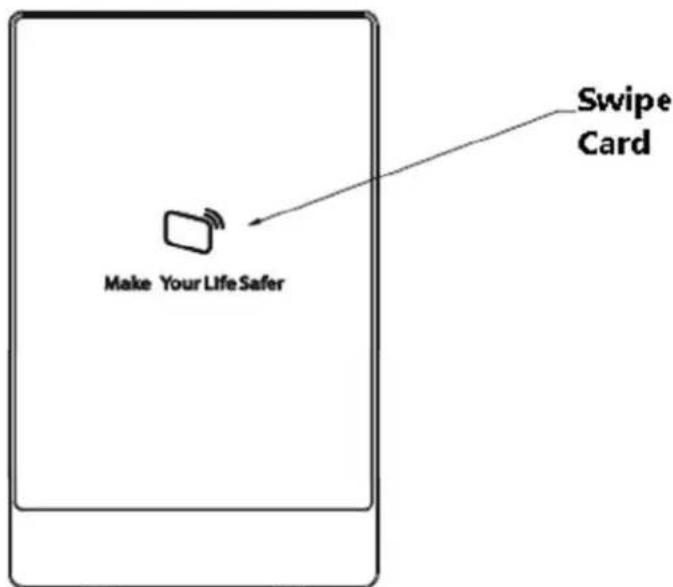
Figure 2-2 Without number key
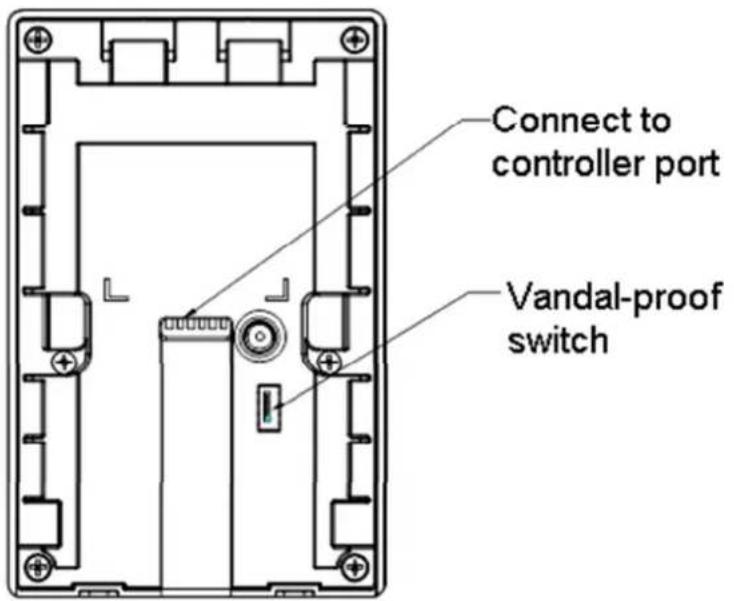
Figure 2-3 Device appearance
| Color of Wire Wiring Port Note | ||
| Red | 12V power | Card reader power |
| Black | GND | |
| Blue CASE | Weigand card reader | |
| White | D1 | |
| Green D0 | ||
| Brown | LED | |
| Yellow RS485- | RS485 card reader | |
| Purple RS485+ | ||
Chart 2- 1
2.2 Dimension
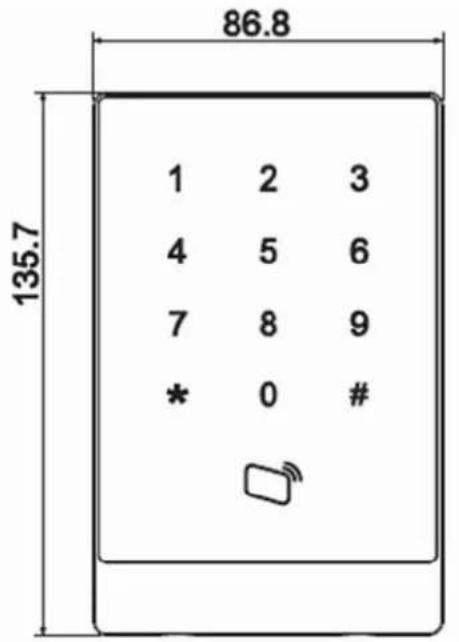
Card reader's dimension is shown in Figure 2-4, Figure 2-5, Figure 2-6 and Figure 2-7. Unit is mm.
other
| Value | |---| | 1 | | 2 | | 3 | | 4 | | 5 | | 6 | | 7 | | 8 | | 9 | | * | | 0 ||
Figure 2-4 With number key
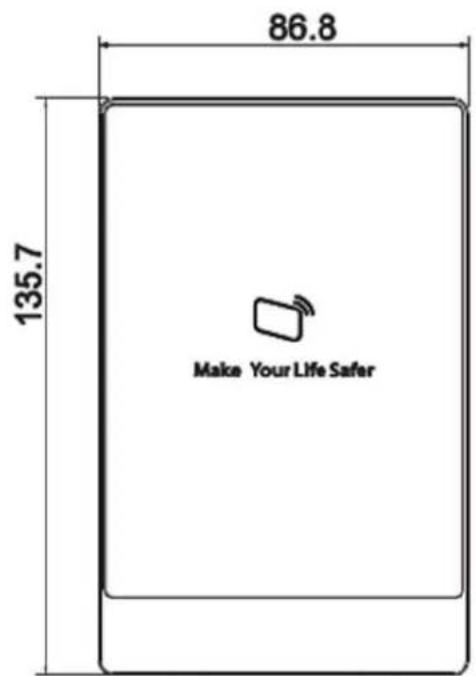
Figure 2-5 Without number key
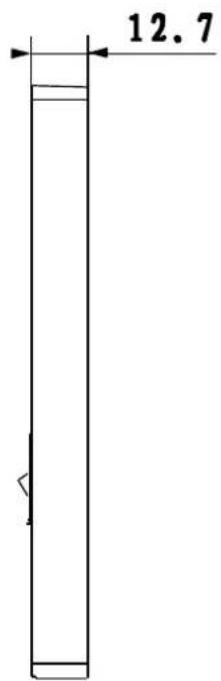
Figure 2-6 Dimension 3
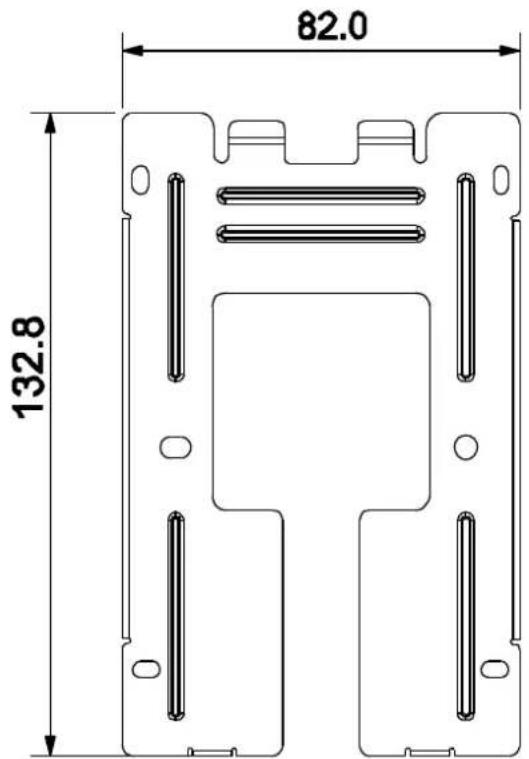
Figure 2-7 Dimension 4
3 Device Installation
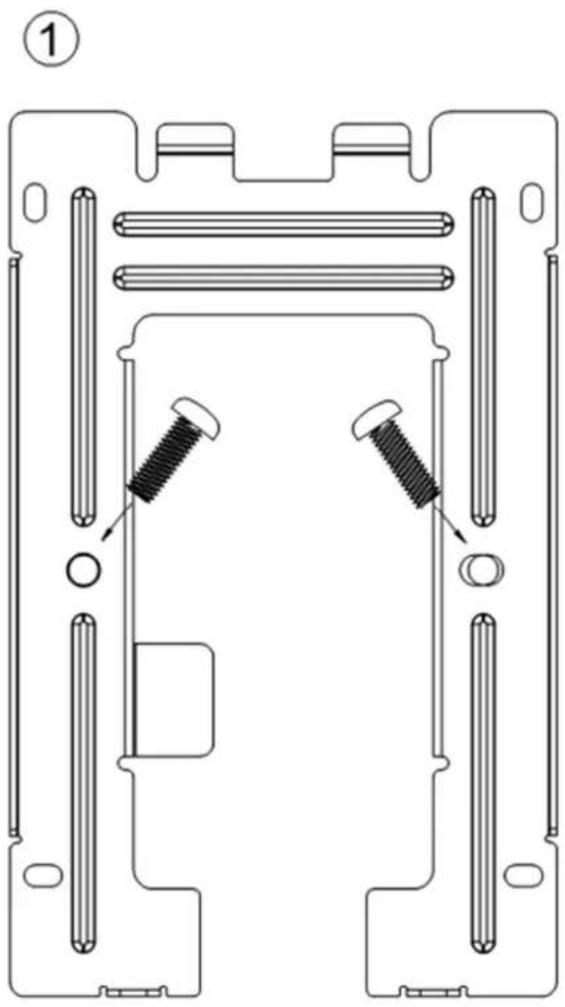
Card reader installation illustration is shown in Figure 3-1 and Figure 3-2.
natural_image
Technical line drawing of a mechanical assembly with two screws and a central hub (no text or symbols)Figure 3- 1
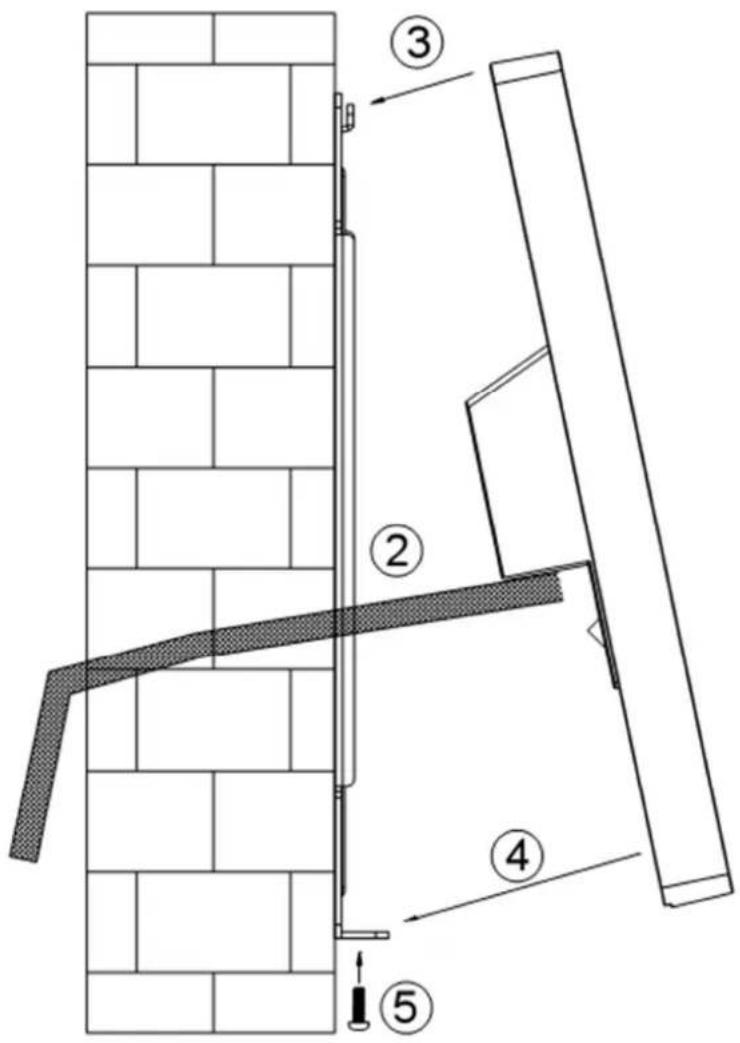
Figure 3- 2
Installation steps:
Step 1. Fix installation board on wall or other location.
Step 2. Connect device, and connect each wiring port.
Step 3. Make device top face the slot on installation board.
Step 4. Joint device and installation bracket.
Step 5. Use screw to secure them from bottom up.
4 System Framework
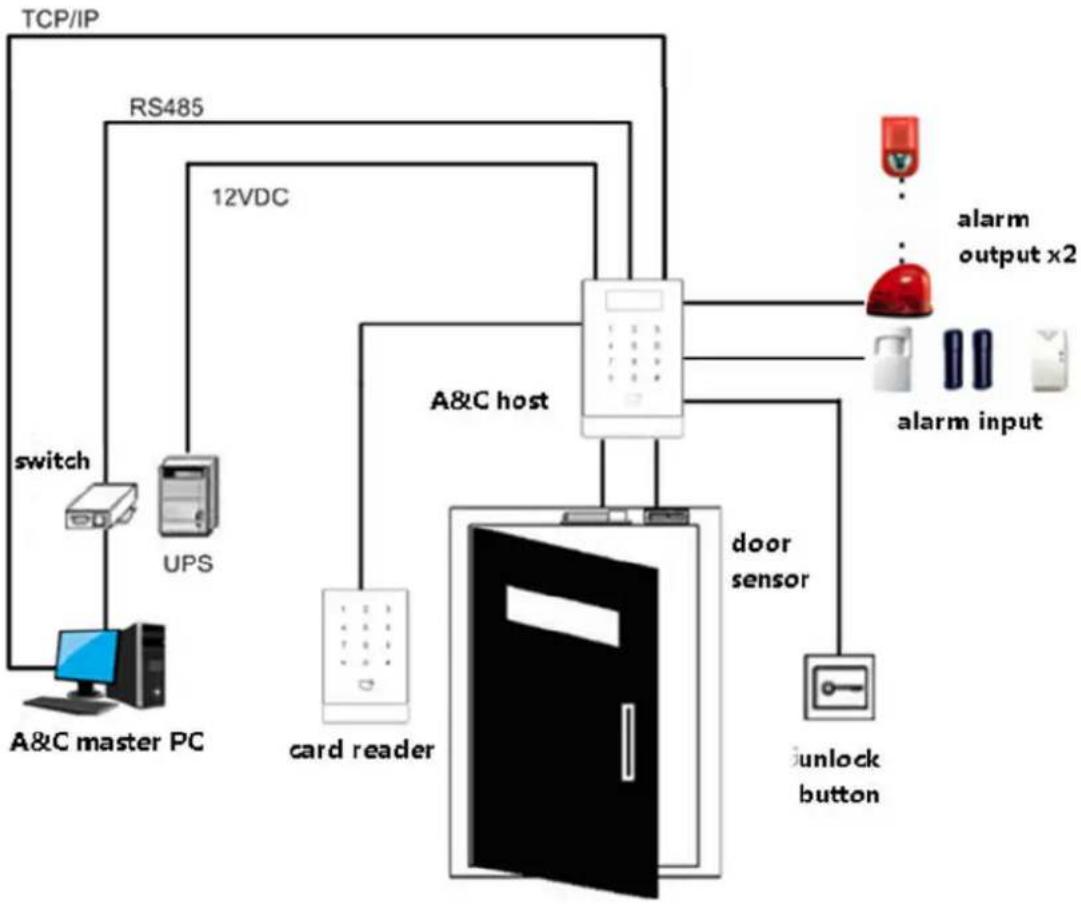
Access control card reader and access control host, alarm device, master PC and etc. are connected as in Figure 4-1.
flowchart
graph TD
    A["A&C master PC"] -->|switch| B["UPS"]
    B --> C["RS485"]
    C --> D["12VDC"]
    D --> E["A&C host"]
    E --> F["door sensor"]
    F --> G["unknown button"]
    G --> H["alarm input"]
    H --> I["alarm output x2"]
    E --> J["card reader"]
Figure 4- 1
Note:
- This manual is for reference only. Slight difference may be found in user interface.
- All the designs and software here are subject to change without prior written notice.
- All trademarks and registered trademarks are the properties of their respective owners.
- If there is any uncertainty or controversy, please refer to the final explanation of us.
- Please visit our website or contact your local service engineer for more information.


Brand : Dahua Technology
Model : ASR1100A-D
Category : Secure Access Control System