TPS900 - Treadmills True - Free user manual and instructions
Find the device manual for free TPS900 True in PDF.


| Type de produit | Treadmill |
| Marque | True |
| Modèle | TPS900 |
| Dimensions (L x l x H) | 80" x 35" x 60" |
| Poids | 260 lbs |
| Alimentation | 120V, 15A |
| Moteur | 3.0 HP continu |
| Plage de vitesse | 0.5 - 12 mph |
| Inclinaison | 0 - 15% |
| Surface de course | 22" x 60" |
| Écran | Écran LCD multi-couleurs |
| Programmes | Préréglages, contrôle de fréquence cardiaque |
| Capteurs de pouls | Poitrine (chest strap) et poignées |
| Cordon de sécurité | Inclus |
| Placage | Non pliant |
| Garantie cadre | À vie |
| Garantie moteur | 5 ans |
| Garantie pièces et main-d'œuvre | 2 ans |
| Entretien | Graisser la courroie tous les 3 mois |
| Nettoyage | Chiffon humide, éviter produits abrasifs |
Frequently Asked Questions - TPS900 True
User questions about TPS900 True
0 question about this device. Answer the ones you know or ask your own.
Ask a new question about this device
Download the instructions for your Treadmills in PDF format for free! Find your manual TPS900 - True and take your electronic device back in hand. On this page are published all the documents necessary for the use of your device. TPS900 by True.
USER MANUAL TPS900 True
PS900 TREADMILL OWNER'S MANUAL
natural_image
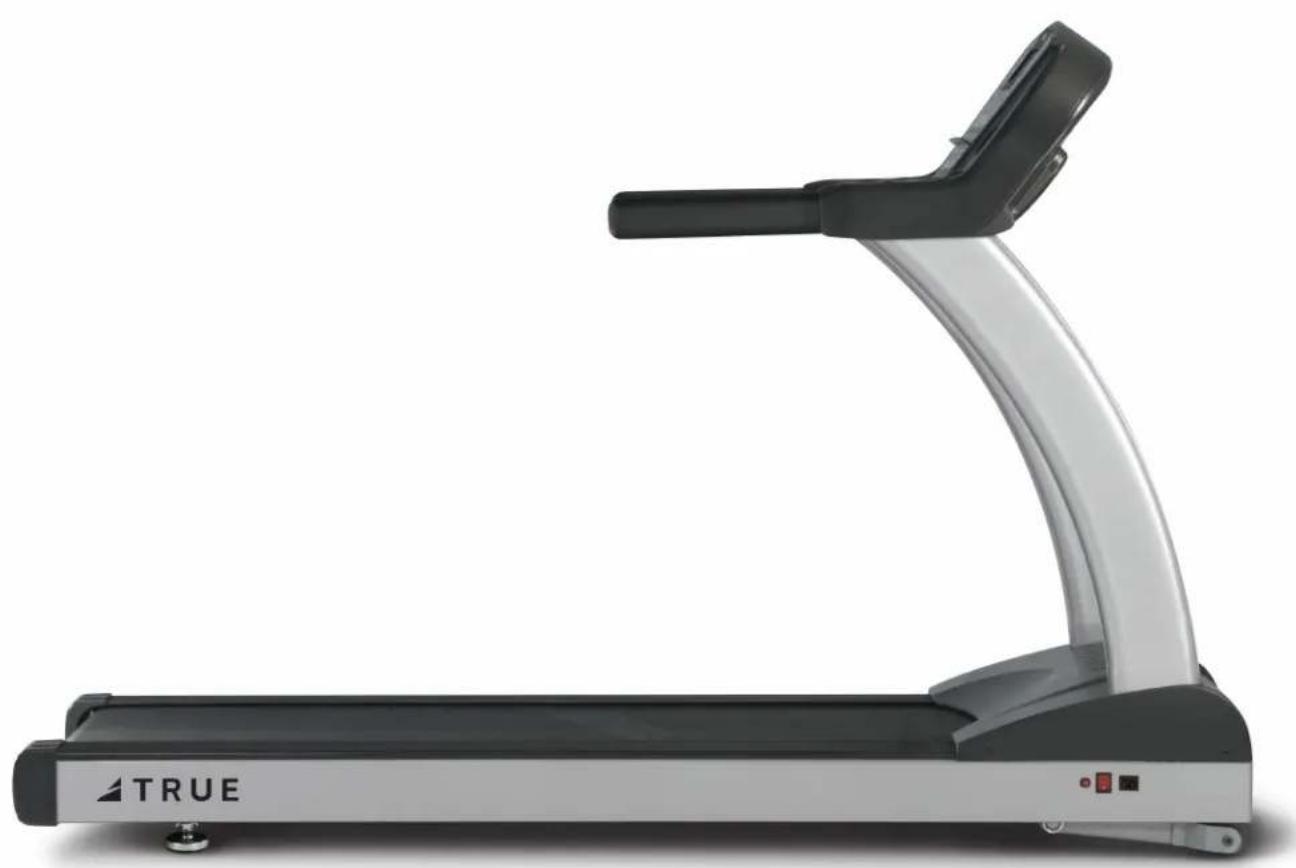
Side view of a Treadm machine with black and silver body, no visible text or symbols on the device itself.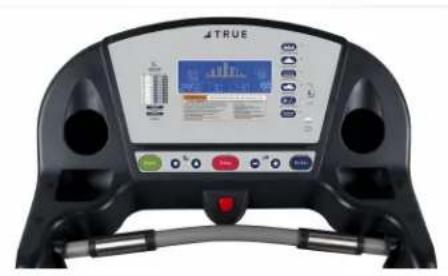
PS900 TREADMILL OWNERS MANUAL
IMPORTANT:
All Products shown are prototype. Actual product delivered may vary.
Product specifications, features & software are subject to change without notice.
For the most up to date owner's manual please visit www.truefitness.com.
For documents in additional languages please visit www.truefitness.com/document-library/29/international-manuals
IMPORTANTE:
Frank Trulaske, founder and CEO of TRUE, has had the same simple philosophy of delivering superior products, service and support for over 30 years. Today, TRUE is the global leader in premium cardio equipment for the commercial and residential markets. Our goal is to be the leader in technology, innovation, performance, safety and style. TRUE has received many awards for its commercial and retail product over the years and remains the benchmark for the industry. Fitness facilities and consumers invest in TRUE products for their durable commercial platforms used in all its cardio products, both commercial and residential alike.
The proud manufacturing tradition of quality and the culture of innovation at TRUE have given rise to a full line of truly extraordinary treadmills, indoor cycles and elliptical cross-trainers. As a result, people all over the world are benefiting from the TRUE experience. Innovation across the full product line has made TRUE successful and is a trademark of the TRUE heritage. TRUE's patented Heart Rate Control® technology is just one of the remarkable ways we deliver simple and superior performance every user can enjoy, and most importantly, use to achieve personal health and fitness goals.
TRUE strives to perfect biomechanically correct and orthopedically comfortable, functional products. Whether it be the mesh seat in the recumbent bike, the Soft Step ^® in the elliptical cross-trainers or the Soft System ^® in our treadmills, we deliver the best.
At the heart of our success is the relentless and systematic life testing of both our products and their components. We have dedicated employees who understand our philosophy is to deliver the best products in the world.
Our goal is not to sell the most cardio products in the world, but to deliver the world's best premium equipment for our customers' health and fitness solutions.
To own a TRUE machine is to be part of an exclusive fitness community that delivers results – your results.
Thank you for becoming a part of the TRUE experience.
TRANSCEND ALL OTHERS!
PS900 TREADMILL OWNERS MANUAL
TABLE OF CONTENTS:
Chapter 1: Safety Instructions
Safety Instructions 1
Use of Safety Key 4
Space Requirements 4
Grounding Instructions 5
Power Requirements 6
Warning Decals 7
Compliances 7
Chapter 2: Assembly Instructions
Pre-Assembly Checklist 9
Assembly Steps 11
Chapter 3: Product Overview
Treadmill Overview 14
Chapter 4: Programming & Operation
Heart Rate Monitoring 16
Heart Rate Control 17
Console Overview 18
Program Descriptions 20
Favorites/User Workouts....22
Advanced Console Functions 22
Chapter 5: Care & Maintenance
Care & Maintenance 24
Cleaning the Equipment 24
Running Belt Alignment 25
Tensioning the Running Belt 26
Treadmill Lubrication 26
Leveling the Treadmill 27
Other Scheduled Preventive Maintenance....27
Long Term Storage 27
Chapter 6: Customer Service
Contacting Service 28
Contacting Sales 28
Reporting Freight Claims or Parts Damage 29
Chapter 7: Additional Information
Troubleshooting Guide 30
Product Specifications 33
Commercial Warranty Information 35
Retail Warranty Information 38
CHAPTER 1: SAFETY INSTRUCTIONS
IMPORTANT SAFETY INSTRUCTIONS
SAVE THESE SAFETY INSTRUCTIONS
This treadmill is intended for a commercial or institutional setting. This owner's manual should be accessible to all personal trainers, faculty, and members.

WARNING: All EXERCISERS MUST READ ALL INSTRUCTIONS BEFORE USING THE TREADMILL.

WARNING: Heart rate monitoring systems may be inaccurate for some individuals. Over-exercising may result in serious injury or death. If you feel faint, stop exercising immediately.

WARNING: Equipment should be immediately taken out of use if it fails to work properly or when a warning is presented electronically.
TRUE STRONGLY recommends seeing a physician for a complete medical exam before undertaking an exercise program, particularly if the user has a family history of high blood pressure or heart disease, is over the age of 45, smokes, has high cholesterol, is obese or has not exercised regularly in the past year. Additionally, TRUE recommends consulting a fitness professional on the correct use of this product. If at any time while exercising the user experiences faintness, dizziness, pain or shortness of breath, he or she must stop immediately.

WARNING: To reduce the risk of electrical shock, always unplug this TRUE product before cleaning or attempting any maintenance activity. Do not handle the plug with wet hands.

WARNING: To reduce the risk of burns, fire, electric shock or injury, it is imperative to connect each product to a properly grounded 110V electrical outlet. A risk of electrical shock may result from improper connection of the equipment's grounding conductor. Check with a qualified electrician if you are unsure about proper grounding techniques. Do not modify the plug provided with this product. If it will not fit an electrical outlet, have a proper outlet installed by a qualified electrician. Your TRUE Fitness product must be properly grounded to reduce risk of shock if the treadmill malfunctions. Your treadmill is equipped with an electrical cord, which includes an equipment grounding conductor and a grounding plug. The plug must be inserted into an outlet that has been properly installed and grounded in accordance with all local codes and ordinances. A temporary adapter cannot be used to connect this plug to a two-pole receptacle in North America. If a properly grounded 15 amp outlet is not available, a qualified electrician must install one.

WARNING: Do not move the equipment by lifting the console. Do not use the console as a handlebar during a workout.

WARNING: This product contains chemicals known to the state of California to cause cancer and birth defects or other reproductive harm.

WARNING: Keep equipment stable on flat ground.

WARNING: Replace warning labels that may be worn, damaged or missing

WARNING: Replace any non-working or damaged components; remove the unit from service until repair is performed.
CHAPTER 1: SAFETY INSTRUCTIONS

WARNING: To reduce the risk of burns, fire and electric shock or injury to persons, follow these instructions:
- This appliance should never be left unattended when plugged in.
- Do not use any type of extension cord with this product.
- Unplug it from the outlet when not in use and before any servicing.
- Do not operate the equipment while being covered with a blanket, plastic, or anything that insulates or stops airflow.

WARNING: Risk of personal injury-crushing hazard when treadmill is in operation - Keep feet, hands, and fingers away from moving parts.

CAUTION:
• Health related injuries may result from incorrect or excessive use of exercise equipment.
- Do not use typing or web surfing features at excessive speeds. Always stabilize yourself by holding a stationary handle when using typing or web surfing features. (Varies by console option)
- Do not use the contact heart rate grips as a handlebar during a workout.
- Any changes or modifications to this equipment could void the product warranty.
- To disconnect, turn power OFF at the ON/OFF switch if applicable, then remove plug from electrical outlet.
- Never operate a TRUE product if it has a damaged power cord or electrical plug, or if it has been dropped, damaged, or even partially immersed in water. Contact TRUE Customer Service for a replacement.
- Use a TRUE AC power cord or AC/DC adapter only. *Note the plug configuration for the power adapter may vary by country.
- Position this product so the power cord plug is accessible to the user.
- Keep the power cord away from heated surfaces. Do not pull the equipment by the power cord or use the cord as a handle. Do not run the power cord along the side or under the treadmill.
- If the electrical supply cord is damaged it must be replaced by the manufacturer, an authorized service agent, or a similarly qualified person to avoid a hazard.
- Do not use this product in areas where aerosol spray products are being used or where oxygen is being administered. Such substances create the danger of combustion and explosion.
• Always follow the console instructions for proper operation.
- Close supervision is necessary when used near children under the age of 15, or disabled persons.
- Do not use this product outdoors, near water, while wet, or in areas of high humidity including extreme temperature changes
- Never operate a TRUE product with the air openings blocked. Keep air openings free of lint, hair or any obstructing material.
- Never insert objects into any openings in this product. If an object should drop inside, turn off the power, unplug the power cord from the outlet and carefully retrieve it. If the item cannot be reached, contact TRUE Customer Service.
- Never place liquids of any type directly on the unit except in the accessory tray or bottle holders. Containers with lids are recommended.
- Wear shoes with rubber or high traction soles. Do not use shoes with heels, leather soles, cleats or spikes. Make sure no stones are embedded in the soles. Do not use this product in bare feet. Keep all loose clothing, shoelaces and towels away from moving parts.
- Do not reach into or underneath the unit, or tip it on its side during operation.
CHAPTER 1: SAFETY INSTRUCTIONS
CAUTION (CONTINUED):
• Use correct ergonomic positioning while running on treadmill.
- Do not allow animals on or near the equipment while in operation.
- Use the side handrails whenever additional stability is required. In case of emergency, such as tripping, the side handrails should be grabbed and the user should place his/her feet on the side platforms. The front handlebars should be used to grasp the heart rate sensors or to rest the hand on while operating the activity zone keys, but not for stability, emergency, or continuous use.
• Do not exceed maximum user weight of 350 lbs (159 kg).
- Do not use if you have a cold or fever.
- When using this exercise machine, basic precautions should always be followed.
- Use this equipment only for its intended use as described in this manual.
- Do not use attachments not recommended by the manufacturer.
- Allow only trained personnel to service this equipment.
- Avoid the possibility of bystanders being struck or caught between moving parts by making sure that they are out of reach of the equipment while it is in motion.
- This appliance can be used by children aged from 8 years and above and persons with reduced physical, sensory or mental capabilities or lack of experience and knowledge if they have been given supervision or instruction concerning use of the appliance in a safe way and understand the hazards involved.
• Children shall not play with the appliance.
• Cleaning and user maintenance shall not be made by children without supervision.
- Allow only one person at a time on the equipment while it's operating.
- It is the sole responsibility of the owner/operator to ensure regular and scheduled maintenance is performed.
• To avoid injury stand on the side rails before starting the treadmill.
- Avoid exiting treadmill while leaving the tread belt in motion.
• Never walk or jog backwards on the treadmill.
CAUTION:
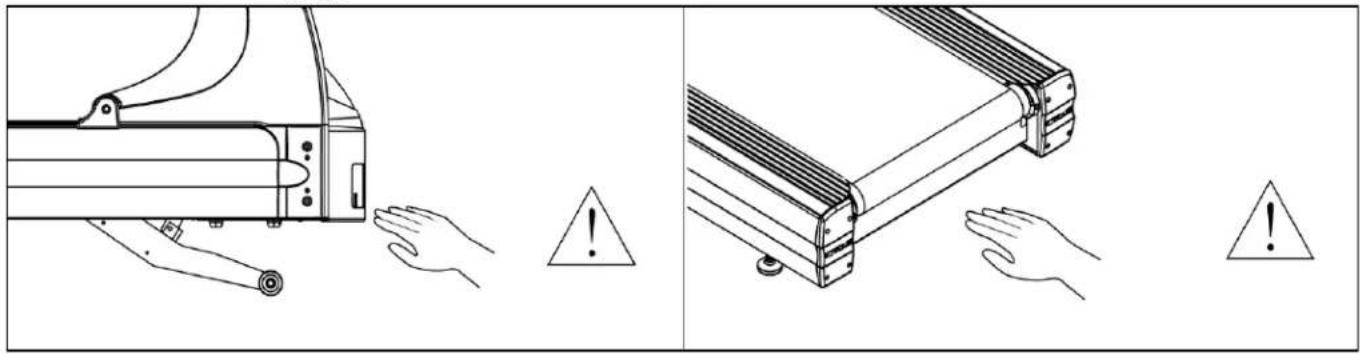
• To avoid serious injury, do not touch the incline rack while the treadmill is in use.
• To avoid serious injury, do not touch the belt while the treadmill is in use.
natural_image
Technical illustration showing hand positioning and warning symbols on a mechanical component (no text or labels)CHAPTER 1: SAFETY INSTRUCTIONS
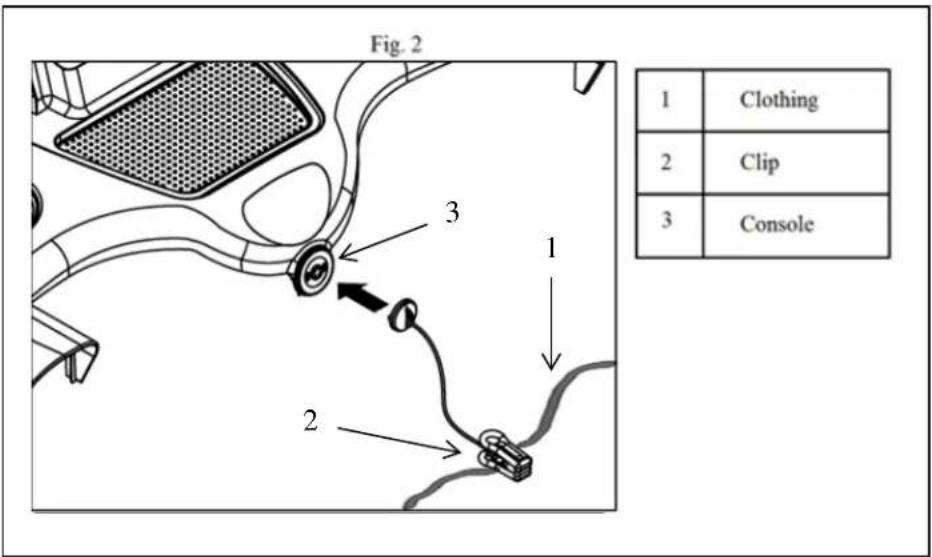
USE OF SAFETY KEY (E-STOP):
- Atta ch the safety clip to your clothing before each workout and when treadmill is in use. (See Fig 2)
- Attach the magnetic key to the treadmill console assembly.
SPACE REQUIREMENTS:
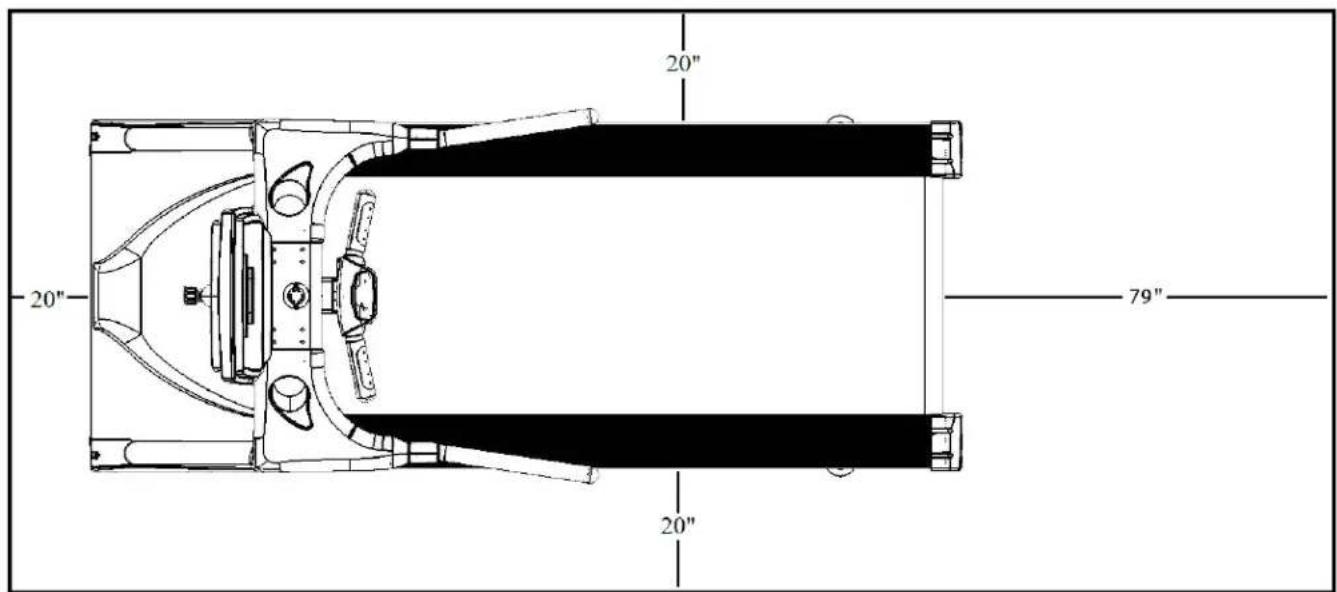
TRUE's recommendation is to leave a minimum of 20" (0.5m) on each side of the treadmill and a 79" (2 m) safety zone at the rear of the treadmill. (See Fig 1)
Fig. 1
CHAPTER 1: SAFETY INSTRUCTIONS
GROUNDING INSTRUCTIONS:
This product must be grounded, if it should malfunction or breakdown, grounding provides a path of least resistance for electric current to reduce the risk of electric shock. This product is equipped with a cord having an equipment-grounding conductor and a grounding plug. The plug must be plugged into an appropriate outlet that is properly installed and grounded in accordance with all local codes and ordinances.
GROUNDING INSTRUCTIONS (CONTINUED):

DANGER:
- Improper connection of the equipment-grounding conductor can result in a risk of electric shock.
- Check with a qualified electrician or serviceman if you are in doubt as to whether the product is properly grounded. Do not modify the plug provided with the product. If it will not fit the outlet, have a proper outlet installed by a qualified electrician.
- Do not remove the motor cover or you may risk injury due to electric shock.
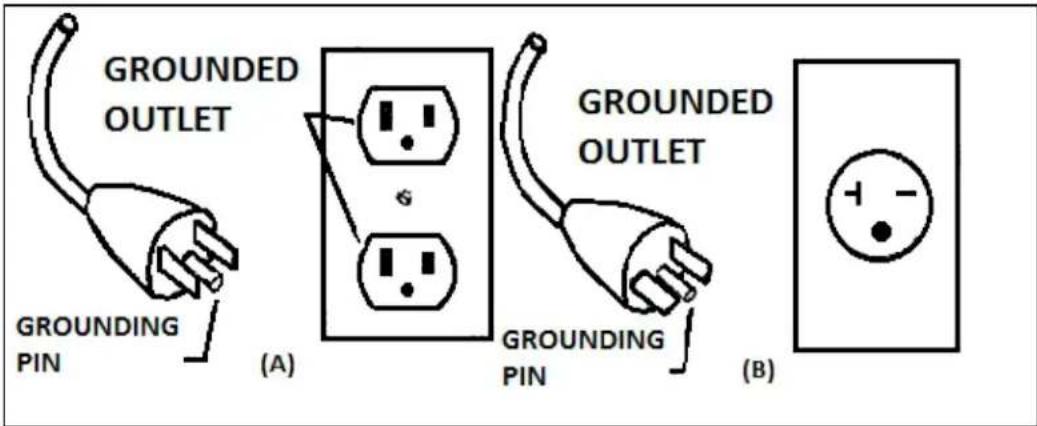
- The 120-V model is for use on a nominal 120-V circuit and has a grounding plug that looks like the plug illustrated in figure A. Make sure the product is connected to an outlet having the same configuration as the plug. No adaptor should be used with this product.
- The 230-V model is for use on a circuit having a nominal rating more than 120-V and is factory-equipped with a specific electric cord and has a grounding plug that looks like the plug illustrated in figure B. Make sure that the product is connected to an outlet having the same configuration as the plug in Figure B. No adapter should be used with this product. If the product must be reconnected for use on a different type of electric circuit, the reconnection should be made by qualified service personnel.
CHAPTER 1: SAFETY INSTRUCTIONS
POWER REQUIREMENTS FOR TRUE PRODUCTS
Information Sheet 2010
NOTE: Read and understand all instructions on this sheet and in the Owner's manual before plugging any TRUE power cord into an electrical outlet. This information sheet will help you identify the voltage and cords you need where you live and will outline requirements for:
• Grounded, dedicated lines
- Voltage
- Power cords
• Power adapters
- Extension cords
!DANGER: Improper connection of the equipment-grounding conductor can result in risk of electric shock. Check with a qualified electrician or service provider if you are in doubt as to whether the equipment is properly grounded or installed on a dedicated line. Seek a qualified electrician to perform any modifications to the cord or plug. TRUE is not responsible for injuries or damages as a result of cord or plug modification.
!CAUTION: Place cords away from heat (such as baseboards). Use care to arrange any cord so it doesn't become an obstacle.
Extension Cords
Do not use an extension cord to supply power to any TRUE product.
Grounded, Dedicated Line
TRUE equipment must be grounded. If it should malfunction or break down, grounding provides a path of least resistance for electric current to reduce the risk of electric shock. TRUE cords (except for cycle adapters) have an equipment-grounding conductor and a grounding plug. The plug must be plugged into an appropriate outlet that is properly installed and grounded in accordance with all local codes and ordinances where you live. Do not use a ground plug adapter to adapt the power cord to a non-grounded outlet. Do not use a GFCI outlet or GFCI circuit breaker. A dedicated line will assure that adequate power is available for safe operation over the life of your TRUE Product.
Voltage
Voltage required for your unit is located on the serial number decal (usually on the front of the unit). Depending on where you live voltage requirements differ.
For example, in the United States some TRUE treadmills require a circuit rated 115 VAC, 60 Hz and 20 amps. See Figure 1. However, a home typically has 15 amp outlets. In this case, contact an electrician to install a 20 amp dedicated line prior to use. See Figure 2.
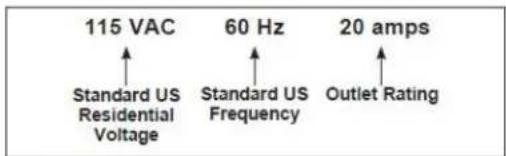
Figure 1
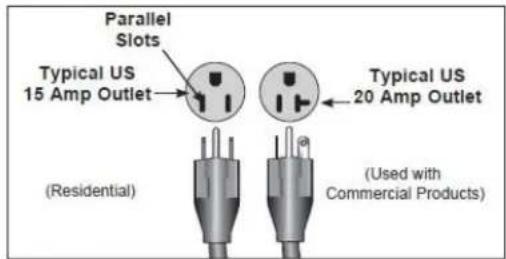
Figure 2
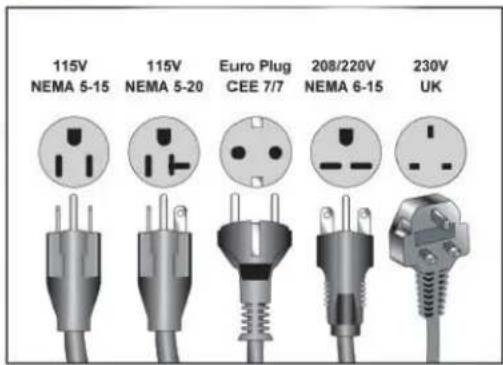
Figure 3
CHAPTER 1: SAFETY INSTRUCTIONS
WARNING DECALS:

WARNING: Replace warning labels that may be worn, damaged or missing
To replace any worn or missing warning decals contact TRUE FITNESS by visiting www.truefitness.com or contact customer service at 800-883-8783.

WARNING!
Read and understand all instructions and warnings prior to use.
AVERTISSEMENT!
• Death or serious injury can result if caution is not used while exercising.
• Heart rate display may be inaccurate and should be used for reference only.
- Stop exercise if you feel faint, dizzy, or experience pain.
- Keep body, clothing, and fitness accessories clear of all moving parts.
- Obtain medical exam before beginning any exercise program.
- Inspect equipment before use. Do not use if machine appears damaged or inoperable.
- Care should be used when mounting or dismounting machine.
- Keep children away at all times.
FOR TREADMILL USE:
• Straddle treadbelt before starting.
- Read, understand, and test the emergency stop procedures before use.
• ALWAYS ATTACH THE EMERGENCY STOP SAFETY CLIP TO CLOTHING PRIOR TO USE!
- Prior to use, inspect safety clip cord to ensure it is free of tangles or knots, and that red magnetic key will easily disengage from machine.

TRUE
TRUE FITNESS TECHNOLOGY, INC. ST LOUIS, MISSOURI 63366
Model No.
TPS900-19

Intertek
3135202
CONFORMS TO ANSI/UL STD.1647 CERTIFIED TO CAN/CSA STD. C22.2 NO.68
Serial No./Date Code
19-TPS900001A
Rating: 120V, 60 Hz, 15A
Intertek Testing Services Taiwan Ltd.
MADE IN TAIWAN
COMPLIANCES:
This equipment complies with all applicable codes and regulations. For a complete list of compliances, please visit www.truefitness.com
CHAPTER 2: ASSEMBLY INSTRUCTIONS
IMPORTANT SAFETY INSTRUCTIONS
- Read and understand all instructions and warnings prior to use.
- Obtain a medical exam before beginning any exercise program. If at any time during exercise you feel faint, dizzy, or experience pain, stop and consult your physician.
- Obtain proper instruction prior to use.
- This treadmill is intended for light commercial use only.
- Inspect the treadmill for incorrect, worn, or loose components and do not use until corrected, replaced, or tightened prior to use.
- Do not wear loose or dangling clothing while using the treadmill.
- Care should be used when mounting or dismounting the treadmill.
- Read, understand, and test the emergency stop procedures before use.
- Disconnect all power before servicing the treadmill.
- Do not exceed maximum user weight of 350 lbs.
- Keep the top side of the moving surface clean and dry.
- Keep children and animals away.
- Use caution when moving and assembling treadmill.
- All exercise equipment is potentially hazardous. If attention is not paid to the conditions of equipment usage, death, or serious injury could occur.
- Save these instructions.
Basic Guidelines for Setting Up Your Treadmill:
After removing the treadmill from the packaging, place your treadmill on a clean, level surface. Make sure the electrical cord easily reaches a grounded three-pronged outlet and has enough slack to allow the deck to incline without tightening the cord. Do not allow the treadmill assembly to rest on the cord.
Important Electrical Requirements - 120V:
Your TRUE treadmill requires a dedicated 120 volt, alternating current (AC), 20 amp grounded outlet circuit. This means nothing else can be plugged into the same circuit. Most power circuits are rated for this 120V AC 20 amp requirement, but you must ensure the treadmill does not share the circuit with anything else.
Important Electrical Requirements - 230V:
Your TRUE treadmill requires a dedicated 230 volt, alternating current (AC), 15 amp grounded outlet circuit. This means nothing else can be plugged into the same circuit. Most power circuits are rated for this 230V AC 15 amp requirement, but you must ensure the treadmill does not share the circuit with anything else.
Danger: Do not use an extension cord or ungrounded outlet:
The ground helps prevent electrical damage to your treadmill and enhances your safety by helping to prevent shock.
Check with a qualified electrician or serviceman if you are in doubt as to whether the treadmill is properly grounded. Do not modify the plug provided with the treadmill if it will not fit the outlet. Have a proper outlet installed by a qualified electrician.
CHAPTER 2: ASSEMBLY INSTRUCTIONS
PRE-ASSEMBLY CHECK LIST:
| ITEM: DESCRIPTION: QTY: | _ | |
| A Display | Console 1 | |
| B Frame 1 | ||
| C Upright | (L) 1 | |
| D Upright | (R) 1 | |
| E Wire Cover 1 | ||
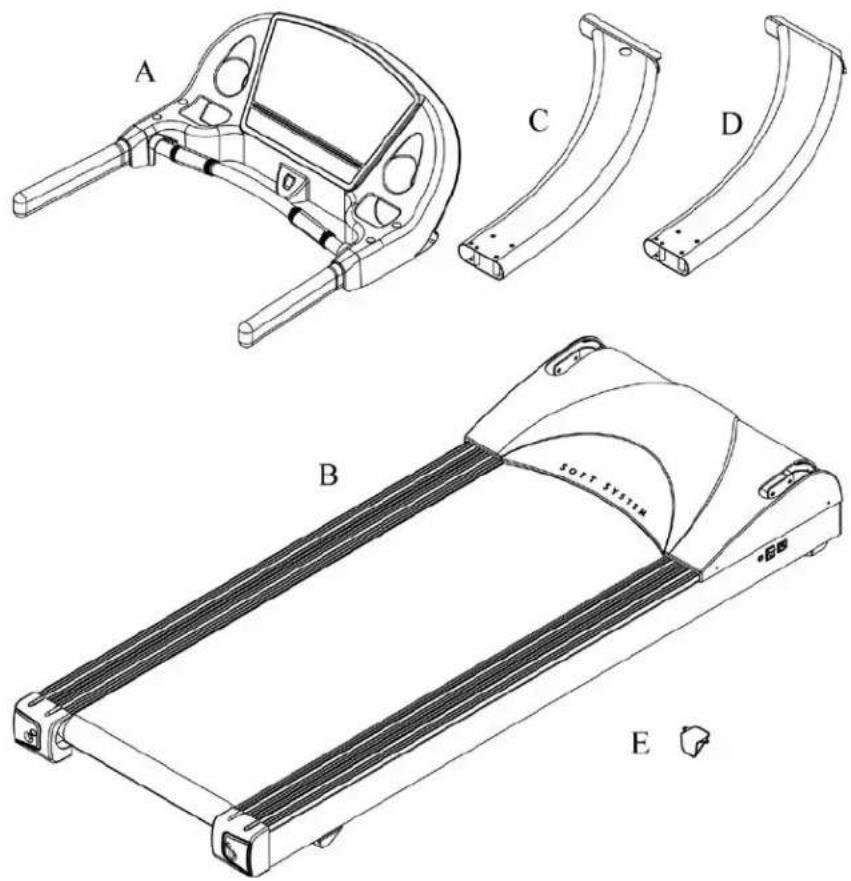
CHAPTER 2: ASSEMBLY INSTRUCTIONS
PRE-ASSEMBLY CHECK LIST (CONTINUED):
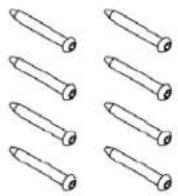
Provided Hardware:
| ITEM: | DESCRIPTION: | QTY: |
| a Bolt | M8×P1.25×75 8 | |
| b SEMS | MS Bolt M8×P1.25×90 4 | |
| c Bolt | Cover 4 | |
| d Internal Tooth Washer M8 8 | ||
| e Bolt | ∅4×12 2 | |
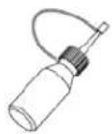
| f SILICON 1 | ||
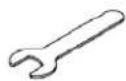
| g | Open Spanner | 1 |
| h | T Spanner | 1 |
| i | Hex Wrench 5mm | 1 |
| j | Wire Cover | 1 |
| k | Safety Key/Clip | 1 |
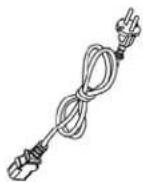
| l Power Cord | 1 | |
a
b
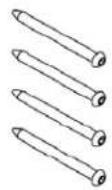
c
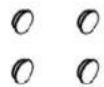
d
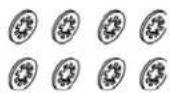
e

f
g
h
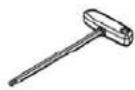
i
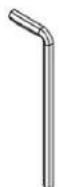
j
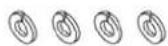
k
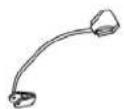
1
CHAPTER 2: ASSEMBLY INSTRUCTIONS
TREADMILL ASSEMBLY STEPS:
CAUTION:
- Use caution when assembling treadmill. Unpacking and assembling of this treadmill is a two person task.
- Remove all treadmill components from packaging.
-
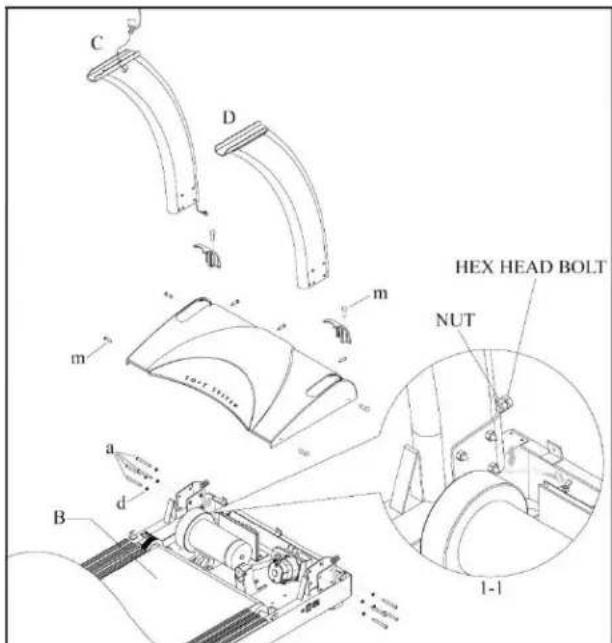
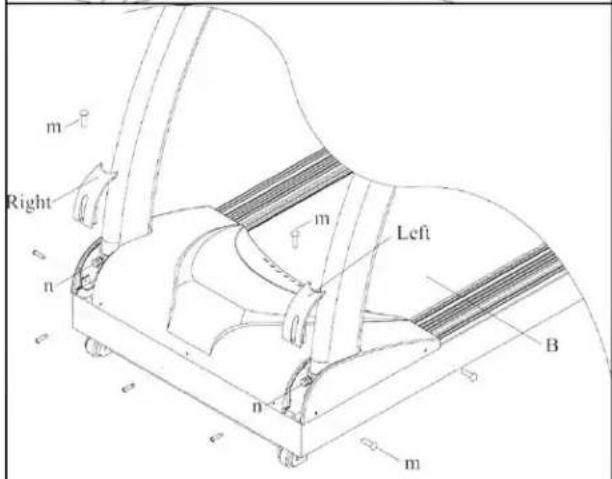
Remove 9 bolts (m), Left and Right motor decoration covers and upper motor cover.
-
Sl ip the left and right upright (C, D) into place.
-
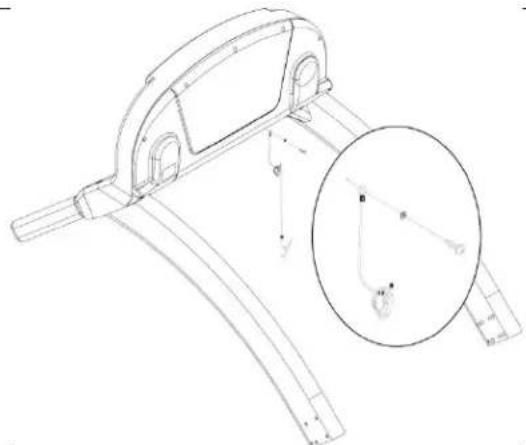
Co nnect the wire of left upright (C) as the arrow shows in the drawing 1-1.
-
In stall, but do not tighten, 8 bolts and washers (a,d) into each upright.
-
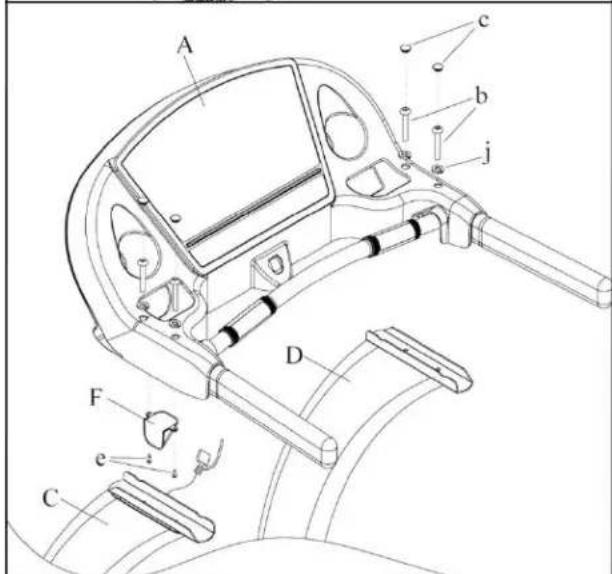
Place the console on the uprights and fasten it with 4 SEMS bolts (b). Place 4 bolt covers (c) into holes of console as shown.
-
Co nnect the lower control wire coming out of left upright with the upper control wire attached in the console, then fasten the wire cover (j) with 2 bolts (e) to the upper console cover.
-
For each upright, tighten Hex Head bolt against upright. Then tighten nut.
-
Rein stall the upper motor cover, place the left and right motor decoration cover into place, and fasten with 9 bolts (m) as shown.
CHAPTER 2: ASSEMBLY INSTRUCTIONS
TREADMILL ASSEMBLY STEPS (CONTINUED):
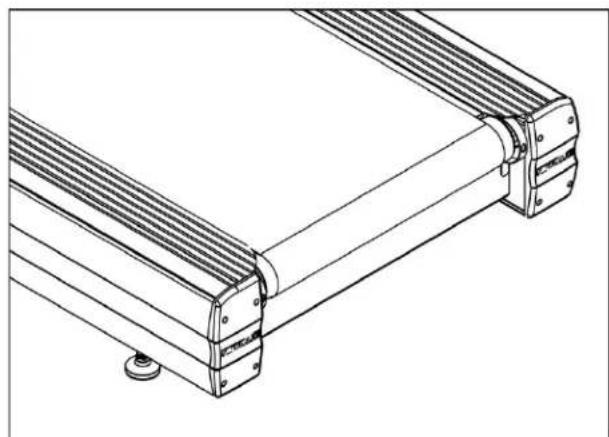
9) Rear Foot Leveling:
a) Ensure treadmill incline rack wheels and rear feet are resting on the floor and not on cardboard, packaging, etc.
b) Using the pliers to loosen the wing-nut (A) counter-clockwise.
c) Using a level or estimating by sight, turn section (B) of foot counter-clockwise to a proper height.
d) Tighten wing-nut (A) to secure (B) section.
NOTE: Same adjustment applies to both sides.
natural_image
Technical line drawing of a mechanical assembly with ribbed metal components and mounting base (no text or symbols)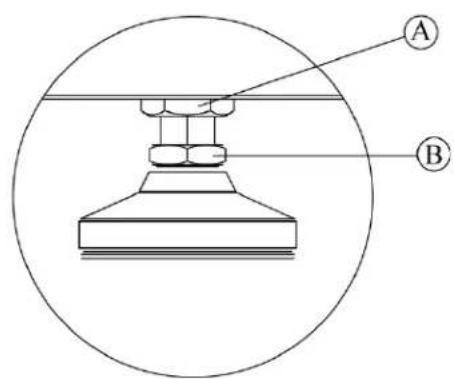
10) Safety Key Attachment:
CAUTION: Read the entire Owner's Manual before attempting any workout.
CAUTION: Remove Safety Key from treadmill after each use to
a) Attac h the safety key on the back of console.
NOTE: The bolt and washer are pre-installed. Remove these parts and re-install as shown.
b) Attach Safety Key magnet ( A ) to front of console ( B ) as shown below.
c) Attach clip (C) to clothing at the beginning of any workout.
natural_image
Technical line drawing of a mechanical bracket assembly with an inset magnified detail (no text or symbols)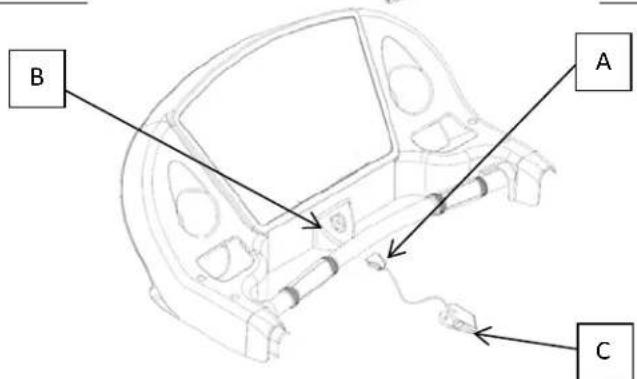
CHAPTER 2: ASSEMBLY INSTRUCTIONS
TREADMILL ASSEMBLY STEPS (CONTINUED):
11) Run Treadmill Calibration:
WARNING:
This process will take full control of the treadmill and can be dangerous if caution is not taken.
- Calibration can take up to two minutes to complete.
- Do not stand on the treadmill during the calibration procedure.
- Verify that the machine is free of all parts and tools.
- Keep children and animals at a safe distance.
Calibration Steps:
- Remove the safety key
- Replace the safety key
- When the screen goes blank, immediately press and hold the up and down incline keys until "CAL" appears on the console display.
- Press start to activate the auto calibration.
- Upon completion the console display will read "DONE" followed by "PASS" or "FAIL".
CHAPTER 3: PRODUCT OVERVIEW
TREADMILL OVERVIEW:
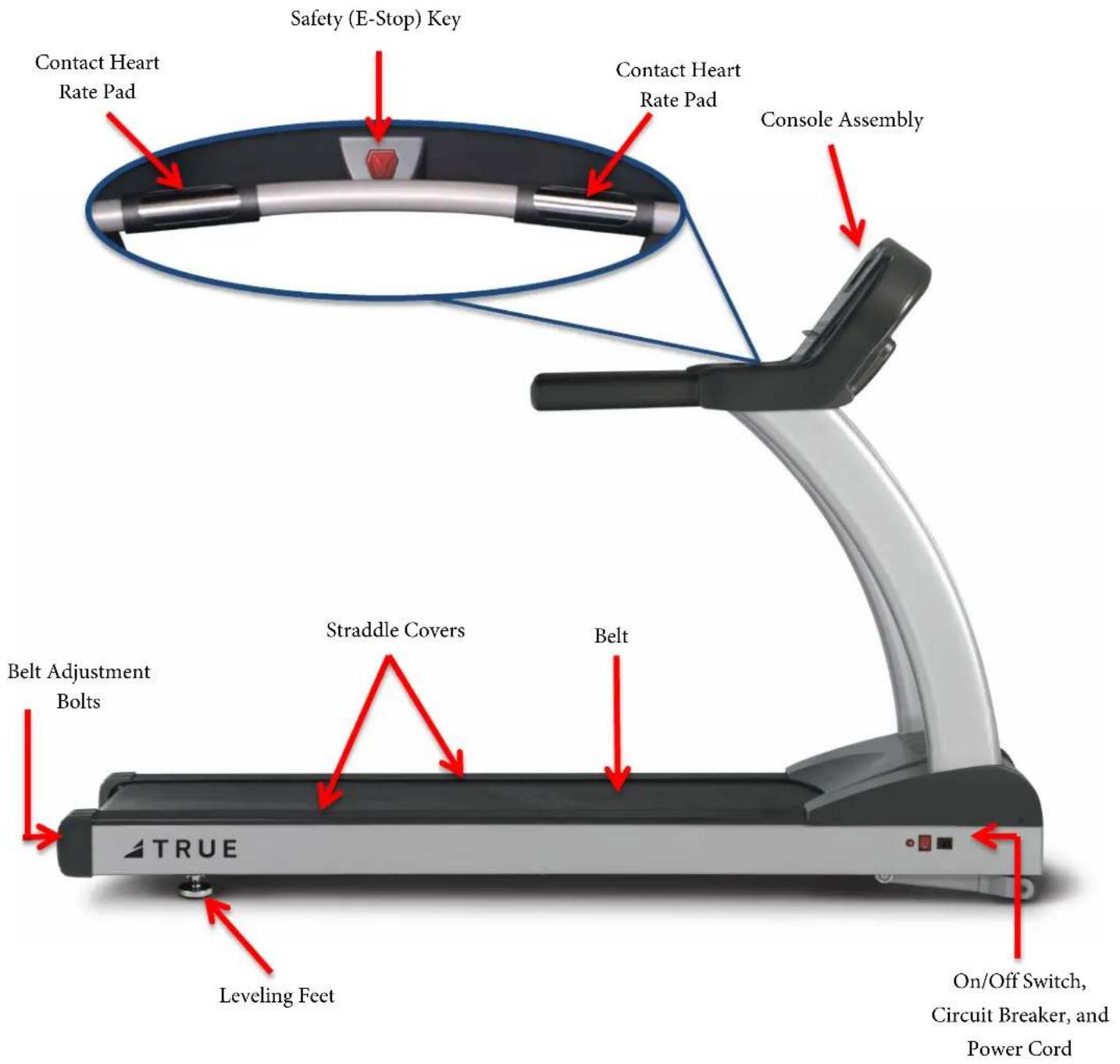
CHAPTER 3: PRODUCT OVERVIEW
TREADMILL OVERVIEW (CONTINUED):
Console Assembly:
The console allows the user to set up a workout program and control the treadmill during a workout (For console overview and operation instructions refer to chapter 4).
Contact Heart Rate Pads:
Allows the user to check their heart rate without wearing a wireless chest strap.
*For increased safety and accuracy this feature should only be used when the belt speed is below 4 mph.
Safety (E-Stop) Key:
A tethered safety device designed to attach to both the user and the treadmill console. Removal of the key from the console will stop belt motion to prevent injury in an emergency.
*The safety key must be in place on the treadmill, and should be attached to the user's clothing. The treadmill will not operate if the safety key is not attached to the treadmill.
Belt:
The moving surface of the treadmill on which the user walks or runs.
Straddle Covers:
Stationary covers on either side of the belt, which allows the user to safely straddle the belt during startup or in the event of an emergency.
Belt Adjustment Bolts:
An adjustment system that allows the users to adjust the belt tracking and tension as needed.
On/Off Switch:
Allows users or faculty to turn the power on or off to the treadmill.
Circuit Breaker:
A safety device designed to protect the treadmill from excessive electrical current.
Power Cord:
Delivers power from the wall outlet to the treadmill.
Leveling Feet:
An adjustable system used to aid in the leveling the treadmill.
CHAPTER 4: PROGRAMMING & OPERATION
CAUTION:
The safety key must be in place on the treadmill console, and should be attached to the user's clothing. The treadmill will not operate if the safety key is not attached to the console.
HEART RATE MONITORING:
This treadmill can monitor a user's heart rate using either a Polar® compatible chest strap or the metal grips on the hand rails (called contact heart rate or CHR pads). A chest strap transmits the user's heart rate to the treadmill via radio, and the CHR pads connect to a special computer circuit to extract the user's heart rate.
Chest Strap Heart Rate Monitoring:
Although this treadmill functions fine without using the heart rate monitoring feature, this kind of monitoring gives valuable feedback on the user's effort level. Chest strap monitoring also allows users to use Heart Rate Control, the most advanced exercise control system available.
When users wear a Polar® compatible transmitter strap, the treadmill will display the user's heart rate as a digital beats-per-minute (bpm) readout.
The transmitter strap should be worn directly against the user's skin, about 1-2 inches below the pectoral muscles/breast line. Women should be careful to place the transmitter below their bra line.
Initially the transmission signal for heart rate may be erratic or non-existent. Some moisture is necessary between the strap and the user's skin for proper transmission. Sweat from exercise works best, but ordinary tap water may be used prior to the workout if desired.

natural_image
Woman wearing a light blue sports bra and black athletic belt (no text or symbols visible)A Note on Chest Strap Heart Rate Monitoring:
The chest strap produces a radio signal that the treadmill reads and registers as the user's heart rate. The accuracy of a reading may be affected when outside interference is present.
Contact Heart Rate (CHR):
The CHR system will let the user monitor their heart rate without wearing a chest strap. When using the CHR system users should gently grasp the CHR pads with both hands. Within 30 seconds, the user's heart rate should be displayed as a digital bpm readout (during the first 30 seconds the system is analyzing and locking in the user's heart rate). Users should exercise with smooth body motions and breathe regularly. It is best to avoid talking while using the CHR system, as talking will cause unrepresentative heart rate spikes of 5 to 10 bpm. To ensure an accurate reading, the user's hands should be clean, free of both dirt and hand lotions.
*For increased safety and accuracy the CHR system should only be used at speeds of 4 mph or lower (CHR readings are less accurate due to large muscle movements above this speed).
A Note on CHR Accuracy:
CHR monitoring may be less accurate than chest strap monitoring since the heart rate signals are much stronger at the chest. When using a HRC workout, it is best to use a chest strap because of the stronger and more accurate readings.
CAUTION:
Do not use the contact heart rate grips as a handlebar during a workout.
CHAPTER 4: PROGRAMMING & OPERATION
HEART RATE CONTROL (HRC):
Introduction:
You are now the owner of the most sophisticated Heart Rate Control treadmill available. TRUE HRC is unique and patented. It accommodates users from rehabilitation to world class athletes, and all those in between. TRUE HRC allows users to do a completely hands free heart rate controlled workout using speed, incline or both. By training at a specific target heart rate, users can exercise at a more efficient cardiovascular level.
The TRUE HRC system is unique because users must enter the key parameters of the workout; target heart rate, maximum speed, maximum incline, and time, prior to beginning the HRC workout. As users approach their target heart rate, the treadmill's computer automatically takes over and changes the speed and/or incline automatically to keep users near their target heart rate. This allows for a completely “hands free” workout.
^* A Polar ^® compatible heart rate monitoring chest strap should be worn during HRC workouts. For increased safety and accuracy, contact heart rate monitoring is not recommended for HRC workouts.
Target Heart Rate:
TRUE's heart rate control (HRC) workouts let the treadmill monitor relative exercise intensity by way of the user's heart rate, then automatically adjust the speed and incline to keep the user at their target heart rate and thus their desired exercise intensity. Heart rate is a good measure of the body's exercise stress level. It reflects differences in physical condition, fatigue, the comfort of the workout environment, even diet and emotional state. Users should compare their heart rate with how they feel to ensure safety and comfort.
Consult a physician to determine target heart rate:
Using heart rate to control a workout takes the guesswork out of the workout settings. Consult a physician before using heart rate controlled workouts for advice on selecting a target heart rate range. Also, it is important to use the treadmill for several workouts in the manual mode while monitoring heart rate. Users should compare their heart rate with how they feel to ensure safety and comfort. After users have spent some time learning how their heart responds to different levels of speed and incline, they will have a better understanding of how to select the maximum speed and maximum incline required for reaching their target heart rate.
Warm Up:
At the beginning of an HRC workout, the treadmill is in full Manual Control mode. Users should gradually increase the workout intensity to slowly raise their heart rate to within 10 beats per minute (bpm) of their target heart rate. The treadmill will operate as if in manual mode during the warm up stage. Users control both speed and incline. The user may only increase speed and incline to the present maximum values entered. It is important that the user starts at a low level of perceived exertion and gradually increase the workout intensity over several minutes until they approach their target heart rate. This allows the body to adapt to the workout. Increasing the workout intensity gradually will allow the user to enter the heart rate control stage without overshooting their target, keeping their heart rate within a few bpm of their target. *Warming up too fast may cause the user to overshoot their target. If this occurs it may take several minutes before the computer software can control their heart rate. Users may overshoot and undershoot for several minutes until control is achieved.
CHAPTER 4: PROGRAMMING & OPERATION
HEART RATE CONTROL (CONTINUED):
Heart Rate Control Stage:
The treadmill takes control of speed and incline, keeping the user's heart rate within a few bpm of their target. When using the Interval HRC Workout, the treadmill alternates between work and rest intervals.
Cool-Down:
At the end of the workout time or distance, the treadmill reduces the workout intensity by half and goes back into Manual Control mode, where users directly control their cool-down.
CONSOLE OVERVIEW:
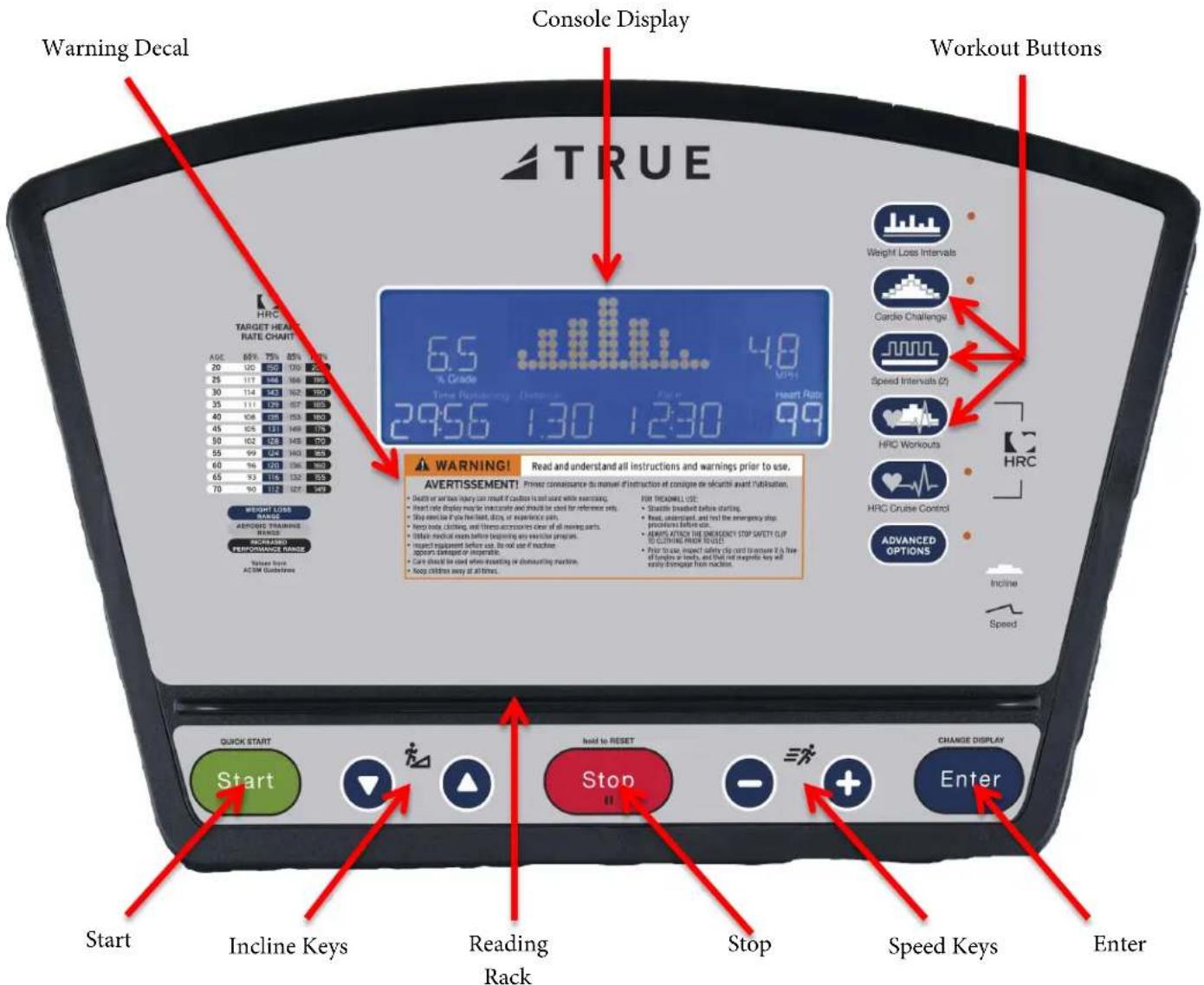
CHAPTER 4: PROGRAMMING & OPERATION
CONSOLE OVERVIEW (CONTINUED):
Console Display:
Used to monitor or control a work out and feature navigation.
Workout Keys:
Allows the user to select one of the preset workouts, heart rate control workouts or custom workouts.
Incline Keys:
Manually increases or decreases the incline of the treadmill.
Start:
Allows the user to begin a Quick Start workout or preset workout.
Reading Rack:
A ledge on the console can be used to hold a book, magazine, e-reader, or tablet computer during a workout.
Warning Decal:
Important safety information for users to review prior to using the equipment.
Stop:
Stops/Pauses a workout. Press and hold this key for five seconds to reset the unit.
Speed Keys:
Manually increases or decreases the speed of the belt.
Enter Key:
Used to confirm a selection.
CHAPTER 4: PROGRAMMING & OPERATION
PROGRAM DESCRIPTIONS:
Quick Start:
A workout in which the user controls all settings. The workout continues until it is ended by the user.
- Pressing START begins the workout.
- Adjust speed or incline at any time by using the dedicated SPEED and INCLINE keys.
- Change data readouts by pressing the CHANGE DISPLAY key.
- Pause the workout by pressing the STOP key.
Manual:
Users enter their weight, workout time or distance. The user controls both the SPEED and INCLINE of the treadmill throughout the workout.
- Press MANUAL.
- Enter the time and press ENTER or press ENTER to be prompted for a target distance.
- You can keep adjusting the workout setup by repeatedly pressing ENTER.
• The workout starts only when you press START. - Adjust speed or incline at any time by using the dedicated SPEED and INCLINE keys.
Weight Loss Intervals:
2-minute WALKING interval segments with INCLINE alternating between hills and a nearly flat landscape. Users can make adjustments to the SPEED during the workout. SPEED changes are permanent; INCLINE changes affect the current segment only.
- Press WEIGHT LOSS INTERVAL Key.
- Press ENTER.
- Adjust time + and - keys and press ENTER.
- Use + or - to adjust program level of (1-9) and press ENTER.
• Maximum grade and speed will be displayed. - Press START to begin program.
| Level | Max Speed | Max Incline |
| 1 | 2.4 mph | 2.6% |
| 2 | 2.8 mph | 2.8% |
| 3 | 3.2 mph | 3.0% |
| 4 | 3.6 mph | 3.2% |
| 5 | 4.2 mph | 3.4% |
| 6 | 4.6.mph | 3.6% |
| 7 | 5.0 mph | 3.8% |
| 8 | 5.4 mph | 4.0% |
| 9 | 6.0 mph | 4.2% |
Hill Intervals:
Hill Intervals makes changes to the INCLINE in 2-minute segments with the SPEED remaining constant. Users can make adjustments to the SPEED during the workout. SPEED changes are permanent; INCLINE changes affect the current 2-minute segment only.
- Press SPEED INTERVALS Key Twice.
- Press ENTER.
- Adjust time using + and - keys and press ENTER.
- Use + or - to adjust program level of (1-9) and press ENTER.
• Maximum grade and speed will be displayed. - Press START to begin program.
| Level | Max Speed | Max Incline |
| 1 | 2.4 mph | 4.0% |
| 2 | 2.8 mph | 5.0% |
| 3 | 3.2 mph | 6.0% |
| 4 | 3.6 mph | 7.0% |
| 5 | 4.2 mph | 8.0% |
| 6 | 4.6 mph | 9.0% |
| 7 | 5.0 mph | 10.0% |
| 8 | 5.4 mph | 11.0% |
| 9 | 6.0mph | 12.0% |
CHAPTER 4: PROGRAMMING & OPERATION
PROGRAM DESCRIPTIONS (CONTINUED):
Cardio Challenge:
SPEED and INCLINE increase to a maximum at the mid-point of the workout, then decrease to the finish. INCLINE and SPEED changes affect the current segment only.
- Press CARDIO CHALLENGE Key.
- Press ENTER.
- Adjust time using + and - keys and press ENTER.
- Use + or - to adjust program level of (1-9) and press ENTER.
• Maximum grade and speed will be displayed. - Press START to begin program.
| Level | Max Speed | Max Incline |
| 1 | 2.4 mph | 4.0% |
| 2 | 2.8 mph | 5.0% |
| 3 | 3.2 mph | 6.0% |
| 4 | 3.6 mph | 7.0% |
| 5 | 4.2 mph | 8.0% |
| 6 | 4.6 mph | 9.0% |
| 7 | 5.0 mph | 10.0% |
| 8 | 5.4 mph | 11.0% |
| 9 | 6.0mph | 12.0% |
Speed Intervals:
Walking or running speed intervals that are in 1-minute segments. Users can make adjustments to the INCLINE during the workout. INCLINE changes are permanent; SPEED changes affect the current 1-minute segment only.
- Press SPEED INTERVALS Key.
- Press ENTER.
- Adjust time using + and - keys and press ENTER.
- Use + or - to adjust program level of (1-9) and press ENTER.
• Maximum grade and speed will be displayed. - Press START to begin program.
| Level | Max Speed | Max Incline |
| 1 | 2.4 mph | 4.0% |
| 2 | 2.8 mph | 5.0% |
| 3 | 3.2 mph | 6.0% |
| 4 | 3.6 mph | 7.0% |
| 5 | 4.2 mph | 8.0% |
| 6 | 4.6 mph | 9.0% |
| 7 | 5.0 mph | 10.0% |
| 8 | 5.4 mph | 11.0% |
| 9 | 6.0mph | 12.0% |
HRC Cruise Control:
While in any program, Cruise Control will allow the user to set current heart rate as target heart rate by pressing a single button. The Cruise Control program takes control of SPEED and INCLINE to maintain the users target Heart Rate. If Beats per Minute exceeds the target by more than 12 BPM the workout will end and Cool Down will begin.
HRC Target:
Users choose their target heart rate. The treadmill begins in MANUAL control – The user should gradually increase the workout intensity until heart rate is within 10 bpm of their target. At this point, the treadmill takes over to control speed and incline to maintain heart rate within a few beats of the user's target. There are five programmable HRC Target programs.
- Press HRC WORKOUTS Key to select Interval 1-5.
- Enter a target heart rate using the + and - keys and press ENTER.
- Adjust time using numeric keys or + and - keys and press ENTER.
- Enter maximum speed and press ENTER.
- Enter maximum grade and press ENTER.
- Press START to begin program.
CHAPTER 4: PROGRAMMING & OPERATION
PROGRAM DESCRIPTIONS (CONTINUED):
Fitness Test: \*\*
A fitness test uses heart rate to estimate the user's VO2 max. The test increases SPEED and INCLINE gradually every minute and ends at the point where the user's heart rate reaches 85% of the maximum for their age.
- Press ADVANCED OPTIONS until Fitness Test is displayed.
- Press ENTER.
- Enter user age.
- Press START to begin program.
FAVORITES/USER WORKOUTS:
During a manually controlled workout, the PS treadmills “record” the changes users make to speed and incline. These treadmills can save up to two user programs that can be played back to use as a custom-designed workout. Up to 20 changes in speed or incline can be recorded and each change in speed or incline must be separated by at least 30 seconds.
*Workout recording only takes place when the Quick Start or default Manual workouts are used.
Saving a Workout:
To save a workout press the STOP key to end the workout.
Press and hold the ENTER key until Save User 1 is displayed.
Use incline ^ to select the desired profile to save the workout under (User 1, User 2, or user 3).
Press and hold the ENTER key to save the workout.
Replaying a Saved Workout:
Press the ADVANCED OPTIONS key until the desired workout is displayed (User 1, User 2, or User 3).
Press START to begin program.
ADVANCED CONSOLE FUNCTIONS:
WARNING:
Misconfiguration of the console may cause damage to the unit and void the manufacturer warranty. If necessary, please contact TRUE Fitness Technical Support at 800-883-8783 for assistance.
Diagnostics Mode:
Diagnostics mode contains several tools and information that are useful in diagnosing technical issues.
Entering Diagnostics Mode:
- Remove the safety key.
- Replace the safety key.
- When the console display goes blank, immediately press and hold the + and - speed keys until “DIAG” appears on the console display.
CHAPTER 4: PROGRAMMING & OPERATION
ADVANCED CONSOLE FUNCTIONS (CONTINUED):
Navigating Diagnostics Mode:
Using the up and down incline keys, users can scroll through the available options, which include:
Hours - The total number of hours the unit has been used.
Distance - The total distance (in miles) the unit has run.
Average Speed - The overall average speed at which the unit has been used.
Units - Toggles the units between English Standard to Metric (use the + and - speed keys).
Current Shut Off - When enabled, the unit will shut down if the weight of a user is not detected while the belt is moving.
Cooldown Time - Adjusts the length of the cooldown workout segment (use the + and - speed keys).
Backlight - Increase or decrease the brightness of the console display (use the + and - speed keys).
Contrast - Increase or decrease the contrast of the console display (use the + and - speed keys).
(The Video Disabled, TV Model and DVD Model options are not used on the PS900 treadmill)
Calibration Mode:
Calibration mode will conduct a basic test of the drive and incline systems to ensure that they are operating as intended. Calibration may also be used by technicians to troubleshoot system errors.
WARNING:
This process will take full control of the treadmill and can be dangerous if caution is not taken.
- Calibration can take up to two minutes to complete.
- Do not stand on the treadmill during the calibration procedure.
- Verify that the machine is free of all parts and tools.
- Keep children and animals at a safe distance.
Calibration Steps:
- Remove the safety key.
- Replace the safety key.
- When the screen goes blank, immediately press and hold the up and down incline keys until “CAL” appears on the console display.
- Press start to activate the auto calibration.
- Upon completion the console display will read "DONE" followed by "PASS" or "FAIL".
CHAPTER 5: CARE & MAINTENANCE
CARE & MAINTENANCE:
It is important to perform the minor maintenance tasks described in this section. Failure to maintain the treadmill as described here could void the TRUE Fitness Warranty. To reduce the risk of electrical shock, always unplug the unit from its power source before cleaning or performing any maintenance tasks.
Inspection:
TRUE Fitness is not responsible for performing or scheduling regular maintenance or inspections. Users should inspect the treadmill daily. Check for worn, frayed or missing safety lanyards. Replace missing or worn safety lanyards immediately. Do not exercise on the treadmill without attaching the safety clip to your clothing. Look and listen for slipping belts, loose fasteners, unusual noises, worn or frayed power cords, and any other indications that the equipment may be in need of service. If any of these are noticed, obtain service. Do not attempt to use the treadmill until proper service has been performed or damaged parts have been replaced.
Important:
If you determine that the treadmill needs service, make sure that the treadmill cannot be used inadvertently. Turn the unit off, and then unplug the power cord from its power source. Remove the magnetic safety key and safety clip and store it in a safe place. Make sure other users know that the treadmill needs service.
*To order parts or to contact a TRUE Authorized Service representative, please visit www.truefitness.com.
CLEANING THE EQUIPMENT:
After Each Use:
- Use GymWipes™ Antibacterial wipes or spray a solution of 30 parts water to 1 part mild detergent to dampen a soft cloth and wipe all exposed surfaces.
- Use a LCD/screen cleaner or spray a solution of 1 part 91% isopropyl alcohol and 1 part water to dampen a soft cloth and wipe the surface of the console. This helps remove fingerprints, dust, and dirt.
Weekly:
- Vacuum any dust or dirt that might have accumulated under or around the treadmill, any motor cover vents and under the straddle covers. Clogged air vents can prevent adequate cooling to the drive motor, incline motor, and motor control board causing a shortened life.
- Check for proper running belt alignment and tension. If running belt adjustment is required see sections RUNNING BELT ALIGNMENT: and TENSIONING THE RUNNING BELT: below.
CAUTION:
Do not use any acidic cleaners. Doing so will weaken the paint or powder coatings and may void the TRUE Fitness Warranty. Never pour water or spray liquids on any part of the treadmill. Allow the treadmill to dry completely before using. Frequently vacuum the floor underneath the unit to prevent the accumulation of dust and dirt, which can affect the smooth operation of the unit. Use a soft nylon scrub brush to clean the running belt. Do not clean directly underneath the treadbelt. Most of the working mechanisms are protected inside the motor cover and base of the treadmill. However, for efficient operation, the treadmill relies on low friction. To keep the friction low, the unit's running belt, staging platforms, and internal mechanisms must be as clean as possible.
CHAPTER 5: CARE & MAINTENANCE
RUNNING BELT ALIGNMENT:
Proper belt alignment allows the belt to remain centered and ensures smooth operation. Realigning the belt takes a few simple adjustments. If you are unsure about this procedure, call the TRUE Service Department.

CAUTION:
Special care must be taken when aligning the running belt. Turn off the treadmill while adjusting or working near the rear roller. Remove any loose clothing and tie back your hair. Be very careful to keep your fingers and any other object clear of the belt and rollers, especially in front of the roller and behind the deck. The treadmill will not stop immediately if an object becomes caught in the belt or rollers.

CAUTION:
If you hear any chafing or the running belt appears to be getting damaged, stop the running belt immediately by pressing the STOP key. Contact the TRUE Service Department. Walk around to the rear of the unit and observe the belt for a few minutes. The belt should be centered on the running deck. If the belt drifts off center, you must make adjustments.
Important:
Failure to align the belt may cause the belt to tear or fray, which may not be covered under the TRUE Fitness Warranty. To stop the running belt, press the STOP key. Turn the treadmill off.

CAUTION:
For your safety, use the power switch to turn off the treadmill before making any adjustments. Do not adjust the running belt when someone is standing on the unit.

CAUTION:
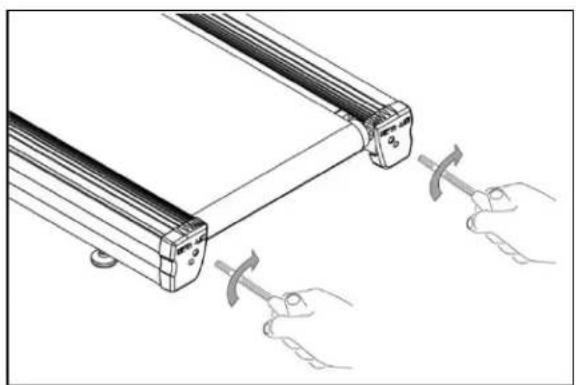
Do not turn the adjusting bolt more than 14 turn at a time. Over tightening the bolt can damage the treadmill. If you are unsure how to adjust the running belt, call the TRUE Service Department.
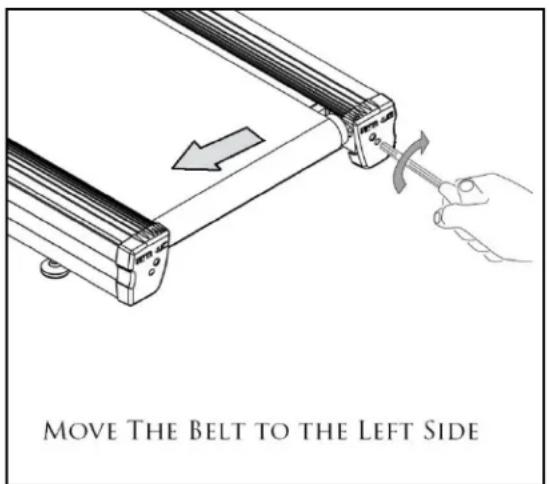
If the running belt is too far to the right side:
- Locate the belt adjustment bolts in the rear end caps of the treadmill. (To determine left and right, stand at the rear of the treadmill and face the display).
- Using the appropriate size Allen wrench or socket turn the RIGHT adjustment bolt clockwise 14 turn.
- Turn the treadmill on and start the belt at 3mph keeping off the unit.
- Allow 2 minutes for the belt to adjust itself.
- Repeat the above steps if additional adjustment is necessary.
CHAPTER 5: CARE & MAINTENANCE
RUNNING BELT ALIGNMENT (CONTINUED):
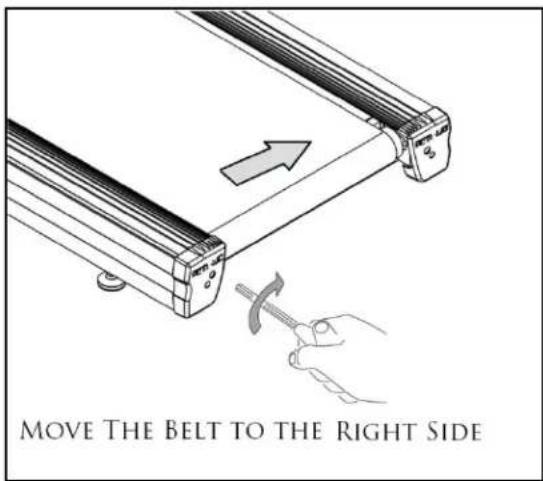
If the running belt is too far to the left side:
- Locate the belt adjustment bolts in the rear end caps of the treadmill. (To determine left and right, stand at the rear of the treadmill and face the display).
- Using the appropriate size Allen wrench or socket turn the LEFT adjustment bolt clockwise 14 turn.
- Turn the treadmill on and start the belt at 3mph keeping off the unit.
- Allow 2 minutes for the belt to adjust itself.
- Repeat the above steps if additional adjustment is necessary.
TENSIONING THE RUNNING BELT:
If there is a slipping or jerking sensation when running on the treadmill, the running belt may require tightening. In most cases the belt has stretched from use. Tensioning the belt takes a few simple adjustments. If you are unsure about this procedure, call the TRUE Service Department.
- Locate the belt adjustment bolts in the rear end caps of the treadmill.
- Using the appropriate size Allen wrench or socket turn BOTH adjustment bolts clockwise 14 turn.
- Turn the treadmill on and start the belt and check if the slipping continues. Repeat the above steps if additional adjustment is necessary.
natural_image
Technical line drawing of a mechanical component with two hands holding curved tool tips (no text or symbols)TREADMILL LUBRICATION:
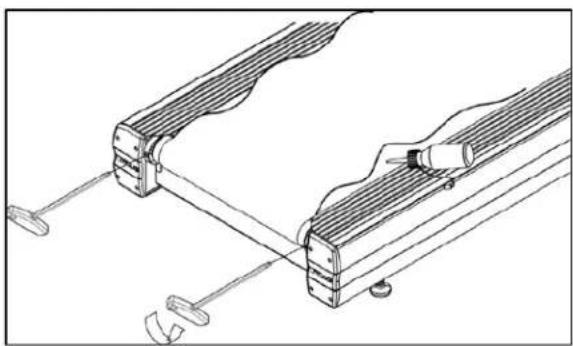
For commercial use over 20 hours per week, TRUE recommends lubricating every three months.
natural_image
Technical line drawing of a mechanical clamp or bracket assembly (no text or symbols)- L oosen the belt adjustment bolts in the rear end caps.
- Lift the belt and apply the lubricant to the center of the deck.
• Center and re-tension the belt using the directions above. - W alk on the treadmill at 2MPH for about 60 seconds to spread the lubricant evenly through the belt and deck.
*Please contact your dealer or visit www.truefitness.com to obtain the proper lubricants.
CHAPTER 5: CARE & MAINTENANCE
LEVELING THE TREADMILL:
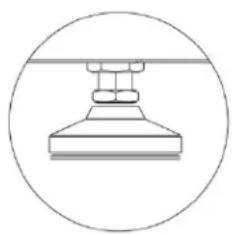
The treadmill has adjustable rear leveling feet. Make sure that the running surface is level. If the treadmill is placed on an uneven surface, adjusting the rear feet can help, but may not completely compensate for extremely uneven surfaces.
natural_image
Simple line drawing of a mechanical component inside a circle (no text or symbols)OTHER SCHEDULED PREVENTIVE MAINTENANCE:
TRUE recommends that quarterly scheduled maintenance be performed by a qualified service technician. Please contact your dealer or visit www.truefitness.com to contact a local TRUE authorized service technician.
Scheduled Preventive Maintenance:
• Record time, distance and hours from the console.
- Check error log in console.
- Check running belt and drive belt tension and tracking.
- Remove the motor cover and vacuum any debris out of the drive motor, speed sensor cage, motor control board and heat sink motor compartment.
- Move treadmill and vacuum underneath.
- Lubricate elevation pivot points including rear stabilizing feet and the lift motor screw.
• Lubricate walking belt and deck.
- Inspect all fasteners.
- Inspect all electrical connections.
- Inspect all components for abnormal or premature wear.
CAUTION:
Use only TRUE Fitness certified service providers.
LONG TERM STORAGE:
When the treadmill is not in use for any length of time, turn it off. Make sure that the power cord is unplugged from the power source and is positioned so that it will not become damaged or interfere with people or other equipment.
Storing the Chest Strap:
Store the chest strap in a place where it remains free of dust and dirt such as, in a closet or drawer. Be sure to protect the chest strap from extremes in temperature. Do not store it in a place that may be exposed to temperatures below 32^ F ( 0^ C). To clean the chest strap, use a sponge or soft cloth dampened in mild soap and water. Dry the surface thoroughly with a clean towel.
CHAPTER 6: CUSTOMER SERVICE
CONTACTING SERVICE:
TRUE Fitness recommends that you gather the serial number, model number, and a brief description of the reason for the request. After information has been gathered you may choose to contact your selling dealer or local service company to set an appointment. (If you are not familiar with who is in your area, you may visit our website at www.truefitness.com and use our dealer locator to obtain the contact information for the closest dealer).
You may also contact TRUE Fitness' customer support team by calling 800.883.8783 or e-mailing us at service@truefitness.com Monday – Friday during normal business hours.
TRUE FITNESS SERVICE DEPARTMENT
865 HOFF ROAD
ST. LOUIS, MO 63366
1.800.883.8783
HOURS OF OPERATION: 8:30 A.M. - 5:00 P.M. CST
E-MAIL: service@truefitness.com
CONTACTING SALES:
Interested in TRUE Product? Please contact us with any sales or product inquires so that we may direct you to the appropriate sales representative to answer your questions.
E-MAIL: sales@truefitness.com
CHAPTER 6: CUSTOMER SERVICE
REPORTING FREIGHT OR PARTS DAMAGE:
Unfortunately, sometimes materials can be damaged during shipment. If materials are damaged during shipment, please follow the guidelines below to determine the appropriate process for you to follow in case of damages.
Severe Damage:
Obvious damage to external packaging / internal product. Please refuse the shipment and it will be returned to TRUE Fitness by the carrier. Contact the TRUE Fitness customer support team by calling 800.883.8783 or sales support team by calling 800.426.6570 Monday-Friday during normal business hours to notify us that the shipment has been refused. Once we have received the damaged shipment, a replacement shipment will be sent to you. Only refuse the damaged piece if the shipment is multiple boxes.
Slight Damage:
The box may have minimal damages and you are not sure if the actual product is damaged or not. You must sign the bill of lading as damaged when accepting the shipment. Once you have opened the box and you have determined something is indeed damaged, please gather the serial number, model number, description and photos of damages. Please make sure the photos include the damaged product as well as the damaged box the product arrived in. Contact the TRUE Fitness customer support team by calling 800.883.8783 or sales support team by calling 800.426.6570 Monday-Friday during normal business hours.
Concealed Damage:
You may receive a shipment that looks intact and discover once the box has been opened that there are hidden damages. Please notify the carrier immediately. We will not be able to file a claim if the carrier is not notified in a timely manner. Once you have called the carrier you will need to gather the serial number, model number, description and photos of damages. Contact the TRUE Fitness customer support team by calling 800.883.8783 or sales support team by calling 800.426.6570 Monday-Friday during normal business hours.
CHAPTER 7: ADDITIONAL INFORMATION
TROUBLESHOOTING GUIDE:
This troubleshooting guide is intended to assist in diagnostics only and is not all inclusive. Technical specifications, error codes and programming are subject to change without notice. TRUE accepts no liability for any damage or loss suffered by persons whom rely wholly or in part on any description or statement contained within this manual. Please visit www.truefitness.com to obtain the most recent version of all manuals and contact the TRUE Service Department at 800-883-8783 for assistance with troubleshooting and diagnostics.
| Malfunction | Possible Cause | Corrective Action |
| No Power | Unit turned off | Verify the On/Off switch is at the ON position |
| Damaged power cord Replace power cord | ||
| Power cord not fully seated in socket | Inspect power connection at the unit and outlet | |
| No power at outlet Using a voltmeter | verify power at outlet | |
| Tripped circuit breaker | The location of the circuit breaker is next to the On/Off switch. Verify the circuit breaker is not open. If the breaker is open reset. | |
| Unit resets or pauses randomly | Damaged power cord Replace power cord | |
| Power cord not fully seated in socket | Inspect power connection at the unit and outlet | |
| Safety e-stop key not fully engaged | Re-engage the safety/e-stop key to the console | |
| Insufficient power | Verify output voltage from 20A outlet with a voltmeter | |
| Error code is displayed on console | Contact True Fitness Customer Service Department | |
| Pinched or loose main communication cable | Contact True Fitness Customer Service Department | |
| No User Present displayed on screen | User weight must be over 90lbs. Verify No User Present settings in console. | |
| Walking belt is off center | Uneven floor | Adjust treadmill with rear leveling feet. See Chapter 5: Running Belt Alignment |
| Adjust belt tracking | See Chapter 5: Centering the Running Belt | |
| Walking belt hesitates or slips when stepping | Adjust belt tension | See Chapter 5: Tensioning the Running Belt |
| Lubricate running belt | See Chapter 5: Treadmill Lubrication | |
CHAPTER 7: ADDITIONAL INFORMATION
TROUBLSHOOTING GUIDE (CONTINUED):
| Malfunction | Possible Cause | Corrective Action |
| Rubbing sound from treadmill when in operation | Walking belt is rubbing a straddle cover | Adjust belt tracking. See Chapter 5: Centering the Running Belt |
| Foreign object may be stuck under walking belt | Inspect under the unit. Remove and object that may be under the unit. | |
| Foreign object may be stuck in motor compartment | Contact True Fitness Customer Service Department | |
| Roller bearings may be damaged | Contact True Fitness Customer Service Department | |
| Drive motor may be damaged | Contact True Fitness Customer Service Department | |
| Drive belt may be misaligned | Contact True Fitness Customer Service Department | |
| Heart rate is displaying erratically or not displaying | Transmitter belt contacts are not making good contact with the skin | Re-adjust the transmitter belt so that it is in full contact with the skin |
| Contacts on the transmitter belt are not moist | Moisten the contacts on the transmitter belt | |
| Transmitter belt is not within 3 feet (1 meter) of the heart rate receiver | Adjust your position on the belt so that you are within 3 foot (1 meter) of the console | |
| The battery inside the transmitter belt is depleted | replace the transmitter belt with a compatible transmitter belt | |
| Another user wearing a compatible transmitter strap is within 3 foot (1 meter) of the unit | Move the units so that there is more space in-between units |
CHAPTER 7: ADDITIONAL INFORMATION
TROUBLSHOOTING GUIDE (CONTINUED):
| Malfunction | Possible Cause | Corrective Action |
| Heart rate is displaying erratically or not displaying (continued) | Environmental interference from high voltage power lines | Move the unit to another position within the room or move the cause of the interference until heart rate reading are stable. If the probable source of interference is plugged into the same outlet move the suspect source to another outlet. |
| Environmental interference from computers | ||
| Environmental interference from motor driven appliances | ||
| Environmental interference from cell or cordless phone | ||
| Environmental interference from Wi-Fi router |
| Error Code | Possible Cause | Corrective Action |
| Elevation Stall | Invalid potentiometer feedback | Contact TRUE Fitness Customer Service Department |
| Loss of data cable connectivity | ||
| Disconnected or misaligned limit switch | ||
| No power to incline motor | ||
| Blown fuse on lower control board | ||
| Speed Stall | Worn belt and deck | Contact TRUE Fitness Customer Service Department |
| Misaligned speed sensor | ||
| Insufficient power supply | ||
| Lack of lubrication | Lubricate the unit (See Chapter 5: Treadmill Lubrication) | |
| Key Stuck | A button is being constantly engaged | Contact TRUE Fitness Customer Service Department |
| E5 Sensor(Drive System Error) | Belt and Deck Friction | Lubricate the unit (See Chapter 5: Treadmill Lubrication) |
| Failing or misaligned speed sensor | Contact TRUE Fitness Customer Service Department | |
| Damaged or disconnected data cable | ||
| Improper voltage | ||
| Drive motor failure | ||
| Insufficient power supply | ||
| Memory Fail | Power Surge | Contact TRUE Fitness Customer Service Department |
| Excessive static electricity | Lubricate the unit (See Chapter 5: Treadmill Lubrication) | |
| Use a humidifier to add humidity to the air | ||
| Ensure the unit is plugged into a grounded outlet |
CHAPTER 7: ADDITIONAL INFORMATION

TRUE
COMMERCIAL LIMITED WARRANTY PS900 TREADMILL
Save Time and Register Online!
Activate Multiple Warranties at www.truefitness.com/support
All TRUE® Fitness products are distributed by TRUE and are warranted to the original registered product purchaser and the parts of the TRUE product (the "Product") listed below, under normal use and service, shall be free of manufacturing defects in workmanship and materials only for the period of time beginning from the original date of purchase set forth below:
| Frame* Lifetime | |
| MotorDrive MotorMotor Controller | 3 Years3 Years |
| PartsElectricalWear ItemsCosmetics | 3 Years3 Years6 Months |
| LaborPartsMotorCosmetics | 1 Year1 Year6 Months |
NOTE: Warranty valid for USA and Canada only.
NOTE: Failure to register this product will result in no servicing or authorization of parts to be shipped.
NOTE: Buying after-market products from a 3rd party will result in voided warranty
NOTE: This product is intended for Commercial use which includes non-dues paying facilities where usage does not exceed 8 hours per day. If this product will not be used in this particular setting, please contact TRUE as this warranty is void.
Frame: The frame is warranted for defects in material and workmanship for as long as the original purchaser owns the Product. The frame is warranted for labor and freight (for parts shipped from TRUE) for one year from date of purchase. * This limited warranty on structural frame does not include paint or coatings.
Parts: The treadmill electrical parts and wear items are warranted for defects in material and workmanship for three years with one year labor warranty. This limited warranty does not cover damage or equipment failure resulting from or caused by improper assembly/installation, failure to follow instructions and warnings in owner's manual, accident, misuse, abuse, unauthorized modification, or failure to provide reasonable and necessary maintenance. *TRUE Fitness shall
not warrant the performance of the heart rate system on its products, as the heart rate system performance varies, based on user's physiology, age, method of use and other factors.
* This limited warranty shall not apply to software version upgrades.
Cosmetics: The treadmill cosmetic parts are warranted for defects in material and workmanship for six months with labor warranty to match the parts warranty period. This limited warranty does not cover damage or equipment failure resulting from or caused by improper assembly/installation, failure to follow instructions and warnings in owner's manual, accident, misuse, abuse, unauthorized modification, or failure to provide reasonable and necessary maintenance. This limited warranty will apply to but may not be limited to plastic covers, shrouds, caps, badges, overlays, paint, coatings, and grips.
Labor: Labor is covered for a period of one year from the date of purchase unless otherwise expressed within this limited warranty as long as a TRUE authorized service provider performs the service. Service that requires over 50 miles of travel may be subject to additional charges. Reasonable and necessary maintenance guidelines can be found in the owner's manual.
Claims Procedure: TRUE Limited Warranty service may be obtained by contacting the authorized TRUE dealer from whom the Product was purchased. If the dealer from whom the Product was purchased is no longer an authorized TRUE dealer, then TRUE Limited Warranty service may be obtained by contacting TRUE directly at:
TRUE Fitness, Service Department
865 Hoff Road, St. Louis, MO 63366
1.800.883.8783
Hours of operation 8:30am - 5:00 pm CST
The above Limited Warranty is subject to and will be in accordance with the conditions set forth below:
- This Limited Warranty can be processed only if the Warranty Registration Form is completed on-line; or if the attached form is filled in, signed by the original purchaser and mailed to TRUE within 30 days of purchaser's receipt of this Product. The serial number must be intact on the Product for this Limited Warranty to be valid.
CHAPTER 7: ADDITIONAL INFORMATION

TRUE
COMMERCIAL LIMITED WARRANTY PS900 TREADMILL
Save Time and Register Online!
Activate Multiple Warranties at www.truefitness.com/support
- This Limited Warranty applies to the product only while the Product remains in the possession of the original purchaser and is not transferable.
- This Limited Warranty becomes VALID ONLY if the Product is initially assembled/installed by a TRUE authorized dealer/ technician (if anyone other than a TRUE authorized dealer/ technician initially assembles and installs the Product, this Limited Warranty will be void unless the written authorization of TRUE is first obtained).
- This Limited Warranty does not cover damage or equipment failure resulting from or caused by improper assembly/installation, failure to follow instructions and warnings in owner's manual, accident, misuse, abuse, unauthorized modification, or failure to provide reasonable and necessary maintenance (as referenced in the owner's manual.)
- This Limited Warranty applies only to the cost of repair or replacement of parts and does not include labor (beyond the above warranty period), transportation, service, return and freight charges associated there with expressly specified herein.
- This Limited Warranty shall not apply to: Service calls to correct installation of the equipment or instruction to owners on how to use the equipment; or any labor costs incurred beyond the applicable labor warranty period.
- This Limited Warranty is in lieu of all warranties, express or implied, and in lieu of all other obligations or liabilities on the part of TRUE, under no circumstances shall TRUE be liable by virtue of this Limited Warranty or otherwise from damage to any person or property whatsoever for any special, indirect, incidental, secondary or consequential losses, damages or expenses in connection with exercise products.
Any implied warranty is limited in duration to the time period covered by the Limited Warranty. Some states do not allow limitations on how long an implied warranty lasts, or the exclusion may not apply to you. This Limited Warranty grants you specific legal rights and you may also have other rights, which vary from state to state.
NOTE TO AUTHORIZED WARRANTY LABOR PROVIDERS:
Warranty labor reimbursement or warranty parts rights may not be transferred to, reassigned to, a third party without the express written consent of TRUE. Even jobbing out warranty labor requires TRUE's written approval.
PS900 TREADMILL SERIAL NUMBER:
The PS900 treadmill comes with one serial number on the base of the machine. This serial number is located on the motor cover above the on/off switch. Please write down your serial number below and keep for your records.
SERIAL NUMBER:

natural_image
Empty rectangular frame with no text, symbols, or content inside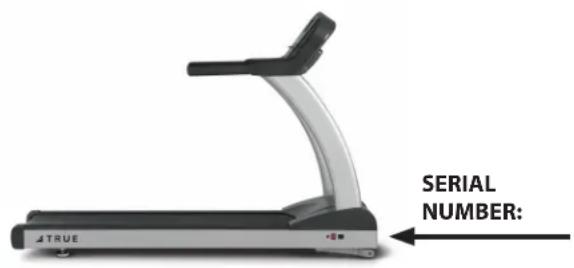
SAMPLE SERIAL NUMBER STICKER:

TRUE
TRUE FITNESS TECHNOLOGY, INC. ST LOUIS, MISSOURI 63366

CONFORMS TO ANSI/UL STD.1647 CERTIFIED TO CAN/CSA STD. C22.2 NO.68
Intertek 3135202
Intertek Testing Services Taiwan Ltd.
Model No.
TPS900-19
Serial No./Date Code
19-TPS900001A
Rating: 120V, 60 Hz, 15A
MADE IN TAIWAN
CHAPTER 7: ADDITIONAL INFORMATION

TRUE
COMMERCIAL LIMITED WARRANTY PS900 TREADMILL
Thank you for purchasing a TRUE product. To validate the TRUE product warranty the fast and easy way, please go on-line now to truefitness.com/support and register your product. The information you provide will never be distributed to any other individuals or agencies for any purpose. If you prefer to mail your warranty card, have the owner of the product complete the information below and return it to TRUE Fitness within 30 days from the date of equipment installation.
Please Note: Failure to register this product will result in no servicing or authorization of parts to be shipped.
To mail your warranty information, please fill in the information below and mail to: Service Dept., TRUE Fitness, 865 Hoff Road, St. Louis, MO 63366 (or save postage and register online at www.truefitness.com/support)

Commercial Warranty Registration
PLEASE PROVIDE YOUR SERIAL NUMBER BELOW. REQUIRED FOR WARRANTY REGISTRATION:
SERIAL NUMBER:
Model Type: PS900 Commercial Treadmill
Date of Purchase
Your Company Name____
Contact First Name
Contact Last Name
Address
City State ZIP ____ ____
Email Address Website
Phone Fax
- Where did you first learn about TRUE?
a. Dealer b. Website
____ c. Advertisement ____ d. Referral
____ e. Current Customer ____ f. Other ____
- Why did you purchase a TRUE product?
____ a. Design/Appearance ____ b. Dealer Suggestion
____ c. Price/Value ____ d. Quality Construction
____ e. Performance ____ f. TRUE Reputation
__ g. Other ____
- Please indicate your type of facility:
a. Apartment/Condo b. Corporate Fitness Center
c. Municipality d. Health Club/Gym/Spa
____ e. Hotel/Resort ____ f. Military Base
____ g. Student Rec Center ____ h. Other
- What other types of equipment does your company currently own?
a. Treadmill Brand
b. Bike Brand
c. Elliptical Brand
d. Free Weights/Gym Brand
- How many people use your facility on a daily basis?
a. <25 b. 25-75
_ c. 76-150 _ d. 150+
- Do you plan to purchase more fitness equipment in the next 6-12 months?
____ Yes ____ No
- If you answered "yes" to question 6, what type do you plan to purchase?
____ a. Treadmill ____ b. Elliptical
____ c. Stationary Bike ____ d. Free Weights
____ e. Gym ____ f. Other ____
- Would you recommend TRUE to other club owners?
____ Yes ____ No
- You are a valued TRUE customer and your suggestions allow us to continually improve your experience. Is there anything else you would like us to know? Please explain:
CHAPTER 7: ADDITIONAL INFORMATION

TRUE
RESIDENTIAL LIMITED WARRANTY PS900 TREADMILLS
Save time and register online!
Activate Multiple Warranties at truefitness.com.
All TRUE® Fitness products are distributed by TRUE and are warranted to the original registered Product purchaser and the parts of the TRUE product (the "Product") listed below, under normal use and service, shall be free of manufacturing defects in workmanship and materials only for the period of time beginning from the original date of purchase set forth below:
| Frame* Lifetime | |
| Drive Motor 30 Years | |
| Parts | |
| Electrical | 10 Years |
| Wear Items | 10 Years |
| Cosmetics | 6 Months |
| Labor | |
| Parts | 1 Year |
| Motor | 1 Year |
| Cosmetics | 6 Months |
NOTE: Warranty valid for USA and Canada only.
parts warranty period. This limited warranty does not cover damage or equipment failure resulting from or caused by improper assembly/installation, failure to follow instructions and warnings in owner's manual, accident, misuse, abuse, unauthorized modification, or failure to provide reasonable and necessary maintenance. This limited warranty will apply to but may not be limited to paint/coatings, covers/caps, badges, overlays, safety key and straddle covers.
Labor
Labor is covered for a period of one year from the date of purchase unless otherwise expressed within this limited warranty as long as a TRUE authorized service provider performs the service. Service that requires over 50 miles of travel may be subject to additional charges. Reasonable and necessary maintenance includes proper lubrication of the running deck and tread belt area as specified in the owner's manual.
Frame
The frame is warranted for defects in material and workmanship for as long as the original purchaser owns the Product. The frame is warranted for labor and freight (for part shipped from TRUE) for one year from date of purchase.* This limited warranty on structural frame does not include paint or coatings.
Drive Motor
The treadmill drive motor is warranted for defects in material and workmanship for 30 years with a one year labor warranty. This limited warranty does not cover damage or equipment failure resulting from or caused by improper assembly/installation, failure to follow instructions and warnings in owner's manual, accident, misuse, abuse, unauthorized modification, or failure to provide reasonable and necessary maintenance.
Parts
The treadmill electrical parts and wear items are warranted for defects in material and workmanship for ten years with one year labor warranty. This limited warranty does not cover damage or equipment failure resulting from or caused by improper assembly/installation, failure to follow instructions and warnings in owner's manual, accident, misuse, abuse, unauthorized modification, or failure to provide reasonable and necessary maintenance. This limited warranty will apply to but may not be limited to the treadmill elevation motor, upper control board, deck, running belt and drive belt. *TRUE Fitness shall not warrant the performance of the heart rate system on its products, as the heart rate system performance varies, based on user's physiology, age, method of use and other factors. * This limited warranty shall not apply to Software version upgrades.
Cosmetics
The treadmill cosmetic parts are warranted for defects in material and workmanship for six months with labor warranty to match the
truefitness.com / 800.426.6570 / 1.636.272.7100
CHAPTER 7: ADDITIONAL INFORMATION

TRUE
RESIDENTIAL LIMITED WARRANTY
PS900 TREADMILLS
Save time and register online!
Activate Multiple Warranties at truefitness.com.
Claims Procedure: TRUE Limited Warranty service may be obtained by contacting the authorized TRUE dealer from whom the Product was purchased. If the dealer from whom the Product was purchased is no longer an authorized TRUE dealer, then TRUE Limited Warranty service may be obtained by contacting TRUE directly at:
TRUE Fitness, Service Department
865 Hoff Road, St. Louis, MO 63366
1-800-883-8783, (Hours of operation 8:30am - 5:00 pm CST)
The above Limited Warranty is subject to and will be in accordance with the conditions set forth below:
- This Limited Warranty can be processed only if the Warranty Registration Form is completed on-line; or if the attached form is filled in, signed by the original purchaser and mailed to TRUE within 30 days of purchaser's receipt of this Product. The serial number must be intact on the Product for this Limited Warranty to be valid.
- This Limited Warranty applies to the product only while the Product remains in the possession of the original purchaser and is not transferable.
- This Limited Warranty becomes VALID ONLY if the Product is initially assembled/installed by a TRUE authorized dealer/technician (if anyone other than a TRUE authorized dealer/technician initially assembles and installs the Product, this Limited Warranty will be void unless the written authorization of TRUE is first obtained).
- This Limited Warranty does not cover damage or equipment failure resulting from or caused by improper assembly/installation, failure to follow instructions and warnings in owner's manual, accident, misuse, abuse, unauthorized modification, or failure to provide reasonable and necessary maintenance (as referenced in the owner's manual.)
- This Limited Warranty applies only to the cost of repair or replacement of parts and does not include labor (beyond the above warranty period), transportation, service, return and freight charges associated therewith expressly specified herein.
- This Limited Warranty shall not apply to: Service calls to correct installation of the equipment or instruction to owners on how to use the equipment; or any labor costs incurred beyond the applicable labor warranty period.
- This Limited Warranty is in lieu of all warranties, express or implied, and in lieu of all other obligations or liabilities on the part of TRUE, under no circumstances shall TRUE be liable by virtue of this Limited Warranty or otherwise from damage to any person or property whatsoever for any special, indirect, incidental, secondary or consequential losses, damages or expenses in connection with exercise products.
Any implied warranty is limited in duration to the time period covered by the Limited Warranty. Some states do not allow limitations on how long an implied warranty lasts, or the exclusion may not apply to you. This Limited Warranty grants you specific legal rights and you may also have other rights, which vary from state to state.
NOTE TO AUTHORIZED WARRANTY LABOR PROVIDERS:
Warranty labor reimbursement or warranty parts rights may not be transferred to, reassigned to, a third party without the express written consent of TRUE. Even jobbing out warranty labor requires TRUE's written approval.
PLEASE RETAIN THIS PORTION FOR YOUR RECORDS
SERIAL NUMBER:
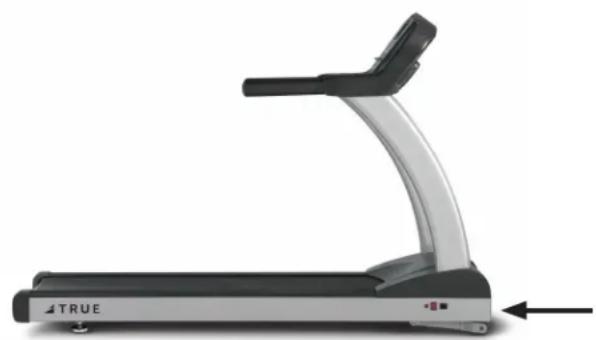
natural_image
Side view of a treadmill with black handle and gray body, no visible text or symbols on the device itselfSERIAL NUMBER
TRUE
TRUE FITNESS TECHNOLOGY, INC. ST LOUIS, MISSOURI 63366

Intertek
3135202
CONFORMS TO ANSI/UL STD.1647 CERTIFIED TO CAN/CSA STD. C22.2 NO.68
Intertek Testing Services Taiwan Ltd.
Model No.
TPS900-19
Serial No./Date Code
19-TPS900001A
Rating: 120V, 60 Hz, 15A
MADE IN TAIWAN
CHAPTER 7: ADDITIONAL INFORMATION

TRUE
RESIDENTIAL LIMITED WARRANTY
PS900 TREADMILLS
Thank you for purchasing a TRUE product. To validate the TRUE product warranty the fast and easy way, please go on-line now to www.truefitness.com and register your product. The information you provide will never be distributed to any other individuals or agencies for any purpose. If you prefer to mail your warranty card, have the owner of the product complete the information below and return it to TRUE Fitness within 30 days from the date of equipment installation.
To mail your warranty information, please fill in the information below and mail to: Service Dept., TRUE Fitness, 865 Hoff Road, St. Louis, MO 63366 (or save postage and register online at www.truefitness.com)

Residential Warranty Registration
Model Type: ____ Treadmill ____ Elliptical ____ Bike ____
Other
Date of Purchase
Purchased From (dealer name)
First Name
Last Name
Address
City____ State____ ZIP____
Email Address
Phone
- Where did you first learn about TRUE?
a. Dealer b. Website
____ c. Referral ____ d. Gym/Club
____ e. Current Customer ____ f. Other ____
- The primary user(s) is:
a. Male b. Female
c. Both
- Do you currently belong to a health club?
____ a. Yes ____ b. No
- Your age group:
____ a. Under 25 ____ b. 25-35
c. 36-45 d. 46-55
____ e. 56-65 ____ f. 65+
- What was the primary reason you bought a TRUE product? (Check only one)
____ a. Design/Appearance ____ b. Dealer
____ c. Price ____ d. Ease of Operation
____ e. Quality of Construction ____ f. Size
____ g. Reputation ____ h. Warranty
____ i. Friend/Family Recommendation
- Do you plan to purchase more fitness equipment in the next 6-12 months?
____ Yes ____ No
- If you answered "yes" to question 6, what type do you plan to purchase?
a. Treadmill b. Elliptical
____ c. Stationary Bike ____ d. Free Weights
____ e. Gym ____ c. Other
- What is your annual household income? (Optional)
a. Under \$50,000
b. \50,000 - \75,000
c. \75,000 - \100,000
d. \100,000 - \150,000
e. \$150,000+
- You are a valued customer of TRUE and your suggestions allow us to continually improve your experience. Is there anything else you would like us to know? Please explain:
SERIAL NUMBER:
truefitness.com / 800.426.6570 / 1.636.272.7100
- PS900 TREADMILL OWNER'S MANUAL
- PS900 TREADMILL OWNERS MANUAL
- IMPORTANT:
- IMPORTANTE:
- TRANSCEND ALL OTHERS!
- TABLE OF CONTENTS:
- Chapter 1: Safety Instructions
- Chapter 2: Assembly Instructions
- Chapter 3: Product Overview
- Chapter 4: Programming & Operation
- Chapter 5: Care & Maintenance
- Chapter 6: Customer Service
- Chapter 7: Additional Information
- IMPORTANT SAFETY INSTRUCTIONS
- SAVE THESE SAFETY INSTRUCTIONS
- CAUTION:
- CAUTION (CONTINUED):
- USE OF SAFETY KEY (E-STOP):
- SPACE REQUIREMENTS:
- GROUNDING INSTRUCTIONS:
- GROUNDING INSTRUCTIONS (CONTINUED):
- DANGER:
- POWER REQUIREMENTS FOR TRUE PRODUCTS
- Extension Cords
- Grounded, Dedicated Line
- Voltage
- WARNING DECALS:
- WARNING!
- Read and understand all instructions and warnings prior to use.
- AVERTISSEMENT!
- FOR TREADMILL USE:
- TRUE
- TPS900-19
- 19-TPS900001A
- COMPLIANCES:
- Basic Guidelines for Setting Up Your Treadmill:
- Important Electrical Requirements - 120V:
- Important Electrical Requirements - 230V:
- Danger: Do not use an extension cord or ungrounded outlet:
- PRE-ASSEMBLY CHECK LIST:
- PRE-ASSEMBLY CHECK LIST (CONTINUED):
- TREADMILL ASSEMBLY STEPS:
- TREADMILL ASSEMBLY STEPS (CONTINUED):
- 9) Rear Foot Leveling:
- 10) Safety Key Attachment:
- WARNING:
- Calibration Steps:
- TREADMILL OVERVIEW:
- TREADMILL OVERVIEW (CONTINUED):
- Console Assembly:
- Contact Heart Rate Pads:
- Safety (E-Stop) Key:
- Belt:
- Straddle Covers:
- Belt Adjustment Bolts:
- On/Off Switch:
- Circuit Breaker:
- Power Cord:
- Leveling Feet:
- HEART RATE MONITORING:
- Chest Strap Heart Rate Monitoring:
- A Note on Chest Strap Heart Rate Monitoring:
- Contact Heart Rate (CHR):
- A Note on CHR Accuracy:
- HEART RATE CONTROL (HRC):
- Introduction:
- Target Heart Rate:
- Consult a physician to determine target heart rate:
- Warm Up:
- HEART RATE CONTROL (CONTINUED):
- CONSOLE OVERVIEW (CONTINUED):
- PROGRAM DESCRIPTIONS:
- Quick Start:
- Manual:
- Weight Loss Intervals:
- Hill Intervals:
- PROGRAM DESCRIPTIONS (CONTINUED):
- Cardio Challenge:
- Speed Intervals:
- HRC Cruise Control:
- HRC Target:
- Fitness Test: \*\*
- FAVORITES/USER WORKOUTS:
- Saving a Workout:
- Replaying a Saved Workout:
- ADVANCED CONSOLE FUNCTIONS:
- Diagnostics Mode:
- Entering Diagnostics Mode:
- ADVANCED CONSOLE FUNCTIONS (CONTINUED):
- Calibration Mode:
- CARE & MAINTENANCE:
- Inspection:
- CLEANING THE EQUIPMENT:
- After Each Use:
- Weekly:
- RUNNING BELT ALIGNMENT:
- If the running belt is too far to the right side:
- RUNNING BELT ALIGNMENT (CONTINUED):
- If the running belt is too far to the left side:
- TENSIONING THE RUNNING BELT:
- TREADMILL LUBRICATION:
- LEVELING THE TREADMILL:
- OTHER SCHEDULED PREVENTIVE MAINTENANCE:
- Scheduled Preventive Maintenance:
- LONG TERM STORAGE:
- Storing the Chest Strap:
- CONTACTING SERVICE:
- CONTACTING SALES:
- REPORTING FREIGHT OR PARTS DAMAGE:
- Severe Damage:
- Slight Damage:
- Concealed Damage:
- TROUBLESHOOTING GUIDE:
- COMMERCIAL LIMITED WARRANTY PS900 TREADMILL
- Save Time and Register Online!
- Activate Multiple Warranties at www.truefitness.com/support
- NOTE TO AUTHORIZED WARRANTY LABOR PROVIDERS:
- PS900 TREADMILL SERIAL NUMBER:
- SAMPLE SERIAL NUMBER STICKER:
- Commercial Warranty Registration
- PLEASE PROVIDE YOUR SERIAL NUMBER BELOW. REQUIRED FOR WARRANTY REGISTRATION:
- SERIAL NUMBER:
- RESIDENTIAL LIMITED WARRANTY PS900 TREADMILLS
- Activate Multiple Warranties at truefitness.com.
- Labor
- Frame
- Drive Motor
- Parts
- Cosmetics
- RESIDENTIAL LIMITED WARRANTY
- PS900 TREADMILLS
- PLEASE RETAIN THIS PORTION FOR YOUR RECORDS
- Residential Warranty Registration
Brand : True
Model : TPS900
Category : Treadmills