
TC-X14 - Uncategorized TAMRON - Free user manual and instructions
Find the device manual for free TC-X14 TAMRON in PDF.


| Product Type | Teleconverter |
| Brand | TAMRON |
| Model | TC-X14 |
| Magnification | 1.4x |
| Optical Construction | 4 elements in 3 groups |
| Dimensions (Dia. x Length) | Approx. 2.7 x 0.9 in (69 x 22 mm) |
| Weight | Approx. 2.5 oz (70 g) |
| Mount | Tamron AF (compatible with specific lenses) |
| Compatible Lenses | Select Tamron lenses for 35mm SLR |
| Coatings | Multi-coated |
| Features | Preserves autofocus and exposure metering; compact design |
| Power Source | None (passive) |
| Usage | Attaches between camera body and lens to increase focal length |
| Cleaning | Use a soft brush and lens cloth; avoid solvents |
| Storage | Keep in a dry, dust-free environment with caps on |
| Safety | Handle with care; avoid shocks and extreme temperatures |
| Repairability | Not user-serviceable; contact Tamron for service |
| Included Accessories | Front and rear caps |
Frequently Asked Questions - TC-X14 TAMRON
User questions about TC-X14 TAMRON
0 question about this device. Answer the ones you know or ask your own.
Ask a new question about this device
Download the instructions for your Uncategorized in PDF format for free! Find your manual TC-X14 - TAMRON and take your electronic device back in hand. On this page are published all the documents necessary for the use of your device. TC-X14 by TAMRON.
USER MANUAL TC-X14 TAMRON
Thank you for purchasing the TELE CONVERTER 1.4×.
Please read this owner's manual well before using the product.
After reading this manual, store it in a safe place.
● Meaning of symbols in this manual

Explains precautions that help to prevent problems.

Explains things you should know in addition to basic operations.
PART NAMES
① Lens attachment mark
② Lens removal lever
③ Camera attachment mark
SPECIFICATIONS
| Model TC-X14 | |
| Focal Length 1.4x attached lens | |
| Lens construction 3/6 | |
| Overall length 21.4 mm* | |
| Diameter ø Nikon: 62.6 mm / Canon: 70.0 mm | |
| Weight Nikon: 180 g / Canon: 205 g | |
* Since the aperture value depends on the specifications of the attached lens, please refer to the list posted on the website.
* Specifications and appearance are subject to change without notice.
INCLUDED ACCESSORIES
- Mounting cap (equipped with TELE CONVERTER)
- Rear cap (equipped with TELE CONVERTER)
- Lens case
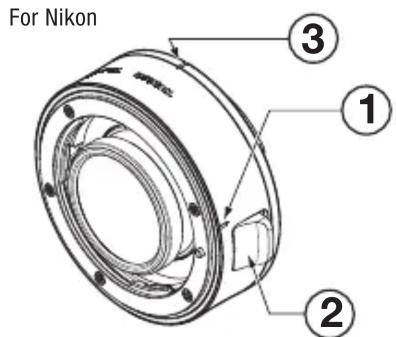
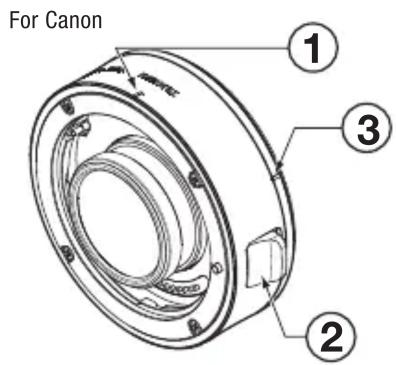
Attaching and removing the lens and camera
Attachment
- Align the lens attachment mark ① on the TELE CONVERTER with the attachment mark on the lens.
- Turn the lens in a clockwise direction (counter-clockwise for Nikon) until it stops.
- Align the camera attachment mark ③ on the TELE CONVERTER with the mounting mark on the camera.
- Turn the TELE CONVERTER in a clockwise direction (counter-clockwise for Nikon) until it stops.
Removal
- While pressing the lens removal button on the camera, remove the unit by turning it in the opposite direction used for attachment.
- While pressing the lens removal lever on the unit, remove the lens by turning it in the opposite direction used for attachment.

- Turn the camera power off before attaching or removing the unit.

- For details, refer also to the instruction manuals for both the camera and lens.

Precautions regarding the use of this product
- The following lens can be attached to this product: SP 150-600mm F/5-6.3 Di VC USD G2 (Model A022) (as of September 2016).
- Do not mount any lenses other than the compatible one, as doing such could lead to malfunction or accident.
- Please refer to the latest catalog or our website for up-to-date information on compatible cameras and lenses and AF functionality.
Tamron website: http://www.tamron.com/en/faq/ - Do not attach more than one TELE CONVERTER (this product or other tele converters), as doing such could lead to malfunction or accident.
To ensure long-term satisfaction
- Remove dust and soiling on the lens by using a blower or soft brush. Do not touch the lens with your fingers.
- When fingerprints or oil have adhered to the lens, lightly wipe with commercially available lens cleaning paper, soak a well-washed cotton cloth, or microfiber cloth (cleaning cloth for glasses, etc.) in lens cleaner, and then lightly wipe the lens surface starting from the center. Do not use a silicone cloth.
- Clean the lens barrel using a silicone cloth. Never use benzene, thinner, or other organic solvents.
- Mildew is a major problem for lenses. Store your lens in a clean, cool, and dry place. When you store the lens in a lens case, store it with a commercially available drying agent and replace the drying agent occasionally.
- Do not touch the lens-camera interface contacts. If dust or stains cause contact problems, signals are not transmitted properly between the lens and camera, and malfunctions may occur.
- If the temperature changes suddenly, moisture may form within the camera and lens and cause malfunctions.
To prevent this, seal your equipment in a plastic bag or similar container. After your equipment has adjusted to the ambient temperature, remove it from the bag and use it as usual.
Disposal of Electrical and Electronic Equipment in Private Households. Disposal of used Electrical & Electronic Equipment (Applicable in the European Union and other European countries with separate collection systems)
This symbol indicates that this product shall not be treated as household waste.
Instead it shall be collected separately for the recycling of electrical and electronic equipment.
If the new products are purchased, this product might be handed over to the distributor or the collection system of waste electrical and electronic equipment eventually.
By ensuring this product is disposed of correctly, you will help prevent potential negative consequences for the environment and human health, which could otherwise be caused by inappropriate waste handling of this product or components of this product.
If this product is disposed illegally, it might cause a possibility of penalties. For more detailed information about recycling of this product, please contact your local Civic Office, your household waste disposal service or the shop where you purchased the product.
TAMRON
ENGLISH
Precautions for Safe Use of Tamron Lenses
For safe operation be sure to carefully read the "Precautions for Safe Use of Tamron Lenses" and the manual before using the product.
After reading them, store them in a place where they can easily be reviewed whenever needed. Caution instructions are divided into the following two categories according to the degree of danger involved.

WARNING
This indicates instructions which if not followed or if performed incorrectly could lead to death or serious injury.
- Do not directly view the sun or other strong light source using this lens or a camera to which the lens is attached.
Doing such could cause loss of vision or other damage. - Do not dissemble, repair, or modify the lens.
This could damage the lens or camera. - Keep the lens out of the reach of small children.
There is a risk of injury if the lens is dropped or falls down.

CAUTION
This indicates instructions which if not heeded or if performed incorrectly could lead to bodily injury or physical damage
- Do not place lens in direct sunlight or leave it in an extremely hot place such inside a car. Doing such could damage the internal parts of the lens or cause a fire.
- Always attach the lens cap whenever the lens is not in use.
- When attaching the lens to the camera, ensure that the lens has been properly attached to the camera and firmly locked.
If the lens is not attached properly, it could be difficult to remove or it could fall off causing damage or injury. - Do not use this lens for any application other than photography.
- Do not transport the lens while it is still attached to a tripod.

- ● Meaning of symbols in this manual
- PART NAMES
- INCLUDED ACCESSORIES
- Attaching and removing the lens and camera
- Attachment
- Removal
- Precautions regarding the use of this product
- To ensure long-term satisfaction
- Disposal of Electrical and Electronic Equipment in Private Households. Disposal of used Electrical & Electronic Equipment (Applicable in the European Union and other European countries with separate collection systems)
- TAMRON
- ENGLISH
- Precautions for Safe Use of Tamron Lenses
- WARNING
- CAUTION
Brand : TAMRON
Model : TC-X14
Category : Uncategorized