
MWI 3443 IX - Microwave INDESIT - Free user manual and instructions
Find the device manual for free MWI 3443 IX INDESIT in PDF.
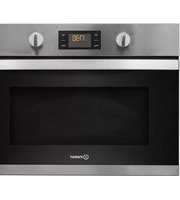


| Product Type | Built-in Microwave Oven |
| Brand | Indesit |
| Model | MWI 3443 IX |
| Capacity | 34 L |
| Microwave Power | 900 W |
| Grill Power | 1000 W |
| Dimensions (HxWxD) | 388 x 595 x 400 mm |
| Weight | 23 kg |
| Voltage | 230 V |
| Frequency | 50 Hz |
| Energy Efficiency Class | A |
| Control Type | Touch + Rotary |
| Door Opening | Drop-down |
| Interior Light | LED |
| Turntable | Glass |
| Color | Stainless Steel |
| Functions | Microwave, Grill, Defrost, Auto Cook, Multi-stage |
| Safety Features | Child Lock, Overheat Protection |
| Special Features | Quick Start, Crisp Function, Easy-clean Interior |
| Installation | Built-in |
| Spare Parts Availability | Available from Indesit |
Frequently Asked Questions - MWI 3443 IX INDESIT
User questions about MWI 3443 IX INDESIT
0 question about this device. Answer the ones you know or ask your own.
Ask a new question about this device
Download the instructions for your Microwave in PDF format for free! Find your manual MWI 3443 IX - INDESIT and take your electronic device back in hand. On this page are published all the documents necessary for the use of your device. MWI 3443 IX by INDESIT.
USER MANUAL MWI 3443 IX INDESIT
THANK YOU FOR PURCHASING AN INDESIT PRODUCT
To receive more comprehensive help and support, please register your product at www.indesit.com/register

You can download the Safety Instructions and the Use and Care Guide by visiting our website docs.indesit.eu and following the instructions on the back of this booklet.

Before using the appliance carefully read the Health and Safety guide.
PRODUCT DESCRIPTION

- Control panel
- Identification plate (do not remove)
- Door
- Upper heating element/grill
- Light
- Turntable
CONTROL PANEL

1. SELECTION KNOB
For switching the oven on by selecting a function. Turn to the O position to switch the oven off.
2. BACK
For returning to the previous settings menu.
3. STOP
For interrupting an active function at any time. Press twice to stop the function and put the oven on stand-by.
4. DISPLAY
5. START
For starting functions and confirming settings. When the oven is switched off, it activates the microwave function.
6. CONFIRM
For confirming a function selection or a set value.
7. ADJUSTMENT KNOB
For scrolling through the menus and applying or changing settings.
ACCESSORIES
GLASS TURNTABLE

Placed on its support, the glass turntable can be used with all cooking methods.
The turntable must always be used as a base for other containers or accessories.
TURNTABLE SUPPORT

Only use the support for the glass turntable. Do not rest other accessories on the support.
WIRE RACK

This allows you to place food closer to the grill, for perfectly browning your dish. Place the wire shelf on the turntable.
COVER (IF PRESENT)

Useful for covering containers during microwave cooking and heating. The cover reduces splashes, keeps foods moist and can also be used to create two cooking levels.
It is not suitable for use in convection cooking or with any of the grill functions.
The number and type of accessories may vary according to which model is purchased. Other accessories that are not supplied can be purchased separately from the After-sales Service.
There are a number of accessories available on the market. Before you buy, ensure they are suitable for microwave use and resistant to oven temperatures.
Metallic containers for food or drink should never be used during microwave cooking.
Always ensure that foods and accessories do not come into contact with the inside walls of the oven.
Always ensure that the turntable is able to turn freely before starting the oven. Take care not to unseat the turntable whilst inserting or removing other accessories.

MICROWAVE
For quickly cooking and reheating food or drinks.
POWER RECOMMENDED FOR
| 900 W | Quickly reheating drinks or other foods with a high water content |
| 750 W | Cooking vegetables |
| 650 W | Cooking meat and fish |
| 500 W | Cooking meaty sauces, or sauces containing cheese or egg. Finishing off meat pies or pasta bakes |
| 350 W | Slow, gently cooking. Perfect for melting butter or chocolate |
| 160 W | Defrosting frozen foods or softening butter and cheese |
| 90 W | Softening ice cream |

GRILL
For browning, grilling, and gratins. We recommend turning the food during cooking. For best results, preheat the grill for 3-5 minutes.
Recommended accessories: Wire rack

GRILL + MW
For quickly cooking and gratinating dishes, combining the microwave and grill functions.
Recommended accessories: Wire rack

AUTO DEFROST *
For quickly defrosting various different types of food simply by specifying their weight. Food should be placed directly on the glass turntable. Turn the food when prompted.
CATEGORY FOOD WEIGHT
| 1* | MEAT(mince, cutlets, steaks, roasting joints) | 100 g - 2 kg |
| 2* | POULTRY(whole chicken, pieces, fillets) | 100 g - 2.5 kg |
| 3* | FISH(whole, steaks, fillets) | 100 g - 1.5 kg |
| 4* | VEGETABLES(mixed vegetables, peas, broccoli, etc.) | 100 g - 1.5 kg |
| 5* | BREAD(loaves, buns, rolls) | 100 g - 1 kg |

AUTO - REHEAT *
CA For reheating ready-made food that is either frozen or at room temperature. The oven automatically calculates the settings required to achieve the best results in the shortest amount of time. Place food on a microwave-safe and heatproof dinner plate or dish.
CATEGORY FOOD WEIGHT
 | DINNER PLATE 250 - 500 g |
 | FROZEN PORTION 250 - 500 g |
 | FROZEN LASAGNA 250 - 500 g |
 | SOUPS 200 - 800 g |
| [800] | BEVERAGES 100 - 500 g |

AUTO COOK *
CA For cooking foods quickly and achieving optimal results. Use cookware that is suitable for oven cooking and resistant to microwaves.
CATEGORY FOOD WEIGHT
 | BAKED POTATOES(Turn when prompted) | 200 g - 1 kg |
 | FRESH VEGETABLES(Cut into pieces of equal size and add 2 to 4 tablespoons of water. Cover) | 200 - 800 g |
 | FROZEN VEGETABLES(Turn when prompted. Cover) | 200 - 800 g |
 | CANNED VEGETABLES 200 - 600 g | |
| [TO42] | POPCORN 100 g |
* With the automatic functions, simply select the type and weight or the quantity of the food items to obtain the best results. The oven will automatically calculate the optimum settings and continue to change them as cooking progresses. Turn or stir the food when prompted.
FIRST TIME USE
SET THE TIME
You will need to set the time when you switch on the appliance for the first time: The two digits for the hour will flash on the display.

Turn the adjustment knob to set the correct hour and press OK to confirm. The two digits for the minutes will start flashing. Turn the adjustment knob to set the correct minutes and press OK to confirm.
Please note: to change the time at a later point, press and hold OK for at least 3 seconds while the oven is off and repeat the steps above. You may need to set the time again following lengthy power outages.
DAILY USE
1. SELECT A FUNCTION
When the oven is off, only the time is shown on the display. Turn the selection knob to select one of the available functions.

2. SET THE FUNCTION
MANUAL FUNCTIONS
After having selected the function you require, you can change its settings.
The display will show the settings that can be changed in sequence.
When the W icon flashes on the display, turn the adjustment knob to adjust the power setting and then press OK to confirm and continue to alter the settings that follow (if possible).
In the same way, when the °C icon flashes on the display, turn the adjustment knob to adjust the temperature setting and then press OK to confirm and continue to alter the settings that follow.
Please note: once the function has been activated, the power can be changed by pressing OK 3 times to access the power settings menu, then turning the adjustment knob to change the setting.
DURATION

When the icon flashes on the display, turn the adjustment knob to set the desired duration. Once the displayed cooking time corresponds with what you desire, press Start to confirm and start the function.
Please note: During cooking, you can adjust the cooking time by turning the knob; each time you press the cooking time increases by 30 seconds.
AUTOMATIC FUNCTIONS / AUTO DEFROST
CATEGORIES
Once you have chosen one of the automatic functions, you will need to select a category for the food you are cooking.

When the icon flashes on the display, turn the adjustment knob to select the digit that corresponds to the desired category, then press OK to confirm.
WEIGHT
To achieve the best results, the automatic functions require you to enter the weight of the food, selecting from amongst the default settings: the oven will calculate the ideal length of time for the function to run for each category of food.

When the default setting appears on the display and the icon flashes, turn the adjustment knob to enter the weight, then press Start to confirm and start the function.
3. ACTIVATE THE FUNCTION
Once you have applied the settings you require, press Start to activate the function.
Every time the Start button is pressed again, the cooking time will be increased by a further 30 seconds (only for manual functions).
Please note: You can press service at any time to stop the function that is currently active.
JET START
When the oven is switched off, it is possible to press Start to activate cooking with the microwave function set at full power (900 W) for 30 seconds.
SAFETY LOCK
This function is automatically activated to prevent the oven from being switched on accidentally.

Open and close the door, then press Start to activate the function.
4. PAUSE
For pausing an active function, for example to stir or turn the food, simply open the door.
To start it up again, close the door and press Start. It is also possible to temporarily pause cooking by pressing Stop. To resume the cooking process, close the door and press Start.
AUTOMATIC PAUSE
(STIR OR TURN THE FOOD)
Certain functions will pause to allow you to turn or stir the food.

When the oven pauses the cooking and "Turn food" or "Stir Food" appear on the display, open the door to turn or stir the food, then close the door and press Start to start cooking again.
Please note: after 2 minutes, even if the food has not been turned or stirred, the function will start again automatically.
5. END OF COOKING
An audible signal will sound and "End" will appear on the display to indicate that a cooking function is complete.

For some functions, it is possible to delay cooking while maintaining previously established settings: turn the adjustment knob to set a new cooking time, then press Start.
. TIMER
When the oven is switched off, the display can be used as a timer. The timer does not activate any of the cooking cycles.
To activate the function and set the cooking time you require, turn the adjustment knob.

Press ☐ to activate the timer. An audible signal will sound and the display will indicate once the timer has finished counting down the selected time. To make a change to the timer once it has been activated, turn the adjustment knob, then press OK to confirm.
To interrupt it or return to the current time display, turn the adjustment knob until 0:00 is on the display and press OK.
Please note: Once the timer has been activated, you can activate a function as well: The timer will continue to count down the selected time automatically without having any effect on the function. To go back to viewing the timer, wait for the function to finish or stop the oven function by pressing Stop.
COOKING TABLE
| FOOD FUNCTION | POWER (W) | DURATION (MIN) | ACCESSORIES | |
| Ready-made meals (250 - 500 g) |  | 750 | 4 - 7 | |
| Lasagna/pasta bake |  | 350 - 500 15 - 25 |   | |
| Frozen lasagna (500 - 700 g) |  | 500 - 750 | 14 - 20 |   |
| Meat (chops, steaks) |  | 500 10 - 15 |   | |
| Poultry (whole, 800 g - 1.5 kg) |  | 350 - 500 | 30 - 45 * |   |
| Chicken fillets or pieces |  | 350 - 500 10 -17 |   | |
| Roasts (800 g - 1.2 kg) |  | 350 - 500 | 25 - 40 * |   |
| Sausages/kebabs |  | - | 20 - 40 * |  |
| Fish (slices or fillets) |  | 160 - 350 | 15 - 20 * |  |
| Whole fish (800 g - 1.2 kg) |  | 160 - 350 | 20 - 30 * |  |
| Baked potatoes (600 g - 1 kg) |  | 350 - 500 30 - 50 * |  | |
| Baked apples |  | 160 -350 | 15 -25 |  |
Download the Use and Care Guide from docs.indesit.eu for the table of tested recipes, compiled for the certification authorities in accordance with the standards IEC 60705 and IEC 60350.
| FUNCTIONS | Microwaves Grill Grill + Microwaves | ||
| [wycg] | [kccz] | [wwg?] | |
| ACCESSORIES | Heatproof plate/container suitable for use in microwaves | Wire rack |
CLEANING
Make sure that the appliance has cooled down before carrying out any maintenance or cleaning. Do not use steam cleaners.
Do not use wire wool, abrasive scourers or abrasive/corrosive cleaning agents, as these could damage the surfaces of the appliance.
INTERIOR AND EXTERIOR SURFACES
- Clean the surfaces with a damp microfibre cloth. If they are very dirty, add a few drops of pH-neutral detergent. Finish off with a dry cloth.
- Clean the glass in the door with a suitable liquid detergent.
- At regular intervals, or in case of spills, remove the turntable and its support to clean the bottom of the oven, removing all food residue.
- The grill does not need to be cleaned as the intense heat burns away any dirt. Use this function on a regular basis.
ACCESSORIES
All accessories are dishwasher safe.
TROUBLESHOOTING
| Problem Possible cause Solution | ||
| The oven is not working. | Power cut.Disconnection from the mains. | Check for the presence of mains electrical power and whether the oven is connected to the electricity supply. Turn off the oven and restart it to see if the fault persists. |
| The oven makes noises, even when it is switched off. | Cooling fan active. Open the door or wait until the cooling process has finished. | |
| The display shows the letter “F” followed by a number. | Software fault. Contact you nearest Client After-sales ServiceCentre and state the number following the letter “F”. | |
PRODUCT FICHE
The product fiche with energy data of this appliance can be downloaded from our website docs.indesit.eu
HOW TO OBTAIN THE USE AND CARE GUIDE
Download the Use and Care guide from our website docs.indesit.eu (you can use this QR code), specifying the product's commercial code.
Alternatively, contact our Client After-sales Service.

CONTACTING OUR AFTER-SALES SERVICE
You can find our contact details in the warranty manual. When contacting our Client After-sales Service, please state the codes provided on your product's identification plate.


- THANK YOU FOR PURCHASING AN INDESIT PRODUCT
- PRODUCT DESCRIPTION
- CONTROL PANEL
- SELECTION KNOB
- BACK
- STOP
- DISPLAY
- START
- CONFIRM
- ADJUSTMENT KNOB
- ACCESSORIES
- GLASS TURNTABLE
- TURNTABLE SUPPORT
- WIRE RACK
- COVER (IF PRESENT)
- MICROWAVE
- GRILL
- GRILL + MW
- AUTO DEFROST
- AUTO - REHEAT
- AUTO COOK
- FIRST TIME USE
- SET THE TIME
- DAILY USE
- SELECT A FUNCTION
- SET THE FUNCTION
- MANUAL FUNCTIONS
- AUTOMATIC FUNCTIONS / AUTO DEFROST
- CATEGORIES
- WEIGHT
- ACTIVATE THE FUNCTION
- JET START
- SAFETY LOCK
- PAUSE
- AUTOMATIC PAUSE
- END OF COOKING
- TIMER
- CLEANING
- INTERIOR AND EXTERIOR SURFACES
- PRODUCT FICHE
- HOW TO OBTAIN THE USE AND CARE GUIDE
- CONTACTING OUR AFTER-SALES SERVICE
Brand : INDESIT
Model : MWI 3443 IX
Category : Microwave