
2435W HA - Screen Wortmann AG - Free user manual and instructions
Find the device manual for free 2435W HA Wortmann AG in PDF.


| Product Type | 24-inch Widescreen LED Monitor |
| Model | 2435W HA |
| Screen Size | 24 inches (61 cm diagonal) |
| Resolution | 1920 x 1080 (Full HD) |
| Aspect Ratio | 16:9 |
| Panel Type | IPS (In-Plane Switching) |
| Refresh Rate | 60 Hz |
| Response Time | 5 ms (GTG) |
| Brightness | 250 cd/m² (typical) |
| Contrast Ratio | 1000:1 (static) |
| Viewing Angles | 178° / 178° (horizontal/vertical) |
| Connectivity | 1 x HDMI 1.4, 1 x VGA (D-Sub), 1 x 3.5 mm audio out |
| Power Consumption | 25 W (typical), <0.5 W (standby) |
| Power Supply | External power adapter (100-240 V AC, 50/60 Hz) |
| Dimensions (with stand) | 540 x 410 x 180 mm (W x H x D) |
| Weight (with stand) | 4.2 kg |
| VESA Mount | 100 x 100 mm |
| Tilt Adjustment | -5° to +20° |
| Speakers | Built-in 2 x 2W speakers |
| Maintenance | Clean with soft, dry cloth; avoid harsh chemicals |
| Safety | CE, RoHS compliant; use only supplied adapter |
| Spare Parts & Repairability | Contact Wortmann support for service; not user-serviceable |
Frequently Asked Questions - 2435W HA Wortmann AG
User questions about 2435W HA Wortmann AG
0 question about this device. Answer the ones you know or ask your own.
Ask a new question about this device
Download the instructions for your Screen in PDF format for free! Find your manual 2435W HA - Wortmann AG and take your electronic device back in hand. On this page are published all the documents necessary for the use of your device. 2435W HA by Wortmann AG.
USER MANUAL 2435W HA Wortmann AG
Operation Instructions
Thank you for purchasing this monitor, a high-resolution multi-scan color monitor.
Please read this guide thoroughly before installation.
FCC RADIO FREQUENCY INTERFERENCE STATEMENT WARNING: (FOR FCC CERTIFIED MODELS)
This monitor has been tested and found compliant with the limits for a Class B digital device, pursuant to part 15 of the FCC Rules. These limits are designed to provide proper protection against harmful interference to a residential installation. This monitor generates, uses, and can radiate radio frequency energy. Harmful interference to radio communication may be led as a result if it's not properly installed and used. However, there is no guarantee that interference will not occur in a particular installation. If this monitor does cause serious interference to radio or television reception, resetting the monitor may determine it. Moreover, users are encouraged to correct interference by doing one or more of the following:
● Reorient or relocate the receiving antenna.
- Move the monitor and the receiver further away from each other.
- Connect the monitor into an outlet on a circuit different from that to which the receiver is connected.
- Consult your local dealer or an qualified technician.
FCC Warning:
To assure a continued FCC compliance, a user must use a grounded power supply cord and the provided shielded video interface cable with bonded ferrite cores. Also, any unauthorized changes or modifications to this monitor would void the user's authority to operate this device.
Note: If necessary, shielded interface cables and AC power cord must be used to meet the emission level limits.
Content
Safety Precautions ....1
First Setup....2
Quick Installation....2
Illustration for turning the high Adjustable stand base 3
Front View of the Product....4
Rear View of the Product....4
Using On Screen Display (OSD) Functions....5
Supporting Timing Modes....8
Technical Information....9
Care and Maintenance....10
Troubleshooting....10
Safety Precautions
This monitor is manufactured and tested on a ground principle that a user's safety comes first. However, improper use or installation may result danger to the monitor as well as to the user. Carefully go over the following WARNINGS before installation and keep this guide handy.
WARNINGS:
This monitor should be operated only at the correct power sources indicated on the label on the rear end of the monitor. If you're unsure of the power supply in your residence, consult your local dealer or power company.
Do not try to repair the monitor yourself as it contains no user-serviceable parts. The monitor should only be repaired by a qualified technician.
Do not remove the monitor cabinet. There is high-voltage parts inside that may cause electric shock to human bodies, even when the power cord is disconnected.
◆ Stop using the monitor if the cabinet is damaged. Have it checked by a service technician.
◆ Put your monitor only in a clean, dry environment. Unplug the monitor immediately if gets wet and consult your service technician.
◆ Always unplug the monitor before cleaning it. Clean the cabinet with a clean, dry cloth. Apply non-ammonia based cleaner onto the cloth, not directly onto the glass screen.
◆ Keep the monitor away from magnetic objects, motors, TV sets, and transformer.
◆ Do not place heavy objects on the cable or power cord.
◆ For PLUGGABLE EQUIPMENT, the Socket-outlet shall be installed near the equipment and shall be easily accessible.
For displays with glossy bezels the user should consider the placement of the displays as the bezel may cause disturbing reflections from surrounding light and bright surfaces.
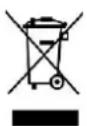
According to WEEE regulation, this monitor can't be handled as normal trash in Europe when it is out of usage. Please refer to the recycle information from our website to handle it.
First Setup
Congratulations for purchasing this monitor of high performance!
This monitor comes with the following accessories :
- AC Power Cord
- Audio Cable
- User's Guide
- Warranty Card
- HDMI cable
Quick Installation
- Connect Video cable (VGA cable) *Optional
Make sure both monitor and computer are powered OFF. Connect the video cable (VGA cable) to the computer, then to the monitor.
or connect DisplayPort cable *Optional
Connect the DisplayPort cable from DisplayPort output of computer to the DisplayPort input of the monitor..
or connect HDMI cable
Connect the HDMI cable from HDMI output of computer to the HDMI input of the monitor.
- Connect Power cord
Connect the power cord to a properly grounded AC outlet, then to the monitor.
- Connect Audio cable
Connect the Audio cable from Audio output of computer to the Audio input of the monitor.
- Connect Earphone (not supplied)
Connect the earphone to the earphone output terminal of the monitor. (Earphone sold separately).
- Power-ON computer and monitor
Power-ON the computer, then Power-ON the monitor.
- Windows users: Setting the Timing Mode (Resolution and Refresh Rate)
Example: 1920 x 1080 @ 60 Hz
Resolution Right-click on the Windows desktop > Properties > Settings > "Desktop Area". Set the resolution.
Refresh Rate (vertical frequency) See your graphic card's user guide for instructions.
Example:
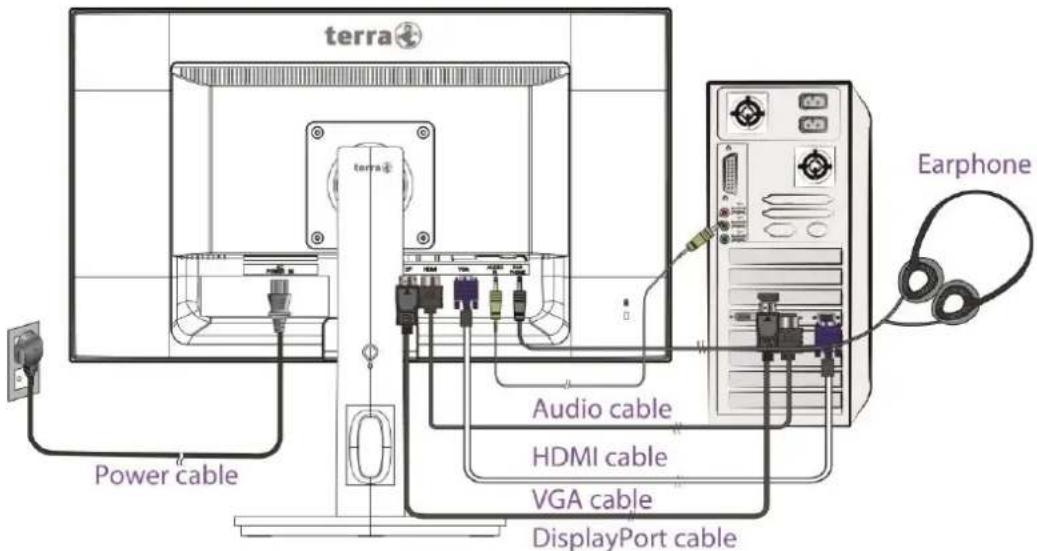
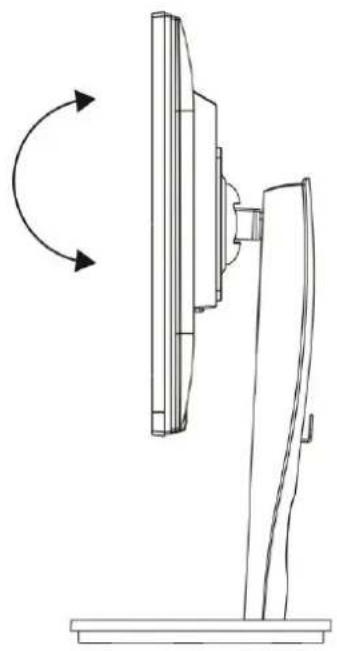
Illustration for turning the high Adjustable stand base
(1) Tile Angle
Tilt UP: 15^ ± 2^
Tilt DOWN: -5^ ± 2^
natural_image
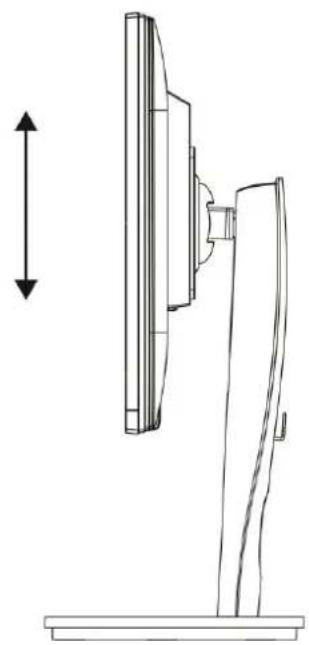
Technical line drawing of a mechanical device with a rotating arm and base mount (no text or symbols)(2) Lift Range
120mm±5mm
natural_image
Technical line drawing of a mechanical assembly with a vertical dimension arrow (no text or symbols)Front View of the Product
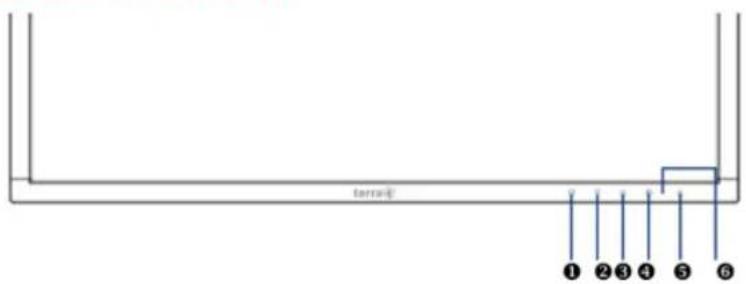
| 1 | OSD Menu On/Off |
| 2 | Scroll Down/ Decrease |
| 3 | Scroll Up/ Increase |
| 4 | Confirm Select |
| 5 | Power ON/OFF |
| 6 | LED Indicator |
Rear View of the Product

natural_image
Pure horizontal lines without any text, numbers, or symbolsUsing On Screen Display (OSD) Functions
| 1 | Display main menu |
| Exit from OSD menu | |
| 2 | Manual adjust mode select for VGA, HDMI, DISPLAY PORT mode |
| ▼ | Select the desired item when in OSD menu |
| When not in OSD menu, directly enters Contrast/ Brightness /DCR/ECO Mode menu. | |
| ▲ | Select the desired item when in OSD menu |
| Auto adjust the image when not in main menu | |
| ▼+▲ | Recall both of Contrast and Brightness (when not in OSD menu) |
| 1+▼ | Power Lock (when not in OSD menu) |
| 1+▲ | OSD Lock (when not in OSD menu) |
Main Menu
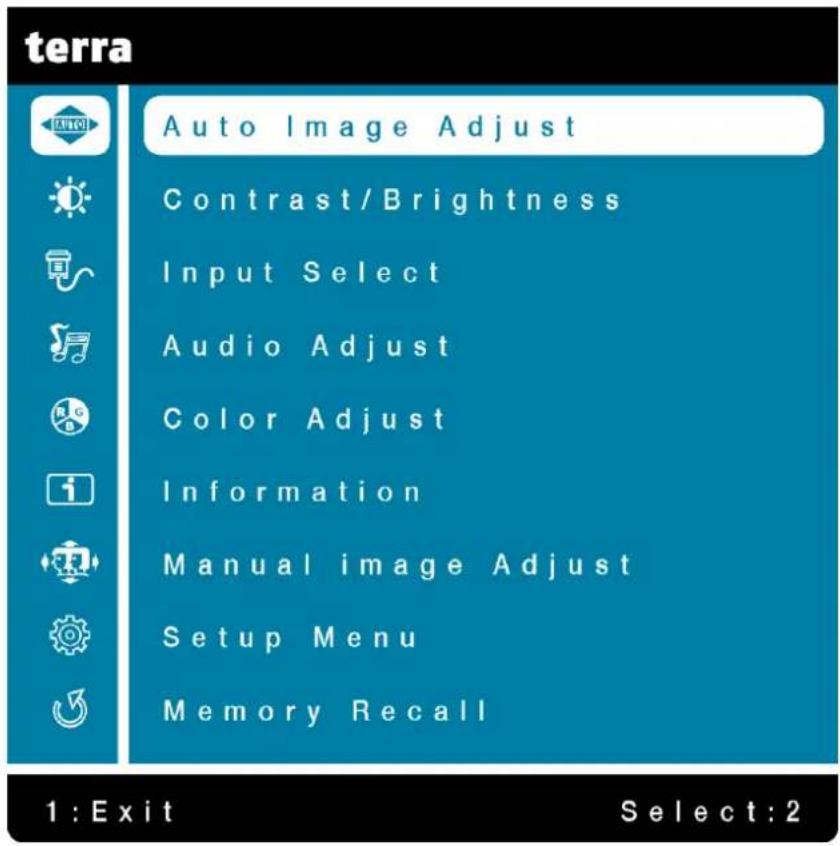
Short Cuts Function from the button(s)

Auto Image Adjust: To auto adjust Horizontal Position, Vertical Position, Phase (Fine Tune) and Clock (H. Size) of the screen.

Contrast: To adjust the foreground white level of screen image.
▲: increase contrast, ▼: decrease contrast.
Brightness: To adjust the luminance of the video.
▲: increase brightness, ▼: decrease brightness.
DCR: To detect the distribution of the visual signals inputs, and create an optimized contrast. Press 2 key to adjust the DCR On or Off.
ECO Mode: Allows the user to turn the ECO Mode On or Off. Brightness adjustment disabled when ECO Mode is active.

Input Select: When press Input Select change Input signal to VGA, or HDMI, DISPLAY PORT.

Audio Adjust: To adjust the audio functions.
Volume: To adjust the volume of speaker output.
Audio Input: When in HDMI input, select where the audio source comes from Digital or Analog.

Color Adjust: To select the color for improving brightness and color saturation between Cool, Normal, Warm, User Color, Preset Mode.
Cool: Adds blue to screen image for cooler white.
Normal: Adds red to screen image for warmer white and richer red.
Warm: Adds green to screen image for a darker color.
User Color: Individual adjustments for Red (R), Green (G), Blue (B).
-
Press button 2 to select the desired color.
-
Press ▲ or ▼ button to adjust selected color.
Preset Mode: Provides an optimum display environment depending on the contents displayed. It contains 5 user-selectable presets.
- Standard is for general windows environment and monitor default setting.
- Game optimized for PC game environment.
• Cinema optimized for movie and video environment.
- Scenery optimized for displaying outdoor scenery images.
- Text optimized for text editing and viewing in a word processing environment.

Information: To display the information, regarding the current input signal coming from the graphic card in your computer.
Note: See your graphic card user guide for more information about changing the resolution and refresh rate.

Manual Image Adjust: To manually adjust the H./V. position, Horizontal Size, Fine Tune, Sharpness, Video Mode Adjustment.
H. /V. Position: To adjust the horizontal and vertical position of the video.
H. Position: ▲: move screen to the right, ▼: move screen to the left.
V. Position: ▲: move screen up, ▼: move screen down.
Horizontal Size: To adjust the width of the screen image.
▼: decrease the width of screen image, ▲: increase the width of screen image.
Fine Tune: To adjust the delay time of data and clock.
Press ▼ or ▲ to adjust to your preference.
Sharpness: To adjust the clarity of a non-Full HD Resolution (1920x1080) signal with ▼ or ▲ button.
Video Mode Adjustment: To select the video mode from 4:3, Full Screen.
4:3: To select 4:3 image size
Full Screen: To select full-screen size image.

Setup Menu: To set up Language Select, OSD Position, OSD Time Out and OSD Background.
Language Select: To allow users to choose from available languages.
OSD Position: Press ▼ or ▲ button to select between horizontal and vertical OSD Position adjustment.
OSD H. Position: To horizontally adjust the OSD position.
▲: move OSD to the right, ▼: move OSD to the left.
OSD V. Position: To vertically adjust the OSD position.
▲: move OSD up, ▼: move OSD down.
OSD Time Out: To automatically turn off On Screen Display (OSD) after a preset period of time.
OSD Background: Allows the user to turn the OSD background On or Off.

Memory Recall: To recall factory settings for Video & Audio controls.
Press button 2 to select the Memory Recall menu option
Supporting Timing Modes
| VGA | 720 x 400 @ 70Hz |
| VGA | 640 x 480 @ 60Hz |
| MAC | 640 x 480 @ 67Hz |
| VESA | 640 x 480 @ 72Hz |
| VESA | 640 x 480 @ 75Hz |
| VESA | 800 x 600 @ 56Hz |
| VESA | 800 x 600 @ 60Hz |
| VESA | 800 x 600 @ 72Hz |
| VESA | 800 x 600 @ 75Hz |
| MAC | 832 x 624 @ 75Hz |
| VESA | 1024 x 768 @ 60Hz |
| VESA | 1024 x 768 @ 70Hz |
| VESA | 1024 x 768 @ 75Hz |
| VESA | 1280 x 960 @ 60Hz |
| VESA | 1152 x 864 @ 75Hz |
| MAC | 1152 x 870 @ 75Hz |
| VESA | 1280 x 1024 @ 60Hz |
| VESA | 1280 x 1024 @ 75Hz |
| VESA | 1440 x 900 @ 60Hz |
| VESA | 1440 x 900 @ 75Hz |
| CVT | 1400 x 1050 @ 60Hz |
| VESA | 1600 x 1200 @ 60Hz |
| VESA | 1680 x 1050 @ 60Hz |
| VESA | 1920 x 1080 @ 60Hz |
\*ONLY SUPPORT HDMI/ DisplayPort SOURCE
| 480i |
| 480p |
| 576i |
| 576p |
| 720p |
| 1080i |
| 1080p |
Warning: Do not set the graphic card in your computer to exceed these maximum refresh rates. Doing so may result in permanent damage to your monitor.
Note: To switch between similar PC timings, open the information menu from the OSD and simultaneously press 1 and 2 keys.
Similar PC Timing on list below:
640 x 480 @ 60Hz / 720 x 480 @ 60Hz 720 x 400 @ 70Hz /640 x 400 @ 70Hz
1400 x 1050 @ 60Hz / 1680 x 1050 @ 60Hz
Technical Information
Technical Specification
| LCD Panel | 61cm (24") TFT |
| Power Management | VESA DPMS compatibleOff Mode, < 0.5 W |
| Displayable Resolution | Full HD 1920 x 1080 max.Vertical Frequency 60Hz max. |
| Pixel Dimension | 0.2767 x 0.2767 mm |
| LCD Display Color | 16.7M |
| Active Display Area | 531.36 mm x 298.89 mm |
| Temperature | Operating: 0°C ~ + 40°CStorage: -20°C ~ + 60°C |
| Compliance | CE, WEEE |
| Power | Input Voltage AC100-240 V |
| Speaker | 1.5W x 2 |
Care and Maintenance
Care
- Avoid exposing your monitor directly to sunlight or other heat source. Place your monitor away from the sun to reduce glare.
- Put your monitor in a well ventilated area.
- Do not place any heavy things on top of your monitor.
● Make certain your monitor is installed in a clean and moisture-free area. - Keep your monitor away from magnets, motors, transformers, speakers, and TV sets.
Note
- Move the monitor out of the package and take off the plastic bag and Polystyrene Foam.
- Pull the base from Parallel versus Panel to Vertical.
- Adjust the Panel within 0(± 2) degree leaning forward and 20(± 2) degree leaning backward.
Safety Tips
- If smoke, abnormal noise or odor came out from your monitor, caution you should remove the power cord immediately and call your service center.
- Never remove the rear cover of your monitor cabinet. The display unit inside contains high-voltage parts and may cause electric shock to human bodies.
- Never try to repair your monitor yourself. Always call your service center or a qualified technician to fix it.
Troubleshooting
No power
- Make sure AC power cord is securely connected to the power adapter and the power supply is firmly connected to the monitor.
- Plug another electrical device into the power outlet to verify that the outlet is supplying proper voltage.
● Make sure all signal cables are installed.
Power on but no screen image
- Make sure the video cable supplied with the monitor is tightly secured to the video output port on back of the computer. If not, tightly secure it.
- Adjust brightness.
Wrong or abnormal colors
- If any colors (red, green, blue) are missing, check the video cable to make sure it is securely connected. Loose or broken pins in the cable connector could cause an improper connection.
- Connect the monitor to another computer.
WEEE Statement

Wichtige Recyclinginformation
Important Information for Recycling
This warning sign of trash bin indicates that the objects are not allowed to be disposed as general refuse. Please follow the local act and carry out further disposal with refuse recycling and collecting system in your Country or District.
Please contact the address below for more information on recycling.
This product includes software code developed by third parties, including software code subject to the GNU General Public License Version 2 ("GPLv2") and the GNU Lesser Genberal Public License, Version 1.2 (LGPLv2.1). These parts of the software are hereinafter referred to as "the or this Program"
WRITTEN OFFER FOR GPL/LGPL SOURCE CODE
We will provide everyone upon request the applicable GPL and LGPL source code files via CD-ROM or similar storage medium for a nominal cost to cover shipping and media charges as allowed under the GPL/LGPL. This offer is valid for 3 years.
GPLv2 and LGPLv2.1 inquiries: Please direct all GPL/LGPL inquiries to the following address. Note that technical support inquiries will not be supported at the below address.
WORTMANN AG
- GPL ANFRAGE -
Bredenhop 20
32609 Hüllhorst
Deutschland
NO WARRANTY
This program is distributed in the hope that it will be useful, but WITHOUT ANY WARRANTY; without even the implied warranty of MERCHANTABILITY or FITNESS FOR A PARTICULAR PURPOSE. See the GNU General Public License for more details.
IN NO EVENT UNLESS REQUIRED BY APPLICABLE LAW OR AGREED TO IN WRITING WILL ANY COPYRIGHT HOLDER, OR ANY OTHER PARTY WHO MAY MODIFY AND/OR REDISTRIBUTE THE PROGRAM AS PERMITTED ABOVE, BE LIABLE TO YOU FOR DAMAGES, INCLUDING ANY GENERAL, SPECIAL, INCIDENTAL OR CONSEQUENTIAL DAMAGES ARISING OUT OF THE USE OR INABILITY TO USE THE PROGRAM (INCLUDING BUT NOT LIMITED TO LOSS OF DATA OR DATA BEING RENDERED INACCURATE OR LOSSES SUSTAINED BY YOU OR THIRD PARTIES OR A FAILURE OF THE PROGRAM TO OPERATE WITH ANY OTHER PROGRAMS), EVEN IF SUCH HOLDER OR OTHER PARTY HAS BEEN ADVISED OF THE POSSIBILITY OF SUCH DAMAGES.
GNU GENERAL PUBLIC LICENSE
Version 2, June 1991
Copyright [C] 1989, 1991 Free Software Foundation, Inc. 51 Franklin Street, Fifth Floor, Boston, MA 02110-1301, USA
Everyone is permitted to copy and distribute verbatim copies of this license document, but changing it is not allowed.
Preamble
The licenses for most software are designed to take away your freedom to share and change it. By contrast, the GNU General Public License is intended to guarantee your freedom to share and change free software--to make sure the software is free for all its users. This General Public License applies to most of the Free Software Foundation's software and to any other program whose authors commit to using it. [Some other Free Software Foundation software is covered by the GNU Lesser General Public License instead.] You can apply it to your programs, too. When we speak of free software, we are referring to freedom, not price. Our General Public Licenses are designed to make sure that you have the freedom to distribute copies of free software (and charge for this service if you wish), that you receive source code or can get it if you want it, that you can change the software or use pieces of it in new free programs; and that you know you can do these things. To protect your rights, we need to make restrictions that forbid anyone to deny you these rights or to ask you to surrender the rights. These restrictions translate to certain responsibilities for you if you distribute copies of the software, or if you modify it. For example, if you distribute copies of such a program, whether gratis or for a fee, you must give the recipients all the rights that you have. You must make sure that they, too, receive or can get the source code. And you must show them these terms so they know their rights.
We protect your rights with two steps: (1) copyright the software, and (2) offer you this license which gives you legal permission to copy, distribute and/or modify the software. Also, for each author's protection and ours, we want to make certain that everyone understands that there is no warranty for this free software. If the software is modified by someone else and passed on, we want its recipients to know that what they have is not the original, so that any problems introduced by others will not reflect on the original authors' reputations. Finally, any free program is threatened constantly by software patents. We wish to avoid the danger that redistributors of a free program will individually obtain patent licenses, in effect making the program proprietary. To prevent this, we have made it clear that any patent must be licensed for everyone's free use or not licensed at all. The precise terms and conditions for copying, distribution and modification follow.
TERMS AND CONDITIONS FOR COPYING, DISTRIBUTION AND MODIFICATION
- This License applies to any program or other work which contains a notice placed by the copyright holder saying it may be distributed under the terms of this General Public License. The "Program", below, refers to any such program or work, and a "work based on the Program" means either the Program or any derivative work under copyright law: that is to say, a work containing the Program or a portion of it, either verbatim or with modifications and/or translated into another language.
(Hereinafter, translation is included without limitation in the term "modification".) Each licensee is addressed as "you". Activities other than copying, distribution and modification are not covered by this License; they are outside its scope. The act of running the Program is not restricted, and the output from the Program is covered only if its contents constitute a work based on the Program (independent of having been made by running the Program). Whether that is true depends on what the Program does.
- You may copy and distribute verbatim copies of the Program's source code as you receive it, in any medium, provided that you conspicuously and appropriately publish on each copy an appropriate copyright notice and disclaimer of warranty; keep intact all the notices that refer to this License and to the absence of any warranty; and give any other recipients of the Program a copy of this License along with the Program.
You may charge a fee for the physical act of transferring a copy, and you may at your option offer warranty protection in exchange for a fee.
- You may modify your copy or copies of the Program or any portion of it, thus forming a work based on the Program, and copy and distribute such modifications or work under the terms of Section 1 above, provided that you also meet all of these conditions:
a) You must cause the modified files to carry prominent notices stating that you changed the files and the date of any change.
b) You must cause any work that you distribute or publish, that in whole or in part contains or is derived from the Program or any part thereof, to be licensed as a whole at no charge to all third parties under the terms of this License.
c) If the modified program normally reads commands interactively when run, you must cause it, when started running for such interactive use in the most ordinary way, to print or display an announcement including an appropriate copyright notice and a notice that there is no warranty (or else, saying that you provide a warranty) and that users may redistribute the program under these conditions, and telling the user how to view a copy of this License. [Exception: if the Program itself is interactive but does not normally print such an announcement, your work based on the Program is not required to print an announcement.]
These requirements apply to the modified work as a whole. If identifiable sections of that work are not derived from the Program, and can be reasonably considered independent and separate works in themselves, then this License, and its terms, do not apply to those sections when you distribute them as separate works. But when you distribute the same sections as part of a whole which is a work based on the Program, the distribution of the whole must be on the terms of this License, whose permissions for other licensees extend to the entire whole, and thus to each and every part regardless of who wrote it.
Thus, it is not the intent of this section to claim rights or contest your rights to work written entirely by you; rather, the intent is to exercise the right to control the distribution of derivative or collective works based on the Program.
In addition, mere aggregation of another work not based on the Program with the Program (or
with a work based on the Program) on a volume of a storage or distribution medium does not bring the other work under the scope of this License.
- You may copy and distribute the Program (or a work based on it, under Section 2) in object code or executable form under the terms of Sections 1 and 2 above provided that you also do one of the following:
we use this doubled UL to get the sub-sections indented, while making the bullets as unobvious as possible.
a) Accompany it with the complete corresponding machinereadable source code, which must be distributed under the terms of Sections 1 and 2 above on a medium customarily used for software interchange; or,
b) Accompany it with a written offer, valid for at least three years, to give any third party, for a charge no more than your cost of physically performing source distribution, a complete machine-readable copy of the corresponding source code, to be distributed under the terms of Sections 1 and 2 above on a medium customarily used for software interchange; or,
c) Accompany it with the information you received as to the offer to distribute corresponding source code. [This alternative is allowed only for noncommercial distribution and only if you received the program in object code or executable form with such an offer, in accord with Subsection b above.] The source code for a work means the preferred form of the work for making modifications to it. For an executable work, complete source code means all the source code for all modules it contains, plus any associated interface definition files, plus the scripts used to control compilation and installation of the executable. However, as a special exception, the source code distributed need not include anything that is normally distributed (in either source or binary form) with the major components (compiler, kernel, and so on) of the operating system on which the executable runs, unless that component itself accompanies the executable. If distribution of executable or object code is made by offering access to copy from a designated place, then offering equivalent access to copy the source code from the same place counts as distribution of the source code, even though third parties are not compelled to copy the source along with the object code.
-
You may not copy, modify, sublicense, or distribute the Program except as expressly provided under this License. Any attempt otherwise to copy, modify, sublicense or distribute the Program is void, and will automatically terminate your rights under this License. However, parties who have received copies, or rights, from you under this License will not have their licenses terminated so long as such parties remain in full compliance.
-
You are not required to accept this License, since you have not signed it. However, nothing else grants you permission to modify or distribute the Program or its derivative works. These actions are prohibited by law if you do not accept this License. Therefore, by modifying or distributing the Program (or any work based on the Program), you indicate your acceptance of this License to do so, and all its terms and conditions for copying, distributing or modifying the Program or works based on it.
-
Each time you redistribute the Program [or any work based on the Program], the recipient automatically receives a license from the original licensor to copy, distribute or modify the Program subject to these terms and conditions. You may not impose any further restrictions on the recipients' exercise of the rights granted herein. You are not responsible for enforcing compliance by third parties to this License.
-
If, as a consequence of a court judgment or allegation of patent infringement or for any other reason (not limited to patent issues), conditions are imposed on you (whether by court order, agreement or otherwise) that contradict the conditions of this License, they do not excuse you from the conditions of this License. If you cannot distribute so as to satisfy simultaneously your obligations under this License and any other pertinent obligations, then as a consequence you may not distribute the Program at all. For example, if a patent license would not permit royalty-free redistribution of the Program by all those who receive copies directly or indirectly through you, then the only way you could satisfy both it and this License would be to refrain entirely from distribution of the Program.
If any portion of this section is held invalid or unenforceable under any particular circumstance, the balance of the section is intended to apply and the section as a whole is intended to apply in other circumstances.
It is not the purpose of this section to induce you to infringe any patents or other property right claims or to contest validity of any such claims; this section has the sole purpose of protecting the integrity of the free software distribution system, which is implemented by public license practices. Many people have made generous contributions to the wide range of software distributed through that system in reliance on consistent application of that system; it is up to the author/donor to decide if he or she is willing to distribute software through any other system and a licensee cannot impose that choice. This section is intended to make thoroughly clear what is believed to be a consequence of the rest of this License.
-
If the distribution and/or use of the Program is restricted in certain countries either by patents or by copyrighted interfaces, the original copyright holder who places the Program under this License may add an explicit geographical distribution limitation excluding those countries, so that distribution is permitted only in or among countries not thus excluded. In such case, this License incorporates the limitation as if written in the body of this License.
-
The Free Software Foundation may publish revised and/or new versions of the General Public License from time to time. Such new versions will be similar in spirit to the present version, but may differ in detail to address new problems or concerns. Each version is given a distinguishing version number. If the Program specifies a version number of this License which applies to it and "any later version", you have the option of following the terms and conditions either of that version or of any later version published by the Free Software Foundation. If the Program does not specify a version number of this License, you may choose any version ever published by the Free Software Foundation.
-
If you wish to incorporate parts of the Program into other free programs whose distribution conditions are different, write to the author to ask for permission. For software which is copyrighted by the Free Software Foundation, write to the Free Software Foundation; we sometimes make exceptions for this. Our decision will be guided by the two goals of preserving the free status of all derivatives of our free software and of promoting the sharing and reuse of software generally.
NO WARRANTY
-
BECAUSE THE PROGRAM IS LICENSED FREE OF CHARGE, THERE IS NO WARRANTY FOR THE PROGRAM, TO THE EXTENT PERMITTED BY APPLICABLE LAW. EXCEPT WHEN OTHERWISE STATED IN WRITING THE COPYRIGHT HOLDERS AND/OR OTHER PARTIES PROVIDE THE PROGRAM "AS IS" WITHOUT WARRANTY OF ANY KIND, EITHER EXPRESSED OR IMPLIED, INCLUDING, BUT NOT LIMITED TO, THE IMPLIED WARRANTIES OF MERCHANTABILITY AND FITNESS FOR A PARTICULAR PURPOSE. THE ENTIRE RISK AS TO THE QUALITY AND PERFORMANCE OF THE PROGRAM IS WITH YOU. SHOULD THE PROGRAM PROVE DEFECTIVE, YOU ASSUME THE COST OF ALL NECESSARY SERVICING, REPAIR OR CORRECTION.
-
IN NO EVENT UNLESS REQUIRED BY APPLICABLE LAW OR AGREED TO IN WRITING WILL ANY COPYRIGHT HOLDER, OR ANY OTHER PARTY WHO MAY MODIFY AND/OR REDISTRIBUTE THE PROGRAM AS PERMITTED ABOVE, BE LIABLE TO YOU FOR DAMAGES, INCLUDING ANY GENERAL, SPECIAL, INCIDENTAL OR CONSEQUENTIAL DAMAGES ARISING OUT OF THE USE OR INABILITY TO USE THE PROGRAM (INCLUDING BUT NOT LIMITED TO LOSS OF DATA OR DATA BEING RENDERED INACCURATE OR LOSSES SUSTAINED BY YOU OR THIRD PARTIES OR A FAILURE OF THE PROGRAM TO OPERATE WITH ANY OTHER PROGRAMS), EVEN IF SUCH HOLDER OR OTHER PARTY HAS BEEN ADVISED OF THE POSSIBILITY OF SUCH DAMAGES.
END OF TERMS AND CONDITIONS
How to Apply These Terms to Your New Programs
If you develop a new program, and you want it to be of the greatest possible use to the public, the best way to achieve this is to make it free software which everyone can redistribute and change under these terms.
To do so, attach the following notices to the program. It is safest to attach them to the start of each source file to most effectively state the exclusion of warranty; and each file should have at least the "copyright" line and a pointer to where the full notice is found.
This program is free software: you can redistribute it and/or modify it under the terms of the GNU General Public License as published by the Free Software Foundation, either version 3 of the License, or (at your option) any later version.
This program is distributed in the hope that it will be useful, but WITHOUT ANY WARRANTY; without even the implied warranty of MERCHANTABILITY or FITNESS FOR A PARTICULAR PURPOSE. See the GNU General Public License for more details.
You should have received a copy of the GNU General Public License along with this program. If not, see http://www.gnu.org/licenses/.
Also add information on how to contact you by electronic and paper mail.
If the program does terminal interaction, make it output a short notice like this when it starts in an interactive mode:
This program comes with ABSOLUTELY NO WARRANTY: for details type 'show w'.
This is free software, and you are welcome to redistribute it under certain conditions; type 'show c' for details.
The hypothetical commands 'show w' and 'show c' should show the appropriate parts of the General Public License. Of course, your program's commands might be different; for a GUI interface, you would use an "about box".
You should also get your employer (if you work as a programmer) or school, if any, to sign a "copyright disclaimer" for the program, if necessary. For more information on this, and how to apply and follow the GNU GPL, see http://www.gnu.org/licenses/.
The GNU General Public License does not permit incorporating your program into proprietary programs. If your program is a subroutine library, you may consider it more useful to permit linking proprietary applications with the library. If this is what you want to do, use the GNU Lesser General Public License instead of this License. But first, please read http://www.gnu.org/philosophy/why-not-lgpl.html.
natural_image
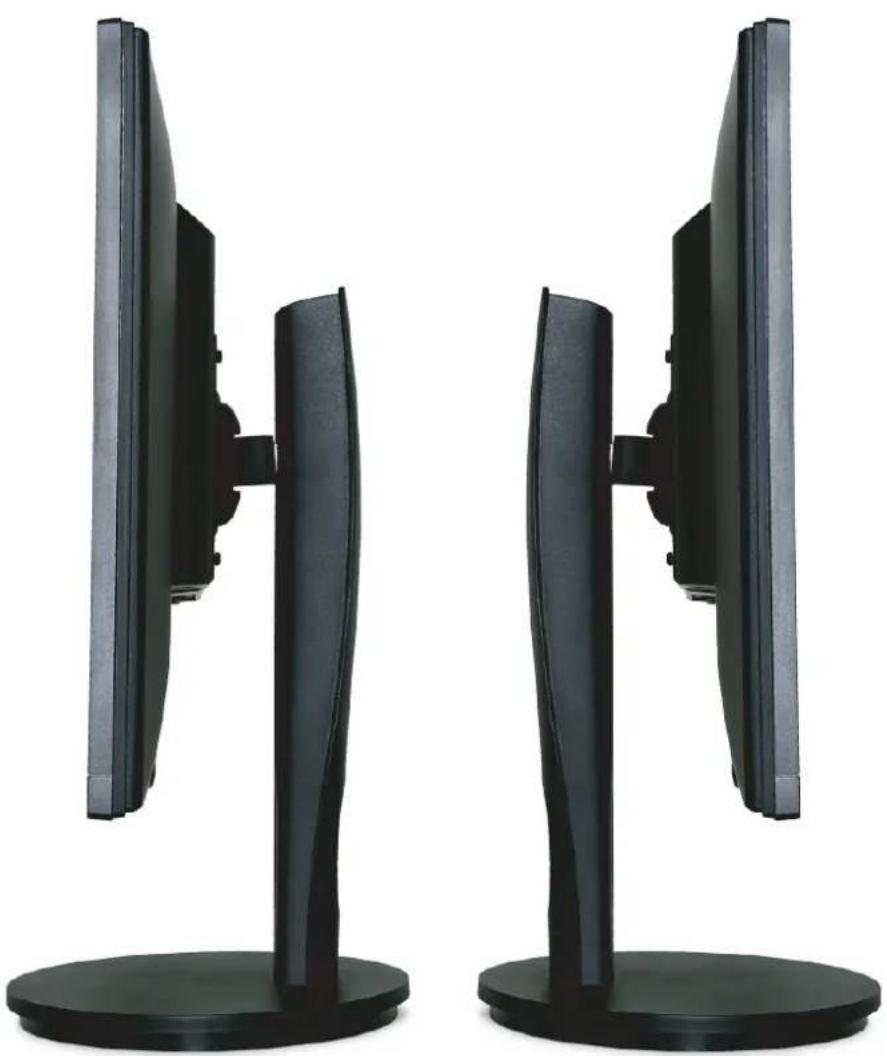
Two black computer monitors mounted on a stand, viewed from the side (no text or symbols visible)
- Operation Instructions
- FCC RADIO FREQUENCY INTERFERENCE STATEMENT WARNING: (FOR FCC CERTIFIED MODELS)
- FCC Warning:
- Content
- Safety Precautions
- WARNINGS:
- First Setup
- Quick Installation
- Illustration for turning the high Adjustable stand base
- Using On Screen Display (OSD) Functions
- Main Menu
- Short Cuts Function from the button(s)
- Supporting Timing Modes
- \*ONLY SUPPORT HDMI/ DisplayPort SOURCE
- Technical Information
- Care and Maintenance
- Care
- Note
- Safety Tips
- Troubleshooting
- No power
- Power on but no screen image
- Wrong or abnormal colors
- WEEE Statement
- Wichtige Recyclinginformation
- Important Information for Recycling
- WRITTEN OFFER FOR GPL/LGPL SOURCE CODE
- NO WARRANTY
- GNU GENERAL PUBLIC LICENSE
- Preamble
- TERMS AND CONDITIONS FOR COPYING, DISTRIBUTION AND MODIFICATION
- END OF TERMS AND CONDITIONS
- How to Apply These Terms to Your New Programs
Brand : Wortmann AG
Model : 2435W HA
Category : Screen