
U4T - Earphones Xvive - Free user manual and instructions
Find the device manual for free U4T Xvive in PDF.


| Product Type | Digital Wireless Audio System (Guitar/Bass/Instrument) |
| Package Contents | Transmitter, Receiver, USB Cable, Manual |
| Frequency Band | 2.4 GHz ISM (2400-2483.5 MHz) |
| Channels | 4 selectable channels |
| Audio Frequency Response | 20 Hz - 20 kHz (±3 dB) |
| Dynamic Range | >103 dB |
| Total Harmonic Distortion | 0.2% |
| Latency | <6 ms |
| Sample Rate / Bit Depth | 48 kHz / 24-bit uncompressed |
| Operating Range | >70 feet (21 m) line-of-sight |
| RF Output Power | 10 mW E.I.R.P. max |
| RF Sensitivity | -85 dBm |
| Battery Type | Built-in Li-ion, 3.7 V, 650 mAh |
| Battery Life | Up to 5 hours per charge |
| Charging Input | 5 V via USB (micro-USB port) |
| Charging Time | Approximately 2 hours |
| LED Indicators | Red (power/battery); Blue (channel/signal) |
| Channel Setting | Double-click button to select, auto-lock after 15 s |
| Enclosure Material | Durable ABS plastic |
| Operating Temperature | -18°C to 57°C |
| Certifications | FCC Part 15, CE, Canada ICES-003, Japan MIC |
| Safety | Class B digital device; complies with Part 15 |
| Maintenance | Clean with a damp cloth; store at room temperature |
| Warranty / Support | Refer to Xvive official website |
Frequently Asked Questions - U4T Xvive
User questions about U4T Xvive
0 question about this device. Answer the ones you know or ask your own.
Ask a new question about this device
Download the instructions for your Earphones in PDF format for free! Find your manual U4T - Xvive and take your electronic device back in hand. On this page are published all the documents necessary for the use of your device. U4T by Xvive.
USER MANUAL U4T Xvive
natural_image
Abstract black-and-white graphic with stylized number '12' inside a circle (no text or symbols)GUITAR
WIRELESS SYSTEM
CAUTION RISK OF ELECTRIC SHOCK DO NOT OPEN

WARNING : TO REDUCE THE RISK OF FIRE OR ELECTRIC SHOCK, DO NOT REMOVE SCREWS. NO USER-SERVICEABLE PARTS INSIDE. REFER SERVICING TO QUALIFIED SERVICE PERSONNEL.
WARNING : TO REDUCE THE RISK OF FIRE OR ELECTRIC SHOCK, DO NOT EXPOSE THE APPLIANCE TO RAIN OR MOISTURE.
Radio Approvals: FCC Part 15.249, FCC Part 15 B, RSS-210 (Canada), EN 300 440 (Europe), EN 301.489 (Europe), Japan Radio 2.4GHz Band (Japan), MIC ARIB STD-T66 (Japan)
The CE Declaration of Conformity & California 65 Test Report can be obtained at http://www.xviveaudio.com/productInfo.asp?id=354
CERTIFICATION
THIS DEVICE COMPLIES WITH PART 15 OF THE FCC RULES. OPERATION IS SUBJECT TO THE FOLLOWING TWO CONDITIONS:
(1) THIS DEVICE MAY NOT CAUSE HARMFUL INTERFERENCE, AND
(2) THIS DEVICE MUST ACCEPT ANY INTERFERENCE RECEIVED, INCLUDING INTERFERENCE THAT MAY CAUSEUNDESIRED OPERATION.
Warning: Changes or modifications not expressly approved in writing by Xvive may void the users authority to operate this equipment.
RF Exposure Statement: This transmitter must not be co-located or operated in conjunction with any other antenna or transmitter.
Note: This equipment has been tested and found to comply with the limits for a Class B digital device, pursuant to part 15 of the FCC Rules. These limits are designed to provide reasonable protection against harmful interference
in a residential installation. This equipment generates, uses and can radiate radio frequency energy and, if not installed and used in accordance with the instructions, may cause harmful interference to radio communications. However, there is no guarantee that interference will not occur in a particular installation. If this equipment does cause harmful interference to radio or television reception, which can be determined by turning the equipment off and on, the user is encouraged to try to correct the interference by one or more of the following
measures:
- Reorient or relocate the receiving antenna.
- Increase the separation between the equipment and receiver.
- Connect the equipment into an outlet on a circuit different from that to which the receiver is connected.
- Consult the dealer or an experienced radio/TV technician for help.
This Class B digital apparatus complies with Canadian ICES-003.
IMPORTANT SAFETY INSTRUCTIONS PLEASE THESE INSTRUCTIONS IN A SAFE PLACE

WARNING: BEFORE USING YOUR XVIVE U2 DIGITAL WIRELESS SYSTEM, CAREFULLY READ THE OPERATING INSTRUCTIONS.
- Observe all instructions carefully in the U2 manual.
- Do not to perform service operations beyond those described in the U2 Manual. Services required when the apparatus has been damaged in any way, such as:
- Liquid has been spilled or objects have fallen into the apparatus
- The unit has been exposed to rain or moisture
- The unit does not operate normally or changes in performance in a significant way
-
The unit is dropped or the enclosure is damaged
-
Do not place near heat sources, such as radiators, heat registers, or appliances which produce heat.
- Guard against objects or liquids entering the device. Do not use or place unit near water.
- Clean only with a damp cloth.
- Only use attachments/accessories specified by the manufacturer.
- Prolonged listening at high volume levels may cause irreparable hearing loss and/or damage. Always be sure to practice "safe listening."
PRODUCT INTRODUCTION PACKAGE DETAILS
Xvive U2 guitar system features digital wireless technology that delivers incredible audio quality, simple setup, and is extremely reliable for any gigging musicians. It delivers a full 20 Hz - 20K Hz frequency response, so you'll hear your guitar tone in great detail with only 6ms of latency. This wireless system operates at 2.4G Hz ism band for crystal clear broadcasting ensuring the integrity of your signal on stage and covers 70 feet of range without any signal dropout. The li-ion batteries help makes the U2 wireless system environmentally friendly that can last up to 5 hours per charge. The chassis is made out of a durable abs plastic that can withstand the rigors of touring and the harshest of climates. This wireless is a perfect fit for any pedal board thanks to its simplistic, and compact design. So, go wireless with the xvive U2 system. It'll declutter the stage and offers freedom in motion
U2 Guitar Transmitter 1PCS
U2 Guitar Receiver 1PCS
USB cable 1PCS
Manual 1PCS
QUICK START
flowchart
graph TD
    A["TRANSMITTER"] --> B["Receiver"]
    B --> C["Output"]
    style A fill:#f9f,stroke:#333
    style B fill:#ccf,stroke:#333
    style C fill:#cfc,stroke:#333
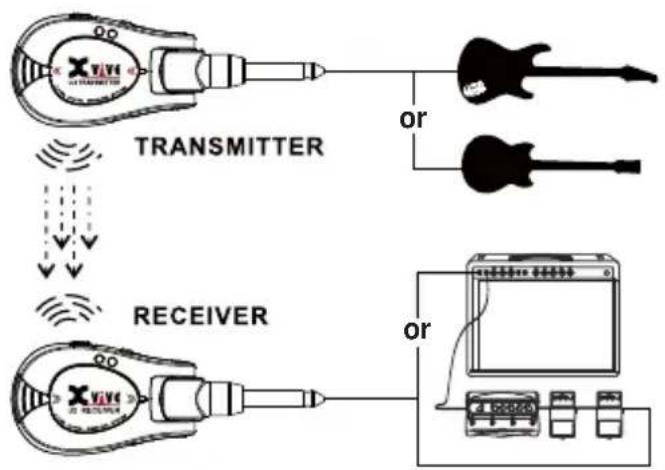
- Transmitter plugs into the Guitar (you instruments), the receiver plugs into the effects pedal, AMP, Audio, etc.
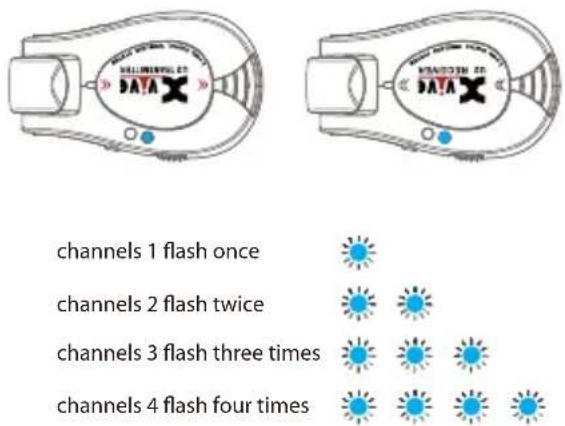
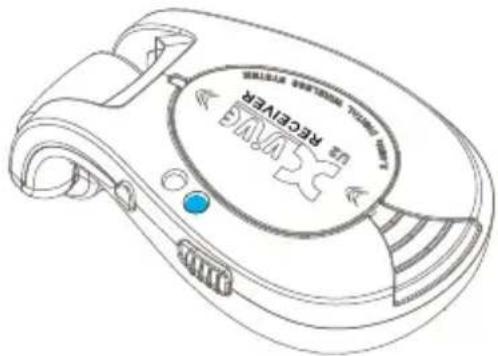
- Turn on the Transmitter and the receiver and check the LED blue lights flashing times and make sure the blue led lights have same flashing times which means transmitter and receiver are in both same channels.
QUICK START DIAGRAM
natural_image
Line drawing of a portable electronic device with a circular label and control buttons (no readable text or symbols)- After connecting successfully, LED lights on receiver will keep light on.

natural_image
Silhouette of a person playing electric guitar with musical notes floating around (no text or symbols)- Now, let's rock together.
BASIC OPERATION
- Power – Slide Switch to turn on/off
TRANSMETER/RECEIVER
- Power LED and Battery LED
Solid Red LED indicates the power on,
The flashing red LED indicates the battery is low charge, it needs to be recharged.
In the progress of charging, the light will stop flashing and will turn off when it is fully charge.
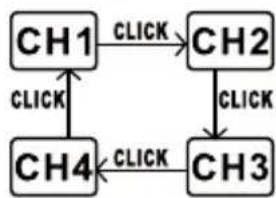
- Channel Select - Align TRANSMITTER and RECEIVER channels.
▲ Double click the switch to activate the channel select function.
▲ Follow the diagram below to set up the channel, meanwhile the audio signal indicator LED will flash to indicate the channel.
flowchart
graph TD
    CH1 -->|CLICK| CH2
    CH2 -->|CLICK| CH3
    CH3 -->|CLICK| CH4
    CH4 -->|CLICK| CH1
BASIC OPERATION
4. Transmitter Audio signal indicator LED
When Power is on, the Blue LED will flash to indicate the pre-set channel.
After activating the channel selection function, click the button to set up the channel, the blue LED will flash to indicate the channel
* For the flicking channel indication, please refer to chart 1*
Receiver Audio Signal indicator LED
When the power is on, the blue LED will flash to indicate the pre-set channel.
After activating the channel selection function, click the channel button, the blue LED will flash to indicate the channel
The Receiver audio signal indicator LED will become solid blue when the Transmitter and Receiver are in alignment.
When the signal is good, The receiver audio Signal indicator LED will become solid blue, it will start to flash if the signal is not good.
*For the flashing channel indication, please refer to chart 1*
5. USB Port – Battery recharger port.
* Chart 1, Flashing channel indication
| Channel 1 | The Audio signal LED will flash once |
| Channel 2 | The Audio signal LED will flash twice |
| Channel 3 | The Audio signal LED will flash three times |
| Channel 4 | The Audio signal LED will flash four times |
FOR THE FLASHING CHANNEL INDICATION, PLEASE REFER TO CHART 1
BATTERIES AND CHARGING
natural_image
Diagram of a medical device with two connectors and a curved cable, enclosed in a circular boundary (no text or labels)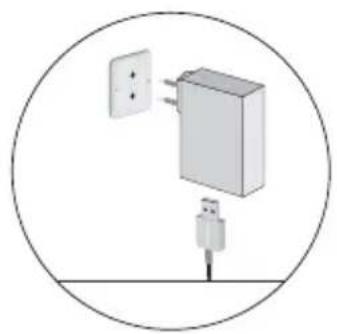
natural_image
Diagram of a wall-mounted power strip connected to a plug, enclosed in a circle (no text or symbols)CHARGING TIMES BATTERY LIFE
| 0:15 min | 30 min |
| 0:30 min | 1 hour |
| 1 hour | 2 hours |
| 2 hours | 5 hours |
* Always store U2 at room temperature
* When storing the unit, please check the battery
Connect to the socketConnect Pov
state regularly and charge if necessary.
Note:
In an emergency, power can be supplied via a USB wall adapter however, the battery life will be reduced.
2.4 GHz SPECTRUM OVERVIEW AND INTERFERENCE
U2 operates within the 2.4GHz ISM band which is utilize by Wi-Fi, Bluetooth, and other wireless devices. 2.4Ghz is an open band and, as such, does not require a license to be used worldwide.
Tips and Methods to Improve Wireless System Performance
1) Keep more than 3 meteres distance between U2 Receiver unit and other WiFi transmitters such as routers.
2) Change channels to avoid interference with other WiFi products.
3) In case of environmental interference from other WiFi systems, shorten the distance between the U2 receiver and transmitter units.
2.4Ghz Frequency Tables
| CHANNEL1 | 2402MHZ,2480MHZ,2482MHZ |
| CHANNEL2 | 2408MHZ,2472MHZ,2474MHZ |
| CHANNEL3 | 2420MHZ,2456MHZ,2458MHZ |
| CHANNEL4 | 2432MHZ,2448MHZ,2450MHZ |
Q & A
Four channels
The U2 wireless guitar system has four different channels, and can use up to 4 pair of systems at the same time. When your band plays for guitar, bass, keyboard and other instruments, U2 can set up different channels for them to prevent signal interference. When there is only one player, the different channel function can also be used for him/her to prevent interferences from different frequency bands of routers or other WIFI devices. Generally we recommend to use Channel 1
Portable Plug-and- Play design
U2 wireless system uses a portable design; both the receiver and the receiver are plug-and-play design. It is very convenient for fast switching among guitar, bass, amplifiers, effect pedal and other audio equipments. It provides more flexibility in adjusting the equipments.
One Transmitter and multiple Receivers
When using a transmitter, you can use multiple receivers. For example, if you want to connect a guitar to two
amplifiers or connect to effect pedal and pedal tuner, you need just use multiple receivers with setting up to be the same channel.
U2 Receiver
Since U2 is the 2.4 GHz wireless system, please avoid putting the receiver close to other signal emitting devices. It is recommended that your U2 receiver keep a distance of more than 3 meters from the other 2.4 GHz transmitter and WIFI router.
Channel switching and locking
The select function of channel is unlocked within 15 seconds after the product is started. You can click the "Channel" button for selecting the channel that you want. After the click, the blue LED will flash. Flash once means you are in Channel 1. Flash twice means you are in Channel 2, and so forth. The select function of channel will be locked after 15 seconds. Double clicks for the Channel button can activate the function again.
Q & A
Power charge
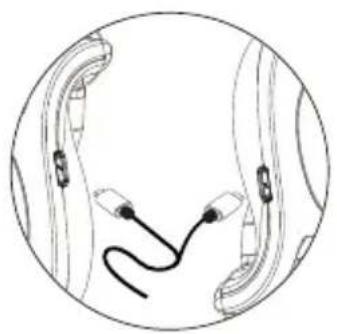
There is a "Y" shape cable in the package. It can charge the transmitter and receiver at the same time. The voltage output is 5V. The red LED light of U2 will be always on for normal use. Red LED light flashing means low battery which requires immediate power charge. During power charging, the red LED on the transmitter and receiver will light on and they will be light off automatically after full power charge.
Blue LED Flashing
The blue LED light flashing indicates there is signal interference. Please switch to another channel, turn off or stay away from other 2.4GHz WIFI, to make sure the U2 transmitter and receiver antennae be in the signal receiving range.
Antennae angle
The rear end of U2 is the antenna, which can be used at about an angel of 180^ . The front signal of the transmitter and the receiver is the strongest. Please try to keep the
front to face each other during using. Do not block the antenna with your hand or other items, and keep the signal within the receiving range of the antenna. When confront with interference from other devices or need more distance for using, you can change the antenna's angle and adjust it to be the best condition.
Supportive pickup and musical instrument
U2 wireless system works fine with passive electric guitar pickup, Piezo-electric acoustic guitar pickup and Piezo-electric violin pickup. For the Active electric guitar, pickup output voltage need less than 5.6Vp-p. Acoustic guitar with microphone pickup system, Please keep the U2 transmitter away from the microphone. Transmitter is better to connect to the instrument. Please avoid connecting it to distortion effect pedal or high power output interface which may incur the timbre distortion.
USB port
USB only works for charging function, does not support firmware upgrade.
SPECIFICATIONS
| Tuning Bandwidth | 2400 – 2483.5MHz |
| Working Range | >70 feet Line-0-site outdoors. Actual range depends on RF signal absorption, reflection and interference. |
| Audio Frequency Response | 20Hz – 20KHz(-3dB). Dependent on microphone type or Input signal. |
| Dynamic Range | >103dB |
| Battery Life | Up to 5 hours (3.7V Rechargeable Li-lon, 650mA) |
| RF Sensitivity | -85dBm |
| Total Harmonic distortion | 0.2% |
| RF Output Power | 10 mW E.I.R.P. max |
| Operating Temperature Range | -18°C to 57°C. Battery characteristics may limit this range. |
| Channel Count | up to 4 Channels |
| Maximum Level | Input: 5.6Vp-p Output: 5.6Vp-p |
| Sample Rate | 24bit/48K Hz uncompressed digital transmission |
APPLICATION SCENE
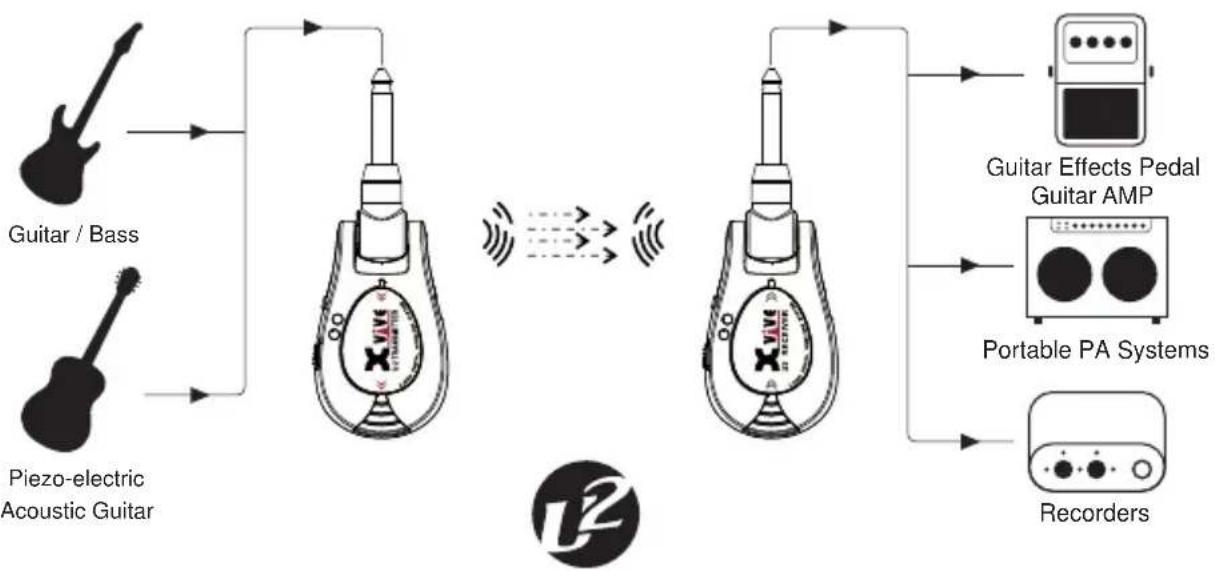
flowchart
graph TD
    A["Guitar / Bass"] --> B["Audio Analyzer"]
    C["Piezo-electric Acoustic Guitar"] --> B
    B --> D["Audio Analyzer"]
    D --> E["Portable PA Systems"]
    E --> F["Guitar Effects Pedal Guitar AMP"]
    E --> G["Recorders"]
    style A fill:#f9f,stroke:#333
    style C fill:#f9f,stroke:#333
    style B fill:#ccf,stroke:#333
    style D fill:#ccf,stroke:#333
    style E fill:#ccf,stroke:#333
    style F fill:#dfd,stroke:#333
    style G fill:#dfd,stroke:#333
China Patent Numbers ZL 2016 3 0165464.8
2nd floor, Building 12, Xicheng Industrial Area, Xixiang Town, Baoan District, Shenzhen Guangdong China. 518101
E-mail: nancy@xviveaudio.com
www.xvive.com
- GUITAR
- CAUTION RISK OF ELECTRIC SHOCK DO NOT OPEN
- CERTIFICATION
- measures:
- IMPORTANT SAFETY INSTRUCTIONS PLEASE THESE INSTRUCTIONS IN A SAFE PLACE
- PRODUCT INTRODUCTION PACKAGE DETAILS
- QUICK START
- QUICK START DIAGRAM
- BASIC OPERATION
- Transmitter Audio signal indicator LED
- Receiver Audio Signal indicator LED
- USB Port – Battery recharger port.
- BATTERIES AND CHARGING
- Note:
- GHz SPECTRUM OVERVIEW AND INTERFERENCE
- Tips and Methods to Improve Wireless System Performance
- Q & A
- Four channels
- Portable Plug-and- Play design
- One Transmitter and multiple Receivers
- U2 Receiver
- Channel switching and locking
- Power charge
- Blue LED Flashing
- Antennae angle
- Supportive pickup and musical instrument
- USB port
Brand : Xvive
Model : U4T
Category : Earphones