KM0930 - Smartphone Krüger&Matz - Free user manual and instructions
Find the device manual for free KM0930 Krüger&Matz in PDF.


| Product Type | Smartphone |
| Brand | Krüger&Matz |
| Model | KM0930 |
| Display Size | 6.5 inches (estimated) |
| Dimensions | 165 x 76 x 8.5 mm (approx.) |
| Weight | 200 g (approx.) |
| Battery Capacity | 4000 mAh (typical) |
| Charging Port | USB Type-C |
| Operating System | Android (likely version 12 or 13) |
| Processor | Octa-core (up to 2.0 GHz) |
| RAM | 4 GB |
| Internal Storage | 64 GB |
| Main Camera | Triple camera: 13 MP + 2 MP + 2 MP |
| Front Camera | 8 MP |
| Connectivity | 4G LTE, Wi-Fi 802.11 b/g/n, Bluetooth 5.0, GPS |
| Sensors | Fingerprint (side-mounted), accelerometer, proximity, light |
| Maintenance & Cleaning | Wipe with a soft, dry cloth. Do not use harsh chemicals. |
| Safety | Avoid exposure to water or extreme temperatures. Use only approved chargers. |
| Spare Parts & Repairability | Contact Krüger&Matz service center for genuine parts. Battery may be replaceable by professionals. |
| General Info | User manual available in PDF format. Rated 6.5/10 on notice-facile.com. |
Frequently Asked Questions - KM0930 Krüger&Matz
User questions about KM0930 Krüger&Matz
0 question about this device. Answer the ones you know or ask your own.
Ask a new question about this device
Download the instructions for your Smartphone in PDF format for free! Find your manual KM0930 - Krüger&Matz and take your electronic device back in hand. On this page are published all the documents necessary for the use of your device. KM0930 by Krüger&Matz.
USER MANUAL KM0930 Krüger&Matz
DE
DE
Krüger&Matz
Bedienungsanleitung
Bedienungsanleitung
Krüger&Matz
- In case of losing or stealing the phone, contact your network carrier about locking the SIM card. Taking action immediately will increase chances to avoid unauthorized use. To secure the phone from unauthorized use, set the SIM card PIN number and set up the phone password.
- It is forbidden to use the phone while driving, if it requires holding the phone near your ear. If it is necessary to use the phone, use headset or earphones.
- Do not use the phone while onboard in a plane. During flight it must be shut down.
- Turn off the phone in places where using it is forbidden or may cause danger. Do not expose the phone to high or low temperatures.
- Do not expose the device to moisture. Submerging the device in the water may lead to damage.
- Use of this device near medical apparatuses may cause interference in their operation. Pay attention while using your phone near medical apparatuses such as pacemakers, hearing aids and some other electronic medical devices.
- Any repair of this device can be carried out qualified and authorized service point exclusively. Any attempts to repair this device on your own, may hold the risk of permanent device damage and lose of warranty.
- Do not use accessories which are not specifically designed and recommended by the manufacturer.
- Producer does not claim responsibility of
Krüger&Matz
Owner's manual Owner's manual
Krüger&Matz
damages or injuries caused by inappropriate device use and handling.
- The phone may not include all of the features that are listed in this owner's manual due to network settings or network carrier setting. Do not rely solely on this phone in emergency situations. If there are any doubts, please consult your network carrier.
PRODUCT DESCRIPTION
- Earspeaker
- Display
- Volume buttons
- Navigation buttons
- Function buttons
- Calls buttons
- M buttons
- Numeric keypad
- Front display
- Camera
- Flash diode
- SOS button
- Speaker
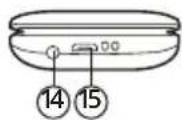
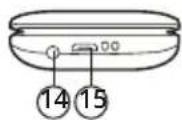
- Earphone jack
- Micro USB socket

EN
EN
Krüger&Matz
Owner's manual Owner's manual
Krüger&Matz
SIM CARDS AND MEMORY CARD INSTALLATION
- Open the battery compartment.
- Take out the battery.
- Insert SIM cards to proper slots.
- Unlock the memory card slot by sliding it to the bottom and lift the bracket. Install the memory card and lock the socket.
- Insert the battery.
- Close the battery compartment.
CHARGING
- Connect the micro USB plug to the docking station.
- Connect the USB plug to the power supply.
- Slide the phone into the docking station.
- Make sure that the pins of the docking station are making contact with the phone pins.
The phone can also be charged without the docking station.
Caution: disconnect the charger after finished charging or take out the phone from the docking station. Otherwise the battery may be damaged.
TURNING ON
To turn on the phone, press and hold the end call button.
LOCKING KEYPAD
To lock the keypad, press the menu button, then the * button. To unlock the keypad, press the Unlock button, then OK button.
MAIN SCREEN NOTIFICATION ICONS
| Network signal level | |
| Battery level | |
| Unread text message | |
| Missed call | |
| Alarm enabled | |
| Silent profile active | |
| Meeting profile active | |
| Outside profile active | |
| Inside profile active | |
| Bluetooth enabled |

NAVIGATING THE MENU
• Function on the left corresponds to left function button.
• Function on the right corresponds to right function button.
Krüger&Matz
• Function on the middle (and entering some menus) corresponds to M2 button.
- To exit text edit screen press the end call button.
• To change the volume, use the volume buttons.
- Up, down, M1, M2, M3 buttons open assigned shortcuts (while on the main screen)..
MAKING PHONECALLS
To dial the number, while in main screen, use the numeric keypad and press the make call button. To end the call, press the end call button.
SOS BUTTON
Press and hold the SOS button for 5 seconds to send the text or make a call to defined numbers. Alarm sound will also be played.
OPERATION
Messages
• To create a new message, select "Write message". Input the number or select existing number from the Phonebook. Input the text and press the Options button, then select Send.
• To view the messages, select menu: Inbox, Outbox, Drafts, Sentbox.
• Voicemail: change the voicemails number.
- Settings: allows to change the messaging settings.
Owner's manual Owner's manual
Krüger&Matz
Contacts
• To call the contact from contact list, select the contact and press the make call button.
- To edit the contact, select it and press the View button. Press the Edit button and input the information.
- To add the contact, press the Options button and select Add contact. Input the information and press the Save button.
Call logs
- Call menu allows for viewing missed, dialed, received and rejected calls.
- To clean all of these lists, select the Delete all option.
Multimedia
- Camera allows for taking pictures.
• DV allows for shooting videos.
• Audio player allows for listening to music.
• Video player allows for watching videos.
• Sound recorder allows for recording voice. - Image viewer allows for viewing taken pictures. To switch between pictures, use the * and # buttons.
- My files: allows for browsing the files on internal memory and memory card.
Settings
- Call settings: change the settings of dialing and receiving calls.
- Phone settings:
- Date and time: set the date and time
• Language: set the phones language - Shortcuts: change the shortcuts on the main
Krüger&Matz
Owner's manual Owner's manual
Krüger&Matz
screen
• Auto power on/off: change the hour of automatic power on and off.
Power management: view the battery status.
- Restore factory settings: set the settings to factory values. Use this function if the phone freezes or does not work properly.
- Display: change the backlight, wallpaper and backlight time.
- Security: change the phone password, PIN code and Black list (Default security password is: 1122).
To secure the phone by requiring the password while turning on the phone, select the Phone lock setting.
To protect functions of the phone with password, select the Privacy setting. Input the security password and select the functions that you want to be locked with password.
- Profiles: editing and activating sound profiles.
- SOS Settings: change the settings of SOS button.
- SOS Status: turn on or off the SOS button
- SOS numbers: add the numbers to call after pressing the SOS button.
- SOS SMS ON/OFF: turn on or off sending the text message after pressing the SOS button.
- SOS SMS: editing the text message
- Warning Tone: turn on or off the warning sound after pressing the SOS button.
- Alarm: turn on and edit the alarms.
- Bluetooth: turn on and add the Bluetooth devices.
- Torch: turn on and off.
- Calendar: allows for browsing days of month and adding tasks. To change the day of week, use the * and # buttons.
- Calculator: allows for making simple calculations. To change the calculation, press the up or down button.
EN
EN
Application
• FM Radio allows for listening to radio stations.
- Internet: access to the Internet (costs may be applied).
- Ebook: read txt files.
Krüger&Matz
Owner's manual
Εγχειρίδιο χρήσης
Krüger&Matz
LEARN MORE
For more information on this product, go to www.krugermatz.com.
Visit www.krugermatz.com website for more products and accessories.
In case of any doubts or questions reach out to our Frequently Asked Questions section.
Lechpol Electronics Sp. z o.o. Sp.k. hereby declares that mobile phone KM0930 is consistent with directive 2014/53/UE.
Full text of the EU Declaration of Conformity is available at following Internet address: www.lechpol.eu.

English
Correct Disposal of This Product
(Waste Electrical & Electronic Equipment)

(Applicable in the European Union and other European countries with separate collection systems) This marking shown on the product or its literature, indicates that it should not be disposed with other household wastes at the end of its working life. To prevent possible harm to the environment or human health from uncontrolled waste disposal, please separate this from other types of wastes and recycle it responsibly to promote the sustainable reuse of material resources. Household users should contact either the retailer where they purchased this product, or their local government office, for details of where and howtheycantakethisitemforenvironmentallysaferecycling. Business users should contact their supplier and check the terms and conditions of the purchase contract. This product should not be mixed with other commercial wastes for disposal.
Made in China for LECHPOL ELECTRONICS Sp. z o.o. Sp.k., ul. Garwolińska 1, 08-400 Miętne.
ΟΔΗΓΙΕΣ ΑΣΦΑΛΕΙΑΣ


GR
GR
Krüger&Matz
Εγχειρίδιο χρήσης
Εγχειρίδιο χρήσης
Krüger&Matz
For more information on this product, go to www.krugermatz.com.
Visit www.krugermatz.com website for more products and accessories.
In case of any doubts or questions reach out to our Frequently Asked Questions section.
Lechpol Electronics Sp. z o.o. Sp.k. hereby declares that mobile phone KM0930 is consistent with directive 2014/53/UE.
Full text of the EU Declaration of Conformity is available at following Internet address: www.lechpol.eu.

English
Correct Disposal of This Product
(Waste Electrical & Electronic Equipment)


(Applicable in the European Union and other European countries with separate collection systems) This marking shown on the product or its literature, indicates that it should not be disposed with other household wastes at the end of its working life. To prevent possible harm to the environment or human health from uncontrolled waste disposal, please separate this from other types of wastes and recycle it responsibly to promote the sustainable reuse of material resources. Household users should contact either the retailer where they purchased this product, or their local government office, for details of where and how they can take this item forenvironmentally saferecycling. Business users should contact their supplier and check the terms and conditions of the purchase contract. This product should not be mixed with other commercial wastes for disposal.
Made in China for LECHPOL ELECTRONICS Sp. z o.o. Sp.k., ul. Garwolińska 1, 08-400 Miętne.
Krüger&Matz
PL

INSTALACJA KART SIM I KARTY PAMIĘCI
INSTALAREA CARTELEI SIM ŞI A CARDULUI DE MEMORIE


www.krugermatz.com
Krüger&Matz is a registered trademark


- DE
- KRÜGER&MATZ
- OWNER'S MANUAL OWNER'S MANUAL
- PRODUCT DESCRIPTION
- EN
- SIM CARDS AND MEMORY CARD INSTALLATION
- CHARGING
- TURNING ON
- LOCKING KEYPAD
- MAIN SCREEN NOTIFICATION ICONS
- NAVIGATING THE MENU
- MAKING PHONECALLS
- SOS BUTTON
- OPERATION
- MESSAGES
- CONTACTS
- CALL LOGS
- MULTIMEDIA
- SETTINGS
- SCREEN
- APPLICATION
- OWNER'S MANUAL
- ΕΓΧΕΙΡΊΔΙΟ ΧΡΉΣΗΣ
- LEARN MORE
- ΟΔΗΓΙΕΣ ΑΣΦΑΛΕΙΑΣ
- GR
- INSTALACJA KART SIM I KARTY PAMIĘCI
- INSTALAREA CARTELEI SIM ŞI A CARDULUI DE MEMORIE
Brand : Krüger&Matz
Model : KM0930
Category : Smartphone