
A5232M - Roller shutter control JUNG - Free user manual and instructions
Find the device manual for free A5232M JUNG in PDF.


| Product Type | JM Memory Attachment for Jalousie Management (louver control) |
| Brand | JUNG |
| Model | A5232M (Ref.-no.: ..5232 M., ..5232 MS.) |
| Category | Louver Control Accessory |
| Compatibility | Requires JM motor control insert (sold separately) |
| Installation | In a connecting box per DIN 49073 (deep box recommended); terminals down |
| Functions | Blade adjustment (≤1s), continuous operation (>1s-<3.5s), storing up/down times (3.5s-<8s), mode change (8s-<12s), reset (>12s) |
| Operating Modes | Push-button mode (short/long press) and memory mode (automatic daily repetition) |
| Storage Capacity | One up time and one down time; can be overwritten |
| Automatic Cycle | Repeats stored movements every 24 hours (e.g., presence simulation) |
| Sensor Options | Sun sensor and glass breakage sensor (for models with sensor connection); wind sensor via extension input |
| Feedback | Acoustic tones (buzzer) for storing, mode change, and reset |
| Protection | Electronic locking ensures min. change-over time ~1 second |
| Power Supply | Via JM motor control insert (typically 230V AC, 50Hz) |
| Memory Retention | Times cleared after mains failure >30 minutes; shift <30 minutes |
| Safety | Installation by skilled electrician only; use with limit switches; observe motor manufacturer specs |
| Warranty | Statutory warranty; return to service center for defects |
| Dimensions | Flush-mounted: standard 55x55mm cover plate (approx.) |
| Weight | Approx. 100g (typical for such device) |
| Clean Care | Wipe with dry cloth; no solvents |
Frequently Asked Questions - A5232M JUNG
User questions about A5232M JUNG
0 question about this device. Answer the ones you know or ask your own.
Ask a new question about this device
Download the instructions for your Roller shutter control in PDF format for free! Find your manual A5232M - JUNG and take your electronic device back in hand. On this page are published all the documents necessary for the use of your device. A5232M by JUNG.
USER MANUAL A5232M JUNG
Operating Instructions JM Memory Attachment

natural_image
Simple white square button with two black double-headed arrow symbols (no text or numbers)1. Function
The JM memory attachment is a component of the Jalousie Management louver control system and must be installed in a connecting box according to DIN 49073 (recommendation: deep box) in conjunction with the JM motor control insert. Due to the possibility of individually storing one up and one down time, the unit adjusts to the practice of the user. The two louver moving times stored are repeated every 24 hours. This provides comfortable, automatic louver control which can, for example, be used for presence simulation.
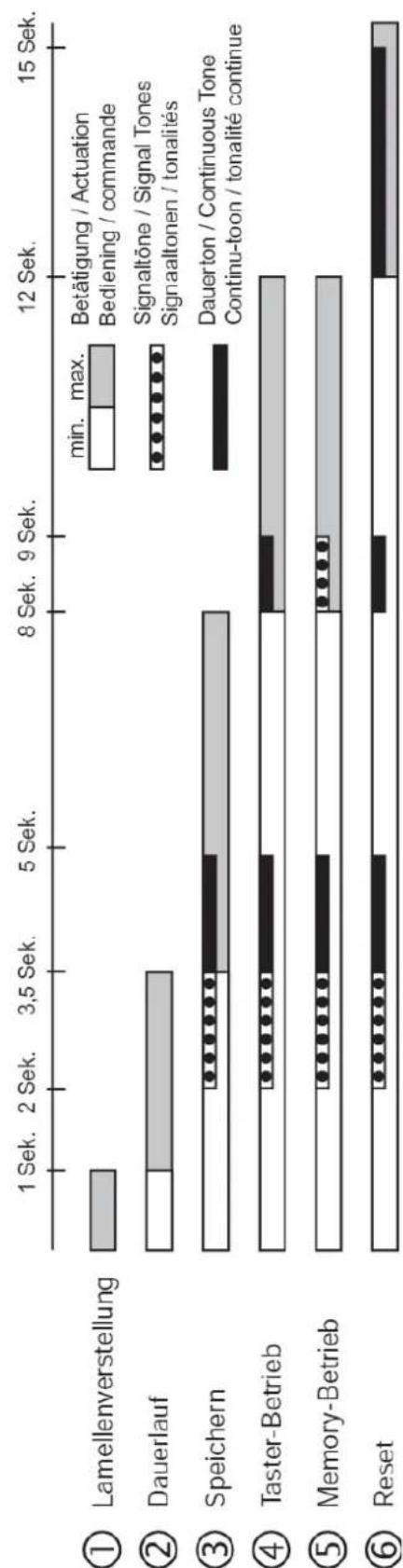
The different functions are activated by the period of operating the pushbutton (Fig. A):
| Funktion | Approx.Operating Period. |
| 1 Blade adjustment max. 1sec. | |
| 2 Continuous operation >1s - <3,5sec. | |
| 3 Storing one up and down time 3,5sec. - <8sec. | |
| Mode (4 p/b mode,5 memory mode) | 8sec. - <12sec. |
| 6 Reset >12sec. |
Blinds Management JM Memory Attachment
Ref.-no.: ..5232 M., ..5232 MS..
line
| Category | Timeframe | |---|---| | Lamellenverstellung | 1 Sek. | | Dauerlauf | 3.5 Sek. | | Speichern | 8 Sek. | | Taster-Betrieb | 12 Sek. | | Memory-Betrieb | 15 Sek. | | Reset | 15 Sek. |1.1. Push-Button Mode
The JM memory attachment acts as a louver push-button. Using the ▲ key moves up the louver, while the ▼ key moves it down.
Short pressing (1 second max.):
A pulse is produced which corresponds to the length of the time the key is held pressed. This function, for example, serves for adjusting the louver blades.
After longer pressing (> 1 sec. to < 3,5 sec.):
The JM memory attachment changes to self-holding ('continuous operation').
1.2. Memory Mode
Louver operation is the same as in the push-button mode. The set indicates the operating mode by a tone signal when the pushbutton is depressed (no tone signal when the set is controlled via the extension input.) For presence simulation, the two moving times learnt (one up and one down time) are, in addition, reproduced every 24 hours. Example: Control events learnt: Up at 7:00 a. m.; down at 8:00 p. m. The louver is daily moved up at 7:00 a. m. and moved down at 8:00 p. m. This takes place every day by day until a new time is learnt. Always a full movement of approx. 2 minutes is done.
1.3. Storing Up or Down Time
Storing can be performed in the push-button or memory mode. The moving.
time is stored by long pressing of the ▲ up zime or ▼ down time direction key. After approx. 2 seconds, 5 or 6 signal tones of the built-in buzzer sound, followed by a continuous tone of about 1.5 seconds. This saves the moving command. Zf the key is released before, the moving command is executed (moving tim approx. 2 minutes) but not saved. One up time and one down time can be stored. It is also possible to store one up time or one down time only (e.g. only one down time in the evening; the louver is individually moved up in the morning by hand). Storing more than two switching events within one day will overwrite the first ones so that only the last two events are recorded in this case.
1.4. Mode Changing (Push-Button Mode, Memory Mode)
By longer pressing period of the ▲ or the ▼ key (8 sec. to <12 sec.) After approx. 2 seconds, 5 to 6 signal tones of the built-in buzzer sound, followed by a continuous tone about 1.5 seconds. Then, depending upon the current mode:
4 short signal tones: memory attachment is in the memory mode. 1 second continuous tone: memory attachment is in the push-button mode. The mode is changed with the beginning of the signal tones or the continuous tone, respectively.
1.5. Reset (Resetting the Times Learnt)
By longer pressing period of the ▲ or the ▼ key (2 sec. min.)
After approx. 2 seconds, 5 to 6 signal tones of the built-in buzzer sound, followed by a continuous tone about 1.5 seconds. Then, depending upon the current mode, 4 short signal tones or a continuous tone of 1 second. Then, a continuous tone of approx. 3 seconds length sounds. With the beginning of the tone, the times learnt are deleted. The JM memory attachment toggles into the memory mode.
① After mains failures of longer than 30 minutes, both moving times stored will be cleared. When the mains voltage reappears, the JM memory attachment goes into the memory mode. Mains failures of less than 30 minutes in the memory mode shift the switching times by the length of time the mains failure lasts.
2. Warning
Caution: The installation and assembly of electrical equipment may only be performed by a skilled electrician.
This Jalousie Management system has been designed for switching louver or roller blind motors. Do not switch any other loads. If louver motors are to connected in parallel, please observe the information given by the motor manufacturers.
Use louvers or roller blinds with limit switches (mechanical or electronic) only. An electronic locking of the attachment provides for a minimum change-over time of approx. 1 second.
Please observe the information of the motor manufacturers with respect to change-over time and max. cyclic duration factor.
3. Installation Instructions
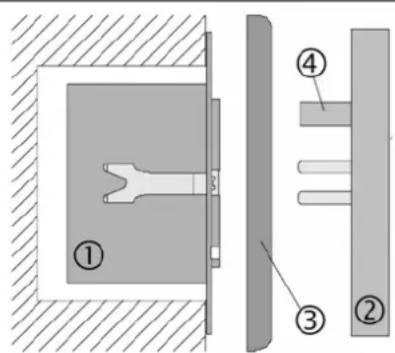
Fig. B: The JM memory attachment can only be placed into service in conjunction with the JM motor control insert.
JM motor control insert (1) must be installed in a connecting box according to DIN 49073 (recommendation: deep box).
The connecting terminals of the units must be down. Plug JM memory attachment (2) onto the insert together with frame (3).
Electrical contacting is established through plugs (4) and (5)
3.1. Connection of Sensors (only for attachment with sensor connection)
Important: The sensor line carries protective low voltage (SELV). Please observe the installation procedures as specified by VDE 0100.
Sun sensor: The sun sensor must be attached to a window pane and facilitates the sun protection function.
Choose the sensor position to which the louver is to be moved when the brightness value is exceeded.
Prior to the execution of the sun protection function, the louver must be moved to its upper end position in 'continuous mode' (2 minutes running time). The sun protection function is initiated approx. 2 minutes after the factory-set brightness value is exceeded (approx. 20000 lux). The louver moves down. Such delay (hysteresis) by approx. 2 minutes is necessary in order to compensate short-time brightness variations. The louver or roller blind, respectively, is not moved up and down upon each brightness difference. After the factory-set brightness value has been undercut for at least 15 minutes, the louver is moved up again (short-time brightness variations will be disregarded).
Glass breakage sensor: The glass breakage sensor should be attached to the window pane. If the window pane is damaged, the louver is moved to its lower end position. Application: Protection against weather influences in the event of glass breakage. The glass breakage message can be reset with the ▲ key, and the louver moves up.
i Glass breakage sensors must not be used together with the wind sensor. The wind protection function via extension input ▲ (louver moves up) will be disabled after glass breakage, the louver or roller blind remaining closed.
Flush-mounted installation:
Additional plug contacts (5) on the JM memory attachment with sensor connection must be led into the insert for the connection of a sensor cable. The sensor can be connected via screw terminals (refer to the 'Insert' Operating Instructions).
Surface installation:
Connect the sensor directly to the attachment via a plug. (For the description, installation and connection of the insert, please refer to separate instructions.)
4. Guarantee
Our products are under guarantee within the scope of the statutory provisions.
Please return the unit postage paid to our central service department giving a brief description of the fault:
ALBRECHT JUNG GMBH & CO. KG
Service-Center
Kupferstr. 17-19
D-44532 Lünen
Service-Line: +(49) 23 55 . 80 65 51
Telefax: +(49) 23 55.80 61 65
CE The CE-sign is a free trade sign addressed exclusively to the authorities and does not include any warranty of any properties.
- Operating Instructions JM Memory Attachment
- Function
- Blinds Management JM Memory Attachment
- Push-Button Mode
- Memory Mode
- Storing Up or Down Time
- Mode Changing (Push-Button Mode, Memory Mode)
- Reset (Resetting the Times Learnt)
- Warning
- Installation Instructions
- Connection of Sensors (only for attachment with sensor connection)
- Flush-mounted installation:
- Surface installation:
- Guarantee
Brand : JUNG
Model : A5232M
Category : Roller shutter control