USER MANUAL Xacti VPC-E60EX SANYO
natural_image
Illustration of a silver digital camera with lens and screen (no text or symbols)
Important note
This manual explains how to safely operate the VPC-E60EX and VPC-E60. Any information regarding only one of these products will be labeled as such.
Please read these instructions carefully before using the camera.
Make sure to read and understand the separate booklet "SAFETY MANUAL".
Keep this manual in a safe place for later reference.
Warning
TO PREVENT THE RISK OF FIRE OR ELECTRIC SHOCK, DO NOT EXPOSE THIS APPLIANCE TO RAIN OR MOISTURE
FOR AMERICAN USERS
The following advisory is included in accordance with the laws of the State of California (USA):
WARNING:
This product contains chemicals, including lead, known to the State of California to cause cancer, and birth defects or other reproductive harm.
Wash hands after handling.
- This equipment has been tested and found to comply with the limits for a Class B digital device, pursuant to Part 15 of the FCC Rules. These limits are designed to provide reasonable protection against harmful interference in a residential installation. This equipment generates, uses and can radiate radio frequency energy and, if not installed and used in accordance with the instructions, may cause harmful interference to radio communications. However, there is no guarantee that interference will not occur in a particular installation. If this equipment does cause harmful interference to radio or television reception, which can be determined by turning the equipment off and on, the user is encouraged to try to correct the interference by one or more of the following measures:
Reorient or relocate the receiving antenna.
Increase the separation between the equipment and receiver.
Connect the equipment into an outlet on a circuit different from that to which the receiver is connected.
Consult the dealer or an experienced radio/TV technician for help.
- Changes or modifications not expressly approved by the party responsible for compliance could void the user's authority to operate the equipment.
Model number: VPC-E60
Trade Name: SANYO
Responsible party: SANYO FISHER COMPANY
Address: 21605 Plummer Street, Chatsworth, California 91311
Telephone No.: (818) 998-7322
This device complies with Part 15 of the FCC Rules. Operation is subject to the following two conditions:
(1) this device may not cause harmful interference, and
i English
FOR CANADIAN USERS
- This Class B digital apparatus complies with Canadian ICES-003.
FOR EU USERS
natural_image
Symbol of a trash bin with crossed lines indicating no waste or discharge, and a solid black rectangle below (no text or labels)
Note:
- This symbol mark and recycle system apply only to EU countries and do not apply to the countries in the other areas of the world.
Your SANYO product is designed and manufactured with high quality materials and components which can be recycled and reused.
This symbol means that electrical and electronic equipment, at their end-of-life, should be disposed of separately from your household waste.
Please dispose of this equipment at your local community waste collection/recycling centre.
In the European Union there are separate collection systems for used electrical and electronic products.
Please help us to conserve the environment we live in!
Symbols used in this manual
HINT Points giving some extended instructions or special points to pay attention to.
CAUTION Points that require special attention.
(page xx) Refer to the page indicated for detailed information.
You may find the answers to questions or problems concerning camera operation in the sections “COMMONLY ASKED QUESTIONS” (page 154) and “TROUBLESHOOTING” (page 161).
GETTING UP AND RUNNING
Install the battery pack
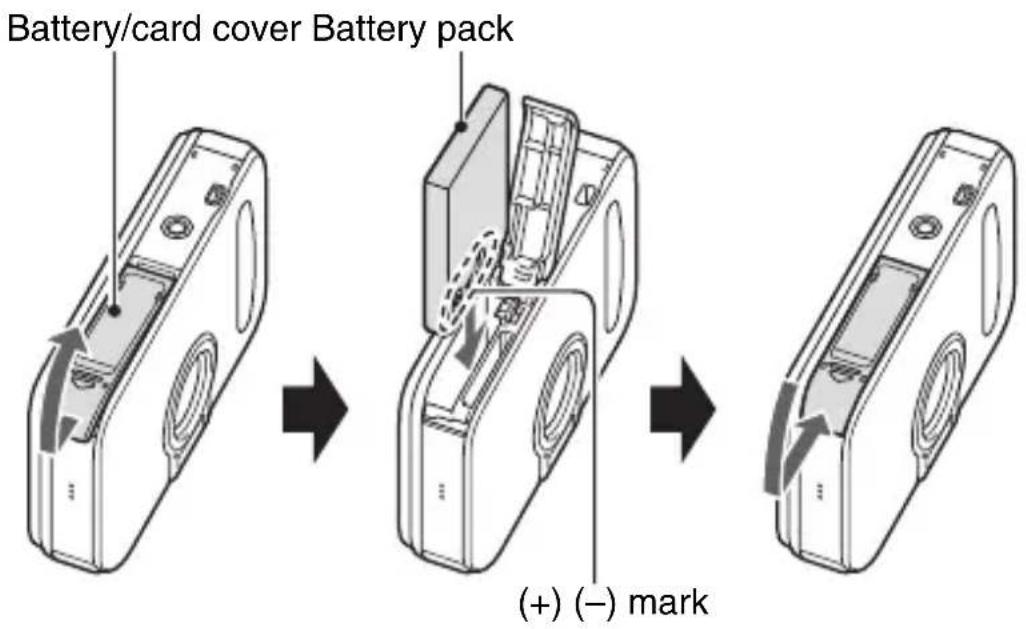
1 Open the battery slot cover, and insert the battery pack.
- The battery slot cover is located on the bottom of the camera.
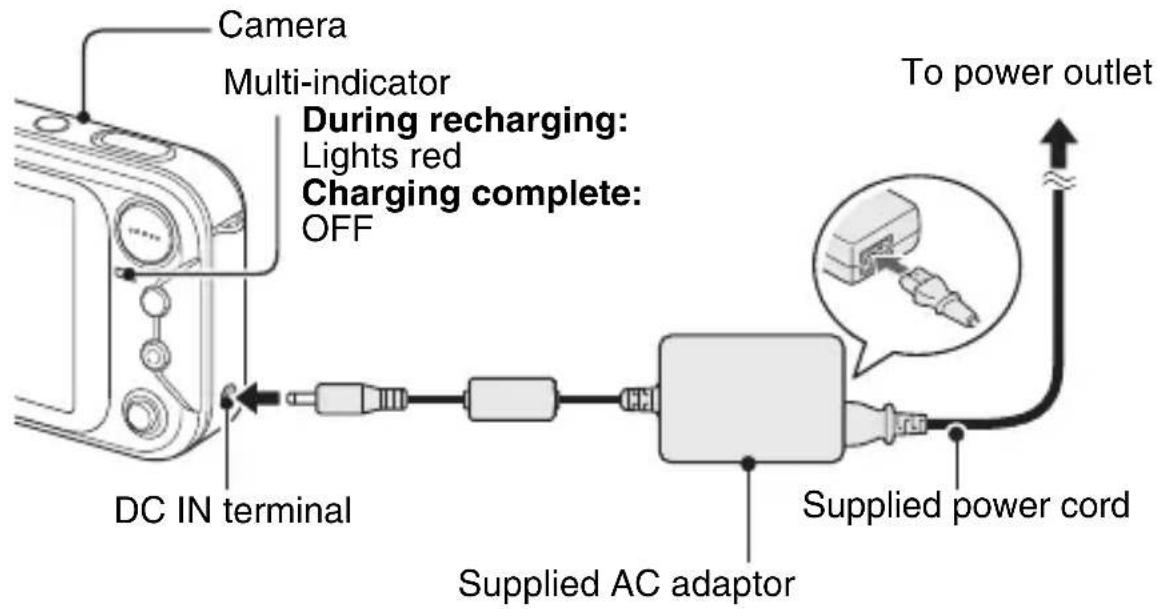
2 Use the supplied AC adaptor to charge the battery pack.
- Charging will take approximately 90 minutes.
flowchart
graph LR
    A["Camera"] --> B["Multi-indicator"]
    B --> C["During recharging: Lights red"]
    B --> D["Charging complete: OFF"]
    C --> E["DC IN terminal"]
    D --> E
    E --> F["Supplied AC adaptor"]
    F --> G["Supplied power cord"]
    G --> H["To power outlet"]
Shooting
■Still image photography
• The Still Image Shooting Screen appears.
• The image is captured.
■Video clip recording
• The camera changes to the video clip recording mode.
Recording begins.
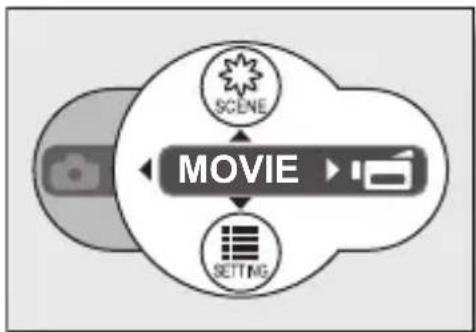
Press the MENU button, toggle the SET button to the left, and press the MENU button. The camera changes to the still image shooting mode.
flowchart
graph TD
    A["SCENE"] --> B["MOVIE"]
    C["SETTING"] --> B
Playback
■Still image playback
• The display switches to the Playback Screen.
■Video clip playback
• The display switches to the Playback Screen.
Playback of the selected video clip begins.
If the playback button [▶] is pressed again, the display changes to the Shooting Screen.
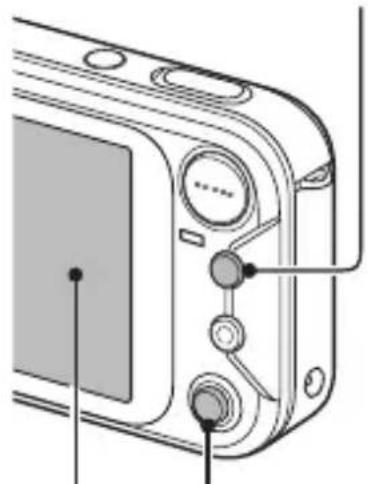
Playback button [▶]
natural_image
Diagram of a camera module with labeled ports and buttons (no text or symbols present)
SET button
natural_image
Black-and-white photo of a smiling child playing with a guitar, framed within a filmstrip border (no text or symbols visible)
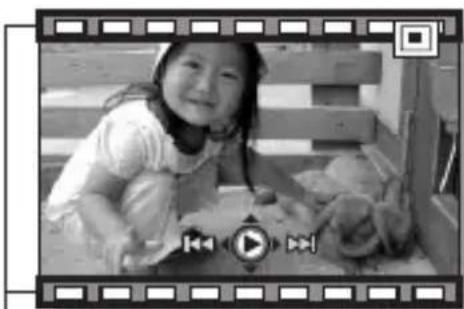
Video clip pattern
When you are finished taking pictures...
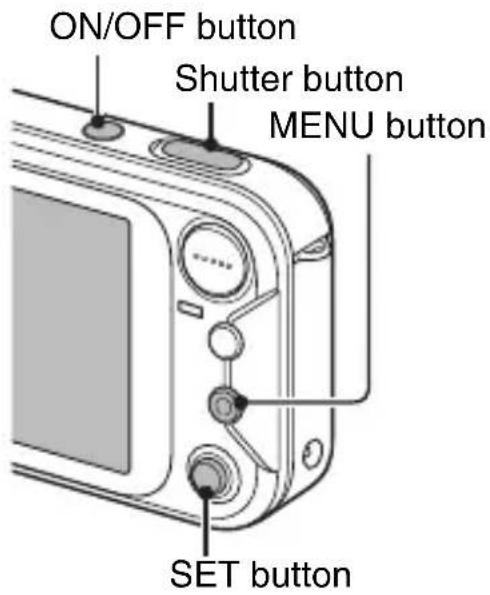
Press the ON/OFF button to turn the camera off.
v English
QUICK SEARCH BY OPERATION
Your camera has an abundance of convenient features and functions. From creating precisely the photo you want, to viewing images using various techniques, you can locate the exact operation for your purposes in the following table.
Basic operation Convenient functions Additional functions Shooting/recording Getting started shooting/recording“Recording a video clip” on page 39“Shooting single shots” on page 33“Shooting sequential shots” on page 76“MAKE AN AUDIO RECORDING” on page 67 Change the setting to sequential shots“How to use the best shot feature” on page 52Log the date and time of your photos“DATE AND TIME SETTING” on page 23Zoom in on the subject“USING THE ZOOM” on page 43Close-up photography“FOCUS RANGE” (supermacro mode) on page 69 For more accurate focus“FOCUS RANGE” (manual focus) page 70Set the focus to a narrow range“FOCUS AREA SETTING” on page 81Check the focus status“Zoom jump playback” on page 38 Optimize the photo quality“RESOLUTION SETTING” on page 66 Reduce video clip flicker“FLICKER-REDUCTION SETTING” on page 80 Shooting/recording Capture fast-moving subjects“SCENE SELECT” (sports mode) on page 49 Shoot in dark conditions“EXPOSURE CORRECTION” on page 46“FLASH SETTING” on page 44“SCENE SELECT” (night view mode/fireworks mode/lamp mode) on page 49 Photographing people“SCENE SELECT” (portrait mode/night view mode) on page 49“SHUTTER OPERATION SETTING” (ID photos) on page 79“FILTERS” (cosmetic filter) on page 53“FLASH SETTING” (red-eye reduction) on page 44 Photographing landscapes“SCENE SELECT” (landscape mode) on page 49“FOCUS RANGE” (telephoto mode) on page 69 Take a self-photo“SELF-TIMER” on page 71 Make images lighter or darker“EXPOSURE CORRECTION” on page 46 Measure the brightness of a specific area“LIGHT-MEASURING MODE SETTING” on page 82Adjust the camera’s sensitivity“ISO SENSITIVITY” on page 83 Shooting/recording Change the color of the images“ FILTERS” (monochrome filter/ sepia filter) on page 53 Make white appear natural“WHITE BALANCE” on page 84 Add an audio track to still image data“ADDING A VOICE MEMO” on page 86“ADDING/DELETING A VOICE MEMO” on page 100 Create a calendar from a captured still image“Making a calendar shot” on page 77 Playback Getting started viewing images“Playing back the video clip” on page 40 Adjust the speaker volume“PLAYBACK VOLUME” on page 95 “Viewing still images” on page 35 Search for image/ audio data“9-image/36-image display playback” on page 36Magnify an image“Magnifying (zooming in) the image” on page 37 Check the focus status“Zoom jump playback” on page 38Change the angle of view“ROTATE IMAGE” on page 112 “Playing back audio recordings” on page 68 Adjust the speaker volume“PLAYBACK VOLUME” on page 95 Slideshow playback“SLIDESHOW PLAYBACK” on page 116 Adjust the LCD monitor brightness“LCD MONITOR BRIGHTNESS” on page 129 Playback on a TV“CONNECTING TO A TV” (for playback) on page 144 Set the TV system“TV SYSTEM SETTING” on page 131 Data managing/processing Search for image/audio data“9-image/36-image display playback” on page 36 Delete data“ERASING DATA” on page 93 Protect images from accidental erasure“IMAGE PROTECT” on page 91Format a card“INITIALIZING THE CARD MEMORY AND INTERNAL MEMORY” on page 137 Add an audio track to still image data“ADDING A VOICE MEMO” on page 86“ADDING/DELETING A VOICE MEMO” on page 100 Create a calendar from a captured still image“Making a calendar shot” on page 77“ENTER AN IMAGE IN THE CALENDAR” on page 97Change the “red eyes” in flash photos to make them look more natural“RED-EYE CORRECTION” on page 110 Specify the number of prints, index print, and date imprint“PRINT SETTINGS” on page 102 View the settings that were in effect when the image/audio data was recorded“DISPLAYING IMAGE PROPERTIES (INFORMATION SCREEN)” on page 117
CONTENTS
QUICK SEARCH BY OPERATION .... 1
CONTENTS 5
CHECKING THE INCLUDED ACCESSORIES 9
GETTING THE MOST OUT OF YOUR CAMERA 11
SYSTEM MAP 13
SETUP
PARTS NAMES 14
INSTALLING THE CARD 16
POWER FOR THE CAMERA 18
TURNING THE CAMERA ON AND OFF 21
DATE AND TIME SETTING 23
■ BASIC OPERATION
ABOUT THE 2WAY SHOOTING GUIDE (Guidance display) ...... 26
BEFORE TAKING PICTURES 28
CAPTURING AND PLAYING BACK STILL IMAGES 33
VIDEO CLIP RECORDING AND PLAYBACK 39
USING THE ZOOM 43
FLASH SETTING 44
EXPOSURE CORRECTION 46
■ SHOOTING (EASY SETTING MODE)
EASY SETTINGS SCREEN 47
OVERVIEW OF THE EASY SETTINGS SCREEN 48
SCENE SELECT 49
FILTERS 53
5 English
■ SHOOTING (SHOOTING SETTING SCREEN)
ACCESSING THE SHOOTING SETTING SCREEN ....55
TOUCH SENSOR (TOUCH FOCUS) SETTING 65
RESOLUTION SETTING 66
MAKE AN AUDIO RECORDING 67
FOCUS RANGE 69
SELF-TIMER 71
CAMERA SHAKE COMPENSATION 73
SHUTTER OPERATION SETTING 75
FLICKER-REDUCTION SETTING 80
FOCUS AREA SETTING 81
LIGHT-MEASURING MODE SETTING 82
ISO SENSITIVITY 83
WHITE BALANCE 84
ADDING A VOICE MEMO 86
■ PLAYBACK
DISPLAYING THE PLAYBACK SETTING SCREENS ....87
IMAGE PROTECT 91
ERASING DATA 93
PLAYBACK VOLUME 95
DISPLAYING THE CALENDAR 96
ENTER AN IMAGE IN THE CALENDAR 97
ADDING/DELETING A VOICE MEMO 100
PRINT SETTINGS ....102
CHANGING IMAGE SIZE (RESIZE) 109
RED-EYE CORRECTION 110
ROTATE IMAGE 112
EXTRACTING A STILL IMAGE FROM A VIDEO CLIP ....113
COPY DATA 114
SLIDESHOW PLAYBACK 116
DISPLAYING IMAGE PROPERTIES (INFORMATION SCREEN) .....117
■ OPTION SETTINGS
DISPLAYING THE OPTION SCREEN 118
SET THE 2WAY SHOOTING GUIDE SETTING .... 121
SELECT THE STARTUP DISPLAY 122
OPERATION SOUNDS 123
HELP DISPLAY 125
POST-VIEW SETTING 126
ZOOM SETTINGS 127
LCD MONITOR BRIGHTNESS 129
SCREEN LANGUAGE 130
TV SYSTEM SETTING 131
POWER SAVE FUNCTION 132
FILE No. RESET FUNCTION 134
INITIALIZING THE CARD MEMORY AND INTERNAL MEMORY .... 137
RESETTING THE CAMERA SETTINGS 139
CHECKING THE REMAINING INTERNAL MEMORY AND CARD MEMORY 140
CHECKING THE REMAINING BATTERY PACK CHARGE 142
■ OTHER DEVICES AND CONNECTIONS
CONNECTING TO A TV 144
DIRECT PRINTING 145
■ APPENDICES
COMMONLY ASKED QUESTIONS ....154
TROUBLESHOOTING 161
SPECIFICATIONS 169
HINTS FOR TAKING PICTURES 179
CHECKING THE INCLUDED ACCESSORIES
\- Handstrap: 1 • SANYO Software Pack

natural_image
Simple line drawing of a keychain with a loop handle (no text or symbols)
(CD-ROM): 1

• Li-ion battery pack: 1 •

natural_image
Isometric illustration of a rectangular electronic device with two ports and a side panel (no text or symbols)
Dedicated AV interface cable: 1

natural_image
Illustration of a coiled cable with two connectors (no text or symbols)
• Dedicated USB interface cable: 1

natural_image
Illustration of a coiled cable with two connectors (no text or symbols)
• AC adaptor and power cord: 1

natural_image
Illustration of a gray electronic device with coiled cables and connectors (no text or symbols)
\- “SAFETY MANUAL” (safety precautions booklet) Please read this booklet carefully before using the digital camera.

\- Quick Guide

natural_image
Illustration of two overlapping smartphone screens with no visible text or symbols on the screens or background.
Attaching the handstrap

The types of card that can be inserted into and used with this camera are:
- SD Memory Card
- Multi Media Card
What "card" means in this manual
- In this manual, SD Memory Cards and Multi Media Cards that can be used in this digital camera are referred to as “card”.
- The cards in the illustrations in this manual are SD Memory Cards, but all installation, removal, and formatting procedures are the same for both SD Memory Cards and Multi Media Cards.
GETTING THE MOST OUT OF YOUR CAMERA
Your camera can not only take still photos, it can also record video clips and make audio recordings.
It's loaded with lots of functions that are possible only in a digital camera, including a super-quick focus, an easy-to-understand guidance display on a large screen, a schedule-making function that incorporates your captured images, and more.
Never again miss a great shot, thanks to the quick focus: Touch focus (see page 28)
Just touch the shutter button lightly, and the touch sensor automatically focuses the image (touch focus).

Complex operation made easy with the guidance feature: Shooting Guide display (see page 26)
The current shooting settings are visible right on the Shooting Screen. When the camera detects a possible problem—such as camera shake due to a slower shutter speed or an underexposed subject due to light from behind—the appropriate countermeasures are shown on the display. Use the suggestions, or not, as you wish to get exactly the photo you want.
11 English
Mode Select Screen
Switch between the still photo shooting and video clip recording modes with a single on-screen action. Accessing the Shooting Setting Screen has never been so fast.

flowchart
graph TD
    A["<Still photo shooting mode>"] --> B["<Video clip recording mode>"]
    B --> C["SCENE"]
    C --> D["PHOTO"]
    D --> E["SETTING SETTING"]
    E --> F["SCENE"]
    F --> G["MOVIE"]
    G --> H["SET"]
    H --> I["SET"]
    I --> J["SET"]
    J --> K["SET"]
    K --> L["SET"]
    L --> M["SET"]
    M --> N["SET"]
    N --> O["SET"]
    O --> P["SET"]
    P --> Q["SET"]
    Q --> R["SET"]
    R --> S["SET"]
    S --> T["SET"]
    T --> U["SET"]
    U --> V["SET"]
    V --> W["SET"]
    W --> X["SET"]
    X --> Y["SET"]
Create a schedule from your photos: schedule-making feature (see page 77)
Enter your photos in the calendar to create a custom image-based schedule. For example, you could snap a photo of a movie poster and record it in the calendar on the date of the movie's premiere.

SYSTEM MAP
The included accessories can be used to connect your camera to a computer, printer or TV. By connecting the camera to your computer, you can, for example, copy your photos to the computer's hard disk. You can connect it to a printer for direct printing of your photos. Or take the card to a photo shop to have your photos printed there.

flowchart
graph TD
    A["Camera"] --> B["Dedicated USB interface cable"]
    A --> C["Dedicated AV interface cable"]
    B --> D["Computer"]
    C --> E["Printer"]
    D --> F["Internet"]
    E --> G["Image of person with photo"]
    C --> H["TV"]
    H --> I["AC adaptor (Supplied)"]
    H --> J["Battery charger (Optional)"]
    I --> K["Card reader"]
    I --> L["DPOF-compatible printer"]
    I --> M["Photo shop"]
    H --> N["Separately sold or commercially available SD Memory Card/Multi Media Card"]
PARTS NAMES
Front

PARTS NAMES
Rear

Bottom

15 English
INSTALLING THE CARD
Your camera has an internal 32MB memory, which means that you can take photos (record image data) even when no card is installed. By using a card, however, you will be able to take many more photos.
The card can be used after it has been formatted with the camera (page 137).
1 Open the battery/card cover.
\- While gently pressing the battery/card cover, slide it open.

2 Insert the card, and close the battery/card cover.
\- Firmly insert the card until it clicks into place.

INSTALLING THE CARD
When removing the card...
• To remove the card, press it down, and then release. The card will protrude slightly, and you can then pull it out.

CAUTION
- Do not attempt to forcibly remove the card.
- Never remove the card when the multi-indicator is flashing red quickly. In doing so, you risk losing the data stored in the card.
HINT
Shooting without a card installed
\- The camera has a 32MB internal memory that lets you photograph and play back images even when there is no card installed. When the camera is turned on with no card installed, the internal memory icon 📇 is shown on the LCD monitor to let you know that the images you capture will be saved to the camera's internal memory.
POWER FOR THE CAMERA
The supplied AC adaptor is used not only as the camera's AC adaptor, but also to charge the battery installed in the camera.
Using the battery pack
At the time of purchase, the battery pack is not charged. The battery pack must be charged before it can be used in the camera. Also, if the battery power becomes depleted when the camera is being used (see CHECKING THE REMAINING BATTERY PACK CHARGE [page 142]), it should be recharged as soon as possible.
1 Install the battery pack.
Battery/card cover (on the camera bottom)

natural_image
Diagram of a device with a scroll and cable, showing a directional arrow (no text or symbols)

(+) (-) mark
POWER FOR THE CAMERA
2 Turn the camera off, and connect the AC adaptor to the camera.
- Charging begins as soon as the AC adaptor is connected to the camera. However, the camera does not charge when it is set to the shooting mode.
- The camera's multi-indicator lights red during charging.
- Charging will take approximately 90 minutes.
- The multi-indicator will turn off when the battery pack is fully charged.
ON/OFF button
\- Turn the camera off.

flowchart
graph LR
    A["Camera"] --> B["DC IN terminal"]
    B --> C["Multi-indicator During recharging: Lights red Charging complete: OFF"]
    C --> D["DC IN terminal"]
    D --> E["Supplied AC adaptor"]
    E --> F["Supplied power cord"]
    F --> G["To power outlet"]
3 Disconnect the AC adaptor after charging is completed.
Using a power outlet
When the supplied AC adaptor is connected to the camera, power can be supplied from a power outlet.
HINT
About the internal backup battery
\- This camera's internal battery serves to maintain the date and time settings, as well as the shooting settings. The backup battery will be fully charged when the battery pack is kept in the camera continuously for about 2 days. In the fully charged state, the backup battery will maintain the camera settings for about 7 days.
When not using the camera for a long time, remove the battery pack
\- A small amount of power is still used even if the camera is turned off, and it is therefore recommended that the battery pack be removed from the camera if it is not going to be used for a long time. Note that when the battery pack is removed for a long period, the time and date settings may be cleared. Before using your camera again, be sure to confirm that the camera settings are correct.
TURNING THE CAMERA ON AND OFF
Turning on the camera
In the shooting mode
• The camera turns on.
• The camera turns on in the shooting mode that was active before it was last turned off.
In the playback mode
• The Playback Screen appears on the LCD monitor (page 35).

Turning off the camera
• The camera turns off.
- When the playback button [▶] or ON/OFF button is pressed, the camera turns off.
21 English
Turning on the camera when the power save (sleep) function is active
In order to preserve battery pack power, the power save (sleep) function will automatically turn off the camera after one minute of no use during shooting, or five minutes of no use during playback (factory-preset setting).
\- When the power save function is active, you can restore the power by any of the following methods:
- Press the playback button [▶].
- Press the SET or MENU button.
- Press the shutter button.
- Press the ON/OFF button.
- When the AC adaptor is connected, the power save function will become active about 10 minutes after the camera is turned on (factory-preset setting).
- The user can specify the time elapsed before the power save function is activated (page 132).
- When the camera is connected to a computer or printer using the dedicated USB interface cable, the power save function is disabled, and the camera turns off after about 12 hours.
HINT
If the Ⓤ? icon appears...
\- When a picture is taken, the date and time it was captured is recorded with it. When the date and time cannot be recorded with the image because the date and time have not yet been set (page 23), the 🔒? icon appears. To have the date and time recorded with images, please make this setting before capturing images.
DATE AND TIME SETTING
The camera will record the date and time an image or audio recording is taken so that you can display them during playback. Therefore, before capturing images, make sure the correct date and time are set.
Example: To set the clock to 7:30 p.m. on December 24, 2006
1 Press the ON/OFF button to turn the camera on, and press the MENU button.
2 Toggle the SET button down.
• The Shooting Setting Screen appears (page 55).
3 Display the Option Screen (page 118).

4 Toggle the SET button up or down to select the clock set icon ⏻, and press the SET button.
• The Clock Set Screen appears.
- The current date and time settings are shown.
- Follow the procedures below to enable or disable the date display during playback, to set the display format for the date, and to set the date and time.
- To return to the Option Screen, press the MENU button, or select "EXIT" and press the SET button.

5 Set the date.
①Select "DATE".
②Press the SET button.
• The Set Date Screen appears.
③Set the date to "2006/12/24".
- The date is set in the following order: Set the year → Set the month → Set the day.
- Toggle the SET button left or right to select year, month or day. Toggle the SET button up or down to increase or decrease the number.
④Press the SET button.

6 Set the time.
①Select "TIME".
②Press the SET button.
• The Set Time Screen appears.
③Set the time to "19:30".
- The time is set in the following order: Set the hour Set the minute.
• A 24-hour clock is used for the time display.
④Press the SET button.

7 Set the order in which the date is displayed during playback.
①Select "DISP".
②Press the SET button.
• The Set Date Format Screen appears.
③Toggle the SET button up or down.
- Toggle the SET button up to change the displayed date order as follows:

year/month/day → month/day/year → day/month/year → DISP OFF (no display).
Toggle the SET button down to change it in the reverse order.
DATE AND TIME SETTING
\- If "DISP OFF" is selected, the date the image was captured is not shown during playback.
④Press the SET button.
- The date and time setting is completed, and you are returned to the Option Screen.
- To return to the Shooting Screen, press the MENU button.
HINT
\- Under normal conditions, while the battery pack is being replaced, an internal battery will maintain the date and time settings. However, there is a small chance the settings may be lost. (The backup will last for about 7 days.) It is recommended to check that the date and time settings are still correct after replacing the battery pack and before shooting or recording of any type (follow steps 1 to 4).
To correct the date and time settings
\- After steps 1 to 4, select the line of the setting that you want to change, press the SET button, and follow the steps in the respective paragraphs above to change the setting.
ABOUT THE 2WAY SHOOTING GUIDE (Guidance display)
Your camera features a “2WAY Shooting Guide” by which the shooting settings and a next-step guide are shown on the display.

\* All the icons do not appear at the same time.
① Shooting Screen
②Remaining number of images that can be captured (page 174)
③ Shooting mode and resolution settings (page 66)
④ Focus range setting (page 69)
⑤White balance setting (page 84)
⑥Exposure correction (page 46)
⑦Internal memory icon (page 16)
⑧Flash operation setting (page 44)
⑨Scene select setting (page 49)
⑩Filter setting (page 53)
⑪Guidance display
ABOUT THE 2WAY SHOOTING GUIDE (Guidance display)
To display the 2WAY Shooting Guide
\- Toggle the SET button to the left. To return to the previous screen, toggle the SET button to the left again.

flowchart
graph TD
    A["12"] --> B["6W-H"]
    C["6W-H"] --> D["Target Device"]
    D --> E["12"]
    F["Focus by touching shutter button"] --> G["Target Device"]
    G --> H["12"]
\- By selecting the 2WAY shooting guide icon ☐ from the Option Screen, you can set the camera to display the 2WAY Shooting Guide (page 121).
In this manual...
\- For the purpose of clarity, the LCD monitor display examples are shown with the 2WAY Shooting Guide turned off. Please note, however, that the actual operation is the same even when the 2WAY Shooting Guide is displayed.
BEFORE TAKING PICTURES
How to hold the camera
Hold the camera securely, keeping your elbows close to your body and making sure the camera is stable.
Correct hold Incorrect hold

natural_image
Illustration of a person holding a camera (no text or symbols present)

natural_image
Illustration of a person holding a circular object with a rose symbol (no text or symbols present)
A finger is blocking the lens or flash.
Make sure that the lens and flash are not blocked by your fingers or the handstrap.
HINT
- Images captured in the still image shooting mode can be rotated when they are played back (page 112).
- When the optical zoom is used or when the autofocus is operating, the image may appear to waver, but this is not a malfunction.
About the touch sensor (touch focus)
With the touch sensor, the image is focused simply by a light finger-touch on the shutter button (focus lock). With the subject in focus, just gently press the shutter button to take the picture for a perfectly focused image.
At the same time, the touch sensor is temporarily deactivated whenever the Mode Select Screen (page 31) or Shooting Setting Screen is displayed, thereby facilitating operation of these screens.
Furthermore, you can also deactivate the touch sensor so that the autofocus operates only when you press the shutter button halfway (page 65).
BEFORE TAKING PICTURES
Using the autofocus
The autofocus will work in almost all situations; however, there are certain conditions that may cause the autofocus function to not work properly. If the autofocus function is not working properly, set the focus range to capture images (page 69).
■Conditions that may cause incorrect focus
The following examples are some of the situations where the autofocus function may not work.
\- Subjects with low contrast, very bright subjects at the center of the image or dark subjects or locations
Use the focus-lock function to lock the focus on an object with contrast at the same distance as the desired subject.

natural_image
Illustration of a cartoon-style car with smoke and light effects (no text or symbols)
\- Subjects without vertical lines
Use the focus-lock function to lock the focus on the subject while holding the camera vertically.

natural_image
Simple line drawing of a potted tree with horizontal striped background (no text or symbols)
The following examples are some of the situations where the autofocus function may work, but not as desired.
\- When both near and far objects are present
Use the focus-lock function to lock the focus while framing the subject vertically, then re-orient the camera to compose a horizontally framed image.

natural_image
Black and white illustration of a panda sitting in front of vertical bars (no text or symbols)
- Fast-moving subjects
Use the focus-lock function to lock the focus on an object at the same distance as the desired subject, then reposition the camera to compose the picture.

natural_image
Illustration of a soccer player kicking a ball (no text or symbols)
BEFORE TAKING PICTURES
How to switch the shooting mode
Your camera can both capture still photos (still image shooting mode) and record video clips (video clip recording mode). When shooting, you can switch the shooting mode on the Mode Select Screen.
• The Mode Select Screen appears.
• The shooting mode is switched.

flowchart
graph TD
    A["<Still image shooting mode>"] --> B["<Video clip recording mode>"]
    B --> C["SCENE"]
    B --> D["MOVIE"]
    C --> E["SET"]
    D --> F["SET"]
    style A fill:#f9f,stroke:#333
    style B fill:#ccf,stroke:#333
    style C fill:#cfc,stroke:#333
    style D fill:#fcc,stroke:#333
• The display changes to the Shooting Screen.
31 English
Hints for taking pictures
Muting the operation sounds
\- The operation sounds that are generated, for example, when the shutter button, MENU button or SET button is pressed, as well as the audio guidance when you switch the mode, can be muted (page 123).
Where is the image and audio data saved?
- All the image and sound data is recorded in the camera's internal memory or on the card installed in the camera.
- When a card is installed in the camera, the data is recorded on the card. If no card is installed, the data is recorded in the camera's internal memory.
Taking pictures in backlight conditions...
\- When taking pictures with the light coming from behind the subject, due to the characteristics of the CCD, light lines or ghost patterns (flare phenomenon) may appear in the captured image. In this situation, it is recommended that you avoid taking pictures with the subject lit from behind.
While the image data is being recorded...
\- While the multi-indicator is flashing red quickly, the image data is being written to the memory, during which time it is not possible to capture another image. Another image can be captured after the flashing red indicator turns off. However, even when the multi-indicator is flashing red, depending on the camera's internal memory remaining capacity, in some cases the next image can be captured about 2 seconds after shooting.
CAPTURING AND PLAYING BACK STILL IMAGES
Your camera can both capture still images and record video clips. There are two modes for capturing still images. In the normal still image mode, one image is captured each time the shutter button is pressed. In the sequential shots mode, when you press the shutter button, several successive images are captured. For more information about taking sequential shots, please see page 76.
Shooting single shots
• The Still Image Shooting Screen appears.
\- If the touch sensor (page 65) has been set to ON, when the shutter button is touched, the autofocus operates and the image is focused (focus lock).

natural_image
Simple line drawing of a curved object resembling a stylized hand or tool (no text or symbols)
\- Engage the autofocus by pressing the shutter button halfway.

natural_image
Illustration of a finger pressing down on a curved surface with a downward arrow (no text or symbols)


natural_image
Black-and-white photo of a smiling child sitting on a bed with two dogs, no visible text or symbols
33 English
- Press the shutter button gently, taking care not to move the camera.
- The image that was captured appears on LCD monitor as long as the shutter button is kept pressed (post view).

natural_image
Simple line drawing of a finger with an arrow pointing to the thumb area (no text or symbols)
\- The captured image is recorded.
HINT
What is the camera focusing on?
- A target mark [] on the LCD monitor shows the area the camera is focusing on.
- The camera automatically determines the correct focus by measuring from 9 different focus points within the shooting area. If the target mark is at a position that is different from the point you wish to focus on, you can refocus, for example, by changing the shooting angle.
\- The large target mark appears when the camera focuses on a wide area in the center of the screen.
About the focus indicator
\- A green focus indicator appears when the subject is successfully focussed, or a red focus indicator when the camera was not able to focus the subject.
The shutter speed and aperture are displayed
\- When the camera focuses and the target mark appears, at the same time, the shutter speed and aperture settings are also displayed. You can use them as a reference when shooting.
Focus indicator

Motion alert icon

If the motion alert icon appears...
\- During still image shooting, if the shutter speed is slow and the possibility that the image may be blurred due to camera shake becomes high, the motion alert icon may appear on the LCD monitor. In this case, use a tripod to stabilize the camera when shooting, or set the flash operation mode to automatic (page 44).
\- When shooting with the scene select function set to the fireworks mode, the motion alert icon always appears, but this is normal.

CAPTURING AND PLAYING BACK STILL IMAGES
Viewing still images
The steps for viewing both single shots and sequential shots are the same.
• The image most recently captured appears on the LCD monitor.
6 View other images.
\- Toggle the SET button to the left or right to display the previous or next image. To display the previous image: Toggle the SET button to the left. To display the next image: Toggle the SET button to the right.
\- To return to Shooting Screen, press the playback button [▶].
\- When the playback button [▶] or ON/OFF button is pressed, the camera turns off.

When you are finished viewing images...
\- Press the ON/OFF button to turn the camera off.
HINT
For still images with voice memo (page 86 and 100)...
\- When the shutter button is pressed, the voice memo is played back.
35 English
9-image/36-image display playback
2 Press [W] ([☐]) on the zoom switch.
• The 9-image display appears.
- When [W] on the zoom switch is pressed again, the 36-image display appears. To return to the 9-image display, press [T] ([○]) on the zoom switch.
3 Select the image to play back.
- Toggle the SET button up, down, left or right to move the orange frame to the desired image, and press the SET button.
- When the 9-image display is shown, instead of pressing the SET button, you can press [T] ([○]) on the zoom switch to show the image full screen.

CAPTURING AND PLAYING BACK STILL IMAGES
Magnifying (zooming in) the image
1 Display the image that you want to magnify.
2 Press [T] ([○]) on the zoom switch.
• Magnification is enabled.
- The image is magnified, and the central portion of image is displayed.
- Toggle the SET button to view different parts of the magnified image.
To magnify:
Magnification increases with each press of [T] ([○]) on the zoom switch.
To return to normal size:
Magnification decreases with each press of [W] ([☐]) on the zoom switch.
\- Press the SET button to return to the normal (100%) view.

HINT
The magnified portion of the image can be saved as a separate image.
\- Press the shutter button. The magnified portion is saved as a new still image.
Zoom jump playback
You can magnify a portion of a still image to check the accuracy of the focus.
1 Display a still image to view using zoom jump playback.
• The image is magnified.
- If the magnified view appears to be in focus, then the overall image will be in focus.
• The displayed area is further magnified.
To magnify further:
Magnification increases with each press of [T] ([○]) on the zoom switch.
To go back: Magnification decreases with each press of [W] ([☐]) on the zoom switch.
\- Press the SET button again to return to the normal size (100%) screen.

HINT
\- Zoom jump playback can also be accessed from the Playback Setting Screen.
VIDEO CLIP RECORDING AND PLAYBACK
Recording a video clip
1 Press the ON/OFF button to turn the camera on.
2 Press the MENU button.
• The Mode Select Screen appears.
3 Toggle the SET button to the right to select "MOVIE", and press the MENU button.
• The Video Clip Recording Screen appears.
4 Press the shutter button.
• Video clip recording begins. During recording, the recording time is shown on the LCD monitor.
- It is not necessary to continue pressing the shutter button while shooting.
5 End the recording.
\- Press the shutter button again to stop recording and save the video clip.
ON/OFF button


natural_image
Black-and-white portrait of a young woman with short hair, looking upward (no visible text or symbols)
Playing back the video clip
• The video clip just recorded appears on the LCD monitor.
• Video clips are indicated by a video clip pattern along the top and bottom of the screen.
• Video clip playback begins.

VIDEO CLIP RECORDING AND PLAYBACK
Outline of playback operation
To do this... Do this Stop playback During playback, toggle the SET button down. Pause During playback, press the SET button or toggle the SET button up.During accelerate playback, toggle the SET button up. To play back one image at a time (single-frame step) During forward playback After pausing playback, toggle the SET button to the right. During reverse playback After pausing playback, toggle the SET button to the left. Slow playback During forward playback After pausing playback, press and hold the SET button to the right. During reverse playback After pausing playback, press and hold the SET button to the left. To accelerate playback Forward playback During forward playback, toggle the SET button to the right.* The playback speed changes each time the SET button is toggled to the right, as follows: Normal playback → 2x → 5x → 10xToggle the SET button to the left to resume normal playback speed. Reverse playback During forward playback, toggle the SET button to the left.* The playback speed changes each time the SET button is toggled to the left, as follows: 10x ← 5xToggle the SET button to the right to resume normal playback speed. Return to normal playback speed Press the SET button. Adjusting the volume Louder: During playback, press [T] on the zoom switch.Softer: During playback, press [W] on the zoom switch.
When you are finished viewing video clips...
\- Press the ON/OFF button to turn the camera off.
41 English
HINT
Adjusting the LCD monitor brightness
\- While the Shooting Screen is active, you can quickly access the screen for adjusting the brightness of the LCD monitor by pressing the MENU button for at least 1 second.
Display the video clip playback point
\- During video clip playback, press the MENU button for at least 1 second to display a bar showing the current playback point in the video clip.
\- Press the MENU button for about 1 second to cancel the bar.
CAUTION
If no audio is heard...
\- The audio is not played back when the video clip is played back in the frame-by-frame playback or reverse playback mode.
During video clip playback, the sound of a motor is audible
\- During recording, the sound of the optical zoom movement or autofocus movement was recorded. This is not a malfunction.
The data for a video clip is very large.
\- Therefore, be aware that if the video clip is uploaded to a computer to be played back, the computer may not be able to play back the video fast enough, making it appear jerky. (The video will always be displayed properly on the LCD monitor or a television.)
When the remaining card memory becomes 10 percent or less of the total card capacity...
\- The remaining memory icon appears on the LCD monitor.
\- Depending on the card, shooting may end even before the possible shooting time indicated.
USING THE ZOOM
Your camera has two zoom functions: optical zoom and digital zoom. You can specify whether or not the digital zoom is enabled, and whether or not the optical zoom during video clip recording is enabled (page 127).
1 Point the camera lens at the subject.
2 Press [T] or [W] on the zoom switch to compose the desired image.
[T]: Zoom in on the subject.
[W]: Zoom out.
- When the zoom switch is pressed, the zoom bar appears on the LCD monitor.
- When the optical zoom factor is at maximum, zooming stops temporarily. When [T] on the zoom switch is pressed again, the mode changes to the digital zoom mode and zooming continues.
3 Take the picture.


When optical zoom only is enabled

CAUTION
\- If the optical zoom is used during video clip recording, the noise from the movement of the lens may be audible in the recording.
FLASH SETTING
The flash is used not only for taking pictures where there is insufficient light, but also when the subject is in shade or in backlight conditions. Your camera's flash has four modes of operation (automatic flash mode, forced flash mode, flash off mode, and red-eye reduction mode). Select the flash mode that is appropriate for the surrounding conditions. The flash can be enabled only when taking single-shot still images.
1 Display the Still Image Shooting Screen (page 33).
• The flash setting changes.
• The flash setting appears on the LCD monitor.
• The flash setting can also be changed from the Shooting Screen (page 58).
No flash indication:
The camera will detect the subject brightness and use the flash only when required. In a backlight situation, if only the center of the image is very dark, the flash will operate to compensate (auto flash).
The flash will operate with every image captured regardless of the conditions. Use this setting under backlight conditions, when the subject is in shade, under fluorescent lighting conditions, etc. (forced flash).
The flash will not operate even in dark situations. Use this setting when capturing an image in a location where flash photography is prohibited, or when shooting a night landscape scene (flash off).
The digital camera will detect the subject brightness and use the flash only when required. At this time the flash will operate in a manner that reduces the red reflection (“red-eye”) in the subject’s eyes (red-eye reduction).

FLASH SETTING
• Each time the SET button is toggled up, the flash mode changes.
- Display the icon for the desired flash mode.
\- The picture is snapped and the flash operates according to the selected mode.
HINT
In the automatic flash mode...
\- In the automatic flash mode using the LCD monitor, when the shutter button is depressed halfway, a ⚡A icon appearing on the LCD monitor indicates that the flash will operate.
EXPOSURE CORRECTION
When capturing images, you can make the image lighter or darker.
1 Point the camera lens at the subject.
\- If the Mode Select Screen or a menu screen (Shooting Setting Screen) is active, press the MENU button to exit it.
• The exposure correction bar appears.
- The exposure setting numerical value is shown at the left end of the exposure bar. The exposure can be set to a value from -1.8EV to +1.8EV.
• To cancel the exposure correction bar, press the MENU button.
- The exposure correction setting can also be accessed from the Shooting Setting Screen (page 60).

HINT
The exposure correction setting is canceled in the following cases:
- When the pointer is set to the center position.
- When the Option Screen is accessed.
- Press the playback button [▶].
• After the power is turned off.
EASY SETTINGS SCREEN
With the Easy Settings Screen, it's a cinch to get beautiful photos every time, simply by selecting the setting that matches your shooting conditions.
1 Press the ON/OFF button to turn the camera on, and press the MENU button.
• The Mode Select Screen appears.
2 Toggle the SET button to the left or right to select the desired shooting mode.
3 Toggle the SET button up.
• The Easy Settings Screen appears.
\- Toggle the SET button up or down to choose either the scene select menu or the filter menu.

To exit the Easy Settings Screen
Press the MENU button to return to the Mode Select Screen. Press the MENU button again to return to the Shooting Screen.
OVERVIEW OF THE EASY SETTINGS SCREEN

① Scene select menu (page 49)
AUTO: Full auto photography
: Sports photography
: Portrait photography
: Landscape photography
Night view photography (Available only when shooting single shots)
: Fireworks photography (Available only when shooting single shots)
☐: Lamp photography (Available only when shooting single shots)
: Best shot photography
② Filter menu (page 53)
No filter
: Cosmetic filter selected
: Monochrome filter selected
: Sepia filter selected
Sharpness filter selected
: Contrast filter selected
: Color filter selected
③Remaining battery power (page 142)
④HELP display (page 125)
SCENE SELECT
You can select from various preset settings (aperture, shutter speed, etc.) for specific shooting conditions.
1 Display the Easy Settings Screen (page 47).
AUTO: The camera automatically makes the optimum settings suitable for the surrounding conditions (full auto).
: Capture a split-second image of a fast-moving subject (sports mode).
: Enhance the 3D feeling of the subject by blurring the background (portrait mode).
: For beautiful shots of distant scenery (landscape mode).
: Photograph the subject while keeping the background night scenery (night view mode).
: For capturing fireworks at night (fireworks mode).
: Photograph in low-light conditions (lamp mode).
When the shutter button is pressed, you can capture successive still images as the settings change (best shot mode).

\- This completes the scene select setting.
4 Take the picture.
For video clip recording, see page 39.
For still image shooting, see page 33.
\- To return to normal photography, select AUTO from the scene select menu, and press the SET button.
SCENE SELECT
Scene select and operation mode
The scene select functions that are available depend on the active operation mode (page 75).
Operation mode Single shotsStill images with voice memo Sequential shots Calendar shotComposite photo ID photo Au O O O Sports O O — Portrait O O O Landscape O O O — Night view O — O — Fireworks O — O — Large — O * Best shot [STXY] O** ——
O: Available —: Not available
\*: Not available for composite photos.
\*\*: Not available for still images with voice memo.
CAUTION
- When capturing images using the lamp (A), fireworks (S) or night view setting, use a tripod or other method to stabilize the camera.
- A table showing the limitations for settings corresponding to scene select icons other than AUTO is on page 167.
How to use the best shot feature
1 Set the camera to the still image shooting mode, select the best shot icon from the scene select menu, and press the SET button.
2 Press the shutter button.
- While the settings change, four still images are shot in sequence.
- If the resolution is set to 10M , the setting changes automatically to 6M-H and the images are captured.
• After the images are captured, the four still images are displayed on the LCD monitor.

natural_image
Four grayscale portrait photos of a woman in professional attire, no text or symbols visible
3 Toggle the SET button up, down, left and right to move the orange frame to the image you wish to save.
- For a full-size view of the selected image, press the SET button.
- With the full-size view active, you can toggle the SET button to the left or right to view the previous or next image.
\- With all four images showing on the LCD monitor, press the MENU button.
4 With the full-size view of the image you wish to save, select "YES", and press the SET button.
\- The image currently displayed is saved, and the other images are deleted.

FILTERS
The filter feature changes image characteristics such as color tones, to apply unique effects to the photographed image.
1 Display the Easy Settings Screen (page 47).
☐: No filter is used (normal photography).
: Skin tones are enhanced in close-up shots (cosmetic filter).
☐: Snap black-and-white photos (monochrome filter).
: Create a sepia-tone photo (sepia filter).

☐: Accentuates the outlines in the image (sharpness filter).
: Accentuates the light and dark areas in the image (contrast filter).
: Accentuates the colors in the image (color filter).
• This completes the filter setting.
4 Take the picture.
For video clip recording, see page 39.
For still image shooting, see page 33.
\- To return to normal photography, select ☑ from the filter menu, and press the SET button.
HINT
\- A table showing the limitations for settings corresponding to filter icons other than 📄 is on page 167.
ACCESSING THE SHOOTING SETTING SCREEN
The Shooting Setting Screen is used to adjust the focus range and self-timer settings; to select the single-shot, sequential shots, schedule shot, composite photo, or ID photo operation mode; and to manage various settings such as turning the shutter button touch sensor ON/OFF. This mode is also used to create audio recordings.
1 Press the ON/OFF button to turn the camera on, and press the MENU button.
• The Mode Select Screen appears.
2 Toggle the SET button to the left or right to select the desired shooting mode.
3 Toggle the SET button down.
• The Shooting Setting Screen appears.

To cancel the Shooting Setting Screen
Press the MENU button once to return to the Mode Select Screen. Press the MENU button again to return to the Shooting Screen.
Switching the page
The Shooting Setting Screen consists of two pages: PAGE 1 and PAGE 2.
1 Display the Shooting Setting Screen.
• The Shooting Setting Screen PAGE changes.
• Each time the SET button is toggled to the left, the PAGE changes.

flowchart
graph TD
    A["Shooting Setting Screen: PAGE 1"] --> B["TOUCH SENSOR ON"]
    B --> C["FOCUS METHOD 9-PT AUTOFOCUS"]
    C --> D["Shooting Setting Screen: PAGE 2"]
ACCESSING THE SHOOTING SETTING SCREEN
Overview of the Shooting Setting Screen (still images)
PAGE 1


①Touch sensor menu (page 65)
[1] : Set the shutter button touch sensor to ON.
: Set the shutter button touch sensor to OFF.
②Resolution menu (page 66)
6M-H: Shoot at 2,816 × 2,112 pixels, low compression
10M: Shoot image at 3,680 × 2,760 pixels
6M-S: Shoot at 2,816 × 2,112 pixels, standard compression
4M: Shoot image at 2,288 × 1,712 pixels
2M: Shoot image at 1,600 × 1,200 pixels
0.3M: Shoot image at 640 × 480 pixels
③ Focus range menu (page 69)
: Shoot using the autofocus.
: Close-up photography
▲: Distant focus
MF: Manual focus
C-AF: Continuous AF
④Flash menu (page 44)
A: Automatic flash mode
: Forced flash mode
: Flash off mode
: Red-eye reduction
⑤Self-timer menu (page 71)
: Self-timer off
_2 : Shooting begins 2 seconds after the shutter button is pressed.
^10 : Shooting begins 10 seconds after the shutter button is pressed.
⑥Operation mode menu (page 75)
: Shoot single images.
: Shoot single images with an accompanying audio track (voice memo).
: Shoot sequential images.
☐: Enter the captured image in the schedule.
: Create a composite photo.
☐: Create ID photos.
⑦PAGE display (page 56)
⑧Option icon (page 118)
\- Displays the Option Screen.
⑨Help display (page 125)
⑩Remaining battery power (page 142)
\- When you specify multiple functions that cannot be simultaneously enabled, the function which was last set becomes the active setting, and the other settings accordingly change automatically.
ACCESSING THE SHOOTING SETTING SCREEN
PAGE 2

① Focus mode menu (page 81)
9-AF: 9-point focus mode
\$-AF: Spot focus mode
②Light-measuring mode (EXP MEASURE) menu (page 82)
: Multi-section light-measuring setting
☐: Center-weighted light-measuring setting
☐: Spot light-measuring setting
③ISO sensitivity menu (page 83)
ISO-A: Sets the ISO sensitivity automatically (corresponds to ISO50 to 200).
50: Corresponds to ISO50
100: Corresponds to ISO100
200: Corresponds to ISO200
400: Corresponds to ISO400
④White balance menu (page 84)
AWB: The camera will determine the setting automatically.
☀️: For photography in fair weather (sunny) conditions
: In overcast conditions
: Under fluorescent lighting
: Under incandescent lighting
: For setting the most accurate white balance
⑤Exposure correction icon (page 46)
\- Change the brightness of the image.
⑥PAGE display (page 56)
⑦Option icon (page 118)
\- Displays the Option Screen.
⑧Help display (page 125)
⑨Remaining battery power (page 142)
\- When you specify multiple functions that cannot be simultaneously enabled, the function which was last set becomes the active setting, and the other settings accordingly change automatically.
ACCESSING THE SHOOTING SETTING SCREEN
Overview of the Shooting Setting Screen (video clips)
PAGE 1


①Touch sensor menu (page 65)
[1] : Set the shutter button touch sensor to ON.
: Set the shutter button touch sensor to OFF.
②Video clip mode menu (page 66)
640H: Shoot at 640 × 480 pixels (30 frames/second, low compression)
640s: Shoot at 640 × 480 pixels (30 frames/second, standard compression)
320H: Shoot at 320 × 240 pixels (30 frames/second, low compression)
320: Shoot at 320 × 240 pixels (15 frames/second, standard compression)
160: Shoot at 160 × 120 pixels (15 frames/second, standard compression)
☐: Make an audio recording (page 67)
③ Focus range menu (page 69)
: Shoot using the autofocus.
: Close-up photography
▲: Distant focus
MF: Manual focus
④Self-timer menu (page 71)
: Self-timer off
_2 : Shooting begins 2 seconds after the shutter button is pressed.
^10 : Shooting begins 10 seconds after the shutter button is pressed.
⑤Camera shake compensation menu (page 73)
[O: Set the camera-shake compensation function to ON.
: Set the camera-shake compensation function to OFF.
⑥Flicker-reduction menu (page 80)
FR: Set the flicker-reduction function to OFF.
FR: Set the flicker-reduction function to ON.
⑦PAGE display (page 56)
⑧Option icon (page 118)
\- Displays the Option Screen.
⑨Help display (page 125)
⑩Remaining battery power (page 142)
\- When you specify multiple functions that cannot be simultaneously enabled, the function which was last set becomes the active setting, and the other settings accordingly change automatically.
ACCESSING THE SHOOTING SETTING SCREEN
PAGE 2

① Focus mode menu (page 81)
9-AF: 9-point focus mode
\$-AF: Spot focus mode
②Light-measuring mode (EXP MEASURE) menu (page 82)
: Multi-section light-measuring setting
☐: Center-weighted light-measuring setting
☐: Spot light-measuring setting
③ISO sensitivity menu (page 83)
ISO-A: Sets the ISO sensitivity automatically (corresponds to ISO450 to 1800).
50: Corresponds to ISO450
100: Corresponds to ISO900
200: Corresponds to ISO1800
400: Corresponds to ISO3600
④White balance menu (page 84)
AWB: White balance is automatically adjusted depending on ambient lighting
☀️: For photography in fair weather (sunny) conditions
: In overcast conditions
: Under fluorescent lighting
: Under incandescent lighting
: For setting the most accurate white balance
⑤Exposure correction icon (page 46)
\- Change the brightness of the image.
⑥PAGE display (page 56)
⑦Option icon (page 118)
\- Displays the Option Screen.
⑧Help display (page 125)
⑨Remaining battery power (page 142)
\- When you specify multiple functions that cannot be simultaneously enabled, the function which was last set becomes the active setting, and the other settings accordingly change automatically.
TOUCH SENSOR (TOUCH FOCUS) SETTING
The touch sensor function, by which the autofocus is activated by a finger-touch on the shutter button, can be set to ON or OFF. When the touch sensor function is set to OFF, the autofocus is activated when you press the shutter button halfway; then gently press the shutter button to snap the picture.
1 Display PAGE 1 of the Shooting Setting Screen (page 55).
• The sensor menu appears.
The touch sensor function is set to ON.
: The touch sensor function is set to OFF.

\- The selected touch sensor function is set.
CAUTION
\- When the camera is attached to a tripod, the touch sensor sensibility may be diminished. This happens because the touch sensor works by detecting changes in the capacitance when the camera is touched with bare hands. The touch sensor sensibility will also be diminished, for example, if you hold the camera with gloved hands.
RESOLUTION SETTING
By setting the image resolution (pixels) to a higher setting, image detail is enhanced for a smoother, finer picture. However, the file size also becomes large and uses more memory. Select the resolution setting that suits your purpose.
1 Display PAGE 1 of the Shooting Setting Screen (page 55).
\- The resolution menu or video clip mode menu appears.
MAKE AN AUDIO RECORDING
In the video clip recording mode, your camera can make audio recordings.
1 Display PAGE 1 of the Shooting Setting Screen for the video clip recording mode (page 55).
2 Select the audio recording icon from the video clip mode menu, and press the SET button.
• The recording mode is enabled.
- The menu display is canceled if the MENU button is pressed.

3 Press the shutter button.
- Audio recording begins. It is not necessary to continue pressing the shutter button while recording.
• Take care not to cover the microphone with your fingers.
- When the remaining recording time becomes short, the time remaining is indicated in red.
- The maximum time for recording a continuous audio memo is about 9 hours.

4 End the recording.
\- Press the shutter button again to stop recording.
Playing back audio recordings
Listen to your audio recordings.
1 Display the desired audio data.
• A musical note graphic appears on the screen.
2 Play back the recording.
Forward playback:
Press the SET button.
Pause:
While the audio memo is playing, toggle the SET button up.

natural_image
Audio player interface with musical note and playback controls (no text or symbols)
Stop playback:
While the audio recording is playing, toggle the SET button down.
Fast forward:
During playback, toggle the SET button to the right.
• The recording is played back at double speed.
- When the SET button is pressed, the recording is played back at normal speed.
Begin reverse playback:
During playback, toggle the SET button to the left.
• The recording is played back in reverse at double speed.
- When the SET button is pressed, the audio is played at normal forward speed.
FOCUS RANGE
1 Display PAGE 1 of the Shooting Setting Screen (page 55).
• Display the focus menu.
The camera automatically focuses on the subject within a range of 20 cm (7.87 in.) to infinity (autofocus).
: You can focus on a subject within a range of 1 cm (0.39 in.) (Wide end) or 50 cm (19.69 in.) (Tele end) to 60 cm (23.62 in.) (super macro).
▲: You can focus on a subject in the distance.
MF: The focus can be manually set to any distance from 1 cm (0.39 in.) to 8 m (26.25 ft), as well as to infinity (manual focus).
C-AF: The camera continuously focuses on the subject (continuous AF: still image shooting mode only).

• This completes the focus range setting.
HINT
- When the focus range is set to super macro 📊, the zoom is set to the wide end.
- You can also change the focus range setting from the Shooting Screen by toggling the SET button down.
How to use the manual focus
1 Display PAGE 1 of the Shooting Setting Screen (page 55).
2 Select the manual focus icon MF from the focus menu, and press the SET button.
3 Press the SET button.
\- The focus distance adjustment bar appears.
4 Toggle the SET button to the left or right to adjust the focus distance, and press the SET button.
\- The focus distance is set, and you are returned to the Shooting Screen.

natural_image
Black-and-white photo of a flower with soft-focus background, no visible text or symbols
HINT
About the focus range
- The focus distance indication shows the distance between the lens surface and the subject.
- In some cases there may be a slight variance between the distance (numerical figure) you set in the manual focus mode and the actual distance. Use the LCD monitor to confirm the focus and compose the photo.
About zoom movement when using the manual focus
- If the focus distance is set to 30 cm (11.81 in.) or less, the zoom changes to the largest setting that is suitable for that focus distance.
- When the focus distance is set to 30 cm (11.81 in.) or less, the zoom will function only within the range at which the image is focused.
SELF-TIMER
1 Display PAGE 1 of the Shooting Setting Screen (page 55).
• The self-timer icons are shown.
: Turns off the self-timer function.
_2 : The image is captured about 2 seconds after the shutter button is pressed.
10: The image is captured about 10 seconds after the shutter button is pressed.

• This completes the self-timer setting.
HINT
To pause or cancel the self-timer function...
- If the shutter button is pressed again before the shutter is released, the self-timer countdown temporarily stops. Press the shutter button one more time to restart the self-timer.
- To cancel self-timer photography, set the self-timer setting to off 📂.
When 10 is selected...
- When the shutter button is pressed, the self-timer indicator flashes for approximately 10 seconds, after which shooting begins.
- About 3 seconds before shooting, the self-timer indicator flashes faster.

CAMERA SHAKE COMPENSATION
Reduce unintentional camera shake in your video clips by recording using the camera shake compensation function.
1 Set the camera to the video recording mode, and display PAGE 1 of the Shooting Setting Screen (page 55).
2 Select the camera-shake compensation menu.
\- The camera-shake compensation menu appears.
: Set the camera-shake compensation function to ON.
: Set the camera-shake compensation function to OFF.

3 Select the desired icon, and press the SET button.
• This completes the camera shake compensation setting.
HINT
About the change in the angle of view when using the camera shake compensation
\- The angle of view when the camera shake compensation setting is differs slightly from that when the setting is.
If the camera shake compensation does not appear to be working...
- Due to the camera's mechanical characteristics, the camera shake compensation function may not be effective during violent camera motion.
- When the digital zoom (page 127) is used to magnify the subject, it may be difficult for the camera shake compensation function to work effectively.
- When using a tripod or the like to stabilize the camera during video clip recording, set the camera shake compensation setting to 📄. Otherwise the image may appear unnatural.
SHUTTER OPERATION SETTING
Select how the camera operates when the shutter button is pressed.
1 Set the camera to the still image shooting mode, and display PAGE 1 of the Shooting Setting Screen (page 55).
: When the shutter button is pressed, a single still image is captured (single shot).
: A single still image is captured with an accompanying audio recording (still image with voice memo shot).
: When the shutter button is pressed, several still images are captured in succession (sequential shots).
☐: A single still image is captured and entered in the calendar (calendar shot).
☐: Capture a background image and a foreground image, and combine them to create a single image (composite photo).
☐: Take ID photos (ID photos).

\- The selected shutter operation is set.
Shooting sequential shots
When the shutter button is pressed, three still images are captured in succession.
\- If the resolution is set to 10_M , the setting changes automatically to 6_M-H and the images are captured.
\- Sequential shots shooting begins. Up to three still images can be captured, but if the shutter button is released during shooting, shooting stops immediately.

SHUTTER OPERATION SETTING
Making a calendar shot
You can enter a captured still image in the calendar.
1 Select the calendar photo icon from the operation mode menu, and press the SET button.
2 Press the SET button again.
\- The calendar appears on the LCD monitor.
3 Toggle the SET button left, right, up and down to move the orange frame to the date you wish to save the image to.
4 Press the SET button.
• The Shooting Screen appears.
5 Compose the subject, and press the shutter button to snap the picture.
\- The captured image is saved to the date you selected in step 3.


HINT
If the "SET DATE AND TIME" display appears...
\- The date and time have not yet been set. Be sure to set the date and time before capturing images (page 23).
Composite photo
Shoot two separate still images, and combine them to create a composite still image.
1 Select the composite icon ☐ from the operation mode menu, and press the SET button.
2 Press the SET button again.
• The frame selection display appears.
3 Toggle the SET button left or right to select a composite pattern, and press the SET button.
• The select frame shape fills the display.

4 Capture the image for the background (frame).
\- Point the lens at the background subject, and snap the picture.

5 Next, capture the image that will be superimposed in the frame.
• Take the photo of the image inside the frame.

SHUTTER OPERATION SETTING
ID photos
You can create ID photos to use in circulars, ads, and other publications, as well as in identification documents.
1 Select the ID photo icon ☐ from the operation mode menu, and press the SET button.
2 Press the MENU button twice.
• The ID photo outline appears on the LCD display.
3 Align the subject with the ID photo outline, and snap the picture.
• After the preview screen for the captured image appears, you are returned to the Shooting Setting Screen.
\- Three images are shown in each of two sizes on the Playback Screen.


natural_image
Six identical grayscale portrait photos of a woman, arranged in two rows (no text or symbols)
CAUTION
Restrictions regarding sequential shots, composite photos, and ID photos
- The 10M resolution setting is not available for sequential shots. In addition, the flash cannot be used.
- The 10M resolution setting is not available for composite photos. In addition, the super macro focus range is not available, and the self-timer cannot be used.
- The 10M resolution setting is not available for ID photos. In addition, the super macro 🎨 and distant object ▲ focus ranges are not available.
FLICKER-REDUCTION SETTING
The flicker-reduction setting reduces the flicker phenomenon that results when filming video clips under fluorescent lights and the like where the background lighting pulsates at the frequency of the power supply. The flicker-reduction setting is set for a frequency of 50 Hz.
1 Set the camera to the video clip recording mode, and display PAGE 1 of the Shooting Setting Screen (page 55).
- The flicker-reduction menu appears.
FR: Turns off the flicker-reduction setting.
FR: Turns on the flicker-reduction setting.

\- The flicker-reduction is set.
HINT
- Note that although the flicker-reduction setting decreases the image flicker that occurs under fluorescent lighting, the image quality may deteriorate slightly.
- If the flicker-reduction setting is used outdoors on a very bright day, a halation effect may occur.
- If the flicker-reduction is set to FR, then the ISO sensitivity setting becomes fixed at ISO-A.
FOCUS AREA SETTING
You can choose from the following 2 types of autofocus (still image shooting only):
9-point range finder focus: The correct focus is determined from 9 different focus points within the shooting area visible on the LCD monitor. When the image is focused, a target mark [] appears.
Spot focus: The camera focuses on the subject in the center of the LCD monitor.
1 Display PAGE 2 of the Shooting Setting Screen (page 55).
\- The focus mode menu appears.
9-AF: 9-point range finder focus is selected.
\$-AF: Spot focus is selected.
\- When the spot focus setting is selected, the focus mark + appears in the center of the LCD monitor.
\- The focus area is set.

LIGHT-MEASURING MODE SETTING
You can select from 3 types of light-measuring modes.
Multi-section light-measuring:
The exposure is adjusted after sampling from multiple areas of the entire shooting screen.
Center-weighted light-measuring:
The exposure is adjusted after light is measured from the entire image, but with emphasis on the center area.
Spot light-measuring:
You can compose the picture and capture the image after first measuring the light only at the center spot of the LCD monitor.
1 Display PAGE 2 of the Shooting Setting Screen (page 55).
\- The light-measuring mode menu appears.
: Multi-section light-measuring
☐: Center-weighted light-measuring
: Spot light-measuring
- This completes the light-measuring mode setting.
- When spot light-measuring is selected, the light-measuring spot mark □appears in the center of the LCD monitor.

ISO SENSITIVITY
With the initial settings, the ISO sensitivity is automatically set according to the brightness of the subject. However, the ISO sensitivity can be set to a fixed setting.
1 Display PAGE 2 of the Shooting Setting Screen (page 55).
• The ISO sensitivity menu appears.
ISO-A: Sets the ISO sensitivity automatically (equivalent to ISO50 to 200 [video clip recording mode: ISO450 to 1800]).
50: Sets the sensitivity to ISO50 equivalent (video clip recording mode: ISO450).
100: Sets the sensitivity to ISO100 equivalent (video clip recording mode: ISO900).
200: Sets the sensitivity to ISO200 equivalent (video clip recording mode: ISO1800).
400: Sets the sensitivity to ISO400 equivalent (video clip recording mode: ISO3600).
• The ISO sensitivity is set.
HINT
\- By setting a higher ISO sensitivity, you can set higher shutter speeds and capture images in darker locations, but noise in the captured images may increase.
83 English
WHITE BALANCE
This camera automatically adjusts the white balance under most lighting conditions. However, if you want to specify the lighting conditions or change the overall tone of the image, the white balance can be manually set.
1 Display PAGE 2 of the Shooting Setting Screen (page 55).
\- The white balance menu appears.
AWB: The camera will make the white balance adjustment automatically based on the natural and artificial light conditions. This is the setting used in the auto mode.
☀️: For shooting outside on a sunny day.

☐: For shooting outside on a cloudy day.
For shooting inside under fluorescent lighting.
: For shooting inside under incandescent lighting.
☐: For more accurate adjustment or when the light source cannot be specified (one-push).
Setting procedure
① Select the 📋 icon and press the SET button.
\- The icon moves to the left end of the line.
②Fill the entire screen with a plain white card (or piece of paper, etc.), and press the SET button.
WHITE BALANCE
- This completes the white balance setting.
- Once the white balance setting is programmed for the 📄 icon, it is retained even if another white balance setting (AWB, 📃, 📃, 📃, or 📃) is selected. If you changed to another setting, whenever you select the 📄 icon and press the SET button, the previously programmed setting is recalled.
HINT
To cancel the white balance setting
\- Perform step 1, select AWB, and then press the SET button.
ADDING A VOICE MEMO
In the single-shot still image shooting mode, you can record up to approximately 10 seconds of sound (called a “voice memo”) when capturing the image. The voice memo is a monaural recording.
1 Set the camera to the still image shooting mode, and display PAGE 1 of the Shooting Setting Screen (page 55).
2 Select the capture still image with voice memo icon from the operation mode menu, and press the SET button.

3 Press the shutter button to capture the image, and then talk into the microphone.
- During recording, RECORDING appears in the upper right area of the LCD monitor.
• Take care not to cover the microphone with your fingers.
• A voice memo of up to about 10 seconds can be recorded.
• To end the recording before 10 seconds has elapsed, press the shutter button.

DISPLAYING THE PLAYBACK SETTING SCREENS
The Playback Setting Screens are used to adjust your camera's playback settings.
• The display changes to the Playback Screen.
• The Playback Setting Screen appears.

To cancel the Playback Setting Screen
When the MENU button is pressed, you are returned to the Playback Screen.
Switching the page
The Playback Setting Screen consists of two pages: PAGE 1 and PAGE 2.
1 Display a Playback Setting Screen.
• The Playback Setting Screen changes to the other PAGE.
• Each time the SET button is toggled to the left, the PAGE changes.

flowchart
graph TD
    A["OPTION"] --> B["PROTECT"]
    B --> C["Change image protect setting"]
    D["SET"] --> E["ROTATE"]
    E --> F["Rotate image"]
DISPLAYING THE PLAYBACK SETTING SCREENS
Overview of the Playback Setting Screens
PAGE 1

①Protect (page 91)
\- Protect data from accidental erasure (write protect).
②Erase (page 93)
\- Delete images from the card memory.
③Playback volume control (page 95)
\- Adjust the playback volume for video clips and audio data.
④Enter in calendar (page 97)
⑤Add audio track (page 100)
\- Add a voice memo to a captured still image.
⑥Print settings (page 102)
\- Specify the print settings.
⑦PAGE display (page 88)
⑧Option icon (page 118)
\- Display the Option Screen.
⑨Help display (page 125)
⑩Remaining battery power (page 142)
PAGE 2

①Rotate image (page 112)
\- Rotate still images.
②Resize (page 109)
\- Reduce the resolution of a still image.
③Red-eye correction (page 110)
• Repair the red-eye effect to make eyes look more natural.
④Extract still image (page 113)
\- Extract a still image from a video clip.
⑤Copy image (page 114)
⑥Slideshow (page 116)
\- Play back the images in a slideshow format.
⑦PAGE display (page 88)
⑧Option icon (page 118)
\- Display the Option Screen.
⑨Help display (page 125)
⑩Remaining battery power (page 142)
IMAGE PROTECT
Prevent accidental erasure of image and audio data.
1 Display the data that you want to protect from accidental erasure, and display PAGE 1 of the Playback Setting Screen (page 87).
2 Select the protect icon ☐, and press the SET button.
- “LOCK?” appears.
- If the protect mode has already been enabled for the data, then "UNLOCK?" appears.

3 Toggle the SET button up or down to select "YES", and press the SET button.
- The protect mode is set for the data.
- The protect mark □ indicates that the data is locked.
- To return to the Playback Setting Screen, press the MENU button.

CAUTION
\- Even if the protect mode is set for certain data files, they will be erased if the card is reformatted (page 137).
HINT
To select a different image in steps 2 and 3...
\- Toggle the SET button to the left or right.
To cancel the protect mode for an image...
\- Display the desired data and repeat steps 1 to 3. The protect mark will disappear and the protect mode is canceled.
ERASING DATA
You can erase data that is stored on the card if you no longer need it. You can erase the data one at a time, or all at once.
1 Display PAGE 1 of the Playback Setting Screen (page 87).
\- The Erase Mode Screen appears.
DELETE SINGLE:
Erases one data at a time.
DELETE ALL: Erases all the data. All images assigned to the schedule are also erased.

EXIT: Returns to the Playback Setting Screen.
• The Erase Confirmation Screen appears.
CAUTION
About protected images
\- Data which is protected from accidental erase cannot be erased. To erase protected data, set the protect setting for the data to off (page 91), and then follow the data erase procedure.
The schedule shot is also erased.
\- If captured still images were entered in the schedule, the images will also be deleted from the schedule when the image data is erased. Please take note of this especially when choosing the “DELETE ALL” mode.
\- You can also access the One Erase Confirmation Screen from the Playback Screen by toggling the SET button up.
PLAYBACK VOLUME
Adjust the playback volume for video clips and audio data.
1 Display PAGE 1 of the Playback Setting Screen (page 87).
2 Select the playback volume icon, and press the SET button.
\- The volume control bar appears.
3 Toggle the SET button left or right to adjust the volume, and press the SET button.
\- The playback volume is set, and you are returned to the Playback Setting Screen.

DISPLAYING THE CALENDAR
Photos that were captured as calendar shots can be viewed in a calendar-format schedule.
Previously captured images can also be entered in the calendar, and images can be removed from the calendar as desired (page 97).
1 Make a calendar shot (page 77).
2 Display a still image (page 35), and toggle the SET button down.
• The calendar appears.
- You can press the MENU button to return to the Playback Screen.

- The image that was entered for the selected date is displayed full-screen.
- Toggle the SET button to the left or right to display the previous or next image that was entered in the calendar.
- Toggle the SET button down to display the calendar.
- When the MENU button is pressed, the Save To Calender Screen (page 97) appears.
CAUTION
If the calendar does not appear...
\- The calendar will not appear in step 1 if no image has been entered in the schedule. Follow the procedure to make a calendar shot (page 77), or enter an image in the calendar (page 97), and then display the calendar.
ENTER AN IMAGE IN THE CALENDAR
You can enter a previously captured still image in the calendar, as well as remove images from the calendar.
Display the Save To Calender Screen
1 Display the image you wish to enter in the calendar, and access PAGE 1 of the Playback Setting Screen (page 87).
2 Select the save to calendar icon, and press the SET button.
• The Save To Calendar Screen appears.

SPECIFY DATE:
Specify the date and enter the image in the calendar.
DELETE FROM CALENDAR:
Remove an image from the calendar (if one has already been entered).
EXIT: Return to the Playback Setting Screen.
Entering an image in the calendar
1 Display the image you wish to enter, and display the Save To Calendar Screen (page 97).
2 Select "SPECIFY DATE", and press the SET button.
\- The screen to specify the date appears.
3 Specify the date in which you wish to enter the image.
①Select "SAVE TO CALENDAR".
②Press the SET button.
①Select "DATE", and press the SET button.
\- The screen to set the date appears.
②Toggle the SET button up or down to set the year.
\- Toggle the SET button to the right, and set the month and day in the same manner.
③Press the SET button.
④Select "SAVE TO CALENDAR", and press the SET button.
\- The image is entered in the calendar.


4 Select "EXIT" and press the SET button.
\- The image is entered in the calendar.
ENTER AN IMAGE IN THE CALENDAR
Removing an image from the calendar
1 Display the calendar image you wish to remove, and display the Save To Calendar Screen (page 97).
2 Select "DELETE FROM CALENDAR", and press the SET button.
• The Confirm Delete screen appears.
3 Select "YES", and press the SET button.
4 Select "EXIT" and press the SET button.
\- The image is removed from the calendar.

ADDING/DELETING A VOICE MEMO
You can add a voice memo to a still image previously recorded.
You can also erase the voice memo only from an image.
1 Display the still image to which you want to add a voice memo.
\- If the image already has a voice memo recorded, the voice memo icon +♪ appears.
2 Display PAGE 1 of the Playback Setting Screen (page 87).
• The Add Audio Screen appears.
RECORD:
Record a new voice memo. If a voice memo has already been recorded for the image, "RE-RECORD" is shown instead.

ERASE AUDIO:
Erase the voice memo from the image (if one is recorded).
EXIT: Return to the Playback Setting Screen.
ADDING/DELETING A VOICE MEMO
HINT
- For still images, you can also add a voice memo immediately after capturing an image (page 86).
- Note that if you erase the image, the accompanying voice memo will also be erased.
- If a voice memo is added to an image that already has a voice memo, the new recording will replace the previous one.
PRINT SETTINGS
In addition to using your printer to print out still images captured with your camera, as with conventional film, you can have prints made at shops offering digital print services. Moreover, this camera is DPOF-compatible, so you can use the camera to specify the number of prints, whether or not the date is displayed on the print, and also to specify an index print.
Display the Print Settings Screen
1 Display PAGE 1 of the Playback Setting Screen (page 87).
• The Print Setting Screen appears.
ALL IMAGES:
The specified print settings apply to all the still images on the card.
EACH IMAGE:
The print settings are specified for each individual image.
INDEX:
All the still images are printed as miniature images (thumbnail images), several images on one print.
ALL CLEAR:
Clear all the print settings. This cannot be selected if no print settings have been made for the image.
EXIT:
Return to the Still Image Playback Setting Screen.

PRINT SETTINGS
HINT
Printing a single frame from a video clip
\- To print with a printer or have the digital print service shop print out a still image from a video clip, you must first save it (save frame (page 113)) as a still image.
\- DPOF (Digital Print Order Format) is a print order format. You can connect your camera to a DPOF-compatible printer to produce your prints. You can also set the print settings (page 151) for the desired images, and then have the reserved images printed automatically.
About the finished prints
- Images that have been rotated will be printed in their original orientation.
- The quality of the print output will differ depending on the print service and printer used.
Specifying date imprinting and number of prints
You can specify print settings for each individual image (EACH IMAGE), or apply the print settings to all the images on the card (ALL IMAGES).
1 Display the Print Setting Screen (page 102).
2 Select ALL IMAGES or EACH IMAGE. ALL IMAGES:
The set print settings are applied to all the still images on the card.
EACH IMAGE:
The set print settings are applied only to the image currently displayed.

- The Date/Copies Print Screen appears.
- If "EACH IMAGE" was selected, toggle the SET button to the left or right to display the desired image to print.
- Under “SETTINGS” the settings that are currently active for the displayed image are shown. You can toggle the SET button to the left or right to confirm the print settings for each image.

4
Specify whether the date is displayed on the print, and the number of prints.
①Toggle the SET button up or down to select "DATE".
②Press the SET button.
• The Print Date Screen appears.
③Toggle the SET button up or down to select the desired option.
YES: Print the date.
NO: Do not print the date.
④Press the SET button.
\- You are returned to the Date/Copies Print Screen.
① Toggle the SET button up or down to select "COPIES".
②Press the SET button.
• The Print Number Screen appears.
③Toggle the SET button up or down to specify the number of prints.
\- Toggle the SET button up or down until the desired number of prints is displayed.
④Press the SET button.
\- You are returned to the Date/Copies Print Screen.


\- The Confirm Print Settings Screen appears.
If the print settings are correct: Select "EXIT", and press the SET button.
If the print settings were changed:
Select "MODIFY PRINT SETTING", and press the SET button.

Index print
Printing out many small images on one sheet is called an “index print”. This is convenient for use as a list of the images you have captured.
1 Display the Print Setting Screen (page 102).
2 Select "INDEX".

PRINT SETTINGS
• The Index Print Screen appears.
YES:
Specify an index print copy.
EXIT:
Discontinue the setting procedure, and return to the Print Setting Screen.

• This completes the setting for the index print. You are returned to the Print Setting Screen.
Changing the print settings
1 Follow steps 1 to 4 on pages 104 and 105.
2 Select "MODIFY PRINT SETTING", and press the SET button.

Clearing all the print settings
Delete the print settings for all images.
1 Display the Print Setting Screen (page 102).
2 Select "ALL CLEAR".

• The Confirm All Clear Screen appears.
YES: Clear the print settings for all images.
EXIT: Cancel the clear procedure and return to the Print Setting Screen.
\- All the print settings are cleared and you are returned to the Print Setting Screen.

CHANGING IMAGE SIZE (RESIZE)
The size of a still image that has already been captured at a resolution of 2M or more can be changed to 1,600 × 1,200 pixels or 640 × 480 pixels. The resized image is saved as a separate image.
1 Display the still image whose size you want to change.
2 Display PAGE 2 of the Playback Setting Screen (page 87).
3 Select the resize icon ☐, and press the SET button.
• The Resize Screen appears.

4 Toggle the SET button up or down to select the new image size.
2M (1600 × 1200): The saved image will be 1,600 × 1,200 pixels.
0.3M (640 × 480): The saved image will be 640 × 480 pixels.
EXIT: Return to the Playback Setting Screen.
5 Press the SET button.
\- Resizing begins.
HINT
Why can't the image be resized?
\- Images smaller than 640 × 480 pixels cannot be resized to 0.3M ( 640 × 480 pixels). Likewise, images smaller than 1,600 × 1,200 pixels cannot be resized to 2M ( 1,600 × 1,200 pixels).
RED-EYE CORRECTION
If you photograph your subjects at night using the flash, they may appear in the image with glowing red eyes (red-eye phenomenon). Now you can amend the image so that the subjects' eyes appear more natural (red-eye correction).
1 Display the image to be modified, and display PAGE 2 of the Play-back Setting Screen (page 87).
2 Select the red-eye correction icon 📄, and press the SET button.
\- The Red-Eye Correction Screen appears.
YES: Proceed with the red-eye correction.
EXIT: Return to the Playback Setting Screen.

3 Select "YES" and press the SET button.
- Red-eye correction is executed.
- During the red-eye correction process, “PROCESSING” is shown on the screen.
- When the correction is completed, the modified image is shown. Check the image to see if the post-processing result is satisfactory.

RED-EYE CORRECTION
\- A screen appears for you to specify whether or not to save the original image.
YES: The corrected image is saved as a separate image, and the original image is preserved.
NO: The corrected image replaces the original image.
EXIT: The corrections are canceled, and you are returned to the Playback Setting Screen.

\- The corrected image is saved, and you are returned to the Red-Eye Correction Screen.
HINT
If the "RED-EYE CORRECTION NOT AVAILABLE" message appears...
- The camera was not able to successfully correct the red-eye phenomenon.
- The red-eye correction function works to automatically edit the red-eye phenomenon that the camera detects in captured images. In some cases, the camera may fail to correctly detect the red-eye phenomenon, or it may incorrectly identify the red-eye phenomenon where it does not exist.
Concerning the date and time information for the saved image
\- When an image is corrected and saved, the recorded date and time of capture (Exif information) remains unchanged from the original image. However, the file date shown on the computer changes to the date and time the image was revised.
ROTATE IMAGE
Captured still images can be rotated to the correct orientation for viewing.
1 Display PAGE 2 of the Playback Setting Screen (page 87).
\- The Rotate Image Screen appears.
RIGHT: Rotates image clockwise 90 degrees.
LEFT: Rotates image counterclockwise 90 degrees.
EXIT: Return to the Playback Setting Screen.

• Each time the SET button is pressed, the image is rotated another 90 degrees.
HINT
\- On the 9-image/36-image display playback, rotated images are shown in their original orientation.
You can select one image (scene) from a video clip, copy it, and save it as a still image (the original data remains unchanged).
1 Play back a video clip, and pause at the point you wish to copy and save.
2 Display PAGE 2 of the Playback Setting Screen (page 87).
3 Select the extract still icon 📄, and press the SET button.
\- The screen to extract an image appears.
YES: The image is copied and saved as a still image (the original data is left unchanged).
EXIT: You are returned to the Playback Setting Screen.

4 Select "YES" and press the SET button.
\- The image is extracted.
HINT
To select a different image (frame) in step 3...
\- Toggle the SET button to the left or right.
COPY DATA
Images recorded in the camera's internal memory can be copied to the card, and likewise from the card to the internal memory.
1 Insert the card in the camera (page 16).
2 Display PAGE 2 of the Playback Setting Screen (page 87).
3 Select the copy image icon 📄, and press the SET button.
• The Copy Image Screen appears.
4 Toggle the SET button up or down to select the copy direction.
INT MEM ▶ CARD:
Copy image data from the internal memory to the card.
CARD ▶ INT MEM:
Copy image data from the card to the internal memory.

\* If no card is set in the camera, you cannot copy data.
COPY DATA
- The screen to select the type of copy appears.
- The copy source is shown in the background on the screen.
COPY SINGLE:
Copy the data for one image.
COPY ALL:
Copy all the data from the copy source to the copy destination.

6 Select the desired type of copy.
①Toggle the SET button to the left or right to display the image you wish to copy.
②Toggle the SET button up or down to select "COPY SINGLE".
SLIDESHOW PLAYBACK
1 Display PAGE 2 of the Playback Setting Screen (page 87).
\- The Slideshow Screen appears.
TIME: Adjust the transition speed (the period that an image is displayed before it changes to the next image).
EFFECT: Select a transition effect as an image changes to the next image.
START: Begin slideshow playback.
EXIT: Return to the Playback Setting Screen.

CAUTION
\- Voice memos are not played back during slideshow playback.
On the Information Screen you can check what the settings were when an image was captured.
1 Display the desired image.
\- The Information Screen appears.
- If the MENU button is pressed again, the Information Screen is canceled.
①Resolution setting
②Resolution
③Scene select function setting
④Filter function setting
⑤Image number
⑥Protect setting
⑦File size
⑧Aperture value
⑨Shutter speed
⑩Exposure correction setting
⑪Remaining card memory
⑫Date and time of image
⑬Video clip mode settings
⑭Resolution and frame rate
⑮File format
⑯Playback time


DISPLAYING THE OPTION SCREEN
The Option Screen is used to adjust various camera settings.
1 Display the Shooting Setting Screen or Playback Setting screen.
- Shooting Setting Screen, see page 55
- Playback Setting Screen, see page 87
2 Toggle the SET button up or down to select the PAGE indication.
• The Option Screen appears.
- If the SET button is toggled down, the Option Screen menu appears.


To exit the Option Screen
To return to the Shooting Screen or Playback Screen
→ Press the MENU button.
To return to the Shooting Setting Screen or the Playback Setting Screen
→ Highlight the PAGE indication, and toggle the SET button to the right.
DISPLAYING THE OPTION SCREEN
Overview of the Option Screen

①2WAY shooting guide (page 121)
\- Enable or disable the 2WAY Shooting Guide.
②Startup display (page 122)
\- Select the display that appears when the camera is turned on.
③Date and time setting (page 23)
\- Set the camera's internal clock.
④Operation sounds setting (page 123)
\- Adjust the operation sounds produced when the camera's buttons are pressed and turn the audio guide on or off.
⑤Help display setting (page 125)
\- Turn the help display on or off.
⑥Post-view (page 126)
\- Specify how long a still image is displayed on the LCD monitor after it is captured.
⑦Zoom setting (page 127)
\- Set the digital zoom and optical zoom to ON or OFF.
⑧ Monitor brightness (page 129)
\- Adjust the brightness of the LCD monitor.
⑨Screen language (page 130)
\- Select the language in which the LCD monitor messages are displayed.
⑩TV system setting (page 131)
\- Select the type of TV signal that is output from the camera's USB/AV terminal.
⑪ Power save function (page 132)
\- Specify the time elapsed before the power save mode is activated.
⑫File number reset (page 134)
\- Set the file number reset function to ON or OFF.
⑬Card format (page 137)
\- Reformat the camera's internal memory or the card installed in the camera.
⑭Reset camera settings (page 139)
\- Reset the camera to the factory-preset settings.
⑮PAGE display (pages 56, 88 and 118)
⑯Remaining battery power (page 142)
\- Icons ⑦ through ⑭ are displayed when you toggle the SET button up or down to scroll.
SET THE 2WAY SHOOTING GUIDE SETTING
Specify whether, during shooting, the 2WAY Shooting Guide is activated.
1 Display the Option Screen (page 118).
• The 2WAY Shooting Guide Screen appears.
ON: The 2WAY Shooting Guide is enabled.
OFF: The 2WAY Shooting Guide is disabled.

\- The selected 2WAY Shooting Guide setting is set.
HINT
If the 2WAY Shooting Guide does not appear...
\- The 2WAY Shooting Guide does not appear when you are making a calendar shot.
SELECT THE STARTUP DISPLAY
The startup display is the display that appears on the LCD monitor when the camera is turned on.
1 Display the Option Screen (page 118).
\- The Startup Display Setting Screen appears.
Xacti:
The Xacti display is shown.
CALENDAR:
The image that was entered for today's date, or the first image for the next date to which an image was entered, is shown (page 97).
OFF:
No startup display.

\- The selected startup display is set.
OPERATION SOUNDS
This setting allows you to set whether or not a confirming audio signal sounds when the operation buttons (shutter button, SET button, MENU button, etc.) are pressed, and to adjust the audio signal volume.
1 Display the Option Screen (page 118).
- The Operation Beep Setting Screen appears.
- The current settings are shown on the screen.
- If "ALL OFF" is selected and the SET button pressed, all the operation sounds are muted.
- If "EXIT" is selected and the SET button pressed, you are returned to the Option Screen.
TURN ON/OFF:
Mute or enable the sound that is produced when the power is turned on or off.
SHUTTER:
Select the sound that is produced when the still image shooting button is pressed, or when a photo is taken using the self-timer.
KEY SW:
Select the sound that is produced when a camera button (SET button, MENU button, etc.) is pressed.
AUDIO GUIDE:
Mute or enable the camera's audio help guide.
CHANGE SETTINGS:
Change the settings of the operation sounds.

\- The screen to change the settings appears.
• The screen to select operation sounds appears.

ON:
Activates the sound.
OFF:
Deactivates the sound.
HELP DISPLAY
You can set whether or not the help messages are shown on the LCD monitor.
1 Display the Option Screen (page 118).
- The Help Setting Screen appears.
ON:
The HELP messages are enabled.
OFF:
The HELP messages are disabled.

\- This completes the help display setting.
POST-VIEW SETTING
Specify the duration that the captured image appears on the LCD monitor (post-view) after the shutter button is pressed.
1 Display the Option Screen (page 118).
2 Select the post-view icon PV, and press the SET button.
• The Post-view Screen appears.
1 SEC:
The post-view image is displayed for 1 second.
2 SEC :
The post-view image is displayed for 2 seconds.
OFF:
The post-view image is not displayed.

\- This completes the post-view setting.
ZOOM SETTINGS
Set the optical zoom and digital zoom settings to ON or OFF. If you find the noise from the zoom movement during video clip recording too distracting, you may wish disable the optical zoom (OFF). Also, if the deterioration of image quality characteristic of the digital zoom function is not to your liking, you may choose to disable the digital zoom (OFF) and shoot using only the optical zoom.
1 Display the Option Screen (page 118).
• The Zoom Setting Screen appears.

DIGITAL ZOOM ▶ ON: Digital zoom is enabled.
▶OFF: Digital zoom is disabled.
OPTICAL ZOOM
▶ON: During video clip recording, the optical zoom is enabled.
▶OFF: During video clip recording, the optical zoom is disabled.
EXIT: Return to the Option Screen.
• The Zoom Setting Screen appears.

Example: When DIGITAL ZOOM is selected
127 English
\- The selected zoom setting is set.
HINT
- Even when the optical zoom setting is set to OFF, the zoom can be still operated whenever the camera is not recording. This means that you use the zoom switch to compose the picture before actually beginning recording.
- The digital zoom does not function in the following situation: When the resolution is set to 10_M , 640_H , 640_s or 320_H .
LCD MONITOR BRIGHTNESS
Adjust the brightness of the camera's LCD monitor display. Use this adjustment when the monitor image is difficult to view because of ambient lighting.
1 Display the Option Screen (page 118).
\- The brightness control display appears.

\- The LCD monitor brightness is set.
HINT
\- The display in step 2 can also be accessed from the Shooting Screen. Press and hold the MENU button for at least 1 second; the brightness control display will appear, and you can then adjust the monitor brightness.
SCREEN LANGUAGE
You can set the LCD monitor of your camera to display the messages in any one of several languages.
1 Display the Option Screen (page 118).
• The Language Screen appears.
DEUTSCH: German
ENGLISH: English
ESPAÑOL: Spanish
FRANCAIS: French
ITALIANO: Italian
NEDERLANDS: Dutch
РУССКИЙ: Russian
日本語:Japanese
한국어:Korean
中文(繁): Chinese (traditional)
中文(简): Chinese (simplified)

• The selected display language is set.
TV SYSTEM SETTING
Specify the type of image signal that is output from your camera's USB/AV terminal.
1 Display the Option Screen (page 118).
• The TV System Screen appears.
NTSC:
Outputs NTSC video signals.
PAL:
Outputs PAL video signals.

\- The selected TV system is set.
HINT
If no image appears on the TV...
\- If the TV system setting is not correct for the connected equipment, no image will appear on the TV.
POWER SAVE FUNCTION
Your camera has a “power save” function whereby the power automatically turns off after a specified period of inactivity. The power save function works to conserve the battery pack power when the camera is not being used, or to prevent the battery pack from dying if the camera has accidentally been left on. You can specify the elapsed time (standby time) before the power save function is activated.
1 Display the Option Screen (page 118).
\- The Power Save Setting Screen appears.
BATT/CAM:
Set the standby time for the shooting modes when the battery pack is used.
BATT/PB:
Set the standby time for the playback modes when the battery pack is used.
EXT.PWR/CAM.PB:
Set the standby time for the shooting and playback modes when using an AC power source.
EXIT:
Return to the Option Screen.

POWER SAVE FUNCTION
\- The Set Standby Time Screen appears.
Up:
Increases the standby time.
Down:
Decreases the standby time.

\- The power save function is set.
FILE No. RESET FUNCTION
If a newly formatted (page 137) card is used, the file name (image number) of the captured image automatically begins from 0001. If the card is subsequently reformatted, or if a different reformatted card is used, the file names again begin from 0001. This is because the file number reset function is set to "ON", and consequently it results in more than one card containing images with the same numbers. By setting the file number reset function to "OFF", even if the card is reformatted or the card is replaced with another card, the consecutive numbering of file names continues from the last number recorded by the camera.
File name (image number) Card A 0 001, 0002...... 0012, 0013 Replace card↓ Card B 0 001, 0002...... 0012, 0013
File name (image number) Card A 0 001, 0002...... 0012, 0013 Replace card↓ Card B 0 014, 0015......0025, 0026
FILE No. RESET FUNCTION
\- If Card B already has image data in it when it replaces Card A, file names are assigned as follows.
When the highest image number on Card B (before replacing) is lower than the highest image number on Card A: the file name of the next recorded image continues from last file name recorded on Card A.

flowchart
graph TD
    A["Card A 0001, 0002 ..... 0012, 0013"] --> B["Replace card"]
    B --> C["Card B 0001, 0002, 0014, 0015 ..... 0025, 0026"]
    C --> D["Previously recorded images"]
When the highest image number on Card B (before replacing) is higher than the highest image number on Card A: the file name of the next recorded image continues from last file name recorded on Card B.

flowchart
graph TD
    A["Card A 0001, 0002 ..... 0012, 0013"] --> B["Replace card"]
    B --> C["Card B 0020, 0021, 0022, 0023 ..... 0025, 0026"]
    C --> D["Previously recorded images"]
HINT
What about the internal memory?
\- The file number reset function works the same for the internal memory.
1 Display the Option Screen (page 118).
2 Select the file number reset icon No.
3 Press the SET button.
- The File Number Reset Screen appears.
ON:
The file number reset function is "ON".
OFF:
The file number reset function is "OFF".

4 Select "OFF", and press the SET button.
\- The file number reset function was set to OFF.
HINT
\- Until the file number reset function is turned “ON”, consecutive file names are assigned. It is recommended that the file number reset function be returned to “ON” at the end of each photography session.
INITIALIZING THE CARD MEMORY AND INTERNAL MEMORY
A card must be formatted with this camera:
• After purchasing, when used for the first time, or
- If it was formatted using a personal computer or another digital camera.
The card cannot be reformatted if the lock switch is set to the “LOCK” position. Proceed with the reformat procedure after setting the lock switch to the unlocked position.
1 To reformat a card, install it in the camera. To reformat the camera's internal memory, remove the card from the camera.
2 Display the Option Screen (page 118).
3 Select the format icon 📄, and press the SET button.
\- The screen to select the type of format appears.
\- In normal use, a full format is not necessary. However, in case a card error occurs even after normal formatting, executing a full format may resolve the problem.
A normal formatting is executed.
The entire card is scanned and reformatted. It is not possible to select this when there is no card installed, or when the remaining battery charge is low.


• The Confirm Format Screen appears.
5 Select "YES".
- Formatting begins.
- During formatting, “FORMATTING” and “DO NOT POWER OFF” are shown on the LCD monitor.
CAUTION
\- Please do not turn off the camera or insert/remove the card while the card is being formatted.
\- When the card or internal memory is initialized, all the recorded data is erased. Protected data is also erased, so before reformatting a card, any data you want to keep should be copied to your personal computer's hard disk or other storage medium.
\- It may be possible to restore data from a reformatted card by using application software designed to restore data. However, even such application software cannot restore data after a full format has been executed. It is recommended that a full format be executed before you dispose of a card or transfer it to someone else.
HINT
\- In step 5, select "NO", and press the SET button.
RESETTING THE CAMERA SETTINGS
Reset the camera to the factory-preset settings.
1 Display the Option Screen (page 118).
\- The Reset Settings Screen appears.
YES:
Reset to the factory-preset settings.
NO:
Do not change the settings, and return to the Option Screen.

\- The camera settings are reset to the factory-preset settings.
HINT
- Note that the following settings do not change with this procedure:
Date and time setting
Language setting
TV system setting
CHECKING THE REMAINING INTERNAL MEMORY AND CARD MEMORY
You can check how many images can be captured and how much recording time is available on the card. For a table showing the maximum number of images and recording time for the internal memory and for a specific card, please see “Possible No. of Images/Possible Shooting Time/Possible Recording Time” on page 174.
Checking the remaining number of images and video recording time
• The Mode Select Screen appears.
Select PHOTO, and press the MENU button.
Select MOVIE, and press the MENU button.
\- The remaining number of still images or video clip recording time is shown on the LCD monitor.
\- The remaining number of images and video recording time will differ depending on the resolution setting.
Remaining number of images


CHECKING THE REMAINING INTERNAL MEMORY AND CARD MEMORY
For audio data
1 Set the camera to the audio recording mode (page 67).
• The remaining audio recording time is shown.

HINT
- When the remaining number of images or the remaining video recording time is "0", you cannot capture any more images. To capture more images, either install a new card, or save the images to a computer and then erase them (page 93) from the card.
- When the remaining number of images or the remaining video recording time is "0", it may be possible to capture a few more images by setting a lower resolution setting (page 66).
CHECKING THE REMAINING BATTERY PACK CHARGE
When using the battery pack, the remaining battery pack charge can be checked on the LCD monitor. Make sure to check this indicator before capturing an image. For an indication of the possible length of time for battery pack operation, see page 173.
1 Display a Shooting or Playback Setting Screen (pages 55 and 87).
- The battery pack remaining charge indicator appears in the lower right corner of the LCD monitor.
- Due to the battery pack characteristics, when the ambient temperature is low, may appear early for an incorrect indication of the remaining charge. Also, depending on the conditions of use of the camera or the ambient conditions (temperature, etc.), the indicated remaining charge may change. Therefore, this indication can only be used as a general approximation of the remaining charge.

Battery pack remaining charge indicator Battery remaining charge Approx. full. Power is low. It will soon be impossible to capture or play back images. If this icon flashes when the shutter button is pressed, images cannot be captured. Recharge the battery pack.
CHECKING THE REMAINING BATTERY PACK CHARGE
HINT
- If any data is present, you can also check the remaining battery pack charge on the Information Screen (page 117).
- Battery life may differ even among battery packs of the same type.
- Depending on the usage of the camera (such as the number of times the flash is used, the use of the LCD monitor, etc.) or the ambient temperature (temperatures below 10^ [50°F]) the number of images that can be saved on a fully charged battery pack will vary greatly.
- It is recommended that you prepare an extra battery pack(s) when taking pictures at a wedding or while traveling, for example, so you don't miss capturing images of important moments due to the battery pack power running out. The same is recommended for taking photos in cold environments. (In a ski area, for example, the battery pack can be kept warm in your pocket until ready to use.)
CONNECTING TO A TV
Connect the supplied AV interface cable from the USB/AV terminal on the digital camera to the AUDIO and VIDEO input terminals on the TV.

flowchart
graph LR
    A["USB/AV"] -->|To the USB/AV terminal| B["Supplied dedicated AV interface cable"]
    B --> C["Yellow plug"]
    C --> D["To the VIDEO input terminal"]
    D --> E["Switch input to VIDEO"]
    C --> F["White plug"]
    F --> E
Playback
- After connecting the digital camera to the television, set the TV input switch to VIDEO input.
- When an AV interface cable is connected, no image appears on the camera's LCD monitor.
- The playback method is the same as when viewing images on the camera's LCD monitor.
- The same playback procedure as when playing back with the camera is used to play back voice memos and audio recordings as well.
Voice memo playback: see page 35
Audio playback: see page 68
CAUTION
Insert and pull out the cable carefully
\- Do not use excessive force when connecting and disconnecting cables.
DIRECT PRINTING
Your camera supports the PictBridge function. By connecting the camera directly to a PictBridge-enabled printer, the camera's LCD monitor can be used to select images and initiate printing (PictBridge printing).
Print preparations
1 Insert the card containing the images you wish to print in the camera.
2 Turn the printer on, and use the supplied USB interface cable to connect the camera to the printer.
- Connect the camera's USB/AV terminal to the printer's USB connector.
- The USB Connection Screen appears on the camera's LCD monitor.

CAUTION
Insert and pull out the cable carefully
\- Do not use excessive force when connecting and disconnecting cables.
• The Print Settings Screen appears.

CAUTION
Caution when connecting a printer
- If the power to the printer is turned off while it is connected, the camera may not operate correctly. If the camera does not operate correctly, disconnect the USB interface cable, turn off the camera, and then reconnect the cable.
- During PictBridge printing, the camera's button operation response is slower.
- If the camera is powered by the battery pack for printing, make sure that the remaining battery charge is sufficient.
DIRECT PRINTING
To select one image and print it (one image)
Procedure to select one still image and print it.
1 Complete the printing setup (page 145).
2 Select the one image icon 📄, and press the SET button.
\- The screen to select images for printing appears.
3 Toggle the SET button to the left or right to display the image you wish to print.
\- Specify the image to print.

4 Specify the number of prints.
①Select "COPIES", and press the SET button.
②Toggle the SET button up or down to specify the number of prints.
③Press the SET button.
• “PRINT” is selected.

\- Printing begins.
HINT
To cancel printing
①During printing, toggle the SET button down.
• The Confirm Cancel Printing Screen appears.
②Select "YES", and press the SET button.
- If "EXIT" is selected and the SET button is pressed, printing resumes.
DIRECT PRINTING
To print all the images (all images)
Print all of the images on the card.
1 Complete the printing setup (page 145).
2 Select the all images icon ALL, and press the SET button.
• The Print All Images Screen appears.
3 Select "PRINT", and press the SET button.
\- Printing begins.

CAUTION
Printing is not possible if there are more than 999 still images in the card.
\- Delete unwanted images before printing.
Thumbnail prints (index)
Make an index print of all the images on the card.
1 Complete the printing setup (page 145).
• The Index Print Screen appears.
\- Printing begins.

DIRECT PRINTING
To print the images that are set to print (print reserved images)
Procedure to print all the images that are set to print.
1 Make the print settings (page 102), and complete the printing setup (page 145).
2 Select the DPOF icon 📄, and press the SET button.
• The Print Scheduled Images Screen appears.
3 Select "PRINT", and press the SET button.
\- Printing begins.
- Printing begins about 1 minute after the SET button is pressed.

HINT
\- In step 2, if you toggle the SET button to the left or right, you can confirm the images that are set to print and their DPOF settings.
CAUTION
\- Reserved images printing 📄 is not possible if a printer is used that does not support your camera's DPOF function.
To change the printer settings and print images (change printer settings)
Images are printed according to settings specified by the camera, such as paper type, size, layout, printing quality, etc.
1 Complete the printing setup (page 145).
\- The Printer Settings Screen appears.
MÉDIA TYPE:
Specify the type of paper used for printing.
PAPER SIZE:
Specify the size of paper used for printing.
LAYOUT:
Specify how the images are to be arranged on the paper.
QUALITY:
Select the print quality for the images.
DATE STAMP:
Print the date the photo was taken.
EXIT:
Return to the PictBridge Screen.

DIRECT PRINTING
3 Adjust the printer settings.
①Toggle the SET button up or down to select a printer setting parameter, and press the SET button.
- The screen to set the selected parameter appears.
②Toggle the SET button up or down to adjust the setting, and press the SET button.
- The selected parameter is set, and you are returned to the Printer Settings Screen.
- Follow the same procedure to adjust the other parameters, as desired.
- The contents of the settings that can be made for each parameter will differ depending on the printer.
HINT
- The printer setting parameters will differ depending on the printer that is connected.
- To use printer functions which do not appear on your camera's Printer Settings Screen, select "PRINTER VALUE".
- If a function set by the camera is not available in the printer, the camera's printer settings will automatically change to "PRINTER VALUE".
COMMONLY ASKED QUESTIONS
If you have a question about the camera operation, you might find the answer in this compilation of commonly asked questions.
Question Answer Action Power Why doesn't the power turn on? Due to cold temperatures, the battery pack temporarily lost its power. Place the camera in your pocket to warm it up before using it. Why is the battery pack consumed so quickly even after it was fully recharged? The ambient temperature is very low. Keep the battery pack in an environment of 10 to 40°C (50 to 104°F). Why doesn't recharging end? The battery pack life has expired. Replace with a new battery pack. If this is not effective, consult your dealer. Why does the icon appear? The remaining battery pack power is low. Use the supplied AC adaptor, or replace the battery pack with a fully charged one. Shooting Why doesn't the touch sensor work? You are wearing gloves. Remove the glove from the hand pressing the shutter button. Why does the multi-indicator flash red? Recorded data is being saved on the card or to the camera's internal memory. Not a malfunction. Wait until the multi-indicator turns off. Why doesn't the flash operate? The camera has determined that the image is bright enough and the flash is not necessary. Not a malfunction. Capture the image; the camera will determine when the flash is necessary.
COMMONLY ASKED QUESTIONS
Question Answer Action Shooting Are the settings retained even after the camera is turned off? — All settings gs except the self-timer and the exposure correction are retained even after the camera is turned off. Which resolution setting should I use? — Select the resolution setting according to the intended use:10M 6M-H 6M-S 4M:Appropriate for printing letter-size or larger, and for printing a close-up of part of a photo (trimming).2M: For printing standard photo (photo service) sizes.0.3M: For photos displayed on a web page, or sent as e-mail attachments. What is the difference between the digital zoom and the optical zoom? — Because shooting with the optical zoom uses the optics of a physical lens, you can shoot without losing minute details in the image. The digital zoom, on the other hand, works by magnifying a portion of the image that hits the CCD sensor and may produce a coarser image. Shooting How can I get the distant view into focus? — Set the scene select function to the landscape mode when photographing. Or, set the focus range setting to manual focus MF, and set the distance to ∞. The video clip I shot outdoors is completely white. — Set the flicker-reduction setting to off FR. LCD monitor When used in cold weather, why does the image seem to leave traces as it moves? Condition due to the liquid crystals. Not a malfunction. Spots that appear in the LCD monitor only appear in the monitor and will not be recorded with the images. Why does the displayed image contain some red, blue and green dots, or why are black spots visible?
COMMONLY ASKED QUESTIONS
Question Answer Action Viewing images Why is the image too bright? The subject was too bright. When capturing an image, devise a way to compensate for a bright subject, for example, by changing the shooting angle. Why is the image out of focus? The focus is not locked properly. Hold the camera correctly, and when the image is locked in focus, gently press the shutter button all the way to capture the image. Why doesn't the zoom jump playback work? Zoom jump playback does not work for an image that was created from a magnified portion of a zoom jump image, or for video clips. Not a malfunction. Why is there no image (☐ is shown)? This may happen when trying to play back images stored on a card from a different digital camera. Play back images that were recorded on a card using this camera. Why do vertical stripes appear? If a bright subject is shot in the video clip recording mode, vertical stripes may appear on the LCD monitor or in the image. Not a malfunction. Viewing images Why isn't the magnified image clear? Due to the characteristics of the camera, magnified images appear less clear. Not a malfunction. Why isn't the captured image clear? The image was captured using the digital zoom. Not a malfunction. Zoom in only within the optical zoom range when shooting. Can I play back image and sound data that I edited using my computer? — We cannot guarantee the accurate playback of data that has been edited using a computer. Why is there a motor-like sound during video clip playback? The sound of the camera's mechanical action was recorded. Not a malfunction. Connecting to a TV Why is there no sound? The volume on the TV is set to the minimum. Adjust the volume on the TV. The volume of the camera is set to 0. Increase the playback volume of the camera. The edge of the image is cut off. This is a characteristic of the TV. Not a malfunction. Printing Why does a message appear during PictBridge printing? There is a problem with the printer. Please refer to the instruction manual for your printer.
COMMONLY ASKED QUESTIONS
Question Answer Action Misc. Why is a noise heard from a nearby TV or radio during battery recharging? Electromagnetic waves are emitted from the AC adaptor. Move the AC adaptor further away from the TV or radio when recharging the battery pack. Why does the “CARD FULL” or “INTERNAL MEMORY FULL” message appear? There is no more available memory on the card or in the camera’s internal memory. Erase unnecessary data, or use a card that has more memory available. Why does the “CARD IS PROTECTED” message appear? The lock switch on the card is in the locked (protect) position. Move the lock switch to the unlocked position. Why can’t the camera be operated? A temporary internal circuitry problem may be the cause. Remove the AC adaptor and battery pack from the camera, wait a few minutes, then reinstall the battery pack and try again. Misc. Can I use my camera abroad? — When the camera is connected to a TV, you can switch the camera's video output to NTSC or PAL. If you have questions about using the AC adaptor and power cord abroad, please consult with a dealer near you for advice. Why does the “SYSTEM ERROR” message appear? A problem has occurred within the camera or card. Check the following items:1Remove the card and then install it again.2Remove the battery pack and then install them again.3Install a different card.If “SYSTEM ERROR” still appears after performing the above steps, then take the camera to the dealer for service.
TROUBLESHOOTING
Before taking your camera to the repair shop, check the following table for a possible solution to the problem.
CAMERA
Problem Cause Use Action Reference page Power No power. The battery pack is dead. Recharge the battery pack. 18 The battery pack has not been inserted correctly. Reinsert the battery pack, making sure to orient it correctly. The camera turns off by itself. The power save function is operating. Turn on the camera again. 22 Shooting An image is not captured when the shutter button is pressed. The power is not turned on. If the power save function was activated, press one of the buttons to turn the camera on before shooting. If the camera was turned off, press the ON/OFF button to turn it on. 22 The maximum number of images that can be captured or the maximum video clip recording time has been reached. Install a new card. 16 Erase the images that are not necessary. Save the images to separate media, then erase all the images from the card. 93 Problem Cause Action Reference page Shooting The flash does not operate. The flash off mode is selected. Set the flash to automatic flash mode or forced flash mode. 44 The battery pack is dead. Recharge the battery pack. 18 The digital zoom does not work. The still image mode is set to 10M.The video clip mode is set to 320H or higher.The digital zoom setting is set to “OFF”. Set the still image mode to 6M-H.Set the video clip mode to 320 or lower.Set the digital zoom setting to “ON”. 66, 127 A warning tone (beep-beep-beep) sounds, and it is not possible to take a picture using the self-timer. The battery pack is consumed. Install a sufficiently recharged battery pack. 18 When zooming in or out, the zoom movement stops momentarily. The optical zoom has moved to the maximum magnification position. Not a malfunction.Release the zoom switch, and press it again. 43 There is noise in the captured image. The ISO sensitivity setting is too high. Set the ISO sensitivity to a lower setting. 83
TROUBLESHOOTING
Problem Cause Action Reference page LCD monitor No playback image appears. The playback mode is not active. Press the playback button [▶]. 35 Viewing images The image is too dark. The flash was blocked by a finger or other object. Hold the camera correctly, and make sure the flash is not obstructed. 28 The subject was too far away. Capture the image in the range of operation of the flash. 172 The subject was lit from behind. Use the forced flash mode. 44 Use the exposure correction function. 46 There is not enough light. Adjust the ISO sensitivity setting. 83 The video clip picture is flickering. The video clip was filmed under fluorescent lighting. Set the flicker-reduction setting to on. 80 Viewing images The image is too bright. The forced flash mode is selected. Select a different flash mode. 44 The subject was too bright. Use the exposure correction function. 46 The ISO sensitivity setting is incorrect. Set the ISO sensitivity to [ISO·A]. 83 The image is not in focus. The subject is too close to the camera. Select the correct focus setting for your needs. 33, 81 The focus setting is not correct. The camera moved when the shutter button was pressed. Hold the camera correctly and press the shutter button correctly. 28, 33 The focus is not locked properly. The lens is dirty. Clean the lens. — The colors of the images captured indoors are not correct. This is due to ambient lighting. Capture the image using the forced flash mode. 44 The white balance setting is incorrect. Set the white balance setting correctly. 84
TROUBLESHOOTING
Problem Cause Action Reference page Viewing images A part of the image is missing. The handstrap or a finger was blocking the lens or lens opening. Hold the camera correctly, and make sure the lens is not obstructed. 28 “NO IMAGE” is shown. There is no recorded image or audio data in the installed card. Play back after capturing images or making audio recordings. 33, 39 During audio playback, there is no sound. The volume setting on the camera is too low. Select the volume icon [IMAGE] and adjust the volume. 95 Connecting to a TV There are no colors in the image. The image is distorted. The TV system setting is not correct. Change the TV system setting to the correct setting. 131 No image or sound. The digital camera is not correctly connected to the TV. Follow the instructions to make the connection correctly. 144 The TV input is not set correctly. Set the input on the TV to “VIDEO”. There is no sound. The volume setting on the camera is too low. Select the volume icon [IMAGE] and adjust the volume. 95 Image editing You cannot edit or rotate an image. The protect mode is set. Cancel the protect mode. 91 Red-eye correction was not successful. The red-eye effect area could not be recognized. Not a malfunction. 110 Misc. The “PROTECTED” message appears and the data cannot be erased. You have attempted to erase data that is protected from accidental erasure. Set the protect setting for the data to OFF. 91 The audio guide does not sound. The audio guide setting is set to “OFF”. Set the audio guide setting to “ON”. 123 The recording capacity is less than that indicated in the section “Possible No. of Images/ Possible Shooting Time/ Possible Recording Time”. The recording capacity is less than the value specified for the card. Depending on the card, the capacity may be less than the specified value. Please refer to the instructions that accompanied the card. 174
TROUBLESHOOTING
Notes regarding the Scene Select feature and filters
During still image shooting
When using a filter, the focus range setting is not available. The and focus range settings are not available. Focus range: Fixed at .Flash: Fixed at . The and focus range settings are not available.The resolution is fixed at 0.3M .The flash setting is fixed at . The and focus range settings are not available.The flash operates only during the 4th shot.Not available for the 10M resolution setting.
During video clip recording
When using a filter, the focus range setting is not available. The and focus range settings are not available. The focus range is fixed at ▲. The and focus range settings are not available.
About the scene select function and focus range settings
- The scene select function changes to AUTO when the focus range is set to
- Even if you set the focus range to 🎨, 🔊 or MF, it changes to 🔺 when the scene select function is set to AUTO or 🌿.
SPECIFICATIONS
Digital camera
Type CCD digital camera (recording and playback) Recording system Digital recording Image file format Still images: JPEG format (DCF, DPOF, Exif 2.2 compliant)Note: Designed mainly by the Japan Electronics and Information Technology Industries Association (JEITA), DCF (Design rule for camera file system) is standard for digital still camera image files to provide interoperability between digital photography devices for the images stored on removable memory cards. However, it is not guaranteed that all devices will support the DCF standard.Video clips: QuickTime Movie (Photo-JPEG)Audio: WAVE (monaural) Data storage media Internal memory: 32MBExternal memory: SD Memory Card, Multi Media Card Camera effective number of pixels Approx. 6 million pixels Image sensor 1/2.5-inch CCDVirtual number of pixels: Approx. 6.37 million pixels, interlace scan, primary color filter
Recording resolution 10M: 3,680 × 2,760 pixels (single-shot still images only)6M-H: 2,816 × 2,112 pixels (single-shot still images and sequential shots only)6M-S: 2,816 × 2,112 pixels (single-shot still images and sequential shots only)4M: 2,288 × 1,712 pixels (single-shot still images and sequential shots only)2M: 1,600 × 1,200 pixels (single-shot still images and sequential shots only)0.3M: 640 × 480 pixels (single-shot still images and sequential shots only)640H: 640 × 480 pixels, 30 frames/second, low compression (video clip recording only)640S: 640 × 480 pixels, 30 frames/second, standard compression (video clip recording only)320H: 320 × 240 pixels, 30 frames/second, low compression (video clip recording only)320: 320 × 240 pixels, 15 frames/second, standard compression (video clip recording only)160: 160 × 120 pixels, 15 frames/second, standard compression (video clip recording only) White balance Full-auto TTL, manual setting possible Lens Curved optical 3.0× zoom lens f=6.3 mm to 18.9 mm(35 mm film camera conversion f=38 mm to 114 mm)Autofocus, 9 groups, 11 elements Aperture Open F=3.3 (Wide) to 4.0 (Tele)Smallest F=6.6 (Wide) to 8.0 (Tele) Exposure control type Programmable AEExposure correction available from the Shooting Setting Screen (0±1.8EV in 0.3EV steps) Light-measuring modes Multi-section measuring, center-weighted measuring, spot measuring
SPECIFICATIONS
Range 20 cm (7.87 in.) (Wide)/50 cm (19.69 in.) (Tele) to infinity (normal photography), 1 cm (0.39 in.) (Wide)/50 cm (19.69 in.) (Tele) to 60 cm (23.62 in.) (super macro photography) Digital zoom For shooting: 1x to 4x (except resolution 10M )For playback: 1x to 57.5x (varies with resolution) Shutter speed Single-shot mode: 1/2 to 1/2,000 sec.(Maximum approx. 2 seconds when scene select function set to lamp ☐ etc.)(During flash: 1/30 to 1/2,000 sec.)Sequential shots shooting mode:1/2 to 1/2,000 sec.Video clip recording mode:1/30 to 1/10,000 sec. Sensitivity Single-shot mode/sequential shots shooting mode:Auto (equivalent to ISO50 to 200)/equivalent to ISO50, ISO100, ISO200, and ISO400 (switchable from Shooting Setting Screen)(Maximum ISO sensitivity up to 1,800 variation: when scene select function set to lamp ☐)Video clip recording mode:Auto (equivalent to ISO450 to 1,800)/equivalent to ISO450, ISO900, ISO1,800, and ISO3,600 (switchable from Shooting Setting Screen) LCD monitor 3.0-inch low-temperature poly-silicon TFT color LCDApprox. 230,000 pixels(Frame coverage: Approx. 100% when dedicated AV interface cable is not connected)7-step brightness adjustment
Flash working range GN = 5.6Approx. 10 cm (3.94 in.) to 2.4 m (7.87 ft.)(Wide)Approx. 50 cm (1.64 ft.) to 2.0 m (6.56 ft.)(Tele) Flash modes Auto-flash, forced flash, flash off, red-eye reduction Focus TTL-type AF (9-point range finder/spot focus),manual focus (16 steps) Self-timer 2-second delay, 10-second delay Time/date Recorded with image data Ambient environment Temperature 0 to 40°C (32 to 104°F) (operation),-20 to 60°C (-4 to 140°F) (storage) Humidity 30 to 90% (operating, no condensation)10 to 90% (storage, no condensation) Power supply Battery pack(supplied) Lithium-ion battery pack (DB-L20) × 1 AC adaptor(supplied) VAR-G8 Dimensions (not including protuberances, depth at narrowest dimension) 97.7(W) × 59.5(H) × 22.8(D) mm3.85" (W) × 2.34" (H) × 0.90" (D) Weight Approx. 136 g (4.8 oz.) (without battery pack and card)
SPECIFICATIONS
Digital camera connectors
USB/AV(communication/sound and image output) terminal Dedicated regrouped jack Audio output 265 mVrms (-9 dBs), 6 kΩ or less, monaural Video output 1.0 Vp-p, 75 Ω unbalanced, sync negative, composite video, NTSC color TV system/PAL TV system (switchable from the Option mode Screen) USB USB 2.0 High-speedPC camera: USB video class DC IN (external DC power input) terminal DC 5.0 V(for exclusive use with the supplied AC adaptor [VAR-G8])
Battery life
Maximum recording time 170 images: CIPA standard (when a Matsushita 32MB SD Memory Card is used) Maximum playback time 210 minutes: LCD monitor on, continuous playback
- Approximate time until battery pack runs out, based on test conditions at room temperature (25°C [77°F]).
- The operation time may vary depending on the conditions of the battery pack and the conditions of use. Especially when used at temperatures below 10^ (50°F), the battery pack operation time is drastically reduced.
Possible No. of Images/Possible Shooting Time/Possible Recording Time
The table shows the possible number of captured images and the possible recording time for the camera's internal memory (32 MB) and for the commercially available 128 MB and 1 GB SD Memory Card.
Shooting/ recording mode Resolution setting Internal memory SD Memory Card 128 MB 1 GB B Single-shot mode (no voice memo)/ Sequential shots mode 10M^*1 9 images 37 images 290 images 6M-H 10 images 42 images 330 images 6M-S 15 images 64 images 495 images 4M 23 images 96 images 746 images 2M 46 images 191 images 1,470 images 0.3M 240 images 979 images 7,550 images Video clip mode 640H 21 sec. 1 min. 26 sec. 11 min. 7 sec. 640S 28 sec. 1 min. 58 sec. 15 min. 12 sec. 320H 47 sec. 3 min. 15 sec. 25 min. 11 sec. 320 2 min. 55 sec. 11 min. 55 sec. 1 hr. 32 min. 160 5 min. 7 sec. 20 min. 52 sec. 2 hr. 41 min. Sound recording mode — 1 hr. 6 min. 4 hr. 31min. 34 hr. 58 min.
- Even with cards of the same capacity, the amount of data that can actually be stored may differ depending on the card brand, etc.
- The continuous shooting time for each video clip will differ depending, for example, on the card capacity, environmental conditions (temperature and shooting conditions, etc.).
^*1 :Available only for single-shot still image shooting.
SPECIFICATIONS
Concerning the multi-indicator
The camera's multi-indicator will light, flash, or be off, depending on the different camera operations.
Multi-indicator status Camera status Off — Charging completed Lit — Connected to a computer or printer; during charging Flashing Slow Power save mode (sleep) Fast Error or when error is displayed; warning Ver y fast Accessing card or internal memory

Supplied AC adaptor
Part number VAR-G8 Power source AC 100 to 240 V, 50 to 60 Hz Rated output DC 5.0V, 2.0 A Ambient environment Temperature 0 to 40°C (32 to 104°F) (operation), -20 to 60°C (-4 to 140°F) (storage) Humidity 10 to 90% (no condensation) Dimensions 49.5 (W) × 25.5 (H) × 68.3 (D) mm1.95" (W) × 1.00" (H) × 2.69" (D) Weight (without power cord) Approx. 169 g (5.96 oz.) Power cord rated value VPC-E60EX AC 250 V, 2.5 A VPC-E60 AC 125 V, 7 A
- When using the supplied AC adaptor abroad, the power cord may need to be replaced in accordance with local requirements. Please contact your local dealer for details.
SPECIFICATIONS
Supplied Lithium-ion battery pack
Model number DB-L20 Voltage 3.7 V Capacity 720 mAh Ambient environment Temperature 0 to 40°C (32 to 104°F) (during use, recharged)-10 to 30°C (14 to 86°F) (storage) Humidity 10 to 90% (no condensation) Dimensions 39.4 (W) × 6.0 (H) × 35.5 (D) mm1.55" (W) × 0.24" (H) × 1.34" (D) Weight Approx. 19 g (0.67 oz.)
Others
Apple, Macintosh and QuickTime are trademarks or registered trademarks of Apple Computer Inc.
Windows and Windows XP are registered trademarks of Microsoft Corporation.
All other company and product names are registered trademarks or trademarks of their respective owners.
CAUTION
- It is forbidden to copy this manual, whole or in part, without prior written permission.
- All images and illustrations given in this manual are for explanation purposes and may differ slightly from that of the actual product. Also, actual specifications are subject to change without prior notice and therefore may differ from the contents of this manual.
- Sanyo Electric shall not be held responsible for any problems resulting from the use of this camera.
- Sanyo Electric declines all responsibility for damages due to improper use of the camera, failure to adhere to the instructions given in this manual, or repairs or changes done by those other than a technician authorized by the manufacturer.
- Sanyo Electric shall not be held responsible for any damage caused by optional devices or consumable items used with the camera other than those supplied with the camera or those specified by Sanyo Electric.
- Sanyo Electric shall not be held responsible for any losses or loss of revenue resulting from the loss of data caused by the malfunction, or the repairing of a malfunction, of the camera.
- The images captured with this camera will differ in quality from pictures taken with a standard film camera.
HINTS FOR TAKING PICTURES
Taking great pictures in difficult surroundings is easier than you might think. By keeping a few points in mind and choosing the correct settings, you can create photos that you'll be proud to display and share.
If images are blurred even when the autofocus is used
Your camera employs an autofocus function. When you snap a picture using the autofocus, the camera automatically adjusts the settings so that the image will be in focus. If you are getting blurred images even when using the autofocus, one or more of the following might be the reason.
■How the autofocus works
The autofocus is activated when the shutter button is lightly touched. Press the shutter button slightly, and the target mark will appear on the LCD monitor to indicate that the autofocus has been activated. Next, continue to gently press the shutter button all the way to snap the picture. This two-step method is the way to ensure that your photos are perfectly focussed.
■Reasons for unfocussed images
①The shutter button was pressed before the image was focused.
②After the image was focussed, the subject moved.
\- Even if camera focusses the subject once, if the distance between the camera and the subject is changed, the subject may become out of focus.
③The focus setting is not set for the correct distance.
\- If you shoot a close-up subject with the camera set to the normal focus mode, or if you shoot a subject at normal distance with the camera set to the super macro (close-up) mode, the image will not be in focus.
■Preventing blurred images
①Confirm that the camera is set to the correct focus mode for your subject.
②Hold the camera correctly, and lightly touch the shutter button.
③Wait for the target mark to appear in the LCD monitor, and holding the camera steady, gently continue to press the shutter button all the way down.
Following these steps for a gentle but firm pressing of the shutter button will ensure that you get beautifully focussed photos.
Photographing a moving subject
Situation: You would like to snap an action shot of a moving child or pet. The autofocus is activated, but because the subject is moving, the image may be blurred. In particular, when the distance between the camera and the subject is changing, it is difficult to lock the focus on the subject. Here are some hints for successfully capturing images of moving subjects.
■Reasons for unfocussed images
When the shutter button is touched lightly, the camera's autofocus works by determining the distance between the camera and the subject. Once the subject is in focus, if it then moves before the picture is snapped, the image may be out of focus. This often happens when you once lock the focus on a subject and then wait for the right moment to snap the picture. And, conversely, a blurred image may result if you press the shutter button all the way in one step in an attempt to quickly capture an action scene, thus failing to activate the autofocus in time.
■ Preventing blurred images (How to use the manual focus [page 70]) In addition to the autofocus, a manual focus mode is also incorporated in your camera. In the autofocus mode, the distance between the camera and the subject is automatically determined when you press the shutter button halfway. In contrast to this, with the manual focus mode, you manually set the focus by specifying the correct distance between the camera and the subject before taking the picture.
■How to photograph a moving subject
①Set the camera's focus mode to the manual focus. Set the focus distance to the correct distance between the camera and the subject.
②When the subject is at the set focus distance, gently press the shutter button all the way down.
HINTS FOR TAKING PICTURES
Shooting portraits (portrait mode 📁)
Points:
- Choose a background that doesn't detract from your subject.
- Move in close to your subject.
- Pay attention to lighting and how it affects your subject.
NOTE
- If the background is distracting, it will not show your subject to his best advantage. Move in closer to your subject or zoom in so that the background does not compete with the subject.
- In portrait photography your subject is clearly the central figure, so try techniques that allow the subject to stand out.
- If light is coming from behind your subject (backlit), his face will appear dark. You can get a better picture by using the flash, for example, or changing the exposure setting.
Photographing moving subjects (sports mode 📊)
Points:
- Match the camera's movement with that of the subject.
- Set the zoom to the Wide end (wide-angle).
- Don't be too hesitant to press the shutter button, or you'll miss the action.
NOTE
- Tips to not missing those great action shots: Make sure you're holding the camera correctly. Keep the subject in the lens at all times, moving the camera with him while waiting for the right shot. Move your whole body—not just your arms—with the camera while shooting.
- Blurred images are more likely when the zoom is set to the Tele end than the Wide end. Set the zoom as close as possible to the Wide end.
- Learn to press the shutter button quickly yet smoothly the instant your photo chance occurs.
Night photography (night view mode 📁)
Points:
- Avoid camera shake.
- Increase the ISO sensitivity.

NOTE
- Camera shutter speed during night photography is considerable slower, so there is a much greater chance that your photographed images will be blurry. Use a tripod whenever possible, or if a tripod is not available, you can lean against a wall or pillar to help stabilize the camera.
- You can photograph your subject with the night scene in the background by using the flash. Be careful not to shoot too close to the subject, however, or your subject's face will appear too bright.
- After the flash operates, keep the camera and the subjects motionless for about 2 seconds.
Photographing scenery (landscape mode 📄)
Points:
- Shoot using a high resolution.
- For zoom photography, use the optical zoom.
- Pay attention to picture composition.

NOTE
- When shooting with a wide-angle setting, or if you intend to enlarge the photo, the higher the resolution, the better.
- To zoom in on distant scenery, it's better to use the optical zoom. Using the digital zoom produces a coarser image. Hold the camera securely, keeping your elbows close to your body and making sure the camera is stable. Using a tripod or other means of stabilizing the camera will increase the likelihood of getting a clear photo.
- Don't forget to pay attention to picture composition; note perspective and be aware of how the placement of objects affects the scene.
SANYO
SANYO Electric Co., Ltd.