
Premium Pro 10-Tray - Food Dehydrator Cosori - Free user manual and instructions
Find the device manual for free Premium Pro 10-Tray Cosori in PDF.


| Type of Product | Food Dehydrator |
| Brand | Cosori |
| Model | CFD-P101-SUS (Premium Pro 10-Tray) |
| Power Supply | AC 120V, 60Hz |
| Rated Power | 1000W |
| Capacity | 55 qt / 52 L (serves 10–12 people) |
| Temperature Range | 95°–165°F |
| Temperature Adjustment | 1°F increments |
| Time Range | 30 minutes to 48 hours |
| Time Adjustment | 30-minute increments |
| Number of Trays | 10 |
| Tray Material | Stainless steel (dishwasher-safe) |
| Accessories Included | 1 Fruit Roll Sheet, 1 Mesh Screen, 1 Recipe Book |
| Dimensions (L x W x H) | 16.9 x 21.3 x 16.4 in / 42.9 x 54.1 x 41.7 cm |
| Weight | 36 lb / 16.3 kg |
| Control Panel | Digital with START/STOP, TEMP/TIME buttons, +/- controls |
| Airflow | Automatic horizontal fan circulation |
| Safety Features | Overheat protection, automatic shut-off, grounding plug |
| Sound Settings | Can be turned on/off by holding + button |
| App Compatibility | VeSync app for recipes and community |
| Warranty | 2-year limited warranty (register online) |
| Customer Support | Email: support@cosori.com, Toll-Free: (888) 402-1684 |
| Cleaning | Trays dishwasher-safe; housing wipe with damp cloth; do not use abrasive cleaners |
Frequently Asked Questions - Premium Pro 10-Tray Cosori
User questions about Premium Pro 10-Tray Cosori
0 question about this device. Answer the ones you know or ask your own.
Ask a new question about this device
Download the instructions for your Food Dehydrator in PDF format for free! Find your manual Premium Pro 10-Tray - Cosori and take your electronic device back in hand. On this page are published all the documents necessary for the use of your device. Premium Pro 10-Tray by Cosori.
USER MANUAL Premium Pro 10-Tray Cosori
Thank you for your purchase!

(We hope you love your new food dehydrator as much as we do)

join
the Cosori Cooks Community on Facebook facebook.com/groups/cosoricooks

explore
our recipe gallery www.cosori.com/recipes

enjoy
weekly, featured recipes made exclusively by our in-house chefs

natural_image
Three white line-art icons on a solid red background: a broccoli hat, a mustache, and a telephone handset (no text or symbols)CONTACT OUR CHEFS
Our helpful, in-house chefs are ready to assist you with any questions you might have!
Email: recipes@cosori.com
Toll-Free: (888) 402-1684
Mon-Fri, 9:00 am-5:00 pm PST/PDT
On behalf of all of us at Cosori,
Happy cooking!
Table of Contents Package Contents
| Package Contents | 3 |
| Specifications | 3 |
| Important Safeguards | 4 |
| Getting to Know Your Dehydrator | 6 |
| Control Panel | 7 |
| Before First Use | 7 |
| Using Your Dehydrator | 8 |
| Care & Maintenance | 10 |
| Troubleshooting | 10 |
| Warranty Information | 12 |
| Customer Support | 13 |
1 x Premium Pro 10-Tray Food Dehydrator
10 x Trays
1 x Fruit Roll Sheet
1 x Mesh Screen
1 x Recipe Book
1 x User Manual
Specifications
| Model | CFD-P101-SUS |
| Power Supply | AC 120V, 60Hz |
| Rated Power | 1000W |
| Capacity | 55 qt / 52 L(serves 10–12 people) |
| Temperature Range | 95°–165°F |
| Temperature Adjustment | 1°F |
| Time Range | 0:30–48:00 hrs |
| Time Adjustment | 30 min |
| Dimensions | 16.9 x 21.3 x 16.4 in /42.9 x 54.1 x 41.7 cm |
| Weight | 36 lb / 16.3 kg |
Download the free VeSync app to access original recipes and video tutorials from the Cosori chefs, interact with our online community, and more!

natural_image
Simple icon of a house with a Wi-Fi signal inside, on a teal gradient background (no text or symbols)
READ AND SAVE THESE INSTRUCTIONS
IMPORTANT SAFEGUARDS
Follow basic safety precautions when using the dehydrator. Read all instructions.
General Safety
- Do not touch hot surfaces. Use handles.
- Be cautious when handling the back of the dehydrator. This area will be hotter than the rest of the dehydrator.
- Do not immerse cord, plug, or housing in water or other liquids.
- Closely supervise children near the dehydrator.
- Unplug when not in use, and before cleaning. Allow to cool completely before putting on or taking off parts.
- Do not use dehydrator if it is damaged, not working, or if the cord or plug is damaged. Contact Customer Support (see page 13).
• Using third-party parts or accessories may cause injuries. - Do not use outdoors.
- Do not place on a stove, near gas or electric burners, or in a heated oven.
- Be extremely cautious when moving the dehydrator or removing trays if they contain hot liquid, oil, or grease.
- To disconnect, press START/STOP to turn off the dehydrator, then remove the plug from the wall outlet.
-
Keep the dehydrator away from flammable materials (curtains, tablecloths, etc). Use on a flat, stable, heat-resistant surface away from heat sources and liquids.
-
Do not store anything on top of the dehydrator while in use.
- Avoid contact with moving parts.
Never place any object into the openings in the screen protecting the dehydrator fan. - This dehydrator is not to be used by persons (including children) with reduced physical, sensory, or mental capabilities, or lack of experience and knowledge, unless they have been given supervision or instruction concerning use of the appliance by a person responsible for their safety.
- This dehydrator is not intended to be operated by means of an external timer or separate remote-control system.
- Only use the dehydrator as directed in this manual.
- Not for commercial use. Household use only.
Care & Maintenance Power & Cord
- Do not clean housing with metal scouring pads. Metal fragments can break off the pad and touch electrical parts, creating a risk of electric shock.
- Do not run the dehydrator for more than 48 hours at a time. After 48 hours, unplug and allow to cool for 2 hours before using again.
Electromagnetic Fields (EMF)
The Cosori Dehydrator complies with all standards regarding electromagnetic fields (EMF). If handled properly and according to the instructions in this user manual, the appliance is safe to use based on scientific evidence available today.
- Do not let cord (or any extension cord) hang over the edge of a table or counter, or touch hot surfaces.
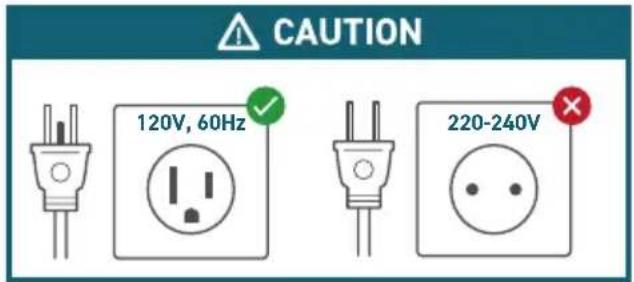
- This dehydrator has a 3-prong grounding plug, and should only be used with 120V, 60Hz electrical systems in North America. Always plug in to a grounded electrical outlet. Do not modify the plug in any way.
- Do not use with a 220–240V outlet.
-
This dehydrator uses a short power-supply cord to reduce the risk of entangling or tripping. Use extension cords with care.
• If a longer extension cord is used: -
The marked electrical rating of the cord set or extension cord should be at least as great as the electrical rating of the appliance (see page 3).
- The cord should be arranged so that it will not drape over the countertop or tabletop where it can be pulled on by children or tripped over unintentionally.
- The cord should be a grounding-type 3-wire cord.
SAVE THESE INSTRUCTIONS
GETTING TO KNOW YOUR DEHYDRATOR
Your Cosori Dehydrator features an automatic fan, which circulates warm air horizontally to evenly and quickly dry food. Dried foods are a great treat to snack on because they keep most of their nutritional value and flavor. Dehydrating is the perfect way to preserve snacks, fruit, vegetables, bread, and even flowers.
Food Dehydrator Diagram
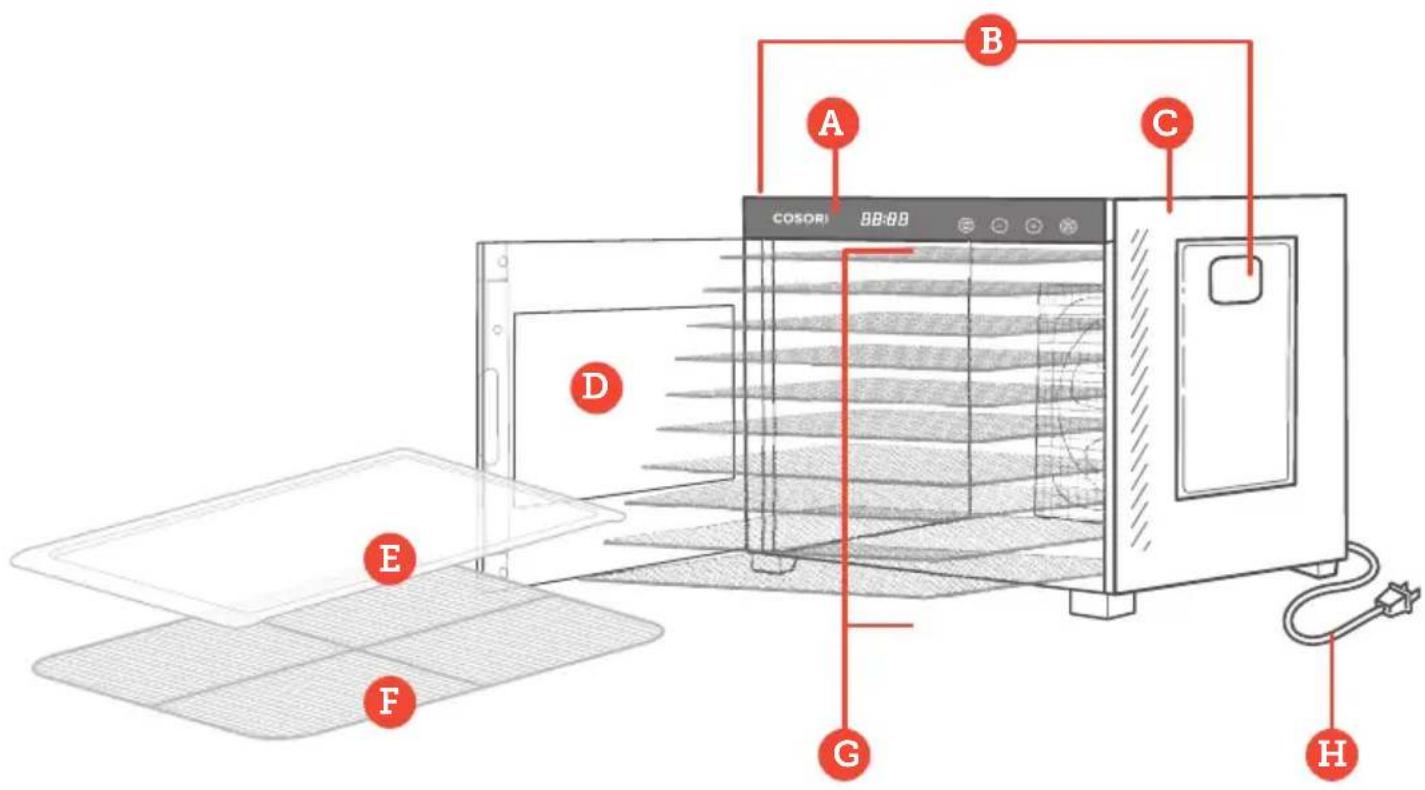
A. Control Panel
B. Handles
C. Housing
D. Door
E. Fruit Roll Sheet
F. Mesh Screen
G. Trays
H. Power Cord
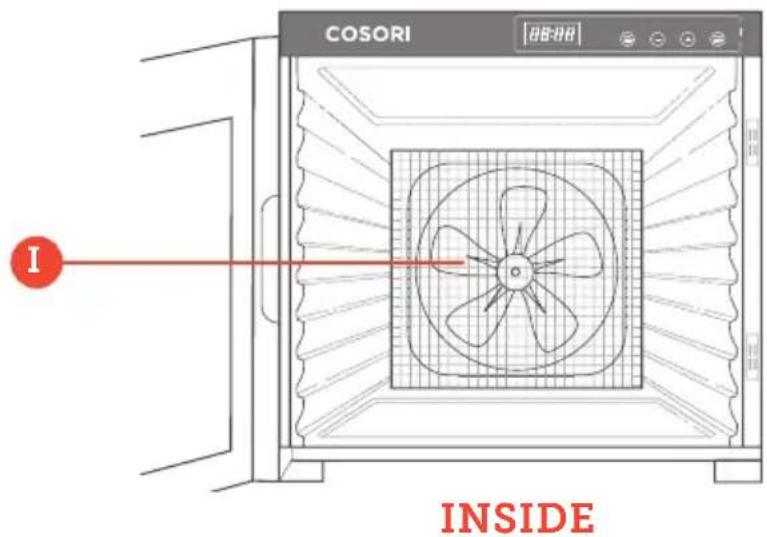
I. Fan
COSORI
88:88


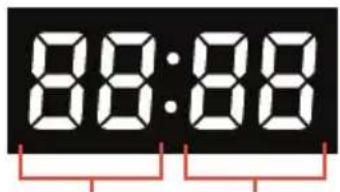
Hours Minutes
Controls
- Press START/STOP to start or stop the dehydrator.
- Press TEMP/TIME once and use the + and - buttons to change the temperature.
- Press TEMP/TIME a second time and use the + and - buttons to change the time.
BEFORE FIRST USE
Setting Up
- Remove all packaging from the dehydrator and its accessories.
- Clean the housing, trays, and tray liners with a damp cloth.
Note: The trays are dishwasher-safe. Do not wash the mesh screen or fruit roll sheet in a dishwasher.
- Place the dehydrator on a solid, level surface. Plug in. Place the trays inside the dehydrator.
- Run the dehydrator for 30 minutes at 165^ F , without adding any food. Make sure that the room has sufficient ventilation in case the dehydrator produces any smoke or smells. This is normal.
- Rinse the trays with water. Dry all parts.
Note: You only need to do this the first time you use the dehydrator.
Operation
Note:
- Use the dehydrator in a warm, dry room, and place on a stable, level, heat-resistant surface.
-
Depending on humidity in the air and moisture in the food, dehydration times may vary.
-
Place food on trays. Rearrange the trays to fit thicker food items. The trays can safely hold 7.7 lb / 3.5 kg of food. Avoid overloading the trays or overlapping food. Close the dehydrator door.
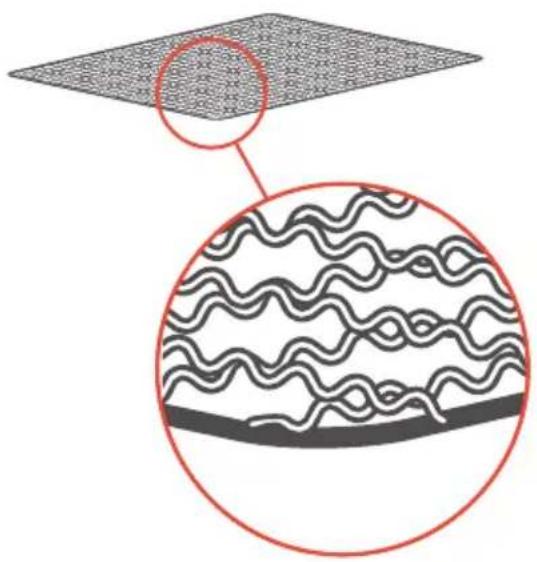
Note: To avoid scratching the inside of your dehydrator, insert the tray with the smooth side of the frame facing down [Figure 1.1].
-
Plug in. The dehydrator will beep, and the display will show "88:88". The dehydrator will switch to standby mode after 3 seconds, and the display will show "--:--".
-
Press TEMP/TIME to choose temperature. The temperature will blink on the display, and the + or - buttons will light up. Use + or - to change the temperature (95°-165°F).
Note: Temperature changes in 1^ F increments. Press and hold + or - to change the temperature rapidly.
- Press TEMP/TIME again to choose time. The time will blink on the display, and the + and - buttons will light up. Use + or - to change the time (0:30-48:00).
Note: Time changes in 30-minute increments. Press and hold + or - to change the time rapidly.
- Press START/STOP to start dehydrating. The dehydrator will start heating. START/STOP will stay lit, and the other buttons will turn off. Temperature and time will cycle on the display every 3 seconds.
Note: If you press START/STOP again to stop dehydration, the timer countdown will reset and the dehydrator will go into standby mode.
-
Optionally, you can change the time and temperature at any time by pressing TEMP/TIME.
-
When the timer finishes, the display will show "End" and heat will turn off. The dehydrator will beep 5 times, and the fan will stop.
-
Use a kitchen towel, heat-resistant glove, or oven mitt to handle the trays.
Note: The dehydrator will always remember your previous temperature and time settings.
natural_image
Diagram showing layered material structure with wavy patterns and a magnified circular detail (no text or symbols)Figure 1.1
Accessories
The dehydrator comes with 2 accessories: a fruit roll sheet and a mesh screen.
Fruit Roll Sheet
- Use for making fruit rolls and strips from fresh, frozen, or canned fruit. You can also use this sheet for pouring purée onto a tray.
- This sheet can also be placed on the bottom of the dehydrator to catch any dripping liquids, to make cleaning easier.
Mesh Screen
- Use for foods that shrink when dried. This screen will prevent them from falling through tray grates.
How to Use Accessories
- Place the accessory on a dehydrator tray. Place food on the accessory.
- Once the food is dehydrated, remove the tray and lift the accessory out of the tray.
- Remove food. Bending the screen is helpful for removing sticky foods.
Sounds
- To turn sounds on/off, wait for the display to show "--:" and press and hold + for 5 seconds until it beeps 1 time.
Overheat Protection
• Overheating is rare. If the dehydrator overheats, it will automatically shut down as a safety feature and can no longer be used. Contact Customer Support (see page 13).
Tips
- Fruit and vegetables dried in the dehydrator will look different from those sold in stores. This is because homemade dried foods do not use preservatives, artificial coloring, or artificial additives.
- Check out the Recipe Book for more tips on dehydrating foods.
CARE & MAINTENANCE
Note: Do not clean any part of the dehydrator with abrasive chemicals or metal scouring pads, as this will damage the surface.
- Unplug the dehydrator and allow it to cool before cleaning.
- Soak trays in hot, soapy water for easy removal of food residue.
- If needed, use a soft brush to clean.
Note: The trays are dishwasher-safe. Do not wash the mesh screen or fruit roll sheet in a dishwasher.
- Clean the dehydrator housing with a damp cloth.
- Dry all parts before storing or using the dehydrator.
TROUBLESHOOTING
| Problem Possible Solution | |
| The dehydrator will not turn on or the fan is not working. | Unplug the dehydrator and plug it in again. |
| The dehydrator may be damaged or malfunctioning.Contact Customer Support (see page 13). | |
| "E1", "E2", or "E3" appears on the display. | The dehydrator may be damaged or malfunctioning.Contact Customer Support (see page 13). |
| "E4" appears on the display. | The dehydrator is being used at a voltage that is too high (such as 220–240V). Unplug and use at a voltage of 120V, 60Hz. |
| Food is dried unevenly. | Cut foods evenly to ensure that they all finish drying at the same time. Avoid overlapping the food. |
| Follow the recipes and tips in the Recipe Book. |
If your problem is not listed, please contact Customer Support (see 13).
FEDERAL COMMUNICATION COMMISSION INTERFERENCE STATEMENT
This device complies with Part 15 of the FCC Rules. Operation is subject to the following two conditions:
- This device may not cause harmful interference, and
- This device must accept any interference received, including interference that may cause undesired operation.
NOTE: This equipment has been tested and found to comply with the limits for a Class B digital device, pursuant to Part 15 of the FCC Rules. These limits are designed to provide reasonable protection against harmful interference in a residential installation. This equipment generates, uses and can radiate radio frequency energy and, if not installed and used in accordance with the instructions, may cause harmful interference to radio communications. However, there is no guarantee that interference will not occur in a particular installation. If this equipment does cause harmful interference to radio or television reception, which can be determined by turning the equipment off and on, the user is encouraged to try to correct the interference by one or more of the following measures:
- Reorient or relocate the receiving antenna.
- Increase the separation between the equipment and receiver.
- Connect the equipment into an outlet on a circuit different from that to which the receiver is connected.
- Consult the dealer or an experienced radio/TV technician for help.
FCC Caution: Any changes or modifications not expressly approved by the party responsible for compliance could void the user's authority to operate this equipment.
FCC SDOC SUPPLIER'S DECLARATION OF CONFORMITY
Arovast Corporation hereby declares that this equipment is in compliance with FCC requirements. The declaration of conformity may be consulted in the support section of our website, accessible from www.cosori.com
| Product | Premium Pro 10-Tray Food Dehydrator |
| Models | CFD-P101-SUS |
| For your own reference, we strongly recommend that you record your order ID and date of purchase. | |
| Date of Purchase | |
| Order ID | |
TERMS & POLICY
Arovast Corporation ("Arovast") warrants this product to the original purchaser to be free from defects in material and workmanship, under normal use and conditions, for a period of 2 years from the date of original purchase.
Arovast agrees, at our option during the warranty period, to repair any defect in material or workmanship or furnish an equal product in exchange without charge, subject to verification of the defect or malfunction and proof of the date of purchase.
There is no other express warranty. This warranty does not apply:
- If the product has been modified from its original condition;
- If the product has not been used in accordance with directions and instructions in the user manual;
- To damages or defects caused by accident, abuse, misuse or improper or inadequate maintenance;
• To damages or defects caused by service or repair of the product performed by an unauthorized service provider or by anyone other than Arovast; - To damages or defects occurring during commercial use, rental use, or any use for which the product is not intended;
- To damages or defects exceeding the cost of the product.
Arovast will not be liable for indirect, incidental, or consequential damages in connection with the use of the product covered by this warranty.
This warranty extends only to the original consumer purchaser of the product and is not transferable to any subsequent owner of the product regardless of whether the product is transferred during the specified term of the warranty.
This warranty does not extend to products purchased from unauthorized sellers. Arovast's warranty extends only to products purchased from authorized sellers that are subject to Arovast's quality controls and have agreed to follow its quality controls.
All implied warranties are limited to the period of this limited warranty.
This warranty gives you specific legal rights and you may also have other rights which vary from state to state. Some states do not allow the exclusion or limitation of incidental or consequential damages, so the above limitation or exclusion may not apply to you.
If you discover that your product is defective within the specified warranty period, please contact Customer Support via support@cosori.com.
DO NOT dispose of your product before contacting us. Once our Customer Support Team has approved your request, please return the product with a copy of the invoice and order ID.
Every Cosori product automatically includes a 2-year warranty. To make the customer support process quick and easy, register your product online at www.cosori.com/warranty.
This warranty is made by:
Arovast Corporation 1202 N. Miller St., Suite A Anaheim, CA 92806
If you have any questions or concerns about your new product, please contact our helpful Customer Support Team.
Arovast Corporation
1202 N. Miller St., Suite A
Anaheim, CA 92806
Support Hours
Mon–Fri, 9:00 am–5:00 pm PST/PDT
Email: support@cosori.com
Toll-Free: (888) 402-1684
*Please have your invoice and order ID ready before contacting Customer Support.
SHOW US WHAT YOU'RE MAKING
We hope this manual has been helpful. We can't wait to see your beautiful results, and we think you'll want to share glam shots! Our community awaits your uploads—just pick your platform of choice below. Snap, tag, and hashtag away, Cosori chef!
Considering what to cook? Many recipe ideas are available, both from us and the Cosori community.
LiveLifeTastefully #iCookCosori
@CosoriCooks


@Cosori

COSORI®

- Thank you for your purchase!
- CONTACT OUR CHEFS
- Table of Contents Package Contents
- READ AND SAVE THESE INSTRUCTIONS
- IMPORTANT SAFEGUARDS
- General Safety
- Care & Maintenance Power & Cord
- Electromagnetic Fields (EMF)
- SAVE THESE INSTRUCTIONS
- GETTING TO KNOW YOUR DEHYDRATOR
- Controls
- BEFORE FIRST USE
- Setting Up
- Operation
- Note:
- Accessories
- Fruit Roll Sheet
- Mesh Screen
- How to Use Accessories
- Sounds
- Overheat Protection
- Tips
- CARE & MAINTENANCE
- TROUBLESHOOTING
- FEDERAL COMMUNICATION COMMISSION INTERFERENCE STATEMENT
- FCC SDOC SUPPLIER'S DECLARATION OF CONFORMITY
- TERMS & POLICY
- Arovast Corporation
- Support Hours
- SHOW US WHAT YOU'RE MAKING
- LiveLifeTastefully #iCookCosori
- COSORI®
Brand : Cosori
Model : Premium Pro 10-Tray
Category : Food Dehydrator