
Kiddypix Robozz - Camera EASYPIX - Free user manual and instructions
Find the device manual for free Kiddypix Robozz EASYPIX in PDF.


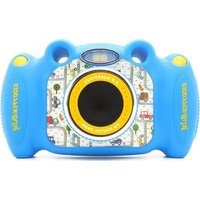
| Product Type | Digital Camera for Kids |
| Model | Kiddypix Robozz |
| Brand | Easypix |
| Dimensions (approx.) | 7 x 5 x 4 cm |
| Weight (approx.) | 80 g (with batteries) |
| Power Supply | 2 x AA batteries (not included) |
| Image Sensor | 2 MP (interpolated up to 5 MP) |
| Display | 1.8 inch LCD screen |
| Storage | Internal memory (approx. 128 MB) + microSD card slot (up to 32 GB) |
| Photo Resolution | Up to 2560 x 1920 pixels (interpolated) |
| Video Resolution | 640 x 480 pixels (VGA) |
| Main Functions | Photo, video record, playback, games, photo effects, selfie mirror |
| Connectivity | USB 2.0 for data transfer |
| Built-in Games | Yes, multiple puzzle and memory games |
| Care and Cleaning | Wipe with a soft, dry cloth. Do not use abrasive cleaners. |
| Safety Notes | Not suitable for children under 3 years. Keep batteries out of reach. |
| Spare Parts / Repairability | No official spare parts; device is not user-serviceable. |
| General Information | Durable, shockproof design for kids. Robot theme. |
Frequently Asked Questions - Kiddypix Robozz EASYPIX
User questions about Kiddypix Robozz EASYPIX
0 question about this device. Answer the ones you know or ask your own.
Ask a new question about this device
Download the instructions for your Camera in PDF format for free! Find your manual Kiddypix Robozz - EASYPIX and take your electronic device back in hand. On this page are published all the documents necessary for the use of your device. Kiddypix Robozz by EASYPIX.
USER MANUAL Kiddypix Robozz EASYPIX
USER'S GUIDE
Congratulations on the purchase of the Kiddypix Robozz! With this camera you can take wonderful photos and videos with your child, check out funny effects and photo frames and play different games.
We hope you have lots of fun!
USING THE CAMERA FOR THE FIRST TIME
To use the camera you need 3x AAA batteries and a micro SD card. They are not included.
Please use a high quality micro SD card - the maximum storage capacity should be 32GB.
Format your memory card using the settings menu in your camera before using it for the first time.
The "Format" option can be found in the "Settings" menu.
For safety reasons the batteries should be stored safely to prevent accident or injury.
To insert the batteries and the micro SD card, the battery cover screw must be opened first using the screwdriver supplied.
Please ensure the cover is securely closed after the batteries and memory card have been inserted.
WARNING! The camera is not suitable for children under 36 months because of choking hazard.
KIDDYPIX ROBOZZ
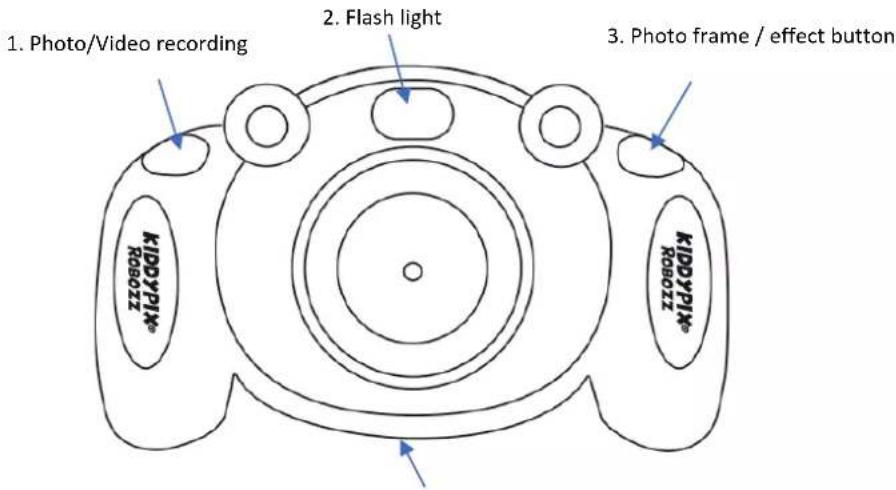
CAMERA BUTTONS AND FUNCTION
-
Battery compartment cover:
3x AAA Battery/micro SD card/USB Slot/ Reset -
Viewfinder

KIDDYPIX ROBOZZ
1. Shutter button - Photo/Video recording
Press this button to take a photo or to start and stop video recording.
2. Flash light
Activate/deactivate the flash light function by briefly pressing the Power on/off button (9).
3. Photo frame / effect button
While using photo mode, press this photo frame button.
To switch between all frames and effects press the left and right arrow buttons (11+13).
You can simply make photos then.
To leave the frame effect please press the photo frame button again.
4. Battery compartment cover
Battery/micro SD card/USB port cover fixing screw
For safety reasons the batteries should be stored safely to prevent accident or injury.
To insert the batteries and the micro SD card, the battery cover screw must be opened first using the screwdriver supplied.
Please ensure the cover is securely closed after the batteries and memory card have been inserted.
Please use a high quality micro SD card - the maximum storage capacity should be 32GB.
Format your memory card using the settings menu in your camera before using it for the first time.
The "Format" option can be found in the "Settings" menu.
5. Delete button (delete one file)
While using playback mode, use the arrow button to select the file you want to delete and confirm with this delete button (5).
6. Mode
Select the operating mode (photo, video, games, playback, settings) and confirm with the OK button.
7. Viewfinder
8. Delete all files
If you want to delete all files at once, press the delete button (8) in playback mode and confirm.
9. Power on/off button
10. Microphone
11. Arrow button up/right
12. OK button
Confirms your selected menu or setting option.
13. Arrow button down/ left
14. Speaker
KIDDYPIX ROBOZZ
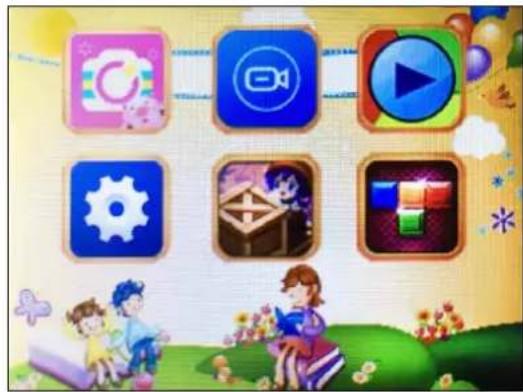
CAMERA MENU
natural_image
Game interface icons including video, play, gear, and children playing (no text or symbols)
PHOTO MODE
Press the mode button and select the photo mode by using the arrow button.
Confirm with the OK button.
Now you can take photos by pressing the photo/video button.
Photo frame effect:
While using photo mode press the photo frame button.
To switch between the frames and effects press the left and right arrow buttons.
When you have chosen a frame simply press the photo/video button to take your framed photo.
To leave the frame effect please press the photo frame button again

VIDEO MODE
Press the mode button and select the video mode by using the arrow button.
Confirm with the OK button.
Now you can record videos by pressing the photo/video button.
KIDDYPIX ROBOZZ

PLAYBACK MODE
Press the mode button and select the playback mode by using the arrow button.
Confirm with the OK button.
Now you can watch your photos and videos and switch between them using the arrow button.
To delete only one file please press the delete button (5) and confirm with OK.
To delete all files at once, press the delete key (8) and confirm with OK.

SETTING MODE
Press the mode button and select the setting mode by using the arrow button.
Confirm with the OK button.
You are now in the settings menu.
Here you can change the following settings using the arrow button to select the various options:
- Photo resolution: 5M / 3M / 2M / 1.3M
- Photo Timer (Self-timer): Off / 2 / 5 / 10 sec.
- Video resolution: 1080FHD, 1080P, 720P
- Loop recording: Off / On
- Date stamp: Off / On
- Select the language for the camera menu
- Screensaver: Off / 1min. / 2min. / 3min.
- Automatic switch-off: Off / after 1 / 3 / 5 minutes
- Frequency: 50HZ / 60HZ
- USB-Connection
- Format your micro SD card
Press OK and then confirm by pressing OK.
Please note: The formatting process will delete all files on the micro SD card.
- Time and date setting
Press the left and right keys of the arrow button to set the hour/minute/second, the up and down keys to increase or decrease the hour/minute/second values, and then press OK to confirm.
- Reset to default setting
Press default setting and then confirm by pressing OK.
All settings that you have previously set will be reset to the factory settings.
KIDDYPIX ROBOZZ

GAME "PUSH BOX"
Press the Mode button and use the arrow key to select the game.
Confirm the selection with OK.
The aim of the game is to use the yellow boxes to move all the red dots away.
Control:
Photo/Video Shutter Button = Down
Effect key = Up
Left arrow key = To the left
Right arrow key = To the right


GAME "TETRIS"
Press the Mode button and select the mode using
the arrow key to stop the game.
Confirm the selection with OK.
Aim of the game:
Complete as many lines of the Tetris puzzle as possible.
Controls:
Effect key = Rotate shapes
Left arrow key = To the left
Right arrow key = To the right

Have fun!
KIDDYPIX ROBOZZ
IN CASE YOU MIGHT HAVE SOME QUESTIONS ...
Photo frames and effects: How do they work?
While using photo mode:
Press the photo frame / effect button and select a frame or effect by pressing the left and right arrow buttons.
To delete the frame effect, press the photo frame / effect button again.
Flash light: How does it work?
Activate / deactivate the flash by briefly pressing the on/off button (9).
How can I delete my files?
Press the mode button and select the playback mode by using the arrow button.
Confirm with the OK button.
Now you can watch your photos and videos and switch between them using the arrow button.
To delete only one file please press the delete button (5) and confirm with OK.
To delete all files at once, press the delete key (8) and confirm with OK.
How can I change the batteries?
To use the camera you need 3x AAA batteries. (Not included)
For safety reasons the batteries should be stored safely to prevent accident or injury.
To insert the batteries and the micro SD card, the battery cover screw must be opened first using the screwdriver supplied.
Please ensure the cover is securely closed after the batteries and memory card have been inserted.
TECHNICAL SPECIFICATIONS
Photo resolutions:
5MP* (2592×1944), 3MP* (2048×1536), 2MP* (1920×1080), 1.3MP (1280×960)
Video resolutions:
1080FHD* (1920x1080), 1080P* (1440x1080), 720P (1920x720)
2.0"/5cm display
110° viewing-angle lens
External memory: micro SD card support up to 32GB (not included)
Microphone built-in
Speaker built-in
Frequency: 50HZ / 60HZ
Self-timer: On / Off / 2sec. / 5sec. / 10sec.
Flash light built-in
Various photo frames built-in
2 games built-in
3x AAA battery (not included)
*interpolated
KIDDYPIX ROBOZZ

IMPORTANT INFORMATION
To ensure the optimal functioning of your camera, please note the following important information:
MicroSD card:
- Please ensure your memory card is formatted in the camera before first using the card for the first time (Settings > Format).
• The maximum capacity memory card supported is 32GB.
Use of memory cards exceeding the maximum recommended capacity may result in file errors.
• The recording time depends on the selected resolution.
Batteries:
- If you are not going to use the camera for a long time, please remove the batteries.
Safety instructions:

WARNING: The camera is not suitable for children under 36 months because of choking hazard.

WARNING: Always protect your camera from falls, blows and bumps.
- Keep a sufficient distance from objects that generate strong magnetic fields or radio waves, such as electrical appliances to prevent them from damaging the product or affecting the sound and image quality.
- Store the device cool (at room temperature) in a dry and dust-free location and never expose the product to high temperatures or permanently direct sunlight.
- In the unlikely event of overheating, smokes or unpleasant odors coming out of the unit, disconnect it immediately from the charging cable and remove the battery to avoid a fire.

All product specifications are correct at time of print and are subject to change without prior notice.
Easypix GmbH reserve the right for errors or omissions.
For technical help please visit our support area on www.easypix.eu.
CONFORMITY
We hereby declare that the CE marking has been affixed to this product in accordance with the essential requirements and relevant provisions of the European directives.

The EC Declaration of Conformity can be downloaded here:
http://www.easypix.info/download/pdf/doc_kiddypix_robozz.pdf
KIDDYPIX ROBOZZ
DISPOSAL

Dispose of packaging
For disposal, separate packaging into different types. Cardboard and board must be disposed of as paper and foil must be recycled.
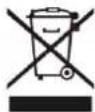
Disposal of Waste Electrical and Electronic Equipment and/or Battery by users in private households in the
European Union. This symbol on the product or on the packaging indicates that this cannot be disposed of as a household waste. You must dispose of your waste equipment and/or battery by handling it over to the applicable take-back scheme for the recycling of electrical and electronic equipment and/or battery. For more information about recycling of this equipment and/or battery, please contact your city office, the shop where you purchased the equipment or your household waste disposal service. The recycling of materials will help to conserve natural resources and ensure that it is recycled in a manner that protects human health and environment.

Battery warning
- Never dismantle, crush, or pierce the batteries, or allow the batteries to short-circuit. Do not expose batteries being placed in high temperature environment, if battery leaks or bulges, stop continue to use.
- Risk of explosion if battery is replaced by an incorrect type.
- Keep the batteries out of reach of children.
- Batteries may explode if exposed to naked fire. Never dispose of batteries in a fire.
- Disposed of used batteries observing local regulations.
- Before disposing the device, please remove the batteries.

The camera is not suitable for children under 3 years because of choking hazard.


Made in China / Only for EU
easypix
LIFESTYLE ELECTRONICS

- USER'S GUIDE
- USING THE CAMERA FOR THE FIRST TIME
- KIDDYPIX ROBOZZ
- CAMERA BUTTONS AND FUNCTION
- Shutter button - Photo/Video recording
- Flash light
- Photo frame / effect button
- Battery compartment cover
- Battery/micro SD card/USB port cover fixing screw
- Delete button (delete one file)
- Mode
- Viewfinder
- Delete all files
- Power on/off button
- Microphone
- Arrow button up/right
- OK button
- Arrow button down/ left
- Speaker
- CAMERA MENU
- PHOTO MODE
- Photo frame effect:
- VIDEO MODE
- PLAYBACK MODE
- SETTING MODE
- GAME "PUSH BOX"
- GAME "TETRIS"
- IN CASE YOU MIGHT HAVE SOME QUESTIONS ...
- Photo frames and effects: How do they work?
- Flash light: How does it work?
- How can I delete my files?
- How can I change the batteries?
- TECHNICAL SPECIFICATIONS
- IMPORTANT INFORMATION
- MicroSD card:
- Batteries:
- Safety instructions:
- CONFORMITY
- DISPOSAL
- Dispose of packaging
- Disposal of Waste Electrical and Electronic Equipment and/or Battery by users in private households in the
- Battery warning
Brand : EASYPIX
Model : Kiddypix Robozz
Category : Camera