
Aeris aair lite - Robot vacuum IROBOT - Free user manual and instructions
Find the device manual for free Aeris aair lite IROBOT in PDF.


| Product Type | Robot Vacuum / Air Purifier |
| Brand | iRobot |
| Model | Aeris aair lite |
| Power Supply | 100–240 VAC, 50/60 Hz |
| Pre‑filter | F7 class; captures hair, dust, pollen |
| Main Filter | HEPA H13; captures PM0.1 with 99.95% efficiency |
| Filter Replacement Indicator | Press P (pre‑filter) or H (main filter) to check status; long press to reset |
| Operating Modes | Smart mode (auto fan speed based on air quality and schedule); Sleep mode (dim lights, whisper quiet) |
| Control Interface | Touch panel: swipe left/right for speed, hold 5 seconds for menu |
| Child Lock | Long press lock button (5 seconds) to enable/disable |
| Wi‑Fi Connectivity | Long press Wi‑Fi icon (3 seconds) to activate “I’m listening” mode and connect via app |
| App Compatibility | Aeris app (available on App Store and Google Play) |
| Safety Features | Auto shut‑off if overheating; polarized plug; do not operate with damaged cord |
| Usage Restrictions | Indoor dry locations only; keep away from water, flammable materials, and heat sources |
| Warranty | 2 years for main components (fan, PCBAs, Wi‑Fi module); 7‑day return; 30‑day exchange for manufacturing defects |
| Certifications | FCC ID: 2A28LAAIRLITE; IC ID: 27816-AAIRLITE; CAN ICES-003(B) |
Frequently Asked Questions - Aeris aair lite IROBOT
User questions about Aeris aair lite IROBOT
0 question about this device. Answer the ones you know or ask your own.
Ask a new question about this device
Download the instructions for your Robot vacuum in PDF format for free! Find your manual Aeris aair lite - IROBOT and take your electronic device back in hand. On this page are published all the documents necessary for the use of your device. Aeris aair lite by IROBOT.
USER MANUAL Aeris aair lite IROBOT
This instruction manual has been developed to help you better understand how to set up and use your aeris device.
If you continue to have issues that the manual cannot address, please contact us at hello@aeris.io.
The information in this manual is subject to change without notice. All other trademarks belong to their respective owners. Contents subject to revision without prior notice.
Pre-filter/Lower-filter
Pre-filtro
Pré-filtro
natural_image
Technical line drawing of a cylindrical mechanical component with internal grooves and central bore (no text or symbols)Diameter
Diámetro
Diâmetro
Durchmesser
242mm
9.5in
Height
Altura
Tamanho
Hohe
100mm
3.9in
Material
Material
Material
Material
Filter class F7
Filtro clase F7
Filtro clase F7
Filterklasse F7
F7 pre-filter captures larger particles such as hair, dust, pollen and enhances the life of the main HEPA filter.
F7 pre-filter captures larger particles such as hair, dust, pollen and enhances the life of the main HEPA filter.
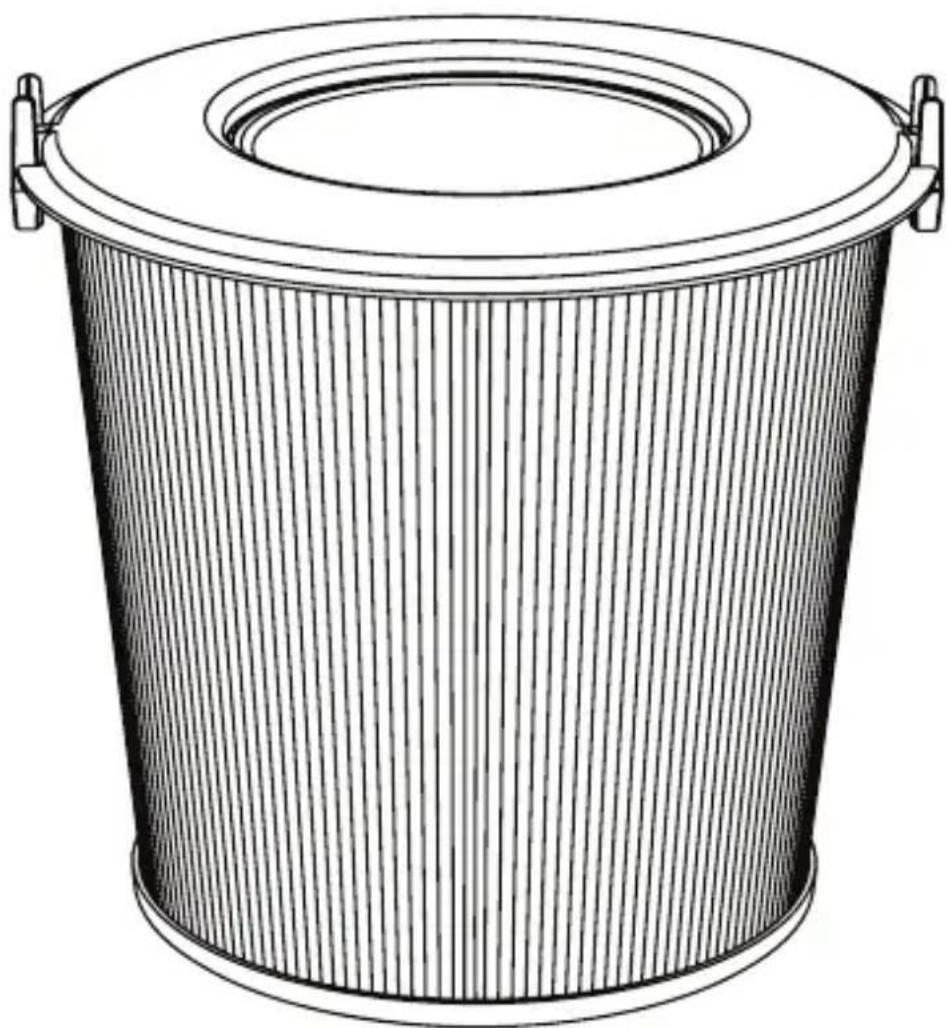
Main Filter/Upper Filter
Filtro principal
Filtro principal
Main Filter/Upper Filter
natural_image
Line drawing of a cylindrical container with a lid and side handles (no text or symbols)| Diameter | 230 |
| Diámetro | 9in |
| Diâmetro | |
| Durchmesser |
| Height | 210mm |
| Altura | |
| Tamanho | 8.2in |
| Hohe |
| Material | Filter class HEPA13 |
| Material | Filtro clase HEPA13 |
| Material | Filtro classe HEPA13 |
| Material | Filterklass HEPA13 |
HEPA H13 main filter captures PM0.1 pollutants with up to 99.95% efficiency.
Attention: aair lite supports 100-240 VAC.
Do not operate any machine with a damaged cord or plug. Discard device or return to an authorized service facility for examination and/or repair. Do not run cord under carpeting. Do not cover cord with throw rugs, runners, or similar coverings. Do not route cord under furniture or appliances. Arrange cord away from traffic area and where it will not be tripped over.
In smart mode air lite selects the most appropriate fan speed automatically based on indoor air quality and your daily schedule.
In sleep mode aair lite will dim its lights and adjust the fan speed to whisper quiet operation.
natural_image
Line drawing of a hand touching a curved line above a circle, with no text or symbols present.Swipe right on the touch panel to increase the fan speed and swipe left to decrease the fan speed.
Hold any point of the swipe pad for 5 seconds to activate the main menu.
Press this button to check the pre filter status.
Press this button to check the main filter status.
Hold this button to activate/desactivate child lock.
A cross-through filter icon indicates that filter need to be replaced.
Long press the "lock" button to enable child lock. Long press again (5 seconds) to disable child lock.
Long press (3 seconds) below Wi-Fi icon to activate "I'm listening" mode on aair lite and connect device to Wi-Fi.
natural_image
Grid pattern with scattered black dots on a light background (no text or symbols)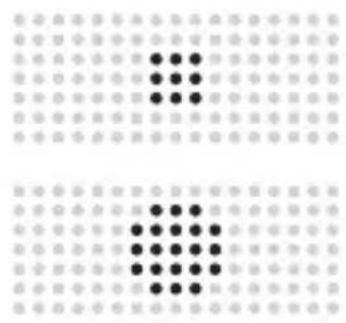
natural_image
Grid pattern with black dots and dots on a light background (no text or symbols)

Please follow the setup instructions in the aeris application.
Please unplug your device before the following steps.
natural_image
Line drawing of hands operating a cylindrical device with a curved arrow indicating motion (no text or symbols)Firmly grasp the aair lite and rotate the base counter-clockwise. aair lite should unlock at the base allowing access to the filter chassis for easy replacement of pre and main filters. To close the device, firmly grasp the upper and lower portions of aair lite and lock by turning in clock-wise motion. The lines at the foot and chassis should align to indicate that the device is fully locked.
Lift off the upper cover from the device and pull out the main filter by pressing the clips on each side. Slide in a new filter until you hear a click. Close the device with the cover.
Reset pre filter life: Press "P" until until icon blinks.
Reset main filter life: Press "H" until the icon blinks.
To avoid electrical shock, fire hazard, and damage to your aair lite, please avoid having water, liquids or any flammable materials come into direct contact with your device.
aairlite may only be connected to 110V-220V power source.
Do not block the air inlet and outlet, e.g. by placing items on the air outlet or in front of the air inlet.
Always unplug aairlite after use and before you clean it.
Stop using a airlite if the device emits strange odors, sounds or over heats. Contact your official aeris distributor for assistance.
aairlite is not designed for heavy storage.
The warranty covers defects of the main components such as: the fan, the PCBAs and the Wi-Fi module.
Within 7 days, starting from the day when the customer receives the air purifier, he can choose to return or exchange it, or have it repaired if it malfunctions without the cause of human damage. A return without malfunctioning of the device is only possible if the filter is unused.
The right to return the product without any reason within 7 days, only applies to the products sold on the official aeris store or on the stores of an official distributor of aeris products. Human damage, severe damages to the packaging or missing accessories will mitigate the right to return the product. The customer wishing to return the product has to cover all shipping costs.
Money will be returned to the customer's account within 7 days from the day the returned product is received by aeris or the official distributor.
The customer can exchange the device within 30 days after purchase, if it is defective due to manufacturing failure. The warranty is valid for a period of 2 years. The receipt and invoice are the proof of warranty, please do not discard them.
The warranty doesn't cover malfunctions that were caused by misuse of the device by the user.
The warranty period has passed.
Repairing the product in a place that is not authorized by aeris; using the product in a wrong way; liquid damage; removing or altering the serial number, label or security tags.
When customers are not following the user manual to use and maintain the product and cause damage.
When damage is caused by force or impact.
The model number of the repaired product does not match the warranty number of the product.
Important Safety Instructions

CAUTION
This symbol (4) is intended to alert the user to the presence of uninsulated “dangerous voltage” within the product’s enclosure that may be of sufficient magnitude to constitute a risk of electric shock to persons.
This symbol ( ⚠️ ) is intended to alert the user to the presence of important operating and maintenance (servicing) instructions in the literature accompanying the appliance.
This appliance can be used by children aged from 8 years and above and persons with reduced physical, sensory or mental capabilities or lack of experience and knowledge if they have been given supervision or instruction concerning use of the appliance in a safe way and understand the hazards involved. Children shall not play with the appliance. Cleaning and user maintenance shall not be made by children without supervision.
Important Safety Instructions
"READ AND SAVE THESE INSTRUCTIONS"
WARNING To Reduce the Risk of Fire, Electric Shock, Property Damage, or Personal Injury
- Heed all warnings.
- Follow all instructions.
- Use only as described in this manual.
- Intended for indoor dry locations only.
- Install in accordance with the manufacturer's instructions.
- To reduce the risk of fire, do not block any ventilation openings. Do not cover the ventilation of the apparatus with newspapers, tablecloths, curtains, etc. and do not place lighted candles on the apparatus.
- Do not install the appliance in a confined space, such as a bookcase or built-in cabinet.
- Do not install near any heat sources such as radiators, heat registers, stoves, or other apparatus that produce heat.
- Do not operate any fan with a damaged cord or plug. Discard fan or return to an authorized service facility for examination and/or repair.
- Do not run cord under carpeting. Do not cover cord with throw rugs, runners, or similar coverings. Do not route cord under furniture or appliances. Arrange cord away from traffic areas and where it will not be tripped over.
- Protect the power cord from being walked on or pinched particularly at plugs, convenience receptacles, and the point where they exit from the apparatus.
- Do not stretch the cord or place the cord under strain. Keep cord away from heated surfaces.
- Do not unplug by pulling on the cord. To unplug, grasp the plug, not the cord. The use of an extension cord is not recommended.
- The unit is not disconnected from the AC power source (mains) while it is connected to the wall outlet, even if the unit itself has been turned off. As the main plug is used to disconnect the unit from the mains, connect the unit to an easily accessible AC outlet. Should you notice an abnormality in the unit, disconnect the main plug from the AC outlet immediately.
- Turn off all controls before unplugging.
- Unplug before cleaning or carrying out any maintenance.
- Unplug this apparatus during lightning storms or when unused for long periods of time. To avoid a tripping hazard, safely coil the cord.
- Do not defeat the safety purpose of the polarized or grounding-type plug. A polarized plug has two blades with one wider than the other. A grounding type plug has two blades and a third grounding prong. The wide blade or the third prong are provided for your safety. If the provided plug does not fit into your outlet, consult an electrician for replacement of the obsolete outlet.
- To reduce the risk of fire or electric shock do not use this apparatus near water. Do not expose this apparatus to dripping or splashing, and do not place objects filled with liquids, such as vases, on the apparatus.
- Do not handle any part of the plug or machine with wet hands.
- Do not use any cleaning agents or lubricants on this machine.
- Clean only with dry cloth.
- Only use attachments/accessories specified by the manufacturer.
- Do not perform any maintenance other than as described in this manual.
- Do not open the unit or attempt to make any repairs yourself. Do not make any modifications to the device.
- Refer all servicing to qualified service personnel. Servicing is required when the apparatus has been damaged in any way, such as power-supply cord or plug is damaged, liquid has been spilled or objects have fallen into the apparatus, the apparatus has been exposed to rain or moisture, does not operate normally, or has been dropped.
- Always carry the machine by the base.
- Always place the machine on a firm, flat, level surface.
Safety information
- Your filter unit is non-washable and non-recyclable. Use caution when replacing the filter to reduce the likelihood of captured particulates being reintroduced to the air.
- Do not use in conjunction with or directly next to an air freshener or similar products. Keep essential oils and chemicals away from the appliance.
- The nameplate with electrical rating is located inside the unit beneath the filter.
Radio Information:
FCC Supplier's Declaration of Conformity
Aeris Cleantec, AG Model: aair lite
FCC ID: 2A28LAAIRLITE IC ID: 27816-AAIRLITE CAN ICES-003(B)
This device complies with part 15 of the FCC Rules. Operation is subject to the following two conditions:
(1) This device may not cause harmful interference, and
(2) this device must accept any interference received, including interference that may cause undesired operation.
This device contains a licence-exempt transmitter/receiver that complies with Innovation, Science and Economic Development Canada's licence-exempt RSS(s). Operation is subject to the following two conditions:
(1) This device may not cause interference
(2) This device must accept any interference, including interference that may cause undesired operation of the device.
- Changes or modifications not expressly approved by iRobot Corporation could void the user's authority to operate the equipment.
- This equipment has been tested and found to comply with the limits for a Class B digital device, pursuant to part 15 of the FCC Rules as well as ICES-003 Rules. These limits are designed to provide reasonable protection against harmful interference in a residential installation. This equipment generates, uses and can radiate radio frequency energy and, if not installed and used in accordance with the instructions, may cause harmful interference to radio communications. However, there is no guarantee that interference to radio communication will not occur in a particular installation. If this equipment does cause harmful interference to radio or television reception, which can be determined by turning the equipment off and on, the user is encouraged to try to correct the interference by one or more of the following measures:
- Reorient or relocate the receiving antenna.
- Increase the separation between the equipment and receiver.
- Connect the equipment into an outlet on a circuit different from that to which the receiver is connected.
- Consult the dealer or an experienced radio/TV technician for help.
- Under Industry Canada regulations, this radio transmitter may only operate using an antenna of a type and maximum (or lesser) gain approved for the transmitter by Industry Canada. To reduce potential radio interference to other users, the antenna type and its gain should be so chosen that the equivalent isotropically radiated power (e.i.r.p.) is not more than the necessary for successful communication.
- FCC Radiation Exposure Statement: This product complies with FCC §2.1093(b) for portable RF exposure limits, set forth for an uncontrolled environment and is safe for the intended operation as described in this manual. Per FCC requirements, maintain a distance of more than 8 inches (20cm) between any person and this device.
- ISED Statement on Radiation Exposure: This product is compliant with the Canadian Standard IC RSS-102, Restriction of RF Exposure in an Uncontrolled Environment. The device can be used safely for its intended purpose, as described in this manual. Per ISED requirements, maintain a distance of more than 8 inches (20cm) between any person and this device.
Brand : IROBOT
Model : Aeris aair lite
Category : Robot vacuum