
STR-M-01 - Joystick Gembird - Free user manual and instructions
Find the device manual for free STR-M-01 Gembird in PDF.


| Product Type | Vibration Racing Wheel with Pedals |
| Compatible Platforms | PS4, PS3, Nintendo Switch, PC (USB X-INPUT/D-INPUT) |
| Wheel Rotation Angle | 270 degrees |
| Wheel Diameter | 220 mm (9 inches) |
| Steering Wheel Cable Length | 1.8 m |
| Foot Pedal Cable Length | 1.8 m |
| Dimensions (Wheel Unit) | 41 x 34 x 25 cm |
| Dimensions (Pedal Unit) | 35.5 x 20.5 x 11.5 cm |
| Net Weight | 1.8 kg |
| Power Consumption | 5 V DC, up to 120 mA |
| Interface | USB |
| Vibration Feedback | Yes, built-in vibration motor for realistic force feedback |
| Auto-Centering | Yes, automatically sets center position when powered on |
| Sensitivity Adjustment | Yes, via rotary dial |
| Menu Buttons | PS4 menu access and mode switch (D-INPUT/X-INPUT) on PC |
| D-Pad | 4-way directional pad |
| Mini Analog Stick | Yes, mounted on wheel |
| Action Buttons | 8 action buttons |
| Pedal Functions | Accelerator (R-pedal) and Brake (L-pedal) with spring-loaded mechanism |
| Pedal Mode (PS3) | Default: L-pedal = Square, R-pedal = Cross; can be changed to L-pedal = L2, R-pedal = R2 |
| Function Relocation (PS4/PS3/X-INPUT) | L1, R1, L2, R2, pedals can be reassigned to other buttons |
| Mounting Options | Desk/table or lap (no attachments needed for lap use) |
| Cleaning | Wipe with dry cloth; do not use liquids or allow moisture inside |
| Safety Precautions | Avoid high temperatures, humidity, direct sunlight; do not disassemble; do not drop or apply strong shock |
| Warranty | Standard manufacturer warranty; see receipt for details |
Frequently Asked Questions - STR-M-01 Gembird
User questions about STR-M-01 Gembird
0 question about this device. Answer the ones you know or ask your own.
Ask a new question about this device
Download the instructions for your Joystick in PDF format for free! Find your manual STR-M-01 - Gembird and take your electronic device back in hand. On this page are published all the documents necessary for the use of your device. STR-M-01 by Gembird.
USER MANUAL STR-M-01 Gembird
natural_image
Abstract geometric logo with a stylized letter 'G' inside a hexagonal frame (no text or symbols)GMB GAMING
STR-M-01
USER MANUAL
HANDBUCH
HANDLEIDING
MANUEL DESCRIPTIF
VIBRATION RACING WHEEL WITH PEDALS (PC/PS3/PS4/SWITCH)
LENKRAD MIT VIBRATION (PC/PS3/PS4/SWITCH)
VIBRATIE RACING STUUR MET PEDALEN (PC/PS3/PS4/SWITCH)
VOLANT DE COURSE À VIBRATIONS AVEC PÉDALIER (PC/PS3/PS4/SWITCH)
• Steering wheel with built-in vibration and gear stick
• Several interfaces in one wheel: PS3, PS4, SWITCH, PC (USB)
- Spring-loaded pedals with accelerator and brakes functions
- 270-degree steering angle, 2-axis, joystick, 4-way D-pad and 8 action buttons
• Sturdy heavy construction
Specifications
- Interface: USB
• Wheel rotation: 270 degrees
• Wheel diameter 220 mm (9")
• Power consumption: 5 V DC up to 120 mA
• Steering wheel cable length: 1.8 m - Foot pedal unit cable length: 1.8 m
• Product size: 41 x 34 x 25 cm (wheel), 35.5 x 20.5 x 11.5 cm (pedals)
• Net weight: 1.8 kg

PRODUCT DESCRIPTION
STEERING WHEEL
The rotation Angle (270 degree).
The wheel have analogue output, such that the actually output is proportional to the movement of the wheel. Please do not try and turn the wheel past its limitations (270 degree turn limiter). Doing so may damage or effectively ruin the steering wheel. Excessive force is NOT necessary to get the most out of your wheel.
MENU BUTTONS
For direct access to the Playstation4 menu in Playstation4. And for D-INPUT mode and X-INPUT mode switch in PC.
D-Pad
This emulates the D-pad found on most control pads. This is used for navigating through the menus and making menu changes
Mini analog stick.
Analog control stick mounted on the wheel for use with games such as GTA. For avoid the wrong action during playing the games, the analog stick X-axis will disable when the steering wheel is turning more than ±15^
Action buttons
These buttons are correspond to specific game functions detailed, in your software documentation and options menu.
Auto centering function
The Wheel center position is automatically set when switching on your game system
Sensitivity settings:
The sensitivity can be adjusted by turning the Sensitivity dial. The higher the sensitivity, the faster the steering wheel reacts to being turned, i.e. even a small movement of the steering wheel produces a distinct reaction in the screen vehicle and vice versa. You will feel the center sensitivity position when turning.
Vibration feedback
The wheel support realistic vibration feedback for effect-feeling on every crash, bump and turn.
Note: please make sure your game platform and game software are supporting the vibration function.
Mode LED
In PS4/PS3/SWITCH/ANDROID/PC-XINPUT mode the LED is on.
In PC: LED off
Playing on the desk or table
Ensure that the wheel is plugged into the game system. Place the wheel in a comfortable driving position near enough to your TV to ensure visual comfort while playing
Playing from your lap
The wheel construction is designed to be placed directly on your lap with no attachments. Now, just take a seat in your favorite gaming chair after plugging in the game system and switch the power on, and you are off to the races!
Foot Pedal
In PS3 playing mode, the foot pedal can be correspond to L-Pedal=☐ / R-Pedal =× or L-Pedal=L2 / R-Pedal =R2 to support all the games.
The default setting is L-Pedal=☐ / R-Pedal =× you can change the setting to L-Pedal=L2 / R-Pedal =R2 by press the “select” and “start” button simultaneously for 3 seconds
Function relocation and return to default value Function relocation in PS4/PS3/X-INPUT
L1, R1, L2, R2, L-pedal, R-pedal can be set to △、○、×、□、L1、L2、R1 and R2 with the following procedures:
Press “MENU” and “×” at the same time and hold 3 seconds, the LED will be flashing., indicating the wheel is in setup environment.
Press one of the relocation buttons L1, R1, L2, R2, L-pedal, R-pedal), for example L1.
Press a action button, for example ‘△’ button which is desired to be relocation onto the “L1”, The LED stop flashing and the setup routine is terminated.
The L1, in this example, will now become the ‘△’ action.
Return to Default Value:
In setup environment, press twice the button which you want to restore, then it done.
BUTTONS LAYOUT
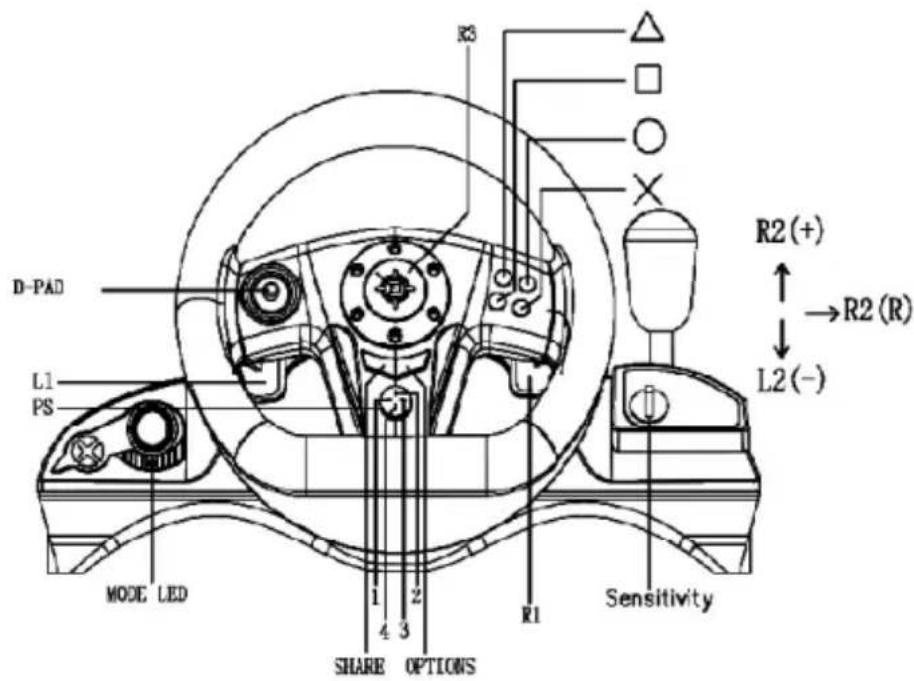
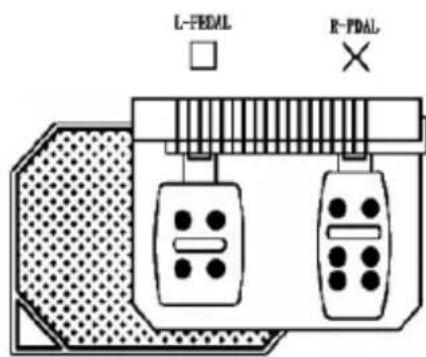
| Wheel | PS4 | PC | PS3 | SWITCH | Android | X-INPUT |
| 1 | X | Y | Y | |||
| 2 | A | B | B | |||
| × | × | 3 | × | B | A | A |
| 4 | Y | X | X | |||
| L1 | L1 | 5 | L1 | L | L1 | LT |
| R1 | R1 | 6 | R1 | R | R1 | RT |
| L2 | L2 | 7 | L2 | ZL | L2 | LB |
| R2 | R2 | 8 | R2 | ZR | R2 | RB |
| SELECT | SHARE | 9 | SELECT | - | SELECT | BACK |
| START | OPTION | 10 | START | + | START | START |
| L3 | L3 | 11 | L3 | L | L3 | LS (LTH) |
| R3 | R3 | 12 | R3 | R | R3 | RS(RTH) |
| D-PAD | D-PAD | View-hat | D-PAD | D-PAD | D-PAD | D-PAD |
| Wheel axis | L-STICK X | X AXIS | L-STICK X | L-STICK X | L-STICK X | L-STICK X |
| L-Pedal(break) | L2 | Y Axis↓ | B | L2 | LT | |
| R-Pedal (accelerate) | R2 | Y Axis ↑ | × | A | R2 | RT |
| shift (+, —, R) | (R2,L2,R2) | (8,7,8) | (R2,L2,R2) | (ZR,ZL,ZR) | (R2,L2,R2) | (RB,LB,RB) |
| PS | PS | PS | home | home | MENU |
Note: for the Android this button layout is defined by certain Android device. There may be difference caused because of different Android devices.
INSTALLATION
The Racing wheel includes the steering wheel unit and foot pedal unit, it is quite easy to connect them together. However, first you must switch your game console “OFF” before connecting the Racing Wheel.
Connecting the foot pedal unit to the steering wheel unit.
To simulate the real driving experience, you can use the foot pedal unit to control the acceleration and braking action. To connect this two unit, simply plug the male type plug found on the foot pedal unit into the base of the steering wheel unit.
Connecting the Racing wheel to the Game console.
Plug the cable from the steering wheel unit into the console.
Note: Please ensure that the steering wheel unit is in initial position when switching on your game system. If the steering wheel unit is not in the neutral position, that position will be deemed the neutral position when switching on your game system.
TO PS4:
Before connecting the steering wheel to your game console, you need to turn off the console. Plug the USB connector of the wheel to the PS4 console for PS4 Playing. In this mode, the LED is off
Mark: when connect to PS4, press SELECT+START in same time, can substitute "share" function.
TO PS3:
Before connecting the steering wheel to your game console, you need to turn off the console. Plug USB connector of the wheel to the PS3 console for PS3 playing. In this mode, LED is on.
PC-USB (X-INPUT and D-INPUT):
Plug USB connector of the wheel to your PC for X-INPUT and D-INPUT playing.
X-INPUT mode (default mode)
Mode Led = on . you can play the X-INPUT PC games directly .
Note: if the wheel has switched into D-INPUT mode, just press Menu Button and hold for 5 seconds, the wheel will switch back to X-INPUT mode.
D-INPUT mode
Press Menu Button and hold for 5 Seconds to access into D-INPUT mode, Mode LED = off
you can play the D-INPUT games now!
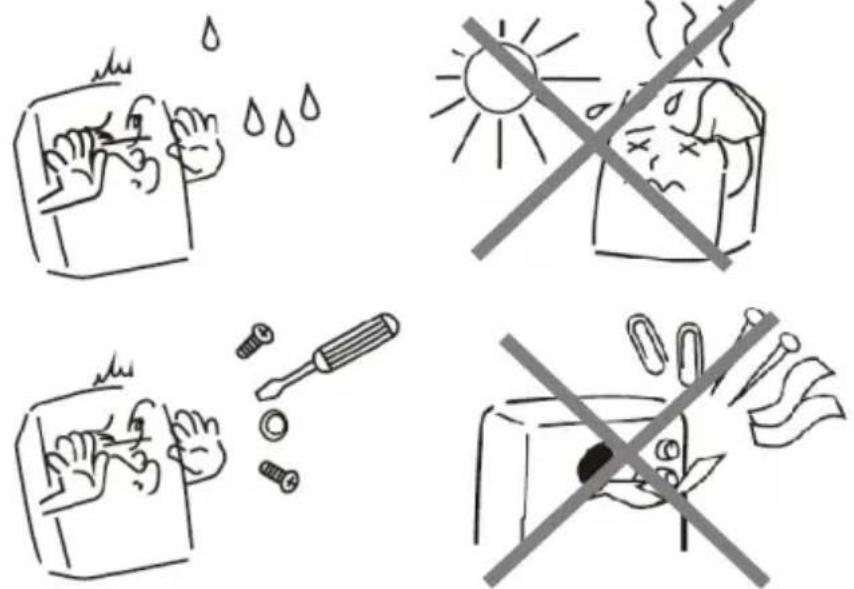
CAUTION:
- Do not expose the steering wheel to high temperatures, high humidity or direct sunlight.
(Use in an environment between 5\~35°C/41\~95°F)
- Do not allow liquid or small particles to enter the steering wheel.
- Do not put any heavy objects on the steering wheel.
- Never disassemble the steering wheel.
- Do not twist or pull the cable too strongly.
- Do not throw, drop, or apply strong shock to the steering wheel.
| (ENG) Declaration of conformityThis product is tested and complies with the essential requirements of the laws of member states concerning EMC(2014/30/EU), RoHS (2011/65/EU). The CE declaration can be found underwww.gembird.eu |
| (DE) KonformitätserklärungDieses Produkt wurde getestet und stimmt mit den grundlegenden Anforderungen der Richtlinie EMC(2014/30/EU), RoHS (2011/65/EU) überein. Die Konformitätserklärung kann auf unserer Webseitewww.gembird.euheruntergeladen werden. |
| (ES) Declaración de conformidadEste producto está probado y cumple con los requisitos esenciales de las leyes de los estados miembros con respecto a EMC (2014/30 / UE), RoHS (2011/65 / UE). La declaración CE se puede encontrar enwww.gembird.eu |
| (CZ) Prohlášení o shoděTento produkt je testován a splňuje základní požadavky právních předpisů členských států týkajících se EMC (2014/30 / EU), RoHS (2011/65 / EU). Prohlášení CE naleznete nawww.gembird.eu |
| (FR/BE) Déclaration de conformitéLe produit est contrôlé et rempli les exigences des directives nationales et de la directive EMC(2014/30/EU), RoHS (2011/65/EU). La conformité CE a été démontrée et les déclarations correspondantes sont déposées chez le fabricant a:www.gembird.eu |
| (HR) Izjava o sukladnostiOvaj je proizvod testiran i udovoljava osnovnim zahtjevima zakona država članica u vezi EMC-a (2014/30 / EU), RoHS (2011/65 / EU). Izjava CE se može naci podwww.gembird.eu |
| (IT) Dichiarazione di conformitàQuesto prodotto è testato ed è conforme ai requisiti essenziali delle leggi degli stati membri in materia di EMC (2014/30 / UE), RoHS (2011/65 / UE). La dichiarazione CE è disponibile all'indirizzowww.gembird.eu |
| (PT) Declaração de conformidadeEste produto foi testado e está em conformidade com os requisitos essenciais das leis dos estados membros sobre EMC (2014/30 / EU), RoHS (2011/65 / EU). A declaração CE pode ser encontrada emwww.gembird.eu |
| (PL) Deklaracja zgodnościTen produkt został przetestowany i jest zgodny z zasadniczymi wymaganiami prawnymi państw członkowskich dotyczącymi EMC (2014/30 / UE), RoHS (2011/65 / UE). Deklaracja CE znajduje się na stroniewww.gembird.eu |
| (RO) Declaratie de conformitateAcest produs este testat și respectă cerințele esențiale ale legislațiilor statelor membre privind EMC (2014/30 / UE), RoHS (2011/65 / UE). Declarația CE se găsește pewww.gembird.eu |
| (SK) Vyhlásenie o zhodeTento produkt je testovaný a spĺňa základné požiadavky právnych predpisov členských štátov týkajúcich sa EMC (2014/30 / EÚ), RoHS (2011/65 / EÚ). Vyhlásenie CE nájdete na stránkewww.gembird.eu |
| (SL) Izjava o skladnostiTa izdelek je preizkušen in ustreza bistvenim zahtevam zakonov držav članic o EMC (2014/30 / EU), RoHS (2011/65 / EU). Izjava CE je na voljo podwww.gembird.eu |
| (GR) Δήλωση συμμόρφωσηςΑυτό το προϊόν έχει ελεγχθεί και συμμορφώνεται με τις βασικές απαιτήσεις των νομοθεσιών των κρατών μελών όσον αφορά την Ευρωπαϊκή οδηγία g EMC (2014/30 / EU), RoHS (2011/65 / EU).Η δήλωση CE μπορεί να βρεθεί στην διεύθυνσηwww.gembird.eu |

| (ENG) Declaration of conformityThis product is tested and complies with the essential requirements of the laws of member states concerning RED (2014/53/EU), RoHS (2011/65/EU). The CE declaration can be found underwww.gembird.eu |
| (DE) KonformitätserklärungDieses Produkt wurde getestet und stimmt mit den grundlegenden Anforderungen der Richtlinie RED (2014/53/EU), RoHS (2011/65/EU) überein. Die Konformitätserklärung kann auf unserer Webseitewww.gembird.euheruntergeladen werden. |
| (ES) Declaración de conformidadEste producto está probado y cumple con los requisitos esenciales de las leyes de los estados miembros con respecto a RED (2014/53/EU), RoHS (2011/65/EU). La declaración CE se puede encontrar enwww.gembird.eu |
| (CZ) Prohlášení o shoděTento produkt je testován a splňuje základní požadavky právních předpisů členských států týkajících se RED (2014/53/EU), RoHS (2011/65/EU). Prohlášení CE naleznete nawww.gembird.eu |
| (FR/BE) Déclaration de conformitéLe produit est contrôlé et rempli les exigences des directives nationales et de la directive RED (2014/53/EU), RoHS (2011/65/EU).La conformité CE a été démontrée et les déclarations correspondantes sont déposées chez le fabricant a:www.gembird.eu |
| (HR) Izjava o sukladnostiOvaj je proizvod testiran i udovoljava osnovnim zahtjevima zakona država članica u vezi RED (2014/53/EU), RoHS (2011/65/EU).Izjava CE se može naći podwww.gembird.eu |
| (IT) Dichiarazione di conformitàQuesto prodotto è testato ed è conforme ai requisiti essenziali delle leggi degli stati membri in materia di RED (2014/53/EU), RoHS (2011/65/EU). La dichiarazione CE è disponibile all'indirizzowww.gembird.eu |
| (PT) Declaração de conformidadeEste produto foi testado e está em conformidade com os requisitos essenciais das leis dos estados membros sobre RED (2014/53/EU),RoHS (2011/65/EU). A declaração CE pode ser encontrada emwww.gembird.eu |
| (PL) Deklaracja zgodnościTen produkt został przetestowany i jest zgodny z zasadniczymi wymaganiami prawnymi państw członkowskich dotyczącymi RED (2014/53/EU), RoHS (2011/65/EU). Deklaracja CE znajduje się na stroniewww.gembird.eu |
| (RO) Declaratie de conformitateAcest produs este testat și respectă cerintele esențiale ale legislațiilor statelor membre privind RED (2014/53/EU), RoHS (2011/65/EU). Declarația CE se găsește pewww.gembird.eu |
| (SK) Vyhlásenie o zhodeTento produkt je testovaný a splňa základné požiadavky právnych predpisov členských štátov týkajúcich sa RED (2014/53/EU), RoHS (2011/65/EU). Vyhlásenie CE nájdete na stránkewww.gembird.eu |
| (SL) Izjava o skladnostiTa izdelek je preizkušen in ustreza bistvenim zahtevam zakonov držav članic o RED (2014/53/EU), RoHS (2011/65/EU). Izjava CE je na voljo podwww.gembird.eu |
| (GR) Δήλωση συμμόρφωσηςΑυτό το προϊόν έχει ελεγχθεί και συμμορφώνεται με τις βασικές απαιτήσεις των νομοθεσιών των κρατών μελών όσον αφορά την Ευρωπαϊκή οδηγία g RED (2014/53/EU),RoHS (2011/65/EU). H δήλωση CE μπορεί να βρεθεί στην διεύθυνσηwww.gembird.eu |
| (ENG) Waste disposal:Do not deposit this equipment with the household waste. Improper disposal can harm both the environment and human health. For Information about waste collection facilities for used electrical and electronic devices, please contact your city council or an authorized company for the disposal of electrical and electronic equipment. |
| (DE) Entsorgungshinweise:Werfen Sie dieses Gerät nicht in den Hausmüll. Unsachgemäße Entsorgung kann sowohl der Umwelt als auch der menschlichen Gesundheit schaden.Informationen zu Sammelstellen für Altgeräte erhalten Sie bei Ihrer Stadtverwaltung oder einer autorisierten Stelle für die Entsorgung von Elektro-und Elektronikgeräten. |
| (ES) Deposito de basura:No deposite este equipo con la basura doméstica. La eliminación inadecuada puede dañar tanto el medio ambiente como la salud humana. Para obtener información sobre las instalaciones de recolección de desechos para dispositivos eléctricos y electrónicos usados, comuníquese con su ayuntamiento o una empresa autorizada para la eliminación de equipos eléctricos y electrónicos. |
| (CZ) Nakládání s odpady:Toto zařízení nevkládejte do domovního odpadu. Nesprávná likvidace může poškodit životní prostředí i lidské zdraví. Informace o zařízení pro sběr odpadu použitých elektrických zařízení získáte u městské rady nebo autorizované společnosti o likvidaci elektrických a elektronických zařízení. |
| (FR/BE) Traitement des déchets:Ne jetez pas cet appareil dans les déchets domestiques. Un traitement inapproprié peut être dommageable à l'environnement et à la santé humain. Vous trouvez des informations sur les centres de rassemblement des appareils vieux chez l'administration municipale ou chez un centre autorisé pour le traitement des appareils électriques ou électroniques. |
| (HR) Odlaganje smeća:Ovu opremu ne odlažite zajedno s kućnim otpadom. Nepravilno odlaganje može našetiti okolišu i ljudskom zdravlju. Za informacije o objektima za prikupljanje otpada za rabljene električne i elektroničke uređaje obratite se gradskom vijeću ili ovlaštenom društvu za odlaganje električne i elektroničke opreme. |
| (IT) Smaltimento dei rifiuti:Non depositare questa apparecchiatura con i rifiuti domestici. Lo smaltimento improprio può danneggiare sia l'ambiente che la salute umana. Per informazioni sulle strutture di raccolta dei rifiuti per i dispositivi elettrici ed elettronici usati, contattare il comune o una società autorizzata per lo smaltimento delle apparecchiature elettriche ed elettroniche. |
| (PT) Depósito de lixo:Não deposite este equipamento no lixo doméstico. O descarte inadequado pode prejudicar o meio ambiente e a saúde humana. Para obter informações sobre instalações de coleta de lixo para dispositivos elétricos e eletrônicos usados, entre em contato com o conselho da cidade ou uma empresa autorizada para o descarte de equipamentos elétricos e eletrônicos. |
| (PL) Utylizacja odpadów:Nie należy deponować tego sprzętu razem z odpadami domowymi. Niewłaściwa utylizacja može zaszkodzić zarówno środowisku, jak i zdrowiu ludzkiemu.Aby uzyskać informacje na temat urządzeń do zbierania zużytych urządzeń elektrycznych i elektronicznych, należy skontaktować się z radą miasta lub upoważnioną firmą w celu usunięcia sprzętu elektrycznego i elektronicznego. |
| (RO) Eliminarea deşeurilor:Nu depuneti acest echipament cu deşeurile menajere. Eliminarea necorespunzátoare poate dăuna atât mediului, cât și sănătății umane. Pentru informații despre instalațiile de colectare a deşeurilor pentru dispositivee electrice și electronice folosite, vă rugăm să contactați consiliul municipal sau o companie autorizată pentru eliminarea echipamentelor electrice și electronice. |
| (SK) Likvidácia odpadu:Toto zariadenie nevkladajte do domového odpadu. Nesprávna likvidácia može poškodit’ životné prostredie a l’udské zdravie. Informácie o zariadeniach na zber použitého odpadu z elektrických a elektronických zariadení získate od mestského zastupitel’sva alebo od autorizovanej spoločnosti o likvidácii elektrických a elektronických zariadení. |
| (SL) Odlaganje odpadkov:Te opreme ne odlagajte skupaj z gospodinjskimi odpadki. Nepravilno odstranjevanje lahko škoduje okolju in zdravju ljudi. Za informacije o napravah za zbiranje odpadnih električnih in elektronskih naprav se obrnite na mestni svet ali pooblaščeno podjetje za odstranjevanje električne in elektronske opreme. |
| (GR) Διαχείριση απορριμάτων:Μην καταθέτετε autóv τον εξοπλισμό στα οικιακά απορρίμματα. Η ακατάλληλη απόρριψη μπορεί να βλάψει τόσο το περιβάλλον όσο και την ανθρώπινη υγεία.Για πληροφορίες σχετικά με τις εγκαταστάσεις συλλογής απορριμμάτων για χρησιμοποιημένες ηλεκτρικές και ηλεκτρονικές συσκευές, επικοινωνήστε με το δημοτικό συμβούλιο ή μια εξουσιοδοτημένη εταιρεία για τη διάθεση ηλεκτρικών και |
(ENG) WARRANTY CONDITIONS
The receipt must clearly list the date of purchase and the part number, in addition it should be printed. Keep the receipt for the entire warranty period since it is required for all warranty claims. During the warranty period the defective items will be credited, repaired or replaced at the manufacturer's expense. Work carried out under the warranty neither extends the warranty period nor starts a new warranty period. The manufacturer reserves the right to void any warranty claim for damages or defects due to misuse, abuse or external impact (falling down, impact, ingress of water, dust, contamination or break). Wearing parts (e.g. rechargeable batteries) are excluded from the warranty. Upon receipt of the RMA goods, Gembird Europe B.V. reserves the right to choose between replacement of defective goods or issuing a credit note. The credit note amount will always be calculated on the basis of the current market value of the defective products.
Gembird Europe B.V. Wittevrouwen 56, 1358CD Almere, The Netherlands
www.gembird.nl/service support@gmb.nl
(DE) GARANTIE BEDINGUNGEN
(PL) WARUNKI GWARANCJI
- STR-M-01
- Specifications
- PRODUCT DESCRIPTION
- STEERING WHEEL
- MENU BUTTONS
- D-Pad
- Mini analog stick.
- Action buttons
- Auto centering function
- Sensitivity settings:
- Vibration feedback
- Mode LED
- Playing on the desk or table
- Playing from your lap
- Foot Pedal
- Function relocation and return to default value Function relocation in PS4/PS3/X-INPUT
- Return to Default Value:
- INSTALLATION
- Connecting the foot pedal unit to the steering wheel unit.
- Connecting the Racing wheel to the Game console.
- TO PS4:
- TO PS3:
- PC-USB (X-INPUT and D-INPUT):
- X-INPUT mode (default mode)
- D-INPUT mode
- CAUTION:
- (ENG) WARRANTY CONDITIONS
- (DE) GARANTIE BEDINGUNGEN
- (PL) WARUNKI GWARANCJI
Brand : Gembird
Model : STR-M-01
Category : Joystick