
GP-101IT - Switch Edimax - Free user manual and instructions
Find the device manual for free GP-101IT Edimax in PDF.


| Product Type | Network Switch |
| Brand | Edimax |
| Model | GP-101IT |
| Ethernet Ports | 5-Port 10/100Mbps Fast Ethernet |
| Data Transfer Rate | 10/100 Mbps (Half/Full Duplex) |
| Switching Capacity | 1.0 Gbps |
| MAC Address Table | 1K entries |
| Dimensions (L x W x H) | 5.5 x 4.0 x 1.2 in (14.0 x 10.2 x 3.0 cm) |
| Weight | 0.3 lbs (136 g) |
| Power Supply | External 5V DC 1A adapter |
| Power Consumption | Max 2.5W |
| LED Indicators | Power, Link/Activity per port |
| Mounting | Desktop or wall-mountable |
| Operating Temperature | 0°C to 40°C (32°F to 104°F) |
| Humidity | 10% to 90% non-condensing |
| Standards Compliance | IEEE 802.3, 802.3u |
| Maintenance | Clean with a dry cloth; avoid liquids |
| Safety Precautions | Keep away from water and heat sources |
| Spare Parts & Repairability | No user-serviceable parts; contact support |
| Warranty | Limited lifetime from Edimax |
Frequently Asked Questions - GP-101IT Edimax
User questions about GP-101IT Edimax
0 question about this device. Answer the ones you know or ask your own.
Ask a new question about this device
Download the instructions for your Switch in PDF format for free! Find your manual GP-101IT - Edimax and take your electronic device back in hand. On this page are published all the documents necessary for the use of your device. GP-101IT by Edimax.
USER MANUAL GP-101IT Edimax
No.3, Wu-Chuan 3rd Road, Wu-Gu, New Taipei City 24891, Taiwan
Email: support@edimax.com.tw
Edimax Technology Europe B.V.
Fijenhof 2, 5652 AE Eindhoven, The Netherlands
Email: support@edimax.nl
Edimax Computer Company
3350 Scott Blvd., Bldg.15 Santa Clara, CA 95054, USA
Live Tech Support: 1(800) 652-6776
Email: support@edimax.com
I. Product Informaon
I-1. Package Contents
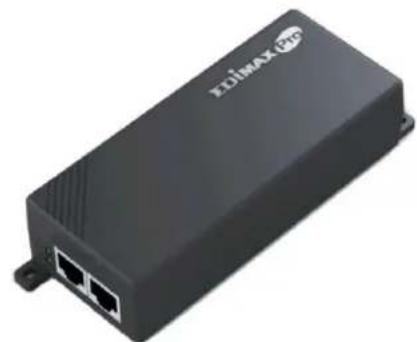
natural_image
Exterior view of a black electronic device labeled 'ZELIMAX (PTC)' with two Ethernet ports (no additional text or symbols visible)GP-101IT PoE Injector
QIG
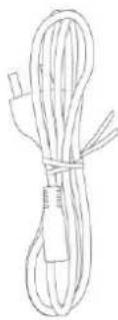
Power Cord
I-2. Hardware Overview
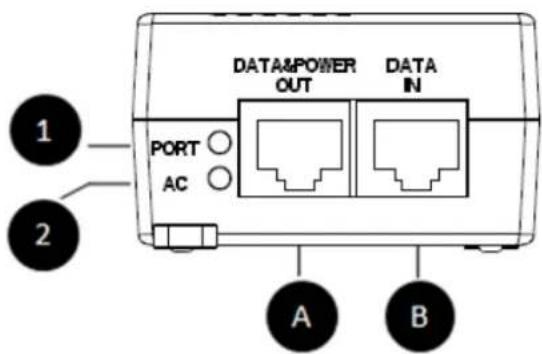
natural_image
Technical line drawing of a rectangular electronic component with an open socket and labeled point C (no text or symbols beyond label)I-3. LED Status
| Code | Name | Indicaon / Funcon |
| 1 | PORT LED | On: PD (Powered Device) connectedO: No PD connected |
| 2 | AC LED | On: Power onO: Power o |
| A | DATA/POWER port | Data & power: Connect to a PoE PD (Powered Device such as PoE wireless access point) |
| B | DATA port | Data only: supports 10/100/1000 base Ethernet. |
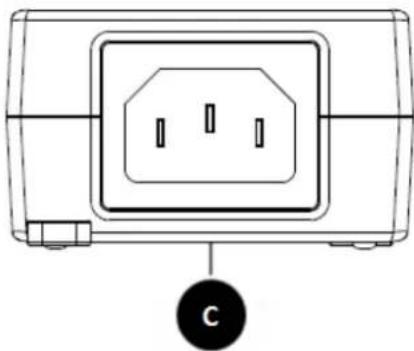
| C | Power Socket | AC Power |
I-4. Connecons
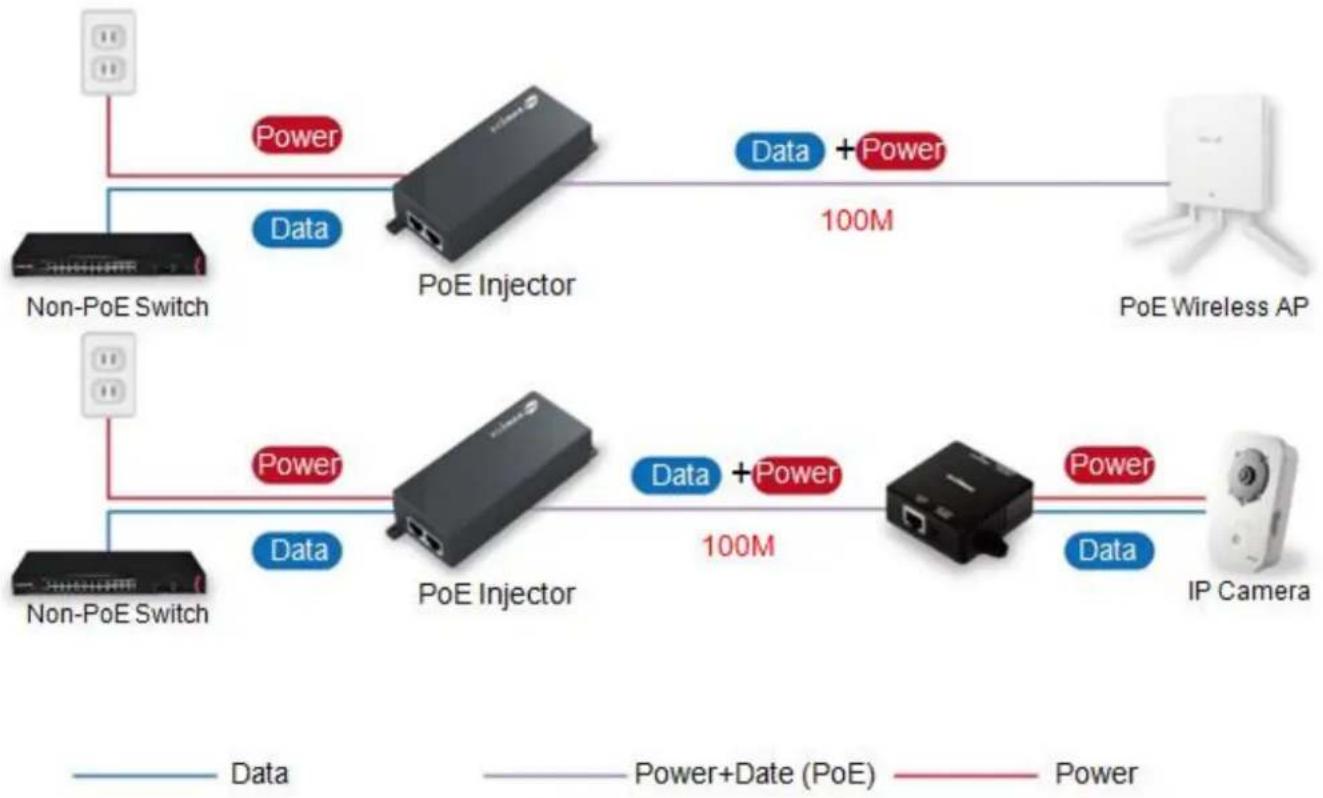
Connect the injector as shown below:
flowchart
graph LR
    A["Non-PoE Switch"] -->|Data| B["PoE Injector"]
    C["Non-PoE Switch"] -->|Data| D["PoE Injector"]
    B -->|Data + Power 100M| E["PoE Wireless AP"]
    D -->|Data + Power 100M| F["IP Camera"]
    style A fill:#f9f,stroke:#333
    style C fill:#f9f,stroke:#333
    style B fill:#ccf,stroke:#333
    style D fill:#ccf,stroke:#333
    style E fill:#dfd,stroke:#333
    style F fill:#dfd,stroke:#333

The PoE/DATA port sends power and Ethernet data to your PoE-enabled device. Use a CAT 5 cable to connect the PoE/Data port to your PoE-enabled device.

The DATA port doesn't deliver power. Use an Ethernet cable to connect to the injector's Data port to the LAN of an Ethernet device, such as an Ethernet switch.

Use the included power cord to connect the injector's power socket to a power source.
COPYRIGHT
Copyright © Edimax Technology Co., Ltd. all rights reserved. No part of this publicaon may be reproduced, transmied, transcribed, stored in a retrieval system, or translated into any language or computer language, in any form or by any means, electronic, mechanical, magnec, opcal, chemical, manual or otherwise, without the prior written permission from Edimax Technology Co., Ltd.
Edimax Technology Co., Ltd. makes no representaons or warranes, either expressed or implied, with respect to the contents hereof and specifically disclaims any warranes, merchantability, or tness for any parcular purpose. Any soware described in this manual is sold or licensed as is. Should the programs prove defecve following their purchase, the buyer (and not this company, its distributor, or its dealer) assumes the enre cost of all necessary servicing, repair, and any incidental or consequential damages resulting from any defect in the soware. Edimax Technology Co., Ltd. reserves the right to revise this publicaon and to make changes from me to me in the contents hereof without the obligaon to nofy any person of such revision or changes.
The product you have purchased and the setup screen may appear slightly dierent from those shown in this QIG. The soware and specicaons are subject to change without noce. Please visit our website www.edimax.com for updates. All brand and product names menoned in this manual are trademarks and/or registered trademarks of their respective holders.
Federal Communicaon Commission Interference Statement
This equipment has been tested and found to comply with the limits for a Class B digital device, pursuant to Part 15 of FCC Rules. These limits are designed to provide reasonable protecon against harmful interference in a residential installaon. This equipment generates, uses, and can radiate radio frequency energy and, if not installed and used in accordance with the instrucons, may cause harmful interference to radio communicaons. However, there is no guarantee that interference will not occur in a parcular installaon. If this equipment does cause harmful interference to radio or television recepon, which can be determined by turning the equipment o and on, the user is encouraged to try to correct the interference by one or more of the following measures:
- Reorient or relocate the receiving antenna.
- Increase the separaon between the equipment and receiver.
- Connect the equipment into an outlet on a circuit dierent from that to which the receiver is connected.
- Consult the dealer or an experienced radio technician for help.
FCC Cauon
This device and its antenna must not be co-located or operang in conjuncon with any other antenna or transmier. This device complies with Part 15 of the FCC Rules. Operaon is subject to the following two conditions: (1) this device may not cause harmful interference, and (2) this device must accept any interference received, including interference that may cause undesired operaon. Any changes or modicaons not expressly approved by the party responsible for compliance could void the authority to operate equipment.
Federal Communicaons Commission (FCC) Radiaon Exposure Statement
This equipment complies with FCC radiaon exposure set forth for an uncontrolled environment. In order to avoid the possibility of exceeding the FCC radio frequency exposure limits, human proximity to the antenna shall not be less than 2.5cm (1 inch) during normal operaon.
Federal Communicaons Commission (FCC) RF Exposure Requirements
SAR compliance has been established in the laptop computer(s) conguraons with PCMCIA slot on the side near the center, as tested in the applicaon for cercaon, and can be used in laptop computer(s) with substanally similar physical dimensions, construcon, and electrical and RF characteriscs. Use in other devices such as PDAs or lap pads is not authorized. This transmier is restricted for use with the speci antenna tested in the applicaon for cercaon. The antenna(s) used for this transmier must not be co-located or operang in conjuncon with any other antenna or transmier.
R&TTE Compliance Statement
This equipment complies with all the requirements of DIRECTIVE 1999/5/EC OF THE EUROPEAN PARLIAMENT AND THE COUNCIL of March 9, 1999 on radio equipment and telecommunicaon terminal equipment and the mutual recognition of their conformity (R&TTE). The R&TTE Directive repeals and replaces in the directive 98/13/EEC (Telecommunicaons Terminal Equipment and Satellite Earth Staon Equipment) As of April 8, 2000.
Safety
This equipment is designed with the utmost care for the safety of those who install and use it. However, special aenon must be paid to the dangers of electric shock and stac electricity when working with electrical equipment. All guidelines of this and of the computer manufacture must therefore be allowed at all mes to ensure the safe use of the equipment.
EU Countries Intended for Use
The ETSI version of this device is intended for home and oce use in Austria, Belgium, Bulgaria, Cyprus, Czech, Denmark, Estonia, Finland, France, Germany, Greece, Hungary, Ireland, Italy, Latvia, Lithuania, Luxembourg, Malta, Netherlands, Poland, Portugal, Romania, Slovakia, Slovenia, Spain, Sweden, Turkey, and United Kingdom. The ETSI version of this device is also authorized for use in EFTA member states: Iceland, Liechtenstein, Norway, and Switzerland.
EU Countries Not Intended for Use
None
EU Declaraon of Conformity
English: This equipment is in compliance with the essenal requirements and other relevant provisions of Direcve 1995/5/EC, 2009/125/EC, 2006/95/EC, 2011/65/EC.
Français: Cet équipement est conforme aux exigences essenelles et autres dispositions de la direcve 1995/5/CE, 2009/125/CE, 2006/95/CE, 2011/65/CE.
Češna: Toto zařízení je v souladu se základními požadavky a ostatními příslušnými ustanoveními směrnic 1995/5/ES, 2009/125/ES, 2006/95/ES, 2011/65/ES.
Polski: Urządzenie jest zgodne z ogólnymi wymaganiami oraz szczególnymi warunkami określonymi Dyrektywą UE 1995/5/EC, 2009/125/EC, 2006/95/EC, 2011/65/EC..
Română: Acest echipament este în conformitate cu cerințele esențiale și alte prevederi relevante ale Direcvei 1995/5/CE, 2009/125/CE, 2006/95/CE, 2011/65/CE.
Русский: Это оборудование соответствует основным требованиям и положениям Директивы 1995/5/EC, 2009/125/EC, 2006/95/EC, 2011/65/EC.
Magyar: Ez a berendezés megfelel az alapvető követelményeknek és más vonatkozó irányelveknek (1995/5/EK, 2009/125/EK, 2006/95/EK, 2011/65/EK).
Türkçe: Bu cihaz 1995/5/EC, 2009/125/EC, 2006/95/EC, 2011/65/EC direkeri zorunlu istekler ve diğer hükümlerle ile uyumludur.
Українська: Обладнання відповідає вимогам і умовам директиви 1995/5/EC, 2009/125/EC, 2006/95/EC, 2011/65/EC.
Slovenčina: Toto zariadenie spíňa základné požiadavky a dálšie príslušné ustanovenia smerníc 1995/5/ES, 2009/125/ES, 2006/95/ES, 2011/65/ES.
Deutsch: Dieses Gerät erfüllt die Voraussetzungen gemäß den Richtlinien 1995/5/EC, 2009/125/EC, 2006/95/EC, 2011/65/EC.
Español: El presente equipo cumple los requisitos esenciales de la Direcva 1995/5/EC, 2009/125/EC, 2006/95/EC, 2011/65/EC.
Italiano: Questo apparecchio è conforme ai requisi essenziali e alle altre disposizioni applicabili della Direva 1995/5/CE, 2009/125/CE, 2006/95/CE, 2011/65/CE.
Nederlands: Dit apparaat voldoet aan de essenële eisen en andere van toepassing zijnde bepalingen van richtlijn 1995/5/EC, 2009/125/EC, 2006/95/EC, 2011/65/EC..
Português: Este equipamento cumpre os requesitos essenciais da Direcva 1995/5/EC, 2009/125/EC, 2006/95/EC, 2011/65/EC.
Norsk: Dee utstyret er i samsvar med de viktigste kravene og andre relevante regler i Direkv 1995/5/EC, 2009/125/EC, 2006/95/EC, 2011/65/EC.
Svenska: Denna utrustning är i överensstämmelse med de väsentliga kraven och övriga relevanta bestämmelser i direkv 1995/5/EG, 2009/125/EG, 2006/95/EG, 2011/65/EG.
Dansk: Dee udstyr er i overensstemmelse med de væ sentligste krav og andre relevante forordninger i direkv 1995/5/EC, 2009/125/EC, 2006/95/EC, 2011/65/EC.
suomen kieli: Tämä laite täyää direkivien 1995/5/EY, 2009/125/EY, 2006/95/EY, 2011/65/EY oleelliset vaamukset ja muut asiaankuuluvat määräykset.
FOR USE IN





WEEE Directive & Product Disposal

At the end of its serviceable life, this product should not be treated as household or general waste. It should be handed over to the applicable collecon point for the recycling of electrical and electronic equipment, or returned to the supplier for disposal.
Declaraon of Conformity
We, Edimax Technology Co., Ltd., declare under our sole responsibility, that the equipment described below complies with the requirements of the European R&TTE directives.
Equipment: GP-101IT Power Over Ethernet Injector
Model No.: GP-101IT
The following European standards for essenal requirements have been followed:
EMC
: EN55022:2010
EN55024:2010
EN61000-3-2:2006+A1:2009+A2:2009
EN61000-3-3:2013
Safety (LVD)
: EN 60950-1:2006 + A11:2009 + A1:2010 + A12:2011+A2:2013
Edimax Technology Co., Ltd.
No. 3, Wu Chuan 3 ^rd Road,
Wu-Ku Industrial Park,
New Taipei City, Taiwan

Date of Signature: Jun, 2015
Signature:
Printed Name: Albert Chang
Title: Director
Edimax Technology Co., Ltd.
ΣDIMAX
NETWORKING PEOPLE TOGETHER
- Edimax Technology Europe B.V.
- Edimax Computer Company
- Product Informaon
- I-1. Package Contents
- I-2. Hardware Overview
- I-3. LED Status
- I-4. Connecons
- COPYRIGHT
- Federal Communicaon Commission Interference Statement
- FCC Cauon
- Federal Communicaons Commission (FCC) Radiaon Exposure Statement
- Federal Communicaons Commission (FCC) RF Exposure Requirements
- R&TTE Compliance Statement
- Safety
- EU Countries Intended for Use
- EU Countries Not Intended for Use
- EU Declaraon of Conformity
- WEEE Directive & Product Disposal
- Declaraon of Conformity
- ΣDIMAX
Brand : Edimax
Model : GP-101IT
Category : Switch