
HPH20 - Heating Heller - Free user manual and instructions
Find the device manual for free HPH20 Heller in PDF.


| Product Type | Fan Heater |
| Brand | Heller |
| Model | HPH20 |
| Dimensions (H x W x D) | 25 x 20 x 30 cm |
| Weight | 2.5 kg |
| Power Source | AC 220-240 V, 50 Hz |
| Power Consumption | 2000 W |
| Heating Element | PTC Ceramic |
| Heat Settings | 2 (1000 W / 2000 W) |
| Adjustable Thermostat | Yes |
| Overheat Protection | Yes |
| Tip-Over Protection | Yes |
| Cord Length | 1.5 m |
| Noise Level | ≤45 dB |
| Color | White |
| Material | ABS Plastic |
| Suitable Room Size | Up to 20 m² |
| Energy Efficiency Class | A |
| Warranty | 2 Years |
| Includes | User Manual |
Frequently Asked Questions - HPH20 Heller
User questions about HPH20 Heller
0 question about this device. Answer the ones you know or ask your own.
Ask a new question about this device
Download the instructions for your Heating in PDF format for free! Find your manual HPH20 - Heller and take your electronic device back in hand. On this page are published all the documents necessary for the use of your device. HPH20 by Heller.
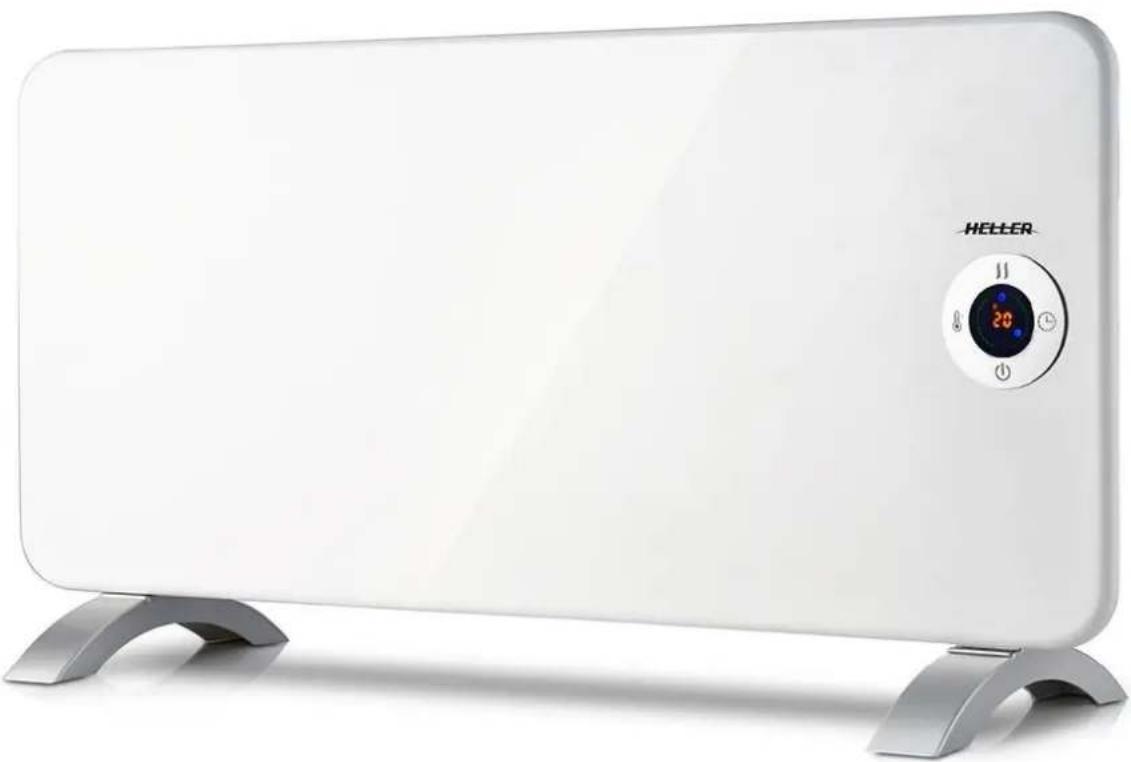
USER MANUAL HPH20 Heller
Aluminium WiFi Panel
Heater – 2000W
Model: HPH20
natural_image
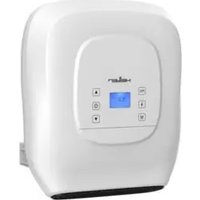
White electric heater with a digital display and 'HELLER' branding on top (no text or symbols on the device itself)BEFORE OPERATING THIS PRODUCT, READ, UNDERSTAND AND FOLLOW THESE INSTRUCTIONS.
IMPORTANT
Read and follow the instructions in this user manual even if you feel you are familiar with the product and find a place to keep it handy for future reference.
For your convenience record the complete model number (located on the product identification plate) and the date you received the product, together with your purchase receipt and attach to the warranty and service information. Retain in the event that warranty service is required.
NOTE: The rating of this product (as marked on the product identification plate) is based on specific loading tests. Normal use or the use of other recommended attachments may draw significantly less power.
DESCRIPTION
- Back panel
- Control panel
- Temperature control
- Power switch
- Front panel
- Feet

PARTS LIST
8 x screws
2 x feet
4 x long screws
4 x wall plugs


natural_image
Two identical curved mechanical components with no text or symbols
natural_image
Illustration of five different screw head designs, showing different thread configurations (no text or symbols)| Details | HPH20 |
| Voltage | 220-240Vac |
| Frequency | 50-60Hz |
| Power | 1000/2000W |
IMPORTANT SAFEGUARDS
When using any electrically powered product, basic safety precautions should always be followed, including the following:
READ AND SAVE THESE INSTRUCTIONS FOR FUTURE REFERENCE
WARNING: To avoid overheating, DO NOT COVER the heater.
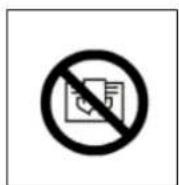
• This appliance is for household use only.
• This appliance should only be used as intended.
- Check item carefully before use. Do not switch on heater with defects or damaged cord.
- DO NOT place this heater in water, near water, in wet areas and areas subject to water spray and in damp locations.
- The heater is hot when in use. To avoid burns, DO NOT touch any hot surfaces. Keep combustible materials, such as furniture, pillows, bedding, papers, clothes, and curtains at least 3.3 ft (1 m) from the front of the heater and keep them away from the sides and rear.
• Plug only into AC source. Do not use non-standard power supply.
• This appliance should be connected to the same voltage as printed on the rating label and package.
• This heater must not be located immediately below a socket-outlet.
• If the supply cord is damaged, it must be replaced by the manufacturer, its service agent, or similarly qualified
persons to avoid a hazard.
• Before plugging in the heater, make sure that it is switched off.
- Do not use this appliance outdoors.
- Protect the product from sudden impacts of sharp corners and areas of high humidity.
- Do not touch heater with wet hands or damp hands when plugged in.
- If there is water on the surface of the heater, disconnect from power immediately and make sure that the heater is completely dry before next use.
• Before next use, the appliance should be checked by a specialist.
• Always unplug the heater when not use for extended period before cleaning and if defects are noted.
• Do not carry the heater by the power cord.
- Do not unplug the heater by pulling the cord. Once the heater is turned off, hold the plug firmly and pull from the socket.
• Do not wrap the cord around the appliance after use.
- Flatten smoothly the cord when you do not use the heater.
• The cord should only change by a qualified electrician or service technician.
- This appliance is not intended for use by persons (including children) with reduced physical, sensory or metal capabilities, or lack of experience and knowledge, unless they have been given supervision or instruction concerning use of the appliance by a person responsible for their safety.
• Children should be supervised to ensure that they do not play with the appliance.
• Do not use this heater in the immediate surroundings of a bath or a swimming pool.
• Do not use this heater if it has been dropped.
• Do not use if there are visible signs of damage to the heater.
• Use this heater on a horizontal, stable surface or fix it to the wall, as applicable.
- WARNING: Do not use this heater in small rooms when they are occupied by persons not capable of leaving the room on their own, unless constant supervision is provided.
- WARNING: To reduce the risk of fire, keep textiles, curtains, or any other flammable material a minimum distance of 1m from the air outlet.
- The heater is to be installed so that switches and other controls cannot be touched by a person in the bath or shower.
SAFTEY INSTRUCTIONS
• The appliance should be connected to the same voltage as printed on the rating label and package.
• DO NOT plug the item in before it is securely mounted on the wall or on its legs/feet.
• DO NOT cover the heater whilst it is operating.
• Do not place foreign objects in air vents.
• DO NOT pull and twist the cord.
BEFORE FIRST USE
Read and follow the instructions in this user manual even if you feel you are familiar with the product and find a place to keep it handy for future reference.
- Remove the heater out of the box.
- Remove all the packing material.
- Check and ensure the all the installation parts as per instruction manual are included in the packaging. If anything is missing, please contact the retailer immediately.
INSTALLATION / MOUNTING INSTRUCTIONS
• This panel convector heater is suitable for wall- mounting as well as free-standing on supplied legs/feet.
• For Free-standing, mount the supplied feet/legs on the main heater body in accordance with Figure G1.
• For wall mounting, please refer to the Figure G2.
a) The heater should be mounted at least 15 cm above the floor and there should be at least 60cm clearance between the top of the heater and the ceiling.
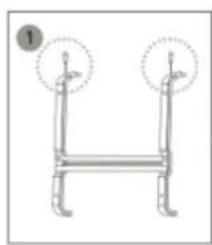
b) Uninstall/remove the bracket from the back of the heater by removing two holding screws on top of the bracket. See Images 1.
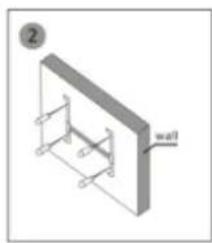
c) Mark intended location, drill required holes on the wall and insert the supplied plastic expanded plugs, then install the bracket on the wall using the supplied 4 X mounting screws. See the Image 2.
d) Fix the heater into the bracket (mount from bottom bracket first then the top until you hear the top latches clicking into place). See Images 3.
e) Reinstall and tighten the holding screws on the top of bracket to secure the heater onto the bracket. See Images 4.

natural_image
Simple line drawing of a blank rectangular object with two curved shapes above it (no text or symbols)Figure G1
natural_image
Simple line drawing of a two-legged support structure with two circular annotations (no text or symbols)Image 2

natural_image
Isometric diagram of a wall-mounted frame structure with no text or symbolsImage 3


natural_image
Isometric view of a rectangular frame with a curved arrow indicating rotation (no text or symbols)Image 4


natural_image
Isometric illustration of a rectangular panel with two metal clips attached (no text or symbols)Image 5
Figure G2
OPERATION OF THIS PRODUCT
• If not wall mounted, place the heater on flat, stable surface.
- Switch thermostat knob in off position.
- Plug the heater in.
- By turning the handle of thermostat clockwise or counterclockwise set the required temperature. For faster heating of the room, set the thermostat handle at maximum level. As soon as the required temperature has been reached, turn thermostat handle counterclockwise until you hear a click. The heating elements will switch off. Indicator light will be also switch off.
- The heater will automatically switch on when temperature decreases, and it will automatically switch off when the temperature increases. The appropriate set temperature is maintained.
• If the appliance is not used for a long time, switch it off from the power switch and unplug the heater. - Attention: DO NOT COVER the heater. This heater should not be placed in or around water. Eg. shower or swimming pools.
- The appliance is hot when in use. To avoid burns, DO NOT touch any hot surfaces. Keep combustible materials, such as furniture, pillows, bedding, papers, clothes, and curtains at least 3.3 ft (1 m) from the front of the heater and keep them away from the sides and rear.
• To prevent a possible fire, DO NOT block air intakes or exhaust vents in any manner.
• DO NOT use on soft surfaces, like a bed, where openings may become blocked.
• DO NOT move the appliance when it is operating. Only move the appliance when it is cool.
• DO NOT run cord under carpeting, DO NOT cover cord with throw rugs, runners, or the like.
• Position the cord away from traffic area and where it will not be tipped over.
CONTROL PANEL AND REMOTE-CONTROL OPERATION
Insert the plug into a suitable power socket.
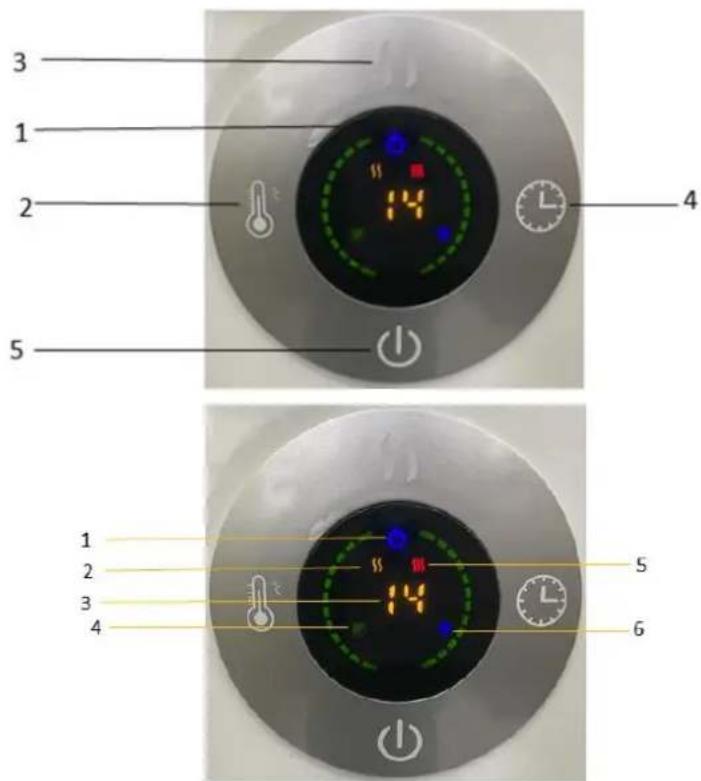
The touch screen buttons located on the product correspond to the remote-control functions:
Control panel:
- LED display
- Temperature Adjust
- Mode
- Timer
- Power/Standby
Display:
- Power
- Low heating level
- Temperature
- Wi-Fi indicator light
- High heating level
- Timer
Power
Turn the main power switch ON, then press "power" to turn the control panel ON, the display will show current temperature.
The heater is working at low power heating modes.
Mode
Press "mode" to select between low ||, or high heating level. ||
Temperature

Press button to select the desired temperature from a range of 5° to 40°C.
Timer
The timer button can be set to start or stop the appliance at the desired time, with a time interval between 1 hour and 24 hours. (Set timer to "00" to turn timer off)
Operating sound
The appliance emits a beep upon each operation setting.
RESET
Long press (for 5 seconds, until you hear "beep" sound, then all functions are reset.
CONNECTION BY WIFI
- Use your mobile phone to scan the QR code below or search "GAFSmartLife" from the Google play or Apple Stores. Proceed to download and install the application GAFSmartLife.


-
Select Sign up and register your mobile number or email address to obtain a verification code or select sign in if you have already signed up to GAFSmartLife. Your verification code will be sent to your registered mobile number or email address.
-
Enter the verification code in the message and tap "Login" to log into the App.
-
Ensure the heater is located within WIFI range and switch on via power button. The indicator light “ ” will rapidly blink. If the indicator light does no rapidly blink, please press “ ” button for 5 seconds until you hear “beep” sound, then go to the App, tap “add device” at the bottom, as shown in Image 1,
a) Press "+" in the top right corner, as shown in Image 1.
b) Choose "All Devices" as shown in Image 2.
c) Choose "Heater", as shown in Image 3.
d) Press the "confirm indicator rapidly blinks" when the indicating light on device rapidly blinks, as shown in Image 4.
e) Input password of WIFI and then confirm, as shown in Image 5.
f) Wait for the APP to connect with the device until it is connected successfully, as shown in Image 6.
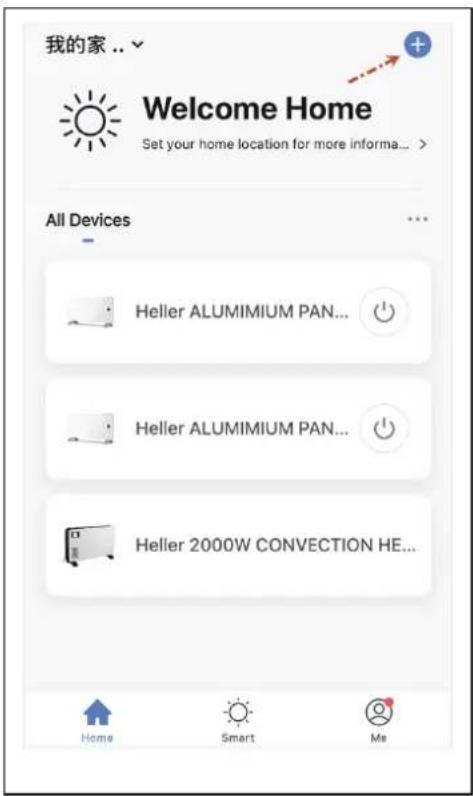
Image 1
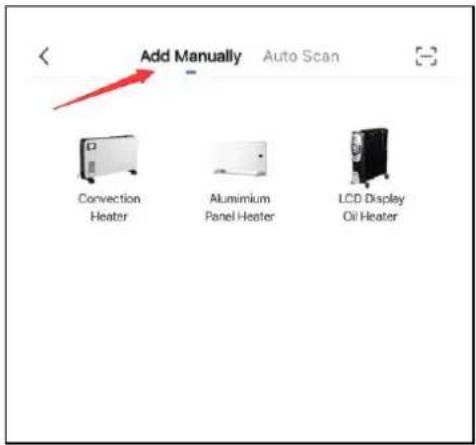
Image 2
Image 3
Image 4

Image 5

Image 6
OPERATION BY WIFI
You can operate the device by mobile under WIFI or 4G network connection, as shown in Image 7.

Image 7
MAINTENANCE
• Before cleaning the heater, wait until it cools down completely and unplug.
- Do not use abrasives and solvents. Wipe the product with a soft, wet cloth.
• It is necessary to remove dust from the surface regularly.
• DO NOT wash the heater or immerse in water.
• If you are not going to use heater for long periods of time, wipe the surface and store away in box.
- It should be stored in dry ventilated room. Avoid high humidity.
WARRANTY INFORMATION
Before delivery, our appliances are subjected to rigorous quality control. If, despite all care, damage has occurred during production or transportation, please return this appliance to your dealer. In addition to statutory legal rights, the purchaser has an option to claim under the terms of the following guarantee:
Manufacturer provides 12 months warranty, commencing from the day of purchase. If you have a defective product, you can return to place of purchase with your receipt.
Defects which arise from improper handling, misuse, or neglect of the device and malfunctions due to the unauthorized interventions and repairs by third parties of the fitting of non-original parts are not covered by the third parties or the fitting of non-original parts are not covered by this guarantee.
Claims for warranty must always be supported by proof of purchase.
Refer to attached warranty statement for complete terms and conditions.
ENVIRONMENT FRIENDLY DISPOSAL


This marking indicates that this product should not be disposed of with other household waste. To prevent possible harm to the environment or human health from uncontrolled waste disposal, recycle it responsibly to promote the sustainable re-use of material resources. To dispose of your appliance correctly, please contact or take it to your local refuse/ recycling centre. Alternatively, contact your local council or information on your local re-use centre. Please make this product environmentally sale for recycling.
CUSTOMER SERVICE
Australian Customer Service
GAF Control (Sales) Pty Ltd
P.O Box 19
Altona North, Victoria, 3025
Phone: 1300 659 489
Hours: 9am-5pm (EST) Mon-Fri
www.gafcontrol.com.au
*This product may vary slightly to the product illustrated due to ongoing product development.
- Aluminium WiFi Panel
- Heater – 2000W
- IMPORTANT
- DESCRIPTION
- IMPORTANT SAFEGUARDS
- SAFTEY INSTRUCTIONS
- BEFORE FIRST USE
- INSTALLATION / MOUNTING INSTRUCTIONS
- OPERATION OF THIS PRODUCT
- CONTROL PANEL AND REMOTE-CONTROL OPERATION
- Control panel:
- Display:
- Power
- CONNECTION BY WIFI
- OPERATION BY WIFI
- MAINTENANCE
- WARRANTY INFORMATION
- ENVIRONMENT FRIENDLY DISPOSAL
- CUSTOMER SERVICE
Brand : Heller
Model : HPH20
Category : Heating