
VE1843 - Audio/video extender ATEN - Free user manual and instructions
Find the device manual for free VE1843 ATEN in PDF.


| Product Type | Audio/Video Extender |
| Model | VE1843 |
| Brand | ATEN |
| Max Resolution | 4K@60Hz (3840x2160) |
| Transmission Medium | Cat5e/6 cable |
| Max Distance | 100 m (328 ft) |
| Supported Audio | 7.1 channel PCM, Dolby TrueHD, DTS-HD Master Audio |
| HDCP Support | HDCP 2.2 compliant |
| Input Interface | 1 x HDMI (Type A female) |
| Output Interface | 1 x RJ-45 (female) |
| Power Supply | DC 5V 2A (included) |
| Power Consumption | 5 W (max) |
| Dimensions (W x D x H) | 120 x 65 x 25 mm (4.72 x 2.56 x 0.98 in) |
| Weight | 150 g (0.33 lb) |
| Operating Temperature | 0°C to 50°C (32°F to 122°F) |
| Storage Temperature | -20°C to 60°C (-4°F to 140°F) |
| Humidity | 20% to 80% RH (non-condensing) |
| Maintenance | Clean with dry cloth; avoid liquids |
| Safety | Use only included power adapter; do not expose to moisture |
| Spare Parts & Repairability | Contact ATEN authorized service centers for repairs |
| General Information | Extend HDMI signals over long distances via Ethernet cable |
Frequently Asked Questions - VE1843 ATEN
User questions about VE1843 ATEN
0 question about this device. Answer the ones you know or ask your own.
Ask a new question about this device
Download the instructions for your Audio/video extender in PDF format for free! Find your manual VE1843 - ATEN and take your electronic device back in hand. On this page are published all the documents necessary for the use of your device. VE1843 by ATEN.
USER MANUAL VE1843 ATEN
HDBaseT 3.0 Transceiver
User Manual
Compliance Statements
FEDERAL COMMUNICATIONS COMMISSION INTERFERENCE STATEMENT
This equipment has been tested and found to comply with the limits for a Class A digital device, pursuant to Part 15 of the FCC Rules. These limits are designed to provide reasonable protection against harmful interference when the equipment is operated in a commercial environment. This equipment generates, uses, and can radiate radio frequency energy and, if not installed and used in accordance with the instruction manual, may cause harmful interference to radio communications. Operation of this equipment in a residential area is likely to cause harmful interference in which case the user will be required to correct the interference at his own expense.
The device complies with Part 15 of the FCC Rules. Operation is subject to the following two conditions: (1) this device may not cause harmful interference, and (2) this device must accept any interference received, including interference that may cause undesired operation.
FCC Caution
Any changes or modifications not expressly approved by the party responsible for compliance could void the user's authority to operate this equipment.
Warning
Operation of this equipment in a residential environment could cause radio interference.
Achtung
Shielded twisted pair (STP) cables must be used with the unit to ensure compliance with FCC & CE standards.

KCC Statement
Industry Canada Statement
This Class A digital apparatus complies with Canadian ICES-003.
CAN ICES-003 (A) / NMB-003 (A)
HDMI Trademark Statement
The terms HDMI, HDMI High-Definition Multimedia Interface, and the HDMI Logo are trademarks or registered trademarks of HDMI Licensing Administrator, Inc.

RoHS
This product is RoHS compliant.
User Information
Online Registration
Be sure to register your product at our online support center:
International http://eservice.aten.com
Telephone Support
For telephone support, call this number:
| International 886-2-86 | 92-6959 |
| China 86-400-810-0-8 | 10 |
| Japan 81-3-5615-5811 | |
| Korea 82-2-467-6789 | |
| North America 1-888- | 999-ATEN ext 4988 |
| 1-949-428-1111 |
User Notice
All information, documentation, and specifications contained in this manual are subject to change without prior notification by the manufacturer. The manufacturer makes no representations or warranties, either expressed or implied, with respect to the contents hereof and specifically disclaims any warranties as to merchantability or fitness for any particular purpose. Any of the manufacturer's software described in this manual is sold or licensed as is. Should the programs prove defective following their purchase, the buyer (and not the manufacturer, its distributor, or its dealer), assumes the entire cost of all necessary servicing, repair and any incidental or consequential damages resulting from any defect in the software.
The manufacturer of this system is not responsible for any radio and/or TV interference caused by unauthorized modifications to this device. It is the responsibility of the user to correct such interference.
The manufacturer is not responsible for any damage incurred in the operation of this system if the correct operational voltage setting was not selected prior to operation. PLEASE VERIFY THAT THE VOLTAGE SETTING IS CORRECT BEFORE USE.
Product Information
For information about all ATEN products and how they can help you connect without limits, visit ATEN on the Web or contact an ATEN Authorized Reseller. Visit ATEN on the Web for a list of locations and telephone numbers:
| International http://www.aten.com |
| North America http://www.aten-usa.com |
Package Contents
Check to make sure that all of the components are in working order. If you encounter any problem, please contact your dealer.
◆ 1 VE1843 True 4K HDMI / USB HDBaseT 3.0 Transceiver
◆ 1 RS-232 terminal block
◆ 1 foot pad set (4 pcs)
◆ 1 USB Type-B to USB Type-A cable
◆ 1 power adapter
◆ 1 IR emitter
◆ 1 IR receiver
◆ 1 user instructions
Table of Contents
Compliance Statements ...... ii
User Information iv
Online Registration....iv
Telephone Support .....iv
User Notice ....iv
Product Information v
Package Contents ......vi
Table of Contents vii
About this Manual ix
Conventions ...... x
1. Introduction
Overview....1
Features 2
Planning the Installation .... 3
Display 3
Source Device....3
Cables....3
Considerations 3
2. Hardware Setup
Mounting the VE1843 Unit 5
Wall Mounting 5
Rack Mounting 5
Hardware Overview 6
VE1843 Front View 6
VE1843 Rear View 7
VE1843 Top View 8
Hardware Installation 10
RS-232 Channel Transmission 12
3. Operation
Tx and Rx Switch 13
HDMI Audio Switch....13
Audio Embedding 13
Audio De-embedding 13
Bypassing Audio Signals 14
Appendix
Safety Instructions 15
General 15
Technical Support 17
International 17
North America 17
Specifications 18
Limited Warranty 21
About this Manual
This user manual is provided to help you get the most from the VE1843 unit. It covers all aspects of installation, configuration, and operation. An overview of the information found in the manual is provided below.
Chapter 1, Introduction, introduces you to the VE1843 system. Its purpose, features, and installation considerations are described.
Chapter 2, Hardware Setup, describes the panel components of the VE1843 and detail steps to quickly and safely set up your installation.
Chapter 3, Operation, explains how to use the Tx and Rx switch, and how to set up the input detection mode using the a pushbutton and RS-232 commands.
Appendix, provides a list of safety instructions and precautions, contact information for ATEN technical support, product specifications, and other technical information regarding the VE1843.
Note:
- Read this manual thoroughly and follow the installation and operation procedures carefully to prevent any damage to the unit or any connected devices.
- This product may be updated, with features and functions added, improved or removed since the release of this manual. For an up-to-date user manual, visit http://www.aten.com/global/en/
Conventions
This manual uses the following conventions:
MonospacedIndicates text that you should key in.
[] Indicates keys you should press. For example, [Enter] means to press the Enter key. If keys need to be chorded, they appear together in the same bracket with a plus sign between them: [Ctrl+Alt].
- Numbered lists represent procedures with sequential steps.
◆ Bullet lists provide information, but do not involve sequential steps.
Indicates selecting the option (on a menu or dialog box, for example), that comes next. For example, Start > Run means to open the Start menu, and then select Run.

Indicates critical information.
Overview
The VE1843 is ATEN's first video transceiver and integrates the functions of a transmitter and a receiver into one unit. This combination allows users to easily configure the unit to be a transmitter or receiver depending on their AV solution, and to enjoy more flexible deployment and effective use with video matrix switches, video splitters, etc.
Designed with HDBaseT 3.0 technology, the VE1843 not only extends True 4K uncompressed signals up to 100 m over a single Cat 6a cable (HDBaseT ^3 Certified Cat 6a cable) with zero latency, but also transmits IR, RS-232, Ethernet, independent audio, and USB signals with the latest HDBaseT standards. For stable HDMI signal transmission, the VE1843 ensures high-quality visuals and reliable extension by supporting HDCP 2.2, 3D, Deep Color, and HDR. In addition, the VE1843 is equipped with HDMI audio embedded / de-embedded functions, enabling users to flexibly adapt suitable audio / video combinations based on different environments. To ensure non-stop operations, the fanless fin heat sink design prevents overheating and thus elevates its reliability.
Empowered by the above benefits, the VE1843 increases the potential of AV applications while also streamlining complex installations. This makes the VE1843 an ideal solution for conference halls, auditoriums, lecture halls, museums, exhibition rooms, and anywhere else that requires high-quality transmission and easy-to-use application.
Features
◆ Extends uncompressed True 4K HDMI signals up to 100 m over a single Cat 6a cable (HDBaseT ^3 Certified Cat 6a cable) with zero latency
- Flexible for deployment — can be configured as a transmitter or receiver depending on the AV solution
- Compliant with HDBaseT 3.0 standards — transmits high-quality video, full range IR, bi-directional RS-232, Gigabit Ethernet, independent stereo audio and USB 2.0 signals channel bypass
◆ HDMI (3D, Deep Color, 4K/60Hz); HDCP 2.2 compliant
- Superior video quality — up to 4096 x 2160 @ 60 Hz (4:4:4); HDR supported
◆ Supports HDMI audio embedding / de-embedding functions
◆ Supports HDMI local output
- Compliant with the USB 2.0 standard for a wide range of USB peripherals compatibility
- LED indication of HDBaseT and HDMI signal status for easier recognition
- Fanless fin heat sink enclosure — elevates durability and reliability by preventing overheating, fan malfunctions, and noises
- Supports extremely high refresh rates up to 240 Hz for the connected display
- Firmware upgradable
◆ Built-in 8KV / 15KV ESD protection
Plug-and-play
- Rack-mountable
Planning the Installation
Display
- Up to two HDMI displays capable of the highest required resolution
Source Device
◆ A source device with an HDMI port
Cables
◆ 2 HDMI cables
- To connect the VE1843 transmitter and receiver units, we recommend using cables of HDBaseT ^3 Certified Cat 6a cable to ensure video quality.
For better video quality, we strongly suggest using ATEN 2L-2920 Cat 6a cable (HDBaseT ^3 Certified Cat 6a cable) with zero latency.
Considerations
- The maximum transmission distance varies at different parts of the transmission:
| Connection Interface Resolution Distance | |||
| Computer to the VE1843 Transmitter H | HDMI True 4K 5 m | ||
| The VE1843 Transmitter to a VE1843 Receiver (R) or a compatible ATEN HDBaseT Receiver | HDBaseT ^3 Certified Cat 6a cable) with zero latency | True 4K 100 m* | |
| VE1843 Receiver to a display HDMI True 4K 5 m | |||
Note: The maximum transmission distance for True 4K resolution using an ATEN 2L-2920 Cat 6a cable (HDBase ^T Certified Cat 6a cable) with zero latency is 100 m. This cable is currently unavailable for purchase and will be sold separately in the future.
This Page Intentionally Left Blank
Chapter 2
Hardware Setup

-
Please review the safety information regarding the placement of this device in Safety Instructions, page 15.
-
Do not power on the VE1843 until all the necessary hardware is connected.
Mounting the VE1843 Unit
You can mount the VE1843 to the wall or on a rack.
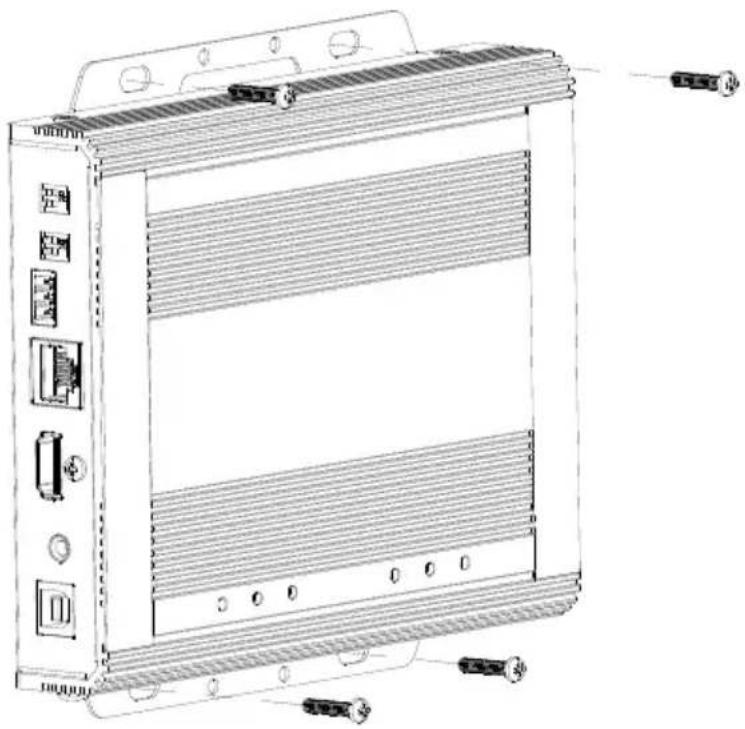
Wall Mounting
Secure or hang the VE1843 unit to the wall using the built-in mounting brackets.
natural_image
Technical line drawing of a server rack unit with ventilation grilles and connectors (no text or labels)Rack Mounting
Use the VE-RMK 1U Rack Mount Kit to rack mount the VE1843. For more information about this accessory, go to www.aten.com/products
Hardware Overview
VE1843 Front View
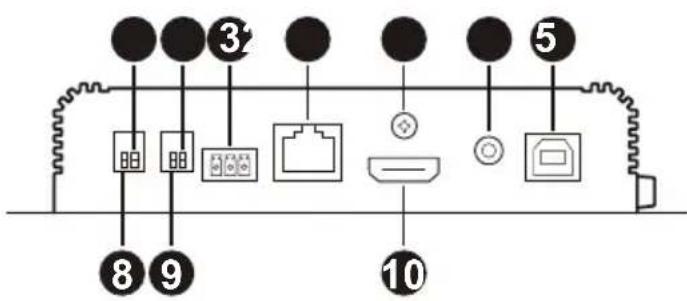
| No. | Component Description | |
| 1 | HDBaseT long reach mode switch (reserved) | Sets to enable the long reach mode. This switch is currently reserved for future expansion. |
| 2 | HDMI audio switch Sets to enable the embed and de-embed functions.See Tx and Rx Switch, page 13. | |
| 3 | RS-232 Port Connects to an RS-232 serial controller, such as a PC or a control system. | |
| 4 | HDBaseT port | Connects to an HDBase T^3 Certified Cat 6a cable with zero latency to transmit HDMI and control signals to the connected receiver if the unit is set to a transmitter. |
| 5 | cable lock screw for ATEN LockProTM | Universal HDMI cable lock that provides the easiest way to secure an HDMI cable to most HDMI devices. |
| 6 | audio in Connects to an audio source device, such as a PC. | |
| 7 | USB Type-B port Connects to source device, such as a PC. | |
| 8 | firmware upgrade switch (reserved) | This switch is reserved for ATEN Technical Support. If you would like to do a firmware upgrade yourself, please contact your dealer. |
| 9 | Tx / Rx switch Sets to define the unit as a transmitter or a receiver. | |
| 10 | HDMI in Connects to an HDMI video source device using an HDMI cable. | |
VE1843 Rear View
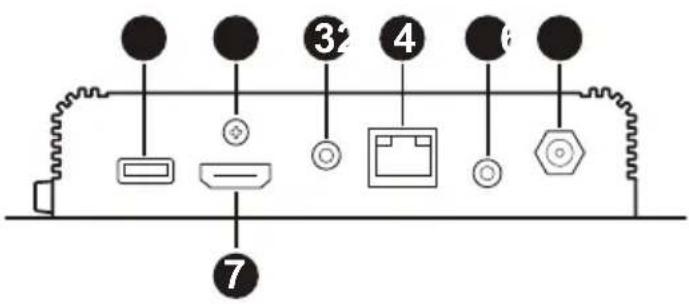
| No. | Component Description | |
| 1 | USB Type-A port Connects to | a peripheral device, such as a keyboard or mouse. |
| 2 | cable lock screw for ATEN LockProTM | Universal HDMI cable lock that provides the easiest way to secure an HDMI cable to most HDMI devices. |
| 3 | audio out Connects to an audio | output device, such as a set of speakers. |
| 4 | Ethernet port Connects to a net | network switch to provide Internet access for the connected source device using an RJ-45 cable. |
| 5 | IR port Connects to an IR emitter | ter or IR receiver for remotely control using an IR remote control. |
| 6 | power jack Connects to a power adapter for power supply. | |
| 7 | HDMI out Connects to a HDMI | display device using an HDMI cable. |
VE1843 Top View
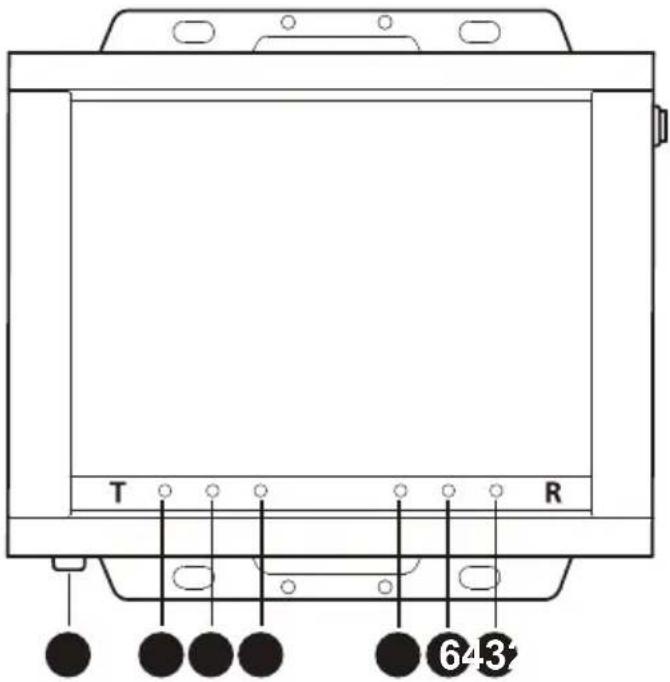
| No. | Component Description | |
| 1 | grounding terminal Grounds the unit to a suitable grounded object. | |
| Transmitter LEDs | ||
| 2 | power LED Lights green: The | unit is receiving power. |
| Off: The unit is powered off. | ||
| 3 | link LED Lights orange: The | transmission between the transmitter and receiver is stable. |
| Blinks orange: The transmission between the transmitter and receiver is unstable. | ||
| Off: There is no transmission between the transmitter and receiver. | ||
| 4 | HDMI in LED Lights orange: | The video display is normal with the HDCP key. |
| Blinks orange: The video display is normal without the HDCP key. | ||
| Off: There is no video signal. | ||
| Receiver LEDs | ||
| 5 H | DMI out LED Lights orange: | The video display is normal with the HDCP key. |
| Blinks orange: The video display is normal without the HDCP key. | ||
| Off: There is no video signal. | ||
| 6 link | LED Lights orange: The tr | transmission between the transmitter and receiver is stable. |
| Blinks orange: The transmission between the transmitter and receiver is unstable. | ||
| Off: There is no transmission between the transmitter and receiver. | ||
| 7 power | LED Lights green: The | unit is receiving power. |
| Off: The unit is powered off. | ||
Hardware Installation
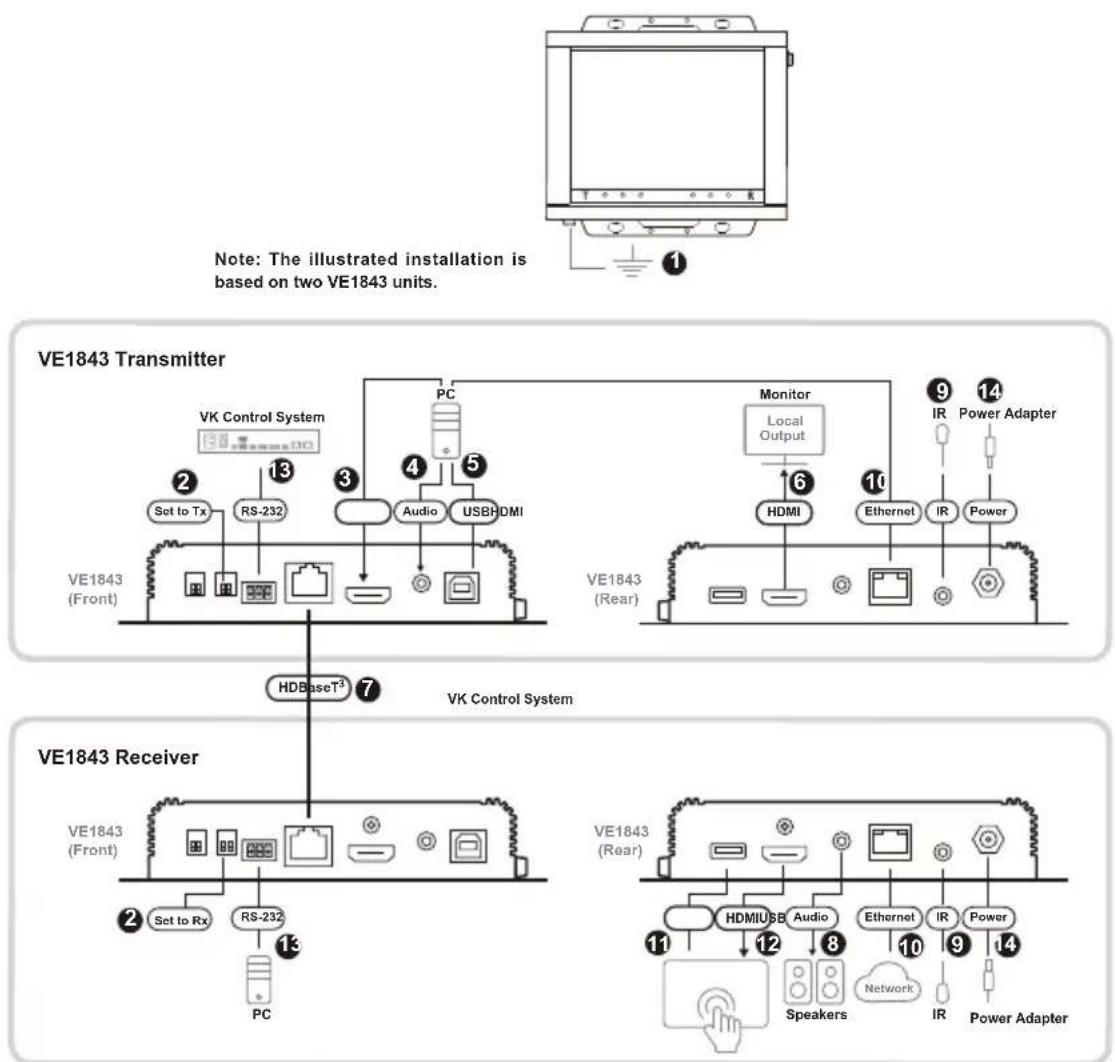
Follow the steps below to safely install the VE1843 to a source, a display device, and other devices as required.
flowchart
graph TD
    A["Note: The illustrated installation is based on two VE1843 units."] --> B["VE1843 Transmitter"]
    B --> C["PC"]
    C --> D["Set to Tx"]
    C --> E["RS-232"]
    C --> F["Audio"]
    C --> G["USB-HDMI"]
    B --> H["Monitor"]
    H --> I["Local Output"]
    I --> J["HDMI"]
    J --> K["Ethernet"]
    K --> L["IR"]
    L --> M["Power"]
    B --> N["VE1843 (Rear)"]
    B --> O["VE1843 (Front)"]
    O --> P["HDBaseT³"]
    P --> Q["VK Control System"]
    Q --> R["PC"]
    R --> S["Set to Rx"]
    R --> T["RS-232"]
    R --> U["Audio"]
    R --> V["USB-HDMI"]
    B --> W["VE1843 Receiver"]
    W --> X["PC"]
    X --> Y["Set to Rx"]
    W --> Z["VE1843 (Rear)"]
    Z --> AA["HDMI"]
    AA --> AB["Audio"]
    AB --> AC["Network"]
    AC --> AD[" Speakers"]
    AD --> AE["IR"]
    AE --> AF["Power Adapter"]
- Ground the VE1843 by connecting one end of a grounding wire to the grounding terminal and the other end to a suitable grounded object.
Note: Do not omit this step. Proper grounding helps to prevent damage to the unit from power surges or static electricity.
-
Important: Before connecting the VE1843, please set the Tx / Rx switch to define the unit.
-
Connect an HDMI-enabled PC to the transmitter using an HDMI cable. You can connect other HDMI-enabled source device here (e.g., Blu-ray player).
-
(Optional) Connect an audio source device (e.g., PC) to the transmitter. To embed this audio input to the HDMI output, put the HDMI audio switch (on Tx) to ON.
- Connect the USB Type-B port of the transmitter to a USB host (e.g., PC).
- Connect an HDMI-enabled display device to the transmitter using an HDMI cable.
- Connect the HDBaseT ports of the transmitter and receiver with a HDBaseT ^3 Certified Cat 6a cable (or above).
- (Optional) Connect your speakers or audio amplifier to the receiver. To de-embed this HDMI audio from the HDMI output, put the HDMI audio switch (on Rx) to ON.
- (Optional) To remotely control a device connected to the receiver, for example, a TV, connect the IR emitter to the IR port of the receiver, and the IR receiver to the IR port of the transmitter, and vice versa.
Note: The unit supports bi-directional IR transmission.
- (Optional) To provide network connectivity for your PC, connect the receiver to a network switch, and then connect the Ethernet port of the transmitter to your PC.
Note: The unit supports bi-directional bypass transmission.
- (Optional) Connect the USB Type-A port to a USB-enabled touch screen.
- Connect an HDMI-enabled touch screen to the receiver using an HDMI cable.
- (Optional) To remotely control a PC through serial controller, connect the RS-232 port of the transmitter to a serial controller, and then connect the RS-232 port of the receiver to a PC, and vice versa.
Note: The unit supports bi-directional bypass transmission.
-
Connect the power cord and the power adapter, and then plug the power adapter cables into the power jack on the units.
-
Power on all connected devices.
RS-232 Channel Transmission
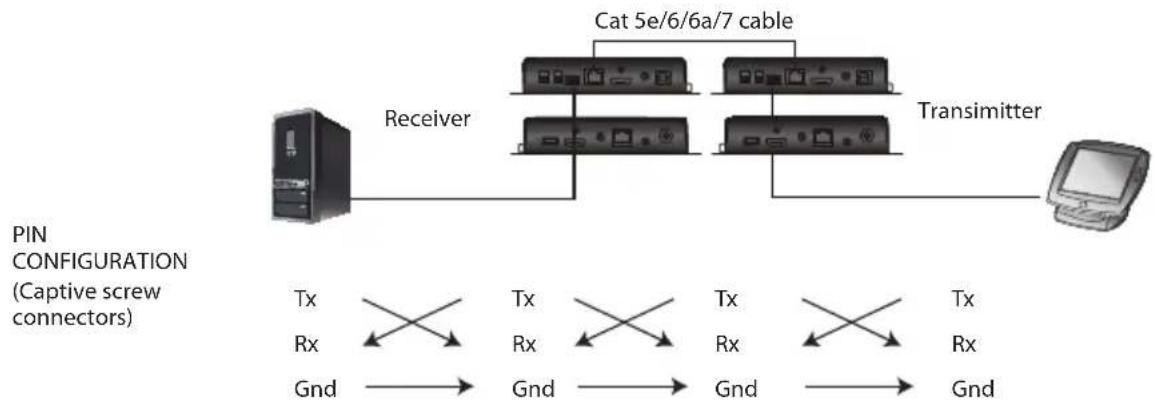
You can manage the connected devices via RS-232 serial devices, such as computers or bar code scanners. The RS-232 signal transmission flow can be illustrated as follows:
flowchart
graph TD
    A["Receiver"] --> B["Cat 5e/6/6a/7 cable"]
    B --> C["Transmitter"]
    C --> D["Computer"]
    E["PIN CONFIGURATION (Captive screw connectors)"] --> F["Tx Rx Gnd"]
    F --> G["Tx Rx Gnd"]
    G --> H["Tx Rx Gnd"]
    H --> I["Tx Rx Gnd"]
    I --> J["Tx Rx Gnd"]
The general concept here is that a RS-232 signal can be transmitted (Tx) to the receiving (Rx) end of a unit. The received signal can then be transmitted (Tx) to the receiving (Rx) end of another unit. The RS-232 signals can be transmitted back the other way.
Tx and Rx Switch
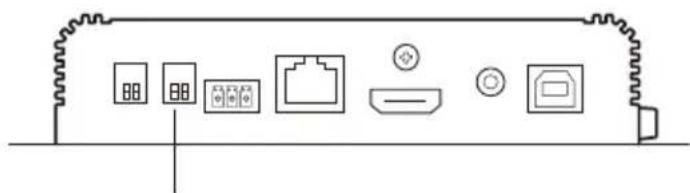
Use the Tx / Rx switch to set the unit as a transmitter or receiver as needed.
natural_image
Pure diagram of electronic device ports without any text, numbers, or symbolsTx / Rx switch
HDMI Audio Switch
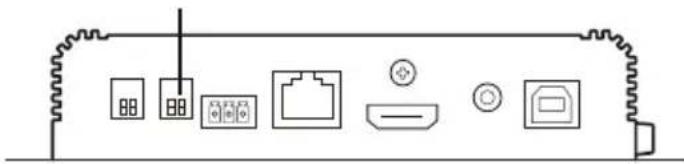
HDMI audio switch
natural_image
Pure diagram of electronic device components without any text, numbers, or symbolsAudio Embedding
To embed the audio signals, follow the steps below.
- Set the HDMI audio switch on the VE1843 transmitter to On.
- Set the HDMI audio switch on the VE1843 receiver to Off.
Audio De-embedding
To de-embed the audio signals, follow the steps below.
- Set the HDMI audio switch on the VE1843 transmitter to Off.
- Set the HDMI audio switch on the VE1843 receiver to On.
Bypassing Audio Signals
To bypass the audio signals, follow the steps below.
- Set the HDMI audio switch on the VE1843 transmitter to Off.
- Set the HDMI audio switch on the VE1843 receiver to Off.
Note: By default, the HDMI audio switch on the VE1843 is set to Off.
Safety Instructions
General
- This product is for indoor use only.
- Read all of these instructions. Save them for future reference.
◆ Follow all warnings and instructions marked on the device. - Do not place the device on any unstable surface (cart, stand, table, etc.). If the device falls, serious damage will result.
- Do not use the device near water.
- Do not place the device near, or over, radiators or heat registers.
- The device cabinet is provided with slots and openings to allow for adequate ventilation. To ensure reliable operation, and to protect against overheating, these openings must never be blocked or covered.
- The device should never be placed on a soft surface (bed, sofa, rug, etc.) as this will block its ventilation openings. Likewise, the device should not be placed in a built-in enclosure unless adequate ventilation has been provided.
- Never spill liquid of any kind on the device.
- Unplug the device from the wall outlet before cleaning. Do not use liquid or aerosol cleaners. Use a damp cloth for cleaning.
- The device should be operated from the type of power source indicated on the marking label. If you are not sure of the type of power available, consult your dealer or local power company.
- To prevent damage to your installation it is important that all devices are properly grounded.
- Do not allow anything to rest on the power cord or cables. Route the power cord and cables so that they cannot be stepped on or tripped over.
- Position system cables and power cables carefully; Be sure that nothing rests on any cables.
- Never push objects of any kind into or through cabinet slots. They may touch dangerous voltage points or short out parts resulting in a risk of fire or electrical shock.
- Do not attempt to service the device yourself. Refer all servicing to qualified service personnel.
- If the following conditions occur, unplug the device from the wall outlet and bring it to qualified service personnel for repair.
- The power cord or plug has become damaged or frayed.
♦ Liquid has been spilled into the device. - The device has been exposed to rain or water.
- The device has been dropped, or the cabinet has been damaged.
- The device exhibits a distinct change in performance, indicating a need for service.
- The device does not operate normally when the operating instructions are followed.
- Only adjust those controls that are covered in the operating instructions. Improper adjustment of other controls may result in damage that will require extensive work by a qualified technician to repair.
Technical Support
International
- For online technical support – including troubleshooting, documentation, and software updates: http://support.aten.com
- For telephone support, see Telephone Support, page iv.
North America
| Email Support support@aten-usa.com | ||
| Online Technical Support | Troubleshooting Documentation Software Updates | http://www.aten-usa.com/support |
| Telephone Support 1-888-999-ATEN ext 4988 | ||
When you contact us, please have the following information ready beforehand:
◆ Product model number, serial number, and date of purchase
- Your computer configuration, including operating system, revision level, expansion cards, and software
◆ Any error messages displayed at the time the error occurred
◆ The sequence of operations that led up to the error
◆ Any other information you feel may be of help
Specifications
| Function VE1843 | ||
| Video Input | ||
| Interfaces 1 x HDMI Type-A Female (Black) | ||
| Impedance 100 Ω | ||
| Max. Distance 5 m | ||
| Video Output | ||
| Interfaces 1 x HDMI Type-A Female (Black) | ||
| Impedance 100 Ω | ||
| Max. Distance 5 m | ||
| Video | ||
| Max. Data Rate 18 Gbps (6 Gbps per Lane) | ||
| Max. Pixel Clock 600 MHz | ||
| Compliance HDMI (3D, Deep Color, 4K / 60Hz); 4K HDR HDCP 2.3 Compatible Consumer Electronics Control (CEC) Note: The CEC signals are only bypassed from the transmitter unit to the receiver unit and do not support local output. | ||
| Max. Resolutions 4096 x 2160 @ 60Hz (4:4:4) 3840 x 2160 @ 60Hz (4:4:4) | ||
| Max. Resolutions / Distances Up to 4K x 2K @ 60Hz (4:4:4) @ 100 m (HDBaseT 3 Certified Cat 6a cable / ATEN 2L-2920 Cat 6a cable) | ||
| Audio | ||
| Input 1 x HDMI Type-A Female (Black) 1 x Stereo Audio (Mini Stereo Jack Female Green) | ||
| Output 1 x HDMI Type-A Female (Black) 1 x Stereo Audio (Mini Stereo Jack Female Green) | ||
| Connectors | ||
| Unit to Unit 1 x RJ-45 Female | ||
| Power 1 x DC Jack with locking (Black) | ||
| Control | ||
| RS-232 Channel | Connector: 1 x Terminal Block, 3 Pole Baud Rate: 19200 Data Bits: 8 Stop Bits 1 no parity and flow control | |
| Function | VE1843 | |
| IR Channel 1 x Mini Stereo Jack Female (Black, Bi-directional)30K ~ 56KHz full range transmission | ||
| Ethernet Channel 1 x GbE RJ-45 Female | ||
| USB Channel 1 x USB 2.0 Type-B Female (White, Host)1 x USB 2.0 Type-A Female (White, Device)Transmission data bandwidth: Up to 3000Mbps | ||
| Power Consumption DC12V:6.45W:40BTU | ||
| Switches | ||
| Selection 1 x Slide Switch - Tx (Transmitter) / Rx (Receiver) | ||
| Mode Selection 1 x Slide Switch - HDMI Audio Embedding or De-embeddin ON/OFF selection | ||
| Firmware Upgrade 1 x Slide Switch - ON/OFF | ||
| Long Reach Mode 1 x Slide Switch - ON/OFF (Reserved) | ||
| LEDs | ||
| Power 1 x Tx (Green, Transmitter)1 x Rx (Green, Receiver)Note: The Tx or Rx LED lights to indicate which role the VE1843 is set to. | ||
| Link 1 x Tx (Orange, Transmitter)1 x Rx (Orange, Receiver) | ||
| Video Output 1 x Rx HDMI Out (Orange, Receiver) | ||
| Video Input 1 x Tx HDMI In (Orange, Transmitter) | ||
| Environmental | ||
| Operating Temperature 0 - 40°C | ||
| Storage Temperature | -20 - 60°C | |
| Humidity | 0 x 80% RH, Non-Condensing | |
| Physical Properties | ||
| Housing | Metal | |
| Weight | 0.64 kg (1.41 lb) | |
| Dimensions (L x W x H) | 17.15 x 15.09 x 3.00 cm (6.75 x 5.94 x 1.18 in) | |
| Function VE1843 | ||
| Input Resolutions 6460 x 480 @ 60/67/72/75 Hz | ||
| 1920 x 1080/1200 @ 60 Hz | ||
Limited Warranty
ATEN warrants its hardware in the country of purchase against flaws in materials and workmanship for a Warranty Period of two [2] years (warranty period may vary in certain regions/countries) commencing on the date of original purchase. This warranty period includes the LCD panel of ATEN LCD KVM switches. Select products are warranted for an additional year (see A+ Warranty for further details). Cables and accessories are not covered by the Standard Warranty.
What is covered by the Limited Hardware Warranty
ATEN will provide a repair service, without charge, during the Warranty Period. If a product is detective, ATEN will, at its discretion, have the option to (1) repair said product with new or repaired components, or (2) replace the entire product with an identical product or with a similar product which fulfills the same function as the defective product. Replaced products assume the warranty of the original product for the remaining period or a period of 90 days, whichever is longer. When the products or components are replaced, the replacing articles shall become customer property and the replaced articles shall become the property of ATEN.
To learn more about our warranty policies, please visit our website: http://www.aten.com/global/en/legal/policies/warranty-policy/
© Copyright 2021 ATEN® International Co., Ltd.
Released: 2022-01-14
ATEN and the ATEN logo are registered trademarks of ATEN International Co., Ltd. All rights reserved. All other brand names and trademarks are the registered property of their respective owners.



- Compliance Statements
- FEDERAL COMMUNICATIONS COMMISSION INTERFERENCE STATEMENT
- FCC Caution
- Warning
- Achtung
- KCC Statement
- Industry Canada Statement
- CAN ICES-003 (A) / NMB-003 (A)
- HDMI Trademark Statement
- RoHS
- User Information
- Online Registration
- Telephone Support
- User Notice
- Product Information
- Package Contents
- Table of Contents
- Introduction
- Hardware Setup
- Operation
- Appendix
- About this Manual
- Note:
- Conventions
- Overview
- Features
- Planning the Installation
- Display
- Source Device
- Cables
- Considerations
- Chapter 2
- Hardware Setup
- Mounting the VE1843 Unit
- Wall Mounting
- Rack Mounting
- Hardware Overview
- VE1843 Front View
- VE1843 Rear View
- VE1843 Top View
- Hardware Installation
- RS-232 Channel Transmission
- Tx and Rx Switch
- HDMI Audio Switch
- Audio Embedding
- Audio De-embedding
- Bypassing Audio Signals
- Safety Instructions
- General
- Technical Support
- International
- Limited Warranty
- What is covered by the Limited Hardware Warranty
Brand : ATEN
Model : VE1843
Category : Audio/video extender