
AcousticCoverage AC-C2T-LP - Loudspeaker QSC - Free user manual and instructions
Find the device manual for free AcousticCoverage AC-C2T-LP QSC in PDF.


| Product Type | Professional Low-Profile Ceiling Loudspeaker |
| Brand | QSC |
| Model | AcousticCoverage AC-C2T-LP |
| Driver Configuration | 2-way coaxial: 6.5" woofer, 1" tweeter |
| Frequency Response (-10 dB) | 55 Hz – 20 kHz |
| Coverage Angle (Conical) | 110° (average 1 kHz – 16 kHz) |
| Sensitivity (1W/1m) | 89 dB SPL |
| Impedance | 8 ohms (bypass transformer) |
| Transformer Taps | 70V/100V: 30W, 15W, 7.5W, 3.75W, 1.9W |
| Power Handling (RMS) | 100 W continuous program |
| Maximum SPL | 109 dB peak |
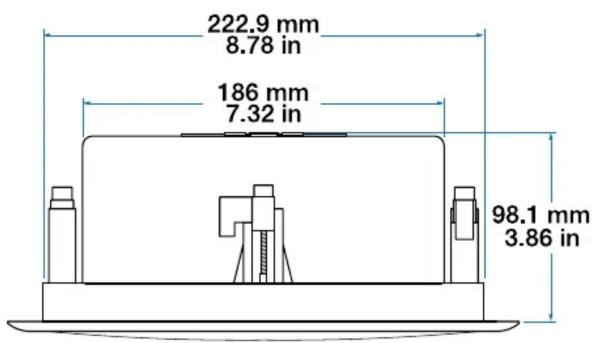
| Dimensions (Cutout) | Ø 222 mm |
| Dimensions (Overall) | Ø 280 mm x 195 mm depth |
| Weight | 4.5 kg (10 lbs) |
| Material | Steel backcan, ABS baffle, powder-coated grille |
| Ingress Protection | Not specified (indoor use only) |
| Safety Features | UL 1480, UL 2043 plenum rated |
| Installation | Tile bridge or C-ring included; easy spring-loaded clamps |
| Input Connectors | Euroblock pluggable screw terminals |
| Mounting Type | Ceiling mount (flush) |
| Color | White (paintable) |
| Included Accessories | C-ring, tile bridge, cutout template, Euroblock connector |
| Maintenance | Wipe grille with damp cloth; no user-serviceable parts |
| Repairability | Replaceable driver module available as spare part |
Frequently Asked Questions - AcousticCoverage AC-C2T-LP QSC
User questions about AcousticCoverage AC-C2T-LP QSC
0 question about this device. Answer the ones you know or ask your own.
Ask a new question about this device
Download the instructions for your Loudspeaker in PDF format for free! Find your manual AcousticCoverage AC-C2T-LP - QSC and take your electronic device back in hand. On this page are published all the documents necessary for the use of your device. AcousticCoverage AC-C2T-LP by QSC.
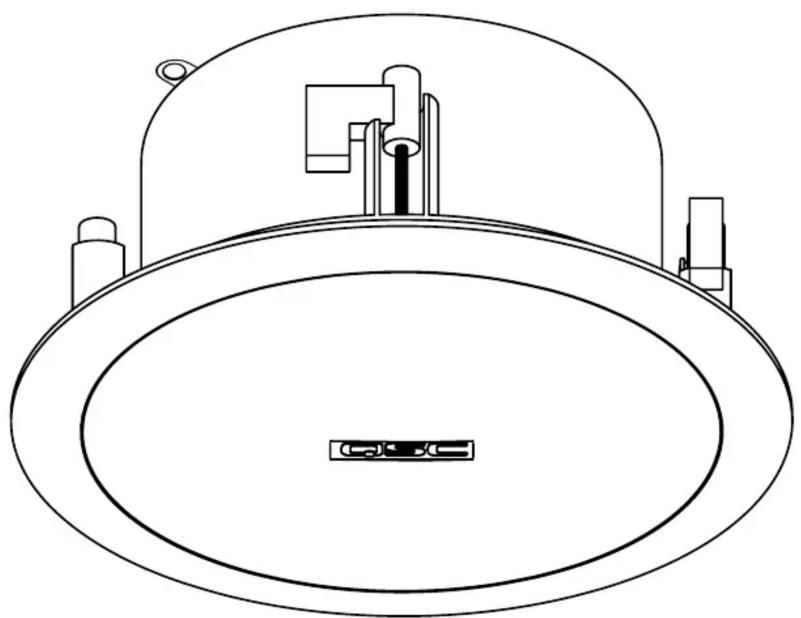
USER MANUAL AcousticCoverage AC-C2T-LP QSC
AcousticCoverage (AC) Series
User Manual
Model AC-C2T-LP
natural_image
Technical line drawing of a circular mechanical component with mounting brackets and a central base (no text or symbols)EXPLANATION OF SYMBOLS
The term WARNING! indicates instructions regarding personal safety. Failure to follow these instructions could result in bodily injury or death.
The term CAUTION! indicates instructions that prevent damage to physical equipment. Failure to follow these instructions could cause damage to the equipment that may not be covered under the warranty.
The term IMPORTANT! indicates instructions or information that are vital to the successful completion of the procedure.
The term NOTE is used to indicate additional useful information.


The lightning flash with arrowhead symbol in a triangle indicates that there is uninsulated dangerous voltage within the product's enclosure that may cause electric shock to a person.
The exclamation point within a triangle indicates important safety, operating, and maintenance information.

IMPORTANT SAFETY INSTRUCTIONS

- Read these instructions and keep a copy for future reference. Strictly follow and heed all instructions and warnings. Install the loudspeaker only as instructed.
- Do not use or submerge this loudspeaker in or near water or liquids.
- Clean only with a dry cloth. Do not use any aerosol spray, cleaner, disinfectant or fumigant on, near, or into the loudspeaker.
- Do not install the loudspeaker near any heat sources, such as radiators, heat registers, stoves, or other apparatus (including amplifiers).
- Do not use any attachments, accessories, mounts, or brackets that are not specified or approved by QSC, LLC.
- Refer all service to qualified personnel. Service is required if the mounting mechanism or loudspeaker have been damaged in any way, such as liquid spilled into the loudspeaker; objects falling into it; exposure to rain or moisture; abnormal operation; or being dropped.
- Observe all applicable local codes. Consult a licensed professional engineer when devising an equipment installation to ensure compliance.
Maintenance and Repair
Advanced technology—e.g., the use of modern materials and powerful electronics—requires specially adapted maintenance and repair methods. To avoid subsequent damage to the equipment, personal injury, and/or creation of additional safety hazards, have all maintenance or repair work on the equipment performed only by a QSC authorized service station or an authorized QSC international distributor. QSC is not responsible for any injury, harm, or related damages that arise from any failure of the customer, owner, or user of the equipment to facilitate those repairs.
Prepare Ceiling
Refer to Figure 1.
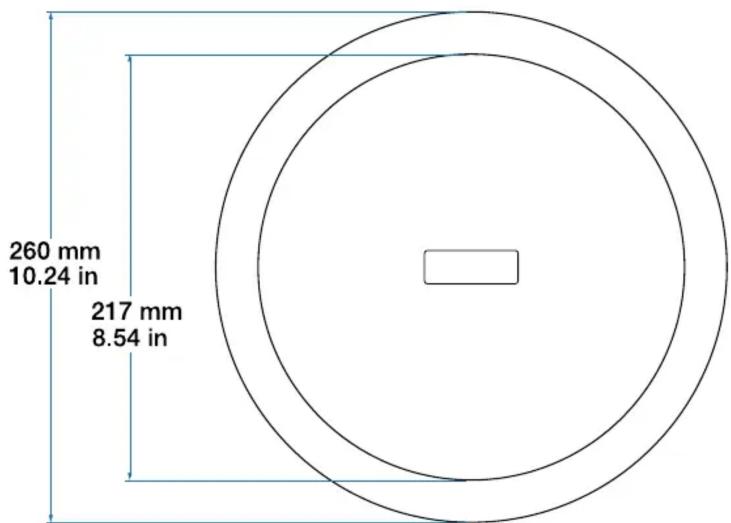
- Use the template provided to mark and cut a hole (1) in the ceiling where the loudspeaker is to be installed. For a frame-construction ceiling, skip to Wire the Loudspeakers.
- Install two V-rails (2), one on each side of the hole, and supported by the suspended-ceiling support rails (3).
- Install the C-ring (4) over the hole, using the V-rails as support. Make sure the clips on the C-ring are properly fitted over the V-rail.
- Use sheet-metal screws (5) to secure the C-ring to the V-rails.
Wire the Loudspeakers
Refer to Figure 2.
- Pass the wires down through the conduit/stress-relief clamp. Leave enough slack wire for making connections. Carefully tighten the clamp over the wires or conduit.
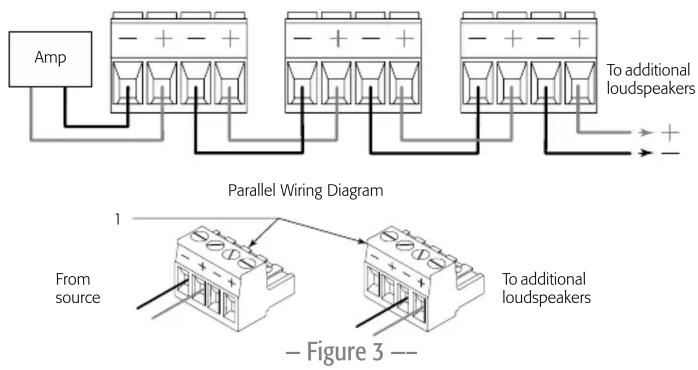
- Wire the Euro-style plug (1) as shown in Figure 3.
- Slide the cover (4) over the connector and secure with the Phillips screw.
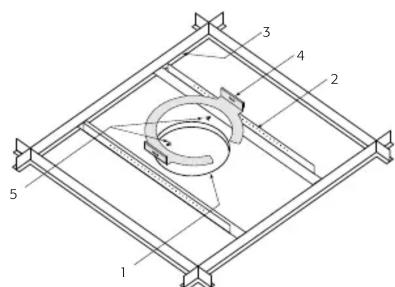
– Figure 1 --
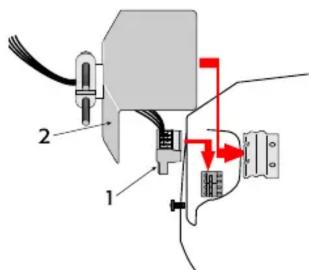
– Figure 2 --
Seismic Safety
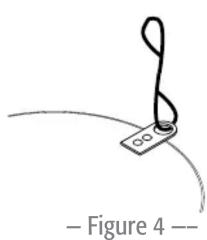
Refer to Figure 4.
- Attach an appropriate safety line from the safety tab on the back of the connector cover to an appropriate part of the structure.

WARNING!: Be sure to observe local building codes for seismic requirements.
Mount the Loudspeaker
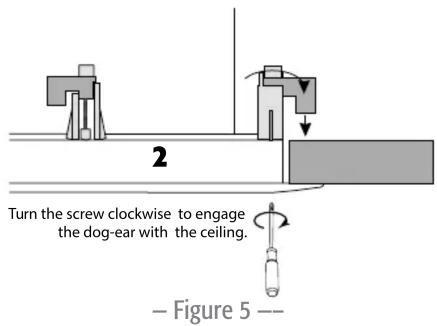
Refer to Figure 5.
- Make sure all of the dog-ears are up against the side of the metal loudspeaker housing.
- Slide the loudspeaker housing up through the hole into the ceiling.
- Use a Phillips screwdriver to tighten each of the four dog-ear screws.
natural_image
Simple line drawing of a musical note with a string, no text or symbols present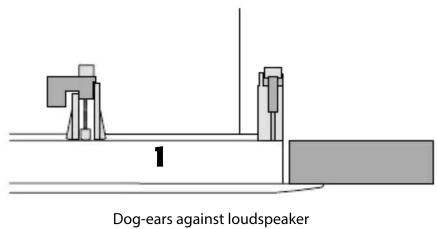

CAUTION!: Tighten the dog-ear screws only until they are snug and support the loudspeaker securely. Do not overtighten!
- Use a flat-tip screwdriver to set the transformer tap according to the design requirements.
- Install the loudspeaker grille.
QSC
Mailing Address:
QSC, LLC
1675 MacArthur Boulevard
Costa Mesa, CA 92626-1468 USA
Telephone Numbers:
Main Number: +1 (714) 754-6175
Sales & Marketing: +1 (714) 957-7100 or toll free (USA only) (800) 854-4079
Customer Service: +1 (714) 957-7150 or toll free (USA only) (800) 772-2834
Facsimile Numbers:
Sales & Marketing FAX: +1 (714) 754-6174
Customer Service FAX: +1 (714) 754-6173
World Wide Web:
www.qsc.com
E-mail:
info@qsc.com
tech_support@qsc.com
QSC Self-Help Portal
Access our Self-Help Portal for additional information, FAQs, and documents. You may also register or login to open a case with QSC Technical Services.
https://qscprod.force.com/selfhelpportal/s/
Brand : QSC
Model : AcousticCoverage AC-C2T-LP
Category : Loudspeaker