
Airwave CWA BT310 - Loudspeaker COBRA - Free user manual and instructions
Find the device manual for free Airwave CWA BT310 COBRA in PDF.


| Product Type | Portable Bluetooth Speaker |
| Brand | Cobra |
| Model | Airwave CWA BT310 |
| Color | Black with orange stripe |
| Waterproof Rating | IPX7 |
| Battery Type | Built-in rechargeable Li-ion |
| Charging Input | Micro USB, DC 5V 500mA |
| Battery Life | Up to 10 hours |
| Charging Indicator | Red LED on when charging, off when full |
| Bluetooth Pairing | Press and hold Multi-Function Key for 5 seconds from power off |
| Audio Input | 3.5mm Aux-in jack (with waterproof cover) |
| Microphone | Built-in for hands-free calls |
| Controls | Multi-Function Key, Volume Up/Down buttons |
| Power On/Off | Press and hold Multi-Function Key 2s to turn on, 3s to turn off |
| LED Indication | Blue LED blinks during pairing, solid blue when connected |
| Operating Temperature | Up to +55°C (+131°F) |
| Care Instructions | Rinse with water or wipe with soft cloth and mild detergent |
| Safety Warning | Do not disassemble; keep away from children |
| Warranty | 1 year limited (USA) |
| Compliance | FCC Part 15, Industry Canada RSS-210 |
Frequently Asked Questions - Airwave CWA BT310 COBRA
User questions about Airwave CWA BT310 COBRA
0 question about this device. Answer the ones you know or ask your own.
Ask a new question about this device
Download the instructions for your Loudspeaker in PDF format for free! Find your manual Airwave CWA BT310 - COBRA and take your electronic device back in hand. On this page are published all the documents necessary for the use of your device. Airwave CWA BT310 by COBRA.
USER MANUAL Airwave CWA BT310 COBRA
natural_image
Black rectangular device with hexagonal mesh grille and orange stripe, no visible text or symbolsCWA BT310
Product
Information Guide
PRODUCT FEATURES
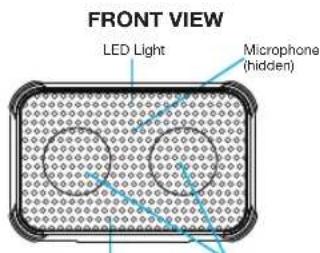
LoudspeakersSpeaker Mesh Rubber Sleeve
REAR VIEW
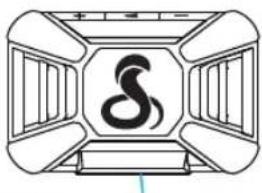
TOP VIEW
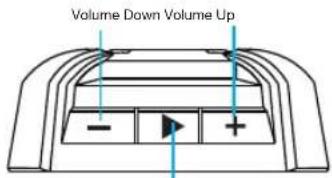
Multi-Function Key
SIDE VIEW
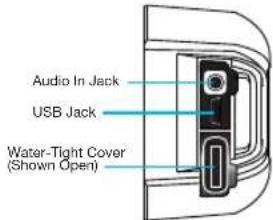
CARE AND MAINTENANCE
- Never try to disassemble or service the product by yourself. Opening the unit will damage the seals that make it waterproof!
- Keep the Cobra Airwave™ Box and accessories out of reach from children.
- Do not expose the Cobra Airwave™ Box to temperatures above +55°C (+131°F). If the product is operated in extreme hot or cold temperature, the battery capacity is reduced. Use it at room temperature for maximum battery capacity.
- The Cobra Airwave™ Box is waterproof and it can be cleaned by rinsing off or with a soft cloth and mild detergent.
- Although the product is IPX7 compliant, it is not designed to be used for extended periods of time floating in water. Please make sure the rubber cover over the jack is closed tightly while around water. Retrieve and dry if the speaker is dropped in water.
CHARGING
The Cobra Airwave ^™ Box has a built-in Li-ion battery, so it can be used without connecting to a power supply.
To charge the battery, follow these steps:
- Connect the micro USB connector of the supplied USB cord to the Cobra Airwave™ Box micro-USB input.
-
Plug the USB full-size connector into a computer USB port, common USB type AC charger (DC 5V, 500mA) or any USB power source.
-
When the device is charging the LED status indicator will be RED. When fully charged the RED status indicator LED will go off.
• A full charge will last for up to 10 hours of normal use.
OPERATION
Turning the Cobra Airwave™ Box On or Off
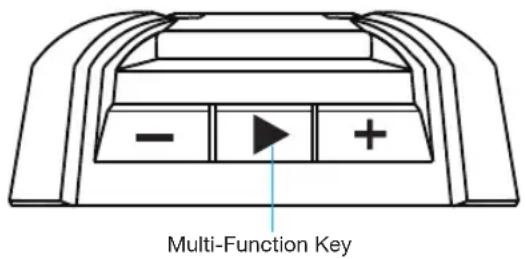
Press and hold the Multi-Function Key for 2 seconds to turn On. The blue LED will turn on and blink. "Power On" will sound from the speaker. Press and hold the Multi-Button for 3 seconds to turn Off. The red LED will turn on then turn off. "Power Off" will sound.
Pairing the Cobra Airwave™ Box with a smartphone or any Bluetooth® enabled music device
To use the Cobra Airwave™ Box with any Bluetooth® enabled smartphone or media device, you must first pair the device to the Cobra Airwave™ Box. Once they have been paired for the first time, the phone or media device will automatically re-connect to the Cobra Airwave™ Box when the power is turned ON and Bluetooth® is enabled on your device. For additional information, see the operation manual for your smartphone or media device.
Pairing with smartphone
- Turn Bluetooth ^® on in your settings menu. It will begin searching for any Bluetooth ^® device within range.
- With power off, press and hold the Multi-Function Key for 5 seconds (keep holding when you hear "Power On" after 2 seconds) and the blue and red LEDs will alternately blink. "Pairing" will sound.
- You will see the Cobra Airwave ^TM Box on the devices list on your phone. Select the Cobra Airwave Box to pair. Once connected, the blue LED light will blink on the Cobra Airwave ^TM Box and "Successful" will sound.
Playing music
To play music through the Cobra Airwave™ Box, first pair the devices. Music played on the Bluetooth® enabled smartphone or other Bluetooth® device will be played through the Cobra Airwave™ Box.
For smartphones and some other Bluetooth ^® devices pressing the Multi-Function Key will cause the paired device to start playing. Pressing the Multi-Function Key again will pause the audio.
The audio can also be started and paused using the smartphone controls.
ADJUSTING VOLUME
To increase or decrease the Cobra Airwave™ Box volume, press the "+" or "-" buttons.
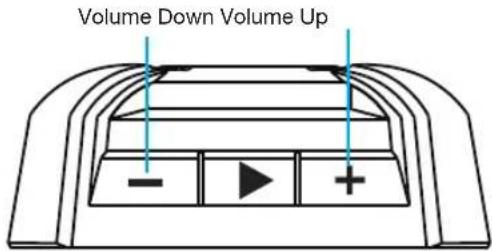
- Volume can be adjusted with Cobra Airwave ^TM Box controls or the paired Bluetooth ^® device connected to the Cobra AirWave ^TM Box.
Pairing a new device with the Cobra Airwave™ Box
- Use the smartphone or paired devices' Bluetooth® settings menu to unpair the Cobra Airwave™ Box.
- Press and hold the Multi-Function Key for 3 seconds to turn off the Cobra Airwave ^TM Box.
- Follow the steps under "Pairing with smartphone" to complete pairing.
Answer incoming call/hang up
If a call comes through in stand by mode or while playing music, click on the Multi-Function Key to answer the call. To hang up, press the Multi-Function Key again.
QUICK REFERENCE GUIDE
| ModeControlsActionFunctions | |||
| Power Press & Hold >2s Turn | Power On/Off | ||
| ▶ | Press & Hold >3s Pair to Bluetooth * (from power off) | ||
| Music Press Play/Pause Music | |||
| + | Press Volume Up | ||
| - | Press Volume Down | ||
| Phone | ▶ | Press | Answer Incoming Call |
| + | Press Volume Up | ||
| - | Press Volume Down | ||
| ▶ | Press | End Call | |
FCC & INDUSTRY CANADA STATEMENT
For Products Purchased in USA:
NOTE: This device complies with part 15 of FCC rules: Operation is subject to the following two conditions: (1) This device may not cause harmful interference, and (2) This device must accept any interference received including interference that may cause undesired operation.
CAUTION: Modifications or parts not approved by Cobra Electronics Corporation may violate FCC Rules and void authority to operate this equipment.
For Products Purchased in Canada:
This device complies with Industry Canada license-exempt RSS standard(s). Operation is subject to the following two conditions: (1) this device may not cause interference, and (2) this device must accept any interference, including interference that may cause undesired operation of the device.
This equipment complies with FCC RF radiation exposure limits set forth for an uncontrolled environment. This device complies with Part 15 of the FCC Rules and with RSS-210 of Industry Canada. Operation is subject to the following two conditions: (1) This device may not cause harmful interference, and (2) this device must accept any interference received, including interference that may cause undesired operation.
NOTE: The manufacturer is not responsible for any radio or TV interference caused by unauthorized modifications or changes to this equipment. Such modifications or changes could void the user's authority to operate the equipment.
This equipment is portable device. The output power of this device is less than 20mW. The SAR test is not required.
NOTE: This equipment has been tested and found to comply with the limits for a Class B digital device, pursuant to part 15 of the FCC Rules. These limits are designed to provide reasonable protection against harmful interference in a residential installation. This equipment generates uses and can radiate radio frequency energy and, if not installed and used in accordance with the instructions, may cause harmful interference to radio communications. However, there is no guarantee that interference will not occur in a particular installation. If this equipment does cause harmful interference to radio or television reception, which can be determined by turning the equipment off and on, the user is encouraged to try to correct the interference by one or more of the following measures:
- Reorient or relocate the receiving antenna.
- Increase the separation between the equipment and receiver.
- Connect the equipment into an outlet on a circuit different from that to which the receiver is connected.
- Consult the dealer or an experienced radio/TV technician for help.
PRODUCT SERVICE QUESTIONS
For any questions about operating or installing this new Cobra product, or if parts are missing...PLEASE CALL COBRA FIRST...do not return this product to the store.
For Products Purchased in the U.S.A.
If your product should require factory service, please call Cobra first before sending your radio. This will ensure the fastest turn-around time on your repair. You may be asked to send your radio to the Cobra factory. It will be necessary to furnish the following to have the product serviced and returned.
1) For warranty repair include a copy of the original sales receipt. If you send the original receipt, it cannot be returned.
2) Send the entire product.
3) Enclose a detailed description of the problem along with the name and address of where the product is to be returned.
4) Pack radio securely to prevent damage in transit. If possible, use the original packing material.
5) Ship prepaid and insured by way of a traceable carrier such as United Parcel Service (UPS) or Priority Mail to avoid loss in transit to Cobra Factory Service:
Cobra Electronics Corporation
6500 West Cortland Street
Chicago, Illinois 60707 U.S.A.
6) If the radio is under warranty, it will be repaired or exchanged depending on the model.
Please allow approximately three to four weeks before contacting Cobra for status. If the product is out of warranty, a letter will automatically be sent informing you of the repair charge or replacement charge. If you have any questions, please call 773-889-3087 for assistance.
For Products Purchased Outside the U.S.A.
Please contact your local dealer for product service information.
LIMITED ONE-YEAR WARRANTY
For Products Purchased in the U.S.A.
Cobra Electronics Corporation warrants that its products and the component parts thereof, will be free of defects in workmanship and materials for a period of one year from the date of first consumer purchase. This warranty may be enforced by the first consumer purchaser, provided that the product is utilized within the U.S.A.
Cobra will, without charge, repair or replace, at its option, defective products, products or component parts upon delivery to the Cobra Factory Service department, accompanied by proof of the date of first consumer purchase, such as a duplicated copy of a sales receipt.
You must pay any initial shipping charges required to ship the product for warranty service, but the return charges will be at Cobra's expense.
if the product is repaired or replaced under warranty. This warranty gives you specific legal rights, and you may also have other rights which may vary from state to state.
Exclusions: This limited warranty does not apply: 1) To any product damaged by accident; 2) In the event of misuse or abuse of the product or as a result of unauthorized alterations or repairs; 3) If the serial number has been altered, defaced, or removed; 4) If the owner of the product resides outside the U.S.A.
All implied warranties, including warranties of merchantability and fitness for a particular purpose are limited in duration to the length of this warranty. Cobra shall not be liable for any incidental, consequential or other damages; including, without limitation, damages resulting from loss of use or cost of installation.
Some states do not allow limitations on how long an implied warranty lasts and/or do not allow the exclusion or limitation of incidental or consequential damages, so the above limitations may not apply to you.
For Products Purchased Outside the U.S.A.
Please contact your local dealer for warranty information.
Trademark Acknowledgement
Cobra®, Nothing Comes Close to a Cobra®; and the snake design are registered trademarks of Cobra Electronics Corporation, USA. Cobra Airwave™ and Cobra Electronics Corporation™ are trademarks of Cobra Electronics Corporation, USA.
The Bluetooth ^® word mark is a registered trademark owned by Bluetooth SIG, Inc. and any use of such marks by Cobra Electronics Corporation is under license.
©2014 Cobra Electronics Corporation
6500 West Cortland Street, Chicago, IL 60707
www.cobra.com

- PRODUCT FEATURES
- CARE AND MAINTENANCE
- CHARGING
- OPERATION
- Turning the Cobra Airwave™ Box On or Off
- Pairing the Cobra Airwave™ Box with a smartphone or any Bluetooth® enabled music device
- Pairing with smartphone
- Playing music
- ADJUSTING VOLUME
- Pairing a new device with the Cobra Airwave™ Box
- Answer incoming call/hang up
- QUICK REFERENCE GUIDE
- FCC & INDUSTRY CANADA STATEMENT
- For Products Purchased in USA:
- For Products Purchased in Canada:
- PRODUCT SERVICE QUESTIONS
- For Products Purchased in the U.S.A.
- For Products Purchased Outside the U.S.A.
- LIMITED ONE-YEAR WARRANTY
- Trademark Acknowledgement
Brand : COBRA
Model : Airwave CWA BT310
Category : Loudspeaker