Ninebot Gokart Kit - Rollerblades SEGWAY - Free user manual and instructions
Find the device manual for free Ninebot Gokart Kit SEGWAY in PDF.


| Product Type | Go-kart conversion kit |
| Compatible Scooter | Ninebot by Segway ES1/ES2/ES3/ES4 (max wheelbase 840 mm) |
| Dimensions (Assembled) | 1020 x 700 x 510 mm |
| Net Weight | 13.6 kg |
| Max Rider Weight | 100 kg |
| Max Speed | 24 km/h (depending on scooter model) |
| Frame Material | Steel tubular frame |
| Seat | Adjustable racing seat with harness |
| Driving Modes | Sport mode, Drift mode |
| Tires | Front: solid rubber tire; Rear: pneumatic tire with drift ring |
| Braking | Electronic brake (via scooter) + hand brake lever |
| Battery & Range | Uses scooter battery; range up to 20 km depending on scooter |
| Assembly Required | Yes, tools included |
| Maintenance | Check bolts weekly, clean frame, lubricate moving parts |
| Safety Gear | Helmet, knee pads, elbow pads recommended |
| Spare Parts Availability | Replacement tires, drift rings, seat cushions available via Segway |
| Repairability | Modular design; most parts replaceable with basic tools |
Frequently Asked Questions - Ninebot Gokart Kit SEGWAY
User questions about Ninebot Gokart Kit SEGWAY
0 question about this device. Answer the ones you know or ask your own.
Ask a new question about this device
Download the instructions for your Rollerblades in PDF format for free! Find your manual Ninebot Gokart Kit - SEGWAY and take your electronic device back in hand. On this page are published all the documents necessary for the use of your device. Ninebot Gokart Kit by SEGWAY.
USER MANUAL Ninebot Gokart Kit SEGWAY
Thanks for choosing the Ninebot Gokart Kit, hereinafter referred to as the Gokart Kit.
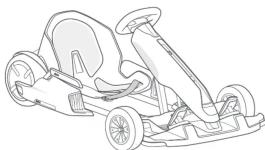
The Gokart Kit is an accessory developed specifically for the Ninebot by Segway products listed below. When the Gokart Kit is attached to the appropriate Ninebot by Segway product it becomes an electric Gokart. You must read and follow these instructions as well as the instructions provided with the applicable Ninebot by Segway product.
natural_image
Line drawing of a race car with wheels and steering wheel (no text or symbols)


- The Gokart Kit is only suitable for use with the Ninebot by Segway miniPRO (hereinafter collectively referred to as the miniPRO) and Ninebot S.
- Other Ninebot and Segway self-balancing models are not supported.

WARNINGS

- To reduce the risk of injury, adult supervision is required. Never use in roadways, near motor vehicles, or near steep inclines or steps, swimming pools or other bodies of water; always wear shoes, and never allow more than one rider.
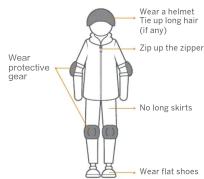
• Always fasten seat belt, wear a helmet with long hair tucked inside and wear protective gear. Loose
clothing or hair can become stuck in wheels or block your vision. Wear appropriate closed toed, secure features. No longer clothing
- Do not drive in rain or snow. When not in use, park the Gokart indoors to avoid water entering and
damaging the vehicle.
- comply with all local laws and regulations.
Risk of death or serious injury from collisions and falls. To reduce the risk of injury user and/or adult must read and follow the user manual.
Correct dress code
[NO TEXT]
Who Should Drive:
The manufacturer recommends drivers be at least 14 years old. Children under the age of 16 should only drive under adult supervision. Always follow these safety instructions:
A. People who should not drive the Gokart include:
i. Anyone under the influence of alcohol, drugs, or intoxicants.
ii. Anyone who suffers from disease that puts himself/herself at risk if he/she engages in
strenuous physical activity.
III. Anyone whose weight is outside the stated limits (see Specifications).
IV. Pregnant women.
B. The Gokart is intended for one person only
C. To drive safely, you must be able to clearly see what is in front of you and you must be
e.g., the real to other
D. Drivers must be able to near the environment around them.
After Each Drive:
-
Park the Gokart on flat ground and power it off. Failure to do so could cause the Gokart to move when exiting potentially paying injury to you and others around you.
-
Allow the Gokart to cool down before charging. Do not attempt to charge the Gokart, if it
the charger, or the power outlet is wet. Follow instructions in the miniPRO User Manual.
- As with any electronic device, use a surge protector when charging to help protect your Celvert from damage due to never surge and voltage strikes.
Source: From England, the 2019 World Economic and Economic Trends
-
Only use the charger specified by the manufacturer, do not use a charger from any other product.
-
Only use Ninebot or Segway approved parts and accessories. Do not modify your Gokart. Modifications to your Gokart could interfere with the operation and performance of the
Gokart, which may result in serious injury and/or damage, and could void the Limited
Warranty.
Maintenance and Storage
-
Be sure the Gokart is powered off before performing any maintenance or when installing or
-
When installing components, use proper and sufficient force until the component is secure.
If the installation is too loose or too tight, the Gokart may not function properly resulting in
the potential for injury to you or others of damage to, or malfunction of, the Don't.
- Instant batteries for the demand in accordance with the instructions and ensure that the positive and negative electrodes of the batteries are installed correctly. Only use the
batteries specified by the manufacturer. Do not charge the batteries as this may cause a risk
of fire of explosion. Do not mix old and new batteries. Do not mix alkaline, standard (carbon-zinc), or rechargeable batteries. When the batteries are dead, purchase and replace
them yourself
- Follow all instructions contained in the miniPRO User Manual when performing mainte-
hance on the miniPRO.
- Do not use a strong water flow or high-pressure hoses to clean the Gokart. Avoid
getting water in the charge port. If your Gokart has been exposed to heavy rain store it outdoors away from buildings and people but protected from the elements until it is dry.
- Store your Gokart indoors. The miniPRO should be stored in an environment where the
temperature is no higher than 122^ F ( 50^ C) or lower than -4^ F ( -20^ C). If the temperature of the storage environment is lower than 32^ F ( 0^ C), do not charge it until after placing it in a warm environment (over 50^ F ( 10^ C)).
The data and parameters of the Ninebot Gokart vary with different models. They are
subject to change without prior notice. Go to www.segway.com for updated information.
Riding Safety
-
The Gokart is a recreational product. Before mastering riding skills, you need to practice. Neither Ninebot (Ninebot (Beijing) Tech Co., Ltd. or its subsidiaries and affiliates) nor Segway Inc. is responsible for injuries or damage caused by a driver's inexperience or failure to follow the instructions in this User Manual or in the New Rider Tutorial.
-
Remember as with any mode of transportation, that whenever you drive the Gokart, you risk injury or death from loss of control, collisions, and falls. You can reduce the risk by following all the instructions and warnings in this manual, but you cannot eliminate all the risks.
-
The Gokart kit contains small parts which can create a choking hazard. Keep small children away from the Gokart.
Pre-Ride Checklist and Preparing for Your Drive
-
Before each drive check and tighten any loose parts, fasteners, straps, and replace damaged components
-
To avoid accidents caused by improperly inflated or worn tires, check the tire pressure on the miniBPO tires and worn on all tires before each side. Do not absorb moving or spinning tires.
-
Ensure that the battery level and vehicle operating status are within the specifications contained in the manual of the model being used with the Gokart Kit.
-
Carefully read, understand and follow all instructions in this User Manual and watch and understand the New Rider Tutorial in the App before your first drive. Do not attempt to drive the Gokart if you are not able to drive in accordance with the instructions in this Manual or you risk serious injury or death.
-
Always wear appropriate shoes, clothing, and protective gear when riding. Protective gear includes the use of a helmet, knee pads, and elbow pads (not included). Use an approved bicycle or skateboard helmet that fits properly with the chin strap in place, and provides protection for the back of your head. Remove or tie back anything loose (i.e. clothing, hair, jewelry, etc.) that could be caught in any moving parts. Always fasten the seat belt before riding and ensure it is securely tightened. Loose seat belt can get stuck in the wheels.
-
Do not turn the Gokart on unless it is parked on flat ground.
Where to Drive:
-
When entering public spaces, always comply with the local laws and regulations. Only ride in areas where you have first obtained permission from the property owner.
-
The Gokart is designed to be driven on a dry, flat, hard-surface, free of obstacles, bumps, holes, and other hazards.
-
The kinds of surfaces which are appropriate for safe use of the toy.
-
Do not drive on roadways, near motor vehicles, pedestrians, bicyclists, animals, on or near steep inclines or steps, curbs, near swimming pools, through puddles or other bodies of water. Use caution when riding in areas with trees, posts, or fences. You must leave sufficient space between you and those
items to be able to safely pass them.
-
The Gokart is never to be ridden indoors.
-
Do not ride the Gokart at night.
-
Do not ride on any ramp or incline that exceeds the maximum slope.
-
Do not ride in the snow, rain, or on roads which are wet, muddy, icy, or that are slippery for any reason. Do not ride over obstacles (including, but not limited to, sand, loose gravel, or sticks).
Doing so could result in a loss of balance or traction and could cause a collision.
- Do not allow the Gokart to get wet. You risk damage to the batteries and potential for a fire or explosion due to a wet battery pack.
How to Drive:
- As with other vehicles, faster speeds require longer braking distance. Sudden acceleration or shaking on smooth surfaces could lead to vehicle and collision.
Staming an effect on surfaces used to internship and commercial
-
Be cautious and always keep a safe distance between you and others when driving. Be alert and slow down when entering unfamiliar areas.
-
Do not allow anyone to drive your Gokart on his/her own unless he/she has carefully read this manual, and followed the New Rider Tutorial. The safety of new riders is your responsibility. Assist new riders until they are comfortable with the basic operation of the Gokart and make sure each new rider wears a helmet and other protective gear.
-
To avoid distraction when driving your Gokart, do not use a cell phone, camera, headphones, ear buds or perform any other activities while driving.
-
Be alert! Scan both far ahead and in front of you. Your eyes are your best tool for safely avoiding obstacles and low traction surfaces (including, but not limited to, wet ground, loose sand, loose gravel, and ice). Use caution when transitioning over differing terrain.
-
When approaching or crossing an intersection, road, corner, or gate of any kind, always slow
down and yield to others.
-
Do not drive at unsafe speeds. You must always use good judgment based on your driving skills and the surrounding environment.
-
Always slow down when turning. Turning at a high speed can cause loss of control, possible
vehicle turn-over, and risk of injury of death
-
Do not perform stunts of any kind. All four tires must remain on the ground at all times
-
While driving the dokart, always remain seated with arms and legs inside the dokart,
-
Do not carry cargo of any kind.
-
If the Gokart makes an abnormal sound or signals an alarm while driving, stop immediately and do not use the Gokart or miniPRO until the cause of the noise (alarm has been identified and
corrected. Contact after-sales service for assistance
Packing List & Diagram
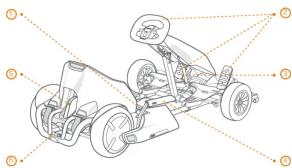
① Frame
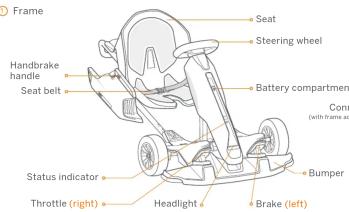
② User Manual & Limited Warranty
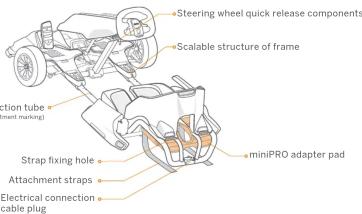
③ miniPRO Adapter Pad
Located under the frame. Remove the attachment step before removing from the frame.
④ Hex Wrenches

6 (AA) Batteries
[Non-Text]

Tools provided to remove the steering bar bracket
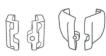

Steering wheel quick release components
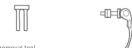
Power extension cord

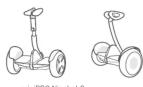
Ninebot by Segway miniPRO and Ninebot S are sold separately. Please contact your reseller for more information.
When unpacking your Gokart, please verify that the above items are included in the package. If you are missing any components, please contact your dealer/distributor or nearest service center (see Contact). Please retain the box and packaging materials in case you need to ship your Gokart in the future. Always power off your Gokart and unplug the power source before cleaning.
Operating the miniPRO
The Gokart is assembled by attaching the Gokart Kit to a miniPRO. Before assembly of the Gokart, please review the miniPRO User Manual and follow all instructions contained in it. Once the miniPRO has been properly activated and charged you can begin assembly of the Gokart.
① Update the miniPRO firmware
Install the app
Download the Segway-Ninebot app (hereinafter referred to as the app)
by any of the following meti
- Download in Google Play Store or Apple's App Store


* Your mobile phone requires Bluetooth 4.0 or later, iOS system 8.0 or later, or Android™ 4.3 or later.
» Pair your mobile phone and the miniPRO
▶ Turn on the phone's Bluetooth.
▶ Press the power
▶ Open the app to search for and
connect your miniPRO
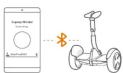
»» Update firmware and switch modes
In the upper right corner of the app. tap Settings → Firmware Update.
On the Ninebot settings page, tap "Gokart mode"
* This firmware update does not involve activation of the miniPRO. If you need to use the miniPRO, please refer to the miniPRO User Manual for related operations.
Remove the steering bar from the miniPRO

This manual uses the miniPRO as an example. If you have a Ninebot S, please watch the
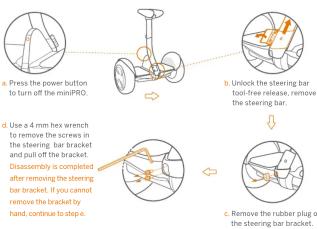
Use the tools provided to remove the steering bar bracket from the miniPRO.
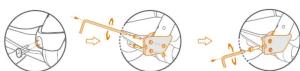
Place the steering bar bracket removal tool into the screw holes on the steering bar bracket. Fasten the two metal molds onto the lower part of the steering bar bracket by inserting the two nuts from the right and the two M5 screws from the left: tighten with a 4mm hex wrench. Insert the M6 screw into the screw hole on the front of metal molds, tightening with a 5mm hex wrench, continue tightening the screw until the steering bar bracket falls off the miniPRO.
③ Check the status of the miniPRO
Refer to the chapter "Maintenance" in the miniPRO User Manual to ensure that the tire performance, the battery level, and the running status of the miniPRO are normal.
Assembling and disassembling the Gokart
Before assembly, update the app's firmware and turn on Galgent mode.
Assembly
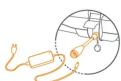
① Plug the power extension cord into the charging port of the miniPRO, tighten by turning clockwise.
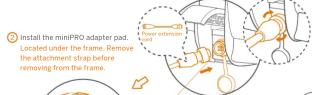
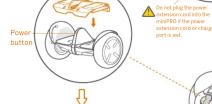
③ Place the Gokart frame on the miniPRO.
The installation direction is as shown below. Be sure to align the steel frame with the adapter pad as shown in the enlarged view.
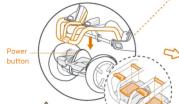
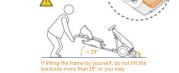
▶ Disassembly
Press the miniPRO's power button to turn off the Gokart.
This assembly is for adults only. Do not power on the miniPRO during assembly or disassembly.
⑨ Once fully assembled, make sure
PRO are facing the correct direction. The attachment straps are properly at
tached and tightened.
• The electrical connection cable is
- plugged into the power extension of The body length and steering wheel
height is appropriate for the rider.
• The battery compartment is closed. If anything appears to be incorrect
stop using the Gokart and
contact
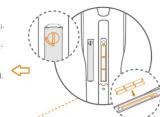
⑧ Install the Gokart batteries.
Unscrew the battery
compartment cover and insert batteries into the
compartment. Close and
tighten the cover.
To avoid issues that may be caused by corrosion.
remove the batteries if not
Using the Gokart for an extended period of time
.
7 Adjust the steering wheel height:
a Raise the steerin
suitable height.
5 insert the quick release screw into the hole of the
corresponding height.
c Tighten the quick release nut.
d Press to fix the steering wheel
- Ensure the steering wheel does
not shake. Otherwise, repeat
the steps b, c, d, e.
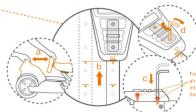
⑥ Stretch the frame and adjust the length of the body
With both hands holding the steering wheel and the seat
stretch the frame out to a suitable position along the horizontal direction of the connection tube.
- Align the scalable structure of the frame with the
marking on the connection tube.
- Positioning: Use a 5mm hex wrench to press the two screws into the hales on the left and right connection
tube in order, as shown in the figure above (The screw is
set to a depth of about 1cm for successful position)
(1) 2017年1月1日星期五
Driving the Gokart
Activate the Gokart Use and charging
Press the power button on the miniPRO to turn on the Gokart. The Gokart will automatically power off when idle for 10 minutes.

» Open the Segway-Ninebot APP and connect your Gokart.
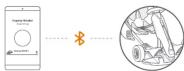
Follow the instructions in the app to activate the Gokart and complete the corresponding tutorial and exercises.

For your safety, the default values of the Gokart speed and sensitivity are set to low. Use the app to learn how to drive safely, then the speed limit can be gradually raised.

① Fastening the seat belt
Sitting on the seat, buckle the left and
Right parts of the seat belt in front of you.
② Driving
Acceleration: lightly press the throttle (right
Deceleration: lightly
pedal) to decelerate.
Steering: steer the Gokart by slightly turning the
steering wheel clockwise or counterclockwise. Do not pump the brake pedal to decelerate
图 1-3
③ Reversing
When the Gokart is stopped, double-press
the Gokart has switched to reverse mode.
Press the throttle to drive the Gokart in
reverse. Double-press the brake (left pedal)
again to reflect the natural life
④ Emergency braking
In the event of a situation that requires an
emergency stop, pull the hand brake handle the right side of the Gokart to engage the
emergency brake.


④ Emergency braking
In the event of a situation that requires an
emergency stop, pull the hand brake handle the right side of the Gokart to engage the
emergency brake.
⑤ Shutdown
Make sure the vehicle is completely stopped before getting off. Press the miniPRO's power button to turn off the Gokart.
6 Charging
Charge the Gokart by plugging the miniPRO
power cord into the power extension cord.
Do not connect the charger if the charge
port of power cable is wet.
Follow the relevant charging instructions in the manual and the common battery maintenance and safety knowledge for maintenance. Ninebot products are designed with overheat protection. If the vehicle temperature exceeds 104 °F (40°C), the vehicle cannot be charged as normal. Wait until the vehicle cools to below 104 °F (40°C) before charging.
Specifications
| Product | Name Ninebot Gokart Kit | |
| Model | N4M298 | |
| Supported models | Name and model | Ninebot by Segway miniPRO (Model: N3M260, N3M320)Nineletv5 (Model:N3M240) |
| Size | Vehicle size | After extension (Max status): 54x-32x-24 in (283x-822x-600 mm); before extension (Max status): 40x+32x-18 in (204x+822x-459 mm) |
| Package size | 43.1x-34.1x-20.1 in (1095x-865x-510 mm) | |
| Weight | Max payload 220 lbs (100 kg) | |
| Net weight | 61.3 lbs (27.8 kg) | |
| Driving | Height requirement | 51-70 in (130-190 cm) |
| Recommended Age | 14 years old | |
| Speed limit | 15 mph (24 km/h) | |
| Novice speed limit | 5 mph (8 km/h) | |
| Reversing speed limit | 2 mph (3 km/h/h) | |
| Typical Range ^c | 9 mile (15km) | |
| Steering ratio | 2:1:1 | |
| Ground clearance | 1.6 in (40 mm) | |
| Maximum slope ^(d) | 15° | |
| Traversable Terrain | Hardened road, flat road surface, slopes below 15° | |
| Operating temperature | 14°F~10.4°F (10~40°C) | |
| Storage temperature | 4°F~122°F (20~50°F.) | |
| IP rating | IPK4 | |
| Front compartment battery ^(e) | Model Quantity | 6 AA Batteries |
| Front tires | Tire width: 3 in (80 mm); flatness ratio: 60%; hub diameter: 5 in (127 mm) | |
| Tires | Type | Non-inflatable hollow tire |
| Headlight | 0.2 Whirl while LETS light bar | |
| Light | Status indicator | The indicator comes in three colors: blue, yellow, and red. Blue means that the vehicle is normal. The color of the vehicle needs to be attained for the batteries in the first component need to be onboard. Red means that the vehicle has a performance failure, and you need to open the air. Red means that the battery can contact the air inside service. |
| Brake | Braking method | Electronic brake + mechanical handbrake |
| Braking distance ^f | 20 ft (6 m) | |
[1] Typical Range : Under the
circumstances of full power, 134 the (70k) load and TTEF(2PEF).
ambient temperature, and
measured on a flat road at an
average speed of 9 mph (15
km/h).
[2] Maximum slope: Refers to the
maximum slope that a 220 lbs
(100 kg) driver can climb at a speed not feel out than 7 min (R
km/h).
[3] Front compartment battery:
The battery compartment inside
the frame that is used to power
the frame indicator/heading.
indicator light turns yellow and
blinks. You need to replace the
batteries yourself.
[4] Braking distance: Under the
circumstances of full power, 154
Ibs (70kg) load, and measured on
a mal, hard road at an average speed of 12.4 mph (70 km/h).
Note: You can also open the App
for more specific tips

Certification
European Union Compliance Statement
Battery recycling information for the European Union

Batteries or packaging for batteries are labeled in accordance with European Directive 2006/66/EC concerning batteries and accumulators and waste batteries and accumulators. The Directive determines the framework for the return and recycling of used batteries and accumulators as applicable throughout the European Union. This label is applied to various batteries to indicate that the battery is not to be thrown away, but rather reclaimed upon end of life per this Directive.
In accordance with the European Directive 2006/66/EC, batteries and accumulators are labeled to indicate that they are to be collected separately and recycled at end of life. The label on the battery may also include a chemical symbol for the metal concerned in the battery (Pb for lead, Hg for mercury, and Cd for cadmium). Users of batteries and accumulators must not dispose of batteries and accumulators as unsorted municipal waste, but use the collection framework available to customers for the return, recycling, and treatment of batteries and accumulators. Customer participation is important to minimize any potential e ccts of batteries and accumulators on the environment and human health due to the potential presence of hazardous substances.
Restriction of Hazardous Substances Directive (RoHS)
Ninebot products sold in the European Union, on or after 3 January 2013 meet the requirements of Directive 2011/65/EU on the restriction of the use of certain hazardous substances in electrical and electronic equipment (“RoHS recast” or “RoHS 2”).
Radio and Telecommunications Terminal Equipment Directive

Segway Europe B.V.
EU Contact Address for regulatory topics only: Hogehilweg 8, 1101CC, Amsterdam, The Netherlands
Hereby, Ninebot (Changzhou) Tech Co., Ltd, declares that the wireless equipment listed in this section are in compliance with the essential requirements and other relevant provisions of Directive 2014/53/EU.

Trademark and Legal Statement
Ninebot is registered trademark of Ninebot (Tianjin) Tech. Co., Ltd; Ninebot miniPRO, miniPLUS, and miniLITE are trademarks of Ninebot (Tianjin) Tech. Co., Ltd; Segway is registered trademark of Segway Inc; Apple and Apple Logo are registered trademark of Apple Inc in the United States and elsewhere. App Store is service mark of Apple Inc; Android is trademark of Google Inc, Android robots was originally created by Google Inc; The respective owners reserve the rights of their trademarks referred to in this manual.
The Ninebot Gokart Kit is covered by relevant patents. For patent information go to http://www.segway.com.
We have attempted to include descriptions and instructions for all the functions of the Gokart Kit at the time of printing. However, your Gokart Kit may differ slightly from the one shown in this document. Please note that there are multiple Ninebot models with different functions, and some of the functions mentioned herein may not be applicable to your unit. The manufacturer reserves the right to change the design and functionality of the Gokart Kit product and documentation without prior notice.
© 2018 Ninebot (Beijing) Tech Co., Ltd. All rights reserved.

Contact
Contact us if you experience issues relating to riding, maintenance and safety, or errors/faults with your Gokart Kit.
Europe, Middle East and Africa:
Segway Europe B.V.
Hogehilweg 8, 1101CC, Amsterdam, The Netherlands
Email service: service@segway.eu.com
Website: www.segway.com
Have your Gokart Kit's serial number on hand when contacting Segway.
You can find your serial number on the exterior of the shipping box, on the Product or in the Segway-Ninebot App, while connected to the Product.

- WARNINGS
- Riding Safety
- Packing List & Diagram
- Operating the miniPRO
- Remove the steering bar from the miniPRO
- Assembling and disassembling the Gokart
- This assembly is for adults only. Do not power on the miniPRO during assembly or disassembly.
- Driving the Gokart
- Activate the Gokart Use and charging
- Specifications
- Certification
- Trademark and Legal Statement
- Contact
Brand : SEGWAY
Model : Ninebot Gokart Kit
Category : Rollerblades