
UFO Mini 2 - Facial care device FOREO - Free user manual and instructions
Find the device manual for free UFO Mini 2 FOREO in PDF.


| Product Type | Facial Care Device |
| Brand | FOREO |
| Model | UFO Mini 2 |
| Dimensions | 72.5 mm x 31.4 mm |
| Weight | 99 g |
| Battery | Li-Ion 1050 mAh 3.7 V |
| Charging Time | 2.5 hours |
| Usage per Charge | Up to 40 treatments |
| Standby Time | 180 days |
| Materials | Body-safe silicone, PC + ABS, Aluminium Alloy |
| Color Options | Pearl Pink, Mint, Fuchsia |
| Thermo-Therapy Temperature | 45°C |
| T-Sonic™ Pulsations | 180 Hz |
| LED Lights | 8 full-spectrum LED lights |
| Noise Level | < 50 dB |
| Waterproof | Yes, 100% waterproof |
| Warranty | 2-year limited warranty |
| App Compatibility | FOREO For You app via Bluetooth |
| Treatment Duration | 90 seconds (pre-programmed masks) |
| Included Accessories | UFO Power Activated Masks, USB charging cable, attachment ring, stand |
| Mask Usage | Single-use only |
| Special Technologies | Hyper-Infusion Technology, Thermo-Therapy, T-Sonic, full-spectrum LED |
Frequently Asked Questions - UFO Mini 2 FOREO
User questions about UFO Mini 2 FOREO
0 question about this device. Answer the ones you know or ask your own.
Ask a new question about this device
Download the instructions for your Facial care device in PDF format for free! Find your manual UFO Mini 2 - FOREO and take your electronic device back in hand. On this page are published all the documents necessary for the use of your device. UFO Mini 2 by FOREO.
USER MANUAL UFO Mini 2 FOREO
natural_image
Product display featuring a blue cosmetic box labeled 'HüChardau' and a pink cosmetic jar with a red handle, set against a pink background (no readable text or symbols)
ONLINE MANUAL
GETTING STARTED
Congratulations on taking the first step toward out-of-this-world skincare by acquiring UFO™ mini 2. Before you begin to enjoy all the benefits of sophisticated power mask technology in the comfort of your home, please take a few moments to carefully read the instructions in this manual.
Please READ ALL INSTRUCTIONS BEFORE USE and utilize this product only for its intended use as described in this manual.
WARNING: NO MODIFICATION OF THIS EQUIPMENT IS ALLOWED.
Re-engineered with ultra-fast heating and an even wider spectrum of LED light, UFO™ mini 2 is a revolutionary power mask device that gives you superior skin in seconds. Featuring advanced Hyper-Infusion Technology, UFO™ mini 2 combines Thermo-Therapy with T-Sonic™ pulsations to enhance the benefits of UFO™ Power Activated Masks. Further equipped with 8 different LED lights, UFO™ mini 2 helps you unmask a refined, radiant complexion in only 90 seconds!
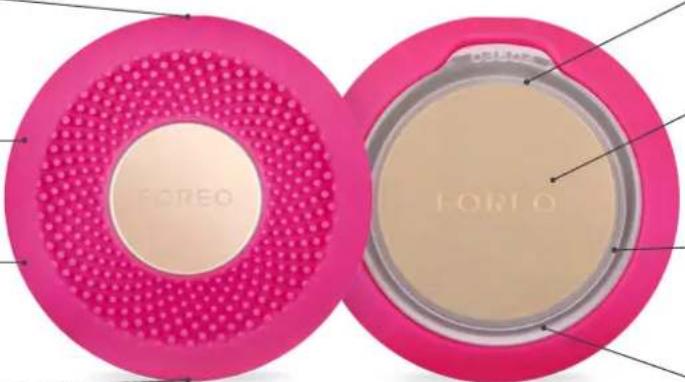
UNIVERSAL POWER BUTTON Turns device on/off, puts device in Bluetooth pairing mode, & selects treatment routines.
ULTRA-HYGIENIC SILICONE Bacteria-resistant and super soft.
T-SONIC™ PULSATIONS— Deliver a soothing facial massage to boost skin's radiance.
CHARGING PORT Up to 40 uses per 2.5 hour charge.
natural_image
Two pink circular powder covers with dotted patterns, one labeled 'FORO' and the other 'FORO', showing different shading and texture (no text beyond brand labels)FULL-SPECTRUM LED LIGHT Helps skin look visibly rejuvenated for a naturally refined complexion.
THERMO-THERAPY Softens skin to infuse mask ingredients into the deepest layers.
INDICATOR LIGHTS Light up to indicate which mask treatment your device is set to.
ATTACHMENT RING Secures UFO™ Power Activated Mask in place.
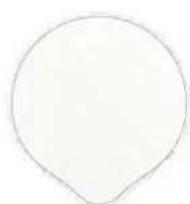
UFO™ POWER ACTIVATED MASK
Soft microfiber masks exclusively formulated for use with UFO".
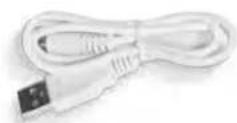
USB CHARGING CABLE
Charge anytime, anywhere with USB cable.
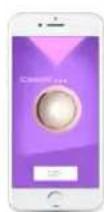
INTERACTIVE APP
Automatically syncs pre-programmed power mask routines to device.
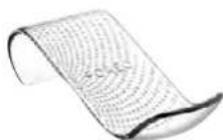
SLEEK & STYLISH STAND
Protects and displays your UFO™ mini 2, while helping it dry quickly.
HOW TO USE
1 To unlock and register your device for first time use, download the FOREO For You app.
2 Connect to the app via Bluetooth on your smartphone, and press the universal power button on UFO™ mini 2 to sync your device to the app.
3 In the app, scan the mask barcode and follow the instructions provided.

Download the FOREO app here
natural_image
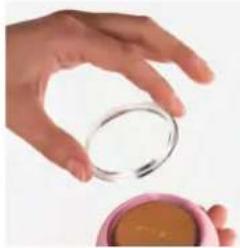
Hand holding a small glass over a pink cup containing a brown substance (no text or symbols visible)Remove the attachment ring from UFO™ mini 2.
4
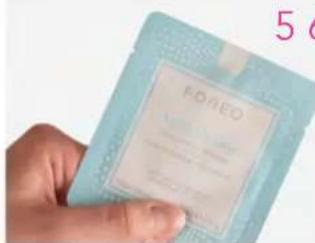
Remove UFO™ Power Activated Mask from sachet.
56
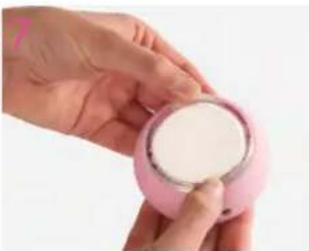
natural_image
Close-up of a hand holding a pink cosmetic cup with white powder (no text or symbols visible)Secure mask on device by clipping the attachment ring in place, with FOREO logo facing up.
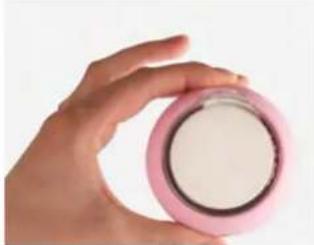
natural_image
Hand holding a pink compact container with white powder (no text or symbols visible)Enjoy your power mask treatment!
ADDING A NEW TREATMENT
Make My Day and Call It a Night are already pre-programmed in your device. Any other mask treatment must be activated through the app for first time use. Then, the routine can be accessed through the app or by using the universal power button.
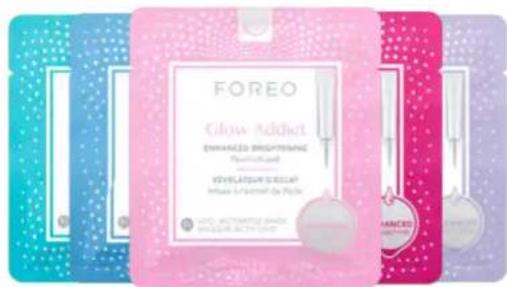
All Additional Mask Treatments*
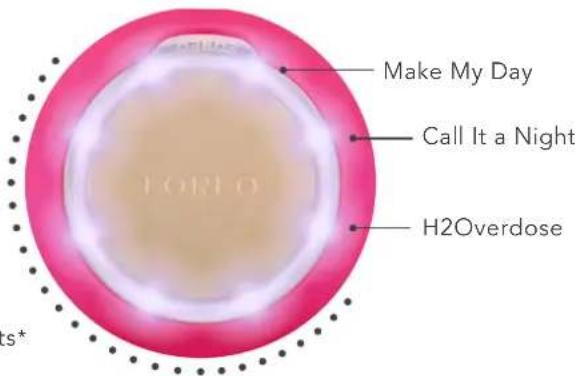
USING UFO™ mini 2 WITHOUT THE APP
1 Press the universal power button to turn on and activate the Make My Day treatment routine.
2 Press again to activate the Call It a Night treatment, and so on with each mask. (For example, if H2Overdose is on slot 3 in your app, press the universal power button 3 times to activate the H2Overdose treatment).
3 Your Power Mask treatment is ready to begin!
STILL WANT MORE?
If one UFO™ mini 2 treatment wasn't enough, press the universal power button again within 30 seconds after the end of the routine to start the same treatment over again! You can also personalize your power mask experience by creating your own treatment routine via the app, where you can select / adjust each technology to accompany your UFO™ Power Activated Mask.
APPLICATION
Start with clean, dry skin. We recommend cleansing with LUNA ^™ first for best results.
1 With a mask secured to your device, gently glide UFO™ mini 2 across your skin, distributing the mask essence evenly.
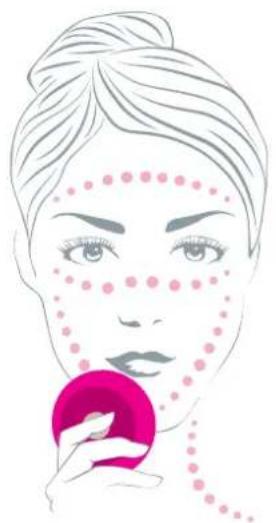
2 Using the UFO™ mini 2 device, massage the formula into your skin with a circular motion. Move the device in a clockwise circle around the face, starting on the chin, then moving up to the right cheek and the forehead. Continue down the left cheek to the chin and neck. Repeat this movement until the treatment ends.
3 Gently pat any remaining essence into your skin, or remove excess with a cotton pad. Apply a moisturizer of your choice, if desired.
natural_image
Illustration of a woman applying makeup with a pink circular object (no text or symbols)Remove the plastic ring from the device and throw away the microfiber mask. As UFO ^™ mini 2 is 100% waterproof, you can rinse both UFO ^™ mini 2 and the plastic ring under warm running water. Pat dry with a lint-free, non-abrasive cloth or towel. After use, we recommend spraying the device with FOREO's Silicone Cleaning Spray and rinsing with warm water for optimal results.
NOTE: Never use cleaning products containing alcohol, petrol or acetone, as they may irritate the skin and damage the silicone.
IMPORTANT
FOR OPTIMUM SAFETY:
Your UFO™ mini 2 device is intended to be used in conjunction with the accompanying masks only. At no time should the device be placed directly onto the skin/face with power on.
- If you have a skin condition or any medical concerns, please consult a dermatologist before use.
- Using UFO" mini 2 should be comfortable – if you experience discomfort, discontinue use immediately and consult a physician.
- Exercise particular care when using UFO™ mini 2 around the under-eye regions and do not bring the device into contact with the eyelids or eyes themselves.
- For reasons of hygiene, we do not recommend sharing your UFO™ mini 2 with anyone else.
- Avoid leaving your UFO™ mini 2 in direct sunlight, and never expose it to extreme heat or boiling water.
- UFO" mini 2 has a heated surface. Those sensitive to heat must use caution and care when using this device.
- Close supervision is necessary when this device is used by, on, or near children, as well as those with reduced physical and mental abilities.
- Discontinue use if this product appears damaged in any way. This product contains no serviceable parts.
- Use this device only for its intended use as described in this manual. If you do not find the answer to your specific question, or if you have any other questions regarding the device's operation, please visit foreo.com/support.
TROUBLESHOOTING
Precautions to be taken in the event of changes in the performance of UFO ^TM mini 2.
If UFO ^™ mini 2 is not activated when pressing the universal power button:
- Battery is empty. Charge your UFO™ mini 2 via USB charging cable until the light emits a steady glow. A full 2.5 hour charge will last up to 40 treatments.
If UFO™ mini 2 cannot be switched off and/or interface buttons do not respond:
- Microprocessor is temporarily malfunctioning. Press and hold universal power button to restart the device.
If UFO™ mini 2 won't sync to the FOREO For You app:
- Switch your Bluetooth off and then on again to try reconnecting.
- Close the FOREO For You app and then reopen it to start the process over.
- Check to see if the app needs to be updated in your mobile device's app store.
WARRANTY TERMS & CONDITIONS
REGISTER WARRANTY
To activate your 2-Year Limited Warranty, register by downloading the FOREO For You app and following the instructions provided.
2-YEAR LIMITED WARRANTY
FOREO warrants this device for a period of TWO (2) YEARS after the original date of purchase against defects due to faulty workmanship or materials arising from Normal Use of the device. The warranty covers working parts that affect the function of the device. It does NOT cover cosmetic deterioration caused by fair wear and tear, or damage caused by accident, misuse or neglect. Any attempt to open or take apart the device (or its accessories) will void the warranty.
If you discover a defect and notify FOREO during the warranty period, FOREO will, at its discretion, replace the device free of charge. Claims under warranty must be supported by reasonable evidence that the date of the claim is within the warranty period. To validate your warranty, please keep your original purchase receipt together with these warranty conditions for the duration of the warranty period.
To claim your warranty, you must log in to your account at www.foreo.com and then select the option to make a warranty claim. Shipping costs are nonrefundable. This undertaking is in addition to your statutory rights as a consumer and does not affect those rights in any way.
DISPOSAL INFORMATION
Disposal of old electronic equipment (applicable in the EU and other European countries with separate waste collection systems).



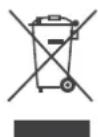
The crossed-out dustbin symbol indicates that this device should not be treated as household waste, but rather be brought to the appropriate collection point for recycling of electrical and electronic equipment. By ensuring this device is disposed of correctly, you will help prevent the potential negative consequences for the environment and human health which could be caused by inappropriate waste handling of the product. The recycling of materials will also help conserve natural resources.
For more information about the recycling of your device, please contact your local household waste disposal service or your place of purchase.
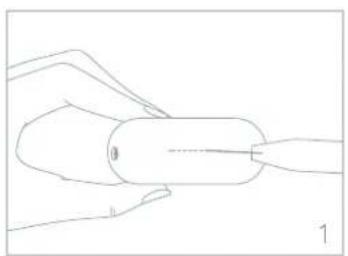
BATTERY REMOVAL
natural_image
Line drawing of a hand holding a cylindrical object with a pointed tip, no text or symbols present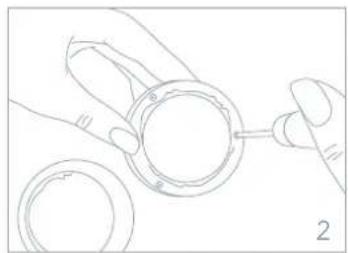
natural_image
Line drawing of hands connecting a circular component to a ring (no text or symbols)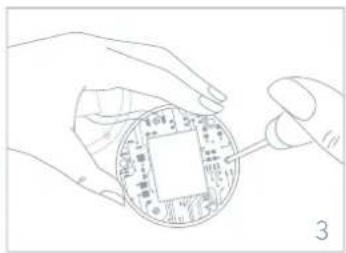
natural_image
Line drawing of hands holding a circular electronic component with a central square (no text or symbols)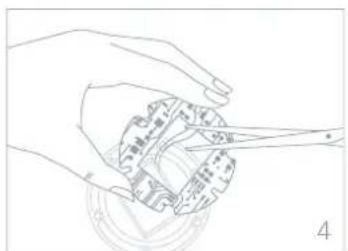
natural_image
Line drawing of a hand holding a mechanical component with a tool, no text or symbols present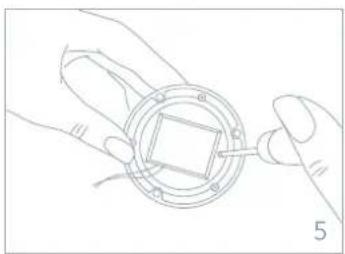
natural_image
Line drawing of hands assembling a circular mechanical component with a tool (no text or symbols)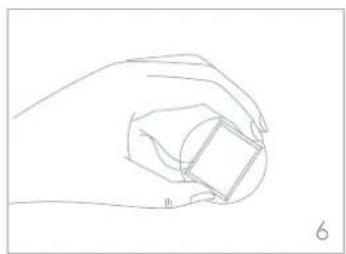
natural_image
Line drawing of a hand holding a small cube (no text or symbols)SPECIFICATIONS
MATERIALS: Body-safe silicone, PC + ABS, Aluminium Alloy
COLOR: Pearl Pink/Mint/Fuchsia
SIZE: 72.5 mm x 31.4 mm
WEIGHT: 99g
BATTERY: Li-Ion 1050mAh 3.7V
TEMPERATURE: 45 Degrees Celsius
USAGE: Up to 40 uses per charge
STANDBY: 180 days
FREQUENCY: 180 Hz
MAX NOISE LEVEL: <50 dB
INTERFACE: 1-button
DISCLAIMER: Users of this device do so at their own risk. Neither FOREO nor its retailers assume any responsibility or liability for any injuries or damages, physical or otherwise, resulting directly or indirectly from the use of this device. Furthermore, FOREO reserves the right to revise this publication and to make changes from time to time in the contents thereof without obligation to notify any person of such revision or changes.
CAUTION: Changes or modifications to this unit not expressly approved by the party responsible for compliance could void the user's authority to operate the equipment.
NOTE: This equipment has been tested and found to comply with the limits for a Class B digital device, pursuant to part 15 of the FCC Rules. These limits are designed to provide reasonable protection against harmful interference in a residential installation. This equipment generates uses and can radiate radio frequency energy and, if not installed and used in accordance with the instructions, may cause harmful interference to radio communications. However, there is no guarantee that interference will not occur in a particular installation. If this equipment does cause harmful interference to radio or television reception, which can be determined by turning the equipment off and on, the user is encouraged to try to correct the interference by one or more of the following measures:
- Reorient or relocate the receiving antenna.
- Increase the separation between the equipment and receiver.
- Connect the equipment into an outlet on a circuit different from that to which the receiver is connected.
- Consult the dealer or an experienced radio / TV technician for help.
Model may be changed for improvements without notice.
FAQs
UFO™ mini 2 BASICS
WHAT SHOULD I DO AFTER I RECEIVE MY UFO™ mini 2 DEVICE?
Congratulations on discovering smarter skincare! First things first - download the FOREO For You app for free, to unlock and register your device. (For more information, please refer to the section below titled 'THE APP').
HOW DO I START MY FIRST TREATMENT?
First, clean and dry your face and neck carefully - we recommend cleansing with LUNA™ first for best results. Then attach a UFO™ Power Activated Mask to your UFO™ mini 2 device. Finally, activate your UFO™ mini 2 mask routine via the app, or follow the step-by-step How To Use guide, which can be found.
HOW DO I TURN MY UFO™ mini 2 DEVICE ON / OFF?
Press the universal power button on your UFO ^™ mini 2 device to turn it on. To turn your device off, press and hold the universal power button for 3 seconds. After completing a pre-programmed mask routine, the device will turn off automatically.
UFO™ mini 2 power mask treatments have been developed for twice-a-day use, morning and evening. However, depending on your skin's needs and your personal preferences, you can use it more or less.
HOW LONG DOES EACH TREATMENT TAKE?
The Make My Day & Call It a Night mask treatments take just 90 seconds. All other treatment times will vary depending on the most effective combination of technologies.
No. Each UFO ^™ Power Activated Mask pairs with a unique treatment routine for optimal results.
IS MY UFO™ mini 2 DEVICE SAFE TO USE ON SENSITIVE SKIN?
UFO™ mini 2 devices are safe to use and suitable for all skin types. Furthermore, depending on your skin's specific needs, you can choose from a range of different UFO™ Power Activated Masks that cater to different skincare desires.
CAN I USE MY UFO™ mini 2 DEVICE AROUND THE EYE AREA?
Yes, UFO ^™ mini 2 devices are safe to be used under the eyes. We recommend gently gliding the device across the eye area, being careful to apply minimal pressure.
CAN I USE MY UFO™ mini 2 DEVICE AFTER HAVING PLASTIC SURGERY, BOTOX OR DERMAL FILLERS?
UFO™ mini 2 devices offer a gentle facial treatment, suitable for all skin types. However, you should consult your doctor before use if you have had any recent medical procedures.
CAN I USE THE LED LIGHT TREATMENTS ON THEIR OWN, WITHOUT HAVING TO USE A MASK OR GO THROUGH A PROGRAM?
No, we don't recommend using your UFO™ mini 2 device without a mask or a pre-set program as it will not offer the same efficiency or results as when combined with a UFO™ Power Activated Mask.
CAN I USE MY FOREO LUNA™ WITH MY UFO™ mini 2?
Yes! UFO ^™ mini 2 & LUNA ^™ work better together - the LUNA ^™ facial cleansing brush gently exfoliates dead skin cells, unclogs pores and removes up to 99.5% of dirt and oil, giving you the perfect canvas for a UFO ^™ mini 2 power mask treatment.
WHAT IS THE DIFFERENCE BETWEEN UFO™ 2 AND UFO™ mini 2?
Both UFO ^™ 2 and UFO ^™ mini 2 offer a sophisticated power mask treatment for you to enjoy in only 90 seconds. However, UFO ^™ 2 features Cryo-Therapy, which instantly cools to shrink the appearance of pores and provide a firmer looking complexion.
Unlike UFO ^™ mini, UFO ^™ mini 2 has been re-engineered with ultra-fast Thermo-Therapy and full spectrum LED lights (8 in total), that offer a more efficient and effective masking experience than ever before!
THE APP
WHY DO I NEED TO DOWNLOAD THE FOREO APP BEFORE USING MY UFO™ mini 2 DEVICE?
All app-enabled FOREO products need to be activated and unlocked via the FOREO For You app the first time they are turned on. This helps protect against fake/copied FOREO products, and makes it easier to register the warranty and protect your investment.
HOW DO I PAIR MY UFO™ mini 2 DEVICE WITH THE FOREO APP?
Download the FOREO For You app to your smartphone or tablet and turn on Bluetooth. Press the universal button on your device once to turn on. A blinking white light indicates your device is in pairing mode. Follow the instructions in the app to register and pair your UFO ^™ mini 2 device.
DOES MY UFO™ mini 2 DEVICE WORK WITHOUT THE APP?
Yes, you can manually use both devices and they do not require use of the FOREO For You app. However, to unlock your device for your first use, you must register your device through the FOREO For You app. The Make My Day and Call It a Night treatments are pre-programmed into UFO™ mini 2 and do not require use of the FOREO app. However, to unlock all remaining UFO™ Power Activated Masks, you must either select your treatment or scan the barcode on the back of each UFO™ Power Activated Mask sachet via the app to activate the treatments - the mask will then automatically sync with your device so it can be accessed manually next time. To customize your power mask routine, you must go directly through the app.
CAN I CUSTOMIZE MY POWER MASK TREATMENT ROUTINE?
Yes. While each UFO™ Power Activated Mask comes with a recommended pre-programmed treatment routine, you can personalize your power mask experience by creating your own treatment routine via the FOREO For You app. On the app, you are able to choose your preferred LED light and T-Sonic™ pulsation level, and select whether you wish your personalized routine to include Thermo-Therapy or not.
TROUBLESHOOTING & MAINTENANCE
WHAT DOES IT MEAN WHEN MY UFO™ mini 2 DEVICE IS CONTINUOUSLY BLINKING?
A blinking light around device indicates that your UFO™ mini 2 device is in Bluetooth pairing mode or that the device needs to be charged. Follow the instructions in the app to sync your device.
HOW DO I CHARGE MY UFO™ mini 2 DEVICE?
UFO™ mini 2 devices are USB-rechargeable, with a two and half hour charge delivering up to 40 uses.
HOW DO I CLEAN MY UFO™ mini 2 DEVICE?
Remove the plastic ring from the device and throw away the microfiber mask. As UFO™ mini 2 is 100% waterproof, you can rinse both UFO™ mini 2 and the plastic ring under warm running water. Pat dry with a lint-free, non-abrasive cloth or towel. After use, we recommend spraying the device with FOREO's Silicone Cleaning Spray and rinsing with warm water for optimal results.
UFO™ POWER ACTIVATED MASKS
CAN I REUSE THE UFO™ POWER ACTIVATED MASKS?
Each UFO™ Power Activated Mask is intended for single-use only. However, if one UFO™ mini 2 treatment wasn't enough, press the universal button again within 30 seconds after the end of the routine to start the same treatment over again!
DO I NEED TO WASH THE MASK ESSENCE OFF AFTER USING MY UFO™ mini 2 DEVICE?
No, Hyper-Infusion Technology is specifically engineered to help mask essence absorb deeper into the skin, faster.
After the treatment, simply massage any remaining essence into your skin, or remove excess with a cotton pad.
HOW DO I KNOW IF MY UFO™ POWER ACTIVATED MASK IS AUTHENTIC?
Using the FOREO For You app, you can scan the barcode on your mask packaging to verify its authenticity.
©2020 FOREO AB. ALL RIGHTS RESERVED.
EU DISTR.: FOREO AB, KARLAVÄGEN 41, 114 31 STOCKHOLM, SWEDEN.
US DISTR.: FOREO INC., 1525 E PAMA LANE, LAS VEGAS, NV 89119, USA.
AUS DISTR.: 6 PROHASKY STREET, PORT MELBOURNE, VIC, 3207 AUSTRALIA.
DESIGNED AND DEVELOPED BY FOREO SWEDEN.
MANUFACTURED FOR FOREO AB.
WWW.FOREO.COM

- GETTING STARTED
- UFO™ POWER ACTIVATED MASK
- USB CHARGING CABLE
- INTERACTIVE APP
- SLEEK & STYLISH STAND
- HOW TO USE
- ADDING A NEW TREATMENT
- USING UFO™ mini 2 WITHOUT THE APP
- STILL WANT MORE?
- APPLICATION
- IMPORTANT
- FOR OPTIMUM SAFETY:
- TROUBLESHOOTING
- WARRANTY TERMS & CONDITIONS
- REGISTER WARRANTY
- 2-YEAR LIMITED WARRANTY
- DISPOSAL INFORMATION
- BATTERY REMOVAL
- SPECIFICATIONS
- FAQs
- UFO™ mini 2 BASICS
- THE APP
- TROUBLESHOOTING & MAINTENANCE
- UFO™ POWER ACTIVATED MASKS
Brand : FOREO
Model : UFO Mini 2
Category : Facial care device