
DMP-CD100 - Mp3 player D-LINK - Free user manual and instructions
Find the device manual for free DMP-CD100 D-LINK in PDF.


| Product Type | MP3 Player / CD Player |
| Model | DMP-CD100 |
| Brand | D-Link |
| Dimensions (W x D x H) | 136 mm x 155 mm x 29.5 mm |
| Net Weight | 200 g |
| Power Supply | AC adaptor 4.5V–8V or DC 3V (2× AA batteries or rechargeable NiCad) |
| Battery Type (Rechargeable) | Kenwood NB-77/NB-88, Panasonic RP-BP60D, Sony NH-DM2AA or equivalent |
| Battery Charging Time | Approximately 10–15 hours |
| Playback Media | CD-DA, CD-R (ISO 9660 / Joliet) |
| Supported Audio Formats | CD-Audio, MP3 (128 kbps CBR, 44.1 kHz) |
| Maximum Recognizable Directories | 255 |
| Headphone Output Power | 15 mW (typical) |
| Digital Converter | 1-bit D/A converter with 8× oversampling digital filter |
| Playback Modes | Normal, Intro, Single Repeat, All Repeat, Program (up to 22 tracks), Random, Track Digit Selection (MP3 only) |
| Electronic Shock Protection (ESP) | Up to 10 seconds of protection (audio CD only) |
| Bass Boost | Yes (DBBS switch) |
| Audio Output | Headphone jack (3.5 mm), Line Out jack (3.5 mm) |
| Safety Certifications | FCC Part 15 Class B, FDA Radiation Performance Standards 21 CFR Subchapter J |
| Maintenance | Clean with a soft, dry cloth; do not use solvents |
| Reparability | Refer to qualified service personnel; user-serviceable only as described in manual |
Frequently Asked Questions - DMP-CD100 D-LINK
User questions about DMP-CD100 D-LINK
0 question about this device. Answer the ones you know or ask your own.
Ask a new question about this device
Download the instructions for your Mp3 player in PDF format for free! Find your manual DMP-CD100 - D-LINK and take your electronic device back in hand. On this page are published all the documents necessary for the use of your device. DMP-CD100 by D-LINK.
USER MANUAL DMP-CD100 D-LINK
This is a Class B product. In a domestic environment, this product may cause radio interference, in which case the user may be required to take adequate measures
Warnung!
This device complies with Part 15 of the FCC Rules. Operation is subject to the following two conditions: (1) This device may not cause harmful interference, and (2) this device must accept any interference received, including interference that may cause undesirable operation.
NOTE: This equipment has been tested and found to comply with the limits for a Class B digital device, pursuant to Part 15 of the FCC Rules. These limits are designed to provide reasonable protection against harmful interference in a residential installation. This equipment generates, uses and can radiate radio frequency energy and, if not installed and used in accordance with the instructions, may cause harmful interference to radio communications. However, there is no guarantee that interference will not occur in a particular installation. If this equipment does cause harmful interference to radio or television reception, which can be determined by turning the equipment off and on, the user is encouraged to try to correct the interference by one or more of the following measures:
• Reorient or relocate the receiving antenna.
- Increase the separation between the equipment and receiver.
- Connect the equipment into an outlet on a circuit different from that to which the receiver is connected.
- Consult the dealer or an experienced radio TV technician for help.
SAFETY CERTIFICATION
This compact disc player is made and tested to meet safety standards of the FCC, requirements and compliance with safety performance of the U.S. Department of Health and Human Services, and also with FDA Radiation Performance Standards 21 CFR Subchapter J.
SAFETY PRECAUTIONS
- Do not take the DMP-CD100 apart. The laser beam used in the DMP-CD100 could harm your eyes.
- Do not insert pins, etc., inside the DMP-CD100. This unit is equipped with a safety device which automatically turns the laser beam off when the disc compartment is opened. If a pin or other metal object should get inside the DMP-CD100, however, this safety device may be deactivated.
- The DMP-CD100 should be connected to a power supply only of the type described in the operating instructions or as marked on the appliance.
- Power supply cords should be routed so that they are not likely to be walked on or pinched by items placed upon or against them, pay particular attention to cords at plugs, convenience receptacles, and the point where they exit from the DMP-CD100.
- Never remove the enclosure. If the internal parts are touched accidentally, a serious electric shock might occur.
- If an abnormal smell or smoke is detected, immediately turn the power OFF and pull out the power cord. Contact your dealer or nearest service center.
- Avoid placing the DMP-CD100 under direct sunlight or near a source of heat such as heating equipment. Particularly, never leave it in an automobile or on the dashboard.
- The DMP-CD100 may not function properly if used at extremely low, or freezing temperatures. The ideal ambient temperature is above +5^ (41°F).
- Avoid places where it is dusty or where the humidity is high.
- Avoid placing the DMP-CD100 on an unstable surface such as a shelf or in a place subject to vibrations.
- Keep the DMP-CD100 away from sources of magnetic fields such as TV sets, speaker systems, radios, motorized toys or magnetized object.
- Do not use volatile solvents such as alcohol, paint thinner, gasoline, or benzene, etc. To clean the cabinet, use a clean dry cloth.
- The user should not attempt to service the DMP-CD100 beyond that described in the operating instructions. All other servicing should be referred to qualified service personnel.
WARNING:
TO PREVENT FIRE OR SHOCK HAZARD, DO NOT EXPOSE THIS APPLIANCE TO RAIN OR MOISTURE.
LIMITED WARRANTY
D-Link Systems, Inc. (“D-Link”) provides this limited warranty for its product only to the person or entity who originally purchased the product from D-Link or its authorized reseller or distributor.
Limited Hardware Warranty: D-Link warrants that the hardware portion of the D-Link products described below (“Hardware”) will be free from material defects in workmanship and materials from the date of original retail purchase of the Hardware, for the period set forth below applicable to the product type (“Warranty Period”) if the Hardware is used and serviced in accordance with applicable documentation; provided that a completed Registration Card is returned to an Authorized D-Link Service Office within ninety (90) days after the date of original retail purchase of the Hardware. If a completed Registration Card is not received by an authorized D-Link Service Office within such ninety (90) period, then the Warranty Period shall be ninety (90) days from the date of purchase.
| Product Type Warranty Period | |
| Product (excluding power supplies and fans), if purchased and delivered in the fifty (50) United States, or the District of Columbia (“USA”) | As long as the original purchaser still owns the product |
| Product purchased or delivered outside the USA | One (1) Year |
| Power Supplies and Fans One (1) Year | |
| Spare parts and spare kits | Ninety (90) days |
D-Link's sole obligation shall be to repair or replace the defective Hardware at no charge to the original owner. Such repair or replacement will be rendered by D-Link at an Authorized D-Link Service Office. The replacement Hardware need not be new or of an identical make, model or part; D-Link may in its discretion may replace the defective Hardware (or any part thereof) with any reconditioned product that D-Link reasonably determines is substantially equivalent (or superior) in all material respects to the defective Hardware. The Warranty Period shall extend for an additional ninety (90) days after any repaired or replaced Hardware is delivered. If a material defect is incapable of correction, or if D-Link determines in its sole discretion that it is not practical to repair or replace the defective Hardware, the price paid by the original purchaser for the defective Hardware will be refunded by D-Link upon return to D-Link of the defective Hardware. All Hardware (or part thereof) that is replaced by D-Link, or for which the purchase price is refunded, shall become the property of D-Link upon replacement or refund.
Limited Software Warranty: D-Link warrants that the software portion of the product (“Software”) will substantially conform to D-Link’s then current functional specifications for the Software, as set forth in the applicable documentation, from the date of original delivery of the Software for a period of ninety (90) days (“Warranty Period”), if the Software is properly installed on approved hardware and operated as contemplated in its documentation. D-Link further warrants that, during the Warranty Period, the magnetic media on which D-Link delivers the Software will be free of physical defects. D-Link’s sole obligation shall be to replace the non-conforming Software (or defective media) with software that substantially conforms to D-Link’s functional specifications for the Software. Except as otherwise agreed by D-Link in
writing, the replacement Software is provided only to the original licensee, and is subject to the terms and conditions of the license granted by D-Link for the Software. The Warranty Period shall extend for an additional ninety (90) days after any replacement Software is delivered. If a material non-conformance is incapable of correction, or if D-Link determines in its sole discretion that it is not practical to replace the non-conforming Software, the price paid by the original licensee for the non-conforming Software will be refunded by D-Link; provided that the non-conforming Software (and all copies thereof) is first returned to D-Link. The license granted respecting any Software for which a refund is given automatically terminates.
What You Must Do For Warranty Service:
Registration Card. The Registration Card provided at the back of this manual must be completed and returned to an Authorized D-Link Service Office for each D-Link product within ninety (90) days after the product is purchased and/or licensed. The addresses/telephone/fax list of the nearest Authorized D-Link Service Office is provided in the back of this manual. FAILURE TO PROPERLY COMPLETE AND TIMELY RETURN THE REGISTRATION CARD MAY AFFECT THE WARRANTY FOR THIS PRODUCT.
Submitting A Claim. Any claim under this limited warranty must be submitted in writing before the end of the Warranty Period to an Authorized D-Link Service Office. The claim must include a written description of the Hardware defect or Software nonconformance in sufficient detail to allow D-Link to confirm the same. The original product owner must obtain a Return Material Authorization (RMA) number from the Authorized D-Link Service Office and, if requested, provide written proof of purchase of the product (such as a copy of the dated purchase invoice for the product) before the warranty service is provided. After an RMA number is issued, the defective product must be packaged securely in the original or other suitable shipping package to ensure that it will not be damaged in transit, and the RMA number must be prominently marked on the outside of the package. The packaged product shall be insured and shipped to D-Link, 53 Discovery Drive, Irvine CA 92618, with all shipping costs prepaid. D-Link may reject or return any product that is not packaged and shipped in strict compliance with the foregoing requirements, or for which an RMA number is not visible from the outside of the package. The product owner agrees to pay D-Link's reasonable handling and return shipping charges for any product that is not packaged and shipped in accordance with the foregoing requirements, or that is determined by D-Link not to be defective or non-conforming.
What Is Not Covered:
This limited warranty provided by D-Link does not cover:
Products that have been subjected to abuse, accident, alteration, modification, tampering, negligence, misuse, faulty installation, lack of reasonable care, repair or service in any way that is not contemplated in the documentation for the product, or if the model or serial number has been altered, tampered with, defaced or removed;
Initial installation, installation and removal of the product for repair, and shipping costs;
Operational adjustments covered in the operating manual for the product, and normal maintenance;
Damage that occurs in shipment, due to act of God, failures due to power surge, and cosmetic damage; and
Any hardware, software, firmware or other products or services provided by anyone other than D-Link.
Disclaimer of Other Warranties: EXCEPT FOR THE LIMITED WARRANTY SPECIFIED HEREIN, THE PRODUCT IS PROVIDED “AS-IS” WITHOUT ANY WARRANTY OF ANY KIND INCLUDING, WITHOUT LIMITATION, ANY WARRANTY OF MERCHANTABILITY, FITNESS FOR A PARTICULAR PURPOSE AND NON-INFRINGEMENT. IF ANY IMPLIED WARRANTY CANNOT BE DISCLAIMED IN ANY TERRITORY WHERE A PRODUCT IS SOLD, THE DURATION OF SUCH IMPLIED WARRANTY SHALL BE LIMITED TO NINETY (90) DAYS. EXCEPT AS EXPRESSLY COVERED UNDER THE LIMITED WARRANTY PROVIDED HEREIN, THE ENTIRE RISK AS TO THE QUALITY, SELECTION AND PERFORMANCE OF THE PRODUCT IS WITH THE PURCHASER OF THE PRODUCT.
Limitation of Liability: TO THE MAXIMUM EXTENT PERMITTED BY LAW, D-LINKIS NOT LIABLE UNDER ANY CONTRACT, NEGLIGENCE, STRICT LIABILITY OR OTHER LEGAL OR EQUITABLE THEORY FOR ANY LOSS OF USE OF THE PRODUCT, INCONVENIENCE OR DAMAGES OF ANY CHARACTER, WHETHER DIRECT, SPECIAL, INCIDENTAL OR CONSEQUENTIAL (INCLUDING, BUT NOT LIMITED TO, DAMAGES FOR LOSS OF GOODWILL, WORK STOPPAGE, COMPUTER FAILURE OR MALFUNCTION, LOSS OF INFORMATION OR DATA CONTAINED IN, STORED ON, OR INTEGRATED WITH ANY PRODUCT RETURNED TO D-LINK FOR WARRANTY SERVICE) RESULTING FROM THE USE OF THE PRODUCT, RELATING TO WARRANTY SERVICE, OR ARISING OUT OF ANY BREACH OF THIS LIMITED WARRANTY, EVEN IF D-LINK HAS BEEN ADVISED OF THE POSSIBILITY OF SUCH DAMAGES. THE SOLE REMEDY FOR A BREACH OF THE FOREGOING LIMITED WARRANTY IS REPAIR, REPLACEMENT OR REFUND OF THE DEFECTIVE OR NON-CONFORMING PRODUCT.
GOVERNING LAW: This Limited Warranty shall be governed by the laws of the state of California.
Some states do not allow exclusion or limitation of incidental or consequential damages, or limitations on how long an implied warranty lasts, so the foregoing limitations and exclusions may not apply. This limited warranty provides specific legal rights and the product owner may also have other rights which vary from state to state.
Trademarks
Copyright 1999 D-Link Corporation. Contents subject to change without prior notice. D-Link is a registered trademark of D-Link Corporation/D-Link Systems, Inc. All other trademarks belong to their respective proprietors.
Copyright Statement
No part of this publication may be reproduced in any form or by any means or used to make any derivative such as translation, transformation, or adaptation without permission from D-Link Corporation/D-Link Systems Inc., as stipulated by the United States Copyright Act of 1976.
TABLE OF CONTENTS
MP3 FILE INFORMATION......1
POWER SUPPLY 2
FEATURE LAYOUT......4
LCD DISPLAY INDICATORS......5
PLAYING A CD....5
BASIC FEATURES ......6
REPEAT FEATURES ....7
ADVANCED PLAYING MODES......8
REMOVING THE DISC 10
HANDLING COMPACT DISCS ....10
CLEANING DISCS.... 11
TROUBLESHOOTING GUIDE....12
SPECIFICATIONS....13
MP3 FILE INFORMATION
WHAT IS MP3?
MP3 is the abbreviation of “MPEG 1 Audio Layer 3”. MPEG Audio is a compression specification that compresses the audio portion only. This audio compression method is used in DVD and Video CD, etc. The audio data has been compressed into about 1/10 the size of a normal audio file.
SEQUENCE OF PLAYING MP3 FILES
MP3 files will be played in the sequence that the writing software had recorded. Therefore, it may be different between the sequence that you want to record and the sequence of playing. To ensure that the songs play in the order that you want, input “01” \~ “99” before the file names in the desired sequence and then record onto a CD-R. Refer to your CD recording software for options on organizing MP3 files.
IMPORTANT NOTES
D-Link is not responsible for playability of MP3 in any case due to recording condition such as PC performance, writing software, media ability or etc.
ACCEPTABLE MEDIUM
• CD-DA Audio CD
• CD-R : ISO-9660 or Joliet file structure.
• Maximum number of recognizable directories : 255
SETTINGS FOR YOUR MP3 ENCODER AND CD WRITER
- When you use your MP3 encoder to compress audio data to an MP3 file, set the transfer bit rate of the encoder to fixed 128 kbps (Constant Bit Rate).
• Sampling frequency is 44.1 kHz. - When burning your MP3 CD's, check “Disc at Once”.
WRITING FILES ONTO A CD
When a CD containing MP3 data is loaded, the DMP-CD100 checks all the files on the CD. If the CD contains a lot of folders or non-MP3 files, it will take time for the DMP-CD100 to start playing MP3 files. In addition, it may also take time for the DMP-CD100 to move to the next MP3 file. A file
search or folder search may not be performed smoothly. You should not write non-MP3 files or unneeded folders along with MP3 files on the CD.
POWER SUPPLY
RECHARGEABLE NICKEL - CADMIUM BATTERY INSTALLATION
-
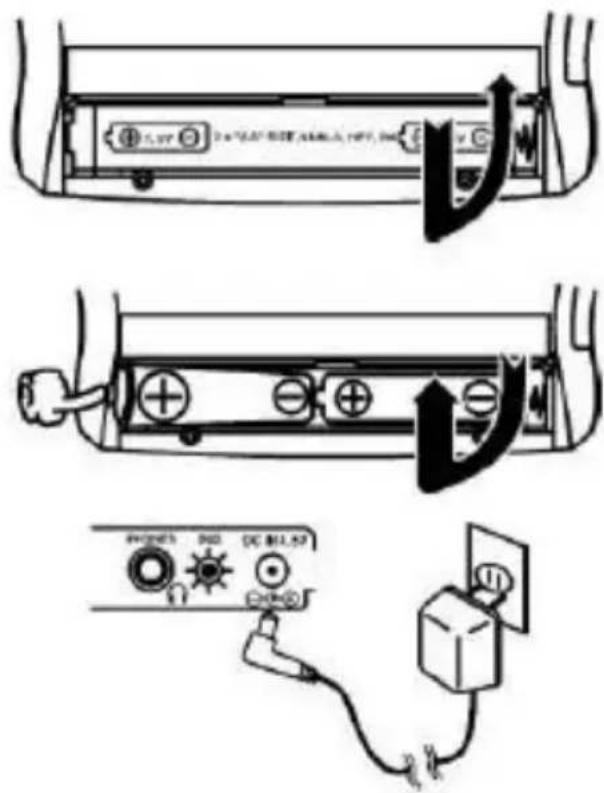
Remove the battery compartment cover by sliding the cover away from the DMP-CD100.
-
Insert the rechargeable nickel-cadmium battery into the battery compartment. Be sure to observe the proper polarity (The + and - signs, as indicated inside the battery compartment).
NOTE: Fully charge the rechargeable nickel - cadmium battery before using it for the first time.
-
Close the battery compartment.
-
Plug one end of the supplied AC adaptor into the DC jack.
Then plug the other end into an AC wall outlet.
- When charging is completed, disconnect the AC adaptor plugs from both the DMP-CD100 and the AC outlet.
NOTE:
- The battery takes approximately 10-15 hours after the AC adaptor is connected to be fully charged.
- The indicator on the right side of the DMP-CD100 will light on during charging.
• Use the DMP-CD100 with the supplied AC adaptor. Using with other AC adaptors could damage the DMP-CD100. - The DMP-CD100 can be powered up by using the AC adaptor alone without batteries.
NICKEL-CADMIUM (NICAD) BATTERIES
The DMP-CD100 is equipped with battery recharging circuitry. For safety measures, it requires specifically made NICAD (Nickel-Cadmium) batteries.
Use ONLY the following rechargeable battery types: KENWOOD NB-77 /
NB-88, PANASONIC RP-BP60D, SONY NH-DM2AA or equivalent.
NOTE: It is always a good idea to let Nickel-Cadmium batteries run all the way down before charging them. When you do charge them, do so to their full potential and they will last longer and provide more power.
ALKALINE BATTERY INSTALLATION
Insert two AA batteries into the battery compartment on the bottom of the DMP-CD100. Be sure to observe the proper polarity (The “+” and “-” signs, as indicated inside the battery compartment).
NOTE:
- When replacing the alkaline batteries, use two new batteries of the same type.
- When inserting the batteries, mistakenly inserting even one with improper polarity will cause leakage.
BATTERY REPLACEMENT
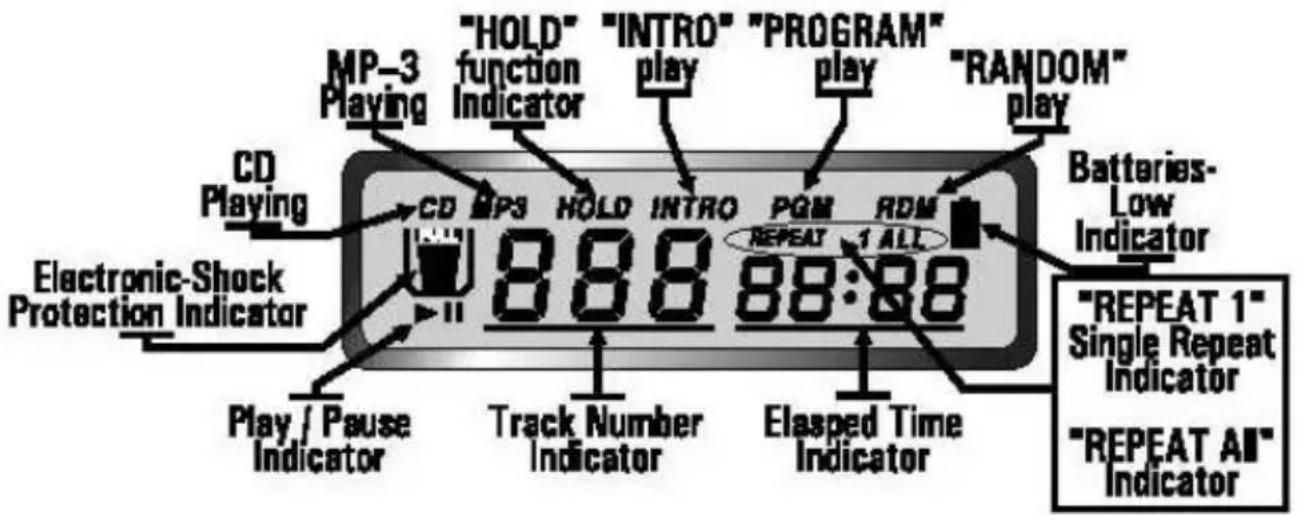
If the rechargeable nickel-cadmium battery or the alkaline batteries are below 2.1v, the battery- low indicator will be shown on the display.
Recharge the rechargeable nickel-cadmium battery or replace the alkaline batteries before using the DMP-CD100.
FEATURE LAYOUT
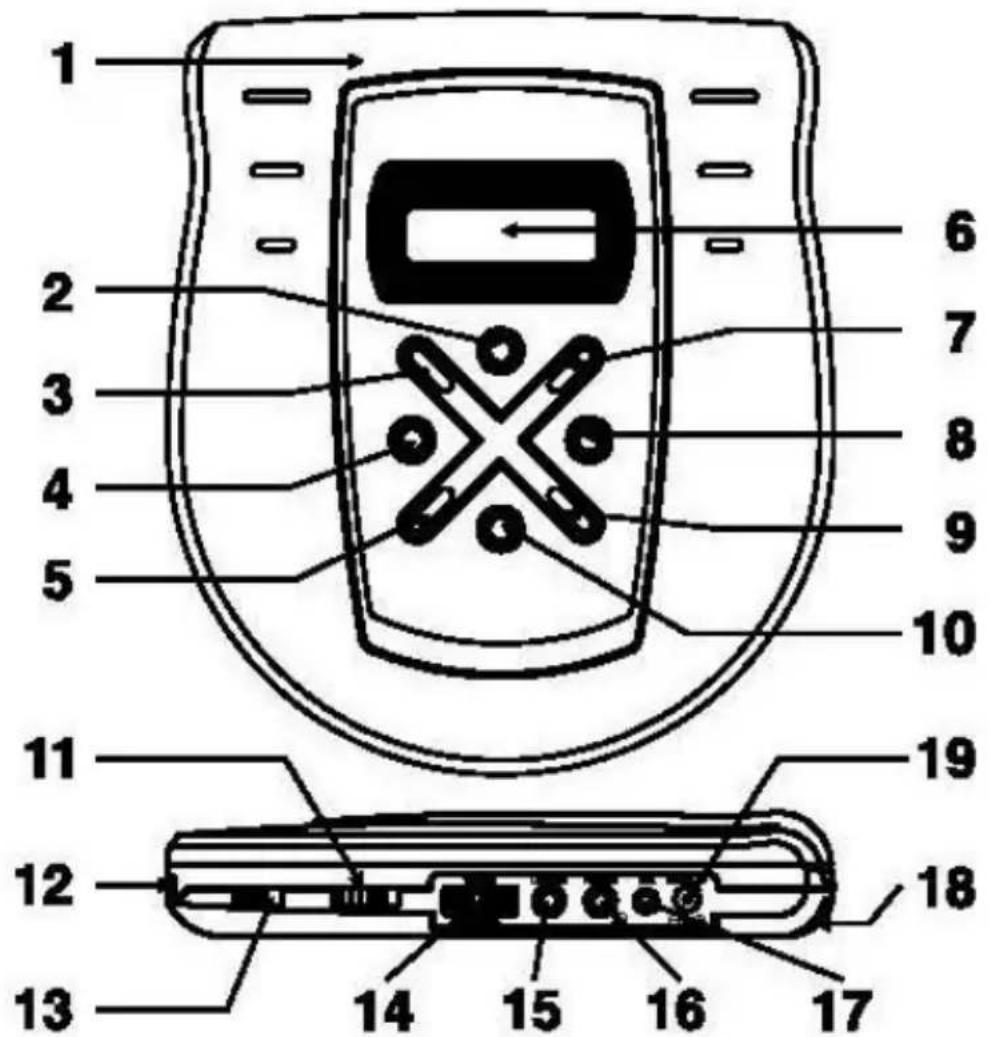
- Disc Compartment Door
- Electronic Shock Protection Button (ESP)
- Stop Button
- Program Button
- Reverse skip/Search Button
- Display Window
- Play/Pause Button
- Mode/ Repeat Button
- Forward skip/Search Button
-
Track Digit Button (T.Digit)
-
DBBS switch
- Door Open Switch
- Hold switch
- Volume knob
- Line Out Jack
- Headphone Jack
- Power Indicator
(Charging Indicator)
- Batteries Compartment
- AC-DC adaptor Input Jack
LCD DISPLAY INDICATORS
PLAYING A CD
- Connect the headphones to the headphone jack.
- Set the volume knob to minimum.
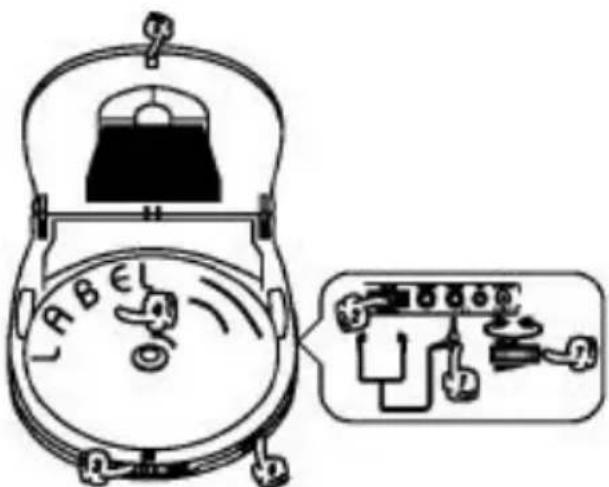
- Slide the door open switch to open the Disc compartment door.
- Insert a disc (CD or CD-R) with the label side facing up.
- Push down on the center of the front edge of the door to close securely.
- Slide the hold switch to the "OFF" position.
- Press the Play/Pause button. The total number of tracks and total playing time will be shown on the LCD display. The DMP-CD100 will then start playing track 1 of the disc automatically.
- Adjust the volume knob to a comfortable level.
- During playback mode, the track number and elapsed playing time are displayed.
SKIP DURING PLAY MODE
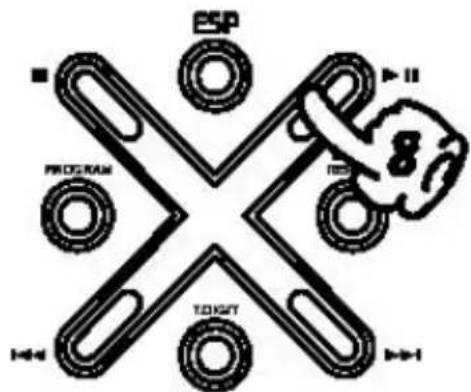
- Press the forward skip/search button once to skip to the beginning of the next track.
- Press the forward skip/search button repeatedly to skip ahead to the beginning of other tracks.
- Press the reverse skip/search button once to skip to the beginning of the current track.
- Press the reverse skip/search button twice or more quickly to go back to previous tracks.
SEARCH DURING PLAY MODE
- Press and hold the skip/search button to quickly advance or reverse through the music at high speed.
- Release the skip/search buttons to return to normal play.
BASIC FEATURES
PAUSE BUTTON
- Press the play/pause button to pause playback temporarily.
- The elapsed time will flash when paused.
- Press it again to resume play.
STOP BUTTON
- Press the stop button to stop playing the disc. The total number of tracks will be shown on the display.
- Press the Stop button to turn off the DMP-CD100.
HOLD SWITCH
- Once all adjustments/selections are completed, the hold switch may be set to the (ON) position, and the
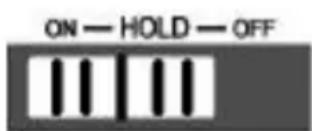
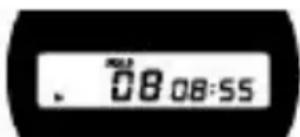
(HOLD) indicator appear on display, thereby deactivating all button functions and eliminating the possibility of accidental unwanted selection.
- Set to (OFF) position to resume normal operation.
DBBS SWITCH
- This switch enhances the low frequency (BASS) response.
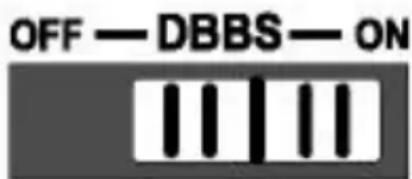
- Set the volume knob to a low listening level before activating the DBBS switch, then adjust to your preference.
Note: The DBBS uses more battery power, thus drawing battery life more quickly. Switch the DBBS to the Off position to conserve battery power.
REPEAT FEATURES
REPEAT ONE PLAY
- Press the REPEAT/MODE Button until the (REPEAT 1) Indicator appear on the display.
- Select the desired track by pressing the FORWARD OR REVERSE SKIP / SEARCH Button.
- The selected track will then begin playing through to its end at which point it will automatically return to the beginning of that track.
REPEAT ALL PLAY
- Press the REPEAT/MODE Button until the (REPEAT ALL) Indicator appear on the display.
- The disc will then begin playing through to the end of the last track, at which point it will automatically return to the beginning of the first track.
ELECTRONIC-SHOCK PROTECTION (ESP)
- Press the ELECTRONIC SHOCK PROTECTION button (ESP) to activate the shock protection control function during “Audio CD” play only.
- The DMP-CD100 will store the CD's digital data in memory and then play back from the memory.
- If vibration occurs on the disc, the DMP-CD100 will continue the playback for 10 seconds until the display has shown
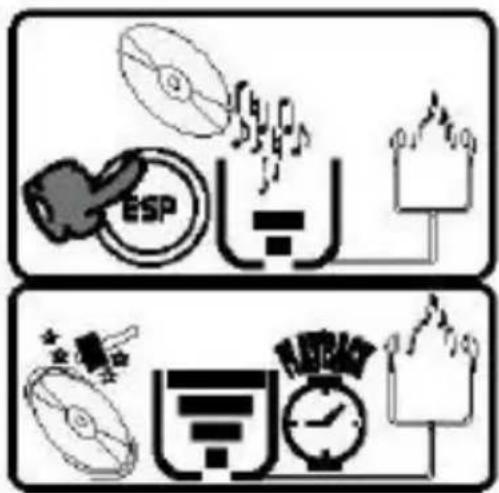
running out of lines in the tank.
- In case of excessive vibration, the memory data may be exhausted and the Electronic Shock Protection (ESP) may become temporarily ineffective.
NOTE: The battery power consumes more quickly when the Electronic Shock Protection control is used. It is therefore recommended to set the ESP control off when the DMP-CD100 is used in a place free of vibration.
ADVANCED PLAYING MODES
INTRO PLAY (INTRO)
- Press the STOP button until the total track number and total plays time appears on the display.
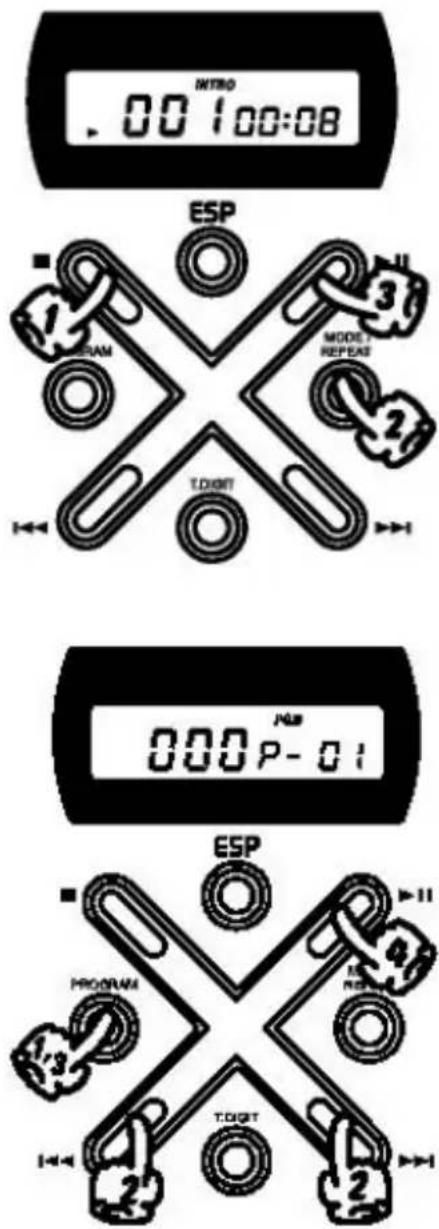
- Press the REPEAT/MODE button until the Intro Indicator (INTRO) flash on the display.
- Press the PLAY / PAUSE button to start playing the Intro mode.
- The disc will then begin playing the first ten seconds of all tracks once and then stops automatically.
PROGRAM PLAY (PGM)
- Press the PROGRAM button until you see the Program Indicator (PGM) flashing on the display.
- Press the FORWARD OR REVERSE SKIP / SEARCH button to select the desired track number.
- Press the PROGRAM button to store the track number into that memory location. The next memory location will flash on the display.
- Repeat Steps 2 and 3 to store up to 22 tracks.
- Press the PLAY / PAUSE button to start the program play.
- When the last programmed track has finished playing, the DMP-CD100 will stop automatically.
TO VIEW THE PROGRAMMED CONTENTS
- Press the STOP Button once to stop the program play.
- Press the PROGRAM Button repeatedly to display programmed tracks one by one in the programmed order.
TO CLEAR THE PROGRAMMED CONTENTS
- Press the STOP button twice or open the compartment door to clear the program.
RANDOM PLAY (RDM)
- Press the STOP button until the total track number and total playtime appear on the display.
- Press the REPEAT/MODE button until you see the Random Indicator (RDM) flash on the display.
- Press the PLAY / PAUSE button to start the Random play.
- The DMP-CD100 will play tracks in a random sequence selected from all tracks on the disc.
- When all disc tracks have been played, the DMP-CD100 will stop automatically.
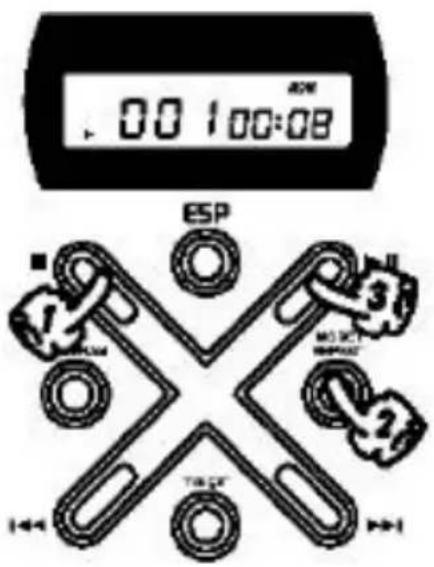
MP3 DISC - TRACK DIGIT SELECTION PLAY (T.DIGIT)
- By pressing the T. DIGIT Button (Track Digit), you can select high numbered tracks quickly. Press the T-DIGIT once, twice, and thirdly, and the digit representing hundredth, tenth and first number position will flash respectively.
- Press the FORWARD OR REVERSE SKIP/SEARCH Buttons to select your digits according to its flashing digit position.
- Press PLAY/PAUSE Button to play your desired track after repeating the above selection procedures.
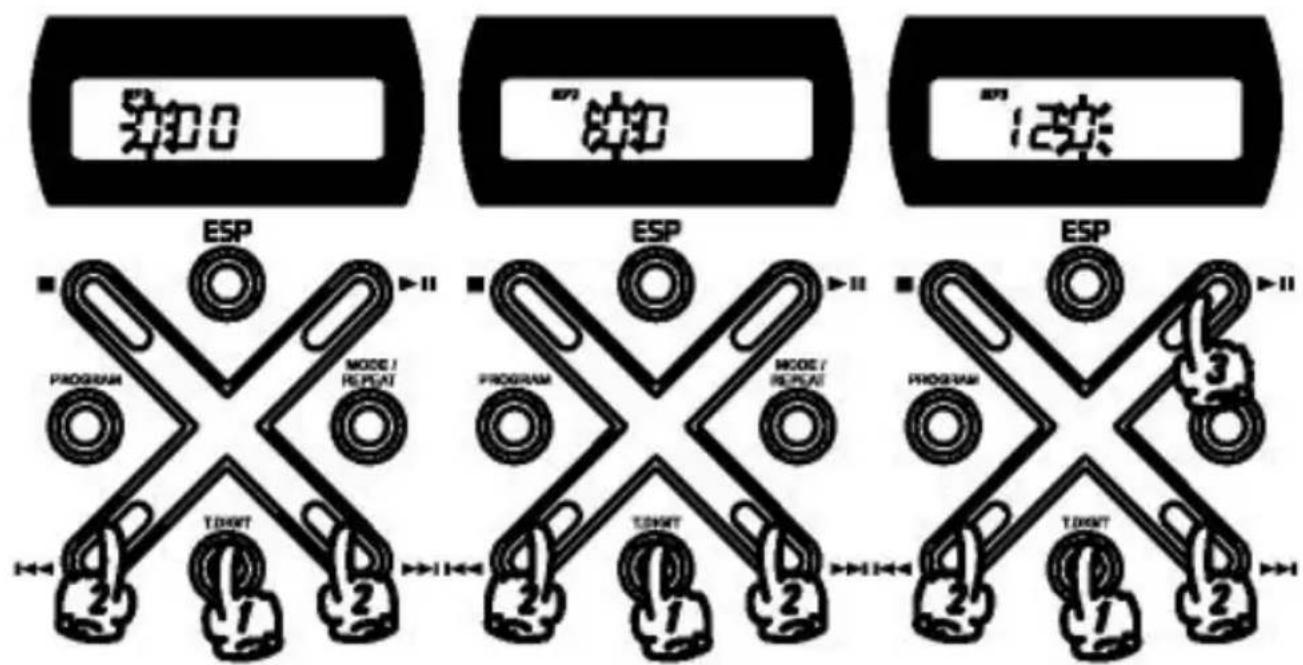
Notes: This function is not compatible with normal CD.
REMOVING THE DISC
- After pressing the STOP button, wait for the disc to stop rotating before sliding the DOOR OPEN switch to remove the disc.
- Hold the disc by the edge while slightly pressing on the center spindle, then lift from the edge to release and remove the disc.

HANDLING COMPACT DISCS
The DMP-CD100 is designed to play CD/CD-R bearing the correct identification logos. Other discs may not conform to the CD/CD-R standard and may not play properly. Dirty, scratched or warped discs may cause skipping or noise. Handle the disc only by the edges. To keep clean, do not touch its surface. Discs should be stored in
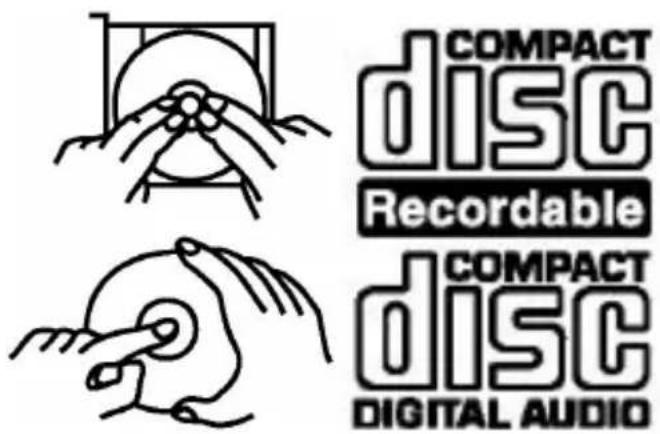
their cases after use to avoid serious scratches. Do not expose discs to direct sunlight, high humidity, high temperatures, or dust etc. Prolonged exposure to extreme temperatures can warp the disc. Do not stick or write anything on either side of the disc. Sharp writing instruments, or the inks used in some felt-tip pens, may damage its surface.
CLEANING DISCS
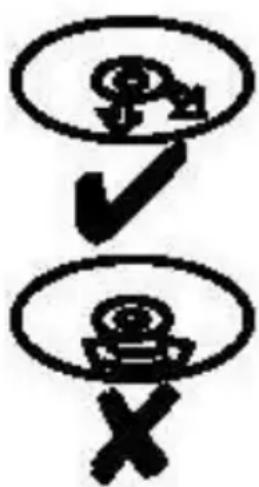
Fingerprints should be carefully wiped from the surface of the disc with a soft cloth. Unlike unconventional records, compact discs have no grooves to collect dust and microscopic debris, so gently wiping them with a soft cloth should remove most particles. Wipe in a straight motion from the center to the edge. Never use thinner, benzene, record cleaner or anti-static spray on a compact disc. Such chemicals can damage its plastic surface.
flowchart
graph TD
    A["Start"] --> B{Check}
    B -->|✓| C["Process Step"]
    B -->|X| D["End"]
TROUBLESHOOTING GUIDE
Check the following guide for problem resolution.
| SYMPTOM | CAUSE | SOLUTION |
| CD Player will not turn on | Hold Switch position is “ON”. | Turn the Hold Switch to the “OFF” position. |
| Dead or weak batteries. | Replace batteries. | |
| AC adaptor not connected properly. | Check AC adaptor connection. | |
| Disc will not play | Disc inserted incorrectly. | Reinsert disc with label side facing up. |
| Defective compact disc. | Try another compact disc. | |
| CD compartment not closed. | Close lid securely. | |
| Moisture has formed inside the CD deck. | Take out the CD and leave the CD compartment door open for about an hour to dry moisture condensation. | |
| No sound from headphones | Headphone plug not inserted properly. | Reinsert headphone cord into Headphone jack. |
| Volume control set to minimum. | Increase the volume. | |
| Weak batteries. | Replace with fresh batteries or use AC power. | |
| Defective compact disc. | Try another compact disc. | |
| Sound is skipping | The compact disc or pickup lens is dirty. | Clean or replace the compact disc or clean the pickup lens. |
| Strong vibrations. | Place the CD player on a level surface that is stable (no vibrations). |
SPECIFICATIONS
• 1 Bit D/A Converter.
• Digital Filter 8 Times Over-sampling.
• Auto CD/MP-3 Detectable (reads CD/CD-R).
• 3 Spot Optical Pick-up.
• Up to 22 Selected Music Storing Ability.
• Up to 255 Music Selection of MP-3 Mode.
• Fast Track Selector in MP-3 Mode.
- Continue/ Intro/ Single Music/ Program/ Random Play Mode.
- Repeat Function.
- Bass Boost.
- Audio Line Out.
• Rechargeable Battery Function.
Power Source :
AC Adapter : Input 4.5V - 8V or Battery : DC 3V (AA1.5V x 2).
Headphone Output Power :
15mW (TYP).
Size of Unit :
136mm x 155mm x 29.5mm (W x D x H).
Net Weight of Unit :
200g.
**THE SPECIFICATION IS SUBJECT TO CHANGE WITHOUT PRIOR NOTICE**
AUSTRALIA
D-LINK AUSTRALASIA
Unit 16, 390 Eastern Valley Way, Roseville, NSW 2069, Australia
TEL: 61-2-9417-7100 FAX: 61-2-9417-1077
TOLL FREE: 1800-177-100 (Australia), 0800-900900 (New Zealand)
URL: www.dlink.com.au EMAIL: support@dlink.com.au, info@dlink.com.au
CANADA
D-LINK CANADA
2180 Winston Park Drive, Oakville, Ontario L6H 5W1 Canada
TEL: 1-905-829-5033 FAX: 1-905-829-5095 BBS: 1-965-279-8732 FREE CALL: 1-800-354-6522
URL: www.dlink.ca E-MAIL: techsup@dlink.ca
CHILE
D-LINK SOUTH AMERICA
Isidora Goyenechea #2934 of.702, Las Condes, Santiago, Chile
TEL:56-2-232-3185 FAX: 56-2-2320923 URL: www.dlink.cl
E-MAIL: ccasassu@dlink.cl, tsilva@dlink.cl
CHINA
D-LINK CHINA
2F., Sigma Building, 49 Zhichun Road, Haidian District, 100080 Beijing, China
TEL: 86-10-88097777 FAX: 86-10-88096789
URL: www.dlink.com.
cn
DENMARK
D-LINK DENMARK
Naverland 2, DK-2600 Glostrup, Copenhagen, Denmark
TEL:45-43-969040 FAX:45-43-424347 URL: www.dlink.dk
E-MAIL: info@dlink.dk
[Non-Text]
EGYPT
D-LINK MIDDLE EAST
7 Assem Ebn Sabet Street, Heliopolis Cairo, Egypt
TEL: 202-2456176 FAX: 202-2456192 URL: www.dlink-me.com
E-MAIL: support@dlink-me.com, fateen@dlink-me.com
FRANCE
D-LINK FRANCE
Plot No.5, Kurla-Bandra Complex Road,
Off Cst Road, Santacruz (E), Bombay - 400 098 India
TEL: 91-22-652-6696 FAX: 91-22-652-8914 URL: www.dlink-india.com
E-MAIL: service@dlink.india.com
ITALY
D-LINK ITALIA
Via Nino Bonnet No. 6/ b, 20154 Milano, Italy
TEL: 39-02-2900-0676 FAX: 39-02-2900-1723 URL: www.dlink.it
E-MAIL: info@dlink.it
JAPAN
D-LINK JAPAN
10F, 8-8-15 Nishi-Gotanda, Shinagawa-ku, Tokyo 141 Japan
TEL: 81-3-5434-9678 FAX: 81-3-5434-9868 URL: www.d-link.co.jp
E-MAIL: kida@d-link.co.jp
RUSSIA
D-LINK RUSSIA
Michurinski Prospekt 49, 117607 Moscow, Russia
TÉL: 7-095-737-3389, 7-095-737-3492 FAX: 7-095-737-3390
E-MAIL: vl@dlink.ru
SINGAPORE
D-LINK INTERNATIONAL
1 International Business Park, #03-12 The Synergy, Singapore 609917
TEL: 65-774-6233 FAX: 65-774-6322
URL: www.dlink-intl.com E-MAIL: info@dlink.com.sg
S. AFRICA
D-LINK SOUTH AFRICA
Unit 2, Parkside 86 Oak Avenue
k Avenue
Highveld Technopark Centurion, Gauteng, Republic of South Africa
TEL: 27(0)126652165 FAX: 27(0)126652186 CELL NO: 0826010806 (Bertus Moller)
CELL NÓ: 0826060013 (Attie Piénaar) EMAIL: bertus@d-link.co.za, attie@d-link.co.za
SWEDEN
D-LINK SWEDEN
P.O. Box 15036, S-167 15 Bromma Sweden
TEL: 46-(0)8564-61900 FAX: 46-(0)8564-61901 EMAIL: info@dlink.se
URL: www.dlink.se
TAIWAN
D-LINK TAIWAN
2F, No. 119 Pao-Chung Road, Hsin-Tien, Taipei, Taiwan, R.O.C.
TEL: 886-2-2910-2626 FAX: 886-2-2910-1515 URL: www.dlinktw.com.tw
E-MAIL: dssqa@tsc.dlinktw.com.tw
U.K.
D-LINK EUROPE
4
^th Floor, Merit House, Edgware Road, Colindale, London, NW9 5AB, U.K.
TEL: 44-20-8731-5555 FAX: 44-20-8731-5511
URL: www.dlink.co.uk E-MAIL: info@dlink.co.uk
U.S.A.
D-LINK U.S.A.
53 Discovery Drive, Irvine, CA 92618 USA
TEL: 1-949-788-0805 FAX: 1-949-753-7033 INFO LINE: 1-800-326-1688
BBS: 1-949-455-1779, 1-949-455-9616
URL: www.dlink.com EMAIL: tech@dlink.com, support@dlink.com
Tech Support Hours: 6 A.M. to 6 P.M. Pacific Standard Time. Monday through Friday
REGISTRATION CARD
Print, type or use block letters.
Your name: Mr./Ms
Organization:
Dept.
Your title at organization:
Telephone:
Fax:
Organization's full address:
Country:
Date of purchase (Month/Day/Year):
| Product Model | Product Serial No. | * Product installed in type of computer (e.g., Compaq 486) | * Product installed in computer serial No. |
(* Applies to adapters only)
Product was purchased from:
Reseller's name:
Telephone:
Fax:
Reseller's full address:
Answers to the following questions help us to support your product:
- Where and how will the product primarily be used?
Home Office Travel Company Business Home Business Personal Use
- How many employees work at installation site?
□1 employee □2-9 □10-49 □50-99 □100-499 □500-999 □1000 or more
- What network protocol(s) does your organization use?
☐XNS/IPX ☐TCP/IP ☐DECnet ☐Others
- What network operating system(s) does your organization use?
□D-Link LANsmart □Novell NetWare □NetWare Lite □SCO Unix/Xenix □PC NFS □3Com 3+Open
□Banyan Vines □DECnet Pathwork □Windows NT □Windows NTAS □Windows '95
□Others
- What network management program does your organization use?
□D-View □HP OpenView/Windows □HP OpenView/Unix □SunNet Manager □Novell NMS
□NetView 6000 □Others
- What network medium/media does your organization use?
☐Fiber-optics ☐Thick coax Ethernet ☐Thin coax Ethernet ☐10BASE-T UTP/STP
□100BASE-TX □100BASE-T4 □100VGAnyLAN □Others
- What applications are used on your network?
□Desktop publishing □Spreadsheet □Word processing □CAD/CAM
□Database management □Accounting □Others
- What category best describes your company?
□Aerospace □Engineering □Education □Finance □Hospital □Legal □Insurance/Real Estate □Manufacturing
□Retail/Chainstore/Wholesale □Government □Transportation/Utilities/Communication □VAR
□System house/company □Other_
- Would you recommend your D-Link product to a friend?
□Yes □No □Don't know yet
- Your comments on this product?

D-Link®
- Warnung!
- SAFETY CERTIFICATION
- SAFETY PRECAUTIONS
- WARNING:
- LIMITED WARRANTY
- What You Must Do For Warranty Service:
- What Is Not Covered:
- Trademarks
- Copyright Statement
- TABLE OF CONTENTS
- MP3 FILE INFORMATION
- WHAT IS MP3?
- SEQUENCE OF PLAYING MP3 FILES
- IMPORTANT NOTES
- ACCEPTABLE MEDIUM
- SETTINGS FOR YOUR MP3 ENCODER AND CD WRITER
- WRITING FILES ONTO A CD
- POWER SUPPLY
- RECHARGEABLE NICKEL - CADMIUM BATTERY INSTALLATION
- NOTE:
- NICKEL-CADMIUM (NICAD) BATTERIES
- ALKALINE BATTERY INSTALLATION
- BATTERY REPLACEMENT
- FEATURE LAYOUT
- LCD DISPLAY INDICATORS
- PLAYING A CD
- SKIP DURING PLAY MODE
- SEARCH DURING PLAY MODE
- BASIC FEATURES
- PAUSE BUTTON
- STOP BUTTON
- HOLD SWITCH
- DBBS SWITCH
- REPEAT FEATURES
- REPEAT ONE PLAY
- REPEAT ALL PLAY
- ELECTRONIC-SHOCK PROTECTION (ESP)
- ADVANCED PLAYING MODES
- INTRO PLAY (INTRO)
- PROGRAM PLAY (PGM)
- TO VIEW THE PROGRAMMED CONTENTS
- TO CLEAR THE PROGRAMMED CONTENTS
- RANDOM PLAY (RDM)
- MP3 DISC - TRACK DIGIT SELECTION PLAY (T.DIGIT)
- REMOVING THE DISC
- HANDLING COMPACT DISCS
- CLEANING DISCS
- TROUBLESHOOTING GUIDE
- SPECIFICATIONS
- AUSTRALIA
- D-LINK AUSTRALASIA
- CANADA
- D-LINK CANADA
- CHILE
- D-LINK SOUTH AMERICA
- CHINA
- D-LINK CHINA
- cn
- DENMARK
- D-LINK DENMARK
- [Non-Text]
- EGYPT
- D-LINK MIDDLE EAST
- FRANCE
- D-LINK FRANCE
- ITALY
- D-LINK ITALIA
- JAPAN
- D-LINK JAPAN
- RUSSIA
- D-LINK RUSSIA
- SINGAPORE
- D-LINK INTERNATIONAL
- AFRICA
- D-LINK SOUTH AFRICA
- SWEDEN
- D-LINK SWEDEN
- TAIWAN
- D-LINK TAIWAN
- U.K.
- D-LINK EUROPE
- 4
- U.S.A.
- D-LINK U.S.A.
- REGISTRATION CARD
- D-Link®
Brand : D-LINK
Model : DMP-CD100
Category : Mp3 player