
F-Control FRC-8 - Regulator ZOOM - Free user manual and instructions
Find the device manual for free F-Control FRC-8 ZOOM in PDF.


| Product Type | Mixer-style controller |
| Brand | Zoom |
| Model | F-Control FRC-8 |
| Compatible Recorders | F4, F8 and other multitrack field recorders |
| Number of Faders | 8 track faders + 1 output fader |
| Power Sources | 4 AA batteries, 9-16V external DC, USB bus power (except F8) |
| Battery Life (Alkaline) | 8.5 hours or more |
| Battery Life (NiMH 2450mAh) | 12 hours or more |
| Battery Life (Lithium) | 16.5 hours or more |
| Power Consumption | 2.5 W |
| External Dimensions | 245.0 mm (W) × 180.7 mm (D) × 47.4 mm (H) |
| Weight (Main Unit Only) | 980 g |
| Connectors - TO F Series | USB Type A |
| Connectors - KEYBOARD | USB Type A (for standard USB keyboard, 100 mA supply) |
| Connectors - FROM F Series HEADPHONE | 1/4" stereo unbalanced |
| Connectors - HEADPHONE | 1/4" stereo unbalanced |
| External DC Power Connector | HIROSE HR10A-7R-4S 4-pin (1: -, 4: +) |
| Auto Power Off | After 10 hours if not connected to compatible device; responds to connected device's auto power off |
| Additional Features | User-assignable function keys, TRIM/PAN knobs, LED level meters, USB keyboard support for metadata input |
| Cleaning | Use a soft cloth; damp cloth if needed. No abrasives, wax, alcohol, benzene, or paint thinner. |
| Safety Precautions | Use only specified power supplies; avoid extreme temperatures, humidity, dust, and vibrations; disconnect cables before moving. |
Frequently Asked Questions - F-Control FRC-8 ZOOM
User questions about F-Control FRC-8 ZOOM
0 question about this device. Answer the ones you know or ask your own.
Ask a new question about this device
Download the instructions for your Regulator in PDF format for free! Find your manual F-Control FRC-8 - ZOOM and take your electronic device back in hand. On this page are published all the documents necessary for the use of your device. F-Control FRC-8 by ZOOM.
USER MANUAL F-Control FRC-8 ZOOM
200M ^
F-Control
FRC-8
Operation Manual
© 2016 ZOOM CORPORATION
Copying or reprinting this manual in part or in whole without permission is prohibited.
Usage and Safety Precautions
Safety Precautions
In this operation manual, symbols are used to highlight warnings and cautions that you must read to prevent accidents. The meanings of these symbols are as follows.

Something that could cause serious injury or death

Something that could cause injury or damage to the equipment
Other symbols used

An action that is mandatory

An action that is prohibited

Warning
Operation with an external DC power supply
Use a 9V-16V external DC power supply. (We recommend ZOOM AD-19 and DHC-1 AC adapters.)
Carefully study the warning indications of the external DC power supply before use.
Operation with batteries
Use 4 commercially-available 1.5 V AA batteries (alkaline dry cell batteries, nickel metal hydride batteries or lithium dry cell batteries).
Carefully study the warning indications of the batteries before use.
Always keep the battery cover closed during use.
Alterations
Do not open the case or modify the product.

Caution
Product handling
Do not drop, bump or apply excessive force to the unit.
Be careful not to allow foreign objects or liquids to enter the unit.
Operating environment
Do not use in extremely high or low temperatures.
Do not use near heaters, stoves and other heat sources.
Do not use in very high humidity or where it could be splashed by water.
Do not use in places with frequent vibrations.
Do not use in places with much dust or sand.
Battery handling
1 Install batteries with the correct +/- orientations.
Use the specified batteries.
Do not use new and old batteries together.
Do not use batteries of different brands or types together.
Remove the batteries when the unit will not be used for a long time. If a leak occurs, thoroughly wipe the battery case and battery terminals to remove the leaked fluid.
Connection cables and input/output jacks
Always turn the power OFF for all equipment before connecting any cables.
Always disconnect all connection cables before moving the unit.
Volume
Do not use at a loud volume for a long time.
Usage Precautions
Interference with other electrical equipment
In consideration of safety, the FRC-8 has been designed to minimize its emission of electromagnetic waves and to suppress interference from external electromagnetic waves. However, equipment that is very susceptible to interference or that emits powerful electromagnetic waves could result in interference if placed nearby. If this occurs, place the FRC-8 and the other device farther apart.
With any type of electronic device that uses digital control, including the FRC-8, electromagnetic interference could cause malfunction, corrupt or destroy data and result in other unexpected trouble. Always use caution.
Cleaning
Use a soft cloth to clean the exterior of the unit if it becomes dirty. If necessary, use a damp cloth that has been wrung out well to wipe it. Never use abrasive cleansers, wax or solvents such as alcohol, benzene or paint thinner.
Breakdown and malfunction
If the unit becomes broken or malfunctions, immediately turn the power off, disconnect the external power supply, remove the batteries and disconnect other cables. Contact the store where you bought the unit or ZOOM service with the following information: product model, serial number and specific symptoms of breakdown or malfunction, along with your name, address and telephone number.
Copyrights
- Product names, registered trademarks and company names in this document are the property of their respective companies.
- All trademarks and registered trademarks in this document are for identification purposes only and are not intended to infringe on the copyrights of their respective owners.
Note about the Auto Power Off function
The power will automatically turn off if the FRC-8 is not connected to a compatible device and is unused for 10 hours. When connected with a compatible device, it will respond to the Auto Power Off function of that device.
FCC regulation warning (for U.S.A.)
Note: This equipment has been tested and found to comply with the limits for a Class B digital device, pursuant to Part 15 of the FCC Rules. These limits are designed to provide reasonable protection against harmful interference in a residential installation. This equipment generates, uses and can radiate radio frequency energy and, if not installed and used in accordance with the instructions, may cause harmful interference to radio communications. However, there is no guarantee that interference will not occur in a particular installation. If this equipment does cause harmful interference to radio or television reception, which can be determined by turning the equipment off and on, the user is encouraged to try to correct the interference by one or more of the following measures:
- Reorient or relocate the receiving antenna.
- Increase the separation between the equipment and receiver.
- Connect the equipment into an outlet on a circuit different from that to which the receiver is connected.
- Consult the dealer or an experienced radio/TV technician for help.
For EU Countries

Declaration of Conformity
FRC-8 features
- This mixer-style controller can be used connected to F4, F8 and other multitrack field recorders.
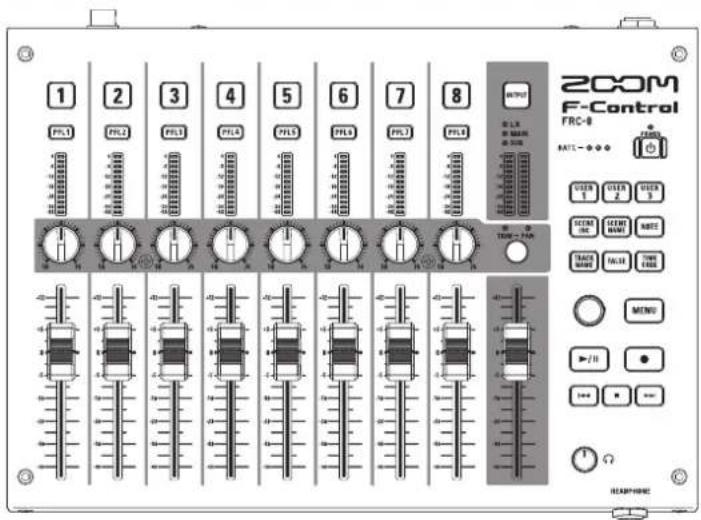
- The faders for 8 tracks and the output enable intuitive volume adjustment.
-
User-assignable function keys and other shortcut keys provide convenient access to functions.
-
A USB keyboard can also be connected for easy input of metadata and other text.
- Power can be supplied in 3 ways: AA batteries, a 9-16V DC power supply, or USB bus power from the recorder (the FB cannot provide power).
Supplying power
■ Using AA batteries
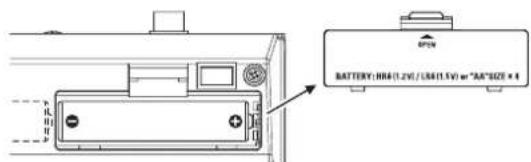
- Remove the battery cover on the back, and install the batteries.
■ Using a DC power supply
- Connect the DC power supply device to the DC IN connector.
Connect a 9–16V direct-current power supply.
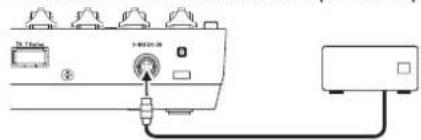
- If there is an adapter, plug the adapter into an outlet.
■ Using USB bus power (F8 cannot supply)
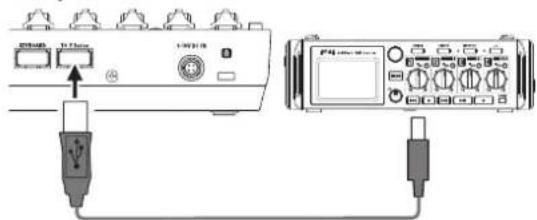
- Use a USB cable to connect the FRC-8 and the compatible device.
NOTE
When multiple power supplies are connected, they will be used in the following order of priority.
- DC power supply (Ext DC)
- USB bus power (F8 cannot supply)
- AA batteries (Int AA)
Names and functions of parts
Top
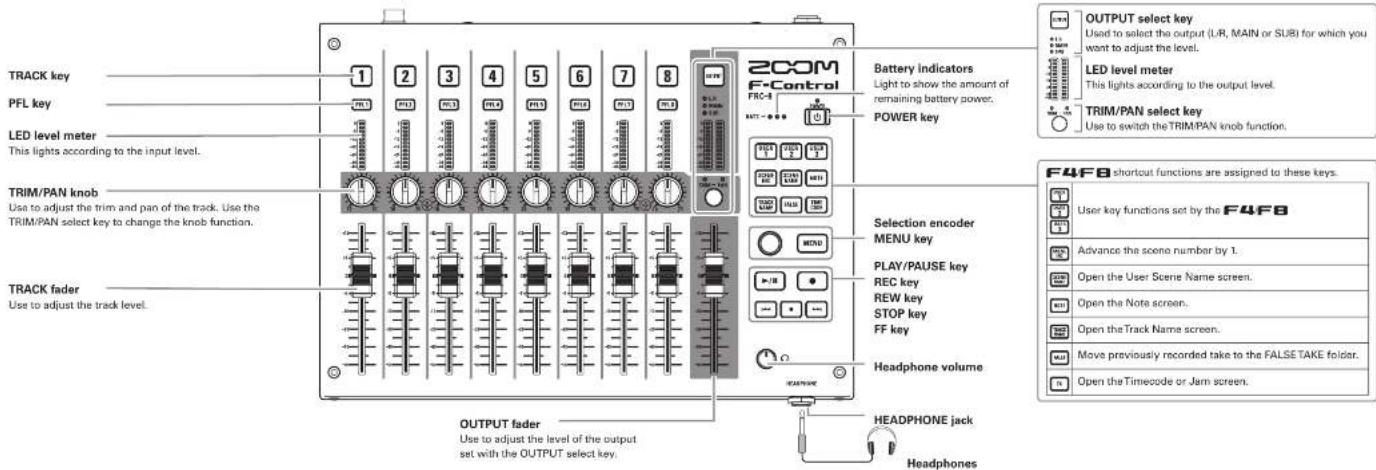
Names and functions of parts
Side
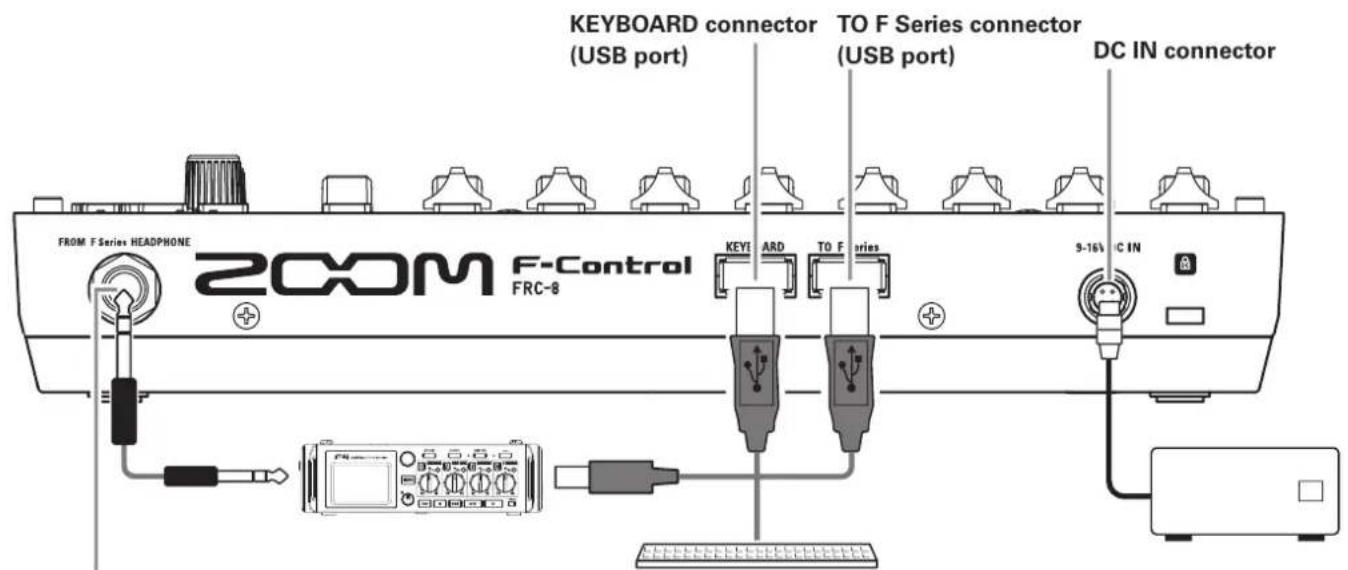
FROM F Series HEADPHONE jack
By connecting the HEADPHONE jack output of a compatible device to this with a stereo cable, the input and playback signals from that device can be monitored through the FRC-8 HEADPHONE jack.
PC keyboard
This can only be used with character input screens.
Specifications
| Power | Batteries: 4 AA | |
| USB bus power (supplied by compatible recorder) | ||
| 9-16V external DC power supply | ||
| Continuous operation time | When 8 channels in use, LED Brightness at 60, no keyboard, and 5 LEDs on each level meter constantly lit | |
| Alkaline batteries | 8.5 hours or more | |
| NiMH (2450mAh) | 12 hours or more | |
| Lithium batteries | 16.5 hours or more | |
| Connectors | TO F Series | USB (Type A) |
| KEYBOARD | USB (Type A)USB standard keyboard connectionPower supply capability: 100 mA | |
| FROM F Series HEADPHONE | 1/4" stereo unbalanced | |
| HEADPHONE | 1/4" stereo unbalanced | |
| External DC power supply: HIROSE HR10A-7R-4S 4-pin connector (1 pin: -, 4 pin: +) | ||
| Power consumption | 2.5 W | |
| External dimensions | Main unit: 245.0 mm (W) × 180.7 mm (D) × 47.4 mm (H) | |
| Weight (main unit only) | 980 g | |
200M®
ZOOM CORPORATION
4-4-3 Kandasurugadai, Chiyoda-ku, Tokyo 101-0062 Japan
http://www.zoom.co.jp
- F-Control
- FRC-8
- Usage and Safety Precautions
- Safety Precautions
- Operation with an external DC power supply
- Operation with batteries
- Alterations
- Product handling
- Operating environment
- Battery handling
- Connection cables and input/output jacks
- Volume
- Usage Precautions
- Interference with other electrical equipment
- Cleaning
- Breakdown and malfunction
- Copyrights
- Note about the Auto Power Off function
- FCC regulation warning (for U.S.A.)
- For EU Countries
- FRC-8 features
- Supplying power
- ■ Using AA batteries
- ■ Using a DC power supply
- NOTE
- Names and functions of parts
- FROM F Series HEADPHONE jack
- PC keyboard
Brand : ZOOM
Model : F-Control FRC-8
Category : Regulator