
NVIDIA NVS 315 - Graphic card HP - Free user manual and instructions
Find the device manual for free NVIDIA NVS 315 HP in PDF.


| Product Type | Graphics Card |
| Brand | HP (NVIDIA NVS 315) |
| GPU Architecture | Fermi |
| CUDA Cores | 384 |
| Memory Size | 1 GB DDR3 |
| Memory Interface | 64-bit |
| Memory Bandwidth | 14.4 GB/s |
| Core Clock | 523 MHz |
| Shader Clock | 1046 MHz |
| Memory Clock | 900 MHz |
| Bus Interface | PCI Express 2.0 x16 |
| Max Resolution | 2560 x 1600 (digital) / 2048 x 1536 (analog) |
| Display Outputs | 2x Dual-Link DVI-D (or 2x DisplayPort, varies) |
| Maximum Displays Supported | 2 |
| DirectX Support | 11 |
| OpenGL Support | 4.2 |
| Form Factor | Low Profile (single slot) |
| Dimensions (with bracket) | 6.6 x 2.7 inches (167.6 x 68.6 mm) |
| Weight | Approx. 150 g |
| Maximum Power Consumption | 19 W |
| Power Connector | None (PCIe slot powered) |
| Cooling | Passive heatsink |
| Operating Temperature | 0°C to 70°C |
| Warranty | Standard HP warranty (varies by region) |
Frequently Asked Questions - NVIDIA NVS 315 HP
User questions about NVIDIA NVS 315 HP
0 question about this device. Answer the ones you know or ask your own.
Ask a new question about this device
Download the instructions for your Graphic card in PDF format for free! Find your manual NVIDIA NVS 315 - HP and take your electronic device back in hand. On this page are published all the documents necessary for the use of your device. NVIDIA NVS 315 by HP.
USER MANUAL NVIDIA NVS 315 HP
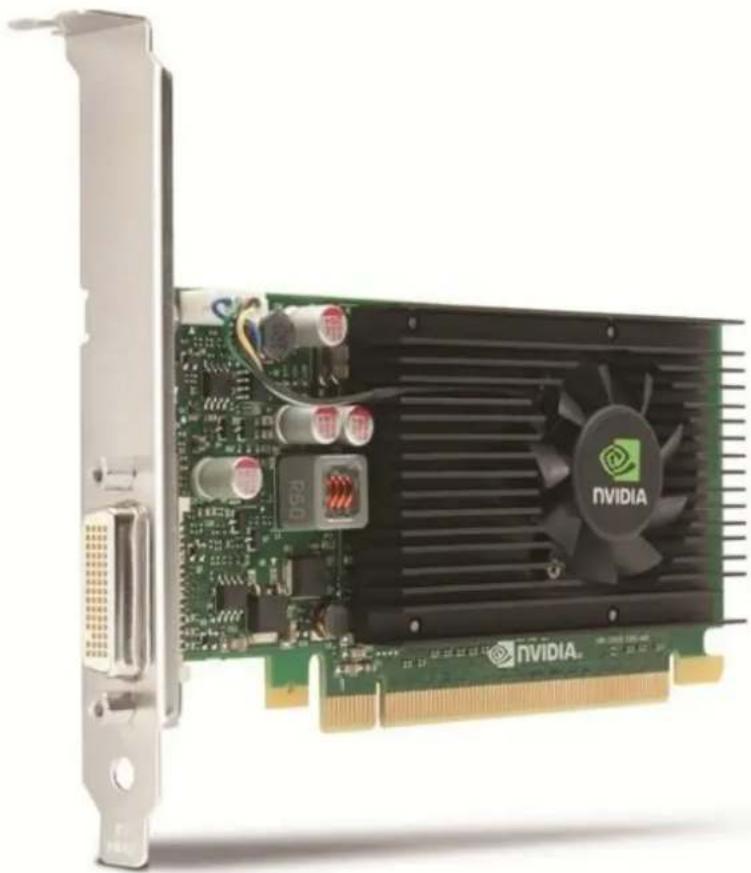
NVIDIA NVS 315 1GB Graphics (for HP Workstations)
Models
NVIDIA NVS 315 1GB Graphics
E1U66AA
Introduction
The NVIDIA® NVS™ 315 graphics board is a PCI Express low profile form factor graphics add-in card targeted as an active low cost graphics solution for the corporate business and enterprise markets requiring convenient attach to legacy displays.
The NVS 315 graphics card is an ideal solution for customers requiring a small form factor graphics add-in card for either standard or small form factor PC designs.
Performance and Features
- The NVIDIA NVS 315 graphics board offers 1GB of DDR3 memory and is capable of supporting up to 2 displays (VGA, DVI, or DP) from the single DMS-59 connector output (requires use of appropriate DMS-59 adapter).
- Combined with NVIDIA's nView advanced desktop management software and NVIDIA Mosaic technologies, the NVS 315 is the ideal enterprise class GPU for users that require single large display or multi-display solutions with the best in class
Overview
acoustics and optimal power.
Compatibility
The NVIDIA NVS 315 is supported on the following platforms:
HP Workstations: Z220 (CMT & SFF), Z230 (CMT & SFF), Z420, Z620, and Z820
Service and Support
The NVIDIA NVS 315 has a one-year limited warranty or the remainder of the warranty of the HP product in which it is installed. Technical support is available seven days a week, 24 hours a day by phone, as well as online support forums. Parts and labor are available on-site within the next business day. Telephone support is available for parts diagnosis and installation. Certain restrictions and exclusions apply.
Technical Specifications
| Form Factor (H x L) | Low Profile:2.713 inches in height × 5.7 inches in lengthWeight: ~142 grams |
| Graphic Controller | NVIDIA NVS 315 (using GF119-825 GPU)Number of Cores: 48 CUDA coresMax. Power: 19.3WCooling Solution: Active fan heatsink |
| Bus type | PCI Express x16, 2.0 compliant |
| Memory | Size: 1GB DDR3Clock: 875MhzMemory Bandwidth: 14GB/s |
| Connectors | DMS-59 outputCables included:- For CTO: DMS-59 to DVI cable- For AMO: DMS-59 to DVI cable and DMS-59 to VGA cable |
| Maximum Resolution | Maximum number of displays supported: 2 |
| Maximum Resolution Support:- DMS-59 to VGA: 2048 x 1536 @ 85Hz- DMS-59 to DVI: 1980 x 1200 @ 60Hz- DMS-59 to DP: 2560 x 1600 @ 60Hz | |
| Image Quality Features | See Display Output section. |
| The following video formats are supported:- MPEG2- MPEG4 Part 2 Advanced Simple Profile- H.264 SVC codec support- Support for 3D Blu Ray- VC1- DivX version 3.11 or later | |
| A full range of video resolutions are supported including 1080p, 1080i, 720p, 480p and 480i. The NVS 315 GPU provides hardware acceleration for the computationally intensive parts of video processing, as well as provides improved video playback speeds via faster decode and transcode. | |
| Display Output | Up to 2 displays using one of the following DMS-59 cables:DMS-59 to DVIDMS-59 to VGADMS-59 to DP |
| DisplayPort output:Drives two DisplayPort enabled digital displays at resolutions up to 2560 × 1600 at 60 Hz with reduced blanking, when connected via the DMS-59 to DP adapter. | |
| DVI-D output:Drives two digital display at resolutions up to 1920 × 1200 at 60 Hz with reduced blanking using DMS-59 to DVI-D single-link cable adaptor | |
| VGA display output: |
Technical Specifications
- Drives two analog displays at resolutions up to 2048 × 1536 at 85 Hz using DMS-59 to VGA cable adaptor.
| Shading Architecture | Shader Model 5.0 |
| Supported Graphics APIs | DX11, OpenGL 4.3 |
| Available Graphics | Windows 8.1 |
| Drivers | Windows 8Microsoft Windows 7 Professional (64-bit and 32-bit)Microsoft Windows XP Professional (64-bit and 32-bit)Red Hat Enterprise Linux(RHEL)SUSE Linux Enterprise Desktop 11 (64-bit and 32-bit) |
| HP qualified drivers may be preloaded or the latest HP qualified drivers are available from the HP support Web site:http://welcome.hp.com/country/us/en/support.html | |
| SUSE Linux Enterprise drivers may also be obtained from:ftp://download.nvidia.com/novellor http://www.nvidia.com | |
| Notes | 1. The thermal solution used on this card is an active fan heatsink.2. Factory configured graphics card includes DMS-59 to DVI cable.3. Option kit graphics card includes DMS-59 to DVI and DMS-59 to VGA cables (one each).4. Configurations of three NVS 315 graphics cards in HP Z440 Workstation require the HP Z440 Fan and Front Card Guide Kit, configurable from the factory (CTO PN: G8T99AV) or as an Aftermarket Option (AMO PN: J9P80AA). |
Summary of Changes
| Date of change: | Version History: | Description of change: | |
| May 1, 2015 | From v1 to v2 | Changed | Note for Technical Specifications section. |
© Copyright 2015 Hewlett-Packard Development Company, L.P.
The only warranties for HP products and services are set forth in the express warranty statements accompanying such products and services. Nothing herein should be construed as constituting an additional warranty. HP shall not be liable for technical or editorial errors or omissions contained herein. The information contained herein is subject to change without notice.
Brand : HP
Model : NVIDIA NVS 315
Category : Graphic card