
HDCP11AB - Audio/video extender Blustream - Free user manual and instructions
Find the device manual for free HDCP11AB Blustream in PDF.


| Product Type | Audio/Video Extender (HDCP Converter) |
| Brand | Blustream |
| Model | HDCP11AB |
| HDCP Conversion | Converts HDCP 2.2 to all lower HDCP formats |
| Audio De-embedding | HDMI audio extracted to analogue L/R and coaxial digital outputs concurrently |
| Video Resolution Support | VGA-WUXGA and 480i-4K |
| Audio Format Support | Dolby TrueHD, Dolby Atmos, Dolby Digital Plus, DTS-HD Master Audio |
| EDID Management | Advanced via 4-pin DIP switch (16 presets) |
| Input Connector | 1 x HDMI Type A (19-pin female) |
| Output Connector | 1 x HDMI Type A (19-pin female) |
| Audio Output Connectors | 1 x SPDIF Coaxial digital, 1 x 3.5mm stereo analogue (L/R) |
| Dimensions (W x D x H) | 55mm x 60mm x 23mm (without feet) |
| Shipping Weight | 0.5 kg |
| Power Supply | 5V/1A DC |
| Power Consumption | 5W maximum |
| Operating Temperature | 32°F to 104°F (0°C to 40°C) |
| Storage Temperature | -4°F to 140°F (-20°C to 60°C) |
| Maintenance | Clean with a soft, dry cloth. Do not use alcohol, paint thinner or benzene. |
| Safety | Surge protection device recommended |
| Package Contents | 1x HDCP11AB, 1x 5V/1A DC power supply, 1x mounting kit |
| Mounting Kit Included | Yes |
Frequently Asked Questions - HDCP11AB Blustream
User questions about HDCP11AB Blustream
0 question about this device. Answer the ones you know or ask your own.
Ask a new question about this device
Download the instructions for your Audio/video extender in PDF format for free! Find your manual HDCP11AB - Blustream and take your electronic device back in hand. On this page are published all the documents necessary for the use of your device. HDCP11AB by Blustream.
USER MANUAL HDCP11AB Blustream
HDCP11AB
User Manual
Thank you for purchasing this product.
For optimum performance and safety, please read these instructions carefully before connecting, operating or adjusting this product. Please keep this manual for future reference.

Surge protection device recommended
This product contains sensitive electrical components that may be damaged by electrical spikes, surges, electric shock, lightning strikes, etc. Use of surge protection systems is highly recommended in order to protect and extend the life of your equipment.
Contents
Introduction 3
Features 3
Panel Descriptions 3-4
EDID Management ____ 4
Application Diagram 5
Specifications ____ 6
Package Contents 6
Maintenance 6
Introduction
Our HDCP11AB is designed to resolve HDCP 2.2 incompatibility issues.
The HDCP11AB converts the HDCP 2.2 input to a lower HDCP format allowing integration of HDCP 2.2 source products to non-HDCP 2.2 compatible products (displays, AV receivers, soundbars etc). The HDCP11AB also features in-built EDID management and has HDMI de-embedding to extract audio from the HDMI input onto both analogue and Coaxial digital outputs concurrently.
This solution prevents the need to upgrade all of your HDMI video components when a HDCP 2.2 device is added to the system.
FEATURES:
- Conversion of HDCP 2.2 to all lower HDCP formats.
-
HDMI audio de-embedded to both analogue L/R audio and Coaxial digital outputs concurrently.
• Supports all industry standard video resolutions including VGA-WUXGA and 480i-4K. -
Support pass-through of all known HDMI audio formats including Dolby TrueHD, Dolby Atmos, Dolby Digital Plus and DTS-HD Master audio transmission.
• Advanced EDID management. - Small compact size.
Front Panel
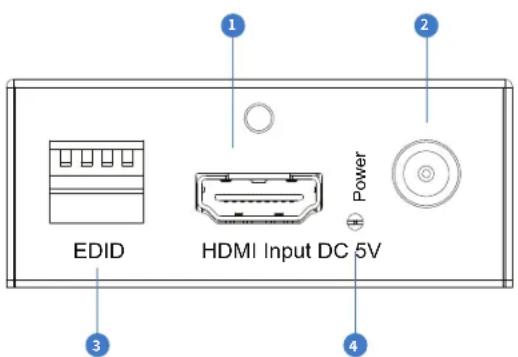
1 HDMI Input - Connect to the HDMI source device.
2 DC 5V - Connect to supplied 5V/1A power supply.
3 EDID DIP Switches - EDID management (see page 4).
4 Power LED indicator - Lit when unit is powered.
Rear Panel
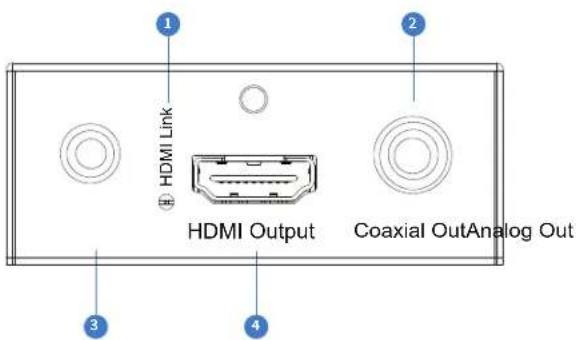
1 HDMI LED indicator - Lit when detecting a HDMI connection to a display/end point.
2 Digital Coaxial Out—Extracted audio from the HDMI input.
3 L/R Out Analogue Audio Out - Extracted audio from HDMI input (Compatible with 2ch PCM only).
4 HDMI Output - Connect to the HDMI display.
EDID Control
EDID (Extended Display Identification Data) is a data structure that is used between a display and a source. This data is used by the source to find out what audio and video resolutions are supported by the display then from this information the source will determine what the best resolution is to output.
While the objective of EDID is to make connecting a digital display to a source a simple plug and play procedure issues do arise when multiple displays or video matrix switching is introduced because of the increased number of variables.
By pre-determining the video resolution and audio format of the source and display device you can potentially work around compatibility issues associated with some display and source combinations.
To change the EDID settings move the EDID dip-switches as required on the front panel of the unit. Please see adjacent table for settings.
Note: You must power-cycle the HDCP11AB after changes have been made in order for the EDID settings to update.
| 3210 Combination of DIP positions | EDID Type | ||
| 0000 Copy EDID from output | |||
| 0001 1080P 2.0CH | |||
| 0010 1080P 5.1CH | |||
| 0011 1080P 7.1CH | |||
| 0100 1080i 2.0CH | |||
| 0101 1080i 5.1CH | |||
| 0110 1080i 7.1CH | |||
| 0111 3D 2.0CH | |||
| 10003D 5.1CH | |||
| 10013D 7.1CH | |||
| 10104K 2.0CH | |||
| 10114K 5.1CH | |||
| 11004K 7.1CH | |||
| 1101 DVI 1280x1024 | |||
| 1110 DVI 1920x1080 | |||
| 1111 DVI 1920x1200 | |||

flowchart
graph TD
    A["Display"] -->|Non HDCP 2.2 display| B["Compaual DC System"]
    B --> C["Compaual DC System"]
    C --> D["Compaual DC System"]
    D --> E["Compaual DC System"]
    E --> F["Compaual DC System"]
    F --> G["Compaual DC System"]
    G --> H["Compaual DC System"]
    H --> I["Compaual DC System"]
    I --> J["Compaual DC System"]
    J --> K["Compaual DC System"]
    K --> L["Compaual DC System"]
    L --> M["Compaual DC System"]
    M --> N["Compaual DC System"]
    N --> O["Compaual DC System"]
    O --> P["Compaual DC System"]
    P --> Q["Compaual DC System"]
    Q --> R["Compaual DC System"]
    R --> S["Compaual DC System"]
    S --> T["Compaual DC System"]
    T --> U["Compaual DC System"]
    U --> V["Compaual DC System"]
    V --> W["Compaual DC System"]
    W --> X["Compaual DC System"]
    X --> Y["Compaual DC System"]
    Y --> Z["Compaual DC System"]
    Z --> AA["Compaual DC System"]
    AA --> AB["Compaual DC System"]
    AB --> AC["Compaual DC System"]
    AC --> AD["Compaual DC System"]
    AD --> AE["Compaual DC System"]
    AE --> AF["Compaual DC System"]
    AF --> AG["Compaual DC System"]
    AG --> AH["Compaual DC System"]
    AH --> AI["Compaual DC System"]
    AI --> AJ["Compaual DC System"]
    AJ --> AK["Compaual DC System"]
    AK --> AL["Compaual DC System"]
    AL --> AM["Compaual DC System"]
    AM --> AN["Compaual DC System"]
    AN --> AO["Compaual DC System"]
    AO --> AP["Compaual DC System"]
    AP --> AQ["Compaual DC System"]
    AQ --> AR["Compaual DC System"]
    AR --> AS["Compaual DC System"]
    AS --> AT["Compaual DC System"]
    AT --> AU["Compaual DC System"]
    AU --> AV["Compaual DC System"]
    AV --> AW["Compaual DC System"]
    AW --> AX["Compaual DC System"]
    AX --> AY["Compaual DC System"]
    AY --> AZ["Compaual DC System"]
    AZ --> BA["Compaual DC System"]
    BA --> BB["Compaual DC System"]
    BB --> BC["Compaual DC System"]
    BC --> BD["Compaual DC System"]
    BD --> BE["Compaual DC System"]
    BE --> BF["Compaual DC System"]
    BF --> BG["Compaual DC System"]
    BG --> BH["Compaual DC System"]
    BH --> BI["Compaual DC System"]
    BI --> BJ["Compaual DC System"]
    BJ --> BK["Compaual DC System"]
    BK --> BL["Compaual DC System"]
    BL --> BM["Compaual DC System"]
    BM --> BN["Compaual DC System"]
    BN --> BO["Compaual DC System"]
    BO --> BP["Compaual DC System"]
    BP --> BQ["Compaual DC System"]
    BQ --> BR["Compaual DC System"]
    BR --> BS["Compaual DC System"]
    BS --> BT["Compaual DC System"]
    BT --> BU["Compaual DC System"]
    BU --> BV["Compaual DC System"]
    BV --> BW["Compaual DC System"]
    BW --> BX["Compaual DC System"]
    BX --> BY["Compaual DC System"]
    BY --> BZ["Compaual DC System"]
    BZ --> CA["Compaual DC System"]
    CA --> CB["Compaual DC System"]
    CB --> CC["Compaual DC System"]
    CC --> CD["Compaual DC System"]
    CD --> CE["Compaual DC System"]
    CE --> CF["Compaual DC System"]
    CF --> CG["Compaual DC System"]
    CG --> CH["Compaual DC System"]
    CH --> CI["Compaual DC System"]
    CI --> CJ["Compaual DC System"]
    CJ --> CK["Compaual DC System"]
Specifications
Video Input Connectors: 1x HDMI Type A, 19-pin, female
Video Output Connectors: 1x HDMI Type A, 19-pin, female
Audio Output Connectors: 1x SPDIF Coaxial digital, 1x 3.5mm stereo analogue audio (L/R)
EDID: 4-PIN DIP Switch
Dimensions (W x D x H): 55mm x 60mm x 23mm, without feet
Shipping Weight: 0.5 KG
Operating Temperature: 32°F to 104°F (0°C to 40°C)
Storage Temperature: - 4°F to 140°F (- 20°C to 60°C)
Power Supply: 5V/1A DC
Package Contents:
- 1x HDCP11AB
- 1x 5V/1A DC power supply
- 1x Mounting kit
Maintenance
Clean this unit with a soft, dry cloth. Never use alcohol, paint thinner or benzene to clean this unit.
Brand : Blustream
Model : HDCP11AB
Category : Audio/video extender