
Slim XJ-A257 - Vidéo-projecteur CASIO - Free user manual and instructions
Find the device manual for free Slim XJ-A257 CASIO in PDF.


| Product Type | Video Projector |
| Brand | Casio |
| Model | Slim XJ-A257 |
| Display Technology | DLP |
| Native Resolution | 1280 x 800 (WXGA) |
| Brightness | 3000 lumens |
| Contrast Ratio | 1800:1 |
| Light Source | Laser and LED, rated 20,000 hours |
| Projection Lens | 2X power zoom, power focus |
| Projected Image Size | 8 to 300 inches |
| Throw Ratio (60-inch) | 1.43 to 2.84 meters |
| Keystone Correction | Auto keystone correction |
| Input Terminals | RGB (15-pin D-Sub), HDMI, AV (3.5mm mini jack), USB-A, Micro-USB |
| Wireless Connectivity | IEEE 802.11b/g/n (via optional wireless adapter) |
| Speaker | 1W monaural |
| Power Supply | 100-240V AC, 50/60Hz |
| Power Consumption (Bright) | 155W |
| Standby Power | 0.14W (100-120V), 0.23W (220-240V) |
| Dimensions (W x D x H) | 297 x 210 x 43 mm (11.7 x 8.3 x 1.7 inches) |
| Weight | 2.3 kg (5.1 lbs) |
| Operating Temperature | 5°C to 35°C (41°F to 95°F) |
| Operating Humidity | 20% to 80% non-condensing |
| Accessories Included | Power cord, RGB cable, AV cable, wireless remote, batteries, carrying bag, setup guide, warranty |
| Cleaning Instructions | Use soft dry cloth; mild detergent if needed; vacuum intake/exhaust vents regularly |
| Light Source Replacement | Contact authorized service center; not user serviceable |
| Safety Class | Class 1 laser product |
Frequently Asked Questions - Slim XJ-A257 CASIO
User questions about Slim XJ-A257 CASIO
0 question about this device. Answer the ones you know or ask your own.
Ask a new question about this device
Download the instructions for your Vidéo-projecteur in PDF format for free! Find your manual Slim XJ-A257 - CASIO and take your electronic device back in hand. On this page are published all the documents necessary for the use of your device. Slim XJ-A257 by CASIO.
USER MANUAL Slim XJ-A257 CASIO
- Be sure to keep all user documentation handy for future reference.
- To obtain the latest version of this manual visit the website at the URL below.
http://world.casio.com/manual/projector/
Français
Operating Precautions ...... EN-6 Specifications ...... EN-12
General Guide ...... EN-10
Unpacking
As you unpack the projector, check to make sure that all of the items listed below are present.
● DATA PROJECTOR
- Carrying Bag
● Wireless remote control (YT-130)
- Setup Guide
● Test Batteries (AAA-size × 2)
- “Read this first” Sheet
- AC Power Cord
- Warranty
- RGB Cable
● Wireless adapter (Provided with USB models only.)
- Special AV Cable
Projector Documentation and Software
The manuals for this projector can be downloaded from the CASIO website at the URL below.
http://world.casio.com/manual/projector/
Reference manual:
"User's Guide" (UsersGuide.pdf)
Manuals for USB models:
"Network Function Guide"
The software for USB models can be downloaded from the CASIO website at the URL below.
http://www.casio-intl.com/support/download/
Software for USB models:
Network Connection, EZ-Converter FA
- The contents of this User's Guide are subject to change without notice.
- Copying of this manual, either in part or its entirety, is forbidden. You are allowed to use this manual for your own personal use. Any other use is forbidden without the permission of CASIO COMPUTER CO., LTD.
- CASIO COMPUTER CO., LTD. shall not be held liable for any lost profits or claims from third parties arising out of the use of this product or this manual.
- CASIO COMPUTER CO., LTD. shall not be held liable for any loss or lost profits due to loss of data caused by malfunction or maintenance of this product, or any other reason.
- The sample screens shown in this manual are for illustrative purposes only, and may not be exactly the same as the screens actually produced by the product.
Safety Precautions
Thank you for selecting this CASIO product. Be sure to read these “Safety Precautions” before trying to use it. After reading this User’s Guide, keep it in a safe place for future reference.
About safety symbols
Various symbols are used in this User's Guide and on the product itself to ensure safe use, and to protect you and others against the risk of injury and against material damage. The meaning of each of the symbols is explained below.
 | Danger | This symbol indicates information that, if ignored or applied incorrectly, creates the risk of death or serious personal injury. |
 | Warning | This symbol indicates information that, if ignored or applied incorrectly, could possibly create the risk of death or serious personal injury. |
 | Caution | This symbol indicates information that, if ignored or applied incorrectly, could possibly create the risk of personal injury or material damage. |
Icon Examples


A triangle indicates a situation against which you need to exercise caution. The example shown here indicates you should take precaution against electric shock.
A circle with a line through it indicates information about an action that you should not perform. The specific action is indicated by the figure inside the circle. The example shown here means disassembly is prohibited.
A black circle indicates information about an action that you must perform. The specific action is indicated by the figure inside the circle. The example shown here indicates you must unplug the power cord from the power outlet.
Precautions During Use

Warning
●Adult supervision is required whenever there are young children present and especially when there is the possibility of young children coming into contact with the projector.
●Smoke, odor, heat, and other abnormalities

Should you ever notice smoke, strange odor, or any other abnormality, immediately stop using the projector. Continued use creates the risk of fire and electric shock. Immediately perform the following steps.
-
Unplug the projector.
-
Contact your original dealer or authorized CASIO service center.
●Malfunction

Immediately stop using the projector if the screen appears abnormal, or if any other abnormal operation occurs even though you are operating the projector correctly. Continued use creates the risk of fire and electric shock. Immediately perform the following steps.
- Turn off the projector.
- Unplug the projector.
- Contact your original dealer or authorized CASIO service center.
●Power cord

Misuse of the power cord creates the risk of fire and electric shock.
Make sure that you always observe the following precautions.
- Be sure to use only the accessories that come with the projector.
- Make sure that you use a power source with the same voltage as that specified for the projector.
- Do not overload a power outlet with too many devices.
- Do not locate the power cord near a stove.
- Do not use the power cord that comes with the projector with any other device.
- Do not share the outlet supplying power to the projector with other devices. If you are using an extension cord, make sure that the ampere rating of the extension cord is compatible with the power consumption value of this projector.
- Never use the power cord while it is still bundled together.
- Use a conveniently located power outlet that you can reach easily when you need to unplug the projector.

A damaged power cord creates the risk of fire and electric shock.
Make sure that you always observe the following precautions.
- Never place heavy objects on the power cord and never expose it to heat.
- Make sure the power cord is not pinched between the wall and the rack or table where the projector is located, and never cover the power cord with a cushion or other object.
- Never try to modify the power cord, allow it to become damaged, or subject it to excessive bending.
- Do not twist the power cord or pull on it.

Never touch the power cord or plug while your hands are wet.
Doing so creates the risk of electric shock.
- When using this projector in the country where you purchased it, be sure to use the power cord that came with it. Whenever using the projector in another country, be sure to purchase and use a power cord that is rated for the voltage of that country. Also make sure that you are aware of the Safety Standards that apply in that country.

When going out, make sure the projector is in a location away from pets and other animals, and unplug the power plug from the power outlet. A power cord damaged by chewing can cause shorts, and creates the risk of fire.
●Water and foreign matter

Never allow water to get on the projector. Water creates the risk of fire and electric shock.

Never place a vase or any other container of water on top of the projector. Water creates the risk of fire and electric shock.

Water or other liquid, or foreign matter (metal, etc.) getting into the projector creates the risk of fire and electric shock. Should anything get inside the projector, immediately perform the following steps.
-
Turn off the projector.
-
Unplug the projector.
-
Contact your original dealer or authorized CASIO service center.
●Disassembly and modification

Never try to take the projector apart or modify it in any way. The projector contains a large number of high-voltage components that create the risk of electric shock and burn injury. Also, note that problems caused by unauthorized projector disassembly or modification are not covered by the warranty and are not eligible for repair by CASIO.
Be sure to leave all internal inspection, adjustment, and repair up to your original dealer or authorized CASIO service center.
●Dropping and impact

Continued use of the projector after it has been damaged by dropping or other mistreatment creates the risk of fire and electric shock. Immediately perform the following steps.
-
Turn off the projector.
-
Unplug the projector.
-
Contact your original dealer or authorized CASIO service center.
●Disposal by burning

Never try to dispose of the projector by burning it. Doing so can cause an explosion, which creates the risk of fire and personal injury.
●Projector light emission

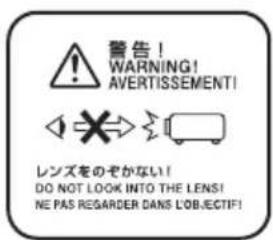
- Never look directly into the lens, intake vents, or exhaust vents while the light is on. When turning on the projector, check to make sure that no one is looking directly into its lens, intake vents, or exhaust vents. The strong light emitted by the projector creates the risk of eye damage.
- Do not attempt to use a magnifying glass, mirror, or other similar object to bend or reflect the projector's light, and never hold or place such object in the path of the projector's light. Refracted or reflected light can shine into a person's eyes and create the risk of eye damage.
●Blocking the vents

Never allow the vents to become blocked. Doing so causes internal heat build up, which creates the risk of fire and breakdown of the projector. Touching the projector while it is hot creates the risk of burn injury. Make sure that you always observe the following precautions.
- Allow at least 30cm (11.8 inches) between the projector and walls.
- Do not insert the projector into any space where air circulation is poor.
- Never cover the projector with a blanket or any similar item.
- Locate the projector on a firm, flat surface during use. Never use the projector while it is on a carpet, blanket, towel, seat cushion, or other pliable surface.
- Never stand the projector up on either end during use.
●Projector cabinet
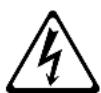
Never open the projector's cabinet. Doing so creates the risk of electric shock.
●Cleaning

Before cleaning the projector, be sure to turn it off and unplug it from the power outlet. Failure to do so creates the risk of electric shock.
●Exhaust vents
The exhaust vents become very hot while the projector is running. Never touch them. Doing so creates the risk of burn injury. The areas near the exhaust vents also become quite hot. Never locate objects made of plastic or other heat-sensitive materials near or under the projector. Doing so creates the risk of deformation and discoloration of the object.
●Lens cover
Be sure to remove the lens cover before turning on the projector. Never leave the lens cover attached while the projector is in use.
●Location
Never locate the projector in any of the following types of locations. Doing so creates the risk of fire and electric shock.
• Near an area subject to strong vibration
- An area subject to large amounts of moisture or dust
• In a kitchen or other area exposed to oil smoke
- Near a heater, on a heated carpet, or in an area exposed to direct sunlight
- An area subject to temperature extremes (Operating temperature range is 5^ to 35^ (41°F to 95°F)).
●Heavy objects
Never place heavy objects on the projector or climb on top of the projector. Doing so creates the risk of fire and electric shock.
●Water
Never locate the projector in a bathroom or anywhere else there is the chance that it will be splashed with water.
●Unstable location

Never place the projector on an unstable surface or on a high shelf. Doing so can cause it to fall, creating the risk of personal injury.
●Using the projector on a base with casters
Whenever using the projector on a base that has casters, make sure that you lock the casters when not moving the base.
●Lightening
During a lightening storm, do not touch the plug of the projector's power cord.
●Remote controller

Never try to take the remote controller apart or modify it in any way. Doing so creates the risk of electric shock, burn injury, and other personal injury. Be sure to leave all internal inspection, adjustment, and repair up to your original dealer or authorized CASIO service center.

Never allow the remote controller to become wet. Water creates the risk of fire and electric shock.
●Radio waves emitted by the wireless adapter (which is provided with some projector models)

Never use this product inside of an aircraft or medical facility, or in any other location where use of such devices is prohibited. Radio waves can have an effect on the operation of electronic equipment and medical equipment, and cause accidents.

Do not use this product in the vicinity of high-precision electronic instruments or electronic devices that handle weak radio signals. Radio waves can have an effect on the operation of such equipment, and cause accidents.
- If you are using a pace maker or any other electronic medical device, be sure to consult your physician or device manufacturer before using this product.
Caution
●Power cord

Misuse of the power cord creates the risk of fire and electric shock. Make sure that you always observe the following precautions.
- When unplugging the power cord, always grasp the plug, and do not pull on the power cord.
- Insert the plug into the power outlet as far as it will go.
- After using the projector, unplug it from the power outlet.
- Unplug the projector from the power outlet if you do not plan to use it for a long time.
- At least once a year, unplug the power plug and use a dry cloth or vacuum cleaner to clear dust from the area around the prongs of the power plug.
- Never use detergent to clean the power cord, especially the power plug and jack.
- Before moving the projector, be sure to turn it off and unplug it from the power outlet first.
●Backup of important data

Be sure to keep separate written records of all data stored in projector memory. Memory data can be lost due to breakdown, maintenance, etc.
●During projection, make sure there is nothing in front of the lens blocking the light.
An object in front of the lens creates the risk of fire.
●Lens effect
Never have an aquarium or any other object that produces a lens effect in front of the projector while the light source unit is on. Such an object creates the risk of fire.
●Lens
Never touch the lens with your hand.
●Wireless adapter (provided with some projector models)

Keep the wireless adapter out of the reach of small children. Accidental swallowing of a wireless adapter can interfere with proper breathing and create a life-threatening situation.
Battery Precautions

Danger

Should liquid leaking from an alkaline battery get into the eyes, immediately take the following steps.
- Do not rub the eyes! Wash the eyes with clean water.
- Contact a physician immediately. Failure to take immediate action can lead to loss of eyesight.

Warning
Misuse of batteries can cause them to leak and stain the area around them, or to explode, creating the risk of fire and personal injury. Make sure that you always observe the following precautions.

- Never try to take batteries apart and do not allow them to become shorted.
- Never expose batteries to heat or throw them into fire.
- Never mix old batteries and new ones.
- Never mix batteries of different types.
- Never try to charge batteries.
• Take care that batteries are oriented correctly when you load them.

Caution
Misuse of batteries can cause them to leak and stain the area around them, or to explode, creating the risk of fire and personal injury. Make sure that you always observe the following precaution.

- Use only the type of batteries that is specified for the remote controller.
●Dead batteries
Be sure to remove batteries from the remote controller as soon as they go dead.

- Remove batteries from the remote controller if you do not plan to use it for a long time.
●Disposing of batteries
Make sure that you dispose of used batteries in accordance with the rules and regulations in your local area.
Lens Cover

Warning

The lens cover of this Data Projector uses a magnetic attachment. Because of this, it should not be used in the vicinity of anyone wearing a pacemaker or any other electric medical device. Should any problem arise, move the lens cover away from the person experiencing the problem and consult a physician.

Caution

Keep the lens cover away from floppy disks, magnetic cards, magnetic tapes, prepaid cards, checks, and any other media that uses magnetic recording. The lens cover can corrupt data recorded on magnetic media.
Other

Caution
Allowing dust to build up inside the projector by not cleaning it for long periods creates the risk of fire and accident, and can cause loss of projection luminosity. Contact your original dealer or authorized CASIO service center once a year about having the interior of the projector cleaned. Note that you will be charged for cleaning.
●Be sure to follow all applicable local laws and regulations, and do not dismantle the projector when disposing of it.
Operating Precautions
About the Light Source Unit
- The projector's light source unit uses a laser and LED.
- The life of the light source unit is rated at approximately 20,000 hours. The actual life will depend on use conditions, the settings configured on the setup menu, and differences between each individual light source unit.
- The light source unit is warranted for the period noted on the warranty certificate or for 6,000 hours, whichever comes first.
- The failure of the light source unit to light or a noticeable drop in light source unit brightness indicates the end of the light source unit's life. Contact your original dealer or authorized CASIO service center for replacement. Note that problems caused by unauthorized projector disassembly or modification are not covered by the warranty and are not eligible for repair by CASIO.
Laser Precautions
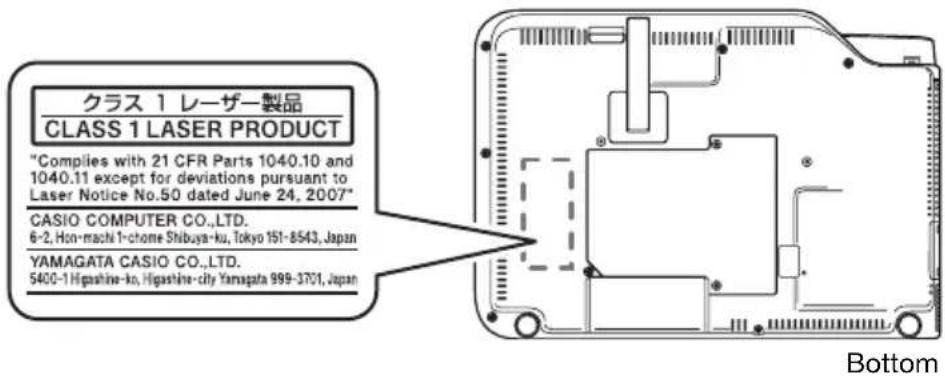
This projector is a Class 1 laser device that conforms with IEC 60825-1.
● This projector has a built-in laser module. Disassembly or modification is very dangerous and should never be attempted.
- Any operation or adjustment not specifically instructed by the user's guide creates the risk of hazardous laser radiation exposure.
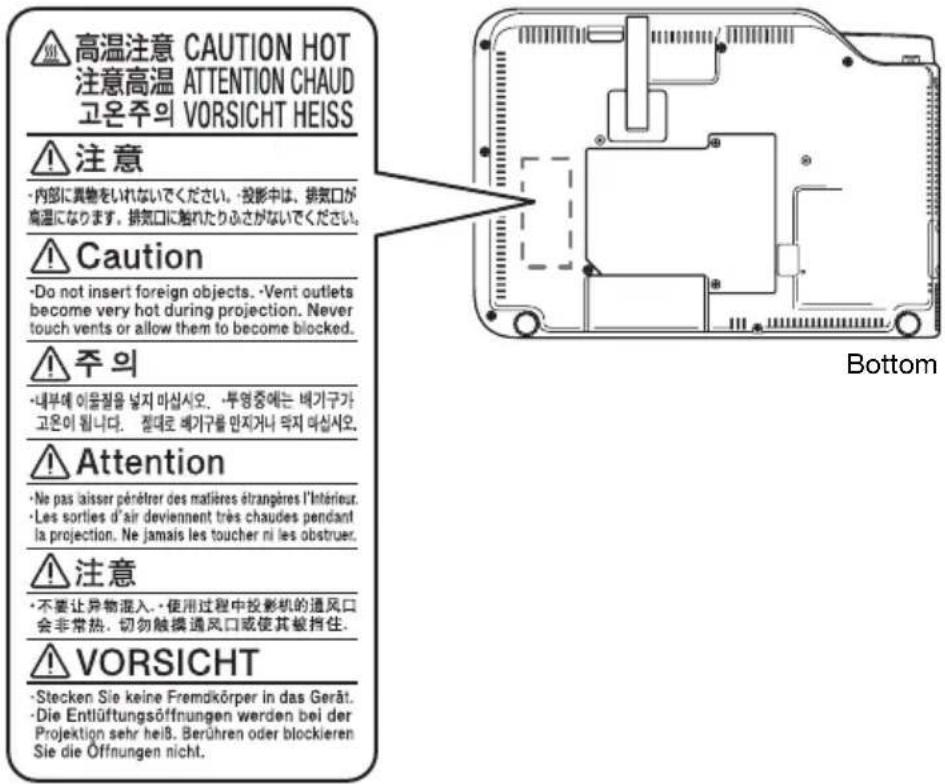
Vent Outlets

- Vent outlets become very hot during projection. Never touch vents or allow them to become blocked.
- Do not insert foreign objects.
Projector Light Emission
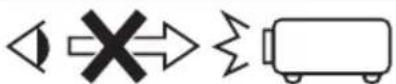
- Never look directly into the lens while the light is on.
Other Precautions
This projector is made of precision components. Failure to observe the following precautions can result in inability to correctly save data and malfunction.
● Never use or store the projector in the following locations. Doing so creates the risk of malfunction of and damage to the projector.
- Locations subjected to electrostatic charge
- Locations subjected to temperature extremes
- Locations where there is extreme moisture
- Locations subjected to sudden temperature changes
- Locations where there is a lot of dust
- On a shaky, slanted, or otherwise unstable surface
- Locations where there is the danger of getting wet
- Locations where there are large amounts of oil smoke or other smoke
● Avoid using the projector under the following conditions. Such conditions create the risk of malfunction of and damage to the projector.
- Avoid areas subject to temperature extremes (operating temperature range is 5^ to 35^ (41°F to 95°F)).
- Never place heavy objects on the projector or climb on top of the projector.
- Never insert or allow foreign objects to drop into the projector.
● Never place a vase or any other container of water on top of the projector.
- Whenever setting the projector down or performing any operation that involves moving or reorienting it, take care that you do not pinch your fingers under the projector.
● Never leave dead batteries inside the remote controller for a long time.
Dead batteries can leak, which leads to malfunction of and damage to the remote controller. Be sure to replace the batteries at least once every one year, no matter how much you use the remote controller during that time.
●Clean with a soft, dry cloth.
When very dirty, use a soft cloth that has been dampened in a weak solution of water and a mild neutral detergent. Wring all excess water from the cloth before wiping. Never use thinner, benzine, or any other volatile agent to clean the projector. Doing so can remove its markings and cause staining of the case.
●Missing Screen Dots
Though this projector is manufactured using the most advanced digital technology available today, some of the dots on the screen may be missing. This is normal, and does not indicate malfunction.
●Never subject the projector to strong impact while it is projecting.
If the projector is accidentally subjected to strong impact, the projection image will momentarily go blank. The image will reappear after some time, but it may be the wrong color or it may be accompanied by an error message.
If the projected image is the wrong color, re-select the current input source. If this does not return the projected image to its proper color, turn projector power off and then back on again.
If the image reappears with an error message, correct the problem in accordance with the indicator explanations under “Error Indicators and Warning Messages” in the User’s Guide.
●Keystone Correction and Image Quality
Performing keystone correction causes the image to be compressed before it is projected. This can result distortion of the image or a loss of image quality. If this happens, change orientation of the projector and/or screen so it conforms as much as possible to the illustration under “Setting Up the Projector” in the User’s Guide.
If image quality is the highest priority, turn off auto keystone correction and position the projector so it is pointed straight at the screen.
- Even if your projector is still within the warranty period, you will be charged for repair if a problem is due to running the projector non-stop for very long periods (like 24 hours) or if the projector was set up and used without following the “Setup Precautions” in the User’s Guide.
- Use under high ambient temperature or in environments subjected to large amounts of dust, oil smoke, tobacco smoke, or other types of smoke can shorten the replacement cycles and require more frequent replacement of the optical engine and other components. Note that you are charged for such replacement. For details about replacement cycles and fees, contact an authorized CASIO service center.
Precaution when Handling the Projector after Use
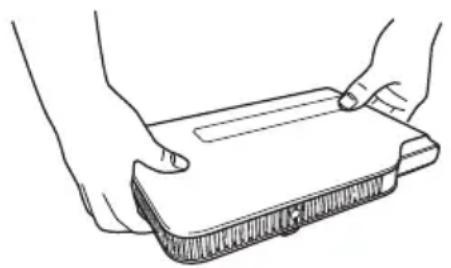
The projector's exhaust vents and the area around the vents become very hot during operation, and will still be hot immediately after turning off the projector. Because of this, you should hold the sides of the projector as shown in the illustration whenever moving it.
natural_image
Line drawing of two hands holding a rectangular object, no text or symbols presentStowing the Projector in the Carrying Bag
Make sure the projector is no longer warm before stowing it in the carrying bag.
Cleaning the Projector
- Periodically clean the projector exterior, lens, intake vents and exhaust vents on a regular basis.
- When cleaning the lens, do not apply undue force and take care to avoid damaging it.
- Dust and dirt tend to collect around the intake vents. Because of this, you should use a vacuum cleaner to clean away accumulated dust and dirt periodically.
- Continued use of the projector after dust has accumulated around the intake vents can cause overheating of internal components and lead to malfunction.
- Certain operating conditions also can cause dirt and dust to accumulate around the projector's exhaust vents. If this happens, use the same procedure as that described above to clean the exhaust vents.
General Guide
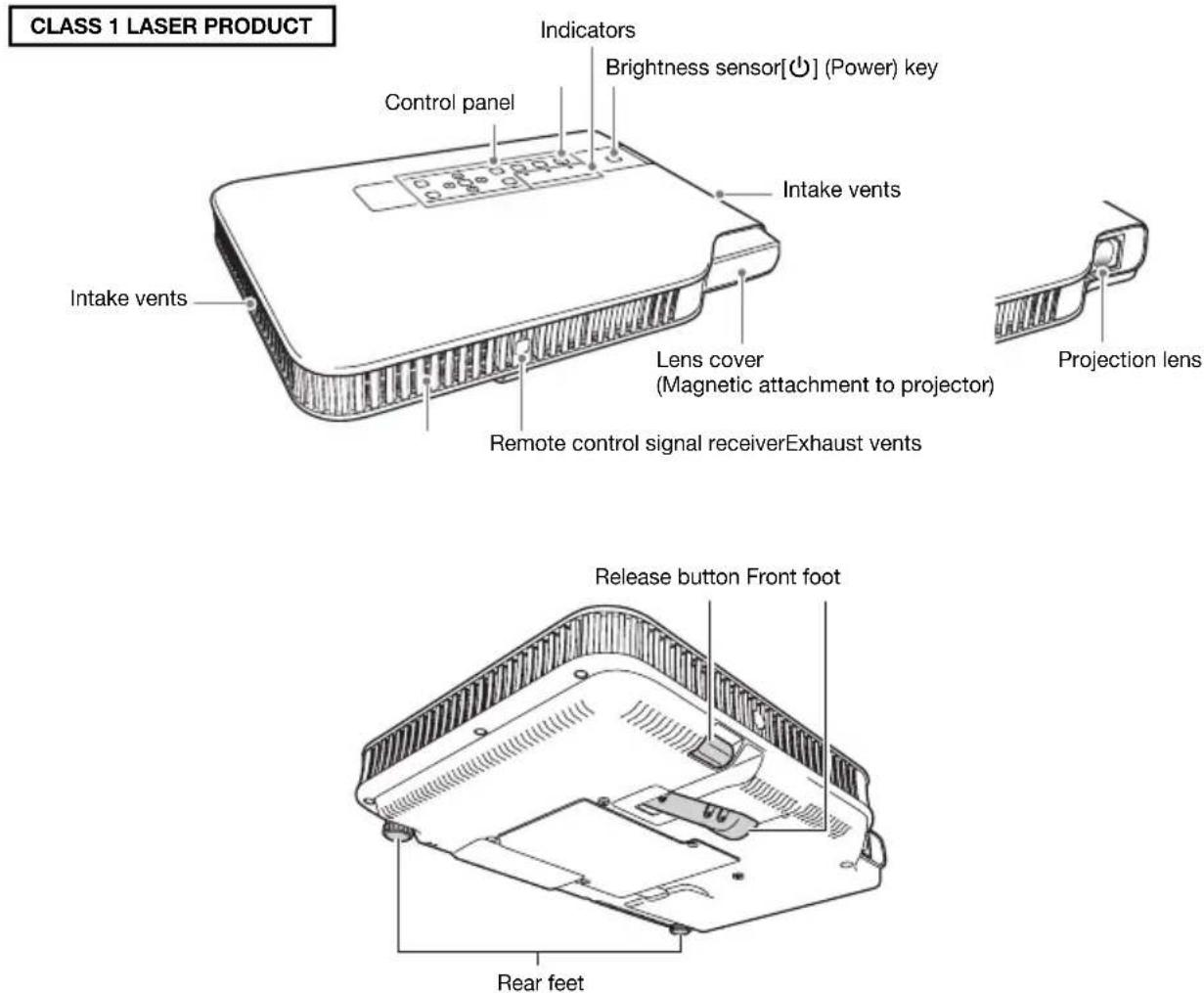
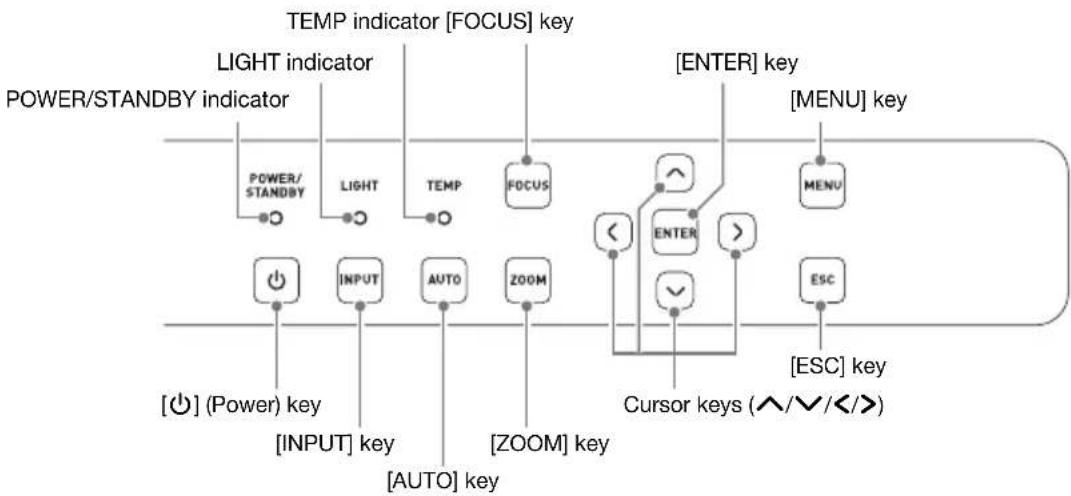
Control Panel and Indicators
flowchart
graph TD
    A["POWER/STANDBY indicator"] --> B["POWER/STANDBY"]
    B --> C["LIGHT indicator"]
    C --> D["TEMP indicator [FOCUS"] key]
    D --> E["FOCUS"]
    E --> F["ENTER"] key
    F --> G["MENU"]
    F --> H["MENU"]
    I["INPUT"] --> J["INPUT"] key
    K["AUTO"] --> L["AUTO"] key
    M["ZOOM"] --> N["ZOOM"] key
    O["Cursor keys (^^/√/<</>)"] --> P["ESC"]
    Q["[Power"] (Power) key] --> R["[Power"] key]
    S["[AUTO"] key] --> T["[AUTO"] key]
Quick Guide
This section explains the operational flow up to the point that projection is started. For more individual operations, see the User's Guide (UsersGuide.pdf).
- Load batteries into the remote controller.
“To load remote controller batteries” (User's Guide)
- Place the projector onto a table, desk, or stand that is level and firm, making sure that you allow enough room around it.
“Setting Up the Projector”, “Setup Precautions” (User’s Guide)
- Also, be sure to read the “Safety Precautions” (page EN-1) and the “Operating Precautions” (page EN-6).
- Referring to the illustration on page EN-10, adjust the vertical angle of the projector.
① Lift up the front of the projector and press the release button. This causes the front foot to drop from the bottom of the projector.
② While holding down the release button, raise and lower the front of the projector. When the front foot is the height you want, release the release button. The front foot will lock at that position.
③ Make fine adjustments to the horizontal tilt of the projector by rotating the rear feet.
-
Use the supplied power cord to plug the projector into a power outlet.
-
Connect the projector to an image output device and then turn on the device.
“Connecting Projector Cables” (User's Guide)
-
Remove the projector lens cover.
-
Press the [⏻] (Power) key to turn on the projector.
- The first time you turn on the projector, a “Language” window will appear in the center of the projection screen. Select the language you want.
- Use the [INPUT] key to select the input source.
“Selecting the Input Source” (User’s Guide)
-
On the remote controller, use the [ZOOM +] and [ZOOM -] keys to adjust the projected image size.
-
On the remote controller, use the [FOCUS ▲] and [FOCUS ▼] keys to adjust image focus.
-
After you finish projecting, press the [⏻] (Power) key.
- This will cause a power down confirmation message to appear. Press the [⏻] (Power) key again to turn off the projector.
NOTE
- This product is also designed for IT power distribution system with phase-to-phase voltage 230V.
If you run into problems...
If you experience any problems while operating the projector or if you suspect that the projector is not operating properly, refer to the "Troubleshooting" section in the User's Guide (UsersGuide.pdf).
Specifications
| Model Name XJ-A142/XJ-A147 XJ-A24 | 2/XJ-A247 XJ-A252/XJ-A257 | |||
| Display system DLP | ® chip × 1, DLP® system | |||
| Display Chip Chip | Size XGA 0.55 inches | (Aspect ratio: 4:3) | WXGA 0.65 inches (Aspect ratio: 16:10) | |
| Number of Pixels 78 | 6,432(1024 × 768) | 1,024,000(1280 × 800) | ||
| Projection Lens 2X power zoom, power focus | ||||
| Light Source Laser and LED | ||||
| Projected Image Size 15 to 300 inches | 8 to 300 inches | |||
| Projection Distance | 60 inches 1.70 to 3.36 meters(5.6 to 11 feet) | 1.43 to 2.84 meters (4.7 to 9.3 feet) | ||
| 100 inches 2.86 to 5.61 meters(9.4 to 18.4 feet) | 2.41 to 4.75 meters (7.9 to 15.6 feet) | |||
| Minimum Projection Distance | 0.84 meters (2.8 feet) | |||
| Gamut Full color (16.77 million colors) | ||||
| Brightness 2500 lumens | 3000 lumens | |||
| Contrast Ratio (Full White / Black) | 1800:1 | |||
| Scanning Frequencies | Horizontal | 15 to 91 kHz | ||
| Vertical | 50 to 85 Hz | |||
| Display Resolution | RGB Signal | Native: 1024 × 768 | Native: 1280 × 800 | |
| Maximum: 1600 × 1200 (UXGA) resizing | ||||
| Component Signal | Maximum: 1920 × 1080 (HDTV 1080P) | |||
| HDMI Signal | Maximum: 1920 × 1080 (HDTV 1080P) | |||
| Video Signal | NTSC, PAL, PAL-N, PAL-M, PAL60, SECAM | |||
| Terminals | RGB input | COMPUTER terminal: RGB 15-pin mini D-Sub × 1Used for both RGB input and component (YCbCr/YPbPr) input. | ||
| Component Input | ||||
| Digital Video Input | HDMI input terminal: HDMI type A terminal × 1 HDCP support, audio signal support | |||
| Analog Video Input | AV terminal: 3.5 mm mini jack × 1Used for both video input and audio input/output. | |||
| Audio (Stereo) Input and Output | ||||
| USB Host | USB type A × 1 (XJ-A147, XJ-A247, XJ-A257 only) | |||
| USB Device | Micro-USB type B × 1 (back of projector)(XJ-A147, XJ-A247, XJ-A257 only) | |||
| Micro-USB type B × 1 (side of projector): For logo data registration | ||||
| Control Terminal | RS-232C(Requires separately available YK-60 converter cable.) | |||
| Wireless Support *1 | IEEE 802.11b/g/n compatible(XJ-A147, XJ-A247, XJ-A257 only) | |||
| Speaker | 1W × 1, Monaural | |||
| Operating Temperature | 5 to 35°C (41 to 95°F) | |||
| Operating Humidity | 20 to 80% (non-condensation) | |||
| Model Name | XJ-A142/XJ-A147 | XJ-A242/XJ-A247 | XJ-A252/XJ-A257 | |
| Operating Altitude 0 to 3,000 meters (0 to 10,000 feet) above sea level | ||||
| Power Requirements 100 to 240V AC, 50/60Hz | ||||
| Power Consumption (100 to 240V) | ||||
| Eco Level 1 when Eco Mode is “On” | 115W 120W | |||
| Eco Level 5 when Eco Mode is “On” | 70W 75W | |||
| When “Bright” is selected for Eco Off Mode. | 155W 165W | |||
| When “Normal” is selected for Eco Off Mode. | 125W 135W | |||
| Standby Power Consumption | 100 to 120V 0.14W | |||
| 220 to 240 V 0.23W | ||||
| Approximate Dimensions 297 (W) × 210 | (D) × 43 (H) mm (11.7" × 8.3" × 1.7")(Including projections) | |||
| Approximate Weight 2.3kg (5.1lbs) | ||||
*1 With connection of provided wireless adapter to USB-A port on the back of the projector. Specifications are subject to change without notice.
GPL and LGPL (for USB port model users)
(1) This product uses software (This Software) that comes under the GNU General Public License (GPL) and GNU Lesser General Public License (LGPL). In accordance with the GPL and LGPL, the source code of This Software is open source code. Anyone who wishes to view the open source code can do so by downloading it from the CASIO Projector download site. Whenever copying, modifying, or distributing This Software, be sure to do so in accordance with the terms and conditions of the GPL and LGPL.
(2) This Software is provided “as is” without expressed or implied warranty of any kind. However, this disclaimer does not affect the terms and conditions of the warranty of the product itself (including malfunctions due to This Software).
(3) The full text of the GPL and LGPL that covers this software can be found at the back of the "User's Guide". The "User's Guide" for this projector is included with the files that you download from the website whose URL is provided on the cover of this manual.
● DLP is a registered trademark of Texas Instruments Incorporated of the United States.
- Microsoft, Windows, Windows Vista, and PowerPoint are registered trademarks or trademarks of Microsoft Corporation in the United States and other countries.
- HDMI, the HDMI Logo and High-Definition Multimedia Interface are trademarks or registered trademarks of HDMI Licensing, LLC.
● Apple and Macintosh are registered trademarks of Apple Inc. of the United States.
- Adobe and Reader are registered trademarks of Adobe Systems Incorporated.
● XGA is a registered trademark of IBM Corporation of the United States.
- Other company and product names may be registered trademarks or trademarks of their respective owners.
GUIDELINES LAID DOWN BY FCC RULES FOR USE OF THIS UNIT IN THE U.S.A. (not applicable to other areas).
NOTICE
This equipment has been tested and found to comply with the limits for a Class B digital device, pursuant to Part 15 of the FCC Rules. These limits are designed to provide reasonable protection against harmful interference in a residential installation. This equipment generates uses and can radiate radio frequency energy and, if not installed and used in accordance with the instructions, may cause harmful interference to radio communication. However, there is no guarantee that interference will not occur in a particular installation. If this equipment does cause harmful interference to radio or television reception, which can be determined by turning the equipment off and on, the user is encouraged to try to correct the interference by one or more of the following measures:
● Reorient or relocate the receiving antenna.
- Increase the separation between the equipment and receiver.
- Connect the equipment into an outlet on a circuit different from that to which the receiver is connected.
- Consult the dealer or an experienced radio/TV technician for help.
FCC CAUTION
Changes or modifications not expressly approved by the party responsible for compliance could void the user's authority to operate the equipment.
Proper connectors must be used for connection to host computer and/or peripherals in order to meet FCC emission limits.
Connector cable....XJ-A142/XJ-A147/XJ-A242/XJ-A247/XJ-A252/XJ-A257 unit to PC
Declaration of Conformity
Model Number: XJ-A142/XJ-A147/XJ-A242/XJ-A247/XJ-A252/XJ-A257
Trade Name: CASIO COMPUTER CO., LTD.
Responsible party: CASIO AMERICA, INC.
Address: 570 MT. PLEASANT AVENUE, DOVER, NEW JERSEY 07801
Telephone number: 973-361-5400
This device complies with Part 15 of the FCC Rules, Operation is subject to the following two conditions:
(1) This device may not cause harmful interference, and (2) this device must accept any interference received, including interference that may cause undesired operation.
FCC Information
This device, Wireless LAN USB Adapter, complies with Part 15 of the FCC Rules. Operation is subject to the following two conditions: (1) this device may not cause harmful interference, and (2) this device must accept any interference received; including interference that may cause undesired operation.
Federal Communications Commission (FCC) Statement
This Equipment has been tested and found to comply with the limits for a Class B digital device, pursuant to Part 15 of the FCC rules. These limits are designed to provide reasonable protection against harmful interference in a residential installation. This equipment generates, uses and can radiate radio frequency energy and, if not installed and used in accordance with the instructions, may cause harmful interference to radio communications. However, there is no guarantee that interference will not occur in a particular installation. If this equipment does cause harmful interference to radio or television reception, which can be determined by turning the equipment off and on, the user is encouraged to try to correct the interference by one or more of the following measures:
— Reorient or relocate the receiving antenna.
— Increase the separation between the equipment and receiver.
— Connect the equipment into an outlet on a circuit different from that to which the receiver is connected.
— Consult the dealer or an experienced radio/TV technician for help.
CAUTION: Changes or modifications to this unit not expressly approved by the party responsible for compliance could void the user authority to operate the equipment.
Tested to comply with FCC standard. FOR HOME OR OFFICE USE.

FCC RF Radiation Exposure Statement:
- This equipment complies with FCC RF radiation exposure limits set forth for an uncontrolled environment, under 47 CFR 2.1093 paragraph (d)(2).
- This Transmitter must not be co-located or operating in conjunction with any other antenna or transmitter.
The Wireless LAN USB Adapter has been tested to the FCC exposure requirements (Specific Absorption Rate).

CASIO COMPUTER CO., LTD.
XJ-A142/XJ-A147/XJ-A242/XJ-A247/XJ-A252/XJ-A257
FOR CALIFORNIA USA ONLY
Perchlorate Material - special handling may apply.
See www.dtsc.ca.gov/hazardouswaste/perchlorate.
HDMI®
HIGH-DEFINITION MULTIMEDIA INTERFACE
CE
Manufacturer:
CASIO COMPUTER CO., LTD.
6-2, Hon-machi 1-chome, Shibuya-ku, Tokyo 151-8543, Japan
Responsible within the European Union:
CASIO EUROPE GmbH



- Français
- Unpacking
- Projector Documentation and Software
- Safety Precautions
- About safety symbols
- Icon Examples
- Precautions During Use
- Warning
- ●Malfunction
- ●Power cord
- ●Water and foreign matter
- ●Disassembly and modification
- ●Dropping and impact
- ●Disposal by burning
- ●Projector light emission
- ●Blocking the vents
- ●Projector cabinet
- ●Cleaning
- ●Exhaust vents
- ●Lens cover
- ●Location
- ●Heavy objects
- ●Water
- ●Unstable location
- ●Using the projector on a base with casters
- ●Lightening
- ●Remote controller
- ●Radio waves emitted by the wireless adapter (which is provided with some projector models)
- Caution
- ●Backup of important data
- ●During projection, make sure there is nothing in front of the lens blocking the light.
- ●Lens effect
- ●Lens
- ●Wireless adapter (provided with some projector models)
- Battery Precautions
- Danger
- ●Dead batteries
- ●Disposing of batteries
- Lens Cover
- Other
- Operating Precautions
- About the Light Source Unit
- Laser Precautions
- Vent Outlets
- Projector Light Emission
- Other Precautions
- ●Keystone Correction and Image Quality
- Precaution when Handling the Projector after Use
- Stowing the Projector in the Carrying Bag
- Cleaning the Projector
- General Guide
- Quick Guide
- NOTE
- If you run into problems...
- Specifications
- GPL and LGPL (for USB port model users)
- NOTICE
- FCC CAUTION
- Declaration of Conformity
- FCC Information
- Federal Communications Commission (FCC) Statement
- CAUTION: Changes or modifications to this unit not expressly approved by the party responsible for compliance could void the user authority to operate the equipment.
- FCC RF Radiation Exposure Statement:
- FOR CALIFORNIA USA ONLY
- HDMI®
Brand : CASIO
Model : Slim XJ-A257
Category : Vidéo-projecteur