
Aqara Vibration Sensor - Sensor Xiaomi - Free user manual and instructions
Find the device manual for free Aqara Vibration Sensor Xiaomi in PDF.


| Product Type | Vibration Sensor |
| Model | DJT11LM |
| Dimensions | 36 × 36 × 9 mm (1.42 × 1.42 × 0.35 in) |
| Weight | 20 g (approx., including battery) |
| Power Supply | CR2032 battery (included) |
| Wireless Protocol | Zigbee |
| Operating Temperature | -10° to +50° C |
| Operating Humidity | 0–95% RH, no condensation |
| Primary Functions | Detect vibration, movement, and glass break; trigger alarms and smart scenes via Aqara Hub |
| Hub Required | Yes (Aqara Hub compatible with HomeKit) |
| Mounting | Place directly on surface or stick with adhesive tape (provided) |
| Reset Button | Long press 5s to reset; single press for effective range test |
| Indicator Light | Yes (for status indication) |
| Indoor Use Only | Yes |
| Material | Plastic |
| Cleaning and Maintenance | Wipe gently with dry cloth; avoid liquids |
| Safety Precautions | Do not expose to moisture; keep away from metal surfaces for optimal signal |
| Spare Parts and Repairability | Battery CR2032 replaceable; no other user-serviceable parts |
| General Information | Manufacturer: Lumi United Technology Co., Ltd., Shenzhen, China; support@aqara.com |
Frequently Asked Questions - Aqara Vibration Sensor Xiaomi
User questions about Aqara Vibration Sensor Xiaomi
0 question about this device. Answer the ones you know or ask your own.
Ask a new question about this device
Download the instructions for your Sensor in PDF format for free! Find your manual Aqara Vibration Sensor - Xiaomi and take your electronic device back in hand. On this page are published all the documents necessary for the use of your device. Aqara Vibration Sensor by Xiaomi.
USER MANUAL Aqara Vibration Sensor Xiaomi
natural_image
Simple line drawing of a rectangular device with three vertical wavy lines inside, resembling a stylized lamp or button (no text or symbols)Vibration Sensor
Vibration Sensor Quick Start Guide
Product Introduction
Aqara Vibration Sensor is embedded with a high precision acceleration sensor and it detects the vibration and movement of objects. It communicates with the Hub via Zigbee protocol. It also works with other smart accessories to set various smart scenes, such as, local and remote alarm when it detects glass breaks.
A hub is required.*
* Aqara Hub is required to enable Aqara Vibration Sensor to work with HomeKit technology. See www.aqara.com for more details. This product is for indoor use only.*
natural_image
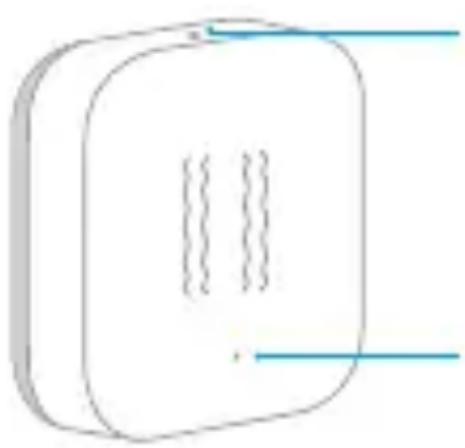
Simple line drawing of a rectangular device with two vertical lines and three internal dashed lines, no text or symbols present.Reset Button
Long Press for 5s: Reset
Single Press: Effective Range Test
Indicator Light
Quick Setup
- Please add the Hub to the app according to the Hub Quick Start Guide.
- Please open the app, tap "Home" and then tap "+" in the top right corner to enter "Add Device (Accessory)" page. Select "Vibration Sensor", and add it according to instructions.
* If the connection fails, please move the accessory closer to the Hub and try again.
Installation
Effective Range Test: Single press the reset button on the accessory at your desired position. If the Hub makes voice prompts, it indicates that the accessory can communicate effectively with the Hub.
Avoid metal surface to maximize signal strength.*
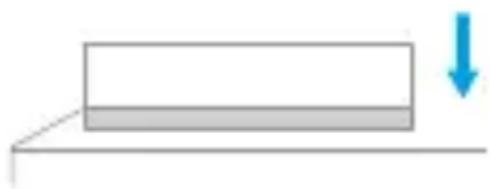
Option 1: Place it directly in the desired position.
natural_image
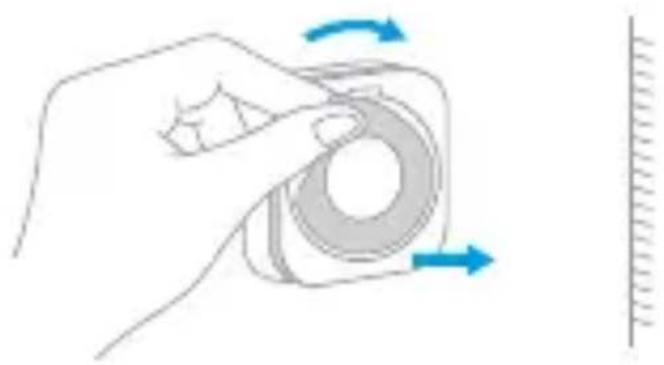
Simple diagram showing a horizontal bar with a blue downward arrow, no text or symbols presentOption 2: Remove the protective film, and stick it to the desired position.
natural_image
Hand holding a circular object with blue arrows indicating rotation, next to a vertical line (no text or symbols)Keep the surface clean and dry.*
Specifications
Model: DJT11LM
Dimensions: 36 × 36 × 9 mm ( 1.42 × 1.42 × 0.35 in.)
Wireless Protocol: Zigbee
Battery: CR2032
Operating Temperature: -10^ - +50^ C
Operating Humidity: 0 – 95% RH, no condensation
Online Customer Service: www.aqara.com/support
Email: support@aqara.com
Manufacturer: Lumi United Technology Co., Ltd.
Address: 8th Floor, JinQi Wisdom Valley, No.1 Tangling
Road, Liuxian Ave, Taoyuan Residential District, Nanshan
District, Shenzhen, China.
Brand : Xiaomi
Model : Aqara Vibration Sensor
Category : Sensor