
DMS-1200 - Receiver UNIVERSAL REMOTE CONTROL - Free user manual and instructions
Find the device manual for free DMS-1200 UNIVERSAL REMOTE CONTROL in PDF.


| Product Type | Multi-Zone Amplifier / Receiver |
| Brand | Universal Remote Control |
| Model | DMS-1200 |
| Dimensions (H x W x D) | 133 mm x 432 mm x 420 mm (5.25 x 17.06 x 16.54 in) |
| Weight | 27 lbs (12.1 kg) |
| Power Supply | AC 100-240V, 50/60Hz, 850W maximum |
| Number of Powered Zones | 6 (8 ohms each, 50W per channel) |
| Preamp Zones | 2 (line level output, 2.2Vp-p variable, 2.0Vp-p fixed) |
| Audio Inputs | 4 analog (RCA), 1 digital coaxial (S/PDIF) |
| Frequency Response | 20Hz - 20kHz ±1dB (8 ohms) |
| Signal-to-Noise Ratio | 85 ± 5 dB |
| Total Harmonic Distortion | <0.06% (20Hz - 20kHz) |
| Network Connectivity | 10/100 BaseT Ethernet |
| Operating Temperature | 32°F to 104°F (0°C to 40°C) |
| Storage Temperature | -4°F to 158°F (-20°C to 60°C) |
| Cooling | Automatic whisper-quiet fan |
| Front Panel Indicators | Power and LAN LEDs |
| Reset | Front panel reset button |
| Safety Certifications | FCC Part 15, CE, LVD |
| Warranty | 1 year limited (2 years for Total Control products) |
| Accessories Included | AC cord, RCA cable, user manual |
| Installation | Professional installation required |
| Maintenance | Clean with dry cloth; ensure 20 cm ventilation clearance |
Frequently Asked Questions - DMS-1200 UNIVERSAL REMOTE CONTROL
User questions about DMS-1200 UNIVERSAL REMOTE CONTROL
0 question about this device. Answer the ones you know or ask your own.
Ask a new question about this device
Download the instructions for your Receiver in PDF format for free! Find your manual DMS-1200 - UNIVERSAL REMOTE CONTROL and take your electronic device back in hand. On this page are published all the documents necessary for the use of your device. DMS-1200 by UNIVERSAL REMOTE CONTROL.
USER MANUAL DMS-1200 UNIVERSAL REMOTE CONTROL
DMS-1200 Owner's Manual Multi-Zone Amplifier
DMS-1200 Owner's Manual ©2010-2014 Universal Remote Control, Inc.
The information in this Owner's Manual is copyright protected. No part of this manual may be copied or reproduced in any form without prior written consent from Universal Remote Control, Inc.
UNIVERSAL REMOTE CONTROL, INC. SHALL NOT BE LIABLE FOR OPERATIONAL, TECHNICAL OR EDITORIAL ERRORS/OMISSIONS MADE IN THIS MANUAL.
The information in this Owner's Manual may be subject to change without prior notice.
Total Control is a registered trademark of Universal Remote Control, Inc.
URC - Control the Experience is a registered trademark of Universal Remote Control, Inc.
All other brand or product names are trademarks or registered trademarks of their respective companies or organizations.

Control the Experience.
Universal Remote Control, Inc.
500 Mamaroneck Avenue, Harrison, NY 10528
Phone: (914) 835-4484 Fax: (914) 835-4532
TABLE OF CONTENTS
Congratulations! 1
System Features 2
Rear Panel Features 4
Important Safety Instructions 6
Federal Communication Commission
Interference Statement 8
Limited Warranty Statement 9
End User Agreement 11
Specifications 12
System Configuration for Internal LAN Network 13
Europe Certificate Of Conformity 14
Congratulations!
You've purchased the finest music distribution system available today. The DMS-1200 is a native to the network, CD quality digital music distribution system with a range of key-pads and remote controls that not only fully control your music but control of all your other audio video components.
The DMS-1200 in many ways is the heart of your system, both distributing music to your speakers and distributing streams of music from your analog sources to other DMS amplifiers in the system. This makes your system scalable, and easy to add additional rooms at any time in the future. All you need is a DMS amplifier connected to the network to make any room a new DMS music room.
Along with the DMS-1200, your system will include a Master System Controller like the MRX-10 (the brain of the system) and as many digital music gateways as you have users via the unique URC SNP-1 Streaming network Player.
Each player provides one user with access to all of their music and all of their preferences and favorites. Each SNP-1 accesses what's stored on the network and what is available through the internet via Pandora, Rhapsody, XM, Sirius and Internet Radio. SNP-1s don't have to be installed in the room where the DMS resides. That way you can take advantage of the TV display of cover art, album name, artist names and song title in rooms with TVs by having your installer connect to one of your TVs in the system.
The DMS-1200 is designed for professional installation only. He or she will help you select the right user interface for every room of your installation. You'll have a choice of Total Control in-wall keypads and remote controls. If you have questions, call our customer service center at:
Company:
Installer Name: ____
Contact #: ____
Email Address: ____
System Features
Pristine Audio Quality
Unlike other digital music systems, the DMS system streams all music uncompressed at pure CD quality levels. You enjoy all the detail of your original source.
Room Linking
Any room can be linked with any other room to listen to the same source. This makes it easy for you to entertain by simply linking all the rooms your guests will be in and controlling the music from any remote or keypad.
Reliability
The DMS-1200 is engineered first and foremost for reliability. It offers extensive internal protection against failure and is manufactured in our ISO 9000 certified factory with the utmost attention to quality control at every stage of manufacturing, from parts procurement to final assembly.

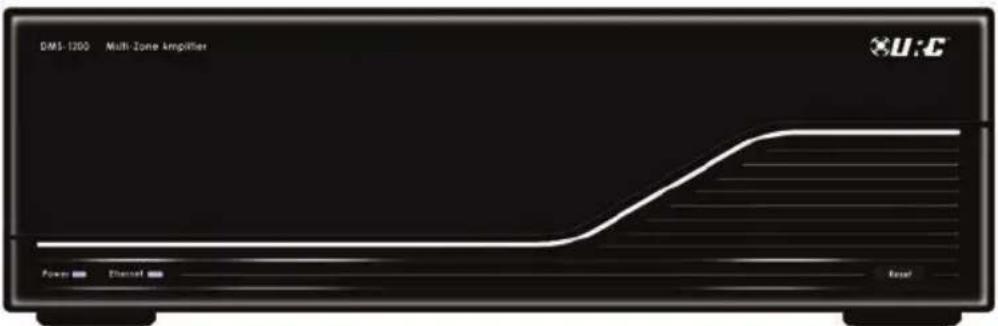
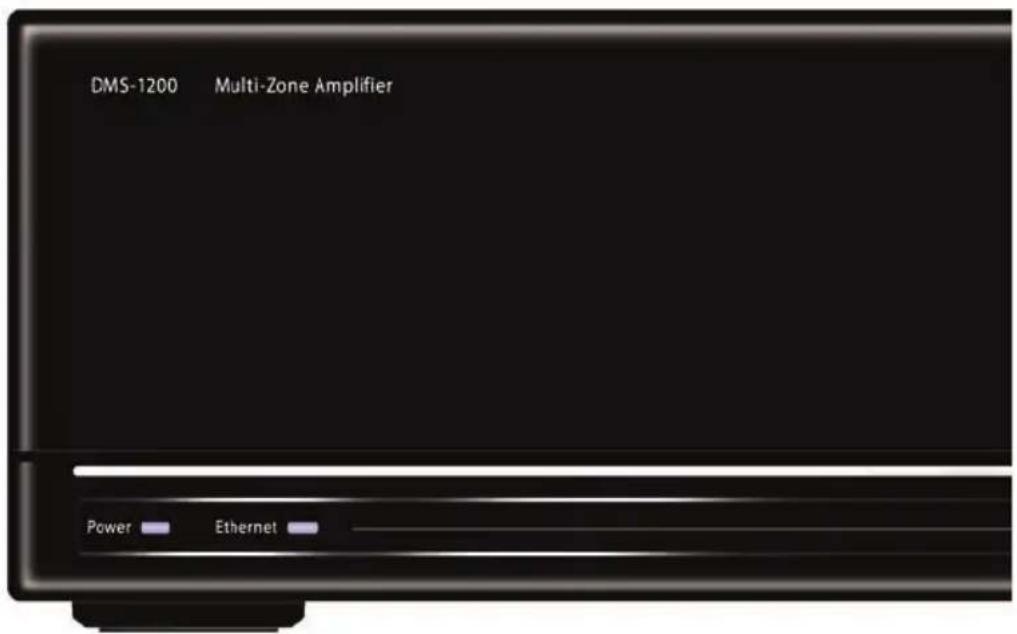
Front Panel Features
Power and LAN LEDs
LEDs indicate that the DMS-1200 is connected to power and connected to the local area network.
Automatic Power Off
The DMS-1200 is powered off and in an automatic standby state when no zones are active.
Reset Button
The front panel reset button offers the end user a quick way to reconnect the DMS-1200 to the local area network.

Rear Panel Features
110V-220V Power Connection
The IEC power socket enables either UL/CSA approved 110V power cords or CE approved 220V power cables to be used with the DMS-1200. The internal power supply automatically switches from 110V to 240V.
Automatic Fan for Cooling
A whisper quiet fan automatically engages to keep the internal temperature optimum for long life and reliable operation.
Network Connection
A 10/100 LAN connection ensures that the DMS-1200 will receive all network streams from other DMS or SNP sources.
Six Powered Zones
The DMS-1200s internal amplifiers will power six pairs of 8 ohm speakers with 50 watts per speaker. Each pair of speakers can listen to any DMS source.

Two Preamp Zones
The two preamp zones enable external power amplifiers to be used for rooms with a need for more or less power than 50 watts per channel. External amplifiers equipped with 12V triggers are ideal, since they will automatically switched on when the zone is in use, and switched off when the zone is off.
4 Audio Inputs Create DMS Streams
Up to four analog audio sources can be connected to the DMS-1200. Each is simultaneously available as a DMS stream on the network, not just to the DMS they are connected to, but all other DMS amplifiers on the same network.
IR In for 1-Way RF Remotes and Base Stations
When connected to a URC RF base station, a one-way URC remote control can be programmed to control any or all zones.
Important Safety Instructions

CAUTION
RISK OF ELECTRIC SHOCK DO NOT OPEN

CAUTION:
TO REDUCE THE RISK OF ELECTRIC SHOCK, DO NOT REMOVE COVER (OR BACK). NO USER-SERVICEABLE PARTS INSIDE. REFER SERVICING TO QUALIFIED SERVICE PERSONNEL.

The lightning flash with arrowhead symbol, within an equilateral triangle, is intended to alert the user to the presence of uninsulated "dangerous voltage" within the product's enclosure that may be of sufficient magnitude to constitute a risk of electric shock to persons.

The exclamation point within an equilateral triangle is intended to alert the user to the presence of important operating and maintenance (servicing) instructions in the literature accompanying the appliance.
WARNING:
TO REDUCE THE RISK OF FIRE OR ELECTRIC SHOCK, DO NOT EXPOSE THIS APPLIANCE TO RAIN OR MOISTURE.
This unit shall be connected to a mains socket outlet with a protective grounded connection.
CAUTION:
To completely disconnect this product from the mains, disconnect the plug from the wall socket outlet. The mains plug is used to completely interrupt the power supply to the unit and must be within easy access by the user.
CAUTION:
These servicing instructions are for use by qualified service personnel only. To reduce the risk of electric shock, do not perform any servicing other than that contained in the operating instructions unless you are qualified to do so.
Important Safety Instructions
- Read these instructions.
- Keep these instructions.
- Heed all warnings.
- Follow all instructions.
- In the event of malfunction, un plug Immediately.
- Do not use this apparatus near water.
- Clean only with dry cloth.
-
Do not block any ventilation openings. Install in accordance with the manufacturer's instructions.
-
Do not install near any heat sources such as radiators, heat registers, stoves, or other apparatus(including amplifiers) that produce heat.
-
Do not defeat the safety purpose of the polarized or grounding-type plug. A polarized plug has two blades with one wider than the other. A grounding type plug has two blades and a third grounding prong. The wide blade or the third prong are provided for your safety. If the provided plug does not fit into your outlet, consult an electrician for replacement of the obsolete outlet.
-
Protect the power cord from being walked on or pinched particularly at plugs, convenience receptacles, and the point where they exit from the apparatus.
-
Only use attachments/accessories specified by the manufacturer.
-
Use only with the cart, stand, tripod, bracket, or table specified by the manufacturer, or sold with the apparatus. When a cart is used, use caution when moving the cart/apparatus combination to avoid injury from tip-over.
-
Unplug this apparatus during lightning storms or when unused for long periods of time.
-
Refer all servicing to qualified service personnel. Servicing is required when the apparatus has been damaged in any way, such as power-supply cord or plug is damaged, liquid has been spilled or objects have fallen into the apparatus, the apparatus has been exposed to rain or moisture, does not operate normally, or has been dropped.

natural_image
Symbolic icon of a person using a ladder to lift a block, enclosed in a circle (no text or symbols)CAUTION:
- The ventilation should not be impeded by covering the ventilation openings with items, such as newspapers, tablecloths, curtains, etc.
- No naked flame sources, such as lighted candles, should be placed on the unit.
- Minimum distances around the apparatus for sufficient ventilation : 20centimeter
• This product is use in moderate climates. - Do not expose the unit to dripping or splashing fluids, do not place objects filled with liquids, such as vases, on the unit.
Federal Communication Commission Interference Statement
This equipment has been tested and found to comply with the limits for a Class B digital device, pursuant to part 15 of the FCC Rules. These limits are designed to provide reasonable protection against harmful interference in a residential installation. This equipment generates, uses and can radiate radio frequency energy and, if not installed and used in accordance with the instructions, may cause harmful interference to radio communications.
However, there is no guarantee that interference will not occur in a particular installation. If this equipment does cause harmful interference to radio or television reception, which can be determined by turning the equipment off and on, the user is encouraged to try to correct the interference by one more of the following measures:
◆ Reorient or relocate the receiving antenna.
◆ Increase the separation between the equipment and receiver.
◆ Connect the equipment into an outlet on a circuit different from that to which the receiver is connected.
◆ Consult the dealer or an experienced radio/TV technician for help.
Warning!
Changes or modifications not expressly approved by the manufacturer could void the user's authority to operate the equipment.
Note : The manufacturer is not responsible for any Radio or TV interference caused by unauthorized modifications to this equipment. Such modifications could void the user's authority to operate the equipment.
FCC Caution
This device complies with Part 15 of the FCC Rules. Operation is subject to the following two conditions: (1) this device may not cause harmful interference, and (2) this device must accept any interference received, including interference that may cause undesired operation.
Any changes or modifications not expressly approved by the party responsible for compliance could void the authority to operate equipment.
Limited Warranty Statement
1. LIMITED WARRANTY AND DISCLAIMERS
Universal Remote Control, Inc. ("URC") warrants that URC equipment purchased directly from URC or from an authorized URC dealer or distributor shall be free from defects in material and workmanship under normal usage for a period of one (1) year from the date of purchase of the product by the end-user, but no longer than thirty-six (36) months from the date of shipment of the URC equipment by URC to an authorized URC dealer or distributor, except that with respect to Total Control® whole-house products, the warranty extends for two (2) years from the date of purchase by the end-user, but no longer than forty-eight (48) months from the date of shipment of the URC equipment by URC to an authorized URC dealer or distributor.
This limited warranty is valid only in the United States of America.
URC equipment purchased from other than an authorized URC dealer or distributor is without warranty.
URC warrants that the software will substantially conform in any material respect to its functional specifications at the time of delivery. URC SHALL NOT BE LIABLE FOR OPERATIONAL, TECHNICAL OR EDITORIAL ERRORS AND/OR OMISSIONS MADE IN THE URC DOCUMENTATION. URC DOES NOT WARRANT THAT THE URC SOFTWARE IS BUG-FREE OR ERROR FREE OR THAT THERE ARE NO ERRORS/BUGS IN THE URC SOFTWARE.
URC warrants that at the time of purchase the URC equipment and the URC software complied with all applicable regulations and policies of the Federal Communications Commission ("FCC") regarding electromagnetic interference caused by electronic/computing devices and to the extent that the URC equipment and/or the URC software fails to so comply, URC shall, at its own expense, take all reasonable measures to promptly cause such to comply.
THIS LIMITED WARRANTY DOES NOT COVER TECHNICAL ASSISTANCE FOR HARDWARE OR SOFTWARE USAGE EXCEPT AS EXPRESSLY PROVIDED FOR HEREIN.
CERTAIN IMPLIED WARRANTIES, INCLUDING AN IMPLIED WARRANTY OF MERCHANTABILITY AND FITNESS FOR A PARTICULAR PURPOSE, MAY BE AVAILABLE WITH RESPECT TO URC EQUIPMENT. IMPLIED WARRANTIES VARY FROM STATE TO STATE. URC EXPRESSLY LIMITS THESE IMPLIED WARRANTIES, TO THE EXTENT ALLOWABLE BY LAW, TO THE TIME PERIODS COVERED BY THE EXPRESS WRITTEN WARRANTIES PROVIDED HEREIN. OTHERWISE AND EXCEPT AS PROVIDED FOR HEREIN, URC EXPRESSLY DISCLAIMS ALL WARRANTIES, EXPRESS, STATUTORY OR IMPLIED, AND MAKES NO REPRESENTATIONS REGARDING THE USE OF, OR THE RESULTS OF THE USE OF, THE EQUIPMENT, SOFTWARE OR DOCUMENTATION IN TERMS OF CORRECTNESS, ACCURACY, RELIABILITY OR OTHERWISE.
EXCEPT AS EXPRESSLY PROVIDED FOR HEREIN, TECHNICAL SERVICES ARE SUPPLIED "AS IS", WITHOUT ANY WARRANTY, EXPRESS, STATUTORY OR IMPLIED, OF ANY KIND. TO THE MAXIMUM EXTENT PERMITTED BY APPLICABLE LAW, URC EXPRESSLY DISCLAIMS ALL WARRANTIES RELATING TO TECHNICAL SERVICES, EXPRESS, STATUTORY OR IMPLIED, INCLUDING BUT NOT LIMITED TO THE WARRANTIES OF QUALITY OR REASONABLE SKILL AND CARE, OR OUTCOME OR RESULTS.
WITHOUT IN ANY WAY LIMITING THE GENERALITY OF THE OTHER PROVISIONS HEREIN, THIS LIMITED WARRANTY DOES NOT COVER: (I) DAMAGE FROM MISUSE, NEGLECT OR ACTS OF NATURE, (II) MODIFICATIONS, (III) INTEGRATION WITH THIRD PARTY CONTENT, OR (IV) BEYOND THE WARRANTY PERIOD AND/ OR FAILURE TO FOLLOW URC WARRANTY CLAIM PROCEDURE.
The warranty limitations and warranty disclaimers may not apply to end user in whole or in part, where such are restricted or excluded by applicable law, and such shall apply to the maximum extent permitted by applicable law.
In the event of any warranty claim, URC will, at its sole option, repair the URC equipment using new or comparable rebuilt parts, or exchange the URC equipment for new or rebuilt equipment. In the event of a defect, these are the end user's exclusive remedies.
All the URC equipment returned for service, exchange or repair require an RGA number. To obtain an RGA number, you must complete a Return Request Form which you may obtain by calling (914) 835-4484 or contacting URC at returnrequest@universalremote.com. To obtain warranty service, end user must deliver the URC equipment, freight prepaid, in its original packaging or packaging affording adequate protection to URC at 420 Columbus Avenue, Valhalla, NY 10595. It is end user's responsibility to backup any macro programming, artwork, software or other materials that may have been programmed into the unit. It is likely that such data, software, or other materials will be lost during service and URC will not be responsible for any such damage or loss. A dated purchase receipt, bill of sale, installation contract or other verifiable proof of purchase is required. For the URC equipment support and other important information, please visit URC's website available at www.universalremote.com or call the Customer Service Center at (914) 835-4484.
This limited warranty only covers the URC equipment issues caused by defects in material or workmanship during ordinary consumer use. It does not cover product issues caused by any other reason, including but not limited to product issues due to commercial use, acts of God, third-party installation, misuse, limitations of technology, or modification of or to any part of the URC equipment. This limited warranty does not cover the URC equipment sold as used, as is, refurbished, so called "B stock" or consumables (such as batteries). This limited warranty is invalid if the factory applied serial number has been altered or removed from the URC equipment. This limited warranty specifically excludes the URC equipment sold by unauthorized resellers.
With the exception of URC's IR-only, broad-based consumer remotes, none of URC's PC programmable remotes or any of our Total Control® whole-house equipment are authorized for online internet sales. Buying URC's PC programmable remotes or any of our Total Control® whole-house equipment online means buying equipment that does not have URC's limited warranty. Such equipment is not eligible for URC tech support or software support, either.
2. URC'S LIMITATIONS OF LIABILITY
IN NO EVENT SHALL URC BE LIABLE FOR INDIRECT, SPECIAL, INCIDENTAL, EXEMPLARY, PUNITIVE OR CONSEQUENTIAL DAMAGES OF ANY KIND OR LOSS OF PROFITS OR BUSINESS OPPORTUNITY, EVEN IF URC IS ADVISED OF THE POSSIBILITY OF SUCH DAMAGES.
IN NO EVENT SHALL URC BE LIABLE FOR LOSS OF OR DAMAGE TO DATA, COMPUTER SYSTEMS OR COMPUTER PROGRAMS.
URC'S LIABILITY, IF ANY, FOR DIRECT DAMAGES OF ANY FORM SHALL BE LIMITED TO ACTUAL DAMAGES, NOT IN EXCESS OF AMOUNTS PAID BY END USER FOR THE URC EQUIPMENT.
IN NO EVENT SHALL URC BE LIABLE FOR ANY EVENTS BEYOND ITS CONTROL, INCLUDING ANY INSTANCE OF FORCE MAJEURE.
IN NO EVENT SHALL URC BE LIABLE FOR THE ACTS OR OMISSIONS OF END USER OR ANY THIRD PARTY.
THE LIMITATIONS OF LIABILITY MAY NOT APPLY TO END USER IN WHOLE OR IN PART, WHERE SUCH ARE RESTRICTED LIMITED OR EXCLUDED BY APPLICABLE LAW AND SUCH SHALL APPLY TO THE MAXIMUM EXTENT PERMITTED BY APPLICABLE LAW.
URC SHALL NOT BE HELD RESPONSIBLE FOR THE STATEMENTS MADE BY OTHERS.
SOME STATES OR JURISDICTIONS DO NOT ALLOW THE EXCLUSION OR LIMITATION OF INCIDENTAL OR CONSEQUENTIAL DAMAGES, OR ALLOW LIMITATIONS ON HOW LONG AN IMPLIED WARRANTY LASTS, SO THE ABOVE LIMITATIONS OR EXCLUSIONS MAY NOT APPLY TO END USER. THIS LIMITED WARRANTY GIVES END USER SPECIFIC LEGAL RIGHTS AND END USER MAY HAVE OTHER RIGHTS WHICH VARY FROM STATE TO STATE OR JURISDICTION TO JURISDICTION.
End User Agreement
The terms and conditions of the End User Agreement available at www.universalremote.com/eua.php shall apply.
Specifications
Audio section
Rated Wattage per Channel 50W+50W
(8ohms, 20Hz\~20KHz with 0.1% T.H.D)
140W+140W
(8ohms, 1KHz with 10% T.H.D)
Frequency Response 20Hz\~20KHz +/-1.0dB at 8ohms
20Hz\~20KHz +/-3.0dB at 4ohms
Signal to Noise Ratio 85+/- 5dB
Total Harmonic Distortion <0.06%, 20Hz\~20KHz
Output connectors 8ohms, 4ohms stable
Input sensitivity 600\~2200mVp-p/10Kohm
Network Connectivity 10/100 BaseT Ethernet
Tone Controls Bass, Treble, 5-Band parametric EQ.
LVLC(low volume level control)
Full Matrix Switching for Audio Yes streaming
Number of Analog Input 4
sources
Number of Digital Input 1
Sources (S/PDIF)
Speaker Output Zones 6
Line level Output Zones 2 (2.2Vp-p Variable output,
2.0Vp-p fixed output level)
Independent Gain Control per Zone Yes
Accessories AC cord, RCA cable, User's manual
Environmental
Operational Temperature 32^ 104^ (0^ +40^)
Humidity 5% - 95% (Non Condensing)
Storage Temperature -4^ 158^ (-20^ + 60^)
General
Power supply AC 100-240V, 50/60Hz
Power consumption 850Watt maximum
Maximum external Dimensions 5.25 1/32" x 17 1/18" x 16 1/1.87"
H x W x D 133mm x 432mm x 420mm
Weight 27lbs (12.1kg)
System Configuration for Internal LAN Network

flowchart
graph TD
    A["Internet"] --> B["Cable Modem"]
    B --> C["WiFi Router"]
    C --> D["MFS-8"]
    D --> E["DMS-1200"]
    E --> F["DVD"]
    G["PC"] --> D
    H["Laptop"] --> D
    style A fill:#f9f,stroke:#333
    style B fill:#ccf,stroke:#333
    style C fill:#cfc,stroke:#333
    style D fill:#fcc,stroke:#333
    style E fill:#cff,stroke:#333
    style F fill:#ffc,stroke:#333
    style G fill:#f9f,stroke:#333
    style H fill:#f9f,stroke:#333
Follow the steps below to connect a DMS-1200 to a LAN network.
-
Connect the Internet to the coaxial CABLE port in the rear of the cable modem.
-
Plug in a RJ-45 ethernet connector cable via the Ethernet port of the cable modem to the WAN port of the Router.
-
Connect a second RJ-45 cable to a LAN port of the Router and plug the other end to the LAN 10/100 port on the rear of the MFS-8/MFSPOE-8 network Switch.
-
Connect a third RJ-45 cable to connect the DMS-1200 LAN port to one of the eight 10/100 Smart ports.
-
Plug the power supply to the DMS-1200 and then plug it in to an unswitched AC outlet.
-
Connect a digital coax cable from the DVD player to the coaxial digital input on the rear of the DMS-1200.
-
Connect a PC computer to the same LAN as the DMS-1200 or plug an ethernet cable directly to the LAN port of the DMS-1200. Now the computer can control and adjust the manufacturer's audio control program.
- Select audio INPUT source and OUTPUT zone, MAC address etc. This function selects input source channel and INPUT gain level and data sent to audio equipment.
• After selecting the output zone, adjust the zone limit power rate and zone power ON/OFF and source signal INPUT channel.
- Adjust the amplifier volume level per each zone for proper sound output and maximum limitation volume level.
- Turn on the ramp up volume level and adjust the equalizer repertory and low volume loudness control effectiveness and custom Equalizer align.
Europe Certificate Of Conformity
Universal Remote Control, Inc. declares that this product complies with the requirements CE/LVD (Low Voltage Directive, 2006/95/EC). Certificated Attestation of compliance “E8N 10 10 75224 001” is issued according to the Directive 2004/108/EC relating to electromagnetic compatibility on a voluntary basis and is in compliance with the corresponding technical standards such as EN55013, EN55020, EN55022, EN55024/A2, EN61000-3-2, EN61000-3-3 and EN60065 A/V. A copy of the full Certificate of Conformance may be obtained at “http://www.universalremote.com”

Control the Experience.
500 Mamaroneck Avenue, Harrison, NY 10528
Phone: (914) 835-4484 Fax: (914) 835-4532
www.universalremote.com

OCE-0100A Rev 04_RH

- DMS-1200 Owner's Manual Multi-Zone Amplifier
- Control the Experience.
- TABLE OF CONTENTS
- Congratulations!
- System Features
- Pristine Audio Quality
- Room Linking
- Reliability
- Front Panel Features
- Power and LAN LEDs
- Automatic Power Off
- Reset Button
- Rear Panel Features
- 110V-220V Power Connection
- Automatic Fan for Cooling
- Network Connection
- Six Powered Zones
- Two Preamp Zones
- Audio Inputs Create DMS Streams
- IR In for 1-Way RF Remotes and Base Stations
- Important Safety Instructions
- CAUTION
- CAUTION:
- WARNING:
- Federal Communication Commission Interference Statement
- Warning!
- FCC Caution
- Limited Warranty Statement
- LIMITED WARRANTY AND DISCLAIMERS
- This limited warranty is valid only in the United States of America.
- URC equipment purchased from other than an authorized URC dealer or distributor is without warranty.
- URC'S LIMITATIONS OF LIABILITY
- End User Agreement
- Specifications
- System Configuration for Internal LAN Network
- Europe Certificate Of Conformity
Brand : UNIVERSAL REMOTE CONTROL
Model : DMS-1200
Category : Receiver