
RS81B - Media player ROLLS - Free user manual and instructions
Find the device manual for free RS81B ROLLS in PDF.


| Product Type | AM/FM Tuner (Quartz PLL Synthesized) |
| Brand | ROLLS |
| Model | RS81B |
| Dimensions | 19 x 1.75 x 7 inches (48.3 x 4.5 x 12 cm) |
| Weight | 7.1 lbs (3.2 kg) |
| Power Supply | AC 115V/230V selectable (via switch) or DC 24V |
| FM Tuning Range | 87.5 – 108 MHz |
| AM Tuning Range | 530 – 1710 kHz (10 kHz steps) / 522 – 1611 kHz (9 kHz steps) |
| FM Usable Sensitivity (Mono, IHF) | 9 dB |
| AM Usable Sensitivity | 28 dB |
| FM S/N Ratio (Mono at 1 mV) | 52 dB |
| AM S/N Ratio (at 5 mV/M) | 46 dB |
| FM THD (at 1 mV, 40 kHz dev) | 0.18% |
| AM THD (at 5 mV/M) | 0.40% |
| FM Stereo Separation | 28 dB |
| Presets | 30 (FM1 x10, FM2 x10, AM x10) |
| RDS Features | AF, PTY, TA, DISP |
| Sleep Timer | Up to 90 minutes (10 min increments) |
| Remote Control | Infrared (line-of-sight) |
| Audio Outputs | RCA (unbalanced line), XLR (balanced line), 1/8" headphone (stereo) |
| Antenna Inputs | FM 75 Ohm (F-type), AM 300 Ohm (loop) |
| Power Consumption | 15W (typical, estimated) |
Frequently Asked Questions - RS81B ROLLS
User questions about RS81B ROLLS
0 question about this device. Answer the ones you know or ask your own.
Ask a new question about this device
Download the instructions for your Media player in PDF format for free! Find your manual RS81B - ROLLS and take your electronic device back in hand. On this page are published all the documents necessary for the use of your device. RS81B by ROLLS.
USER MANUAL RS81B ROLLS
RS81B Quartz PLL Synthesized AM/FM Tuner.
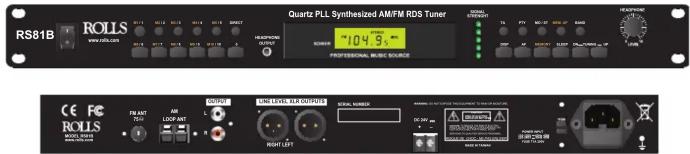
Specs:
FM SECTION
Tuning Range: 87.5-108MHz
3 dB Limiting: 12dB
Image Rejection: 53dB
Usable sensitivity mono IHF: 9dB
Selectivity: (-70KHz : +90KHz)
S/N Ratio at 1 mV Mono: 52dB
Stereo: 50dB
THD at 1 mV 40 kHz deviation: 0.18%
Stereo Separation: 28dB
Auto Scan Sensitivity: 23dB
AM Suppression Mod: 52dB
Antenna Input Impedance: 75 Ohms
AM SECTION
Tuning Range: 530 - 1710 kHz (10 kHz increm.)
522 - 1611 kHz (9 kHz increm.)
IF Frequency: 450KHz
Usable Sensitivity: 28dB
Auto Scan Sensitivity: 41dB
S/N Ratio at 5 mV/M: 46dB
6 dB Bandwidth: 7KHz
Image Rejection: 42dB
A.C.A. +/- 9 kHz: 46dB
AGC Action: 43dB
THD at 5mV/M: 0.40%
Antenna Input Impedance: 300 Ohms
Size: 19" x 1.75" x 7"
(48.3 x 4.5 x 12 cm)
Weight: 7.1 lbs. (3.2 kg)
Quick Start Guide
ROLLS
ROLLS CORPORATION
SALT LAKE CITY, UTAH
10/15

- MEM. UP: Increments up Presets. If the tuner is stepped beyond the highest number preset stored, it will "wrap around" and step back to the lowest numbered preset.
- BAND: Switch for AM or FM (FM 1 / FM 2 / AM)
- Tuning + / - : Increases or Decreases the tuner frequency each time it is pressed. Press in for 2 seconds for automatic scan searching. After a station is received, it will stop automatically and start to play.
- MO/ST: Selects between Stereo and Mono operation (FM mode only).
- DISP: Displays the current RDS information (if available) from the current station.
-DIRECT: Press to directly select a radio frequency. For example, to directly select station107.7, simply press "DIRECT" + number "1077".
-Headphone Level: Adjusts the signal level of the Headphone Out.
-Headphone Out: 1/8" Tip-Ring-Sleeve stereo jack for connection to stereo headphones. The use of MONO jacks will permanently damage the RS81B. Make sure you are using a stereo jack.
-Power Switch: Applies power to the RS81B. - SIGNAL STRENGTH: This is a general signal strength meter. It is not calibrated to a specific level. It will indicate the general strength of a signal coming into the RS81B.
Radio Memory Function
-The 30 Radio presets are in 3 sections: FM 1 x 10 / FM 2 x 10 / AM x 10
-First select the channel which wants to be stored
-Press "MEMORY"
-Press "1 \~ 10" To select the channel number for preset memory.
-Press "MEMORY" again to confirm the memory. LCD shows "CH1 \~ 10".
-Repeat above steps to store more channels. Up to 10 channels can be stored per section.
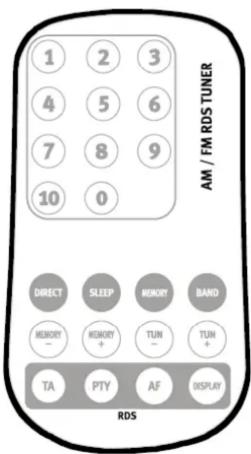
Remote Operation:
The included Infrared Remote provides a way to control the RS81B at a distance from the unit. It must be located in the "line-of-sight".
Remote Description:
-BAND: Switch for AM or FM
-Press "BAND" to select FM 1, FM 2, or AM frequencies.
-Press "TUN+ / TUN-" to select stations. Press and hold for over 2 seconds enters into automatic scan searching. After a station is received, it will stop automatically and start to play the station.
-DIRECT: Press to directly select a radio frequency. For example, to directly select station107.7, simply press "DIRECT" + number "1077".
-Remote buttons work the same as front panel buttons, refer to the section of the manual with the description of the front panel.
Sleep function:
-Press "SLEEP"
-Maximum set up time is 90 minutes. Increase by 10 minutes for every press, this is indicated by the LCD display. Sleep set up is cancelled on final press (LCD shows "00").
-When you reach the pre-set time limit, the tuner will automatically stop playing and go into stand by mode.
-If want to reactivate (power on) the RS81B after it goes into sleep mode, turn off the main power switch and then turn the power switch on.
-In case you need to cancel the sleeping function during play, keep pressing "SLEEP" until LCD shows "00". The sleep function is then cancelled.
Multi path reflections:
FM waves, like light waves, travel in a straight direction unless reflected off objects in their path. Because of this, two sets of waves reach your antenna from the FM station; those that have traveled directly to the antenna, and those that have been reflected off buildings or mountains. When the antenna receives both kinds of signals, the two interfere with each other and result in distorted sound and poor separation. This phenomenon is called “multi path reflection”. To reduce this problem, select an antenna with good directivity and place it in the best location with strong reception.

- AC: Three connector IEC power cord. Please connect to a properly grounded AC outlet.
- Power Select Switch: Selects between 115V (110-120V)/230V (220-240V) input power. Follow silk screening on unit. This switch MUST be in the proper setting before the RS81B is turned on. PERMANENT DAMAGE CAN BE DONE TO THE RS81B IF THE POWER APPLIED TO THE RS81B DOES NOT MATCH SWITCH INDICATION.
- FM ANT. 75 Ohm: Connects to the included 75 Ohm FM antenna.
- AM LOOP ANT. 300 Ohm: Connects to the included 300 Ohm AM Loop antenna.
- RCA OUTPUTS - Line level.
- XLR OUTPUTS - Line level balanced.
- DC 24V: Input for powering the RS81B when main power is not available. Connect as the silk screen indicates. This must be 24V DC only. Wiring with incorrect polarity or any other voltage than 24V DC will result in permanent damage to the RS81B and will not be covered under any warranty.
RADIO TUNING RANGE
FM 87.5 MHz - 108 MHz
AM 530 KHz – 1710 KHz (US) / AM 522 KHz – 1611 KHz (Europe)
- The AM tuning steps from 9kHz (Europe) to 10kHz (US) have been pre-set by the factory. The RS81B 9kHz to 10kHz AM can not be changed.
Connect the RS81B to a properly grounded AC outlet.
Connect the Left and Right outputs to a mixer, amplifier, or other audio device.
FM Antenna:
For an Indoor FM antenna Connect the wire FM antenna to its corresponding input on the rear panel of the RS81B. While listening to a broadcast, hold the wire end and move around until the antenna is facing a direction where the signal comes in the strongest. Secure the antenna in this position.
Outdoor FM antenna:
Installation of an outdoor FM antenna is recommended for a very high quality FM reception.
- The lead-in antenna cable should be of the 75 Ohm coaxial type as it suppresses intrusion of noise more effectively than the 300 Ohm twin lead type.
- The cable should be straight and as far away from power lines as possible. Cut off any extra length.
AM Loop antenna connection:
Connect the cord of the accessory AM loop antenna to the AM LOOP. When tuning in AM stations, move the antenna to the left or right and set in the direction which yields the optimum reception.
-Do not bring the power cord or audio cords near the loop antenna. Interference or noise may be generated.
RDS (Radio Display System) FUNCTION
RDS is a data stream of information sent out by certain FM radio stations along with the actual program. To utilize this feature, you must first be tuned to a station that carries RDS signal. NOTE: Allow 30 - 60 seconds for the data to download. Not all stations that carry the RDS data carry all functions of RDS (ie; some do not carry the "clock" or "text" data).
PLEASE NOTE: THE RDS FUNCTION IS ENTIRELY DEPENDENT ON WHETHER THE STATION FIRST PROVIDES THE RDS INFO AND HOW WELL THEY SUPPORT THE FUNCTION. THEREFORE - THE RESULTS OF THE RDS DISPLAY VARIES GREATLY.
RDS:
-AF: Alternative Frequency
Assuming an alternative frequency is available for the station. If the current signal is weak, press AF, RDS will search a different frequency with stronger signal with same station.
-DISP: (Display) Changes the RS81B display between radio station frequency and RDS information. For example, if 103.5 FM were tuned in, then press DISP button, the display will switch from the frequency to the song and artist description. Otherwise, shows "NO PS" if no RDS information is available.
-PTY: Program Type
Radio stations can assign different program types to their shows. These can be picked up by an RDS radio. Press PTY, LCD shows the radio program type, such as news, sports or drama. If the radio station does not assign the program type for the program, LCD shows "NO PTY".
-TA: Traffic Announcement
Press TA, RDS will automatically search for the traffic or travel stations. It will stop at the travel or traffic station. (There must be a station available with "traffic" RDS or no station will be located). Press the TA button again to return to the original station.

Brand : ROLLS
Model : RS81B
Category : Media player