
AW-VDC-LC - Video editing software Analog Way - Free user manual and instructions
Find the device manual for free AW-VDC-LC Analog Way in PDF.


| Product Type | Smart Graphics™ module for Crestron touchscreens |
| Compatibility | Analog Way LiveCore™ image processors, 3-Series Crestron® control systems with Ethernet connection |
| Supported Panels | TSX Series, TSD2020, TPMC-V Series, DGE-1, DGE-2, Smart Graphics™ XPanel and Web XPanel, Windows Surface Pro |
| Version | 4.01 |
| Modules Included | AW Multi Display Composer, AW Video Perspective Renderer (optional), AW Frames/Logos Configurator (optional), AW Text Entry (optional) |
| Key Features | Visualize screens with layers size/position; live source thumbnails; drag & drop or select & click source selection; recall Presets/Master Presets; compatible with Perspective Layer screens; change background instantly; configure Monitoring mosaic; configure Confidence screen(s) layout; customizable Smart Graphics™ modules |
| Required Firmware | LiveCore™ firmware 4.00.51 or above |
| Required Software | SIMPL Windows 4.09.04.01+, VTPro-e 6.2.00.03+, Smart Graphics™ 2.15.02.09+, Device database 96.00.003.00+, Crestron database 70.00.001.00+, Simpl+ cross compiler 1.3+ |
| License Requirement | License key required; enter via Analog Way logo in XPanel or set in Crestron driver |
| Package Contents | Smart Graphics™ modules installable via Windows setup, Crestron driver, two SIMPL+ example programs, two XPanel projects, help files in English |
| Dimensions | Software only; no physical dimensions |
| Weight | Software only; no weight |
| Power | No power consumption (runs on Crestron processor) |
| Maintenance | No specific maintenance required; keep software updated |
| Spare Parts / Repairability | Not applicable; software can be reinstalled via setup |
| Safety | Standard electrical safety for Crestron equipment; no additional hazards |
| General Info | AW VideoComposer integrates LiveCore™ image processors into a single point of control Crestron® touch-screen application; includes basic and advanced example programs for different configurations |
Frequently Asked Questions - AW-VDC-LC Analog Way
User questions about AW-VDC-LC Analog Way
0 question about this device. Answer the ones you know or ask your own.
Ask a new question about this device
Download the instructions for your Video editing software in PDF format for free! Find your manual AW-VDC-LC - Analog Way and take your electronic device back in hand. On this page are published all the documents necessary for the use of your device. AW-VDC-LC by Analog Way.
USER MANUAL AW-VDC-LC Analog Way
Pioneer in Analog, Leader in Digital
Descripon
AW VideoComposer gives system integrators and developers all the tools they need to easily incorporate LiveCore™ image processors video composing into a single point of control Crestron® touch-screen applicaon.
Version 4.01 adds new features, such as the support of mulple screens sharing the same source list in one page, and the capability to assign sources to video layers either with drag and drop gesture, or just by selecng a source and clicking the target layer.
These new features require new Smart Graphics™ module named AW Mul Display Composer. This new module replaces old AW Video Compositor module (no backward compatibility).
Package content
The package contains the following components:
- The Smart Graphics™ modules. They can be installed easily via the Windows setup applicaon provided. There are 4 dierent Smart Graphics™ modules automacally installed:
○ AW Mul Display Composer
○ AW Video Perspective Renderer (oponal)
○ AW Frames/Logos Congurator (oponal)
○ AW Text Entry (oponal)
• The Crestron driver for the LiveCore™ image processors
- Two SIMPL+® example programs (one basic and one advanced)
- Two XPanel projects (one basic and one advanced) running with the SIMPL+® sample programs provided
• Help les in English
Key features
• Visualize all your screens with layers size and posion (PRG or PRW)
- Use the touchscreen to resize or adjust layer posion
- Visualize live sources with their dynamic thumbnail
• 2 modes for source selecon: drag & drop or select & click
- Recall Presets or Master Presets and start seamless transions
- Also compatible with Perspective Layer screens
- Change the nave background instantly
- Congure the Monitoring mosaic with a simple ick of the nger
- Congure Condence screen(s) layout and load Presets
- All Smart Graphics™ modules can be customized to match the look and feel of your applicaon
- Video Compositing Smart Graphics™ module can be congured to match your exact screens conguraon (pixel area, layers, ...)
- Comparable with 3-Series Crestron® control systems with Ethernet conneccon
- Compatible with any LiveCore™ seamless switcher
Basic example: conguraon and sengs
The basic example provided within the package has been designed to control a LiveCore™ image processor device (Ascender or NeXtage) with one single screen and one Monitoring output. Before running this sample, please make sure your conguraon (as well as the IP addresses) matches the diagram below:
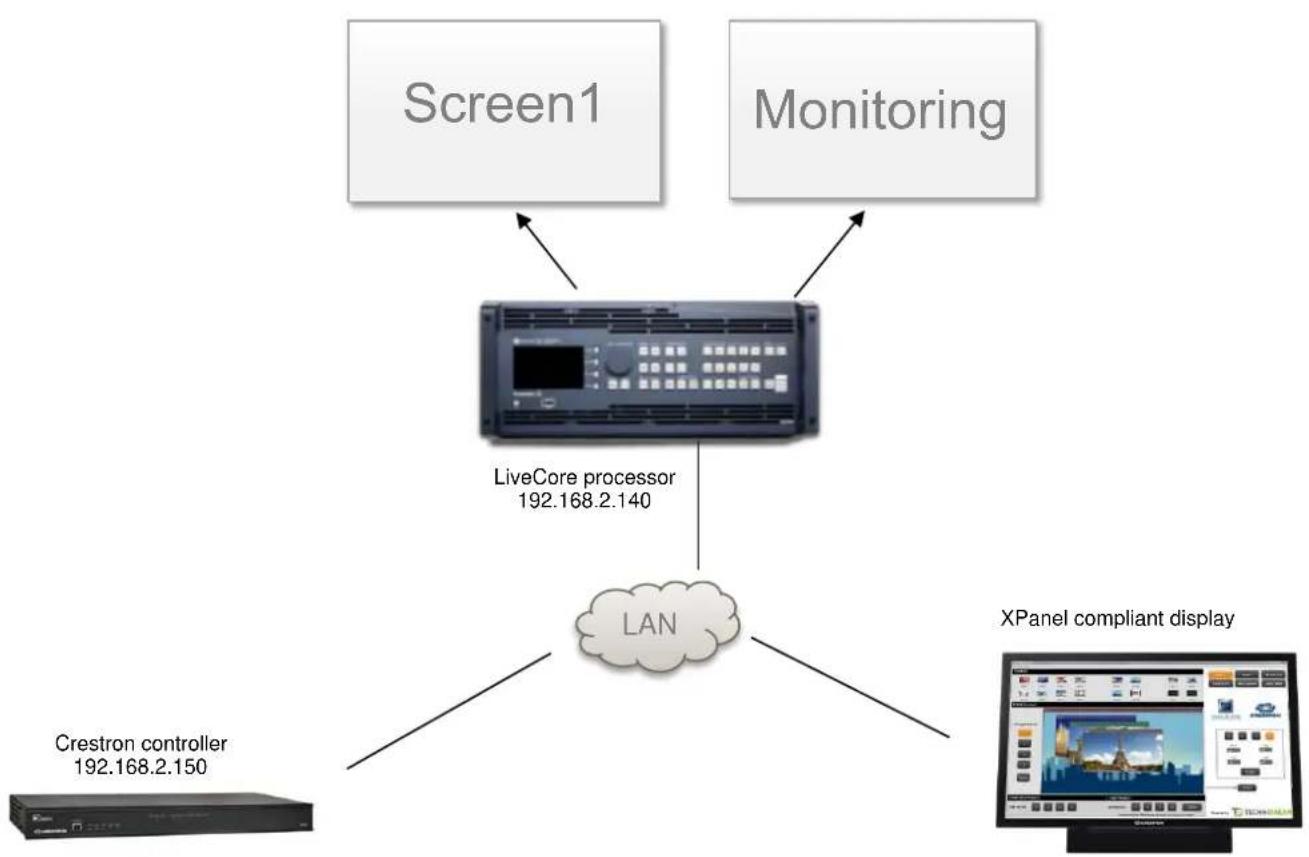
flowchart
graph TD
    A["Screen1"] --> C["LiveCore processor 192.168.2.140"]
    B["Monitoring"] --> C
    D["Crestron controller 192.168.2.150"] --> E["LAN"]
    F["XPanel compliant display"] --> E
Advanced example: conguraon and sengs
The advanced example provided within the package has been designed to control a LiveCore™ Ascender image processor with two 1080p screens, one 1080p Condence screen and one Monitoring output. Before running this sample, please make sure your conguraon (as well as the IP addresses) matches the diagram below:

flowchart
graph TD
    A["Screen1"] --> D["LiveCore (Ascender)<br>192.168.2.140"]
    B["Screen 2"] --> D
    C["Screen 3<br>(Confidence)"] --> D
    E["Monitoring"] --> D
    F["XPanel compliant display"] --> G["Crestron controller<br>192.168.2.150"]
    D --> H["LAN"]
    H --> I["Monitor"]
The example uses few presets that should be created with the WebRCS before running it:
- Preset #1 to #4 (for Screen 1)
- User Preset #91 to #94 (for Screen 1)
- Preset #51 to #54 (for Screen 2)
- Condence Preset #1 to #4 (Screen Condence – Screen #3)
• Monitoring Preset #1 to #4
Of course, you can reuse this example as much as necessary to implement your own soluon.
Demonstraon
A video demonstraon of VideoComposer is available on Analog Way TV: hps://www.youtube.com/watch?v=NnoggW-ynxk
License
Before using AW VideoComposer you need to purchase a license. For pricing informaon, please contact your Analog Way sales representave or reseller. The license key can be entered by clicking the Analog Way logo on the XPanel example main page:
LICENSE NUMBER
CLICK THE EDIT ZONE AND USE PC KEYBOARD TO ENTER LICENSE, THEN PRESS "ENTER" BUTTON
ENTER
You can also set the license string directly into the Crestron driver (module LiveCore_Main_Module_PL parameter).
Requirements
- Any Analog Way LiveCore™ image processor
• A 3-series Crestron processor with Ethernet conneccon - A Smart Graphics™ compliant panel such as TSX Series (TSW, TST, ...), TSD2020, TPMC-V Series (V12, V15, V24), DGE-1, DGE-2, Smart Graphics™ XPanel and Web XPanel, windows surface pro (windows 8.1 with adobe air 3.5). Apple iPad, Apple iPhone and Android are not supported yet
Note: Due to limited performances, TSX panels are not recommended to handle a large number of layers, especially if dynamic snapshots are required in the user interface.
Recommended soware versions:
| Soware | Versions |
| LiveCoreTM rmware | 4.00.51 or above |
| SIMPL Windows | 4.09.04.01 or above |
| VTPro-e | 6.2.00.03 or above |
| Smart GraphicsTM | 2.15.02.09 or above |
| Device database | 96.00.003.00 or above |
| Crestron database | 70.00.001.00 or above |
| Simlp+ cross compiler | 1.3 or above |
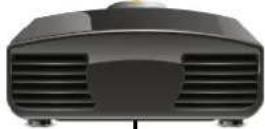
Sample diagram 1 (one screen)
Conguraon with one single screen and one monitoring output
Screen #1
Monitoring
LiveCore™ series
NeXtage 08
Ref. NXT0802
NeXtage 16
Ref. NXT1604
Ascender 16 - 4K
Ref. ASC1602-4K
Ascender 32 - 4K
Ref. ASC3204-4K
Ascender 48 - 4K
Ref. ASC4806-4K
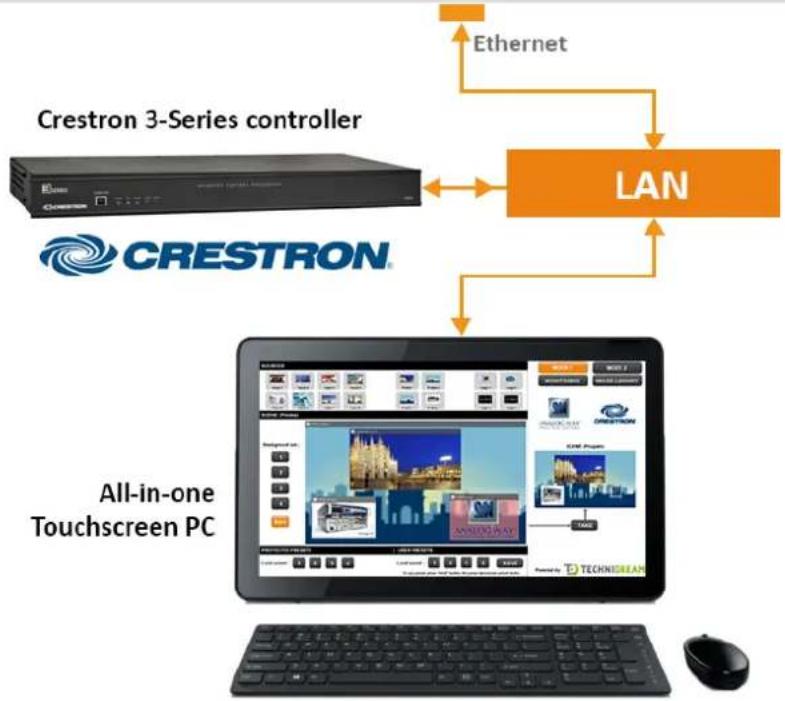
flowchart
graph TD
    A["Crestron 3-Series controller"] -->|Ethernet| B["LAN"]
    C["CRESTRON"] -->|Ethernet| B
    B --> D["All-in-one Touchscreen PC"]
    D --> E["Computer with Gaming Console"]
    D --> F["Desktop with Smart Home"]
    D --> G["Desktop with Smart Home"]
    D --> H["Desktop with Smart Home"]
    D --> I["Desktop with Smart Home"]
    D --> J["Desktop with Smart Home"]
    D --> K["Desktop with Smart Home"]
    D --> L["Desktop with Smart Home"]
    D --> M["Desktop with Smart Home"]
    D --> N["Desktop with Smart Home"]
    D --> O["Desktop with Smart Home"]
    D --> P["Desktop with Smart Home"]
    D --> Q["Desktop with Smart Home"]
    D --> R["Desktop with Smart Home"]
    D --> S["Desktop with Smart Home"]
    D --> T["Desktop with Smart Home"]
    D --> U["Desktop with Smart Home"]
    D --> V["Desktop with Smart Home"]
    D --> W["Desktop with Smart Home"]
    D --> X["Desktop with Smart Home"]
    D --> Y["Desktop with Smart Home"]
    D --> Z["Desktop with Smart Home"]
Sample diagram 2 (2 screens)
Conguraon with two screens and one monitoring output
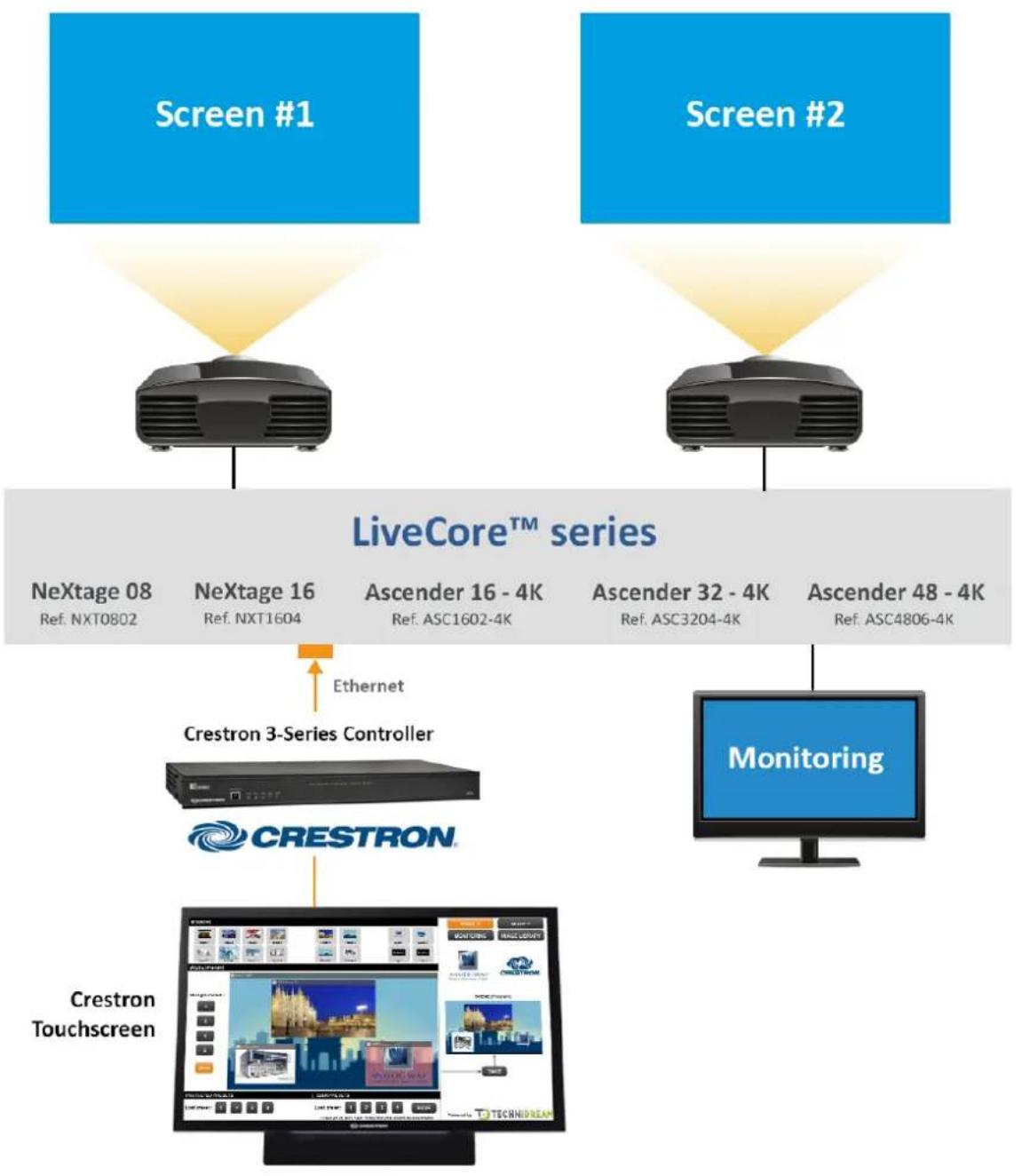
flowchart
graph TD
    A["Screen #1"] --> B["LiveCore™ series"]
    C["Screen #2"] --> B
    B --> D["Crestron 3-Series Controller"]
    D --> E["Crestron Touchscreen"]
    B --> F["Monitoring"]
    D --> G["User Interface"]
    style A fill:#4CAF50,stroke:#388E3C
    style C fill:#4CAF50,stroke:#388E3C
    style B fill:#4CAF50,stroke:#388E3C
    style D fill:#FFA500,stroke:#388E3C
    style E fill:#FFA500,stroke:#388E3C


Brand : Analog Way
Model : AW-VDC-LC
Category : Video editing software