
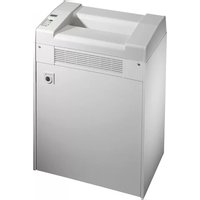
50410 - Shredder Dahle - Free user manual and instructions
Find the device manual for free 50410 Dahle in PDF.


| Product Type | Document Shredder |
| Brand | Dahle |
| Model | 50410 |
| Power Supply | 230V/50Hz or 120V/60Hz (depending on region) |
| Operating Temperature | 15°C to 32°C (59°F to 90°F) |
| Humidity Range | 15% to 95% non-condensing |
| Intended Use | Private and normal office environments |
| Shredding Materials | Paper, CDs/DVDs, credit/debit cards, staples and paper clips (except P6/P7 models) |
| Feed Type | Automatic start via photoelectric sensor |
| Continuous Operation | Yes (via Forward button hold) |
| Reverse Function | Yes |
| Automatic Motor Shutdown | For overheating and paper jam protection |
| Door Open Detection | Yes, stops shredding |
| Bin Full Indicator | Optical LED flashing |
| Filter Change Indicator | Yes (for CleanTEC models) |
| Automatic Oiling | Yes (for cross-cut models P5, P6, P7) |
| Fine Dust Filter | Yes (CleanTEC) |
| Safety Features | Thermal cut-out, overload protection, auto reverse on jam |
| Maintenance | Oil with DAHLE oil, change fine dust filter, clean with dry cloth |
| Recommended Oil | DAHLE document shredder oil |
| Spare Parts | Use only DAHLE spare parts |
| Disposal | Do not dispose with domestic waste; recycle at authorized collection point |
Frequently Asked Questions - 50410 Dahle
User questions about 50410 Dahle
0 question about this device. Answer the ones you know or ask your own.
Ask a new question about this device
Download the instructions for your Shredder in PDF format for free! Find your manual 50410 - Dahle and take your electronic device back in hand. On this page are published all the documents necessary for the use of your device. 50410 by Dahle.
USER MANUAL 50410 Dahle
natural_image
Exterior view of a modern industrial water heater with wheels and control panel (no visible text or symbols)Operating Instructions
Dahle Document Shredders
Models 41xxx, 50xxx, 51xxx
Read the operating and safety instructions carefully before putting the document shredder into operation! You must follow the instructions!
Keep them safe for later use.
- Only store, transport and operate the document shredder in an upright position!
- All liquids and gases used on the document shredder must comply with DAHLE guidelines!
- The document shredder must only be operated in enclosed spaces at temperatures of 15 °C to 32 °C (59 °F–90 °F) and non-condensed humidity of 15% to 95%!
- Do not place the document shredder near a heat source!
- Ensure the document shredder is standing firmly on the floor at a distance of 100 mm from the wall; activate brakes and fasten using the mounting kit if supplied!
- Avoid any accumulation of heat!
- The mains socket must be earthed and easily accessible at all times!
- Use only the mains cable supplied with the device by DAHLE and ensure that it is not damaged!
- Ensure that the building installation has short-circuit protection: max. 16 A (US max. 20 A)!
- Do not use near flammable liquids and gases!
- Do not use near caustic substances!
- Do not subject to moisture!
- Do not open up the machine!
- Automatic start-up!
- Do not operate the document shredder without inserting documents!
- Switch off the shredder at the main switch when it is not in use!
- Only use the document shredder provided that it is in perfect working order, while observing the operating instructions and the usual regulations, guidelines and applicable safety and accident prevention requirements. Take the document shredder out of service immediately if faults occur!
- The device is not intended for use by persons (including children) with restricted physical, sensory or mental capabilities or a lack of experience and knowledge, unless they are working under supervision or receive detailed instruction about how to use the device from a person who is responsible for safety.





^1 - It is obligatory to follow the safety instructions!
2 - Read the operating and safety instructions carefully before putting the document shredder into operation!
3 - This document shredder is not intended to be used by children (the product is not a toy)!
4 - Do not touch the paper feed with your hands!
^5 - Do not allow items of clothing to touch the paper feed!
^6 - Do not allow your hair to touch the paper feed!
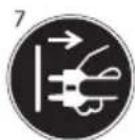
7 - Prior to maintenance work, disconnect the document shredder from the electrical power supply!
^8 - Wear protective goggles when shredding CDs or DVDs!
9 - Remove paper clips and staples before shredding! (security level P6 and P7 devices)
Pay attention to warnings!
1,
2

3


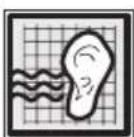
1 - Noise level when operated without shredding documents (in accordance with DIN)
^2 - Document shredder on stand-by
^3 - Document shredder in operation
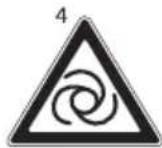
^4 - Automatic start-up
^5 - Oil (only use DAHLE oil!)
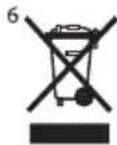
6 - Dispose of the document shredder appropriately and in an environmentally friendly manner at an authorised collection point.
Do not dispose of any parts of the document shredder or packaging in domestic waste.
Intended use, warranty
The document shredder is intended to be used for shredding paper. Depending on the model variant, a small amount of the following materials can also be shredded:
- CDs/DVDs, bank cards and credit cards (see technical data)
- The normal staples and paper clips found in paper documents (exception: security level P6 and P7 devices)
Wear, damage due to improper use or unauthorised modifications and repairs are not covered by the warranty or the guarantee.
The document shredder was designed for private use and for use in normal office environments.
The following conditions apply to the performance in terms of sheets listed under technical data: Maximum number of sheets that are shredded in one pass under the following conditions: New cutting rollers, oiled if needed, cold motor, power supply with nominal voltage and nominal frequency (230 V/50 Hz; 120 V/60 Hz). Deviations may result in reduced sheet processing and increased operating noises. The sheets are fed centrally and lengthwise at a 90 degree angle. The performance in terms of sheets can also vary depending on the paper properties and input.
Subject to technical modifications!
Remove transport lock!

natural_image
Exterior view of a silver and gray industrial waste sorting device (no visible text or symbols)
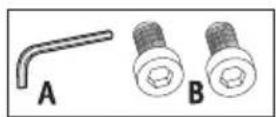
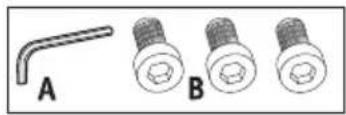
- Apply the brakes! Prior to putting into operation for the first time, open the door and remove the paper collection bin.
- Remove the screws for the transport lock (paper collection bin compartment) from the base plate underneath the shredding mechanism, re-fit paper collection bin and close door.
- Each time the appliance is moved, the transport lock must be re-fitted.
1

2
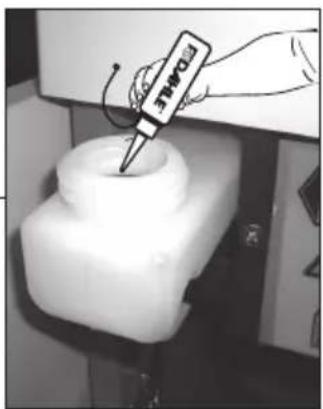
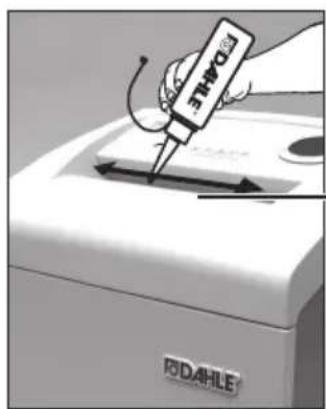
- Oil the shredding rollers using DAHLE document shredder oil (P5, P6 and P7 cross-cut shredding only)!
- Fill the oil tank with DAHLE document shredder oil!
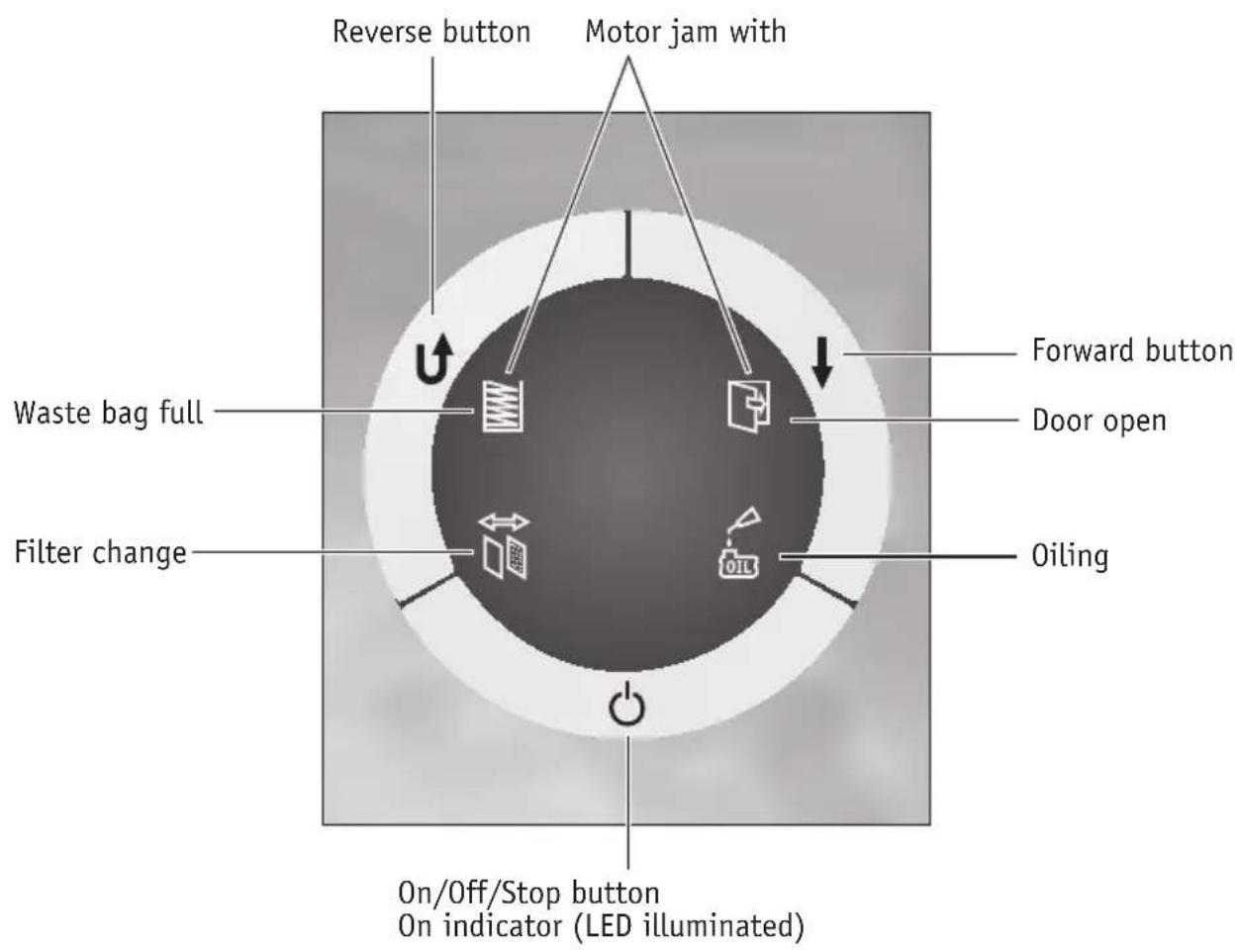
Depending on the model variant, your document shredder may not have all the possible components and functions.
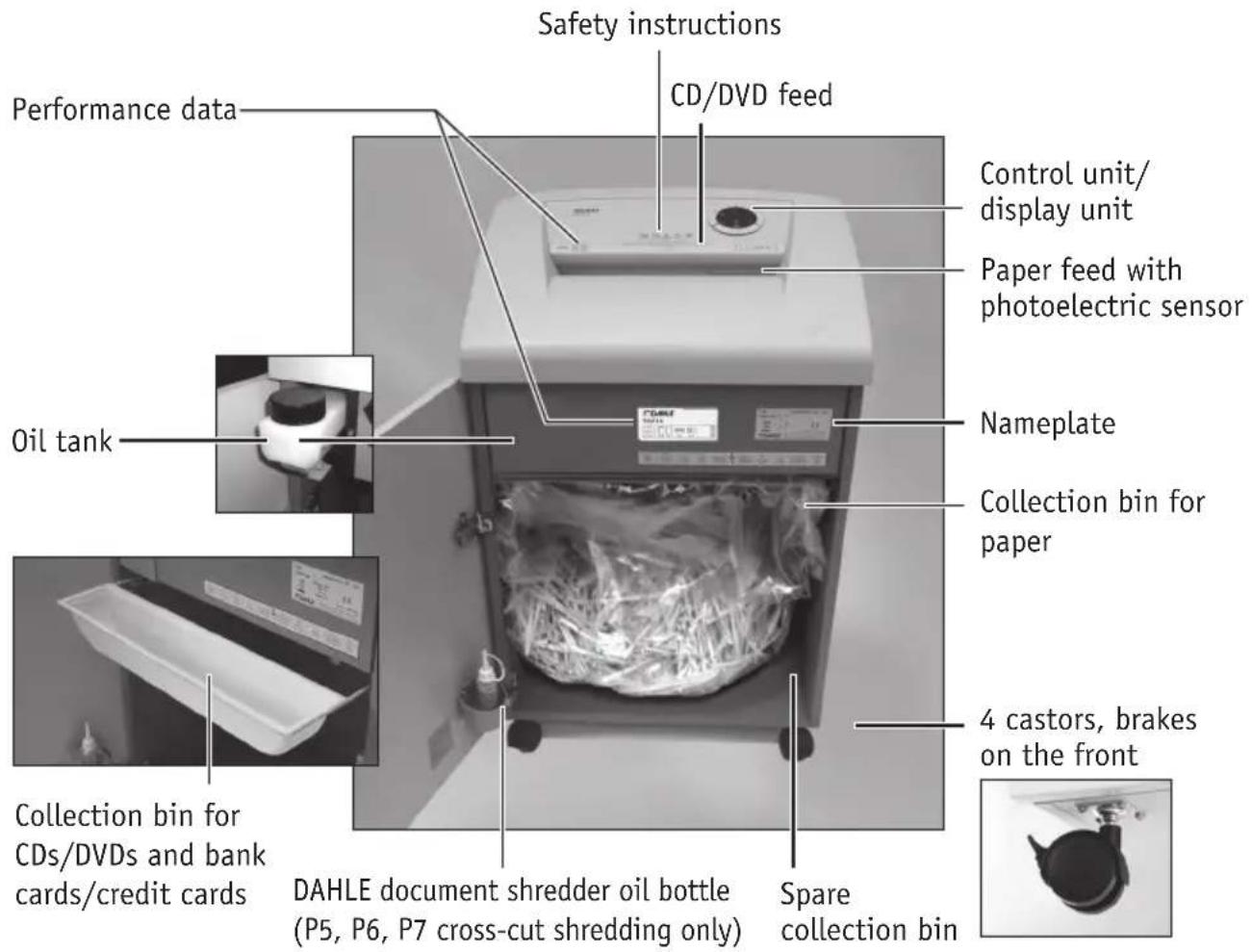

Depending on the model variant, your document shredder may not have all the possible components and functions.

natural_image
Interior view of a white laboratory oven with a wrapped bag on the lid (no visible text or symbols)
- Check that the voltage and mains frequency of your electricity supply match the information on the nameplate.


natural_image
Interior view of a refrigerator with a white arrow pointing to a paper bag inside (no visible text or symbols)
flowchart
graph TD
    A["Document Icon"] --> B["File Icon"]
    B --> C[" folder Icon"]
    C --> D["Arrow Up/Down"]
Please follow the safety instructions.
- Prior to using the document shredder, please check the position of the collection bin for CDs/DVDs and bank cards/credit cards. When shredding paper, this bin must be at the front of the collection bin for paper.
- Close the door of the document shredder.
- Connect the mains cable supplied to the document shredder and plug into a mains socket. Switch on the main switch. After switching on at the main switch, wait 2–3 seconds.
- Switch on the document shredder with the On/Off/Stop button.

1.1






natural_image
Exterior view of a gray industrial waste sorting bin with a paper feeding into a slot (no text or symbols visible)- Observe the maximum number of sheets of paper as stated in the technical data!
- Insert the paper into the middle of the paper feed: the built-in photoelectric sensor starts the document shredder automatically.
- Once the paper feed is clear again, the document shredder switches off automatically and goes into stand-by.
- Continuous operation - If you hold down the Forward button (for approx. 5 sec.), the document shredder changes to continuous operation.
- If the supply of paper is interrupted for 15 seconds, continuous operation is interrupted.
Depending on the model variant, your document shredder may not have all the possible components and functions.



natural_image
Interior view of a refrigerator with a door, showing a closed drawer and a white arrow pointing to the interior (no visible text or symbols)
flowchart
graph TD
    A["Document Icon"] --> B["Folder Icon"]
    B --> C["Input Icon"]
    C --> D["Output Icon"]
    style A fill:#999,stroke:#333
    style B fill:#ccc,stroke:#333
    style C fill:#fff,stroke:#333
    style D fill:#fff,stroke:#333
Please follow the safety instructions: Wear protective goggles when shredding CDs or DVDs!
- Prior to using the document shredder, please check the position of the collection bin for CDs/DVDs and bank cards/credit cards. When shredding CDs/DVDs and bank cards/credit cards, this bin must be at the rear of the collection bin for paper.
- Pull out collection bin and position the collection bin for CDs/DVDs and credit cards/bank cards at the rear.
- Close the door of the document shredder.
- Switch on the document shredder with the On/Off/Stop button.


- Insert the CDs, DVDs or bank cards/credit cards in the middle of the feed while keeping the Forward button pressed.
- Once the CD/DVD feed is clear again, the document shredder switches off automatically and goes into stand-by.
Depending on the model variant, your document shredder may not have all the possible components and functions.
DAHLE CleanTEC®
Change DAHLE fine dust filter


flowchart
graph TD
    A["Start"] --> B{Decision}
    B -->|Yes| C["Process Step 1"]
    B -->|No| D["Process Step 2"]
    C --> E["End"]
    D --> E
    style A fill:#999,stroke:#333
    style B fill:#ccc,stroke:#333
    style C fill:#fff,stroke:#333
    style D fill:#fff,stroke:#333

- The filter change indicator (change DAHLE fine dust filter!) is illuminated on the control panel.
- Unplug the mains cable from the mains socket.
- Change the fine dust filter on the rear of the appliance.
A. Undo screw.
B. Press catch and remove cover.
C. Remove filter and dispose of it. The replacement filter that you fit must be a DAHLE fine dust filter!
D. Close cover.
E. Tighten screw.
-
Plug the mains cable into the mains socket and switch on at the main switch and the On/Off/Stop button.
-
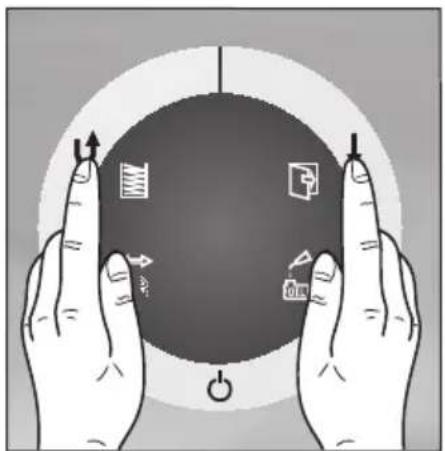
Reset filter change indicator: Keep the Forward and Reverse buttons pressed simultaneously for approx. 5 seconds.

natural_image
Illustration of two hands holding a dark circular object with directional arrows and symbols (no text or labels)We do not accept any liability for improper use of the DAHLE fine dust filter or for not changing the DAHLE fine dust filter. The used DAHLE fine dust filter can be disposed in the domestic waste.
The fine dust particles are bound into the DAHLE fine dust filter. Please dispose of the DAHLE fine dust filter in a manner so that it is inaccessible for children.
Depending on the model variant, your document shredder may not have all the possible components and functions.
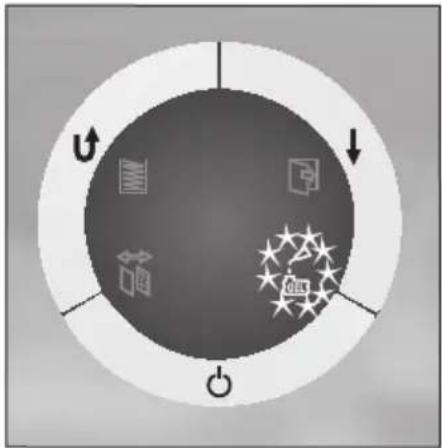
Automatic oiling (only P5, P6 and P7 cross-cut shredding)
Fill oil tank with DAHLE document shredder oil.
Integrated oil tank for regulated, automatic oiling of the rollers.

flowchart
graph TD
    A["Document Icon"] --> B["Folder Icon"]
    B --> C["Starburst Icon"]
    C --> D["Power Symbol"]
    style A fill:#999,stroke:#333
    style B fill:#ccc,stroke:#333
    style C fill:#fff,stroke:#333
    style D fill:#fff,stroke:#333

natural_image
Close-up of a mechanical device with a white cylindrical component inserted into a black housing (no visible text or symbols)
natural_image
Close-up of a mechanical device with a black cylindrical component and directional warning signs (no readable text or symbols)
natural_image
Close-up of a hand using a dropper to lift a white plastic bottle, with warning symbols and labels visible (no readable text or symbols on the bottle itself)Fill the integrated oil tank in the document shredder when indicated on the display.
- Switch off the document shredder with the On/Off/Stop button.
- Open the door. The integrated oil tank is in the cabinet. Open the cap.
- Fill oil tank with oil (use DAHLE document shredder oil!) and close again.
Depending on the model variant, your document shredder may not have all the possible components and functions.
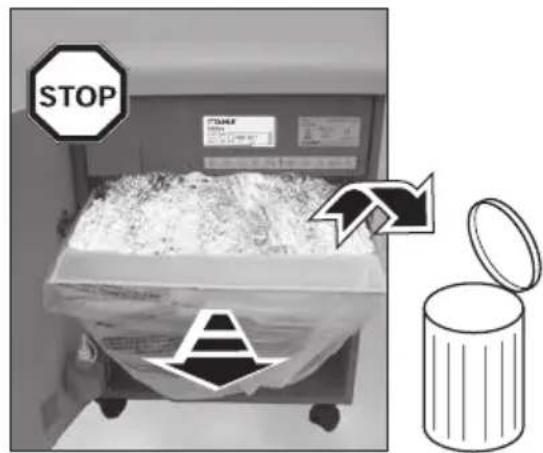
Collection bin full – The LED is flashing.


flowchart
graph TD
    A["Document Icon"] --> B["Folder Icon"]
    B --> C["Software Icon"]
    C --> D["Arrow Down"]
    D --> E["Circle with O"]

natural_image
Exterior view of a modern kitchen appliance with a white box and a paper bag, no visible text or symbols.

natural_image
Exterior view of a portable industrial machine with a paper box and a warning symbol on the front panel (no readable text or labels)-
- If the collection bin is full, the shredding process is stopped; this situation is indicated optically.
- Switch off the main switch and unplug the mains cable from the mains socket.
- Remove collection bin, empty and re-fit.
- Plug the mains cable into the mains socket and switch on the main switch.
Depending on the model variant, your document shredder may not have all the possible components and functions.
Automatic motor shut-down – The LEDs for the fill level and door are flashing.


flowchart
graph TD
    A["Document Icon"] --> B["Folder Icon"]
    B --> C["File Icon"]
    C --> D["Arrow Down"]
    D --> E["Circle"]
    style A fill:#999,stroke:#333
    style B fill:#ccc,stroke:#333
    style C fill:#fff,stroke:#333
    style D fill:#fff,stroke:#333
    style E fill:#ccc,stroke:#333
-
Automatic motor shut down in case of:
-
Overheating of the motor
- Paper jam
Door open – The LED is flashing.


flowchart
graph TD
    A["Document Icon"] --> B["Folder Icon"]
    B --> C["Workflow Icon"]
    C --> D["Arrow Down"]
    D --> E["Arrow Up"]

natural_image
Interior view of a laboratory incubator with a bag of contents and a stop sign (no readable text or symbols on the device itself)
natural_image
Exterior view of a gray industrial waste sorting device with a downward arrow indicator (no text or symbols visible)- If the door is open, the shredding process is stopped and LED is flashing: close the door.
Depending on the model variant, your document shredder may not have all the possible components and functions.


natural_image
Illustration of a paper feeding machine with a document being inserted, alongside a fan arrangement of five sheets of paper (no text or symbols)The document shredder switches off automatically after extended operation and/or overload to cool down.

natural_image
Exterior view of a modern office building (no signage)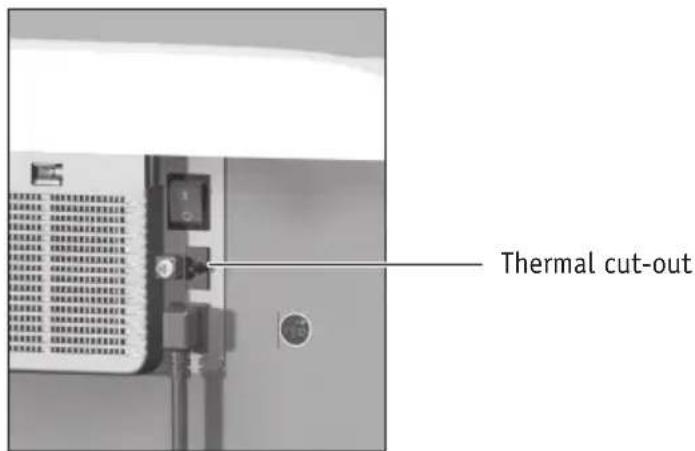
The shredding process is not started:
- Mains cable not plugged into the mains socket
- Main switch not on?
- On/Off/Stop button not switched on?
-
Door open
-
Collection bin full
- Device overloaded/overheated?
- Thermal cut-out OFF?


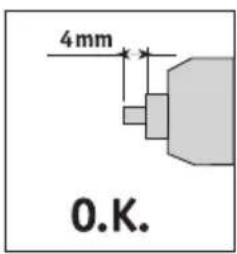
Set the thermal cut-out to the correct position - ON.
Depending on the model variant, your document shredder may not have all the possible components and functions.


natural_image
Illustration of two hands holding a large sphere with directional arrows and icons around (no text or symbols)- If there are too many sheets of paper, the shredding process is stopped.
- The shredding mechanism automatically runs in reverse for a short time and the paper is ejected.
- ATTENTION! To avoid damaging the shredding mechanism, do not operate the Forward and Reverse switches alternately!
natural_image
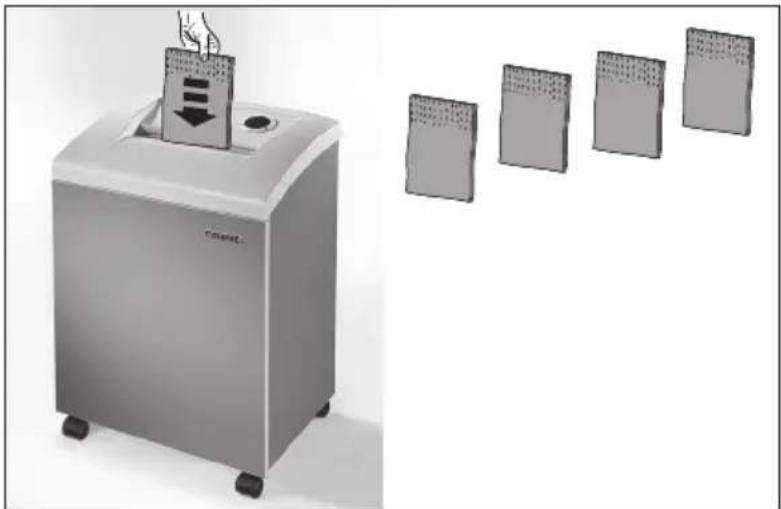
Illustration of a portable electronic device with a downward arrow and four separate rectangular panels, no text or symbols present.- If paper continues to be jammed, operate the Reverse button briefly.
- Reduce the number of sheets of paper by removing or tearing off.
- The shredding process starts automatically after the paper is inserted again, otherwise operate the Forward button.
40334, 40434, 40534, 41334, 41434, 41534
- In the event of a paper jam, the shredding mechanism runs in reverse for 0.5 seconds.
- Remove the paper. Then operate the Forward switch to dear the shredding mechanism. The Reverse switch is inhibited until the Forward switch has been actuated.
- Reduce the number of sheets of paper.
Depending on the model variant, your document shredder may not have all the possible components and functions.
Energy-saving mode


natural_image
Exterior view of a modern office building (no signage)If not used, the document shredder switches off after approx. 30 minutes (LED off).
To use the document shredder, switch it back on with the On/Off/Stop button.
Use only DAHLE spare parts!
Oiling (P5 cross-cut shredding)


natural_image
Exterior view of a stainless steel industrial waste bin (no visible text or symbols)
natural_image
Illustration of a hand using a pipette to clean or inspect the internal components of a stainless steel waste bin (no text or symbols visible)If the shredding performance drops, oil the shredding mechanism after each time you empty the collection bin or at least after the operating time stated in the warning notice has elapsed (for P5 cross-cut shredding only).
- Switch off the document shredder with the On/Off/Stop button. Oil the shredding rollers manually (use DAHLE document shredder oil!).
- Switch on the document shredder with the On/Off/Stop button and run the shredding mechanism in reverse for 10 seconds without paper feed.


natural_image
Illustration of a hand holding a paper airplane (no text or symbols visible)- Switch off the document shredder and unplug the mains cable from the mains socket.
- Clean the appliance using only a dry cloth.
- Plug the mains cable into the mains socket and switch on the document shredder.
Dahle North America, Inc.
49 Vose Farm Road
Peterborough, NH 03458
(800) 995.1379 / www.dahle.com


- Operating Instructions
- Dahle Document Shredders
- Read the operating and safety instructions carefully before putting the document shredder into operation! You must follow the instructions!
- Keep them safe for later use.
- Pay attention to warnings!
- Intended use, warranty
- Subject to technical modifications!
- Remove transport lock!
- Please follow the safety instructions.
- DAHLE CleanTEC®
- Change DAHLE fine dust filter
- Automatic oiling (only P5, P6 and P7 cross-cut shredding)
- The shredding process is not started:
- 40334, 40434, 40534, 41334, 41434, 41534
- Energy-saving mode
- Oiling (P5 cross-cut shredding)
- Dahle North America, Inc.
Brand : Dahle
Model : 50410
Category : Shredder