
NuForce uDAC3 - Receiver OPTOMA - Free user manual and instructions
Find the device manual for free NuForce uDAC3 OPTOMA in PDF.


| Product Type | USB DAC / Headphone Amplifier / Receiver |
| Brand | Optoma |
| Model | NuForce uDAC3 |
| Dimensions (approx.) | 2.5 x 1.5 x 0.5 in (63 x 38 x 13 mm) |
| Weight (approx.) | 1.8 oz (50 g) |
| Power Source | USB bus-powered (5V, 500mA) |
| Input Interface | USB Type B |
| Outputs | 3.5mm headphone jack, stereo RCA line out |
| Sample Rate Support | Up to 24-bit / 96 kHz |
| Signal-to-Noise Ratio | > 100 dB (typical) |
| Total Harmonic Distortion + Noise | < 0.01% (typical) |
| Headphone Impedance | 16 – 300 ohms |
| Output Power (Headphone) | Up to 100 mW into 32 ohms |
| Operating System Compatibility | Windows, macOS, Linux (USB Audio Class 1) |
| Driver Requirement | None (UAC1); optional ASIO driver for Windows |
| Construction | Aluminum chassis |
| Indicators | LED power/status |
| Cleaning Instructions | Wipe with dry cloth; avoid liquids |
| Safety Warnings | Use only with USB compliant ports; do not expose to moisture |
| Repairability | No user-serviceable parts; contact authorized service |
| Accessories Included | USB cable, quick start guide |
Frequently Asked Questions - NuForce uDAC3 OPTOMA
User questions about NuForce uDAC3 OPTOMA
0 question about this device. Answer the ones you know or ask your own.
Ask a new question about this device
Download the instructions for your Receiver in PDF format for free! Find your manual NuForce uDAC3 - OPTOMA and take your electronic device back in hand. On this page are published all the documents necessary for the use of your device. NuForce uDAC3 by OPTOMA.
USER MANUAL NuForce uDAC3 OPTOMA
Class leading mobile DAC
natural_image
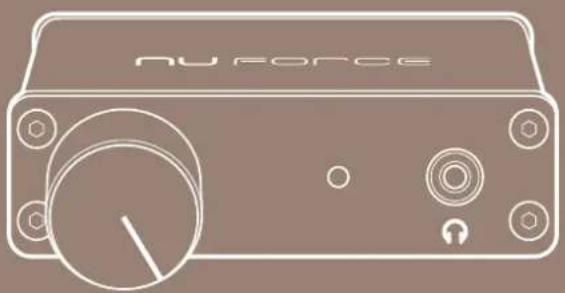
Line drawing of a Nu Force device with control knob and buttons (no text or symbols on body)User manual
APUDACS
FCC Notice - Declaration of Conformity Information
This equipment has been tested and found to comply with the limits for a Class B digital device, pursuant to part 15 of the FCC Rules. These limits are designed to provide reasonable protection against harmful interference in a residential installation. This equipment uses and can radiate radio frequency energy and, if not installed and used in accordance with the instructions, may cause harmful interference to radio communications.
However, there is no guarantee that interference will not occur in a particular installation. If this equipment does cause harmful interference to radio or television reception, which can be determined by turning the equipment off and on, the user is encouraged to try to correct the interference by one or more of the following measures:
WARNING: Only peripherals complying with the FCC class B limits may be attached to this equipment.
Changes or modifications made to this equipment, not expressly approved by us or parties authorized by us could void the user's authority to operate the equipment. This device complies with part 15 of the FCC Rules. Operation is subject to the following two conditions: (1) This device may not cause harmful interference, and (2) this device must accept any interference received, including interference that may cause undesired operation.
INTRODUCTION
The NuForce μDAC is a high-performance USB Digital Audio Converter (DAC) that connects your personal computer's audio to your home stereo, desktop sound system, or headphones. The quality and versatility of the μDAC's performance belies its diminutive size. With its extensive power supply, filtering capabilities and charge-pump circuit as a foundation, the μDAC accurately processes incoming data via a USB audio receiver. A D/A converter stage then translates the data into an analog signal with a robust 2.0-Vrms-output capability. The NuForce μDAC's performance equals or exceeds that of a great many audiophile CD players. The unit's exemplary flexibility -- analog RCA, digital coaxial, and high-performance headphone outputs -- is bound to satisfy the needs of the most critical music lover.
Features
Front Cover Descriptions
home stereo or headphones
QUICK START GUIDE
Product Overview
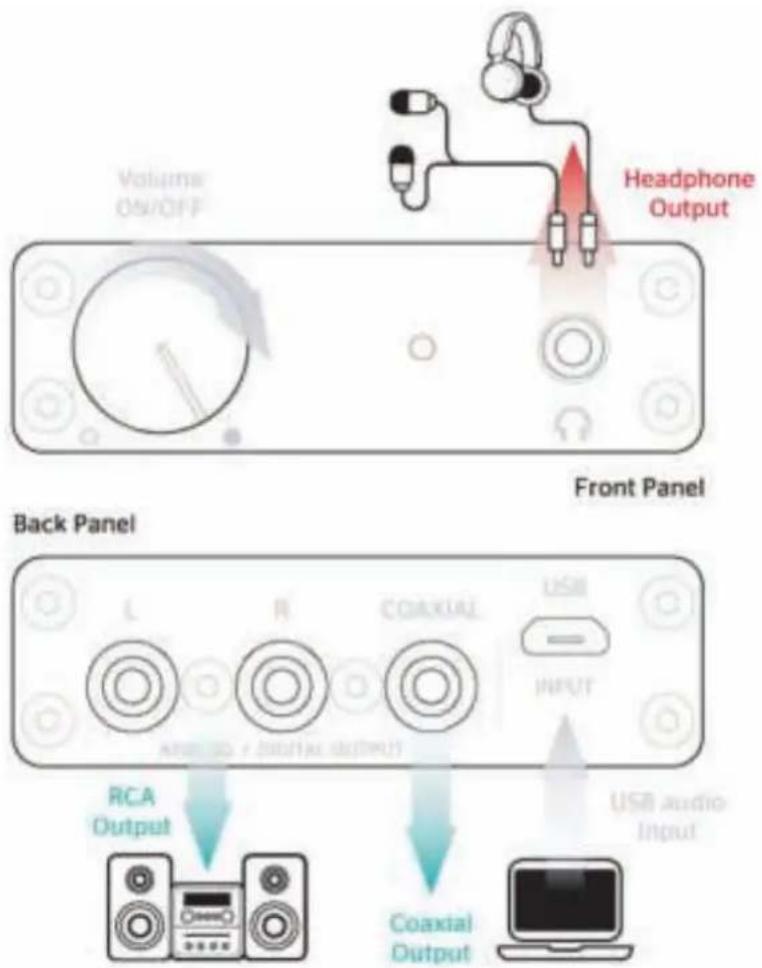
Connections
■ 1 x RCA
■ 1 x Coaxial
■ 1 x 3.5mm headphone output
SPECIFICATIONS
| Input 1 x Micro USB (USB 1.1, 2.0 compatible) |
| Output 1 x RCA |
| 1 x Coaxial |
| 1 x 3.5 mm headphone output |
| Headphone Power Output 80 mW x 2 @ 16 ohm |
| Native Bit Rate 32, 44.1, 48, 96 kHz, 24-bit |
| Dynamic Range 90 dB |
| THD+N 0.05% |
| Power USB Bus powered, 80 mA/5V |
| S/N Ratio 98 dB |
Dimensions (Depth x Width x Height) 1.5 inches (3.8 cm) x 2.68 inches (6.8 cm) x 0.83 inches (2.1 cm)
Optoma
Brand : OPTOMA
Model : NuForce uDAC3
Category : Receiver