
DA90 - Headphone amplifier PLANTRONICS - Free user manual and instructions
Find the device manual for free DA90 PLANTRONICS in PDF.


| Product Type | Headphone Amplifier |
| Brand | Plantronics |
| Model | DA90 |
| Power Source | USB powered (5V DC) |
| Connectivity | USB to laptop; also connects to mobile phone via controller |
| Audio Input | USB from computer |
| Audio Output | 3.5mm headphone jack (typical) |
| Compatibility | Plantronics headsets (DA70, DA80, DA90 series; EncorePro HW510/HW520) |
| Controls | Volume control and mute button (common) |
| LED Indicator | Power/status LED (common) |
| Cable Length | USB cable approx. 3.3 ft (1 m) |
| Dimensions (approx.) | 2.5 x 2.5 x 1 in (63.5 x 63.5 x 25.4 mm) |
| Weight (approx.) | 0.2 lbs (90 g) |
| Certifications | FCC Part 15 compliant; CE marked |
| Country of Origin | Designed in Santa Cruz, California, USA |
| Included Accessories | Quick Start Guide, USB cable (assumed) |
| Material | Plastic housing (common) |
| Maintenance | Clean with dry cloth; avoid liquids |
| Safety | Do not disassemble; keep away from moisture |
Frequently Asked Questions - DA90 PLANTRONICS
User questions about DA90 PLANTRONICS
0 question about this device. Answer the ones you know or ask your own.
Ask a new question about this device
Download the instructions for your Headphone amplifier in PDF format for free! Find your manual DA90 - PLANTRONICS and take your electronic device back in hand. On this page are published all the documents necessary for the use of your device. DA90 by PLANTRONICS.
USER MANUAL DA90 PLANTRONICS
Designed in Santa Cruz, California
QUICK START GUIDE
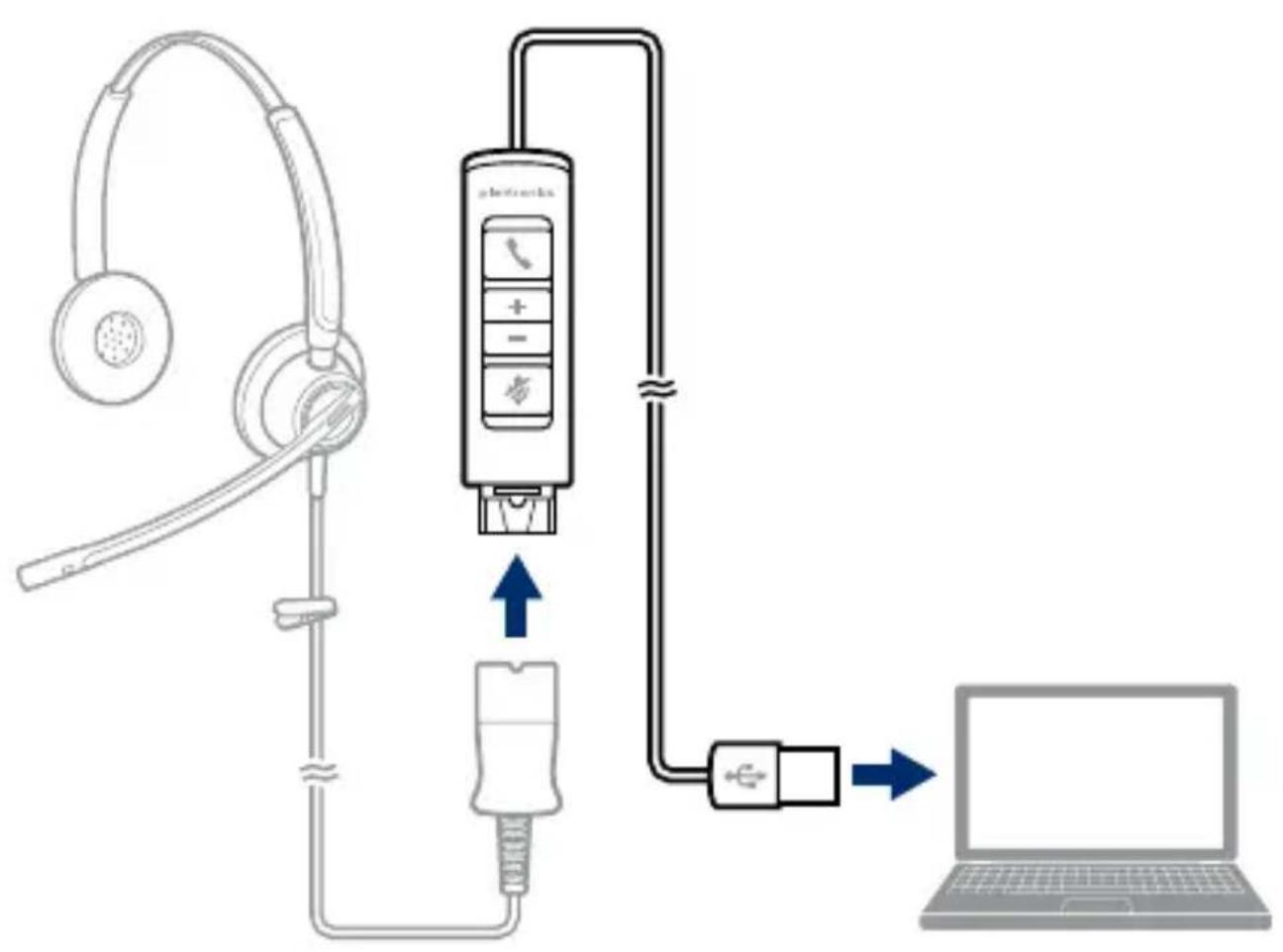
flowchart
graph TD
    A["Headphones"] --> B["Mobile Phone Controller"]
    B --> C["Laptop"]
    D["USB Cable"] -->|USB| B
    B -->|USB| C
DECLARATION OF CONFORMITY
We Plantronics, 345 Encinal Street Santa Cruz, California, 95060 USA (800) 544-4660 declare under our sole responsibility that the product DA70, DA80, and DA90 complies with Part 15 of the FCC Rules. Operation is subject to the following two conditions: (1) this device may not cause harmful interference, and (2) this device must accept any interference received, including interference that may cause undesired operation.
NEED MORE HELP?
plantronics.com/support
Plantronics, Inc.
345 Encinal Street
Santa Cruz, CA 95060
United States
Plantronics BV
South Point Building C
Scorpius 140
2132 LR Hoofddorp
Netherlands
© 2014 Plantronics, Inc. Plantronics is a registered trademark of Plantronics, Inc. in the US and other countries, and DA70 is a trademark of Plantronics, Inc. All other trademarks are the property of their respective owners.
Patents Pending
202046-03 (07.14)


Recyclable where facilities exist
Final Approval Checklist and Signatures
Please note Final approval requires the examination of a printed proof or comp, in addition to quality control of electronic file.
PRODUCTION QUALITY CONTROL [Production Manager or Production Quality Specialist]
- Template (if used): PM or PQS confirms that art file specs match appropriate template in all details
- Text - Spellcheck performed
- Double spaces deleted
Smart quotes used. No straight quotes or apostrophes
-Soil and hard returns used correctly (Type > Show Hidden Characters)
- Fonts - Consistent spacing, font sizes, and leading used (style sheets if applicable)
- No artificial bold or italic
• Color space and varnishes
a file is in CMYK color mode (File > Document Color Mode)
- All colors in swatch palette not used in actual art have been deleted,
including Black and White
No RGB inks
- Inks/ finishes specified and verified; PMS swatches pulled and confirmed;
number of inks verified with PMX and/or SCZ project manager
- Ink overprinting checked (Attributes)
Black - if art contains photography, all Pantone Black has been converted to 100K
- Rich black (if used) is C42 M42 Y52 K100; not used behind small text
- Slug Ink/finish names match swatch names
- Updated art: revisions accurately noted
- Layers - Layers are correctly organized and labeled
separate layers for slug, die line, inks, foil, spot finishes
"Do Not Print" layers are properly identified and turned off/on
- Artwork layer contains only art
- Blood .125* bleed
Non-bleeding elements maintain safe distance from dieline and folds (minimum: 125°)
- Links 300 ppi images, sized and/or rotated in Photoshop
no RGB links
- Stray points and elements deleted
• Measurements from original drawing deleted
FINAL FILE PREP [Production Manager or Production Quality Specialist]
APPROVAL SIGNATURE:
C Lara ECO
• File reviewed by second designer
• Pre-flight performed using Markzware or similar software
- Final zipped archive contains:
- .ai
- eps [with outlined fonts]
fonts - links
from eps. high res PDF (PDF/X-1a:2001)
if using spot varnishes or foil: from eps: low res PDF, one page for each layer
- from .ai: low res PDF with non-outlined tools
plantronics.
Project: DA90
Date: 230714
Component: QSG, WW. 2 color
File Name: 202047-03 DA90_QSG_WW.indd
Ari Masler Number: 202047-03
Part Number: 202046-03
Scale: 1:1
Resolution: 300dpi
Placed Links
Fonts: Gesta Bold, Gesta Regular,
Software. InDesign
Printing Method: Offset lithography or Flexography
Inks
Oyan X PMS 294C
magenta
yellow
black 100%
Original Designer: Necia Robertson
E mail: necia.robertson@plantronics.com
Phone: 831-420-4346
Revisions: Necia Robertson
E-mail: necia.robertson@plantronics.com
Phone: 831-420-4346
Changes to art after approval: Include date and brief description
Delne:
[DDMMYY] Namelinitials - Reason
Color
[DDMMYY] Namelinitials - Reason
Photography
[DDMMYY] Namelinitials - Reason
Text:
[DDMMYY] Namelinitials - Reason
Other:
230714 NR - replaced existing headset with the EncorePro (HW510/HW520)
- DECLARATION OF CONFORMITY
- NEED MORE HELP?
- plantronics.com/support
- Plantronics, Inc.
- Plantronics BV
- Final Approval Checklist and Signatures
- PRODUCTION QUALITY CONTROL [Production Manager or Production Quality Specialist]
- FINAL FILE PREP [Production Manager or Production Quality Specialist]
- APPROVAL SIGNATURE:
- plantronics.
Brand : PLANTRONICS
Model : DA90
Category : Headphone amplifier