
EasyConnect - Uncategorized Neets - Free user manual and instructions
Find the device manual for free EasyConnect Neets in PDF.


| Product Type | Recessed cable housing box with sliding cover |
| Dimensions (Recessed Box) | 235 x 89.5 x 103 mm |
| Dimensions (Top Plate) | 252 x 135.5 x 1.5 mm |
| Weight | 2.15 kg |
| Material | Black anodized aluminum top, steel box |
| Included Cables | HDMI, VGA, 3.5 mm audio, USB-A, 2x Cat-6 RJ45 (each 1.7 m) |
| AC Power Outlet | Built-in outlet (EU, DK, UNI, AUS, or ZA version); max 10A |
| Control Integration Options | Neets Control EcHo or SieRRa II (Control versions); NEB keypad (NEB version); dual power outlets (Power version) |
| Installation | Recessed mount in tabletop or podium; adjustable depth for connector plate; max table thickness 60 mm |
| Safety | CE certified; FCC Class A; read safety instructions before use; no user-serviceable parts |
| Maintenance | Unplug before cleaning; clean with dry cloth only; do not use liquids or aerosols |
| Accessories | EasyConnect Cable Bag (canvas) - optional |
| Warranty & Support | Contact local Neets reseller or Support@Neets.dk for service |
Frequently Asked Questions - EasyConnect Neets
User questions about EasyConnect Neets
0 question about this device. Answer the ones you know or ask your own.
Ask a new question about this device
Download the instructions for your Uncategorized in PDF format for free! Find your manual EasyConnect - Neets and take your electronic device back in hand. On this page are published all the documents necessary for the use of your device. EasyConnect by Neets.
USER MANUAL EasyConnect Neets
Neets Control – EasyConnect
Installation Manual
Neets
Foreword
Neets EasyConnect solves one of the most common and frustrating problems encountered in AV presentations. When a guest presenter wants to connect a laptop computer, all too often the proper cables cannot be found, or they have the wrong length, or the connection point is hidden away in a floor pocket or wall panel.
Cables are terminated at both ends for easy disconnection and re-connection, allowing use in podiums that occasionally must be relocated or removed for storage.
The EasyConnect enclosure also incorporates space for seamless integration of Neets Control EcHo or SieRRa II. With integrated control, starting a presentation is quick and frustration-free. Simply plug in the required cables, press the corresponding control buttons, and your presentation is running in a matter of seconds!
COPYRIGHT - All information contained in this manual is the intellectual property and copyrighted material of Neets. All rights are reserved. You may not allow any third party access to content, information or data in this manual without Neets' express written consent.
CHANGES - Neets reserve the right to change the specification and functions of this product without any notice.
Questions, AFTER reading this manual, can be addressed to your local dealer or:
Neets
Langballe 4
8700 Horsens
Denmark
by E-Mail: Support@Neets.dk or you may use our contact form at www.neets.dk
Revision list
This document (no: 305-02XX-001) has the following revision changes:
| Author: Date Description Pages Rev | ||
| TSA: 09-11-2012 First release. All 1.00 | ||
| TSA: 12-03-2013 Added DK version 3 2.00 | ||
| TSA: 17-05-2013 Added version without control system 3,4,7 3.00 | ||
| JR: 04-03-2014 New layout, added features and NEB version All 4.00 | ||
| MH: 07-07-2014 New layout in A5 format | All 5.00 | |
| MH: 17-08-2015 Updated design in A4 format | All 6.00 | |
| MH: 08-10-2015 Section with “Risk of electric shock” added | 4 7.00 |
Important Safety Instructions
Caution:
Read these instructions:
Read and understand all safety and operating instructions before using the equipment.
Keep these Instructions:
The safety instructions should be kept for future reference.
Heed all Warnings:
Follow all warnings and instructions marked on the equipment or in the user information.
Avoid Attachments:
Do not use tools or attachments that are not recommended, because they may be hazardous
Warning!:
- This equipment should be operated only from the included power supply.
- To remove power from the equipment safely, remove all power cords from the rear of the equipment, or the desktop power module (if detachable), or from the power source receptacle (wall plug).
- Power cords should be routed so that they are not likely to be stepped on or pinched by items placed upon or against them.
- Do not defeat the safety purpose of a polarized or grounding-type plug. A polarized plug has two blades with one wider than the other. A grounding-type plug has two blades and a third grounding prong. The wide blade or the third prong is provided for your safety. If the provided plug does not fit into your outlet, consult an electrician for replacement of the obsolete outlet.
- Unplug this apparatus during lightning storms or when unused for long periods of time.
- Refer all servicing to qualified service personnel. There are no user-serviceable parts inside. To prevent the risk of shock, do not attempt to service this equipment yourself because opening or removing covers may expose you to dangerous voltage or other hazards. Contact your local Neets reseller or distributor.
- If the equipment has slots or holes in the enclosure, these are provided to prevent overheating of sensitive components inside. These openings must never be blocked by other objects.
- Do not use this equipment near water.
- To reduce the risk of fire or electric shock, do not expose this apparatus to rain or moisture and objects filled with liquids.
- Unplug the product before cleaning. Clean only with a dry cloth and not cleaning fluid or aerosols. Such products could enter the unit and cause damage, fire, or electric shock. Some substances may also mar the finish of the product.
FCC Class A Notice:
This equipment has been tested and found to comply with the limits for a Class A digital device, pursuant to part 15 of the FCC Rules. Operation is subject to the following two conditions:
- This device may not cause harmful interference.
- This device must accept any interference received, including interference that may cause undesired operation. The Class A limits are designed to provide reasonable protection against harmful interference when the equipment is operated in a commercial environment. This equipment generates, uses, and can radiate radio frequency energy and, if not installed and used in accordance with the instruction manual, may cause harmful interference to radio communications. Operation of this equipment in a residential area is likely to cause harmful interference, in which case the user will be required to correct the interference at his own expense.
FCC regulations state that any unauthorized changes or modifications to this equipment, not expressly approved by the manufacturer, could void the user's authority to operate this equipment.
The lightning bolt triangle is used to alert the user to the presence of uninsulated “dangerous voltages” within the unit’s chassis that may be of sufficient magnitude to constitute a risk of electric shock to humans.

The exclamation point triangle is used to alert the user to presence of important operating and service instructions in the literature accompanying the product.
Routing and connecting cables:

Caution:
Risk of electric shock
Max power output 10A
- Check with local and state regulations before starting the installation
- Check all parts and equipment before installation
Contents
Foreword 2
Revision list 2
Important Safty Instructions 3
Contents 5
Description....6
EasyConnect Components 7
Installation Procedure 8
Step 1: Prepare opening 8
Step 2: Adjust depth of connector plate .....8
Step 3: Evaluate cable connection procedure / connect cables .....9
Step 4: Insert the unit 9
Step 5: Secure the unit....9
Step 6: Complete cable terminations and connections .....9
Step 7: Install Neets Control - Echo or SieRRa II control module. . . . . . . . . . . . . . . . . . . . . . . . . . . . . . . . . . . . . . . . . . . . . . . . . . . 10
Specifications 11
Description
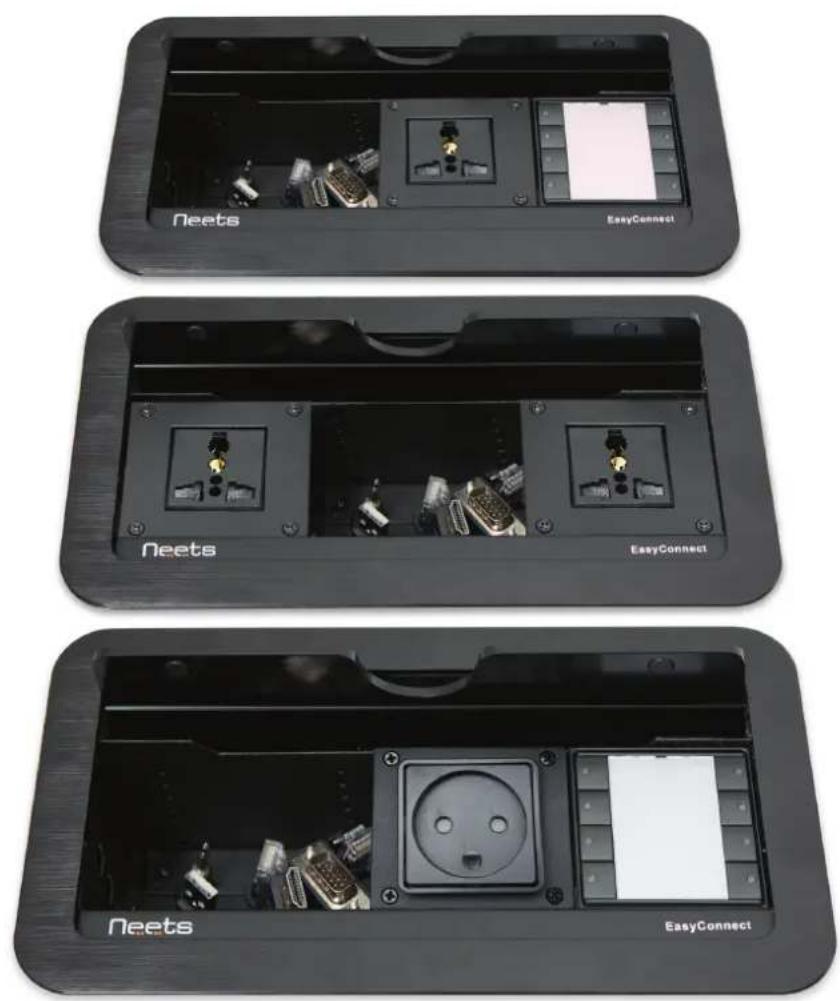
Neets EasyConnect is a high-quality cable housing box designed for recessed mounting in a table-top, podium or other furniture surface in classrooms, board rooms and conference rooms. It contains six connector cables that pull out smoothly for quick connectivity and then disappear below the box for uncluttered storage. The top cover plate slides into its own recessed slot to hide out of the way when cables are in use.
EasyConnect is constructed from black anodized aluminum for years of reliable service. It includes a built-in AC line outlet (with proper socket connector for country of delivery) for powering an external computer or other device, and is CE certified.
The depth of the connector collar panel is adjustable, allowing optimum depth to suit various connector types and sizes.
EasyConnect is delivered with the following cables:
1 x HDMI 1 x 3.5mm audio 1 x VGA 2 x Cat-6 RJ45 1 x USB-A
All cables are 1,7 m long with identical terminations at each end.
EasyConnect is available in 15 versions:
| 305-0200 Neets EasyConnect - Control EcHo, EU - Antrachite |
| 305-0225 Neets EasyConnect - Control SieRRa II, EU - Antrachite |
| 305-0202 Neets EasyConnect - Control EcHo, DK - Antrachite |
| 305-0226 Neets EasyConnect - Control SieRRa II, DK - Antrachite |
| 305-0205 Neets EasyConnect - Control EcHo, UNI - Antrachite |
| 305-0227 Neets EasyConnect - Control SieRRa II, UNI - Antrachite |
| 305-0207 Neets EasyConnect - Control EcHo, AUS - Antrachite |
| 305-0228 Neets EasyConnect - Control SieRRa II, AUS - Antrachite |
| 305-0220 Neets EasyConnect - NEB, EU incl. NEB Extender |
| 305-0221 Neets EasyConnect - NEB, DK incl. NEB Extender |
| 305-0222 Neets EasyConnect - NEB, UNI incl. NEB Extender |
| 305-0250 Neets EasyConnect - Power EU, 2 * Power |
| 305-0251 Neets EasyConnect - Power DK, 2 * Power |
| 305-0252 Neets EasyConnect - Power UNI, 2 * Power |
| 305-0253 Neets EasyConnect - Power AUS, 2 * Power |
Accessories:
305-0299 Neets - EasyConnect Cable Bag Black Canvas
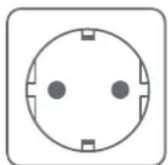
EU "schuko" power socket
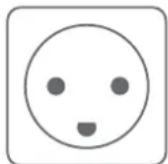
Danish
power socket
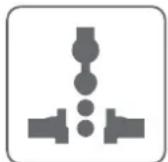
Universal power socket
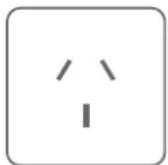
Australian power socket
EasyConnect Components
There are 3 different groups of EasyConnect. One with control system, one with a NEB Keypad and one with two power plugs.

| Number: Description | |
| 1 Sturdy retract | able lid - Opens and closes manually. All connectors are covered when closed, leaving a solid flat surface with only a small opening for lifting the cover |
| 2 Outer flange - | Fits over mounting surface for clean appearance |
| 3 Height adjustment screws - Adjusts height of internal connector plate | |
| 4 Connector box | - Provides space for up to six AV connectors |
| 5 | Neets Control - EcHo, EU or Neets Control - SieRRa II, EU system |
| 6 Built-in AC line | Outlet with either EU, DK, UNI, AUS or ZA power socket |
| 7 | The Neets Expansion Bus - NEB Keypad. The Neets EasyConnect - NEB has no control capabilities, it works as complimentary to the EasyConnect Control unit. |
Installation Procedure
Step 1: Prepare opening
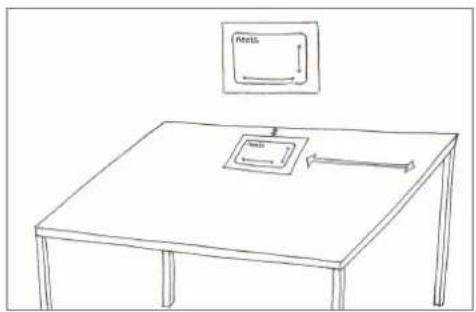
Using appropriate tools, cut an opening in the mounting surface with the dimensions shown on the supplied cutout template. The template is found in the cardboard box.
Remove the back of the template and stick it on the mounting surface (also used to protect when cutting).
Cut according to markings using appropriate tools, e.g. a jigsaw.
natural_image
Simple line drawing of a table with a monitor and arrow, no text or symbols present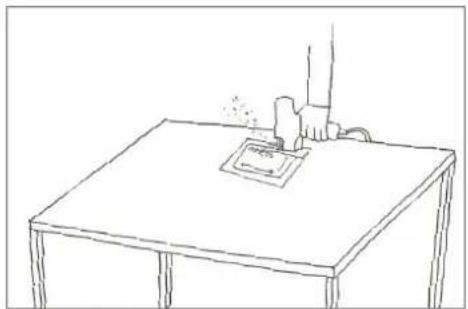
natural_image
Simple line drawing of a desk with a small object on top, no text or symbols presentStep 2: Adjust depth of connector plate
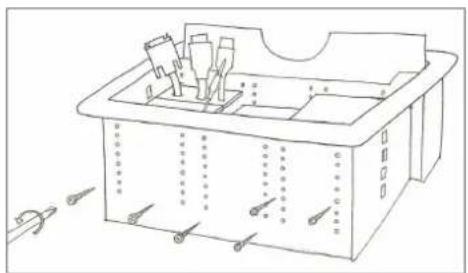
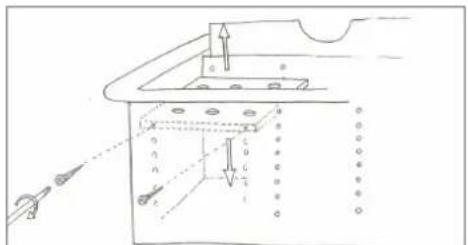
If you need a different depth of the plates inside the box you can adjust them as here bellow.
Remove the height adjustment screws.
Turn the unit and then remove back cover and the height adjustment screws.
natural_image
Line drawing of a rectangular mechanical or architectural component with internal components and mounting holes (no text or symbols)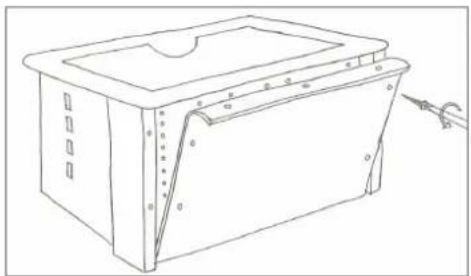
natural_image
Line drawing of a rectangular electronic device with a lid and mounting holes, showing internal structure and mounting points (no text or symbols)Supporting the connector plate from underneath with your fingers, bring the connector plate to the required position. Then replace and tighten the height adjustment screws.
Step 3: Evaluate cable connection procedure/ connect cables
Will it be easier to connect cables to the Neets EasyConnect before mounting it into the tabletop? YES - then make some or all cable connections before mounting EasyConnect do step 6 and 7 first and then continue with step 4. NO - then continue with step 4.
Step 4: Insert the unit
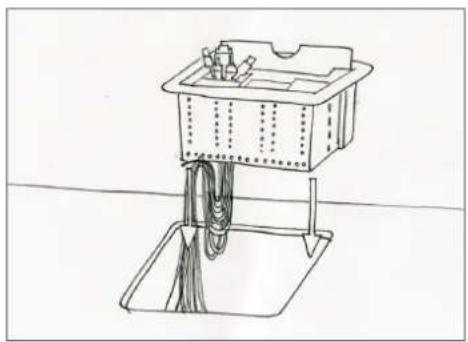
Carefully slide the EasyConnect unit into the opening in the mounting surface.
Step 5: Secure the unit
Working underneath the table surface, place the mounting brackets into the slots on each side of the unit. Verify proper alignment before tightening the mounting screws. Turn screws until the top nut contacts the mounting surface. Tighten firmly. NOTICE: maximum thickness of table plate 60 mm
natural_image
Line drawing of a cleaning or cleaning station with a container and rope system (no text or symbols)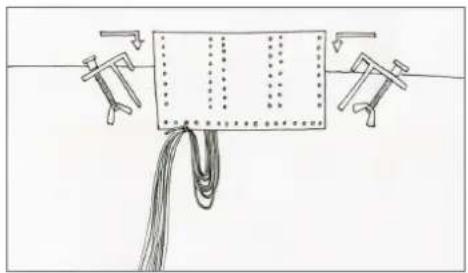
natural_image
Simple line drawing of a rope tied with clamps and a rectangular object, no text or symbols present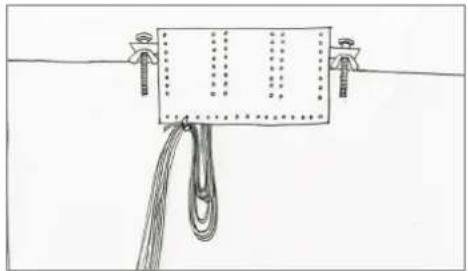
natural_image
Simple line drawing of a rope tied with a hanging rope and attached to a rectangular object (no text or symbols)Step 6: Complete cable terminations and connections
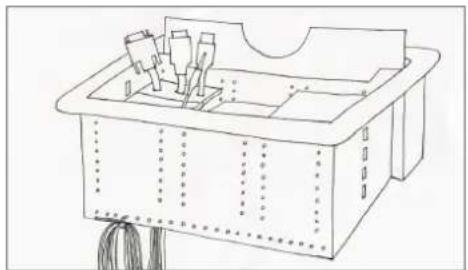
Complete any terminations and connections not done in step 3 above. You can tighten the cables with strips to the lower part of the EasyConnect.
natural_image
Line drawing of a rectangular electronic device with internal components and wiring (no text or symbols)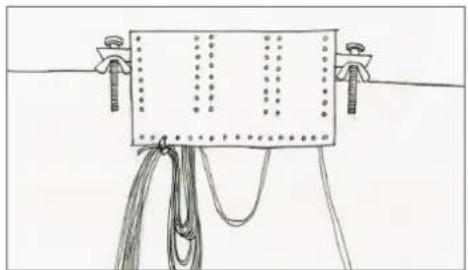
natural_image
Simple line drawing of a breadboard with wires and connectors (no text or symbols)Step 7: Install Neets Control - Echo or SieRRa II control module (Power version: skip this step)
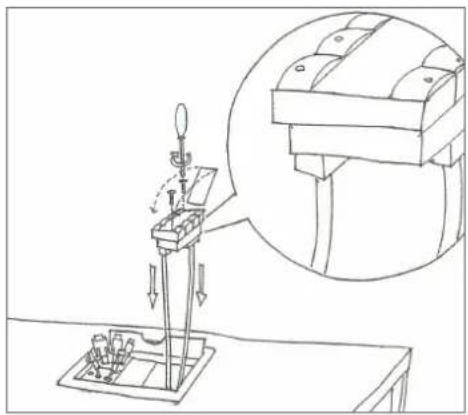
Please connect all cables to the used control system (Neets Control - Echo or Neets Control - SieRRa II) the 12 Volt DC for the control system is supplied from the Neets EasyConnect unit. Rember the included (in the cardboard box) frame for the control system.
natural_image
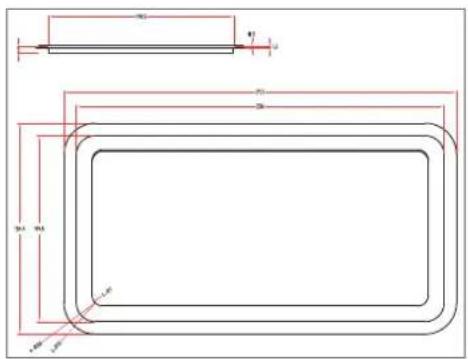
Technical line drawing of a mechanical testing setup with a magnified inset showing internal components (no text or symbols)Top plate dimensions:
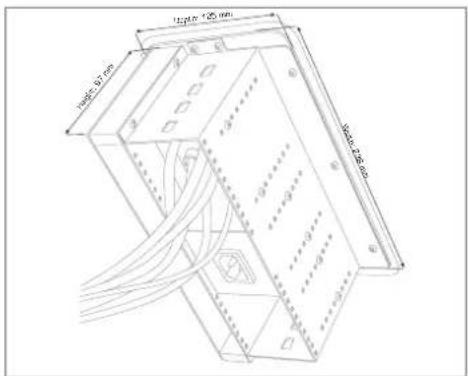
Recessed box dimensions:
Specifications
All Units:
Enclosure type: Metal (steel box with cast aluminum top and lid Sliding cover with cable pass-through
Default cables: HDMI, VGA, 3,5 mm audio, USB-A, Cat-5 type (RJ45)
AC power connector: EU, Universal or DK power connector
Max power output 10A
Dimensions:
Recessed box:
Width: 235 mm
Depth: 89,5 mm
Height: 103 mm
Top plate:
Width: 252 mm
Depth: 135,5 mm
Height: 1,5 mm
Weight: 2,15 kg
Neets EasyConnect - Power:
Two EU, Universal, DK, AUS or ZA power socket
Neets EasyConnect - Control:
Direct access to AV control functions w/ Neets
Control Echo or SieRRa II integration
Direct-out 12V power supply.
Neets EasyConnect, Control - EcHo:
Communication ports:
1 X RS-232 (TX and RX)
Baud: 1200 - 115200
Data Bit: 7/8
Parity: None, Even, Odd
Stop Bit: 1/1, 5/2
1 x RS-232 or IR (TX only)
RS-232
Baud: 1200 - 115200
Parity: None, even, odd
Stop Bit: 1/1, 5/2
IR:
Transmit
381 Hz - 500 kHz
Devices: 2
3 x input/Output:
input:
Sense Low: <1 VDC
Sense High: >4 VDC
Output:
Type: Open drain
Max Voltage: 24 VDC
Max Current: 0,5 A
Neets Expansion Bus (NEB):
12 V (0.3 A) output
See neets.dk for NEB info
Conformity:
Approval: CE
Immunity: EN 61000-6-2:2005
Emission: EN 61000-6-3:2007
Neets EasyConnect, Control - SieRRa II:
Communication ports:
1 X RS-232 (TX and RX)
Baud: 1200 - 115200
Data Bit: 7/8
Parity: None, Even, Odd
Stop Bit: 1/1/5/2
2 x RS-232 or IR (TX only both)
RS-232
Baud: 1200 - 115200
Parity: None, Even, Odd
Stop Bit: 1/1/5/2
IR:
Transmit
381 Hz - 500 kHz
Devices: 4
LAN:
Speed: 10/100 Mbit
Auto-detect
Devices: 5
3 x input/Output:
Input:
Sense Low: <1 VDC
Sense High: >4 VDC
Output:
Type: Open drain
Max Voltage: 24 VDC
Max Current: 0,5 A
Neets Expansion Bus (NEB):
12 V (0.3 A) output
See neets.dk for NEB info
Conformity:
Approval: CE
Immunity: EN 61000-6-2:2005
Emission: EN 61000-6-3:2007
Neets EasyConnect - NEB:
Direct-out 12V power supply
8 LED input
Neets control - EcHo: Red
Neets control - SieRRa II: Multicolor
8 switches
Connection to Neets Control - EcHo and SieRRa II:
4 pin NEB connector
Cable length max 20 cm.
Size (without frame):
Standard: Europe
Height: 55 mm
Width: 55 mm
Depth: 17 mm
Conformity:
Approval: CE
EN 55022
EN 55024
Product item numbers:
305-0200 EasyConnect - EcHo EU, includes a set of default cables,
Neets Control - Echo
and EU power socket.
305-0225 EasyConnect - SieRRa II EU, includes a set of default cables,
Neets Control - SieRRa II
and EU power socket.
305-0205 EasyConnect - EcHo, includes a set of default cables,
Neets Control - Echo and
universal power socket.
305-0227 EasyConnect - SieRRa II Uni, includes a set of default cables,
Neets Control - SieRRa II and
universal power socket.
305-0202 EasyConnect - EcHo DK, includes a set of default cables,
Neets Control - EcHo
and DK power socket.
305-0226 EasyConnect - SieRRa II DK, includes a set of default cables,
Neets Control - SieRRa II
and DK power socket.
305-0228 EasyConnect - SieRRa II AUS, includes a set of default cables,
Neets Control - SieRRa II and
universal power socket.
305-0250 EasyConnect Power EU,
includes a set of default cables
and two EU power sockets.
305-0251 EasyConnect Power DK,
includes a set of default cables
and two DK power sockets.
305-0252 EasyConnect Power Uni,
includes a set of default cables
and two Uni power sockets.
Product item numbers:
305-0220 Neets EasyConnect - NEB EU includes a set of default cables,
Neets Expansion Bus (NEB) Keypad
and EU power socket.
305-0221 Neets EasyConnect - NEB, DK includes a set of default cables,
Neets Expansion Bus (NEB) Keypad
and DK power socket.
305-0222 Neets EasyConnect - NEB, UNI includes a set of default cables,
Neets Expansion Bus (NEB) Keypad
and UNI power socket.
305-0223 Neets EasyConnect - NEB, AUS includes a set of default cables,
Neets Expansion Bus (NEB) Keypad
and AUS power socket.
305-0224 Neets EasyConnect - NEB, ZA includes a set of default cables,
Neets Expansion Bus (NEB) Keypad
and ZA power socket.
- Neets Control – EasyConnect
- Foreword
- Revision list
- Important Safety Instructions
- Caution:
- Warning!:
- FCC Class A Notice:
- Contents
- Description
- Accessories:
- EasyConnect Components
- Installation Procedure
- Step 1: Prepare opening
- Step 2: Adjust depth of connector plate
- Step 3: Evaluate cable connection procedure/ connect cables
- Step 4: Insert the unit
- Step 5: Secure the unit
- Step 6: Complete cable terminations and connections
- Step 7: Install Neets Control - Echo or SieRRa II control module (Power version: skip this step)
- Specifications
- All Units:
- Dimensions:
- Neets EasyConnect - Power:
- Neets EasyConnect - Control:
- Neets EasyConnect, Control - EcHo:
- Neets EasyConnect, Control - SieRRa II:
- Neets EasyConnect - NEB:
- Product item numbers:
Brand : Neets
Model : EasyConnect
Category : Uncategorized