
DSB-4010 - Soundbar DENVER - Free user manual and instructions
Find the device manual for free DSB-4010 DENVER in PDF.


| Product Type | Soundbar |
| Model | DSB-4010 |
| Brand | Denver |
| Color | Black |
| Dimensions (W x H x D) | 800 x 65 x 80 mm |
| Weight | 1.5 kg |
| Power Supply | AC 100-240V, 50/60Hz |
| Power Consumption | 30 W |
| Standby Power | < 0.5 W |
| Audio Output Power | 2 x 20 W RMS |
| Frequency Response | 80 Hz - 20 kHz |
| Bluetooth Version | 4.2 |
| Bluetooth Range | 10 m |
| Connectivity | Bluetooth, USB, AUX, Optical |
| Remote Control | Included |
| Wall Mountable | Yes (brackets included) |
| Package Contents | Soundbar, Remote, Power Cable, AUX Cable, Manual |
| Cleaning | Wipe with a dry, soft cloth |
| Safety | Do not expose to moisture or extreme temperatures |
Frequently Asked Questions - DSB-4010 DENVER
User questions about DSB-4010 DENVER
0 question about this device. Answer the ones you know or ask your own.
Ask a new question about this device
Download the instructions for your Soundbar in PDF format for free! Find your manual DSB-4010 - DENVER and take your electronic device back in hand. On this page are published all the documents necessary for the use of your device. DSB-4010 by DENVER.
USER MANUAL DSB-4010 DENVER
Sound Bar User Manual
Operating Introduction
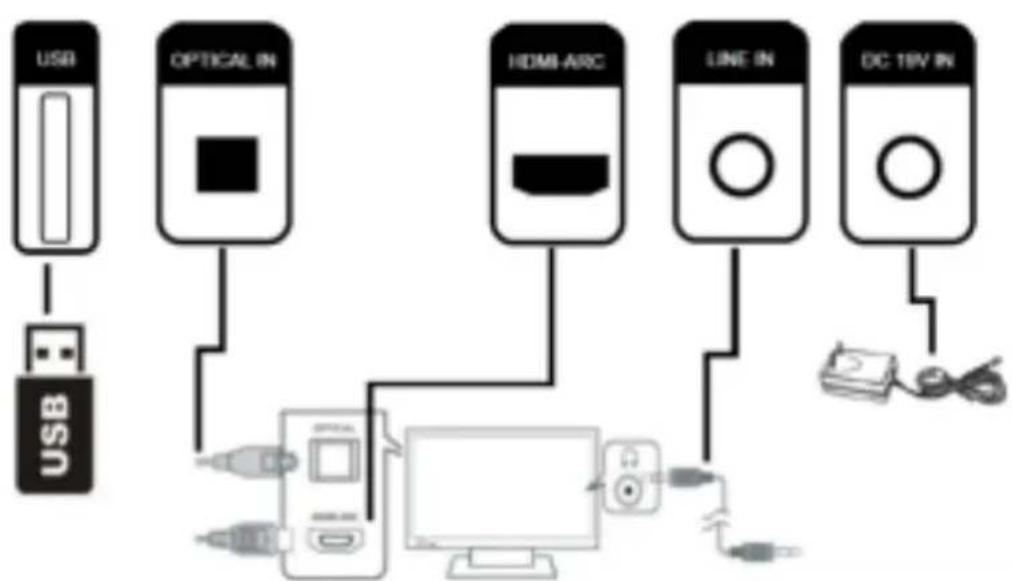
a. Place the Soundbar on a flat and solid surface. Alternatively, you can wall mount the Soundbar with the screws provided. You can hear audio through the Soundbar using ONE of the following connections.
- Connect to your television using one of the connectors.
● HDMI-ARC connector on the TV (using an HDMI cable)
● Optical output connector on the TV (using an optical cable)
● Headphone jack (using the supplied audio cable with 3.5mm plug)
- Connect to a Bluetooth enabled device.
- Connect to a USB drive (stick) loaded with music files
b. Illustration of the Soundbar connectors for different connections
flowchart
graph TD
    USB["USB"] -->|USB| USB1["USB"]
    USB1 --> OpticalIn["OPTICAL IN"]
    OpticalIn --> HDMIAR["HDMI ARC"]
    HDMIAR --> LINE["LINE IN"]
    LINE --> DC18V["DC 18V IN"]
    DC18V -->|USB| Cable["Cable"]
    OpticalIn -->|USB| Computer["Computer"]
    HDMIAR -->|USB| Computer
    LINE -->|USB| Computer
    Cable -->|USB| Cable2[" Cable "]
    Cable2 -->|USB| Cable3[" Cable "]
| EN EN | |
| OPTICAL IN OPTICAL IN | |
| LINE IN LINE IN | |
| DC 19V IN DC 19V IN |
Note: To hear TV audio through the Soundbar via Optical or HDMI-ARC connection, make sure that the LINE IN jack on the Soundbar is not plugged in.
c. The control panel on the Soundbar
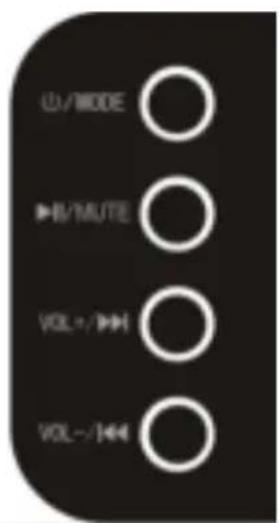
Press the /MODE button to switch the Soundbar on or to standby.
When the LINE IN jack is plugged in, press and hold the ⏻/MODE button to
toggle the sources: Line In -> Bluetooth -> USB Drive.
When the LINE IN jack is not plugged in, press and hold the ⏻/MODE button to
toggle the sources: Bluetooth -> USB Drive -> HDMI-ARC -> Optical In.
Press the ▶/ MUTE button to start or pause play.
Press and hold the ▶/ MUTE button to mute or restore volume.
Press the VOL+/- button to increase volume.
Press and hold the VOL+/- button to skip to next audio file during USB play.
Press the VOL-/◆◆ button to decrease volume.
Press and hold the VOL-/ |← button to skip to previous audio file during USB play.
d. Source selection shown on the LED display
 | Line In source | ||
| Bluetooth source | |||
 | USB source when connecting to a USB drive. USB source cannot be selected if no USB drive is connected. | ||
 | HDMI-ARC source | ||
 | Optical In source |
Notes:
- "bt" (Bluetooth) flashes if the Soundbar is not paired or connected to a Bluetooth device.
● "bt (Bluetooth) lights up if the Soundbar is paired or connected to a Bluetooth device.
● When the Soundbar is switched to standby, the red light is turned on.
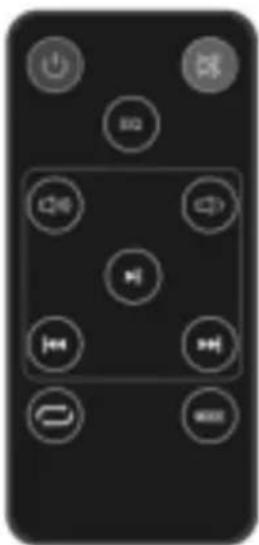
e. Remote control buttons
natural_image
Black remote control with eight function buttons arranged in a grid (no text or symbols visible)| Switch the product on or to standby | |
| Mute or restore volume | |
| Increase volume | |
| Decrease volume | |
| Skip to previous audio file during USB play | |
| Skip to next audio file during USB play | |
| Start or pause play during USB play | |
| Repeat audio play during USB play | |
| EQ Select different preset sound settings | |
| MODE Select an audio source | |
Press the EQ button to toggle different preset sound settings shown below.
| Display EQ mode |
| Eq0 Normal |
| Eq1 Rock |
| Eq2 Pop |
| Eq3 Classic |
| Eq4 Jazz |
| Eq5 Country |
Technical Specifications
Power/Amps:: Input: AC110\~240V, 50/60Hz; Output: DC19V, 1.5A
Power consumption: 36W/Hour
Operating frequency range: 40hz-16Khz
Max output power: 40W (RED Standard)
Soundbar measurement: 80 x 6 x 6cm
Bluetooth name: DSB-4010
Packing List
- Soundbar
- User manual
• Audio cable (3.5 to 3.5mm) - Screws x 2
- Remote control with batteries
- Power adapter
Please notice - All products are subject to change without any notice. We take reservations for errors and omissions in the manual.
ALL RIGHTS RESERVED, COPYRIGHT DENVER ELECTRONICS A/S
DENVER®
www.denver-electronics.com


natural_image
Symbol of a trash bin crossed with no text or labels
Electric and electronic equipment contains materials, components and substances that can be hazardous to your health and the environment, if the waste material (discarded electric and electronic equipment) is not handle correctly.
Electric and electronic equipment is marked with the crossed out trash symbol, seen above. This symbol signifies that electric and electronic equipment should not be disposed of with other household waste, but should be disposed of separately.
All cities have established collection points, where electric and electronic equipment can either be submitted free of charge at recycling stations and other collection sites, or be collected from the households. Additional information is available at the technical department of your city.
Hereby, Inter Sales A/S declares that the radio equipment type DSB-4010 is in compliance with Directive 2014/53/EU. The full text of the EU declaration of conformity is available at the following internet address: www.denver-electronics.com and then click the search ICON on topline of website. Write modelnumber: DSB-4010.Now enter product page, and red directive is found under downloads/other downloads
Operating Frequency Range: 40hz-16Khz
Max Output Power: 40W
DENVER ELECTRONICS A/S
Omega 5A, Soeften
DK-8382 Hinnerup
Denmark
www.facebook.com/denverelectronics

Brand : DENVER
Model : DSB-4010
Category : Soundbar